2026 Guide: Professional Call Answering Service Benefits
You’re probably dealing with one of two problems right now. The phone rings when your team is already busy, or it rings when nobody’s available at all. Either way, a missed call isn’t just an interruption avoided. It can be a lost lead, a frustrated patient, a new client who moves on, or a customer who decides your business is harder to reach than the next one.
That’s why a professional call answering service matters more than most owners first assume. It’s not just overflow coverage. When it’s set up properly, it becomes part front desk, part routing system, part intake desk, and part workflow engine. The older conversation was all about “live agents vs voicemail.” The more useful conversation now is about how human agents and AI work together, which calls should be handled instantly, which should be escalated, and how to move caller information into the systems your business already uses.
The difference between a mediocre setup and a useful one comes down to design. Scripts. routing rules. urgency logic. calendar access. CRM sync. escalation standards. If those pieces are loose, the service becomes a message taker. If they’re tight, it becomes an operational asset.
Understanding Professional Call Answering Services
A professional call answering service is the part of your operation that picks up when your staff cannot, follows clear rules, and keeps the call moving instead of letting it stall. For a medical office, that might mean separating a prescription refill request from a same-day urgent concern. For a plumbing company, it might mean booking a standard estimate while escalating a burst-pipe call to the on-call technician within minutes.
That is the job. Answer the call, identify intent, collect the right details, and trigger the next action your business wants.
What it actually does
At a basic level, the service answers with your business name, takes messages, filters junk calls, and transfers urgent callers. A better setup handles intake, appointment requests, lead qualification, basic FAQs, and priority routing based on rules you define.
The newer model is not human-only. It is hybrid.
AI handles the repetitive front-end work well. It can recognize caller intent, ask standard intake questions, capture address or policy details, and send simple requests into your calendar, CRM, or ticketing system. Human agents step in when the caller is upset, the situation is sensitive, or judgment matters. That split is what improves response speed without turning your phone line into a frustrating phone tree.
For many businesses, that is the difference between a service that just forwards messages and one that effectively supports operations.
How the workflow usually works
Most providers run on cloud telephony, so calls can be routed across multiple agents, locations, and time windows without tying you to one desk phone system. The mechanics are straightforward. A caller reaches your number, the platform identifies the scenario, and the call follows the path you set.
A common setup looks like this:
- New leads get a short intake flow and a booking option
- Existing customers get routed by issue type
- Emergencies go to an on-call person immediately
- After-hours routine calls get logged for next-business-day follow-up
- Spam and sales calls get filtered out before they waste staff time
That sounds simple, but the quality lives in the details. Which calls should ring through instantly. Which ones need a human ear. Which fields are required before an appointment can be booked. Which callers should trigger an SMS, an email, or a task inside your system.
If those rules are loose, your team spends the next morning cleaning up bad messages. If those rules are tight, the service reduces interruptions and keeps work moving.
Practical rule: If your current service only sends an email that says “Caller asked for a callback,” it is not doing enough triage to be useful.
What it is not
Owners often group three separate tools under the same label, and that creates bad buying decisions.
- Voicemail asks the caller to wait, explain the issue, and trust that someone will respond.
- Call forwarding sends the ringing somewhere else, but it does not improve intake or decision-making.
- A professional call answering service manages the interaction and records usable information.
That distinction matters most in businesses where call quality affects revenue or risk. A law firm intake line, HVAC dispatch number, property management office, or clinic front desk needs more than a recording and a forwarded ring. It needs consistency.
Why the hybrid model matters now
The old debate was whether a business needed live agents at all. The better question is which parts of the call should be automated and which should stay with people.
Simple, repetitive calls are expensive to handle with human labor alone. Sensitive calls are risky to hand entirely to automation. A hybrid model solves that by using AI for speed and structure, then bringing in people for exceptions, urgency, and nuance. That gives smaller teams broader coverage without staffing every hour as if every call were high stakes.
There is a trade-off. Hybrid systems need better setup. Scripts, routing logic, escalation thresholds, and system integrations have to be configured carefully. But once that work is done, the service becomes far more useful than a basic live-agent-only model that treats every call the same way.
If you want a clearer breakdown of the service categories and where each one fits, this guide on what an answering services company does is a good reference.
Key Business Benefits of an Answering Service
Friday, 4:47 p.m. Your office manager is wrapping up, two technicians are still in the field, and three calls hit at once. One is a new customer asking for a quote, one is an existing customer with an urgent issue, and one is a vendor calling the main line. If nobody answers cleanly, you lose revenue, create more Monday morning cleanup, or both.

That is the business case. A professional answering service gives you coverage during the hours and volume spikes your in-house team cannot handle efficiently. The newer hybrid model improves the economics further. AI handles routine intake, qualification, and routing, while human agents take over for exceptions, urgency, and conversations that need judgment. If you want a clearer view of how that setup works, this guide to an AI call answering service breaks down the operating model.
You capture more of the demand you already paid for
A lot of businesses do not have a lead generation problem. They have a response problem.
If you spend on Google Ads, local SEO, direct mail, or referrals, every missed call wastes part of that budget. For a plumbing company, one missed weekend emergency call can be worth more than a full month of answering service fees. For a dental office, missing five new patient calls in a busy week can leave open chair time that never gets recovered.
The gain comes from simple coverage points that usually fail first:
- After-hours calls that would otherwise hit voicemail
- Overflow during lunch, shift changes, or peak periods
- Basic screening so urgent jobs reach the right person fast
- Structured intake so quote requests and appointment inquiries are not lost in a vague message
In practice, this means Monday starts with booked work and usable notes, not a stack of missed calls and partial voicemails.
Customers get faster, clearer first contact
Call handling shapes customer trust before your team does any actual work. Speed matters, but clarity matters just as much.
A good service confirms what the caller needs, collects the details your team will use, and sets the next step correctly. A poor service just answers the phone and forwards a message that creates more back-and-forth. That difference is easy to see in businesses where calls are stressful or time-sensitive, such as legal intake, property maintenance, healthcare scheduling, or field service dispatch.
Here’s a useful explainer on how strong call handling supports service standards in practice:
The hybrid AI-human approach improves consistency here. AI can ask the same intake questions every time and log responses in a clean format. A human can step in when the caller is upset, the issue is unusual, or the situation needs discretion.
Your staff gets fewer interruptions and better information
Internal teams lose a lot of productive time to phone interruptions that should never have reached them in the first place. Dispatchers get pulled off scheduling. Front-desk staff stop what they are doing to answer routine questions. Office managers become human switchboards.
A well-set-up service filters that traffic before it hits your team. The calls that get transferred are the ones that need action. The messages that get delivered are complete enough to act on. That sounds basic, but it changes daily operations.
I usually tell owners to look at the hidden labor cost, not just the monthly service fee. If a $28 per hour office employee loses 90 minutes a day to avoidable call handling, you are already paying for inefficiency. An answering service starts making financial sense quickly when it protects skilled staff time.
The same logic applies to software workflows. If call notes can flow into your scheduling or sales system, follow-up gets easier. For companies comparing systems, this overview of the best CRM for small business UK is a practical starting point.
Coverage becomes easier to scale without hiring ahead of demand
Hiring an in-house receptionist or coordinator can work well when call volume is steady and predictable. Many small businesses do not operate that way. Calls bunch up in short windows, spike with weather or promotions, and drop off at odd times. Paying one employee to sit ready for every possible surge is expensive. Paying several is worse.
A hybrid answering model gives you a different cost structure. AI absorbs repetitive front-end work at any hour. Human agents handle the calls where tone, judgment, or escalation matter. That lets a business cover evenings, weekends, seasonal peaks, and multi-location overflow without building a full in-house coverage schedule around the busiest possible hour.
There is a trade-off. You do need clean scripts, routing rules, and escalation instructions. But once those are configured properly, the service does more than answer calls. It protects revenue, reduces interruptions, and gives your team room to focus on the work only they can do.
Core Features of a Modern Answering Platform
A modern answering platform should do more than pick up the phone. It should capture the call, qualify it, route it correctly, and push the outcome into the systems your team already uses.
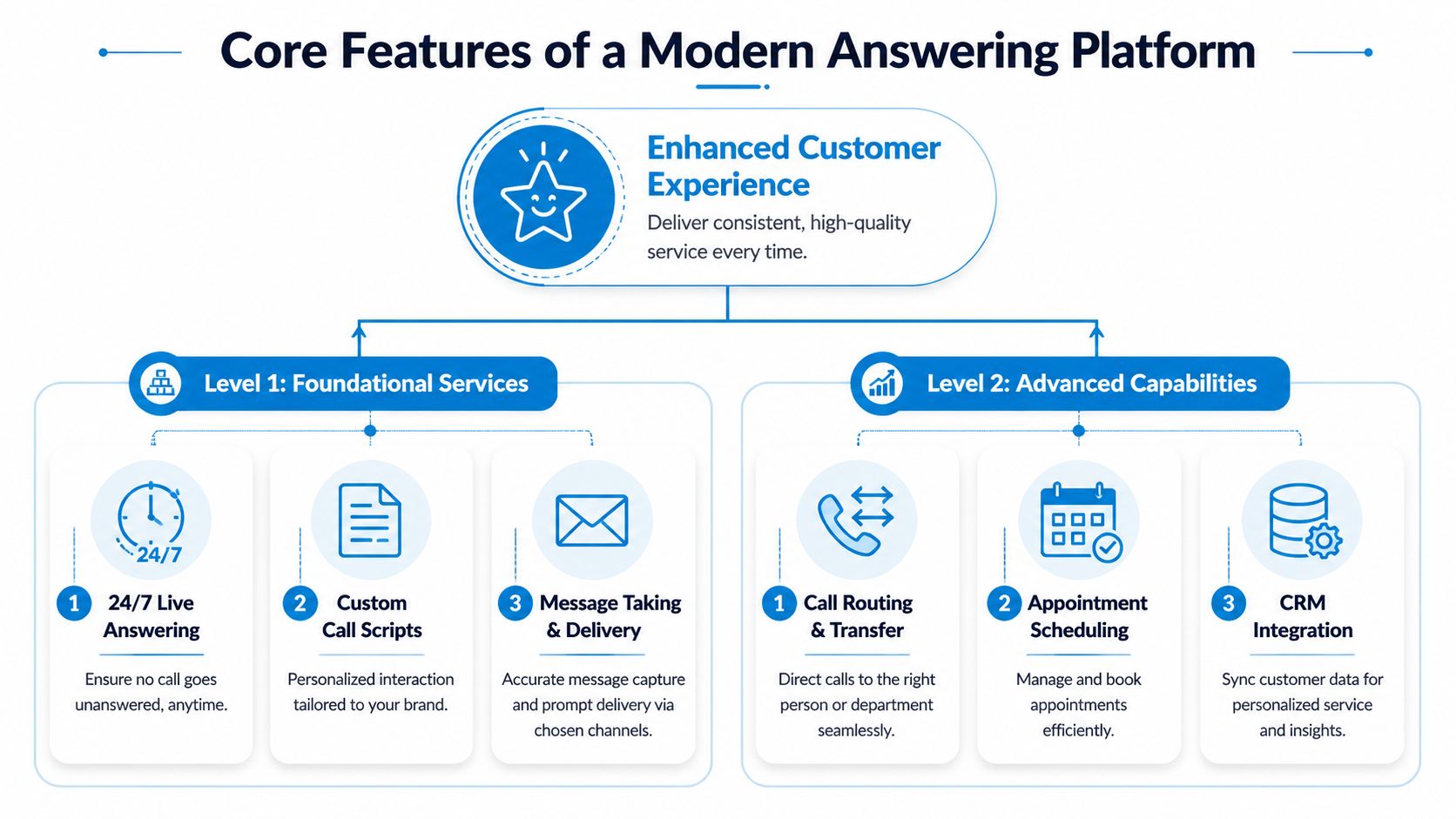
The difference between a basic service and a platform shows up in operations. A basic service answers, takes a note, and emails it over. A platform follows your process. It knows which calls should be transferred now, which should be booked, which need triage questions, and which can be handled by AI before a person steps in.
Foundational features that should be required
If a provider is weak on the basics, the advanced tools will not matter much.
| Feature | What it should do in practice |
|---|---|
| 24/7 live answering | Pick up when your staff can’t, including evenings, weekends, and overflow periods |
| Custom call scripts | Use your greeting, your intake questions, and your rules for transfer or escalation |
| Message capture and delivery | Send clean, structured messages to email, SMS, or your internal system |
| Call routing | Move callers to the right person, department, or on-call contact without confusion |
| Bilingual support | Help businesses serve mixed-language markets without awkward handoffs |
Customization needs to be operational, not cosmetic. A good provider can follow rules such as: burst pipe goes to the on-call technician, quote requests require postcode and service type, and reschedule requests should be handled inside the calendar instead of sent back as a message.
That level of detail matters because call handling breaks down in small moments. One missed triage question can send the wrong job to the wrong person. One vague message can force a callback loop that costs you the booking.
Appointment booking and intake are where the service starts paying for itself
Message taking has value, but booking and structured intake create a much bigger return.
For a dental practice, that means moving a patient into an open slot while they are still on the line. For a law firm, it means collecting conflict-check information before staff spend time reviewing the case. For an HVAC company, it means confirming the job address, issue type, and preferred time so dispatch has what it needs immediately.
This depends on software connections. Google Calendar, Microsoft 365, HubSpot, Salesforce, Acuity, Calendly, and trade-specific systems all come into play here. If you are reviewing the rest of your software stack, this guide to the best CRM for small business UK is useful because it helps you think through what your answering platform needs to sync with, not just what your sales team likes using.
Hybrid AI and human workflows are now the practical standard
The old comparison was live receptionist versus voicemail. Now, the comparison is human-only coverage versus a hybrid system that uses AI for repeatable tasks and people for judgment calls.
That split works well in practice. AI can answer common questions, collect intake details, confirm hours, identify caller intent, and start booking flows at any time of day. Human agents step in when the caller is upset, the situation is sensitive, the request falls outside policy, or the conversation needs discretion.
The trade-off is straightforward. A human-only model gives warmth and flexibility, but it is expensive to scale and often inconsistent across shifts. A pure AI setup is cheaper, but it can fail fast when a caller is unclear, emotional, or off script. Hybrid usually gives better coverage, lower handling cost, and fewer dropped opportunities because each part of the system does the work it is best suited for.
A typical split looks like this:
- Routine calls: Hours, directions, appointment requests, basic FAQs, payment or intake steps
- Complex calls: Complaints, legal sensitivity, emotional callers, medical nuance, pricing disputes
- Urgent calls: Dispatch situations, emergencies, time-sensitive escalations
For a closer look at how a hybrid AI call answering service is configured in practice, that overview is a useful reference.
Integrations are what turn answered calls into usable work
Without integrations, your team still has to do the admin by hand. Someone retypes the lead into the CRM, updates the calendar, copies notes into a job management tool, and sends an internal message. That is where delays and errors creep in.
With integrations in place, the platform can create or update a contact record, trigger a task, notify the right person, and confirm the next step while the call is still fresh. That is the difference between a service that answers calls and one that supports process discipline.
If you still have to manually re-enter every caller’s details after paying for an answering service, the platform is only solving half the problem.
One factual example is Recepta.ai, which combines AI call handling with human escalation and connects with 2,500+ tools for CRM, calendar, and workflow syncing. That setup is useful for businesses that want the front-desk function and the data flow to operate as one system.
Industry-Specific Scenarios and Use Cases
Monday at 8:07 a.m., the phones start stacking up. One caller needs to reschedule. One has an urgent service problem. One wants a price quote. One just needs directions. If every call goes to the same queue with the same handling rule, the business loses time, misses revenue, and frustrates callers who should have been helped in under a minute.
That is why industry fit matters. A professional call answering service is not just “someone answers the phone.” Its function is to sort routine calls from urgent ones, collect the right details the first time, and pass work to the right person without creating cleanup for your staff. The modern version does that with a hybrid AI-human model. AI handles repeatable intake, routing, and documentation fast. Human agents step in when the caller is upset, the issue is sensitive, or judgment matters.
Home services
Home service companies feel the cost of missed calls fast because the caller usually has an immediate problem and several competitors to choose from.
Take a plumbing company at 2 a.m. A burst pipe call should trigger a short triage flow: address, problem type, whether water has been shut off, and whether dispatch rules are met. If it qualifies as urgent, the on-call technician gets the call or alert right away. If it does not, the system can offer the next available appointment and log the issue for the morning team.
That split matters. Sending every after-hours call to a technician creates burnout and wasted payroll. Sending every call to voicemail costs jobs.
HVAC works the same way, especially during weather spikes. AI can gather model information, warranty status, and symptoms before a human steps in or a job is booked. That cuts call time and gives the field team a cleaner handoff.
Healthcare and wellness
Healthcare calls need tighter controls because the caller may be anxious, the information may be private, and the office needs a documented process.
A dental or primary care practice usually has a mix of routine traffic and higher-risk calls. Routine traffic includes appointment changes, office hours, insurance questions, and new patient intake. Higher-risk calls include post-procedure concerns, medication questions, or symptoms that need escalation under office protocol. A hybrid setup works well here because AI can handle standard intake consistently, while trained staff can take over when a caller needs reassurance or the situation falls outside a script.
The trade-off is clear. Pure automation can sound efficient but fail badly on nuance. Human-only coverage is more flexible but often costs more and scales poorly during peak periods. Practices that want both control and coverage usually do better with defined escalation rules and tight documentation. For a closer operational example, this guide to an answering service for medical offices shows how those workflows are typically set up.
In healthcare, friendly service helps. Controlled intake, accurate documentation, and correct escalation matter more.
Legal and professional services
Law firms need accurate intake, conflict-aware workflows, and clear handoff notes. A missed detail at intake can waste staff time or create risk.
A good setup captures the caller’s contact information, matter type, urgency, opposing party or related names if conflict screening requires it, and the best callback window. The service should also know when not to go further. Legal advice, fee negotiations, and sensitive case discussions belong with the attorney or designated staff member.
Accounting firms, insurance agencies, and financial offices have a similar pattern. Many calls are important, but not every caller needs a licensed professional on the line immediately. An answering service can screen for deadlines, policy servicing requests, document questions, or new-client inquiries, then route each one based on business rules. That keeps specialists focused on work only they can do.
Franchises and multi-location businesses
Multi-location operators have a consistency problem and a routing problem.
A caller may dial a general number, the wrong location, or a location that is short-staffed. The answering service needs to identify the right site, apply local hours and booking rules, and keep the brand voice consistent across all locations. That is difficult with a basic receptionist model. It is much easier when AI handles the first layer of identification and routing, then a human agent takes over if the caller has an exception, complaint, or unusual request.
This model also gives management better control. Calls can be tagged by location, service type, and outcome. That makes it easier to spot patterns such as one branch missing lunch-hour calls, one territory getting the bulk of emergency requests, or one team needing better intake discipline.
Common franchise use cases include:
- Brand consistency: Every location uses the same approved greeting, intake flow, and service standard.
- Location-aware routing: Calls are sorted by geography, service line, hours, or staff availability.
- Overflow protection: Busy sites can shift excess volume without leaving callers on hold.
- Central reporting: Leadership can review call outcomes, booking rates, and missed opportunities across the network.
The best use case is not “all calls answered.” It is “the right calls handled the right way at the right cost.” That is where a hybrid AI-human answering model earns its keep.
A Practical Checklist for Evaluating Vendors
At 4:45 p.m. on a Friday, a new lead calls, an existing customer has a billing question, and one urgent issue comes in after your front desk is tied up. The vendor you choose determines whether those calls get booked, routed, documented, or lost. That is why monthly price should be the second question, not the first.
Start with operational fit. A provider should handle your call mix without creating extra admin work, messy handoffs, or hidden fees. In a modern setup, that means looking beyond the old "live agent only" model. The stronger vendors use AI for first-pass tasks like caller identification, intent capture, spam filtering, and basic routing, then move edge cases, sensitive conversations, and exceptions to a trained human. That hybrid structure usually gives better coverage at a lower cost than staffing every call with a person from start to finish.
Cost visibility matters because cheap plans often move work back onto your team. A low base fee can turn expensive once you add setup, integrations, after-hours coverage, calendar access, CRM sync, or manual follow-up caused by weak intake. A ReceptionHQ analysis highlights how answering service pricing can hide these extra costs when buyers compare vendors too narrowly. The practical question is simple. What will this service cost after it is configured for your real workflow?
The questions that expose fit
Ask vendors to show the workflow, not just describe it. If they support AI plus human handling, ask where the line is drawn. Which calls stay automated, which ones transfer to a person, and who defines those rules?
| Evaluation Criteria | Question to Ask | Vendor A Notes | Vendor B Notes |
|---|---|---|---|
| Coverage model | Do you handle all calls, overflow only, after-hours only, or any mix of those? | ||
| Escalation rules | How do you route urgent calls, and who sets the logic? | ||
| Industry knowledge | Are agents trained on my terminology and common caller scenarios? | ||
| Compliance and security | Can you support the privacy and documentation standards my business requires? | ||
| Integrations | Is there an extra fee to connect my CRM, calendar, or practice software? | ||
| Booking ability | Can you schedule directly into my calendar, or do you only take messages? | ||
| AI and human handoff | Which calls are automated, and how does escalation to a live agent happen? | ||
| Reporting | What analytics do I get on call types, peak periods, and outcomes? | ||
| Billing model | Am I charged by minute, by call, or by plan tier, and what triggers overages? | ||
| Onboarding | Who builds the scripts and workflows, and how long does setup usually take? |
A few questions deserve extra scrutiny.
Ask how the vendor handles urgent phrases, repeat callers, wrong-number traffic, spam, booking conflicts, and after-hours exceptions. Ask whether AI can gather details before the human joins, or whether every transfer forces the caller to start over. Ask what the reporting shows at the end of the call. A message in an inbox is not the same thing as a structured record in your CRM.
What works and what usually disappoints
Strong vendors explain the call path clearly. They can show how a routine scheduling call is handled, how an emergency is escalated, and how an unusual request reaches a human without confusion. They also answer pricing questions plainly. You should know what is included, what triggers overages, and what requires custom work.
Weak vendors rely on vague language. “Fully customized” often means a basic message-taking script. “Integrated” may mean someone emails your team after the call. “24/7 coverage” may still exclude direct booking, dispatch actions, or true escalation authority.
Use a live scenario to test them. Give the vendor one call type from your business and ask for the exact flow from first ring to final record. If you run a dental practice, use a same-day tooth pain call. If you run an HVAC company, use a no-cooling call on a hot afternoon. If you run a law firm, use a new-client intake with a conflict-check trigger. Good providers can map that flow in minutes.
Short test: Ask the vendor to walk through one real call from your business, from first ring to final record in your system. If they cannot do that clearly, expect confusion after launch.
Build a simple ROI worksheet
Keep the math grounded in operational reality. Compare the service against missed revenue, staff interruptions, and after-hours gaps, not just against the monthly invoice.
Use these inputs:
- Missed-call impact: How many sales, bookings, or service requests go unanswered now?
- Administrative load: How much staff time is lost to routine calls that interrupt higher-value work?
- Booking efficiency: How often can the provider book or qualify the caller on the first interaction?
- Coverage need: Do your losses happen during lunch, after hours, weekends, or peak-volume periods?
- Cleanup work: How much manual follow-up is required after each call, and can the platform reduce it?
A pricing guide like this breakdown of business answering service cost helps frame the comparison, especially if you are deciding between in-house staffing, a human-only answering service, and a hybrid AI-human model. The goal is not to buy the cheapest service. The goal is to buy the system that captures more of the calls that matter, with less operational drag on your team.
Implementing Your Service for Maximum ROI
Once you choose a provider, the payoff depends on setup quality. Most disappointing results come from vague instructions, weak scripts, and no operational owner on your side.
Build the script around decisions
Don’t write a script like marketing copy. Write it like a call flow. The goal is to help the agent or AI make the right next decision.
Include:
- Greeting language: How should callers be welcomed?
- Caller identification: What details are mandatory every time?
- Intent questions: Is this support, sales, scheduling, billing, or emergency?
- Escalation triggers: Which words or situations require immediate transfer?
- Closing action: Book, message, transfer, log, or queue for callback.
A plumber’s script should not look like a dental office script. An insurance office should not use the same intake flow as a criminal defense firm. Keep it specific.
Create a business brief your provider can actually use
The business brief is what lets the service sound like part of your team. It should contain your hours, service areas, staff contacts, call categories, FAQs, appointment rules, and what counts as urgent.
Good briefs also include what not to do. Don’t quote prices. Don’t discuss diagnosis. Don’t promise same-day service unless dispatch confirms it. Those constraints protect both quality and consistency.
Configure the systems early
If the platform can sync with your CRM, calendars, and other tools, do that before you go live. Don’t wait and tell yourself you’ll “tighten the workflow later.” Later usually becomes never.
The practical priority list is simple:
- Calendar integration first so appointments can be booked without extra calls.
- CRM integration next so caller data lands in one place.
- Notifications after that so urgent calls reach the right person fast.
- Analytics access from day one so you can see call types and bottlenecks.
Review the first weeks closely
Listen to call summaries. Review missed transfers. Look for repeated caller questions. If callers keep asking the same thing, your script or routing probably needs adjustment.
The first version should be treated as a working draft. The businesses that get strong ROI are the ones that refine scripts and routing after real calls come in.
One owner should own the process internally. Not five people. One. That person gathers feedback, updates scripts, and keeps the service aligned with how the business operates.
Common Questions About Answering Services
What’s the difference between a call answering service and a virtual assistant
A call answering service is built around inbound communication. It answers, routes, logs, qualifies, and sometimes schedules. A virtual assistant usually covers a wider set of admin work, which may include email, calendar coordination, research, or back-office tasks. If your main pain point is missed calls and inconsistent intake, start with the answering layer.
How long does setup usually take
It depends on complexity. A simple message-taking setup can go live quickly. A more useful setup takes longer because it includes scripts, routing rules, contacts, calendars, integrations, and escalation paths. The mistake is rushing the live date before the workflows are ready.
Can these services handle outbound calls too
Yes, many can. Common outbound tasks include appointment reminders, lead follow-up, intake completion, confirmation calls, and callback workflows triggered by inbound activity. Outbound works best when it’s tied to the same system that handled the initial call.
Should I choose human-only or hybrid AI-human
For most businesses, hybrid is the practical choice. AI is effective for routine triage, basic FAQs, and structured intake. Human agents are better for emotional, complex, sensitive, or exception-heavy conversations. The decision shouldn’t be ideological. It should match the call types your business gets.
Will customers know it’s outsourced
If the scripts, routing, and handoff process are well configured, most callers care far more about speed and clarity than where the person sits. What breaks trust is not outsourcing. It’s sounding uninformed, robotic, or disconnected from the business.
If you want a practical way to stop missed calls, automate routine intake, and still hand sensitive conversations to real people, Recepta.ai offers a hybrid AI-human answering model with call handling, scheduling, follow-up workflows, and live escalation. It fits businesses that need coverage without turning the phone into another manual bottleneck.