Benefits of AI in Customer Service: A 2026 Guide
Service teams that use AI aren't just answering faster. They're creating more capacity without hiring at the same pace. In customer support, agents assisted by AI handle 13.8% more inquiries per hour, and service professionals using generative AI save over 2 hours daily on quick responses, according to Master of Code's AI customer service statistics roundup.
For a small business owner, that changes the conversation. The benefits of ai in customer service aren't mainly about novelty. They're about fewer missed calls, fewer repetitive interruptions, better follow-through, and a front office that doesn't fall apart after 5 p.m.
If you run an HVAC company, dental practice, law firm, or multi-location service business, the practical question isn't whether AI can answer a question. It's whether it can protect revenue, reduce admin load, and help your team stay responsive when demand spikes. In my experience, that's where AI either proves its value quickly or becomes shelfware.
Why AI in Customer Service Is No Longer Optional
Small businesses used to treat customer service as a staffing problem. More calls meant more reception hours. More inquiries meant more coordinators. More locations meant more complexity. That model breaks down fast when customers expect immediate answers and your team is already stretched.
AI changes the unit economics of responsiveness. Teams can respond faster, capture more inquiries, and reduce repetitive work without adding the same amount of labor. That matters when your missed call might have been an emergency plumbing job, a consultation request, or a patient trying to reschedule before becoming a no-show.

The real cost is often invisible
Most owners notice payroll. They don't always notice the quieter losses:
- Missed after-hours demand: A caller reaches voicemail and moves to the next provider.
- Front-desk overload: Staff spend their day repeating office hours, pricing basics, and appointment availability.
- Slow follow-up: Leads cool off while the team is busy with current customers.
- Burnout from repetition: Good employees get stuck doing low-value work all day.
That's why AI has shifted from “nice to have” to operational necessity. It gives small teams coverage they couldn't previously afford.
Practical rule: If your team repeats the same answer dozens of times a week, that workflow is a candidate for AI.
Customers already expect speed
Customers don't separate “service” from “operations.” If your phones go unanswered, your scheduling is slow, or your intake process is clunky, they read that as poor service. AI helps close that gap by handling the routine layer instantly and consistently.
Used well, it doesn't replace the human side of customer care. It protects it. Your staff spend less time on repetitive responses and more time on exceptions, upset customers, and higher-value conversations.
The Core Benefits of AI Customer Service
The biggest mistake I see is talking about AI in vague terms. Small businesses need to know what improves on Monday morning. The benefits of ai in customer service become obvious when you map them to everyday service bottlenecks.
Around-the-clock coverage without around-the-clock staffing
A plumbing company doesn't need a full overnight team to capture an emergency request at 3 a.m. A dental office doesn't need a receptionist online at all hours to confirm appointments or answer basic intake questions. AI can handle those first-line interactions so customers don't hit silence.
That doesn't just improve convenience. It reduces leakage at the moment of intent, when the customer is ready to book, ask, or buy.
Faster resolution on routine issues
Speed matters most on repetitive issues because they create the biggest drag on your team. When AI handles common questions and drafts or automates responses, businesses can reduce ticket resolution times by up to 77%, and AI systems can detect emotional tone with over 90% accuracy, according to Forethought's analysis of AI in customer service.
For a small clinic, that could mean faster replies to insurance, appointment, or prescription-adjacent questions. For a law firm, it could mean quicker intake triage so the right matters get prioritized first.
Better use of your human team
Not every task deserves a person's full attention. A strong front-office employee is wasted when most of their day is spent repeating office hours, booking basic appointments, and answering simple status questions.
AI is most useful when it clears that clutter. Then the team can focus on situations where judgment matters, such as:
- Complex scheduling: Coordinating multiple technicians, providers, or attorneys
- Sensitive conversations: Handling frustrated patients, anxious clients, or urgent homeowners
- Revenue-critical follow-up: Responding to qualified leads before they go cold
A more detailed look at conversational AI for customer support shows how this works in practice across intake, routing, and follow-up workflows.
More consistent service across channels
Humans vary. They get rushed, distracted, and tired. AI helps standardize the first layer of service so customers get accurate answers, a clear next step, and complete information captured every time.
That consistency matters in service businesses where handoffs create friction. If intake notes are incomplete, appointments are booked incorrectly, or callers have to repeat themselves, the customer feels the operational mess immediately.
Consistency is often the hidden benefit. Owners usually buy AI to move faster, then realize the bigger gain is fewer dropped details.
Smarter prioritization
AI can read signals in conversations that overworked staff often miss. If a message sounds urgent, emotional, or likely to churn, the system can flag it for faster intervention. That's especially useful in healthcare, legal, and home services, where not every request should sit in the same queue.
The result isn't only speed. It's better attention allocation. Your best people spend time where it matters most.
How AI Delivers These Customer Service Wins
Most business owners don't need a technical lecture. They need a clear explanation of what the system is doing behind the scenes. In plain terms, AI customer service tools usually combine four functions: listening, understanding, routing, and documenting.

Conversational AI works like a trained front desk
A good AI assistant acts like a reliable receptionist who never gets tired of answering the same questions. It recognizes common intents, pulls the right answer, gathers details, and moves the conversation forward.
For example, a pest control company might use it to answer service-area questions, capture property type, and offer scheduling windows. A wellness clinic might use it to explain new patient steps and collect the information needed before a callback.
Predictive routing acts like a smart switchboard
Routing is where many service teams lose time. Calls and messages land with the wrong person, get transferred, or sit unresolved because nobody owns them. AI improves that matching process.
Predictive routing can improve first-contact resolution by up to 20% to 30%, reduce unnecessary escalations by half, and cut average handle time by 15% to 25%, according to Couchbase's write-up on AI in customer service.
That matters when different staff handle different issues. In a law office, billing questions shouldn't interrupt legal intake. In an HVAC business, a maintenance inquiry shouldn't go to the same queue as an urgent no-cooling call.
For businesses exploring phone-based workflows specifically, this overview of an AI call answering service is useful because it shows how AI can qualify, route, and document calls before a human ever picks up.
Sentiment analysis catches what a busy team misses
Some customers say they're upset. Others imply it. AI can scan language, tone, and message patterns to identify frustration, urgency, or confusion early enough to change the outcome.
That's useful in a few practical ways:
- Escalation triggers: A dissatisfied caller gets moved to a person quickly.
- Priority handling: Urgent cases don't wait behind low-value admin questions.
- Coaching signals: Managers can spot recurring breakdowns in service quality.
Automation also improves the handoff
One underrated win is documentation. AI can summarize interactions, log details, and pass context to the next person. That reduces the classic customer complaint of having to explain the same issue twice.
The best systems don't just answer. They preserve context so the human takes over with a head start.
That's why the strongest implementations feel less like a chatbot bolted onto your business and more like a workflow layer sitting between the customer and your team.
Measuring the Real ROI of AI in Your Business
Most owners don't need another promise about efficiency. They need a way to decide whether AI will pay for itself in their operation. The cleanest way to do that is to track a small set of service and revenue metrics before implementation, then compare them after rollout.
The broad market case is already strong. Companies report an average 340% ROI in the first year of AI customer service deployment, and Klarna projected a $40 million profit improvement, with its assistant handling two-thirds of service chats, doing work equivalent to 700 full-time agents, and cutting resolution time from 11 minutes to 2, according to Dante AI's 2026 chatbot statistics roundup.
For a small business, though, ROI should be grounded in your own workflows.
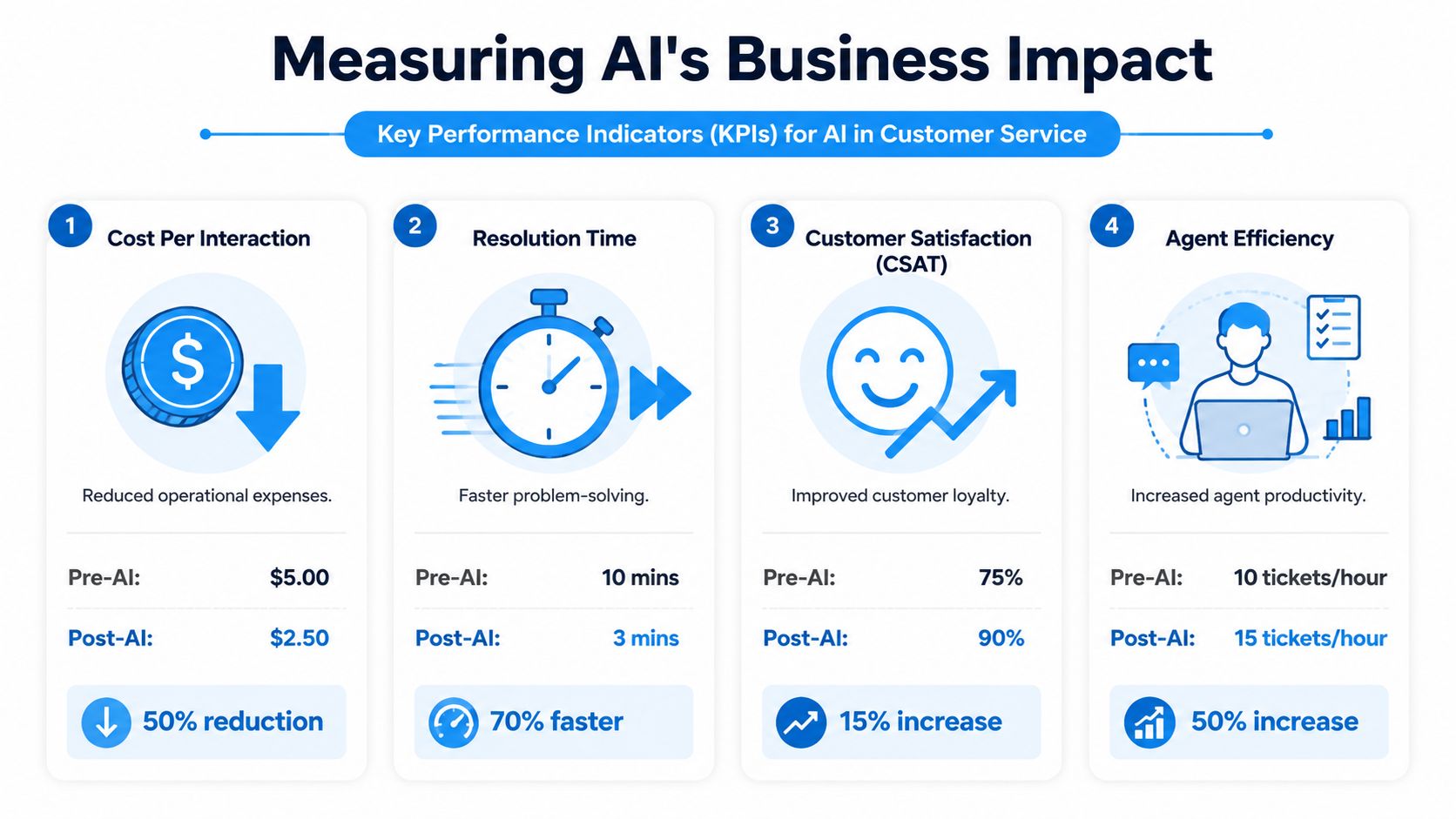
The KPIs that matter most
If you run a service business, start with operational metrics that tie directly to labor cost and booked revenue.
- Cost per interaction: What it costs to answer a call, respond to a message, or complete an intake.
- Lead capture rate: How many inbound opportunities get logged and followed up.
- First-contact resolution: How often the customer gets the right answer or next step without bouncing around.
- Average response time: How long people wait before they hear back.
- Scheduling completion: How many inquiries turn into confirmed appointments.
- Staff admin load: How much team time gets consumed by repetitive communication.
A cost discussion around business answering service pricing and trade-offs is useful here because it forces a comparison between visible payroll costs and hidden losses from missed demand.
A simple way to calculate business impact
Use a basic framework:
- Measure missed calls, response delays, and repetitive admin volume.
- Estimate how many of those interactions could be automated or triaged.
- Track whether your team handles more qualified conversations after AI absorbs the routine layer.
- Compare savings and captured revenue against the monthly cost of the system.
This works especially well for businesses where one saved lead can justify a large share of the spend. Home services are the obvious example, but it also applies to clinics, legal intake, and insurance quote follow-up.
A practical before-and-after view
Below is a qualitative example of how a home service business should think about monthly performance before and after adopting a hybrid model.
| Metric | Before AI (In-House Reception) | After AI (Hybrid Model) | Impact |
|---|---|---|---|
| Missed after-hours inquiries | Calls often go to voicemail | Calls are answered and triaged continuously | More opportunities captured |
| Front-desk workload | Staff handle repetitive questions manually | Routine questions and booking tasks are automated | Less admin strain |
| Lead qualification | Inconsistent intake details | Standardized information captured before handoff | Better sales follow-up |
| Response consistency | Varies by employee and time of day | Same intake flow and service standards every time | Fewer dropped details |
| Escalation handling | Urgent issues can sit in queue | Complex cases routed to the right person faster | Better customer experience |
| Reporting visibility | Manual notes and patchy records | Centralized summaries and cleaner logs | Easier management review |
What small businesses should expect
ROI usually comes from a combination of cost avoidance and service improvement, not from one dramatic change. You reduce time spent on repetitive work, you miss fewer inbound opportunities, and you create a cleaner workflow for the people you already employ.
For industry-specific operations, the gains can be substantial. Recepta.ai reports 80% cost savings versus in-house reception, 30% more qualified leads, and 15× ROI for businesses such as HVAC, plumbing, dental clinics, and law firms, based on the business context provided in the Zendesk AI customer service overview.
If you can't tie the rollout to missed calls, slower scheduling, or overloaded staff, you're not measuring ROI. You're measuring enthusiasm.
The owners who get value fastest are usually the ones who start with one expensive bottleneck, not a company-wide reinvention.
Choosing Your Strategy The Hybrid AI-Human Model
The wrong AI strategy creates a worse customer experience faster. That's the part many vendors skip.
If your business serves people in stressful moments, an AI-only setup can backfire. A patient with a billing concern, a homeowner dealing with flood damage, or a legal prospect calling about a sensitive issue often needs reassurance, not just speed.

Where pure AI fails
The caution data is clear. Pure-AI solutions can increase churn by 15% in emotional interactions, and 68% of healthcare and legal customers abandon a pure-AI chat when they need empathetic support. By contrast, hybrid systems that escalate to human agents boost customer satisfaction by 40%, according to DevRev's overview of AI customer service benefits.
That lines up with what operators see in the field. AI is strong at structure, speed, and consistency. It is weaker when a customer is upset, scared, confused, or dealing with a high-stakes decision.
What a hybrid model gets right
A hybrid model splits the work by fit.
- AI handles the front layer: FAQs, appointment requests, intake questions, routing, summaries, and follow-up prompts.
- Humans handle judgment-heavy moments: nuanced objections, emotional conversations, exceptions, and recovery situations.
- The handoff is designed, not improvised: the customer doesn't start over, and the staff member gets context immediately.
That's the model most small businesses should choose. It keeps service responsive without pretending every interaction can be solved by automation alone.
Here's a short demonstration of the model in action:
What to look for in a vendor
When evaluating options, skip the flashy demo and look at operational fit.
Ask these questions instead:
- Can it escalate cleanly to a person? If not, you'll frustrate customers at the worst possible moment.
- Does it integrate with the tools you already use? Calendar, CRM, intake system, and phone workflow matter more than novelty features.
- Will it log details automatically? Manual re-entry kills efficiency gains.
- Can you control which conversations stay automated and which don't? That boundary needs to be intentional.
One option in this category is Recepta.ai, which combines conversational AI with human support for inbound and outbound calls, scheduling, lead capture, follow-ups, and escalation, while integrating with business tools to keep records in sync.
A useful rule for high-empathy businesses is simple. Automate the repeatable parts. Escalate the consequential parts.
Your Next Steps to AI-Powered Service
The benefits of ai in customer service are real, but most businesses don't need a massive rollout. They need a controlled implementation tied to an obvious operational problem.
Step 1 Audit the friction in your current service flow
Start where customer demand gets stuck. Listen to calls. Review missed messages. Ask the front desk which questions they answer over and over. Look for moments where a customer waits, repeats themselves, or falls through the cracks.
If you run multiple locations, compare how each site handles intake and after-hours communication. Inconsistency usually shows up there first.
Step 2 Choose the repetitive tasks that are easiest to automate
Don't begin with your most sensitive workflow. Start with the predictable layer. That usually includes appointment booking, basic FAQs, lead intake, confirmations, follow-ups, and routing.
Keep the scope narrow enough that you can tell whether it worked. A focused pilot beats a vague transformation plan every time.
For teams evaluating options, this guide to AI customer service solutions gives a practical view of what to compare across platforms and workflows.
Step 3 Test a hybrid model and measure the change
Run a trial against a real bottleneck. Track response consistency, captured leads, admin time, and how often staff get pulled into low-value work. Then decide whether the system improved actual operations, not just the appearance of innovation.
The right result isn't “we added AI.” The right result is that customers got helped faster, your team handled better work, and fewer opportunities slipped away.
If that happens, expand carefully. If it doesn't, adjust the workflow or the escalation design before rolling anything wider.
If you want to test a hybrid approach without overhauling your operation, Recepta.ai offers an AI receptionist model that combines automated call handling, scheduling, lead capture, and follow-up with human escalation when empathy or expertise is needed. For small businesses that want to measure impact before committing, the 30-day risk-free trial gives you a practical way to compare missed calls, admin load, and service responsiveness against your current setup.