Call Forwarding for Business: The Complete 2026 Guide
The missed call is usually not dramatic. A homeowner calls while your crew is on a roof, your clinic is moving patients through the lunch rush, or a prospect hits your law firm after hearing a competitor's ad. The phone rings once, maybe twice, then voicemail. By the time someone checks it, the caller has already moved on.
That's why call forwarding for business should be treated as a routing policy, not a phone setting. It decides where an inbound call lands when the first person, device, or location can't answer. For a lot of small firms, that policy is already mainstream, with one industry summary saying 77% of small business owners use call forwarding and the average monthly cost sits at $3.50 for domestic calls and $10.00 for international calls (NobelBiz summary). The same source says the main reasons are avoiding missed calls (86%), offering alternative contact options (75%), and managing workload (72%).
If you've ever watched a lead disappear because nobody picked up, you already know the problem. The fix isn't “turn forwarding on.” The fix is to decide which calls should move, where they should go, and what happens after they land. Missed-call follow-up logic only works if the call gets to a live path in the first place.
The Missed Call That Cost You the Job
A plumbing company finishes one emergency call and the tech's phone rings again while he's under a sink. The homeowner listens to voicemail for a few seconds, gets nothing useful, and dials the next company in Google. That second company wins the job, not because they were better, but because they answered first.
That's the core job of call forwarding for business. It's not a convenience toggle. It's a decision about what happens when the original recipient can't take the call, and in service businesses that decision directly affects whether the lead stays alive or dies in voicemail. Historical call behavior makes the point clear, because multiple sources cited in the business telephony space say 80% to 82% of callers sent to voicemail do not leave a message, and another summary says 85% of people whose calls go unanswered never call back (Voxbot summary).
Forwarding protects response time
In a clinic, law office, or home-service franchise, the caller usually isn't browsing casually. They're trying to reach someone now. Forwarding gives you a way to route that call to another person, number, or system instead of dropping it into a dead end.
That's why I treat forwarding as an operations rule, not a phone feature. The rule can be simple, like send unanswered calls to intake after hours, or more selective, like route overflow to an AI receptionist during lunch. The point is to keep the first contact moving.
Practical rule: if a caller can't reach a human quickly, give them another human path or a structured intake path, not a silent voicemail box.
What Call Forwarding Does
Forwarding is a routing policy, not a single phone trick. It decides what happens when a call cannot stay on the original line, and that decision should be deliberate, because the wrong default can create compliance problems, weaken caller-ID trust, or send a caller into the wrong intake path.
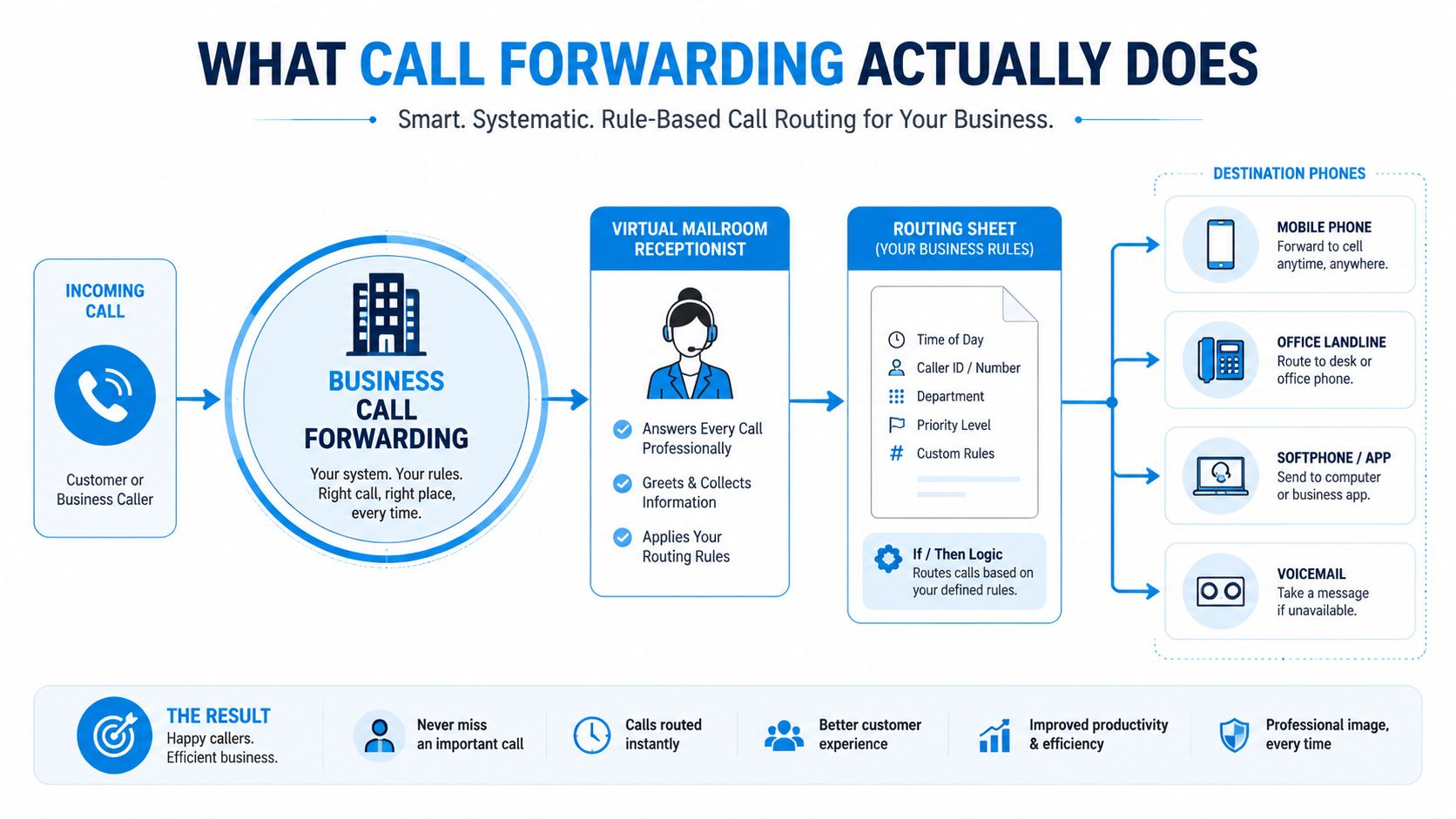
Device settings versus network forwarding
There are two ways to run that policy. Device-side forwarding lives on one handset, so the phone itself decides where the call goes. Network-side forwarding sits in the carrier or SIP layer, so the redirect can still happen even if the original phone is off, busy, or out of reach.
That difference is practical, not theoretical. If a front-desk phone is powered down or a mobile line is in poor coverage, a device-only rule fails with it. If the carrier owns the rule, the network can route the call without waiting for the handset to cooperate.
In SIP systems, this often appears as a 302 redirect with the target in the Contact header. In PSTN environments, SS7 signaling creates the new path (Digital Transformation Authority). The operational point is simple, the original leg and the forwarded leg both exist, so call detail records can show what happened instead of forcing you to guess.
For detailed steps on sending a call to a different number, see our guide to forwarding calls to another number.
Forwarding also needs guardrails. Keep caller ID honest when you hand calls to an AI receptionist or an answering service, because a bad handoff makes the business look unreliable. And do not leave forwarding on all the time by default. A clinic, law office, or home-service franchise should forward by rule, after hours, on no-answer, on busy, or for specific callers, not as a blanket setting that hides who is answering and why.
Operational takeaway: forwarding is a rule plus a destination, evaluated at trigger time by the network. Set the trigger, set the destination, and set the handoff path before you let the call leave the original line.
The Five Rule Types Every Business Should Know
Businesses don't need one generic forwarding setting. They need the right rule for the moment. If you flatten every scenario into “always forward,” you lose control, caller-ID trust, and accountability.
The rule types that actually matter
Unconditional forwarding sends every call onward. A law firm can use it during a holiday closure so every inbound call reaches intake instead of a dead desk.
No-answer forwarding fires after a set number of rings. That's the cleanest option for a dental practice that wants the front desk to answer first, then push missed calls to an AI receptionist so the caller still has a live response path.
Busy forwarding catches the line when it's already in use. That works well for a clinic phone that gets flooded during morning triage.
Selective forwarding uses caller-based logic. A franchise might route VIP numbers or internal overflow differently from regular inbound traffic.
Scheduled forwarding turns routing into a time policy. A service business can forward after-hours calls to a live answering path and keep daytime calls on the main desk.
A practical rule from carrier and business-phone guides is that North American systems often use *72 to activate unconditional forwarding and *73 to cancel it, while *61 commonly controls no-answer forwarding on many carriers (Nextiva). Use those as menu vocabulary, not as a reason to avoid a more flexible platform.
| Forwarding rule types and typical triggers | When it fires | Example use case |
|---|---|---|
| Unconditional | Every inbound call | Holiday closure sends all calls to intake |
| No-answer | After the phone rings and nobody picks up | After-hours dental overflow goes to AI receptionist |
| Busy | The line is already occupied | Front desk stays responsive during a surge |
| Selective | Specific callers or numbers match a rule | Route preferred accounts to a dedicated line |
| Scheduled | A time window begins or ends | Lunch breaks, after-hours, or weekend coverage |
For a tighter routing vocabulary, the call-routing guide for small business is useful, but the bigger point is this. Every forwarding policy should answer one question, when does the call move?
Choosing Your Forwarding Method
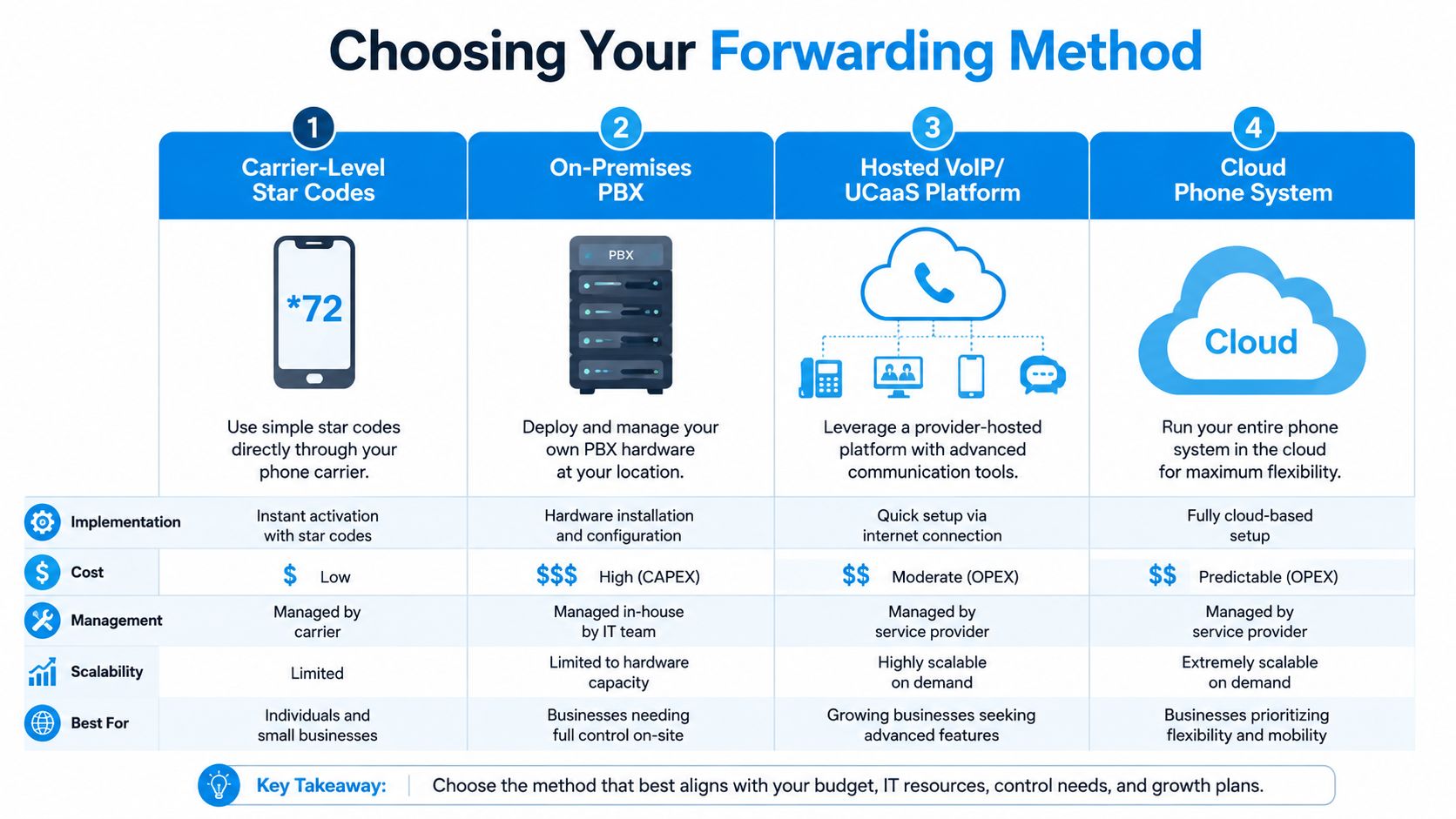
The right forwarding method depends on who should own the logic. That's the core decision. Is it the carrier, the IT team, the phone admin, or a workflow engine that also handles intake and escalation?
Carrier codes, PBX, VoIP, and cloud systems
Carrier-level star codes are the fastest path. They're cheap, familiar, and good for basic forwarding on a landline or mobile, but they don't give you much beyond simple rules. If a receptionist needs a quick temporary reroute, this works.
On-premises PBX gives full control, but you pay for it with hardware, administration, and upkeep. That's fine if your organization already runs its own phone stack and wants to control every route in-house.
Hosted VoIP or UCaaS platforms add dashboards, policy controls, and analytics. Forwarding then starts to look like a real system instead of a single phone trick. It's the cleaner choice for multi-location operators that need reporting and central policy.
Cloud or AI-receptionist services go further. They can receive the call, gather the caller's intent in natural language, hand off to a human when needed, and keep the workflow moving after hours or during overflow.
A multi-location franchise should think about routing ownership this way: carrier codes hand the logic to the network provider, PBX hands it to your internal admin, hosted VoIP hands it to the platform owner, and cloud AI hands it to a workflow. Pick the layer that matches how much control your team will use, not the layer that sounds most advanced.
Pick the layer that matches your team
For a single-location office, star codes may be enough. For a franchise with branch managers and shared intake, hosted VoIP usually makes more sense. For a business that wants the call to become a structured workflow, cloud or AI reception is the stronger choice.
If you want one option that combines human handoff with routing control, Recepta.ai fits that cloud layer, because it can take inbound calls, handle scheduling, and escalate when a human needs to step in. I'm not saying every business needs that level of orchestration, only that forwarding gets a lot more useful when the destination can do something with the call.
Practical Setup Examples You Can Copy
A lot of forwarding fails because the person configuring it never touches the actual setting. They know the concept, but not the screen or code. Fix that and organizations get moving fast.
The common device paths
On iPhone, go to Settings > Phone > Call Forwarding and turn it on from there. On Android, many teams still use the carrier or dialer app, which is why the process varies by device and provider. On some North American carriers, *72 activates forwarding and *73 cancels it, which is still the quickest way to test a temporary reroute on a landline or business mobile (Talkroute).
If you're on a hosted VoIP dashboard, don't start with “forward everything.” Start with a no-answer rule, then decide whether the overflow should go to a teammate, voicemail, or an AI receptionist. That gives you a clean default and a controlled fallback. The setup pattern is also why the activation guide is worth saving for your admin team.
A setup I'd actually use in a dental practice
A multi-location dental practice should standardize after-hours coverage instead of letting each office improvise. Put every office smartphone on the same forwarding destination, then let the front desk use star codes on the main line to reroute lunch-break overflow.
That gives you one shared intake path and keeps patients from hitting dead ends. It also prevents each location from creating its own exception list, which is where routing policies usually fall apart.
Concrete example: a clinic can keep daytime calls local, then switch to a shared intake destination only after closing, so callers still hear a live response path without forcing every office to staff late hours.
Integrations and Automation Beyond Ringing Another Phone
A forwarded call should do more than ring somewhere else. If it only rings another device, you're still doing manual work after the fact. The smarter setup turns the call into a record, a task, or a booked slot.
Three integrations that change the outcome
A CRM update logs the call and opens a lead record, so the first contact doesn't disappear into memory. A calendar check can route the caller straight into an open appointment slot if the intake question is simple enough. An AI receptionist can collect intent, summarize the call, and escalate only the messy cases that need a person.
That last pattern matters most in home services. An HVAC company can forward after-hours calls to an AI receptionist, let it book the visit in ServiceTitan, send a confirmation text, and page the on-call tech only if the caller asks for a human. That's not just routing, it's triage.
If you're deciding what to wire up next, start with this checklist:
- CRM: log the call, attach the source, and create the lead
- Calendar: expose open slots and block the ones already taken
- Helpdesk: create a ticket for support or service issues
- Payment: collect deposits or balances when the workflow allows it
- Dispatch: alert the right field team when location matters
The point is to make forwarding operational. A call lands, something useful happens, and the business doesn't waste the next ten minutes reconstructing what the caller wanted.
When Not to Forward and What It Can Break
More forwarding isn't always better. Always-on redirection can weaken the local trust signal that high-intent callers expect, especially when a service business depends on being the nearby option. If the caller thinks they're reaching a local office and the experience feels remote, you've created friction before the conversation starts.
The trade-offs that get ignored
Bandwidth matters too. Cloud or SIP forwarding still lives inside voice infrastructure, and reliable deployment needs stable bandwidth of about 100 kbps per concurrent VoIP call, with testing at 120% of expected peak load to validate queue behavior and failover paths (Call Routing Authority). If you don't test overflow and contingency routes, you'll discover problems during the exact rush you were trying to absorb.
Cascading voicemail loops are another failure mode. A call forwards to a mobile, the mobile rejects it, the fallback hits voicemail, and nobody notices the missed lead. That's not a routing win, that's a hidden outage.
Compliance and continuity need policy, not improvisation
Healthcare, legal, finance, insurance, and franchise teams need a policy for who can receive forwarded calls, how records are logged, whether audit trails survive the handoff, and what happens when calls cross time zones. The operational risk isn't just missed pickup, it's inconsistent handling.
That's why I'm hard on the phrase “set and forget.” Forwarding should be time-bounded, audited, and reversible. If the business wants after-hours coverage, spell out who gets the call, how the summary is stored, and when the rule turns off. Anything less is a guess disguised as a policy.
Decision Framework and Troubleshooting Checklist
Use a simple sequence. First, pick the rule type. Then pick the method. Then pick the integrations. Finally, check the guardrails for caller-ID trust, compliance, and failover.
The decision path
- Choose the rule type. Decide whether the call should be unconditional, no-answer, busy, selective, or scheduled.
- Select the method. Use carrier codes for quick basic control, PBX for deep internal control, hosted VoIP for visibility, or cloud AI for automated intake.
- Pick the integrations. Connect the call to CRM, calendar, helpdesk, payment, or dispatch logic.
- Document the fallback. Write down who gets the call when the first destination fails.
Troubleshooting the four problems that show up most
- Calls don't forward at all. Check whether the rule is turned on and whether the destination number is entered correctly.
- Calls hit voicemail unexpectedly. Verify the rule trigger, then check whether the first destination is unavailable or set to reject.
- Audio sounds poor on the forwarded leg. Look at the connection quality on the destination side, not just the original line.
- Caller ID looks wrong. Confirm what your platform is configured to display on the forwarded call, then test from an outside number.
Final guardrail: audit one current forwarding rule this week, decide whether it should be always-on, scheduled, or conditional, and write down who receives the call and where the summary goes.
If your business is still treating forwarding like a checkbox, it's time to turn it into a real routing policy. Recepta.ai helps businesses route inbound calls, capture the details, schedule next steps, and hand off to humans when the call needs empathy or judgment. Visit Recepta.ai and map one forwarding rule to a live workflow this week.