Call Routing for Small Business: Never Miss a Lead Again
A customer calls during lunch. Your office line rings five times, then goes to voicemail. They don't leave a message. They tap the next business in search results, and that company gets the job.
That's not a technology problem first. It's an operations problem. Small business owners usually feel it as chaos: calls hitting one person's cell, front desk staff juggling walk-ins, technicians missing leads while driving, and after-hours callers landing in a dead end.
If your phone process depends on one available human being, you don't have a process. You have a bottleneck. Call routing fixes that by giving every incoming call a path.
Your Phone Is Ringing But Are You Answering
Missed calls rarely look dramatic from the inside. They look ordinary. A plumber is on-site. A dental receptionist is helping a patient at the desk. A law office is in consultations all afternoon. The phone rings, no one grabs it in time, and the business assumes the caller will try again.
Many won't.
The hard part is that owners often underestimate how often this happens because they remember the calls they answered, not the calls that went unanswered. The bigger the day gets, the worse the blind spot becomes. One missed estimate request, one lost emergency repair call, one prospective patient who doesn't want to wait, and revenue walks out the door.
The broader pattern is worse than commonly believed. Small businesses answer only 37.8% of inbound calls, while 37.8% go to voicemail and 24.3% receive no response at all, according to business phone responsiveness data summarized by AMBS Call Center. That means a large share of customer intent never reaches the right person in real time.
What a missed call actually costs
A missed call doesn't just mean one lost conversation.
- Lost lead capture: A caller ready to book, schedule, or buy often moves to a competitor.
- Lower trust: Voicemail feels like delay. No answer feels like neglect.
- More admin work: Staff spend time returning calls, sorting messages, and figuring out who should respond.
- Uneven service: Good employees get overloaded while other team members sit idle.
Practical rule: If your team says, “We return calls quickly,” but callers still hit voicemail first, you have a routing problem.
Call routing for small business solves this by acting like a front-desk system that never gets distracted. It decides where a call should go based on rules you set. Sales can go to sales. Emergencies can go to the on-call person. Existing customers can skip the generic queue and reach support.
For a home service company, that might mean new quote requests ring sales while “urgent repair” goes straight to dispatch. For a clinic, it might mean new patient scheduling doesn't compete with billing questions. The point isn't fancy phone tech. The point is simple. Every call needs a next step that doesn't depend on luck.
What Is Call Routing and How Does It Work
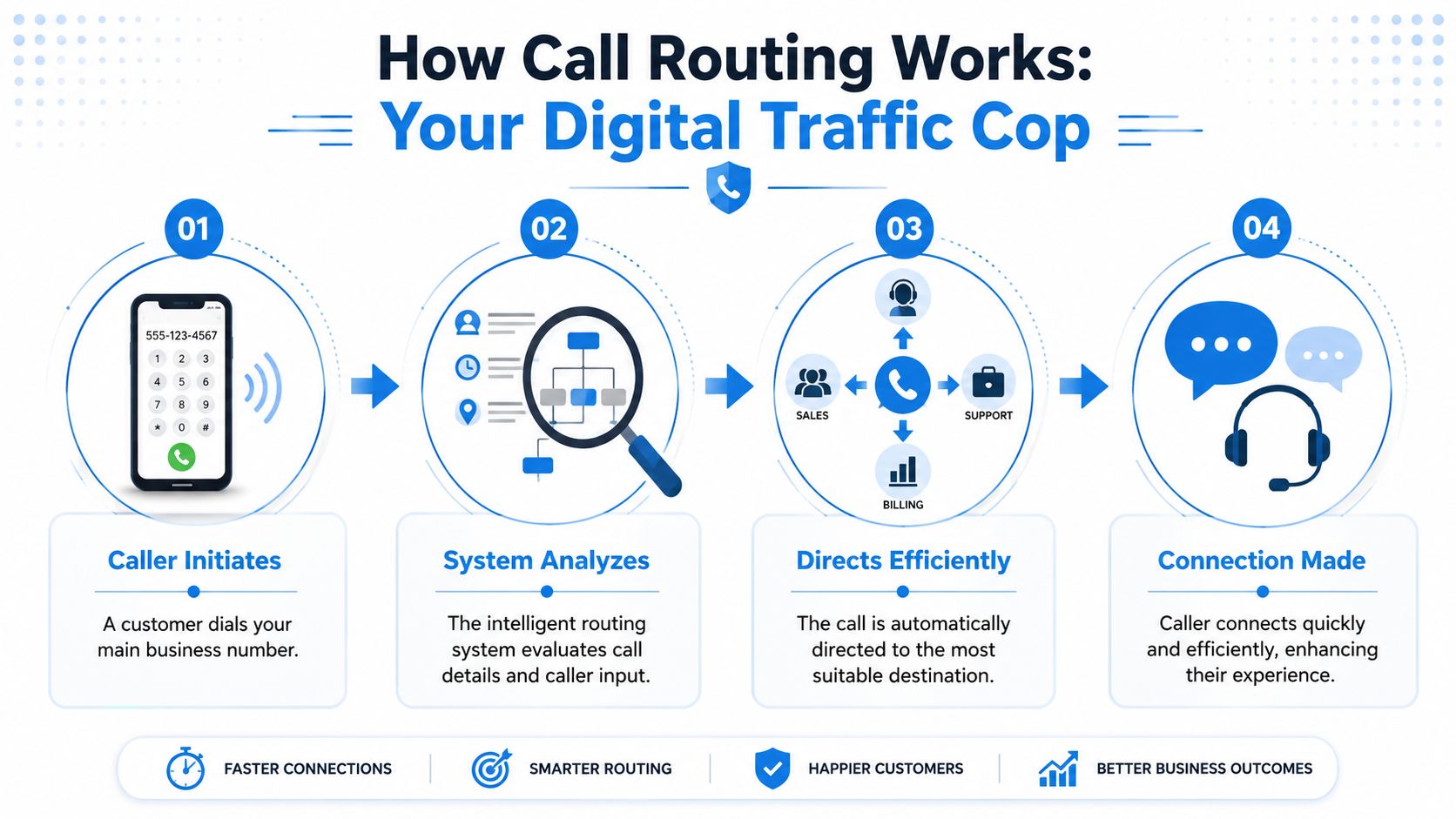
Call routing is a digital traffic cop for your phone lines. Instead of every caller hitting the same number and hoping the right person answers, the system sorts and directs the call based on predefined logic.
Under the hood, this is usually an Automatic Call Distribution, or ACD, setup. The practical definition matters more than the acronym. It's the system that receives incoming calls, evaluates them, and sends them where they belong. According to the U.S. Chamber guide on call routing for small business, it works through three stages: call qualifying, call queuing, and call distribution.
Call qualifying
The system then figures out who's calling and what they need.
That can happen in a few ways. The caller may choose from a simple phone menu. The system may recognize the number and match it to a customer record. It may also use a direct-dial number tied to a specific service line. The goal is to gather just enough information to make a smart decision.
For example, a pest control company might give callers three choices: new service, existing account, or urgent issue. That's enough to separate sales from service without making callers dig through a maze. If you want a clearer sense of how this fits into broader phone operations, this overview of a call management application is useful.
Call queuing
If the right person isn't available immediately, the caller enters a queue.
A queue is just a virtual line, but a good queue is organized. It doesn't dump everyone into the same holding pattern. It can prioritize urgent issues, distribute overflow, and keep callers from being bounced around. Its effectiveness often dictates whether many small businesses present a professional image or appear disorganized.
Keep your menu short. The U.S. Chamber guidance notes that simple IVR menus with no more than 2 to 3 options create a better caller experience than long trees of choices.
Call distribution
Once the system knows the caller's need and has checked who's available, it sends the call to the right destination.
That destination could be a person, a department, a ring group, or an after-hours line. A support request might go to technical staff. A billing issue might go to accounting. A VIP client might get priority treatment. The point is that no one has to manually play operator.
For a small business owner, that changes the daily workload fast. The front desk stops serving as a switchboard. Technicians stop fielding calls they can't resolve. Salespeople get more sales calls, not billing questions.
Key Call Routing Methods to Consider
There isn't one perfect call flow for every business. The right setup depends on how your team works, when calls come in, and how different your caller needs are. A solo attorney and a three-location HVAC company shouldn't route calls the same way.
In call routing, most owners make one of two mistakes. They either keep it too basic and send everything to one line, or they overbuild a complicated menu that annoys callers. Good call routing for small business sits in the middle. Clear logic, minimal friction.
The methods that usually matter most
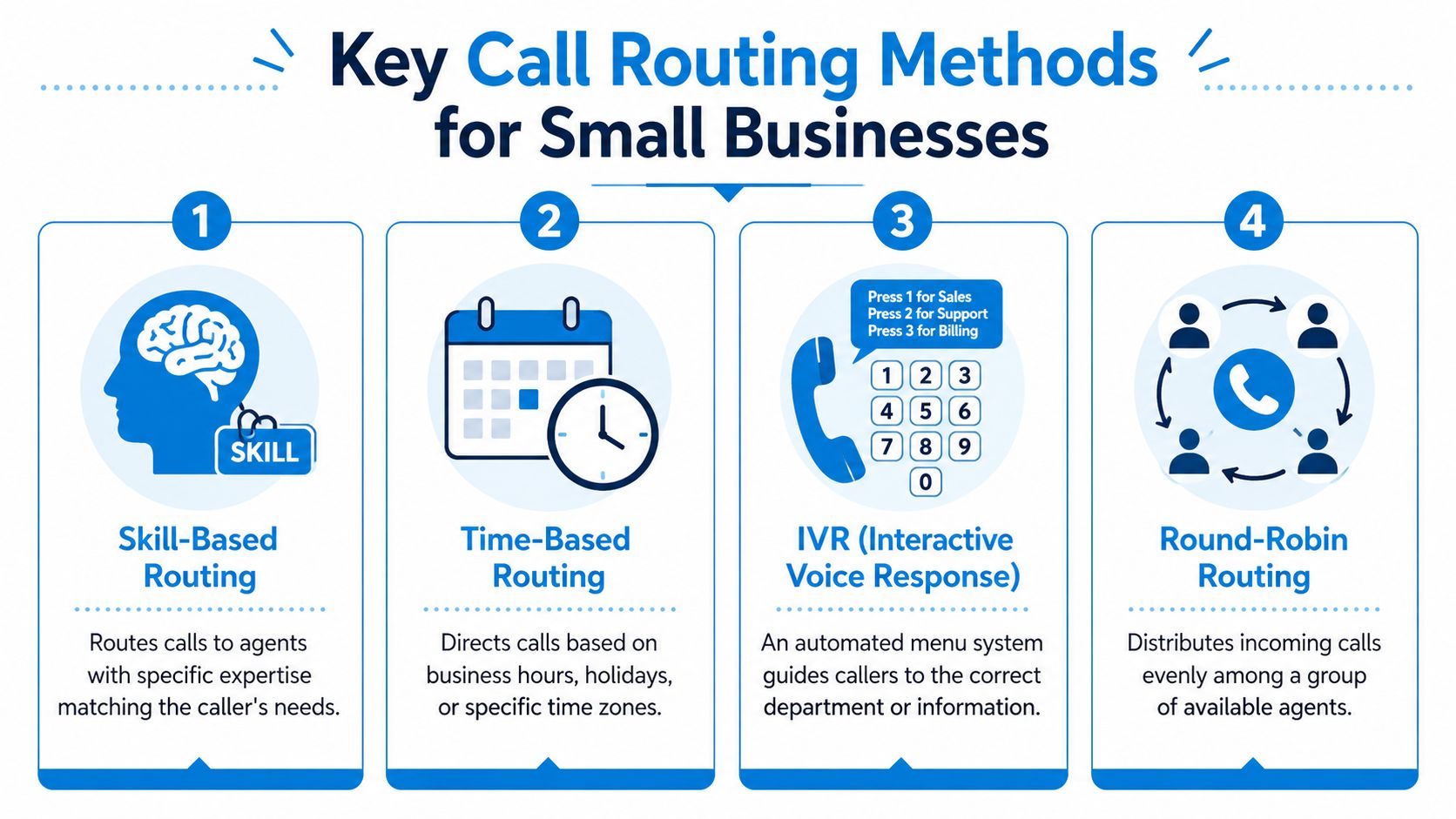
Round-robin routing sends calls evenly across available team members. It works well for small sales teams or service coordinators who handle similar requests. A multi-location cleaning company, for example, can alternate new quote calls between sales reps so one person doesn't get buried while another waits for the phone to ring.
Simultaneous ring makes multiple phones ring at once. This is useful when speed matters more than ownership. Think emergency restoration, after-hours maintenance, or any inbound lead where first response wins.
Sequential routing follows a priority order. The call rings person one, then person two, then the next fallback. This works when you have a lead person who should get first shot, but you still need backup coverage.
Time-based routing changes the destination based on the hour, day, or holiday schedule. During business hours, calls may ring the office. After hours, urgent calls can go to an on-call technician while routine calls route to voicemail or callback handling.
Skill-based routing matches the caller with someone who can solve the issue. That matters because iPlum's overview of call routing notes that skill-based routing can improve first-call resolution by 25%. For businesses with specialized inquiries, that's one of the most practical gains available.
Some teams also layer AI into these flows. If you're evaluating how automation supports triage and decision logic, Resgrid's AI features offer a helpful example of how AI can assist with operational workflows.
A related setup to compare is direct forwarding logic. This breakdown of call forwarding options helps clarify when forwarding alone is enough and when routing rules do a better job.
Here's a quick way to compare the main approaches:
Comparison of Call Routing Methods
| Method | Best For | Pros | Cons |
|---|---|---|---|
| Round-Robin | Small teams with similar roles | Balances workload, simple to manage | Doesn't account for expertise |
| Simultaneous Ring | Urgent or high-value inbound calls | Fastest path to a live answer | Can feel noisy for staff if overused |
| Sequential Routing | Priority-based handling | Preserves hierarchy, clear fallback path | Slower than simultaneous ring |
| Time-Based Routing | After-hours and schedule changes | Supports coverage without manual switching | Needs accurate schedules |
| Skill-Based Routing | Specialized service environments | Better matches caller to expertise | Requires thoughtful setup and tagging |
| IVR Menu Routing | Teams with distinct departments | Gives callers clear choices | Poor design frustrates callers |
A short demo helps make these trade-offs easier to visualize:
What usually works best is a blend. A dental clinic might use an IVR menu first, then skill-based routing inside each branch. An HVAC company might use time-based routing after hours and simultaneous ring only for emergency repair.
The Business Case Why Every Small Business Needs Call Routing
Owners don't buy call routing because they love phone systems. They buy it because wasted calls create wasted payroll, wasted marketing spend, and wasted revenue.
If you're paying for ads, SEO, referrals, direct mail, or field sales, every inbound call carries acquisition cost. Letting that call drift into voicemail means you paid to create demand and then failed at the handoff. That's why call routing isn't an IT upgrade. It's a revenue control system.
Before and after operations
Before routing, phones interrupt everyone. The office manager plays traffic controller. Sales gets support questions. Technicians get quote requests while they're under a sink or on a roof. Customers repeat themselves after every transfer.
After routing, the call flow does the sorting first. Staff spend less time redirecting conversations and more time finishing useful work. That's the difference between a phone line and a phone process.
Why availability matters
One of the strongest operational benefits is coverage. According to Techmode's guide to call routing, advanced strategies that combine round-robin distribution and simultaneous ring can support 100% call availability by spreading calls across team members and ringing multiple people at once. For a busy small business, that's a practical safeguard during lunch rushes, Monday mornings, storm days, and seasonal spikes.
Businesses don't lose calls only when nobody is working. They lose calls when the right person is busy and there's no backup path.
The bottom-line gains owners actually notice
- More captured leads: New inquiries reach someone who can respond right away.
- Fewer internal interruptions: Staff don't stop what they're doing to transfer basic calls.
- Better customer experience: Callers reach the right destination with less repetition.
- Stronger brand perception: Even a five-person team can sound organized and responsive.
- More resilient operations: If one employee is unavailable, the call doesn't die with them.
A practical example: a small insurance agency can route new policy inquiries to licensed producers, claims questions to service staff, and renewal calls to account managers. That cuts internal ping-pong. The caller feels like the business knows what it's doing, even if the team is lean.
That's what good systems do. They make a small company feel bigger without adding unnecessary headcount.
Deploying Your Call Routing System A Practical Checklist
Most call routing projects fail for one reason. The business starts with software instead of workflow. The better order is simpler: map the calls first, then configure the tool.
If you can sketch how calls should move through your business on one page, setup becomes manageable. If you can't, the software won't save you.
Start with your real call types
Write down the categories you already receive. Not the categories you wish customers used. List the actual categories.
For most small businesses, that list includes:
- New sales inquiries: Estimates, consultations, appointments, demos
- Existing customer service: Schedule changes, account questions, follow-ups
- Urgent issues: Emergency repairs, same-day needs, time-sensitive requests
- Administrative calls: Billing, insurance, directions, records, vendor calls
Once those buckets are visible, assign each one a destination and backup path.
Build the flow with simple rules
Don't start with a six-layer IVR. Start with the shortest workable logic.
- Define the first split: New customer, existing customer, urgent issue.
- Choose the destination: Person, team, or ring group.
- Add overflow: What happens if nobody answers.
- Set after-hours behavior: On-call line, callback capture, or voicemail triage.
- Review exceptions: VIP callers, multi-location callers, language needs.
An HVAC example is straightforward. If the caller selects emergency repair, ring the senior technician first, then overflow to dispatch. If they want a quote, send them to sales. If they call after hours with a non-urgent issue, capture details for next-day follow-up.
A detail many owners miss is ring timing. Quo's call routing guidance recommends setting ring durations to at least 15 seconds, or 10 seconds if your team has three or more members. That gives people time to answer before the system moves on and prevents calls from being dropped too aggressively.
Choose tools that fit your operations
For some teams, a cloud phone system with built-in routing is enough. For others, especially those needing handoff between automation and people, an AI receptionist layer makes more sense. One option is Recepta.ai, which handles inbound call routing, lead capture, scheduling, and escalation to human support when needed. If CRM syncing matters, this guide to what CRM integration is is worth reviewing before you choose a platform.
Test your call flow from a customer's point of view, not an admin dashboard. Call the line, press the wrong button, call after hours, and see where the experience breaks.
Final setup checks
- Record clear greetings: Short, specific, and easy to follow
- Verify every fallback path: No dead ends
- Train the team: Everyone should know why calls arrive where they do
- Review weekly at first: Routing needs tuning after real traffic hits it
A workable system is better than a clever one. Clean routing beats complexity every time.
Industry Examples and Measuring Success with KPIs
Call routing works best when it mirrors how the business serves customers. The setup for a dental clinic shouldn't look like the setup for a franchise cleaning company. The logic has to follow the operation.
That's also why measurement matters. If you don't track outcomes, routing turns into one more admin setting nobody revisits.
Three practical examples
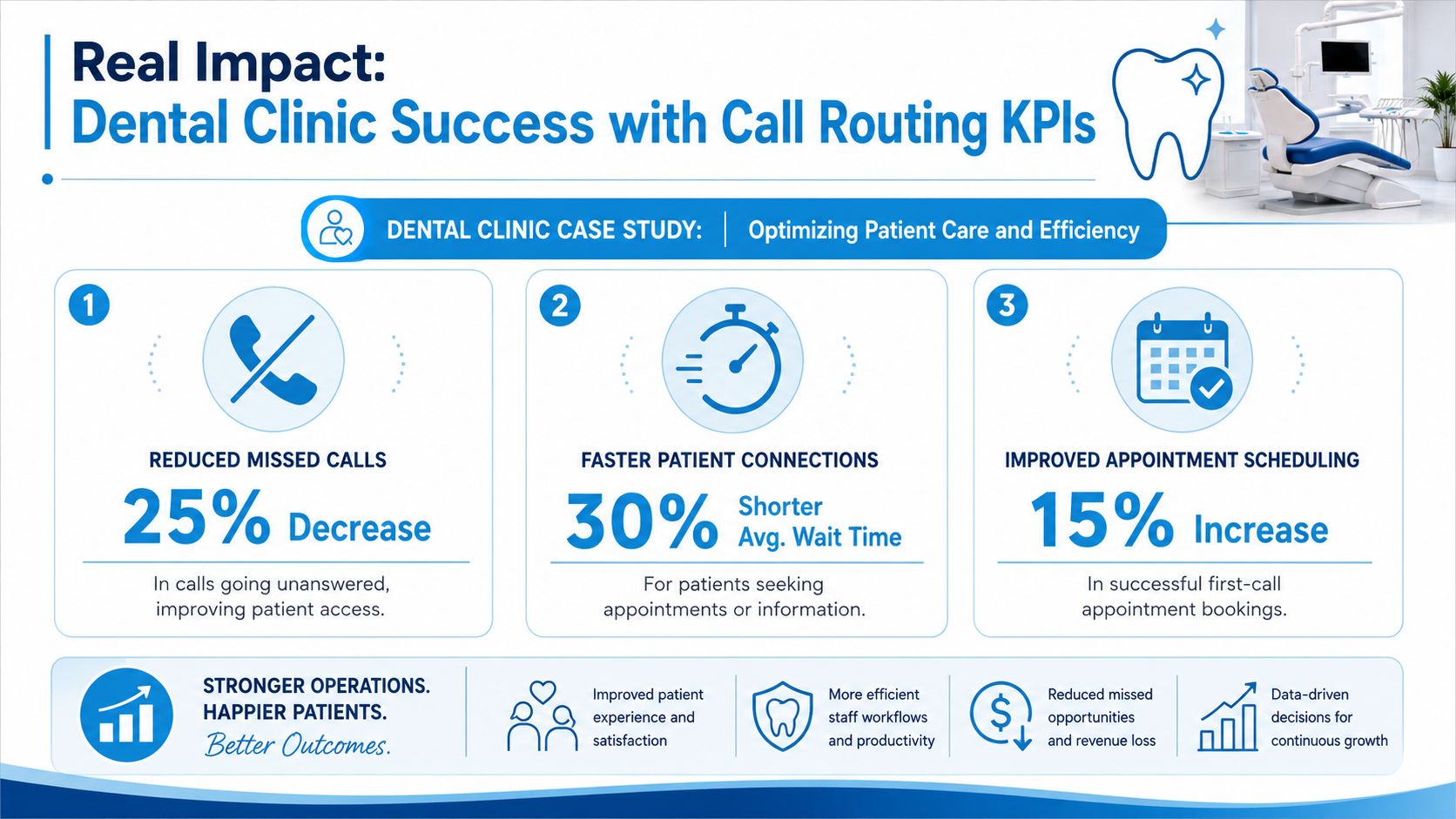
A dental clinic can split calls between new patient scheduling, existing patient support, and billing. That keeps the front desk from spending prime booking time answering insurance questions. New patients reach scheduling faster, while billing calls go to the person who can resolve them without handoffs.
An HVAC company can create a dedicated emergency branch. If someone calls about a failed system during extreme weather, that path should bypass routine scheduling and ring the on-call team first. Meanwhile, maintenance requests and quote inquiries can follow a calmer queue.
A multi-location franchise has a different problem. Consistency. According to Talkroute's discussion of small business call routing, 34% of franchise operators struggle with fragmented call handling, which contributes to 19% lower customer retention. That's why unified routing and AI receptionist support have become more relevant for operators trying to present one brand experience across several locations.
Which KPIs to watch
You don't need a giant dashboard. Start with a short list:
- First-call resolution: Did the caller get what they needed without being transferred around?
- Average wait time: How long did callers sit before speaking with someone?
- Call abandonment: How often did callers hang up before reaching help?
- Missed call volume: Which times, teams, or locations are still leaking calls?
- Lead capture quality: Are sales calls reaching the right people with enough details logged?
For businesses that want a tighter process, effective call tracking strategies can help connect phone performance to lead sources and follow-up quality. It's also useful to review your own call detail reporting so routing decisions are based on actual traffic patterns, not staff impressions.
If one branch answers quickly but transfers constantly, and another branch answers slower but resolves issues on the first call, the second branch may be serving customers better.
A good KPI review doesn't just ask, “Did we answer?” It asks, “Did we connect the caller to the right outcome with the least friction?”
Your Next Steps to Smarter Call Handling
Most small businesses don't need a bigger phone system. They need a smarter front door.
That starts with an honest audit. Call your own business during lunch, after hours, and during your busiest window. See what a new customer hears. Notice how many steps it takes to reach a real person. Check whether urgent calls have a clear path and whether routine questions are eating time from revenue-producing work.
A simple action plan
- Map your top call types: New lead, existing customer, urgent request, admin question
- Choose one routing improvement first: Don't rebuild everything at once
- Create a backup answer path: Every important call should have an overflow destination
- Review the first month of results: Look at wait times, transfers, and missed-call patterns
The businesses that benefit most from call routing for small business are usually the ones that have already felt the pain. The owner who's tired of chasing voicemails. The clinic that loses bookings at the front desk. The franchise operator who wants one brand experience across multiple numbers and teams.
AI receptionists are closing the gap between automation and a human touch. That matters because callers want speed, but they also want to feel handled, not trapped in a machine. The strongest setups use automation for sorting, priority, and capture, then bring people in where empathy or judgment matters.
If your phones still rely on whoever happens to be free, that's the next system to fix.
If you want to see how an AI receptionist can handle routing, lead capture, scheduling, and human escalation in one workflow, take a look at Recepta.ai. It's a practical next step for businesses that want fewer missed calls without building an enterprise phone operation from scratch.