Cleaning Business Scheduling Software: 2026 Buyer's Guide

If you're still running your cleaning schedule through texts, a paper wall calendar, and a spreadsheet someone forgot to update, you already know where the cracks show up. A recurring client gets booked at the wrong time. One cleaner thinks a job was reassigned. Another arrives without the gate code. Then the office work starts after hours, when you're trying to confirm tomorrow's route, answer missed calls, and fix payroll notes from last week.
That mess usually doesn't mean you're bad at operations. It means the system stopped matching the business. What works for a solo cleaner or a two-person crew breaks fast once recurring jobs, staff availability, travel time, and client communication all need to move together.
Beyond the Clipboard and Chaos
A lot of owners hit the same wall in the same way. At first, manual scheduling feels manageable. You know your clients by name, your team is small, and most changes happen over text. Then one busy week exposes everything at once. A move-out clean gets added on short notice. A regular customer wants to shift their slot. One cleaner calls out. Another asks whether Saturday's job is still on because they never saw the update.
That is when scheduling stops being an admin task and becomes an operations problem.
Teams usually try to patch it with one more spreadsheet, one more shared calendar, or one more group chat. Sometimes that helps for a month. It rarely holds up for long. If you're still working on the basics of creating an effective cleaning schedule, that framework matters. But once your business is mobile, recurring, and team-based, the schedule has to do more than list appointments.
The shift toward software isn't a niche trend. The cleaning service software market was valued at USD 2.16 billion in 2026 and is projected to reach USD 2.99 billion by 2030, growing at a CAGR of 8.5%, which reflects broader adoption of digital tools by home service businesses managing operations more efficiently, according to Research and Markets' cleaning service software market report.
Manual scheduling usually fails quietly first. Then it fails all at once on a Monday morning.
Owners now expect software to handle intake, scheduling, dispatch, and communication in one working system. Businesses exploring workflows for cleaning and maid service operations are usually trying to solve that exact handoff problem. A client inquiry comes in, the right details get captured, the job lands on the calendar correctly, and the team sees what changed without five follow-up calls.
Understanding Modern Scheduling Software
Businesses often shop for cleaning business scheduling software as if they're buying a calendar. That's the wrong frame. A modern platform works more like a digital dispatcher. It connects the office, the field crew, the client record, and the day's route in one place.
That matters because cleaning isn't a desk business. Your team is moving. Jobs change. Access details get updated. Someone finishes early at one property and can cover another stop. If your schedule lives in one app, client notes in another, and staff availability in a text thread, nobody has a reliable picture of the day.
What the software is really doing
Modern cleaning business scheduling software functions as an integrated operations hub, which lets dispatchers adjust routes and reassign work dynamically without chasing field updates, according to SaberTask's guidance on cleaning business scheduling software.
In practical terms, that means the system should help you manage:
- Appointments and recurring visits so weekly, biweekly, and monthly cleans don't need to be rebuilt every time
- Crew assignment so the right cleaner or team gets the right property
- Route logic so the calendar doesn't ignore travel reality
- Mobile clock-in and clock-out so field activity matches what was scheduled
- Payroll-ready time tracking so office staff aren't rebuilding timesheets later
If you're comparing broader tools beyond cleaning-specific products, this roundup of top appointment software for small businesses is useful for seeing where a basic scheduler ends and a fuller operations platform begins.
What disconnected tools can't handle
A disconnected setup breaks on the handoffs. The office books the job, but the cleaner doesn't get the update. The cleaner clocks time manually, but payroll can't verify where they were. The client changes the entry instructions, but the note stays buried in a text.
That's why many teams move from a simple booking app to a more complete workflow. If you want to see how this kind of handoff works in practice, automated appointment scheduling software shows how intake and calendar actions can be tied together instead of managed manually.
Operational rule: If your dispatcher still has to call or text for status updates all day, you don't have a scheduling system. You have a notification problem.
A good platform doesn't just show today's jobs. It lets the office make changes with confidence because the schedule, staff, and field activity are connected.
Must-Have vs Nice-to-Have Features
Owners often buy too much software too early, or too little software too late. The fix is simple. Separate the features that keep the business running from the ones that help you grow without adding office chaos.
The list below matters more than glossy demos. A clean interface is nice. A fancy dashboard is nice. Neither matters if the software can't handle recurring jobs, crew assignment, reminders, and payroll-adjacent time tracking.
Core features you shouldn't compromise on
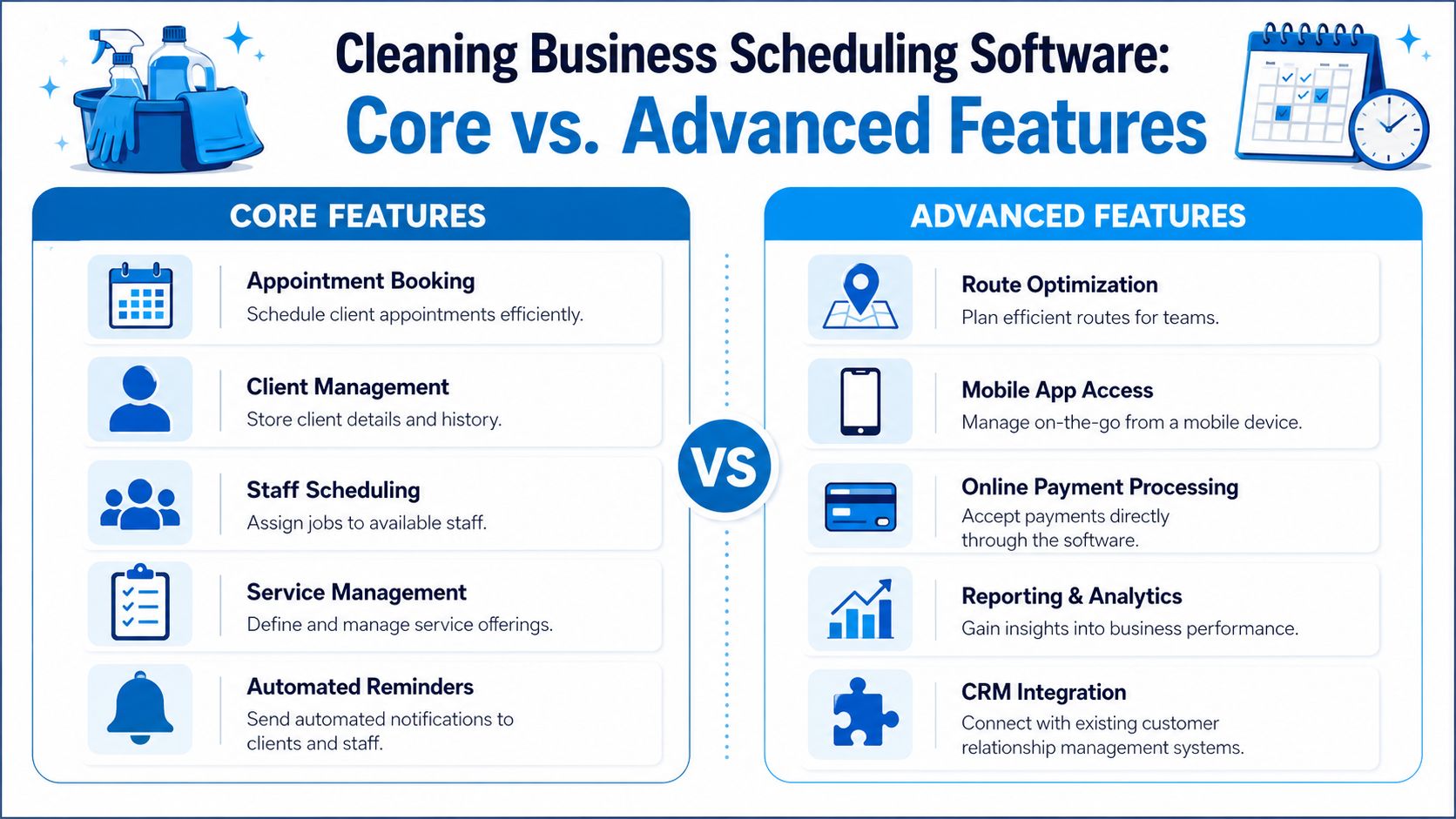
For most cleaning companies, these are essential:
- Appointment booking: Clients need a reliable way to request or confirm service without endless back-and-forth.
- Client management: Store property details, access notes, preferences, and service history in one place.
- Staff scheduling: Dispatch jobs based on availability, not memory.
- Service management: Define what each job type includes so quotes and assignments are consistent.
- Automated reminders: Reduce missed visits and cut down on avoidable confirmation calls.
A simple example: if a residential client books a deep clean, your system should attach the right service type, duration, notes, and assigned cleaner without the office rebuilding that information by hand every time.
Advanced features that become necessary as you scale
These features become more important once your team gets busier, your routes get wider, or payroll gets messier:
- Route optimization: Useful when your crews are losing time between jobs.
- Mobile app access: Critical if cleaners need live updates in the field.
- Online payment processing: Helpful when you want faster collection and fewer invoice chases.
- Reporting and analytics: Important when you need to spot recurring scheduling problems or underused staff.
- CRM integration: Necessary when customer communication, job history, and follow-up all need to stay in sync.
One feature that usually gets underestimated is time tracking. Cleaning businesses using scheduling tools with built-in clock-in and clock-out plus automated wage calculations save an average of 18 hours per month in payroll admin time, and some report up to a 60% reduction in payroll processing errors, based on When I Work's cleaning business scheduling software review.
That sounds like a back-office detail until you live through weekly payroll disputes. Then it becomes one of the most valuable parts of the system.
Core vs Advanced Scheduling Features
| Feature Category | Core (Must-Have) | Advanced (For Growth) |
|---|---|---|
| Booking | Client appointment booking and recurring jobs | Self-serve portals with more workflow logic |
| Team coordination | Staff assignment and shared schedule visibility | Dynamic reassignment and mobile field updates |
| Communication | Automated reminders and confirmations | CRM-connected follow-ups and campaign triggers |
| Operations control | Service definitions and client notes | Route optimization and deeper reporting |
| Admin and finance | Basic timesheets or job status tracking | Clock-in/out, wage calculations, payment processing |
How to prioritize by business stage
If you're a solo cleaner or very small team, start with the basics that remove admin friction:
- Online booking
- Shared calendar visibility
- Reminders
- Recurring jobs
- Mobile access
If you're running multiple crews, the order changes:
- Staff scheduling
- Clock-in and clock-out
- Payroll-ready time tracking
- Route planning
- Customer records tied to each job
Buy for your current bottleneck, not for the demo that looks the most polished.
A practical example: a five-person company with steady inbound demand may gain more from better shift control than from advanced reporting. A larger operation covering multiple neighborhoods may need route planning and payroll controls before it needs marketing automation. The right stack depends on where your day currently breaks.
Why Integrations Are Non-Negotiable
A scheduling app by itself can organize appointments. It can't run the business well unless it connects to the systems around it. That is where many software decisions go wrong. Owners compare screens and features, but ignore whether the tool will share data cleanly with the rest of the operation.
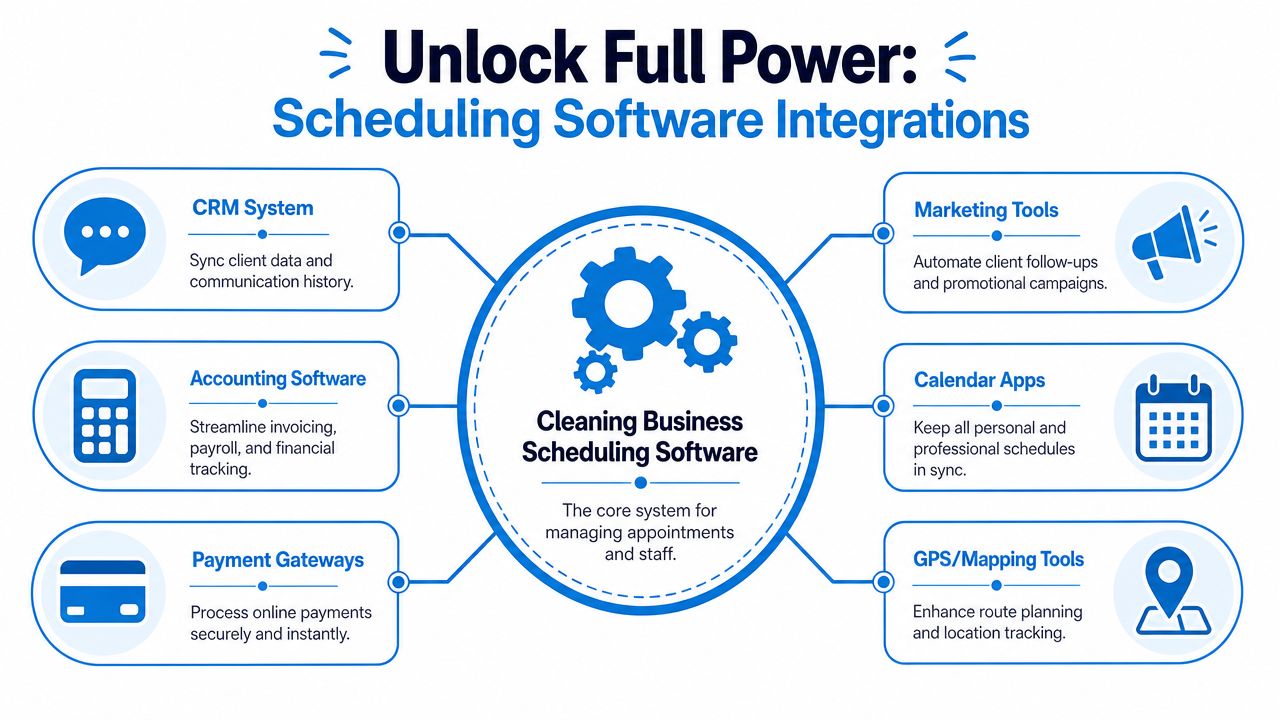
The goal is a single source of truth. When a client calls, updates their service, pays an invoice, or reschedules, your team shouldn't have to re-enter the same information in three places.
The integrations that matter most
The first is CRM integration. That keeps customer records, past services, notes, and communication tied to the appointment itself. When a cleaner opens a job, they should see the access instructions and special requests without asking the office again.
The second is calendar integration. This sounds basic, but it's where avoidable conflicts often start. If your office schedule and the team's live availability don't sync properly, people get booked into slots that looked open but weren't.
The third is phone and communication integration. This is especially important in cleaning because many leads still come in by call, voicemail, or after-hours inquiry. If someone calls for a quote or recurring service, the details should move directly into your workflow instead of sitting in a handwritten note.
One option in that category is Recepta.ai's third-party integrations, which connect call handling and appointment workflows with other business systems. That kind of setup helps when you want an inbound inquiry to become a scheduled job record without extra data entry.
What bad integration looks like
You can usually spot a weak software stack by the amount of duplicate work it creates:
- Office retyping client details from call logs into the schedule
- Cleaners asking for directions or gate codes that already exist somewhere else
- Bookkeepers reconciling hours manually because time data doesn't flow into payroll
- Owners checking multiple apps just to confirm whether a job was completed
Those aren't minor annoyances. They create lag, mistakes, and disputes.
A disconnected schedule forces your staff to become the integration layer.
If a customer changes a recurring booking, the update should move through scheduling, communication, and billing with minimal handholding. That is what keeps the office from becoming a constant repair shop for broken information.
Calculating the True ROI of Scheduling Software
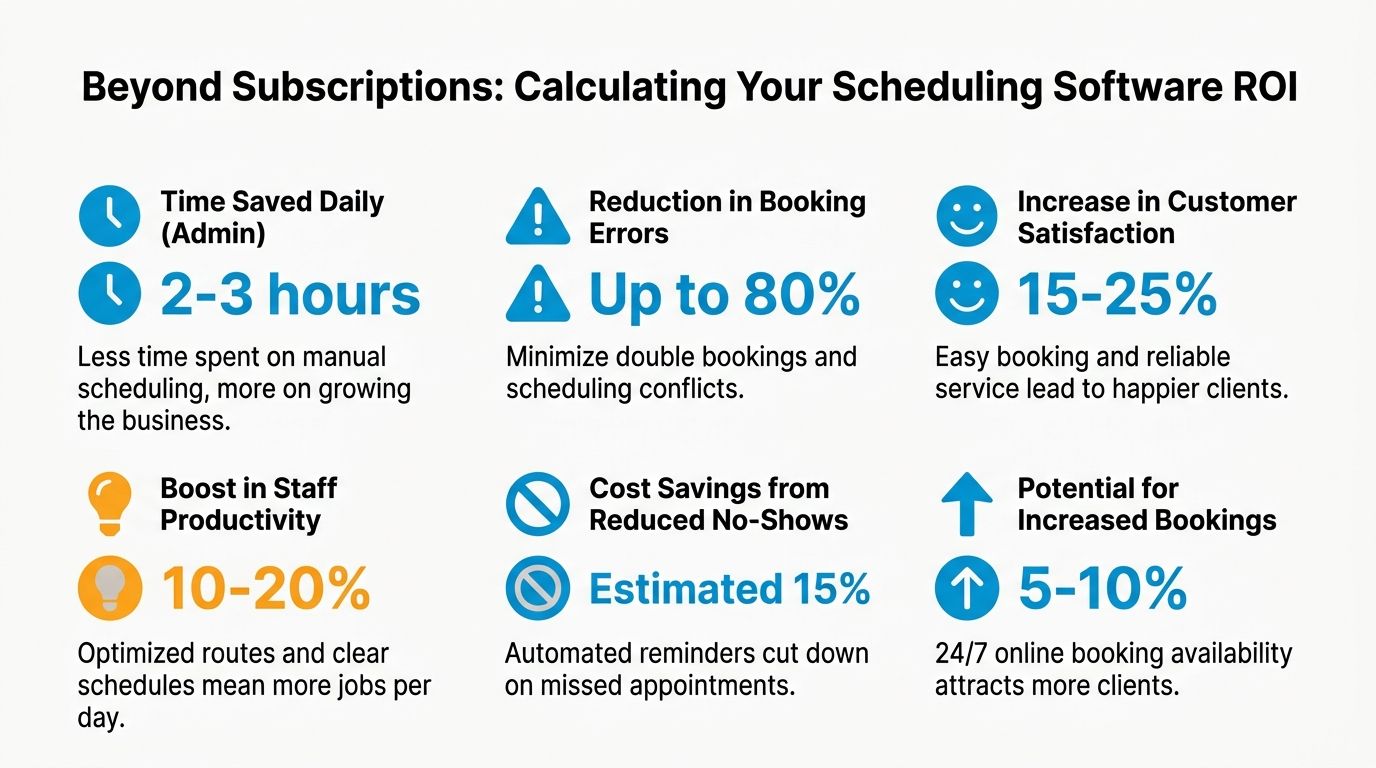
Most owners look at the monthly subscription first. That's normal, but it's incomplete. The true return on cleaning business scheduling software shows up in labor hours recovered, booking friction removed, dispatch mistakes prevented, and staff time used better.
The easiest way to evaluate ROI is to stop treating software as a line item and start treating it as an operations decision.
A useful example comes from a mid-sized cleaning firm in Denver using Jobber. The company automated 150+ monthly recurring cleanings, reduced manual dispatch errors by 38%, and increased technician utilization by 22% within six months, as shown in this Jobber-focused video case reference.
Start with the visual below, then apply the same logic to your own shop.
The costs owners usually miss
A software bill is obvious. Hidden costs are not. Look at these areas first:
- Admin time: How many hours each week go into confirming appointments, fixing changes, and rebuilding payroll notes?
- Dispatch corrections: How often does someone need to move jobs around because the original assignment wasn't realistic?
- Unused labor capacity: Are cleaners losing productive time because the day wasn't organized well?
- Missed opportunities: How many leads stall because nobody answered quickly or got the booking details into the calendar?
If you want a structured way to think through the financial side, this guide on how to calculate operating expenses is a practical place to sort fixed software cost from avoidable operating waste.
A simple ROI framework to use this week
Run the evaluation in three buckets.
Time recovered in the office
Count scheduling, follow-up, and payroll cleanup hours before and after adoption.Errors prevented in the field
Track duplicate bookings, missed updates, wrong-address dispatches, and unapproved time entries.Capacity gained without hiring
Look at whether the team can complete more work because recurring jobs, route flow, and communication are cleaner.
Here's a short explainer worth watching if you're evaluating process efficiency alongside software changes:
What a practical calculation looks like
Say your office manager spends a chunk of every week adjusting recurring jobs, answering confirmation messages, and cleaning up time records. If the software reduces that burden, those hours go back into quoting, customer service, or sales follow-up. If dispatch errors fall, crews spend more of the day cleaning instead of waiting or driving inefficiently. If technician utilization rises, the same headcount can support more booked work.
Buyer check: If a vendor can't help you map savings to admin time, dispatch accuracy, or labor utilization, the ROI conversation is still too vague.
That is the benchmark. Not whether the software is cheaper than another app, but whether it removes enough friction to change how the business performs.
The Most Common Mistake Scheduling Jobs Instead of People
This is the mistake that trips up a lot of growing cleaning companies. They buy software that is good at booking jobs, but weak at managing the people who do the work.
Those are related problems. They are not the same problem.
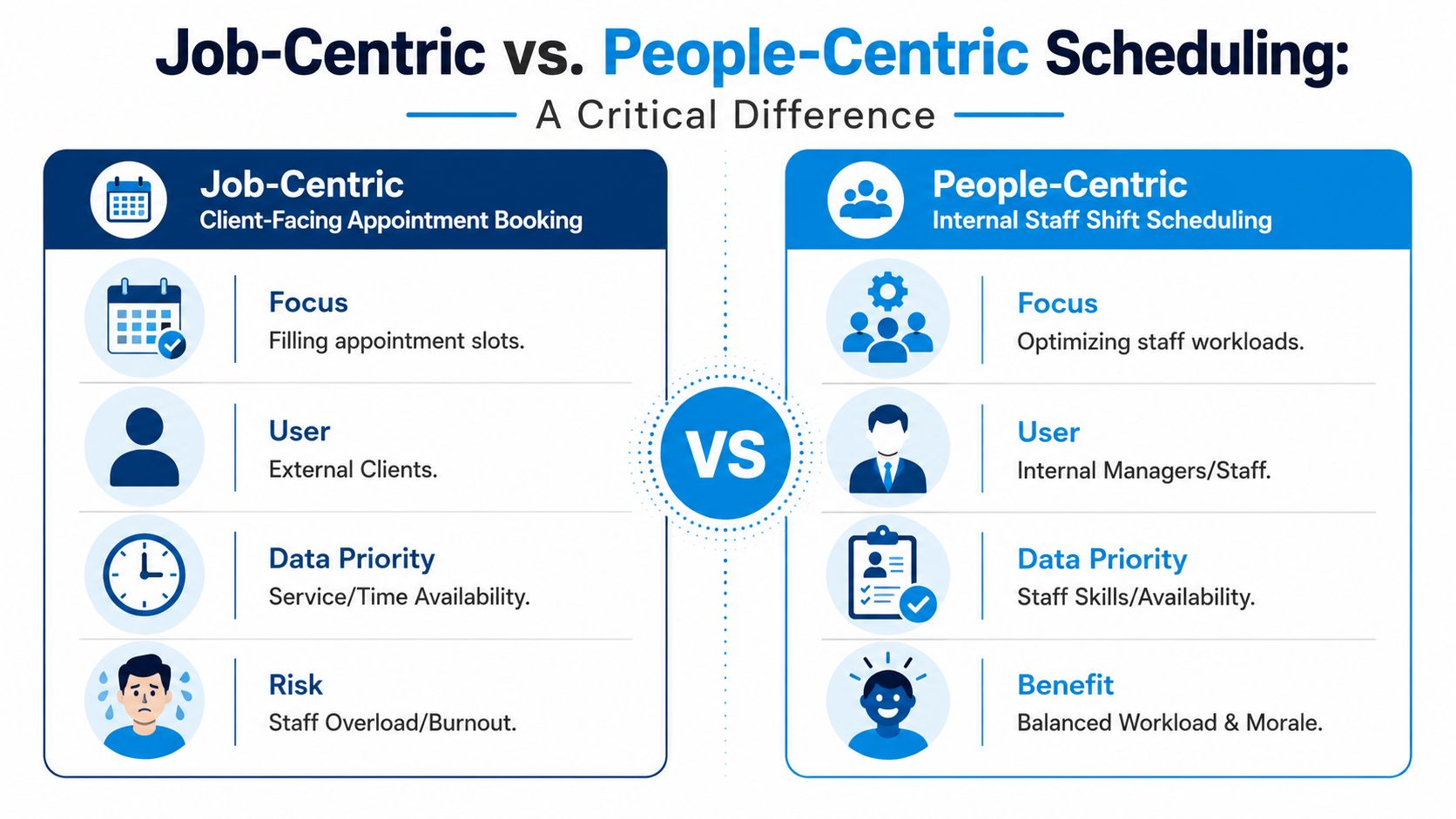
What job scheduling solves
Job-centric scheduling is built around the customer-facing side of the business. It helps you:
- fill appointment slots
- let clients self-book
- manage recurring services
- send reminders and confirmations
- organize service categories and durations
If you're a solo cleaner or a very small team, that may be exactly what you need. Your biggest pain point might be intake friction, not workforce control.
What people scheduling solves
People-centric scheduling is built around your staff. It focuses on:
- shift assignment
- attendance visibility
- shift swaps and availability
- clock-in and clock-out
- payroll accuracy
- workload balancing across the crew
That becomes much more important once you're managing hourly cleaners at scale.
The adoption gap is not small. Data shows that 70% of scheduling tool failures in home services stem from poor adoption due to mismatched functionality. For cleaning businesses with 6+ hourly staff, the primary pain point is shift and payroll disputes, not client booking, according to Truein's analysis of scheduling software for cleaning businesses.
How to diagnose your real bottleneck
Ask yourself which problem creates more friction in a normal week.
| If this happens more often... | You likely need more of this |
|---|---|
| Clients can't book easily or after hours | Job scheduling and intake automation |
| Cleaners dispute hours, shifts, or assignments | People scheduling and time controls |
| Office staff manually reconcile attendance | Payroll-ready time tracking |
| Crews are booked without regard to skills or availability | Workforce scheduling logic |
A practical example: if your team has plenty of demand but your office keeps dealing with late arrivals, disputed hours, and unclear coverage, a slick booking portal won't solve the core issue. It may make things worse by feeding more jobs into a weak staffing process.
Most software disappointment starts with buying for the visible symptom instead of the actual operating constraint.
That is why this distinction matters so much for cleaning companies. The more hourly staff you manage, the more the schedule has to answer labor questions, not just appointment questions.
Your Implementation Plan and Final Checklist
Good software can still fail if the rollout is sloppy. The smoothest implementations are usually boring. The data is cleaned up first. The service types are standardized. The team gets trained on the few actions they need. Then the business rolls it out in a controlled way.
Roll out in four phases
Prepare your data
Export your client list, recurring jobs, addresses, service notes, and staff details. Clean up duplicates before import. If one client exists three times with slightly different spellings, fix that now.Configure the operational basics
Set up service types, durations, pricing logic, work zones, and staff permissions. Decide who can edit jobs, who can approve time, and who only needs mobile access.Train by role, not by feature list
Office staff need to know booking, rescheduling, dispatch, and exception handling. Cleaners need to know where to see jobs, how to clock in and out, and where to find property notes. Keep that training narrow and practical.Pilot before full launch
Run one crew, one territory, or one segment of recurring jobs through the new system first. Catch gaps there instead of discovering them across the entire company on payroll week.
The habits that make adoption stick
A rollout usually succeeds when the owner sets clear rules early.
- Use one system for live schedules: Don't let side texting become the official schedule again.
- Require clock-in discipline: If time tracking matters, everyone has to use the same method.
- Review exceptions weekly: Look at missed clock-ins, reassigned jobs, and disputed time every week for the first month.
- Listen to field feedback: Cleaners usually spot confusing job notes or broken handoffs faster than managers do.
Keep the first version simple. A team will adopt a useful system faster than a perfect one.
Final buyer's checklist
- Match the software to the real bottleneck: booking friction, dispatch complexity, or shift and payroll disputes
- Confirm core features first: recurring jobs, staff scheduling, reminders, client records, mobile access
- Check workforce controls: clock-in, clock-out, attendance visibility, payroll-ready time tracking
- Audit integrations before you buy: CRM, calendar, phone workflows, accounting, payments
- Test recurring job handling: that is where weak systems usually break
- Define who owns schedule changes: avoid side-channel updates through texts and calls
- Pilot with one slice of the business first: one team, one service line, or one territory
- Measure results in admin time, dispatch accuracy, and usable labor capacity: not just subscription cost
If you're evaluating ways to stop missed calls from turning into missed jobs, Recepta.ai is worth a look for cleaning businesses that want inbound inquiries answered, job details captured, and appointments routed into the calendar without relying on voicemail or manual follow-up.