Task Prioritization Guide for Small Business Teams in 2026
Monday morning at a small service business rarely starts with a plan. The phone lights up with voicemails, the inbox fills with callbacks that should've been returned Friday, a technician shows up at the wrong address, and somebody in the office is still trying to finish a report that got pushed three times last week. What looks like a people problem is usually a task prioritization problem, because the team is already drowning in unranked work before anyone gets a chance to think clearly.
That pressure is real across knowledge work, not just in one office or trade. A 2026 synthesis says the average knowledge worker juggles 63 tasks per week, completes only about 50% of them, and spends 58% of work time on “work about work” like coordination, status-chasing, and searching for information, while the same source reports a 28% on-time delivery improvement for organizations using structured task-management tools, which points to execution, not just tidiness, as the payoff of better prioritization (task-management statistics). Another 2026 report says 98.2% of people have trouble prioritizing tasks, which fits what most small teams already feel in their bones.
The fix isn't a better personal planner. It's a working system that decides what enters the queue, what gets ranked, what gets deferred, and what gets deleted.
Why Monday Mornings Break Small Service Teams
A four-truck HVAC company can look calm from the outside and still be one bad Monday away from chaos. The dispatcher is trying to return missed calls while a tech is waiting on a correct job address, the owner is asking why last week's customer follow-ups never got sent, and someone in the office is shuffling paperwork that should've been standardized months ago. In a two-lawyer practice, it's the same pattern, just with different nouns, missed callbacks, intake forms sitting untouched, and a partner asking why the status memo isn't done.
The failure isn't effort. It's load. A 2026 review says 91% of managers struggle to keep on top of their team's tasks and projects, and only 45% of organizations provide accredited project or task-management training (task-management review). That combination explains why teams keep working hard while still missing the things that matter. The work is there, but the method for deciding what matters is weak or inconsistent.
The real cost shows up in service work first
In service-heavy operations, bad prioritization doesn't stay abstract. It becomes a slow callback, a missed lead, a late arrival, or a follow-up that never gets sent at all. Those misses are easy to dismiss as isolated mistakes, but they usually come from the same root cause, too many tasks competing for attention and no single rule for deciding which one wins.
Practical rule: if the team keeps asking, “What should I do next?”, the queue is already broken.
That's why prioritization in a small business has to be treated like an operating system, not a personal habit. The rest of the article is built around that idea, because the moment you stop treating work as a pile of tasks and start treating it as a managed queue, the trade-offs get clearer, the bottlenecks get visible, and the calendar stops lying to you.
What Task Prioritization Means for a Business
A service team feels the problem fast. One person is waiting on a callback, another is fixing an intake form, and someone else is asking whether the proposal or the invoice comes first. The work is not the issue. The queue is.
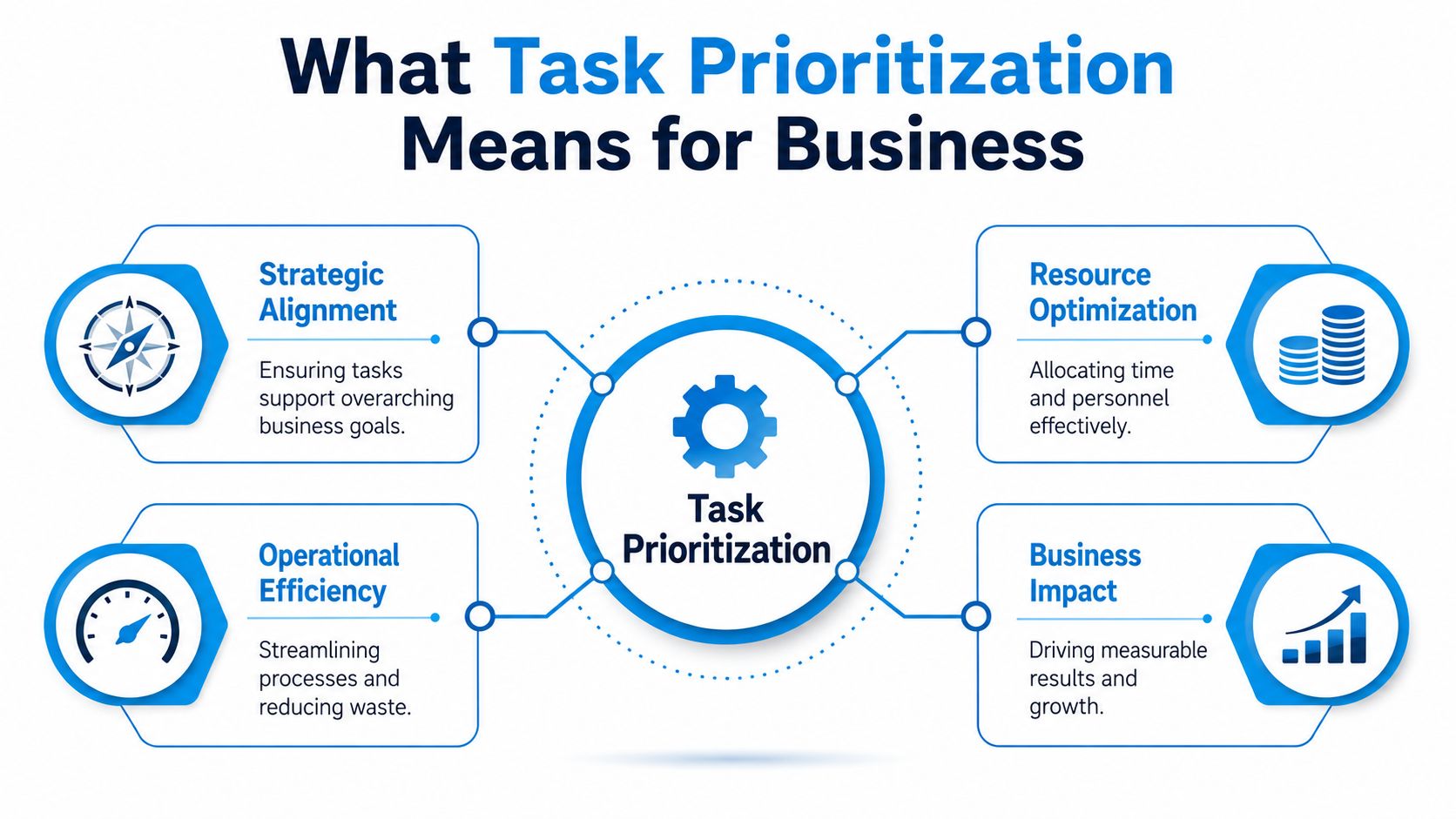
Task prioritization is the discipline of ranking incoming and existing work against shared criteria so the team puts limited capacity into the tasks that move the business. That definition matters because prioritization breaks down as soon as people are left to use different rules. If one person runs on gut feel, another on deadlines, and a third on whoever is loudest, execution becomes uneven even when the team is capable.
A useful shared language usually comes from four scoring inputs, urgency, importance, effort, and business impact. Urgency tells you what is time-sensitive. Importance tells you what supports the goal. Effort keeps the team honest about capacity. Business impact keeps the ranking tied to outcomes instead of noise.
A team definition beats a private to-do list
A private list helps one person stay focused. A team system has to handle something bigger, because shared work creates dependencies, handoffs, and wait states. If the service coordinator, estimator, and field lead all rank work differently, the business pays for that split in rework, delays, and missed timing.
A criteria-based ranking model solves part of the problem by forcing a clearer conversation. Instead of saying “this feels important,” the team has to say why a task should move up, whether it blocks follow-up, affects revenue, or carries a deadline consequence. That makes the meeting more useful and the dispatch process easier to run.
It also exposes trade-offs that a private list hides. A task can be urgent and still be the wrong thing to do first if it consumes the same people needed for a higher-value job. A small service business has to make that call every day, because capacity is limited and every misread item pushes something else back.
A simple operational example
A same-day customer complaint may look urgent, while a proposal draft looks less urgent. If the complaint affects a live account and the proposal only matters tomorrow, urgency wins. If the complaint is mostly cosmetic and the proposal has a high chance of closing business, business impact can outrank urgency. That is the point of having criteria in the first place, the decision becomes visible, explainable, and repeatable instead of improvised.
In a service business, that kind of clarity changes the way work moves. Standups stop turning into status noise, and the team can see what belongs at the front of the queue, what can wait, and what should be handed off. Prioritization starts behaving like an operational system with rules, bottlenecks, and feedback loops, not a personal productivity habit.
Comparing the Most Popular Prioritization Frameworks
The best framework depends on the shape of the work, not on what sounds smartest in a workshop. A small business that handles recurring service calls has different needs than a software team managing a backlog or a practice juggling deadline-driven documents. The same Monday morning can be sorted four different ways, and each method creates a different kind of discipline.
The frameworks solve different problems
The Eisenhower Matrix sorts work by urgency and importance. It helps when a team keeps confusing noise for priority. The ABCD method is stricter, with A tasks for work that must be done today, B tasks for important work that should be done soon, C tasks for nice-to-do items, and D tasks for items that should be delegated or deleted (ABCD and Eisenhower prioritization). For a service team, that makes it easier to separate a same-day regulatory filing from a routine cleanup task.
RICE is more useful when work needs a repeatable numeric score. It ranks items by Reach × Impact × Confidence ÷ Effort, which makes sense when the team has to compare ideas that are hard to judge by instinct alone (RICE prioritization). It works best when the backlog is large and the trade-offs need to be auditable.
The six-task daily reset is the simplest choice for teams that need daily focus. A service manager can list the six most important items, rank them, start with task one, and carry unfinished work forward the next day (daily reset method). That's not elegant, but it's practical when the day keeps getting interrupted.
| Prioritization frameworks at a glance | |||
|---|---|---|---|
| Framework | Core rule | Best for | Watch out for |
| Eisenhower Matrix | Sort by urgency and importance | Teams overloaded with reactive work | Easy to over-label everything as urgent |
| RICE | Score by reach, impact, confidence, and effort | Backlogs that need repeatable comparison | Can feel too formal for small daily decisions |
| ABCD method | Classify work from A to D | Service teams that need clear delegation rules | Can become a labeling exercise without follow-through |
| Six-task daily reset | Limit tomorrow's work to the top six | Busy teams that need a daily restart | Not enough if bottlenecks stay hidden |
Which one fits a small service business
If the work is mostly inbound and reactive, start with Eisenhower or ABCD. If the team is constantly choosing between projects, RICE gives you a fairer comparison. If the day is being destroyed by interruptions, the six-task reset can be the fastest way to create focus.
Bottom line: pick the framework that matches your workflow complexity, then keep it boring enough that people will actually use it.
That's the trade-off most guides skip. You don't need the “best” method. You need the one your team can apply consistently on a normal Tuesday without turning it into theater.
The Bottleneck View of Prioritization Most Guides Skip
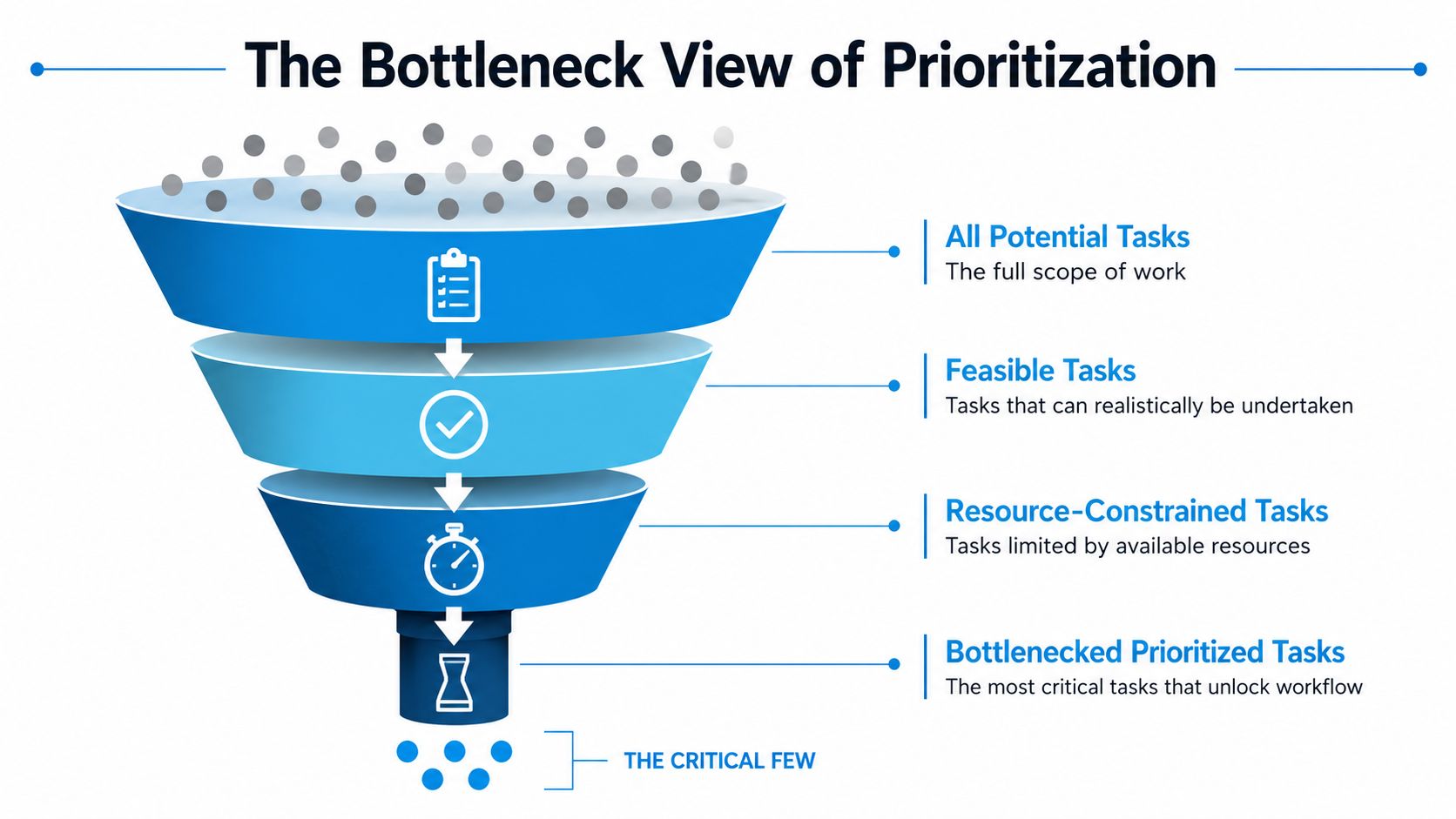
Most prioritization advice treats every task as if it deserves an independent ranking. That's a useful starting point, but it stops too early. In a small service business, the highest-value task is often the one that unblocks the most downstream work, not the one that looks most urgent to the person who asked for it first. When the same role keeps slowing everything else down, ranking harder won't fix the queue.
That's why the bottleneck view matters. Instead of asking only “What's most important?”, ask “What is holding the most other work hostage?” If one person, one inbox, or one approval step keeps delaying the whole team, the priority is to protect that constraint and give it a single, clear queue. One process guide makes this point directly and recommends identifying the role that delays the most tasks, then prioritizing by business impact and cost of delay. workflow optimization is the right lens here, because the workflow itself is often the problem.
False urgency is why busy work keeps winning
A lot of teams don't lose to genuine emergencies. They lose to tasks that feel urgent because they're visible, small, or easy to start. Research on task management describes the smaller tasks trap, where small items crowd out larger priorities, and NIH-backed work on the illusion of urgency supports the idea that urgency is often perceived rather than objective (smaller tasks trap and illusion of urgency). That's exactly why a team can spend the day “being productive” and still fail to move the business.
Small tasks are seductive because they finish quickly. They create the feeling of progress without necessarily relieving the constraint. A locked-in approval, a missed callback queue, or a delayed estimate will still sit there after the easy stuff is gone.
When to stop scoring and redesign the queue
If every day still feels urgent after the list is ranked, the answer isn't more detailed scoring. It's workflow redesign. That may mean one owner for inbound intake, one queue for approvals, or one person responsible for triage. It may also mean software handles the first layer of sorting so humans only see what needs judgment.
The bottleneck view turns prioritization from a personal decision into a queue design problem. That's a much better fit for small service businesses, because the cost usually comes from unmanaged handoffs, not from lack of effort.
Implementing Prioritization in Your Team Step by Step
A small service team usually feels the breakdown on Monday morning. New callbacks pile up, estimates wait for replies, internal admin is still open, and approvals sit in someone's inbox. Pull every open item into one master task list before anything gets worked. If work stays hidden in different heads and chat threads, it cannot be ranked fairly, and it will keep resurfacing as interruption.
Score each item with the framework the team has chosen, then lock the top six for the day. Start with task one, not task three, and carry unfinished work forward instead of pretending the list resets itself. The point is to create a daily gate for the queue, not a motivational exercise.
Build in two guardrails before the week starts
Use a planning rule that estimates each task's duration and adds a 30% buffer to account for the planning fallacy. Leave 20%–30% of the calendar unscheduled for emergencies (planning buffer and unscheduled calendar rule). If a task is expected to take 2 hours, planning it as roughly 2 hours and 36 minutes makes the calendar less fragile. Keeping part of the day open gives urgent inbound work somewhere to go without blowing up the rest of the queue.
That is not idle padding. It is a practical safeguard against overbooking, which is one of the fastest ways a small team turns a workable plan into a mess.
Track what actually happened, then adjust
The last step is the one teams often skip during the first month of rollout. Compare planned rank to actual time spent, and review whether lower-ranked work keeps consuming more hours than expected. If it does, the scoring model needs calibration based on measured effort and delivery, not intuition alone. A weekly review is enough to start, as long as the team looks at the mismatch and changes the queue rules when the pattern keeps showing up.
If you need a practical way to overcome overwhelm in business, the same pattern applies, reduce noise, make the queue visible, and keep the plan small enough that people can finish it. process standardization matters because the team cannot prioritize consistently if every intake and handoff works differently.
Operational rule: if the plan and the day keep diverging, do not blame the people first. Check the ranking model, the intake process, and the queue itself.
Prioritization only works when ranking and execution stay connected. A list that never gets reviewed is just paperwork with better branding.
KPIs That Prove Your Prioritization System Is Working
A prioritization system only matters if it changes what the team finishes, how work moves through the queue, and how often the bottleneck gets flooded. If those patterns stay the same, the framework may look organized on paper, but it is not helping the business run better. Measurement keeps the conversation grounded in actual delivery.
| Prioritization KPI | What it measures | Healthy signal | Warning sign |
|---|---|---|---|
| On-time task completion rate | Whether ranked work is being delivered as planned | More ranked work is finished by its target time | Important tasks keep slipping even after they're marked high priority |
| Planned vs actual time per ranked task | How well the team estimates effort | Estimates get closer to reality over time | The same task type keeps taking far longer than planned |
| Queue age for the bottleneck role | How long work sits before the constraint is cleared | The bottleneck queue stays short and predictable | The same role keeps accumulating old items |
| Rework or escalation rate | How often work has to be redone or kicked upward | Fewer handoff errors and fewer emergency fixes | The team spends too much time cleaning up avoidable mistakes |
Use the numbers to diagnose the system, not the people
The clearest signal from the research brief is the improvement in on-time delivery reported for organizations using structured task-management tools, as summarized in task-management statistics. The exact result will vary by team, but the point holds. Structured prioritization can improve execution, not just make people feel more organized.
The risk is turning KPIs into a scoreboard that gets gamed. If the team starts rushing low-value work just to make the on-time number look better, the metric is no longer telling the truth. If estimates start getting padded to avoid misses, planned versus actual time stops helping with planning. The numbers should show where the queue is breaking down, not reward cosmetic compliance.
Read the bottleneck metrics together
Queue age matters most when it is tied to the role that slows everything else down. Rework rate matters when handoffs are messy. Planned vs actual time matters when the team keeps underestimating the same kind of work. Read together, these indicators show whether prioritization is improving flow or just making the list look tidy. A performance dashboard helps keep that view tied to live work instead of scattered notes.
If the numbers do not move over a quarter, the issue is usually the ranking model or the workflow around it, not the people doing the work.
How Operational Tools Reduce Friction and Improve Prioritization
On a normal day in a service business, inbound calls are the first bottleneck. Someone answers, someone else logs the details, someone else checks availability, and then the lead or appointment gets handed off manually. That handoff is where prioritization gets messy, because the team is sorting urgency after the fact instead of at the point of entry.
With a tool like Recepta.ai in the intake layer, the day starts differently. Calls, appointment requests, and lead capture can be handled and logged automatically, then routed with the right context so the office doesn't begin with a voicemail pile. The win isn't that software “does everything”, it's that the first triage step stops consuming human attention.
Here's how that looks in practice. Before automation, the office opens the day by listening, transcribing, and deciding which caller matters most. After automation, the queue is already cleaner, records are synced, and the team can work from ranked items instead of reconstruction. Recepta.ai also integrates with calendars, CRMs, and other systems, which means the ranking work can happen inside the workflow instead of around it.
The right tool supports the queue, it doesn't replace judgment
The bottleneck view from earlier becomes practical here. The inbound channel is often the highest-friction queue in a small service business, and software can absorb a large part of that load. Inbound work that still needs empathy or judgment can be escalated to humans, while routine scheduling and logging stay automated.
If you want a broader lens on the business case, SME automation ROI is worth reading alongside any operational rollout because automation only matters when it reduces real friction and makes the queue easier to manage. what is business process automation is the right internal reference if the team needs a plain-language explanation of where automation fits in the workflow.
The point isn't to automate for its own sake. It's to remove the first layer of triage so human effort goes where it's needed.
A better day starts before the first interruption
If the team no longer has to sort every inbound task manually, the morning meeting gets shorter and the priority list gets cleaner. The office doesn't spend the first hour recovering from voicemail. The technician doesn't wait for a callback that should've been routed automatically. That's what operational prioritization looks like when the system supports the work instead of fighting it.
Practical rule: automate the intake layer first, then ask humans to rank only the work that actually needs human judgment.
A 30-Day Prioritization Plan for Busy Teams
Week one is for choosing the framework, building the master task list, and deciding which queue carries the most risk if it slips. In a small service business, that usually means naming the bottleneck role first, then sorting work around it instead of around whoever shouts loudest. Week two is for locking the daily top-six ritual so the team stops pretending everything can move at once. That daily list should force trade-offs, because a queue that contains twenty “priority” items is just noise.
Week three is for adding the KPIs, especially planned versus actual time and queue age for the bottleneck role. Those two measures show whether the team is clearing work in the order it said it would, or whether urgent requests keep breaking the line. Week four is for recalibrating the scoring model based on what the team finished, not what it hoped to finish. If certain task types keep getting delayed, the scorecard should reflect that pressure instead of pretending every request carries the same cost.
That is enough time to see whether the system is becoming a habit or collapsing into another abandoned checklist. If D tasks keep piling up without being deleted, if the same bottleneck role is still overloaded every week, or if the team starts skipping the scoring step because it feels slow, the system is drifting. The fix is usually to simplify the queue, not to add more meetings. In practice, that means removing low-value categories, tightening intake rules, or narrowing the number of items that qualify for review.
Prioritization fails when it is treated like a workshop deliverable. It works when it becomes a daily operating routine that survives real interruptions, real customers, and real deadlines. The test is simple. Can the team make the next decision quickly, keep the queue visible, and move work without re-litigating the whole list every morning?
If your team is stuck in voicemails, missed callbacks, and end-of-day scramble, Recepta.ai can help reduce the intake friction that makes prioritization collapse in the first place. It handles inbound work, scheduling, and follow-up so your team can start from a cleaner queue and spend time on the tasks that move the business. Visit Recepta.ai to see how that fits into a more controlled workflow.