Data Entry Automation: A Practical Guide for 2026
Manual data entry errors don't become expensive because someone mistypes a field. They become expensive because the mistake travels. One source estimates that correcting an error immediately can cost $1 to $5, while fixing it during reconciliation can cost $10 to $25, and repairing it after it reaches a customer, vendor, or regulatory filing can cost $50 to $500 or more (Lido's analysis of data entry error costs). Data entry automation matters because it catches information closer to the point where it enters the business, before one bad address, invoice total, or patient identifier spreads across connected systems.
What Data Entry Automation Really Means in 2026
Data entry automation is software that captures information, checks it against rules, and sends it into the systems your team already uses, without asking someone to retype every value. The input might be a PDF, web form, email, call transcript, scanned document, or handwritten form. The output is a structured record in a CRM, EHR, ERP, calendar, ticketing platform, or database.
Take a home services dispatcher handling a new plumbing request. A customer leaves a voicemail with a name, address, preferred appointment time, and description of the leak. An automated workflow can transcribe the call, identify the customer details, check whether required fields are present, create or update the CRM contact, propose a calendar slot, and send the request to a human when the address or job type is unclear.
That workflow is broader than replacing typing. It combines capture, interpretation, validation, routing, and action. A practical overview of the wider operating model appears in this explanation of business process automation and its role in connected workflows.
The operator's view
A reliable system answers four questions for every record:
- Where did the information come from?
- What does each field mean?
- Can the values pass the business rules?
- What should happen next?
If the system can answer all four, automation reduces administrative work without hiding uncertainty. If it can only extract text, it may just move errors faster.
This is why 2026 workflows are best understood as layered operations. OCR reads characters, document intelligence interprets layouts, workflow tools move records, and AI handles language or variable formats. Human reviewers remain part of the process for low-confidence cases, missing information, and decisions that carry financial, legal, or clinical consequences.
The right question isn't whether automation replaces manual entry. Ask whether it can handle routine records consistently, expose exceptions clearly, and give your team enough context to make the final decision.
The Core Technologies Behind the Workflow
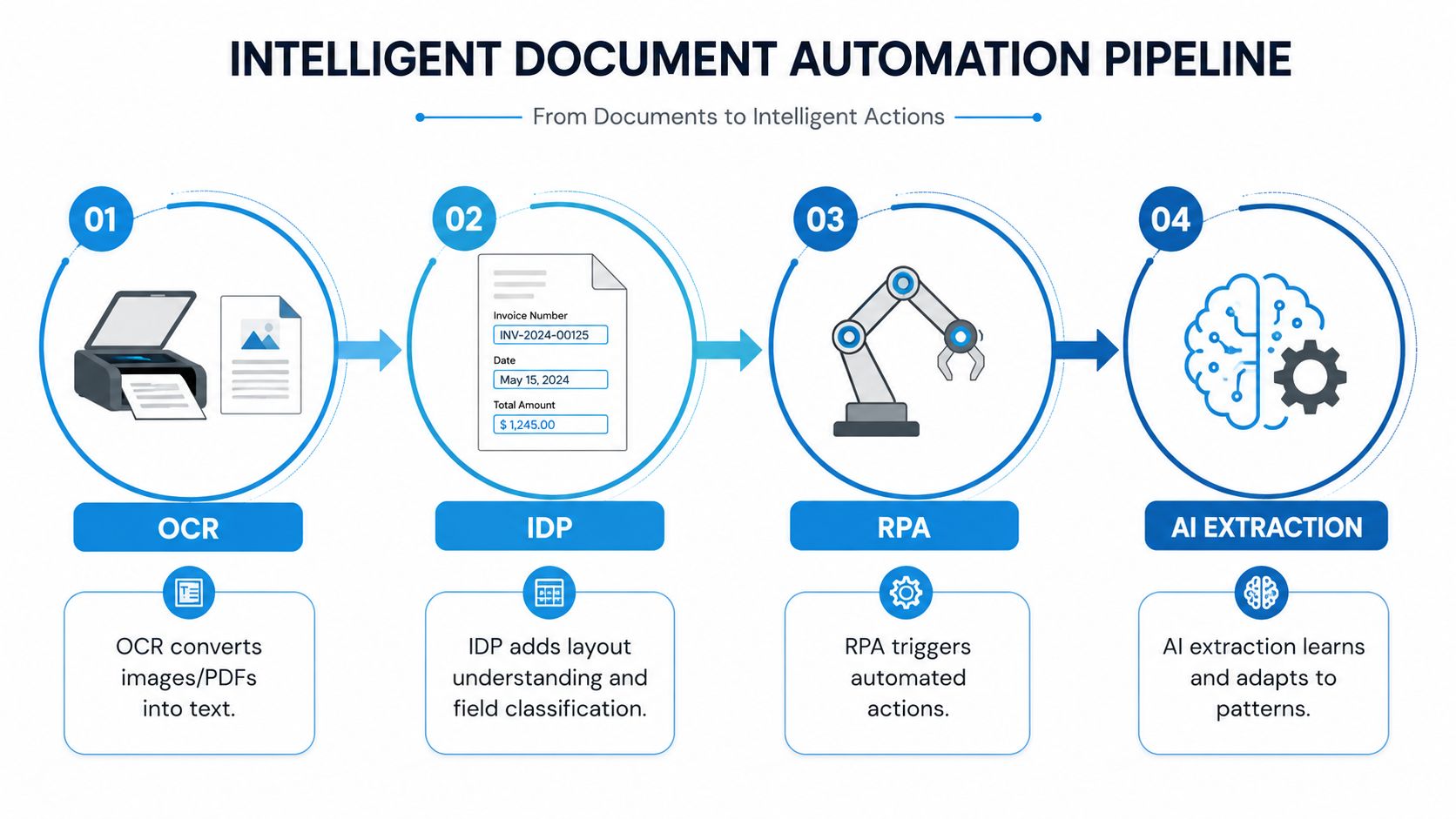
A dependable system doesn't treat OCR, intelligent document processing, RPA, and AI extraction as competing choices. Each technology handles a different part of the path from raw input to usable record.
Start with recognition
Optical character recognition, or OCR, converts pixels in a scan or image-based PDF into machine-readable text. It works well when the source is clean and the typeface is clear. It struggles when a page is skewed, blurry, handwritten, or arranged in an unfamiliar layout.
OCR alone doesn't know whether a number is an invoice total, a purchase order reference, or a phone number. It produces text, not business meaning. That distinction explains why OCR-only tools can struggle with real-world documents. In a GigaOm benchmark, OCR-only tools often couldn't exceed 60% extraction accuracy and could fall below 50% on real-world scans (GigaOm's intelligent document processing benchmark).
Intelligent document processing, or IDP, adds classification and context. It can recognize that a file is an invoice, locate the supplier and total, validate the values against business rules, and route uncertain fields for review. Reported extraction accuracy is typically 95% to 99% for well-structured documents with clean digital inputs, 88% to 96% for scanned or handwritten inputs, and 80% to 95% for variable-layout or mixed-format documents (document AI accuracy and workflow guidance).
Add movement and interpretation
Robotic process automation, or RPA, performs repetitive actions inside systems that may lack modern APIs. For example, an RPA bot can open a legacy scheduling application, select a customer record, and enter approved fields. It's useful when the destination system has no clean integration, but interface changes can break the bot.
AI extraction handles inputs that don't follow a fixed template. An email might say, “We need someone Thursday morning at the property on Oak Street,” while a voicemail transcript contains incomplete or conversational information. AI can identify likely fields and relationships, but it still needs validation and escalation rules.
A job intake form illustrates the full pipeline:
- Capture: Receive a PDF, email attachment, web form, or voicemail transcript.
- Recognition: Use OCR or transcription to convert the source into text.
- Interpretation: Classify the request and extract customer, job, timing, and location fields.
- Validation: Check required fields, duplicate contacts, service areas, and appointment constraints.
- Action: Write the approved record to the CRM, calendar, ticketing system, or business database.
The pipeline delivers the result. No individual component creates reliability on its own.
The Real Numbers Behind Time, Cost, Accuracy, and ROI
The business case should start with your own workflow, not a vendor promise. Count how many records your team processes, how long each record takes, how often staff rework entries, and where errors are discovered.
OCR has already become mainstream infrastructure in large enterprise document workflows. The global OCR market was valued at USD 15.8 billion in 2024 and is projected to reach USD 48.1 billion by 2034, representing a projected 12.8% CAGR. The same coverage reports that 89% of large enterprises deployed OCR for document automation in 2024, while organizations using OCR reported an 85% reduction in data entry time and 60% to 75% lower document-processing costs (OCR market and data entry statistics).
Those figures don't guarantee the same outcome for a small business. They do show why owners should measure the opportunity before deciding that automation is too complex.
Translate the opportunity into operating terms
McKinsey Global Institute research, summarized in industry coverage, estimates that 64% of data-collection activities and 69% of data-processing activities can be automated with technologies already demonstrated today. Automated systems can reach 99.959% to 99.99% accuracy, compared with roughly 96% to 99% for human data entry (data entry automation capabilities and accuracy).
Use a simple estimate:
Annual opportunity = record volume × time saved per record × loaded labor cost per hour, plus avoided rework and error costs.
Then subtract software, implementation, monitoring, and review costs. Accuracy belongs in the same calculation because a fast workflow that creates bad records can increase total operating expense. Teams can also use guidance on calculating operating expenses to place automation costs in the right budget category.
| Metric | Manual Entry | Automated Entry |
|---|---|---|
| Capture method | Retyping from documents, calls, or emails | Extraction from the original source |
| Error exposure | Typos, omissions, duplicate entry, and transcription mistakes | Validation rules plus human review for exceptions |
| Processing cost | Labor and downstream correction | Software, integration, monitoring, and review |
| Best fit | Rare, highly judgment-heavy records | Repetitive, high-volume, rule-based work |
| Measurement focus | Time per record and rework | Straight-through processing, review rate, and error escape rate |
For context, the classic data-quality model estimates $1 to verify data at entry, $10 to correct it later in processing, and $100 when it reaches customers or compliance systems (the 1-10-100 data quality rule). That makes early validation a financial control, not just a convenience.
Industry Use Cases for Home Services, Healthcare, Legal, and Finance
The same automation pattern behaves differently in each industry because the source documents, destination systems, and consequences of an error vary. A dispatcher needs speed and complete job details. A healthcare practice needs correct patient matching. A law firm needs traceable document indexing. A finance team needs controlled reconciliation.
| Industry | Source Documents | Destination System | Primary Outcome |
|---|---|---|---|
| Home services | Voicemail transcripts, emails, web forms, job requests | CRM, dispatch platform, calendar | Faster booking and fewer missed handoffs |
| Healthcare | Patient intake forms, insurance cards, lab results | EHR, practice management system | More consistent registration and structured records |
| Legal | Engagement letters, court filings, discovery documents | Matter management and document systems | Faster indexing and less repetitive paralegal work |
| Insurance | Claim forms, policy documents, estimates, supporting records | Claims platform and policy system | Quicker triage with exceptions routed for review |
| Finance | Loan packets, KYC documents, bank statements | Core banking, underwriting, or ERP system | Faster document preparation and reconciliation |
Match the workflow to the risk
A home services company might extract a caller's name, address, appliance type, and preferred time from a voicemail. The system can create a lead and place a tentative appointment on the calendar, but an unclear address should go to a dispatcher before a technician is assigned.
A healthcare workflow can capture fields from an intake form and insurance card, then route them to the EHR. It should still require safeguards around patient identity, missing fields, and sensitive information. Automation reduces retyping, but it doesn't remove the need for controlled access or verification.
Legal teams can extract matter names, dates, parties, and filing types from engagement letters and court documents. Finance teams can capture borrower details, account information, and statement fields, then compare them with existing records. In both cases, the system should preserve the source document and the reviewer's decision.
The most suitable pilot usually has a high volume, repeatable input, clear destination, and visible bottleneck. Don't begin with the workflow where every record requires nuanced judgment. Start where the team spends time copying information between systems and can define what “complete” means.
Integration Patterns That Trigger Real-Time Outcomes
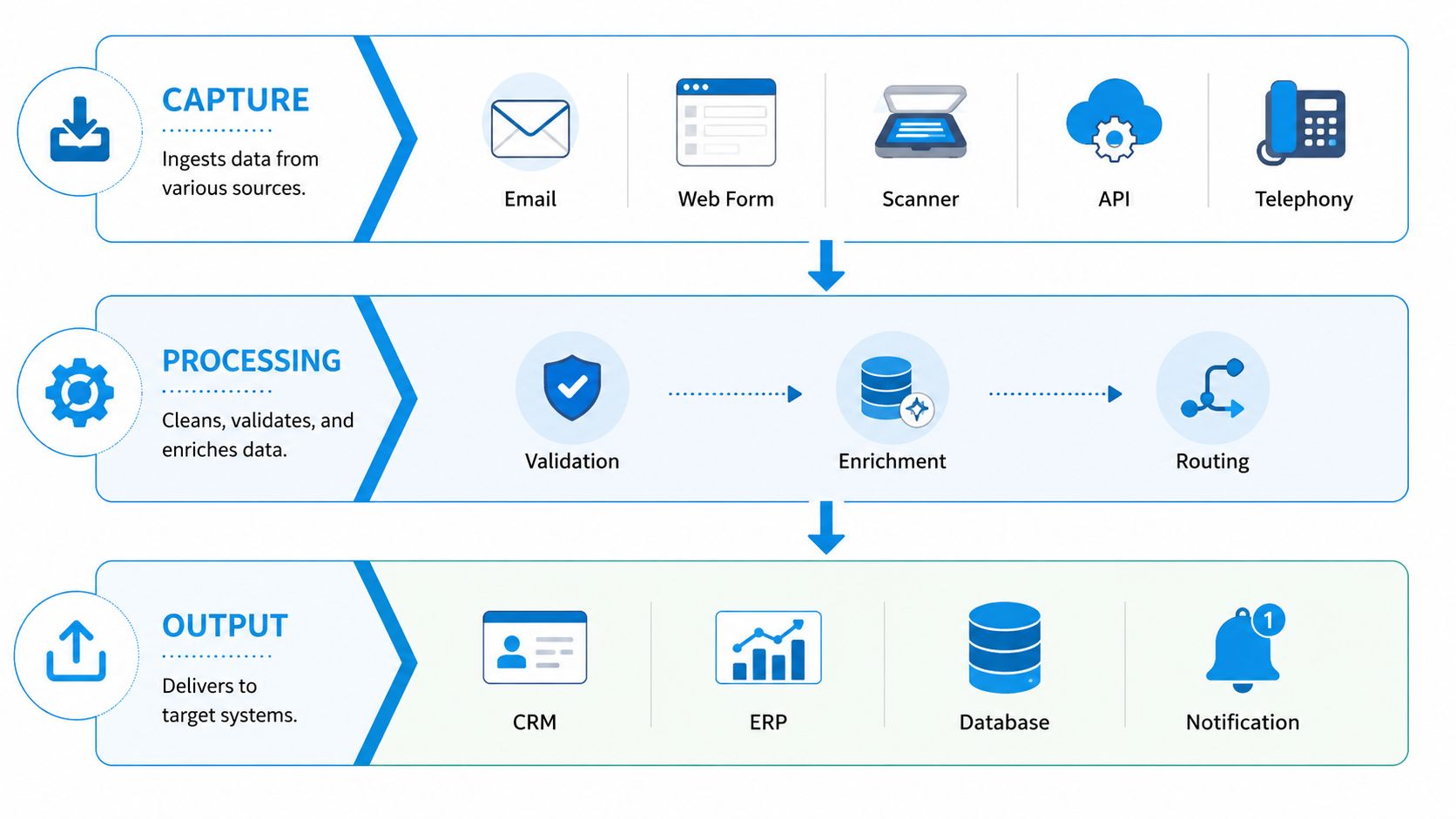
Integrations work best as a sequence of layers, not as a shopping list of applications. The capture layer receives information. The processing layer cleans and checks it. The action layer updates operational systems and starts the next task.
Build the capture layer
Capture can begin with:
- Email: Watch a monitored inbox for invoices, forms, or customer requests.
- Web forms: Collect structured details before the record enters the workflow.
- Scanners: Convert paper records into processable images.
- APIs: Receive data directly from another application.
- Telephony: Turn calls or voicemails into transcripts and structured requests.
The goal is to accept information where people already provide it. Forcing staff to move every input into a separate upload portal often creates a new manual step.
Process before you write
The processing layer classifies the input, extracts fields, checks formatting, detects missing information, and applies business rules. It can also enrich a record with existing customer data, but enrichment should never automatically overwrite a source value. Store the original input, extracted result, validation status, and any human correction.
The action layer then produces an operational outcome. A service call can become a CRM contact, a calendar booking, and a confirmation SMS. An invoice can become an approval task. A patient form can become a registration record awaiting staff verification.
Practical rule: Write to the destination system only after required fields and validation rules pass.
Event-driven triggers usually outperform waiting for a batch upload when response time matters. A webhook can notify middleware when a new call, form, or document arrives. An iPaaS tool can translate fields between systems, while RPA can handle a legacy interface. These connectors are useful, but they aren't the value by themselves. The value comes from a clean record that triggers the correct next step.
For a broader perspective on why automation wins bigger cases, look at workflows where one captured event can activate several downstream actions. Teams designing these handoffs should also understand real-time data synchronization between business systems, especially when calendars, CRMs, and operational platforms must stay aligned.
Designing Human-in-the-Loop Escalation and Governance
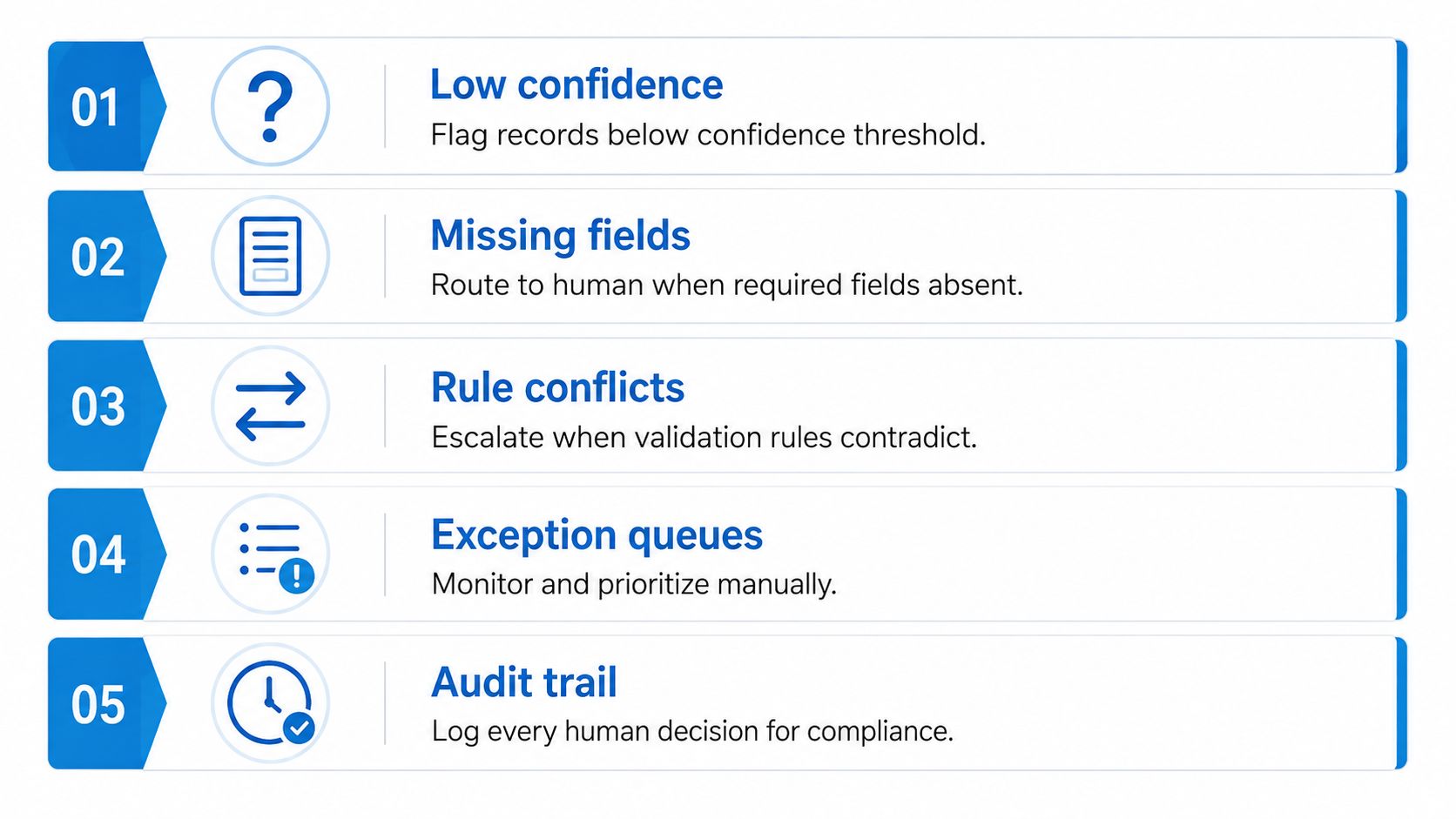
A system can extract routine fields accurately and still fail operationally. The failure usually appears in the exception path: a required field is absent, two rules disagree, or the source is too poor to interpret confidently.
Modern IDP systems are designed to send low-confidence records to human review rather than pass uncertain data downstream. That human-in-the-loop model matters most in healthcare, legal, insurance, and finance, where one incorrect record can create consequences beyond rework (human review and AI data entry analysis).
Define the escalation path
Set a confidence threshold for each important field, not just for the entire document. Route a record to the right reviewer when:
- Confidence is low: The system can't reliably read a value.
- A required field is missing: The record lacks an address, policy number, patient identifier, or other necessary input.
- Rules conflict: The extracted value doesn't agree with a contract, purchase order, or existing account.
- The record is unusual: The document type or request falls outside the workflow's approved scope.
A practical invoice rule might state: if the invoice total deviates by more than 10% from the contract, send it to a senior approver before writing it to the ERP. The rule is useful because it defines both the trigger and the owner.
Make review measurable
Track which fields reviewers correct, how often records enter the queue, how long they wait, and whether the same exception repeats. Feed confirmed corrections back into model configuration or template rules. A review queue without ownership becomes a hidden backlog, not quality control.
Governance should include role-based access, audit trails, PII handling, and retention policies. Keep a record of the source, extracted values, rule results, reviewer identity, decision, and timestamp. Add the following video as a practical visual reference for managing automation exceptions:
A dependable system doesn't aim for blind straight-through processing. It makes routine work automatic and uncertain work visible.
A Mini Case Study Before and After Automation
Consider a regional HVAC services firm with twelve technicians handling roughly 800 service tickets per month. Before automation, dispatchers transcribed phone calls, typed work orders, and entered the same details again into the CRM and calendar.
The firm deployed an OCR and IDP pipeline for document-based requests, with human review for low-confidence fields. Ticket entry fell from an average of 6 minutes to 75 seconds, double entry disappeared, and same-day closeout rates rose from 58% to 91%.
| Metric | Before Automation | After Automation |
|---|---|---|
| Ticket entry time | 6 minutes on average | 75 seconds on average |
| CRM and calendar updates | Re-entered manually | Passed through the workflow |
| Low-confidence information | Found during normal dispatch work | Sent to human review |
| Double entry | Common | Removed from the defined workflow |
| Same-day closeout rate | 58% | 91% |
These results are illustrative, not a promise for every HVAC business. Document quality, call clarity, field design, integration depth, and reviewer availability all affect performance.
The operational lesson is more important than the headline improvement. The firm didn't ask AI to make every decision. It automated the predictable parts, preserved a human checkpoint for uncertain values, and connected the approved record to the systems dispatchers already relied on.
To evaluate a similar opportunity, measure the current time from request arrival to CRM entry, the number of fields typed more than once, the frequency of missing details, and the time required to close a ticket. Those measures reveal whether the bottleneck is capture, review, scheduling, or downstream reconciliation.
Common Pitfalls and Best Practices Before You Scale
Automation magnifies the process it receives. If the intake form is confusing, the data is inconsistent, or ownership is unclear, software will process the confusion faster.
Five failure patterns
- Broken upstream process: Map the current workflow and name the process owner before building anything. Automating a flawed intake path multiplies errors.
- Ignored exception queues: Assign a reviewer, response expectation, and escalation path. Unhandled exceptions become backlogs.
- Missing audit trails: Log source documents, extracted fields, rule results, and human decisions so staff can investigate disputed records.
- Black-box dependence: Require field-level confidence, source references, and test documents that resemble production inputs.
- One-time implementation thinking: Review error types, queue volume, and rule performance continuously. Document formats and business policies change.
Compliance checks belong in the design, not in the final procurement stage. Healthcare teams should assess HIPAA requirements. Payment workflows may involve PCI obligations. Legal and regulated businesses should verify state record retention rules, access controls, and deletion processes before sending sensitive data across connected systems.
A useful launch sequence: stabilize the process, choose one measurable workflow, define exceptions, test with real inputs, then expand only after the queue and audit trail work.
Before moving from one workflow to many, confirm that the team can answer who reviews uncertain records, which system owns each field, how corrections are recorded, and what happens when an integration fails. Then compare labor saved with software, integration, review, and maintenance costs. That discipline keeps data entry automation from becoming another layer of hidden administrative work.
Recepta.ai can capture and transcribe business calls, create or update CRM records, schedule appointments, and send follow-ups while escalating conversations that need human judgment. Visit Recepta.ai to see how its connected call and workflow automation can reduce manual data entry across home services, healthcare, legal, finance, insurance, and other operations.