Mastering Data Retention Policies: Your 2026 Business Guide
You probably have customer data sitting in more places than you realize. Old emails in Microsoft 365. Call notes in your CRM. Appointment records in your scheduling tool. Chat transcripts, intake forms, invoices, spreadsheets, backups, and maybe a shared drive folder called “Archive” that nobody has opened in years.
That setup is common in small businesses. It also creates risk fast. If you keep everything forever, you increase what can be exposed in a breach. If you delete records too early, you can lose documents you're required to keep for legal, tax, healthcare, or audit reasons. A workable retention policy fixes both problems. It tells your business what to keep, where to keep it, who owns it, and when it must be deleted.
What Are Data Retention Policies and Why Do They Matter
A data retention policy is your business rulebook for information. It answers four basic questions: what data you collect, why you keep it, how long you keep it, and what happens when that time runs out.
For many owners, the default policy is no policy at all. A plumbing company saves every call recording “just in case.” A dental office keeps intake forms in email forever because deleting them feels risky. A franchise office leaves old lead lists in the CRM because nobody wants to sort out which records still matter.
That habit worked better when regulators were less specific. It doesn't work now. The California Privacy Rights Act requires firms to disclose exact retention durations and rationales for each data category at collection, and a 2025 analysis found that 78% of small businesses under CPRA are unsure how to define “reasonably necessary” retention periods, which leads to either over-retention or under-retention (CPRA retention analysis).
The two mistakes that create most problems
Small businesses usually make one of two errors:
- Keep everything forever: This feels safe, but it expands your breach surface and makes customer requests harder to manage.
- Delete too aggressively: This can break healthcare, financial, contract, or audit requirements.
- Use one blanket rule for all data: That sounds simple, but customer invoices, call logs, employee files, and marketing leads rarely belong on the same timeline.
Practical rule: If your retention policy fits on one line, it's probably too vague to protect you.
What this looks like in real life
Take a two-location HVAC business. It collects web form leads, dispatch call recordings, job photos, invoices, and warranty emails. Those records don't all serve the same purpose. A quote request that never turns into a customer should not live forever beside billing records tied to completed work.
The same problem shows up in healthcare and legal settings, only with higher sensitivity. A call summary for an appointment request might look routine. If that summary includes treatment details or legal matter details, it may belong in a stricter category.
A good retention policy doesn't need to sound like a law textbook. It needs to be usable. If your office manager can't look at a record and know whether it stays, moves to archive, or gets deleted, the policy won't hold up in practice.
Navigating the Legal Risks of Data Retention
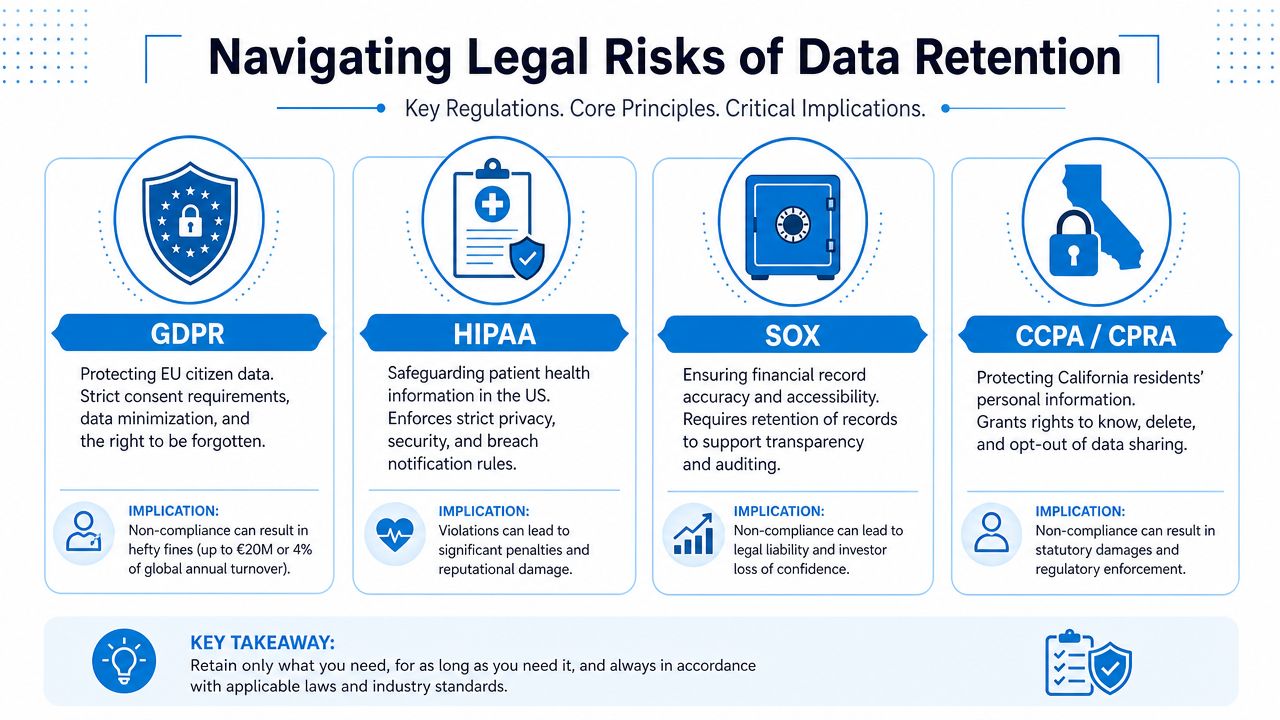
The legal side of data retention policies gets confusing because different rules apply to different kinds of data. The easiest way to handle that is to stop asking, “What's the rule?” and start asking, “What type of data is this, and which law touches it?”
GDPR and customer deletion requests
If you serve people in Europe, GDPR can affect even a small U.S. business. The practical issue most owners run into is erasure. If a customer asks you to delete personal data, you need to know where that data lives and whether any legal exception lets you keep part of it.
One retention framework worth studying is the requirement for classification-based schemas such as public, internal, confidential, and regulated, combined with automated deletion workflows. The same source also notes that GDPR's right-to-erasure mandate requires deleting PII within 30 days and logging proof for audit verification (BigID on data retention).
What it means for you: If you run a home service company and a former customer asks to be forgotten, “we'll check the CRM later” isn't a process. You need a record map. That includes your intake form tool, CRM, email platform, call logs, and any exported spreadsheets.
HIPAA and healthcare records
Healthcare practices don't get much room for improvisation. HIPAA requires covered entities to retain HIPAA-related documents for at least 6 years from creation or last policy effect, and violations can incur fines exceeding $50,000 per tier. The same retention standards resource states that ISO 27001 mandates retaining data logs for at least 3 years (Miami University retention standards).
What it means for you: If you run a dental clinic, patient-related policies, procedures, and related HIPAA documentation cannot be deleted just because your inbox is cluttered. Separately, if your systems generate security or access logs, those logs need their own retention timeline.
For call-heavy practices, recording rules and retention rules start to overlap. If your front desk records appointment calls or voicemail messages, your policy has to line up with your broader privacy controls. A practical primer on call recording compliance for businesses helps clarify where recording, notice, and storage decisions intersect.
CPRA and exact retention disclosures
CPRA changed the conversation for small businesses because it pushes you to define not just a minimum retention need, but a maximum period you can defend. That's a major shift for companies that have historically kept data indefinitely.
What it means for you: If you operate a franchise with several locations, it's not enough to say, “We keep customer data as long as needed for business purposes.” You need category-specific logic. Lead forms may justify one retention period. Closed customer invoices may justify another. Employee recruiting files may need a separate rule entirely.
Don't copy a giant enterprise policy
A large enterprise can assign this work to legal, IT, security, privacy, and records teams. A small business can't. That's why generic policy templates often fail. They list regulations but don't help you decide what to do on Monday morning.
A more grounded model is to start with records you already have, then work outward. For a simple records framework, Reworx Recycling's retention guide is useful because it treats retention as an operational discipline, not just a legal memo.
Keep data because you have a reason, not because deleting it feels uncomfortable.
Data Retention Schedules for Your Industry
A one-size-fits-all retention schedule is a myth. Your policy has to match the data you collect and the industry rules tied to it.
One practical benchmark is this: a compliant data retention policy should include specific schedules, such as financial records for exactly seven years and emails for exactly three years. The same guidance gives a healthcare example of retaining patient communication emails for 3 years and financial invoices for 7 years (FileCloud data retention best practices).
Industry-Specific Data Retention Schedules
| Industry | Data Type | Common Retention Period |
|---|---|---|
| Healthcare practice | Patient communication emails | 3 years |
| Healthcare practice | Financial invoices | 7 years |
| Legal services | Client matter emails | 3 years |
| Legal services | Financial records | 7 years |
| Home services | Customer invoices | 7 years |
| Home services | General business emails | 3 years |
| Finance or insurance | Financial records | 7 years |
| Multi-location business | Operational email records | 3 years |
The point of this table isn't that every business should copy it line for line. The point is that named categories need named timelines. “Business records” is too broad. “All emails” is usually too broad too.
How to use the table without overcomplicating it
Start with your highest-volume records first:
- Customer communications: Email, SMS, voicemail, web chat, and form submissions
- Financial records: Invoices, receipts, billing support, and accounting exports
- Operational records: Call logs, service notes, dispatch records, and CRM entries
- Sensitive records: Health details, legal intake notes, identity documents, and anything regulated
For a small dental clinic, that might mean preserving patient communication emails under a healthcare rule while keeping billing records on a separate financial timeline. For an HVAC company, invoices may stay longer than estimate requests that never become jobs.
What works better than a giant spreadsheet
A short retention matrix usually beats a complex policy binder. Create a table with five columns: data category, system, owner, retention period, and deletion method. Put Google Drive, Microsoft 365, your CRM, QuickBooks, scheduling software, and phone system on that list.
If you handle protected health information, a HIPAA-compliant answering service guide can also help you think through how communication records fit into your broader retention and privacy setup.
Working rule: Build schedules by data type first, then by tool. Most businesses try the reverse, and that's how records fall through the cracks.
How to Implement Your Data Retention Policy
Most retention failures happen because the business never turned a rule into a workflow. A policy sitting in a PDF won't delete old records, pause deletion during a dispute, or tell your office manager which inbox folders matter.
Classify your data
Why it matters: Different records carry different risk. A marketing flyer and a patient intake note should never share the same rule.
How to do it: Use simple categories your team can understand. A practical model is public, internal, confidential, and regulated. Put every major record type into one of those buckets. Public might include website content. Internal could include SOPs and staff schedules. Confidential might include contracts and customer pricing. Regulated would include health information, legal matter details, or identity records. Assign one person to own each category.
For example, an insurance agency might classify policy applications as confidential or regulated, while general marketing leads stay internal unless they contain sensitive details.
Set retention periods by purpose
Why it matters: Retention periods should match a business purpose, legal requirement, or contract duty. “Because we might need it” is not a defensible standard.
How to do it: For each category, write one sentence that explains why the business keeps it. Then assign a retention period. Your list should include where the data is stored and when the clock starts. For example, “Customer invoice, kept for accounting and audit support, retained for seven years from payment date.” Keep the wording plain. If your staff can't apply it consistently, shorten it.
Draft a short policy your team can actually use
Why it matters: Long policies get ignored. Short policies get followed.
How to do it: Your document should include:
- Scope: Which teams, tools, and records the policy covers
- Categories: Your data classes and examples of each
- Schedules: Specific retention periods for each record type
- Deletion rules: What gets deleted, archived, or anonymized
- Legal hold process: Who can stop deletion during a dispute or investigation
- Review cadence: Who updates the policy when systems or laws change
A law firm, for instance, may allow only one person, such as the managing partner or operations lead, to issue a legal hold so client matter records aren't deleted mid-dispute.
Short, specific policies outperform long, impressive ones.
This walkthrough is worth watching if you want a visual explanation of how retention workflows fit together:
Automate deletion and archiving
Why it matters: Manual cleanup fails because people are busy, inconsistent, or unsure what they're allowed to delete.
How to do it: Configure retention labels, lifecycle rules, or archive settings in the systems you already use. The goal is straightforward: the right records move or delete automatically once they hit the approved date. The compliance guidance cited earlier also ties this to automated deletion workflows per NIST 800-88 and to logging proof when personal data is deleted under erasure rules. In practice, that means your CRM, email platform, file storage, and call system should all support an auditable trail of what was removed and when.
If your business uses Google Workspace, Microsoft 365, or a CRM with record lifecycle controls, start there before buying new software.
Make deletion secure
Why it matters: Pressing delete doesn't necessarily mean the record is gone in a defensible way.
How to do it: Define disposal by system. For cloud email, that may mean deleting from active mailboxes and retention folders after the period ends. For shared drives, it may mean removing the file and any duplicate folder copies. For exported reports, it may mean deleting local copies from laptops and shared desktops. Write down the exact method for each system so your team doesn't improvise.
Build a legal hold process
Why it matters: Normal deletion must stop when litigation, an audit, or a formal complaint creates a duty to preserve records.
How to do it: Keep this process simple. Identify who can issue a hold, which systems are affected, and how staff are notified. A small construction company might never think about legal hold until a contract dispute lands. At that point, deleting old emails or job photos could create a second problem on top of the first one.
Review the policy at least once a year
Why it matters: Your tools change. Your services change. Your intake forms and call flows change. The policy has to keep up.
How to do it: Review one part of the schedule at a time instead of rewriting the whole thing. Check new software, new locations, and any new categories of personal data collected since the last review. Most small businesses can do this in a focused operations meeting if someone owns the inventory.
Automating Compliance with Recepta.ai
The hardest retention problem for many small businesses isn't the law itself. It's the messy handoff between systems. A customer calls. An AI system creates a summary. A human agent steps in. Notes move to a CRM. Somebody books an appointment. Later, nobody knows which record is the official one or how long each version should stay.
That's become a real compliance issue. A 2026 study found that 64% of healthcare and legal firms using hybrid AI receptionists cannot determine whether AI-generated summaries count as protected or confidential records, leading to inconsistent retention periods. The example given was a clinic that kept AI summaries for 30 days but human notes for 7 years. That mismatch creates a classification problem, not just a storage problem.

Why a unified record matters
If AI-generated summaries and human escalation notes live in separate silos, businesses tend to assign different retention rules to records that came from the same customer interaction. That's where policies break down.
A unified communications workflow makes retention easier because it gives you one lineage to govern. Instead of treating the AI summary as disposable and the human note as regulated, you can define the record based on the purpose of the interaction and the sensitivity of its contents.
Where automation helps most
For small teams, automation matters in three places:
- Capture: Calls, chats, appointment requests, and follow-ups are logged consistently.
- Classification: Records can be routed into the right category based on workflow and content.
- Sync: Connected tools reduce the risk of one system keeping data longer than another.
That integration layer is often the missing piece. If your communications platform doesn't sync cleanly with the rest of your stack, your retention policy becomes a wish list. A connected setup, including third-party integrations that keep records consistent across business systems, makes it easier to apply one rule across the full customer journey.
Your Data Retention Policy Checklist
Most owners don't need a perfect policy on day one. They need a policy they can use, enforce, and improve. This checklist is the quickest way to see whether your current setup is solid or still based on assumptions.
Ask these questions now
- Do we know every place customer and operational data lives? Include email, CRM, shared drives, phones, scheduling tools, accounting software, and exported spreadsheets.
- Have we grouped records by type and sensitivity? If everything is just “data,” your retention rules will stay vague.
- Does each category have a specific retention period? Not “as needed.” A real duration with a clear start date.
- Can we explain why we keep each category? Purpose matters, especially when privacy laws require justification.
- Do our systems archive or delete records automatically? If not, old records are probably piling up unnoticed.
- Is there a secure deletion method for each tool? Deleting from one screen doesn't always remove the record everywhere.
- Do we have a legal hold process? Someone should know how to stop routine deletion when a dispute or investigation starts.
- Are AI-generated summaries, call notes, and human escalation records governed together? If not, you may be applying conflicting rules to the same interaction.
- Have we reviewed the policy recently? New tools and new workflows often create hidden retention gaps.
What a good answer looks like
A good answer is concrete. “Yes, customer invoices live in QuickBooks, are owned by finance, retained for seven years, and deleted under a documented process.” A weak answer sounds like this: “I think accounting keeps those.”
The best retention policy is the one your staff can apply without calling outside counsel every week.
Data Retention Policy FAQs
Do data retention policies apply to employee data too
Yes. Employee records need retention rules just like customer records do. Payroll documents, performance files, recruiting materials, benefits information, and internal investigation notes shouldn't all sit under one blanket rule. Treat employee data as its own category set, with separate ownership and access controls.
For a small business, HR data often ends up spread across payroll software, email, and shared folders. That's exactly why it needs structure. If you don't map the systems first, you can't apply a consistent timeline.
What's the difference between archiving and backups
They solve different problems. Archiving is for records you still need to keep for business, legal, or audit reasons, but don't need in day-to-day workflows. Backups are for disaster recovery. They help restore systems after accidental deletion, outage, or ransomware.
Don't use backups as your retention policy. Backups usually preserve whatever was in the system at a point in time. They aren't designed to act as your official long-term record schedule, and they can complicate deletion requests if you rely on them carelessly.
How should a small business handle a deletion request
Start with a repeatable checklist. Confirm the requester's identity. Find every system where their personal data may exist. Check whether any legal, tax, healthcare, contract, or dispute-related reason requires you to keep part of the record. Delete what must be deleted, keep what must be preserved, and record what action you took.
The operational challenge isn't the request itself. It's knowing where the data sits. That's why even a basic data inventory is more valuable than a polished policy no one uses.
When should I talk to a lawyer
Talk to counsel when your retention decision depends on legal interpretation, not just process. Common triggers include healthcare data, legal matter files, multi-state privacy obligations, active litigation, government inquiries, or uncertain contract terms with customers or vendors.
You don't need a lawyer to label invoices, emails, and call logs in a sensible way. You do need legal advice when your business can't tell whether a record is regulated, privileged, or subject to a preservation duty.
How do data retention policies apply to AI-generated call summaries
Treat them based on function and content, not on the fact that AI created them. If a summary includes regulated or sensitive information and becomes part of the business record, it should usually follow the retention rule for that underlying interaction. The biggest mistake is splitting the AI summary and human follow-up into different timelines when they document the same customer event.
That issue matters most in healthcare, legal, and insurance. If an AI summary captures medical details, legal intake facts, or claim information, it may need the same governance as the escalated human note.
What if I don't have compliance software
Start manually, but start cleanly. Build a simple retention matrix in a spreadsheet. List your systems. Name the owner of each. Define categories, durations, and deletion methods. Then turn on built-in retention or archival features in the tools you already use.
Small businesses get into trouble when they wait for a perfect platform before doing basic records work. A clear spreadsheet and disciplined process are better than a vague promise to “deal with it later.”
If your business handles calls, appointments, lead capture, and escalations across multiple systems, Recepta.ai can help you keep communication records more consistent from first contact through follow-up. For small teams trying to reduce manual admin and bring order to hybrid AI and human interactions, it's a practical way to support cleaner retention workflows without building everything from scratch.