Master Customer Inquiry Handling: Playbook 2026
The day usually starts the same way. A missed call came in after hours. A website form sat untouched overnight. An existing customer sent an email about a billing issue, and a new prospect asked for pricing through chat. By 9 a.m., your team is already sorting through three different inboxes, two voicemails, and a text thread nobody logged.
That isn't a communication problem. It's an intake and execution problem. In a multi-location service business, every customer inquiry has a cost if it isn't handled fast, routed cleanly, and resolved accurately. Some costs are obvious, like lost jobs and churned accounts. Others hide in labor waste, duplicate follow-ups, bad handoffs, and staff time spent answering the same basic questions all day.
Good customer inquiry handling isn't about sounding polished. It's about building a repeatable system that captures demand, protects your team from low-value busywork, and gets the right person involved at the right time. The companies that do this well don't treat automation and human support as separate systems. They use both. Routine questions get handled quickly. Complex situations get escalated with context. Nothing important disappears into voicemail or a shared inbox.
The High Cost of Fumbled Customer Inquiries
An emergency plumbing call comes in at 8:17 p.m. The customer has water leaking through a ceiling. Nobody answers because the office is closed, so the caller leaves a voicemail. By the time your team hears it the next morning, the job is gone.
That happens in every service category. HVAC after-hours breakdowns. Dental appointment requests sent on Sunday. Law firm intake forms submitted after a prospective client gets served papers. Customers don't think in terms of your staffing schedule. They think in terms of urgency, and they hire the company that responds first and sounds competent.
The pressure is getting worse. 39% of consumers report reduced patience compared to pre-pandemic times, and 54% feel that brands often neglect customer service, according to customer experience management statistics from Market.us. If your process still relies on voicemail, scattered inboxes, or one person remembering to call back, you're operating with a leak in the sales bucket.
Missed inquiries are missed revenue
A fumbled inquiry usually follows a predictable pattern:
- The inquiry arrives in the wrong place: A quote request lands in a general inbox.
- Nobody owns the first response: The office manager assumes sales will handle it.
- The customer waits too long: They call the next provider on the list.
- Your team does work with no payout: Someone eventually replies, but the opportunity is already dead.
This is why the conversation about support can't sit only with customer service. It belongs in operations. Inquiry handling affects lead conversion, dispatch efficiency, schedule utilization, and retention.
Practical rule: If a customer has to wait while your team figures out who owns the message, your system is costing you money.
The damage isn't only speed
Accuracy matters just as much. A slow response loses trust. A wrong answer destroys it faster. If your team gives inconsistent answers on pricing, availability, service areas, or policy, you create rework before the job even starts.
One of the most useful ways to think about this is simple: every inquiry needs a path, an owner, and a deadline. Without those three things, even good staff will drop balls because the system asks them to improvise.
For teams pricing out support options, the economics become clearer when you compare labor against missed opportunities and after-hours coverage. A practical breakdown of that trade-off is in this guide to business answering service cost.
Designing Your Front Door for Inquiry Intake
Most businesses don't have one front door. They have five. Phone, email, web forms, chat, SMS, and social DMs all bring in demand. The mistake is treating every channel as equal.
A roofing company handling storm-related calls needs immediate phone coverage. A family law office needs a secure form that captures conflict-check details before anyone calls back. A med spa may get strong results from SMS and web chat because prospects ask fast questions before booking. Good customer inquiry handling starts when the channel fits the type of buyer and the urgency of the request.
Match the channel to the job
Use this as a working framework:
| Business type | Primary channel | Why it matters | Watch-out |
|---|---|---|---|
| Emergency home services | Phone | Urgent issues need immediate human-ready intake | Voicemail kills conversion |
| Healthcare and wellness | Phone and secure forms | Patients often need scheduling and basic screening | Incomplete intake creates follow-up work |
| Law firms | Forms and phone | Good intake needs matter type and conflict details | Casual chat can create messy records |
| Cleaning or recurring services | Web forms, SMS, chat | Buyers often want quotes and scheduling | Slow follow-up lowers close rates |
The channel decision should come from operations, not preference. Ask three questions. What comes in most often? What needs the fastest response? What information must you collect before someone can act on it?
Build one system of record
Separate channels are fine. Separate records are not.
You need one place where every inquiry lands with the same minimum data set. At a minimum, that record should include contact details, source channel, inquiry type, urgency, location, and status. If you operate across multiple offices, add service area and assigned team from day one.
A lot of small businesses skip this because they think centralization sounds heavy. It isn't. Even a lightweight setup is better than scattered communication. The key is consistency.
- Phone calls: Log missed calls, answered calls, call reason, and follow-up owner.
- Web forms: Require the fields that help routing, not a bloated questionnaire.
- Chat and SMS: Capture transcripts automatically.
- Social messages: Route them into the same queue instead of leaving them inside each platform.
If you're trying to improve inquiry capture from your website, a practical primer on CRO for Prescott businesses is useful because better conversion often starts with a cleaner path from visitor question to booked conversation.
Keep the intake simple enough to scale
Don't ask for information nobody uses. Every extra field increases drop-off and slows the customer down. But don't make the opposite mistake and capture so little that your team has to chase the basics later.
A good intake form for an HVAC company might ask for issue type, zip code, preferred appointment window, and whether the system is fully down. A law firm intake form might ask for practice area, opposing party name, and a short matter summary.
For chat specifically, businesses often overestimate what a live widget solves and underestimate the operational load it creates. This overview of what a live chat setup should do is useful because chat only works when somebody owns the queue and the handoff.
One inbox is manageable. Five channels without a shared workflow become a scavenger hunt.
Building Your Response and Triage Playbook
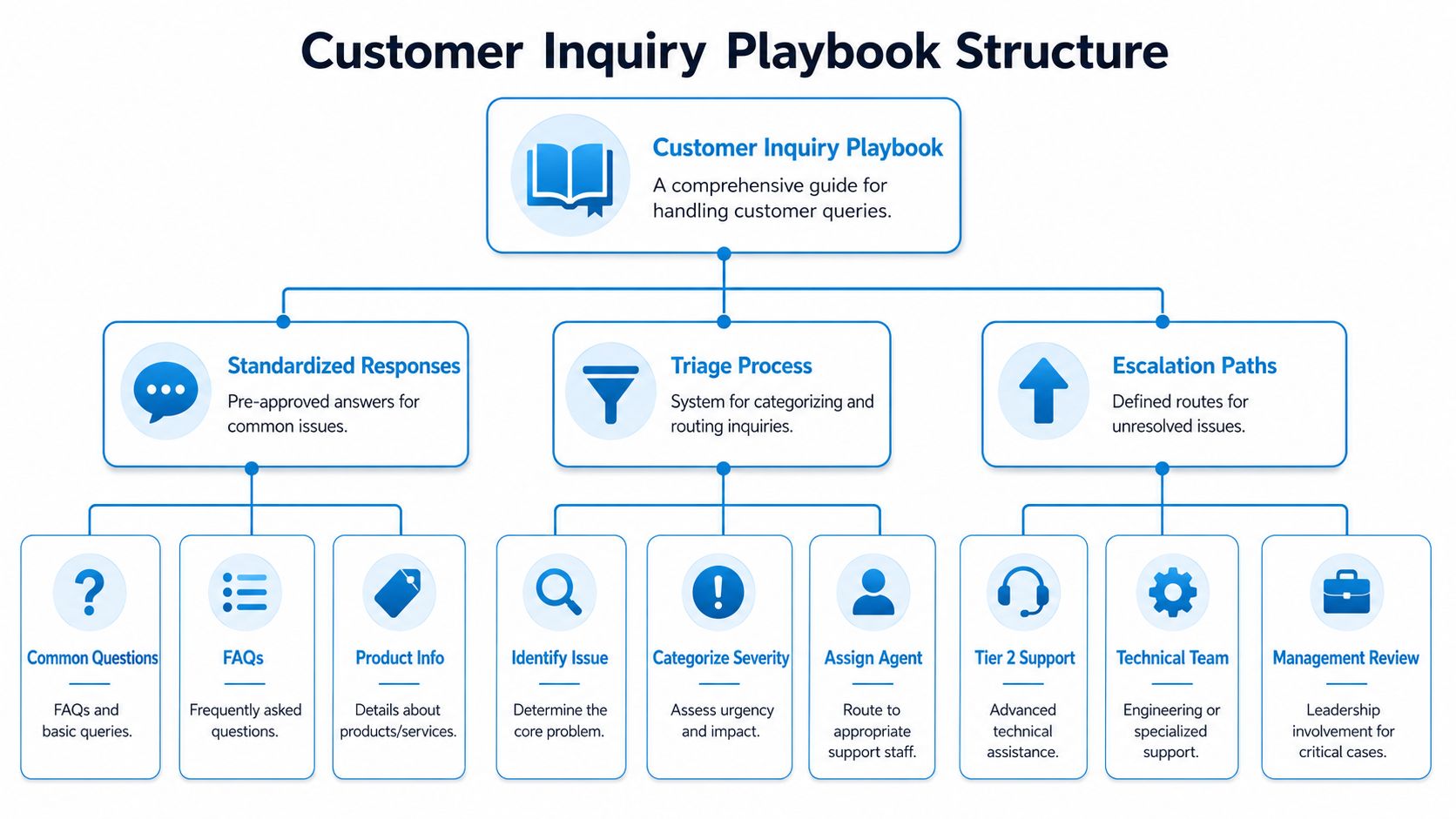
The fastest way to create inconsistency is to let every employee answer from memory. The fastest way to sound robotic is to over-script everything. The middle ground is a playbook.
That playbook matters because 44% of consumers report receiving a wrong answer from a customer service representative, according to Clarity Voice's customer service findings. If your team doesn't have one trusted source for pricing language, policies, service details, and escalation rules, wrong answers are going out daily.
Use a response spine, not canned replies
A solid response has four parts. The order matters.
Acknowledge the issue
Show the customer you understood the question or problem.Give the direct answer
If you can solve it now, solve it now.State the next step
If you need more time, say who is handling it and what happens next.Close the loop
Confirm timing, ownership, or follow-up.
This structure lines up with the operational guidance in Convin's customer inquiry methodology, which emphasizes active listening, acknowledgment, clear solutions or escalation, and follow-up.
Here's the visual framework I use when building the playbook:
Create triage categories your team can actually use
Skip complicated ticket taxonomies. Use categories that drive action.
For a home service business, start with:
- Hot lead: New estimate request, emergency call, or service-area question from a ready buyer
- Active customer issue: Reschedule, no-show, billing question, warranty follow-up
- Routine admin: Hours, payment methods, service list, documentation request
- Reputation risk: Complaint, refund demand, negative review follow-up
For a professional office, adjust the labels:
- New matter intake
- Existing client update
- Billing or records
- Sensitive escalation
Two practical examples
Law firm example
A prospect submits a website form saying they need help with a custody hearing next week. The playbook should trigger:
- Immediate acknowledgment
- Intake review for practice fit
- Conflict check
- Call-back assignment to the right attorney or intake specialist
The wrong move is a generic reply that says, "We'll get back to you shortly."
HVAC example
A caller asks, "My AC stopped working and it's 96 outside. Can someone come today?" The playbook should classify that as urgent, capture zip code and equipment status, and either book directly or escalate to dispatch. The wrong move is sending a long list of troubleshooting steps before confirming service availability.
What works: Short, approved language with room for context.
What doesn't: Paragraph-long scripts that staff ignore under pressure.
A good companion resource for tightening phone workflows is this guide to call handling best practices, especially if your team still answers each call differently depending on who picks up.
Creating Smart Escalation Workflows
Most inquiries should end at the first point of contact. The rest need a clean handoff. Not a transfer that forces the customer to repeat the whole story.
Industry-wide first-call resolution rates sit between 70% and 79%, which means 20% to 30% of inquiries need additional contact, according to AmplifAI's customer service statistics. That's normal. The operational problem isn't that escalations happen. It's when they happen late, without context, or to the wrong person.
Use a simple two-tier model
Tier 1 handles the repeatable work. Tier 2 handles judgment-heavy work.
That first tier can include front-desk staff, a dispatcher, or automation for routine questions. Tier 2 should be the people with authority or expertise to fix exceptions, save accounts, or close higher-value opportunities.
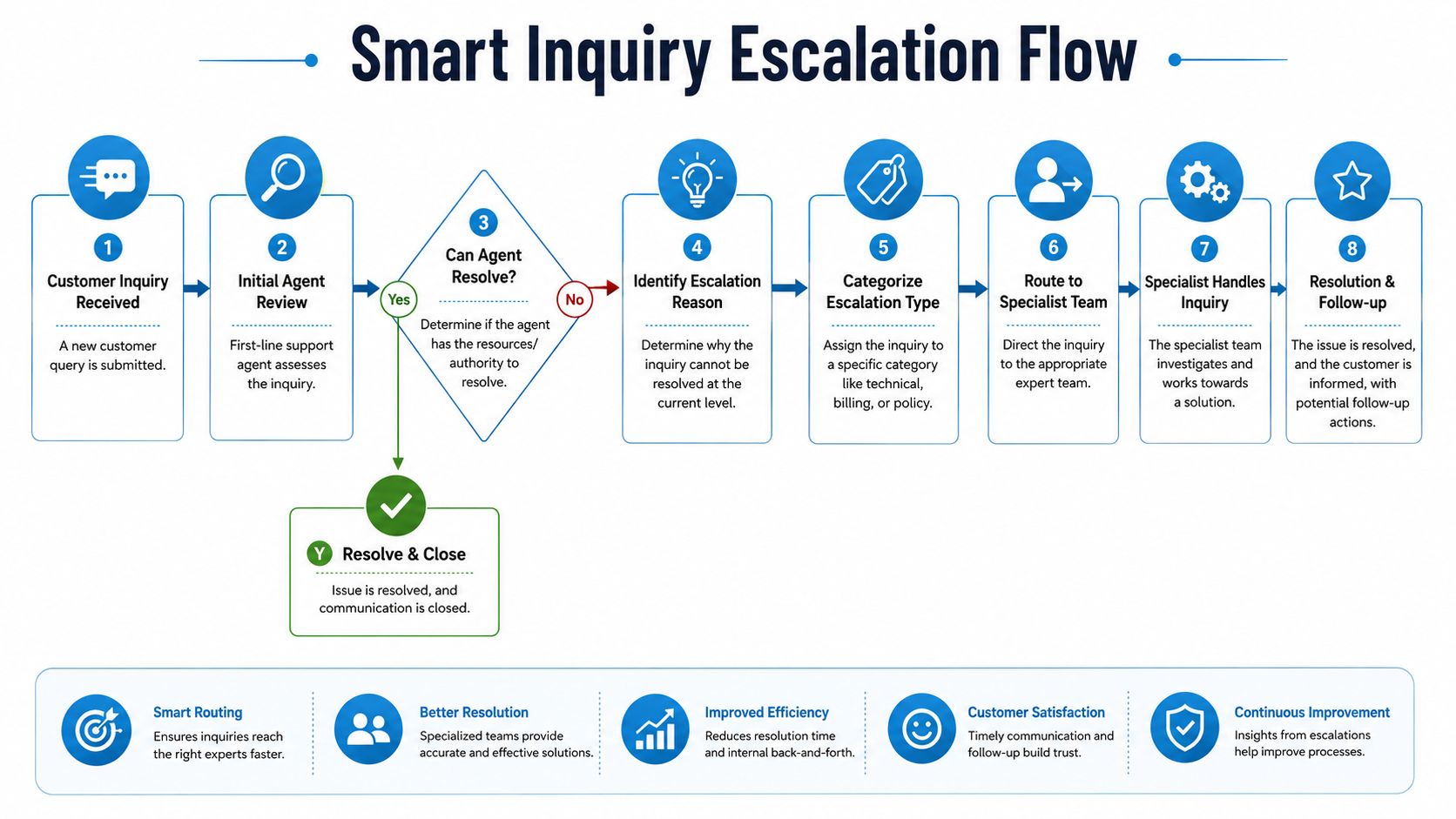
A simple split looks like this:
| Tier | Handles | Should not handle |
|---|---|---|
| Tier 1 | FAQs, scheduling, routing, basic account questions | Legal nuance, sensitive complaints, complex diagnosis |
| Tier 2 | Technical exceptions, billing disputes, upset customers, high-value sales | Repetitive admin tasks |
Define escalation triggers in plain language
Don't tell staff to escalate when something "feels complex." That's too vague. Give them triggers.
- Customer emotion: Angry tone, repeated frustration, request for a manager
- Business risk: Refund demand, billing dispute, compliance question
- Complexity: Multi-part technical issue, unusual policy request, unclear ownership
- Sales value: High-ticket quote, commercial account, multi-location opportunity
A good escalation rule is simple. If the next person has more authority, better context, or deeper expertise, route it fast.
Later in the conversation, training matters as much as structure. This short video gives a useful view of how teams can think about smoother customer handoffs before they become frustrating:
Warm handoffs beat blind transfers
If you're transferring a live conversation, the customer should never arrive cold. The receiving person needs a summary, not just a ringing phone.
Include these three items in every handoff:
- Reason for escalation: One sentence, not a vague label
- What was already done: Questions asked, steps attempted, promises made
- What matters most now: Urgency, emotion, and desired outcome
For teams that still bounce callers around, this explanation of cold transfer vs warm transfer is worth reviewing because the transfer method directly affects customer trust.
Measuring Performance with Key Metrics and SLAs
You can't manage customer inquiry handling with anecdotes. "We seem busy" isn't an operating metric. Neither is "customers sound happier lately."
The starting point is to measure a small set of indicators tied to response quality and labor efficiency. One of the most important is First Response Time, because HeroThemes notes that FRT is a critical KPI for customer satisfaction, and teams often fail by not resolving the query completely in that first reply.
Track the metrics that change behavior
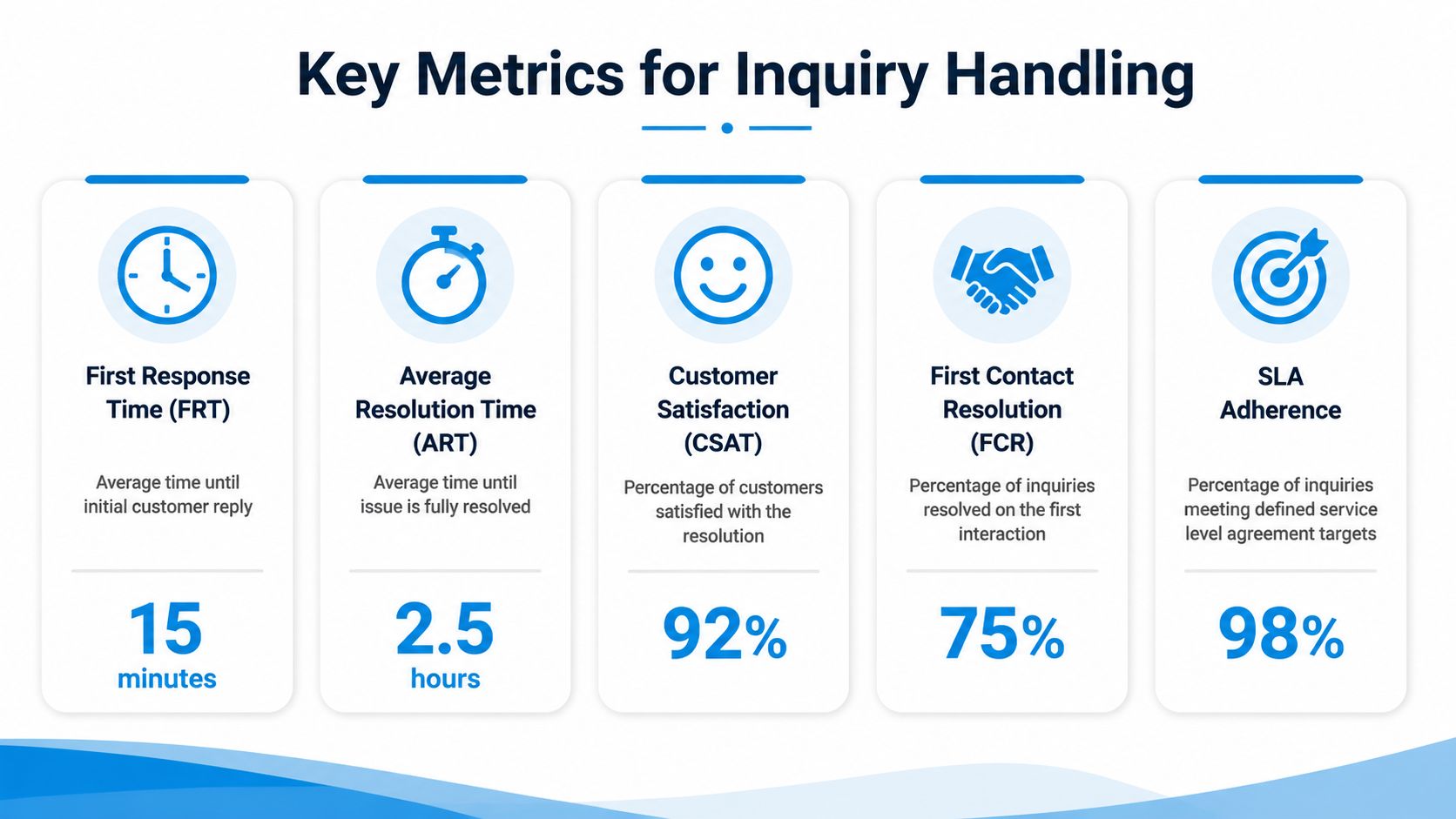
Use a compact scorecard:
First Response Time
How long it takes for a new inquiry to receive a real replyFirst Contact Resolution
Whether the issue got solved in the first interactionAverage Handle Time
How much staff time each interaction consumesCustomer Satisfaction
Whether the customer felt the outcome was useful and clearSLA adherence
Whether your team met the service promises it set internally
This visual is useful for getting buy-in from staff because it turns abstract support language into a working dashboard:
Set internal SLAs your team can keep
An SLA is just an operating promise. It should be specific and realistic.
Examples that work:
- New web leads: Contact within a defined window during business hours
- Missed calls: Return the call the same day if it came in before cutoff
- Existing customer billing issues: Acknowledge quickly and assign an owner
- After-hours emergency inquiries: Send immediate intake response and route for next action
Avoid vanity SLAs that look good on paper but collapse under volume. If a promise requires heroics every week, the process is wrong or staffing is wrong.
Measure where time is lost, not just where tickets close. Slow triage often looks like a staffing problem when it's actually a routing problem.
Read metrics together, not in isolation
A low First Contact Resolution rate might mean your agents need better training. It might also mean your knowledge base is thin, your triage is weak, or your scripts are too vague to solve the issue in one touch.
Likewise, a short Average Handle Time isn't always good. If your team closes conversations quickly but customers call back confused, you've just shifted the work downstream.
A useful review rhythm is weekly. Look at missed SLAs, long-response outliers, reopened issues, and escalations that should have stayed at Tier 1. Then update the playbook. That's how the system improves without major reinvention.
Scaling Your System with Automation and Integration
Manual inquiry handling breaks first at the front line. Staff spend too much time on repeat questions, basic scheduling, and intake cleanup. Then leadership hires more people to process noise instead of redesigning the flow.
That's where the hybrid model wins. Automation handles the repetitive work. Human agents handle exceptions, empathy, negotiation, and revenue-critical conversations.
The business case is already strong. AI-powered customer service systems can cut operational costs by 30%, while AI-assisted agents resolve issues 47% faster, according to Salesmate's customer service statistics. The point isn't to replace people. It's to stop using skilled people for low-value repetition.
Put automation where the rules are stable
Start with tasks that have clear inputs and clear outputs:
- Answer routine questions: Hours, service areas, appointment availability, payment methods
- Capture lead details: Name, location, service type, urgency
- Book or request appointments: Especially after hours
- Log conversation summaries: So humans don't start from scratch
- Route by intent: Quote request to sales, invoice question to billing, complaint to management
This is what that looks like in practice:

The handoff matters more than the bot
A weak automation setup creates another queue. A strong one removes friction.
If the system can answer a basic scheduling question at midnight, that's useful. If it can collect job type, address, urgency, and preferred time, then pass that data into your CRM or calendar before a human ever touches it, that creates operational efficiency. If it can also detect when a caller is upset or when the issue is too nuanced for a scripted flow, then the automation is doing the right work.
One option in this category is Recepta.ai, which handles inbound inquiries, scheduling, lead capture, follow-ups, and escalates to trained human agents when the conversation needs judgment or empathy.
Integration is what turns speed into ROI
Without integration, automation just moves messages faster. With integration, it removes admin.
The difference shows up quickly:
| Without integration | With integration |
|---|---|
| Staff retype caller details | Data logs automatically |
| Calendars get updated later | Scheduling syncs in real time |
| Lead source gets lost | Source tracks with the record |
| Customers repeat themselves | Human agent sees prior context |
This matters most in multi-location businesses, where one missed note can send a technician to the wrong branch, leave a prospect uncalled, or create duplicate follow-ups.
Good customer inquiry handling at scale depends on one principle. Let the system do the repetitive capture and routing. Let people do the work that requires judgment.
If your team is missing calls, juggling inboxes, or spending too much time on routine questions, Recepta.ai is one way to build a hybrid front line without rebuilding your whole operation. It handles inquiry intake around the clock, captures lead data, syncs with your tools, and brings in trained human support when the conversation needs a person instead of a script.