Call Transcription: A Complete Guide for 2026
A customer calls your service desk, explains the problem, and gets a clear promise from the representative: someone will call back tomorrow. A week later, the customer says nobody followed up. The representative remembers the general conversation but can't confirm the exact commitment, the quoted price, or who owned the next step. The recording exists somewhere, but nobody has time to replay the entire call.
Call transcription turns that conversation into searchable text that teams can review, verify, and connect to operational workflows. The value isn't limited to creating a written record. A useful transcription program captures commitments, supports quality assurance, helps document compliance, and gives teams an objective reference when memories conflict.
The difficult part begins after the words become text. Production teams have to manage speaker overlap, accents, poor audio, sensitive information, system integrations, and decisions about when a person must review the transcript. The strongest deployments treat transcription as an operational system, not a button that produces a document.
What Call Transcription Actually Does for Your Business
A transcript gives the service manager a fast way to search the conversation for “callback,” the customer's address, the quoted amount, or the promised resolution. Instead of asking the representative to reconstruct the call, the manager can inspect the relevant passage, listen to the corresponding audio, and determine what happened. That makes the transcript an objective source of truth, provided the business also preserves the recording and marks uncertain passages for review.
The same record supports different teams:
- Customer service: Supervisors can review how representatives handled complaints, whether they explained next steps, and whether a promised action was documented.
- Sales: Managers can find objections, buying signals, competitor mentions, and commitments without sitting through every recording.
- Operations: Coordinators can extract appointment changes, access instructions, delivery requirements, and follow-up tasks.
- Compliance: Reviewers can search for required disclosures, consent language, or prohibited promises.
A practical call detail reporting workflow becomes more useful when it includes both call metadata and the conversation itself. The date, caller, representative, duration, outcome, transcript, and follow-up status belong together. A transcript without context is harder to act on, while call metadata without dialogue can't explain why an interaction ended the way it did.
Live transcription versus post-call transcription
Real-time transcription displays text while the call is happening. It makes sense when an agent needs immediate guidance, a compliance system must identify a risk during the conversation, or an automated voice workflow needs the customer's intent before the call ends.
Post-call transcription processes a recording after the conversation. It usually fits quality assurance, coaching, dispute resolution, documentation, and analysis better because the system has more time to format the dialogue and identify speakers.
For example, a plumbing company may use live text to detect “I need to reschedule” and offer the right scheduling path immediately. A legal practice may prefer post-call processing so a staff member can review a consultation transcript before it enters the client file.
Practical rule: Start with the decision the transcript must support. If the decision happens during the call, evaluate live transcription. If it happens during review, post-call processing may be the safer choice.
How the Technology Turns Speech into Text
Call transcription relies on a pipeline rather than a single AI feature. Each stage solves a different problem, and weaknesses early in the process limit the quality of everything that follows.
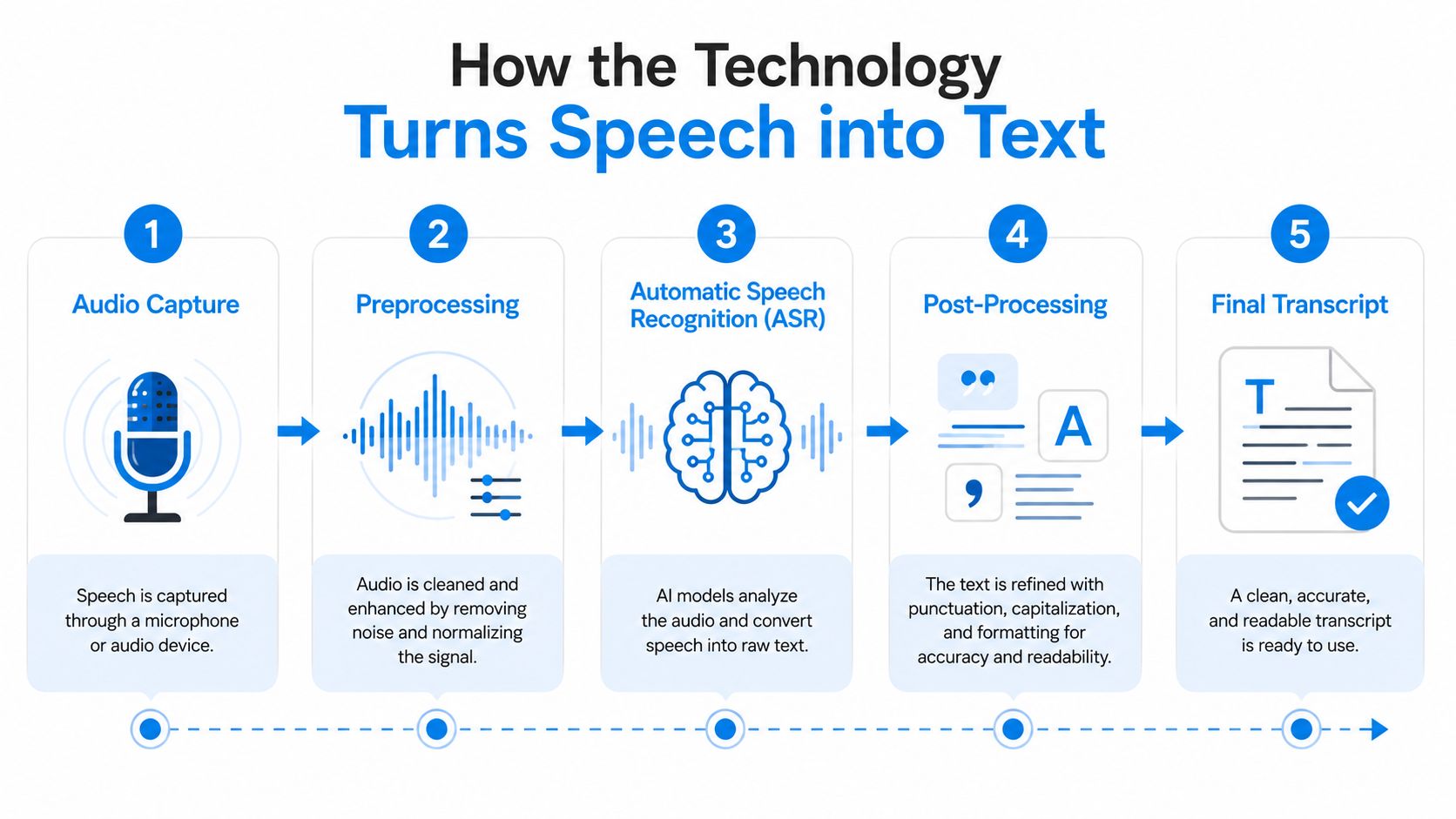
Step one captures usable audio
The system first receives audio from a phone platform, contact-center system, mobile application, or recorded file. The recording method matters. A clean two-channel recording, where each participant has a separate audio stream, gives later processing more information than a single mixed track.
The platform then prepares the audio. Preprocessing can reduce background noise, normalize volume, and divide the stream into smaller segments. It can't reconstruct words that were never captured, so a poor phone connection remains a problem even when the language model is highly advanced.
Step two applies automatic speech recognition
Automatic speech recognition, or ASR, maps sound patterns to words. Think of ASR as a very fast typist listening to a conversation. It can produce text quickly, but it needs context to distinguish a person's name from a common word or a technical term from a similar-sounding phrase.
Speech recognition research moved from isolated-word demonstrations toward practical continuous transcription over decades. Bell Laboratories built Audrey in 1952, IBM's Shoebox followed in 1962 and recognized 16 words plus the digits 0–9, and Carnegie Mellon's Harpy system recognized over 1,000 words in 1971. Dragon Systems released Dragon NaturallySpeaking in 1997, with real-time speech-to-text capability. These milestones are documented in the timeline of speech and voice recognition.
A major modern inflection point arrived in 2022, when OpenAI released Whisper, trained on approximately 680,000 hours of multilingual and multitask audio collected from the web with weak supervision, as described in that same historical reference. The significance is practical: larger training sets and deep learning made systems more capable across languages, speaking styles, and recording conditions.
Step three separates speakers
Speaker diarization determines who said what. Without it, the transcript may contain correct words but assign them to the wrong person, making coaching, dispute review, and compliance checks unreliable.
Overlapping speech is especially difficult. Two people speaking at once create competing acoustic signals, so the system has to estimate which words belong to each speaker and whether either voice can be recovered confidently.
Step four formats the output
Post-processing adds punctuation, capitalization, timestamps, speaker labels, and sometimes summaries or extracted actions. A raw stream of words isn't convenient for a manager. A structured dialogue with searchable terms and linked playback is much easier to audit.
Faberwork's discussion of AI media insights from Faberwork LLC offers useful context for understanding how AI media systems turn unstructured audio into information that people can use.
For business calls, the recording layer also deserves attention. A call recording software workflow for business should define when recording begins, how participants receive notice, where files are stored, and how the resulting transcript moves into the next system.
Accuracy in Production versus Marketing Claims
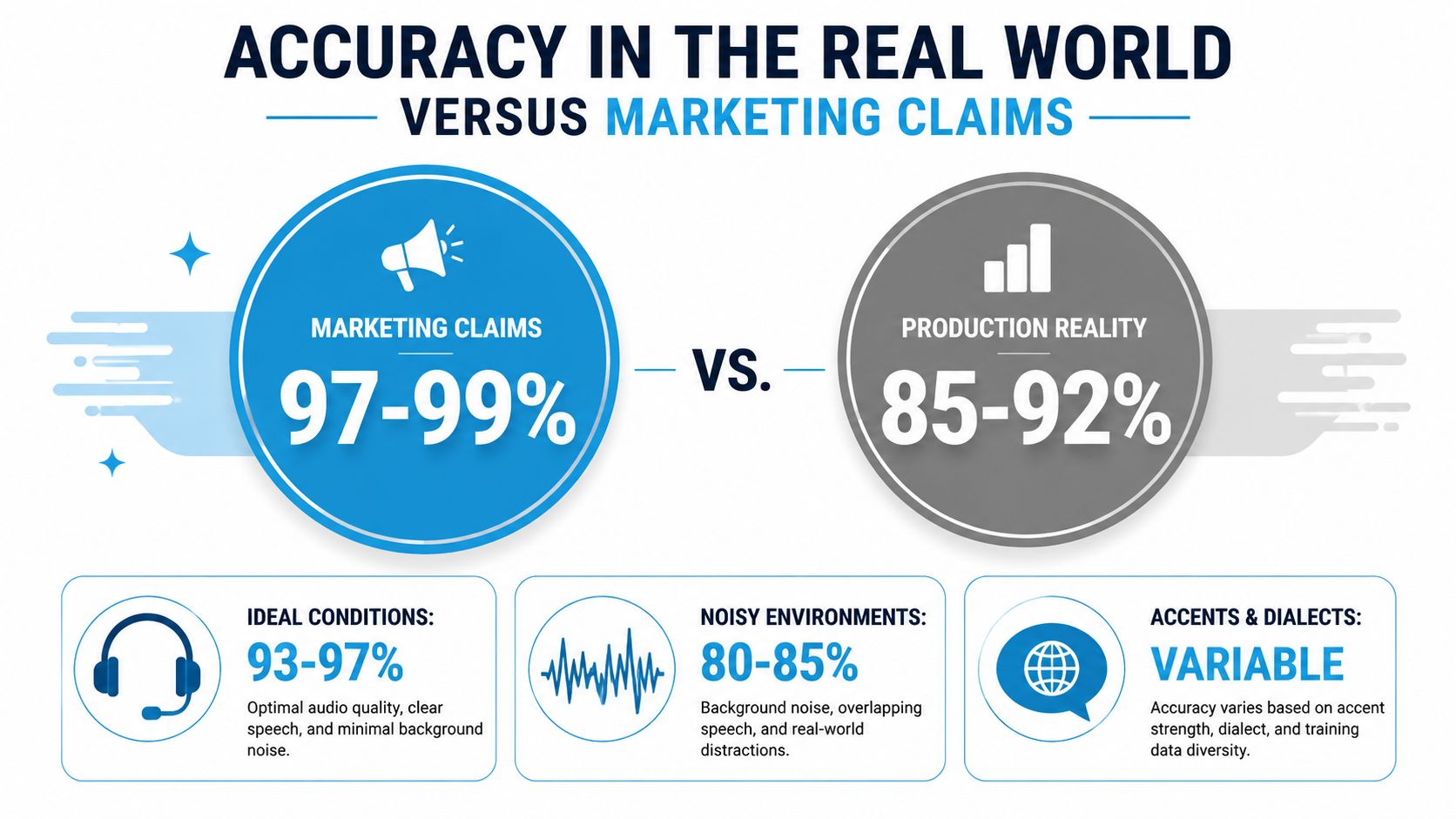
A transcript can be useful without being perfect, but acceptable error depends on the decision it supports. For clear, one-on-one business calls, reported accuracy commonly falls in the 93–97% range, according to call transcription accuracy guidance from Safina. That level may support summaries, lead capture, and topic search. It does not ensure that every name, product code, date, or price is correct.
What damages transcript quality
Production calls rarely match quiet demonstrations. Background noise competes with speech, weak connections remove acoustic detail, accents change pronunciation patterns, and industry terminology creates unfamiliar sound combinations for the language model. Emotion can also make speakers talk faster, interrupt one another, or change volume abruptly.
Speaker overlap has a measurable effect. In a Deepgram summary of an independent benchmark using the LibriCSS corpus, word error rate rose from 3.80% with no overlap to 34.29% at 40% overlap. Adding speaker separation reduced average word error rate from 17.08% to 3.77%, which makes diarization and overlap handling important vendor evaluation criteria. The benchmark details appear in Deepgram's analysis of speech-to-text for contact centers.
A separate production-oriented source reports that difficult conditions can reduce accuracy into the 85–90% range. Human review therefore matters more in medical intake, legal intake, and financial disclosures, where a small transcription error can change meaning. The relevant guidance appears in call transcription service considerations from GetNextPhone.
Test production audio, not headline scores
Build your test set from the calls your team handles. Include clean and noisy recordings, multiple speakers, accented speech, technical vocabulary, and emotional escalations. Check word accuracy alongside speaker labels, timestamps, redaction behavior, searchable terms, and how the system represents uncertainty.
Recepta.ai offers automatic recording, live transcription, call analysis, summaries, and integration-driven follow-up across phone operations. Evaluate any platform against your own audio, governance requirements, and workflow tests.
Review standard: A transcript can support navigation and coaching while still being unsuitable as a final record for a high-stakes decision.
Automated transcripts suit triage, summaries, trend analysis, and routine documentation. Require human verification when a name, diagnosis, legal instruction, policy disclosure, payment detail, settlement term, or quoted amount could create material risk. The comparison of AI meeting transcription tools also highlights the gap between polished benchmark conditions and difficult production audio, along with the continuing role of human-in-the-loop review.
Business Benefits and Measurable ROI
The return from call transcription comes from decisions made faster and records maintained more consistently, not from the transcript file itself. A sales manager can search several calls for objections before a coaching session. A support leader can review a difficult interaction without relying on a representative's summary. An operations coordinator can turn a spoken request into a scheduled task.
Sales and customer service use different signals
Sales teams use transcripts to inspect discovery quality, identify competitive mentions, and compare how representatives handle objections. A manager can search for phrases related to budget, timing, implementation, or procurement, then listen to the surrounding audio before coaching the representative.
Customer service teams gain a reviewable record for quality assurance and dispute resolution. If a home service representative quoted a price, the manager can search the transcript, verify the audio, and compare the promise with the job record. That process is more reliable than asking the customer and representative to remember the same conversation differently.
For a broader view of how automated call records support service operations, see these benefits of AI in customer service.
Measure the work that changes
A practical ROI model tracks operational inputs and outcomes before and after deployment:
- Documentation time: Measure how long representatives spend writing notes, summaries, and follow-up records.
- Retrieval effort: Track how quickly supervisors find a specific promise, complaint, or disclosure.
- Error correction: Record cases where missing or inaccurate notes caused rework, callbacks, or escalations.
- Review coverage: Compare how many calls quality teams can inspect when search and automated prioritization are available.
- Follow-up completion: Monitor whether assigned callbacks, appointments, and customer commitments receive documented owners.
The examples vary by function. A medical practice can use a transcript as a draft record of patient intake, subject to staff verification and appropriate privacy controls. A law firm can capture consultation details for conflict-checking and billing review, while keeping an attorney or trained staff member responsible for the final client record.
A useful business case begins with one workflow, such as quote verification or missed-callback review. Once the team proves that the transcript changes a measurable task, it can expand into coaching, analytics, and automation without treating every conversation as equally important.
Compliance and Data Governance Challenges
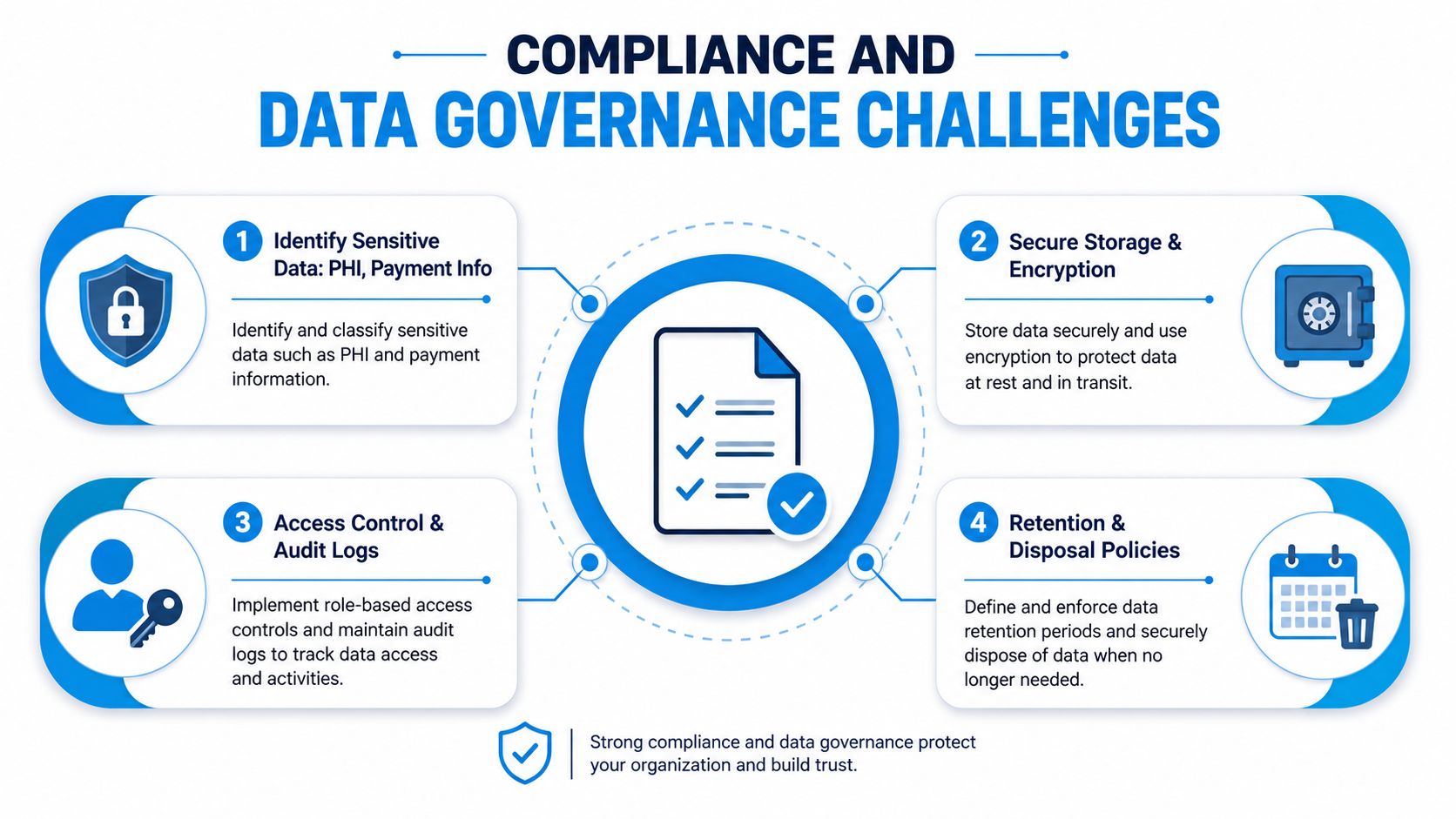
Many organizations ask whether a transcription system is accurate enough. Fewer ask where every copy of the conversation goes after the transcript is created. That omission creates avoidable risk because a call may produce an audio file, transcript, summary, export, backup, CRM note, calendar entry, and downstream task.
Transcripts can contain PHI, payment data, and personally identifiable information. The guidance on personally identifiable information in call transcripts recommends inventorying each copy and testing redaction and deletion across the full chain, rather than checking only the original recording.
Build a transcript data inventory
Start by drawing the complete lifecycle:
- Capture: Identify the phone system, recording trigger, consent notice, and source audio.
- Processing: Document where ASR, speaker separation, summaries, and redaction occur.
- Storage: Record the primary location, backup locations, encryption controls, and residency.
- Distribution: List CRM fields, exports, email notifications, analytics tools, and shared folders.
- Disposal: Define how the audio, transcript, summary, and derived records are deleted.
Access should follow job responsibility. A representative may need a transcript for a customer follow-up, while a compliance reviewer may need the original audio and audit history. Neither role automatically needs unrestricted access to every call.
Treat consent and retention as operating procedures
Consent workflows must match the jurisdictions and industries in which the business operates. The organization should explain recording and transcription clearly, document the notice, and provide a path for handling requests to access or remove personal information where applicable.
Retention needs the same level of specificity. A policy should state how long each data type remains available, which exceptions apply to open disputes or regulated records, and how deletion is verified across connected systems. The guide to how Nutmeg Technologies handles compliance provides broader context for structuring data-handling practices.
Healthcare, finance, and legal teams should involve their compliance and legal stakeholders before production use. A vendor's security page isn't a substitute for mapping the organization's own permissions, integrations, retention rules, and regional obligations. The call recording compliance framework is a useful starting point for documenting those controls.
Governance test: Delete one sample conversation end to end, then verify that no transcript, summary, export, backup, or CRM note remains outside the approved retention exception.
Implementation Steps for Different Business Types
The right deployment starts with a narrow operational problem. Don't enable transcription across every queue before the team knows how it will review, correct, store, and act on the output.
Home service businesses
Begin with appointment confirmation and quote verification. Configure the system to identify the customer, property, requested service, access instructions, appointment details, quoted price, and promised follow-up. Route those fields into the scheduling or job-management system, but require a coordinator to verify changes before dispatch.
A useful trigger is a phrase such as “reschedule,” followed by a task for the scheduling team. Another is a transcript flag for a price or scope change that needs confirmation before a technician travels to the site.
Healthcare practices
Use post-call transcription for patient intake drafts, referral details, appointment requests, and insurance questions. Keep the transcript in an approved environment, limit access by role, and require staff review before information enters the electronic health record.
The review checklist should focus on names, medications, dates, symptoms, and instructions. Live transcription may help a coordinator route a call, but it shouldn't become a clinical record without a defined approval process.
Law firms
Capture consultation details, opposing-party names, matter descriptions, deadlines, and billing expectations. Send potential conflict terms to the conflict-checking workflow, while keeping the transcript separate from the official matter file until an authorized person validates it.
For sensitive consultations, configure strict retention and export rules. A transcript can accelerate intake, but it shouldn't replace attorney judgment or the firm's file-management controls.
Sales teams
Connect transcripts to the CRM and define a repeatable review routine. Managers can inspect discovery calls, tag objections, and assign coaching tasks, while representatives use summaries to confirm next steps.
A staged rollout works well:
- Select the mode: Choose live transcription for agent assist or post-call transcription for review-heavy work.
- Configure speakers: Test labels on representative and customer channels.
- Set vocabulary: Add product names, services, and internal terminology where the platform permits it.
- Train the workflow: Show staff where transcripts appear, how to correct errors, and when to listen to audio.
- Create quality gates: Specify which fields require human verification before CRM or record-system updates.
- Review the pilot: Compare missed actions, correction work, and user adoption against the original problem.
The implementation succeeds when staff know what to do with the transcript. A file that nobody reviews or connects to a task system is only additional storage.
Integrating Transcription into Your Existing Workflows
A transcript becomes operationally valuable when it changes what a system or employee does next. The integration should pass only the information required for the action, not automatically copy the entire conversation into every connected application.
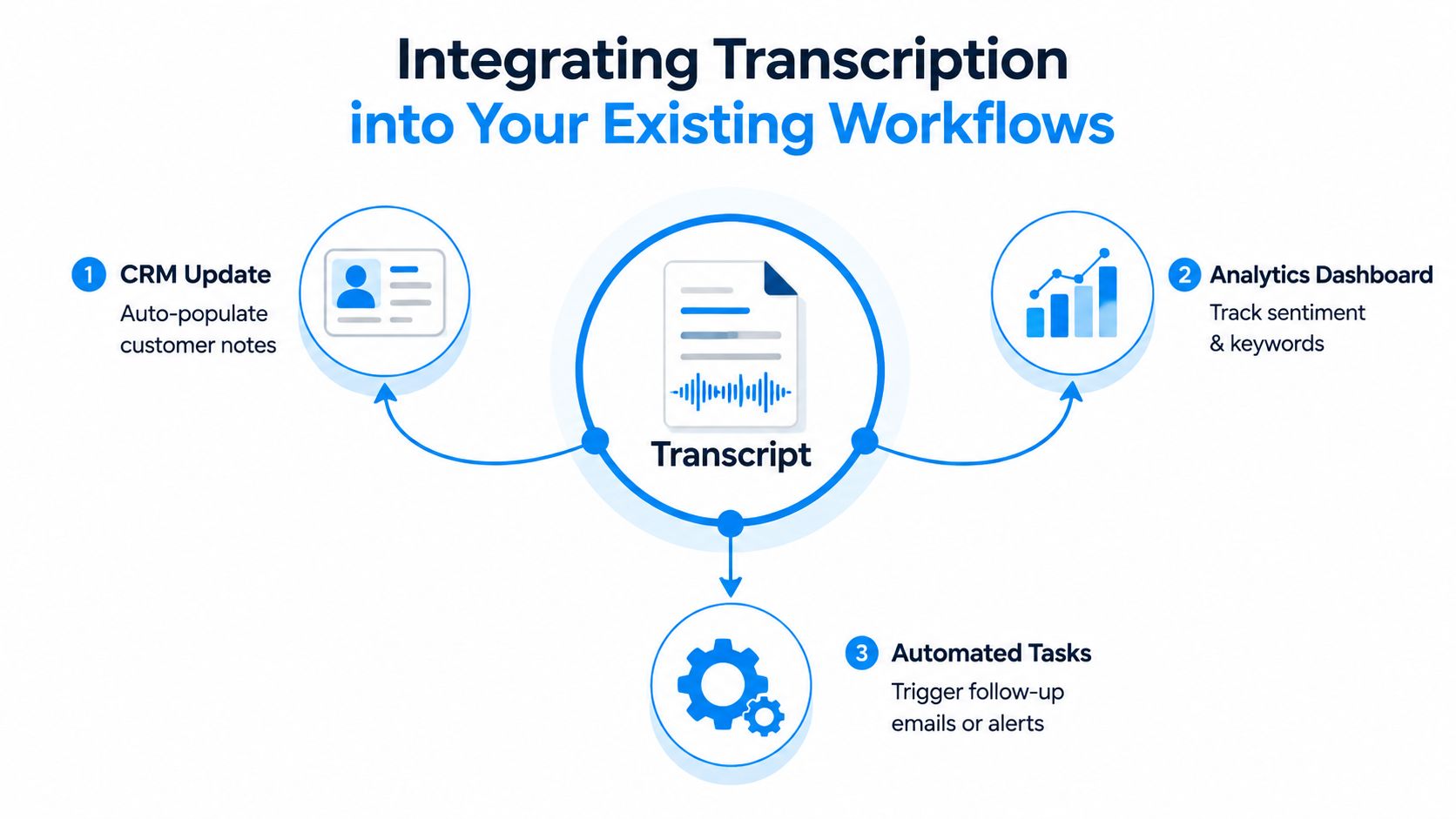
A home service workflow might detect a rescheduling request, create a scheduling task, and send the customer to the correct self-service path. A sales workflow can attach a summary and next steps to the CRM record, then assign a follow-up to the account owner. A support workflow can flag escalation language for a supervisor without exposing unrelated sensitive dialogue to the wider team.
Design events, not just destinations
Before connecting a CRM, calendar, or project-management tool, define:
- Trigger: Which phrase, intent, field, or call outcome starts the workflow?
- Action: Should the system create a task, update a record, send an alert, or request review?
- Owner: Which person or queue receives responsibility?
- Evidence: Can the recipient open the relevant transcript passage and audio?
- Exception: What happens when the transcript is uncertain or the customer disputes the result?
Live workflows have stricter timing requirements. Contact-center guidance targets sub-300ms streaming latency because it aligns with the natural 200–300ms pause window in human dialogue, according to real-time transcription latency guidance from Gladia. Delayed text can weaken agent assist, live compliance alerts, and barge-in handling even when the final transcript is acceptable.
Recepta.ai is one option for teams that need automatic recording, live transcription, call analysis, summaries, and integration-driven follow-up across phone operations. Evaluate it alongside other tools against your own audio, governance requirements, and workflow tests rather than selecting a platform from feature counts alone.
If missed callbacks, inconsistent notes, or slow call reviews are affecting your operation, visit Recepta.ai to see how its receptionist workflows can capture calls, produce searchable transcripts, and connect follow-up actions to your existing systems. Start with one call type, define the review controls, and use the results to decide where automation should replace manual administration and where human judgment must remain in the loop.