Automated Appointment Reminders: The Complete Business Guide
SMS reminders increased attendance at clinical appointments by about 50% versus no reminder, while automated reminder systems reduced non-attendance by a weighted mean of 28.9%. The systematic review evidence makes the commercial point clear: automated appointment reminders aren't a courtesy feature. They protect capacity, reduce avoidable labor, and give customers a practical way to keep or change a booking.
The mistake I see across clinics, law firms, and home service brands is treating the reminder as the product. The message is only the broadcast layer. The return comes from the interaction layer, where a customer confirms, reschedules, cancels, asks a question, or gets escalated to a person. This guide shows how to build that system around three outcomes, recover revenue, reduce staff workload, and improve the customer experience.
What Automated Appointment Reminders Do for Your Business
A missed appointment creates more than an empty slot. It can leave a clinician idle, a technician without a job, a lawyer with unused meeting time, and a customer forced to restart the booking process. In a vascular-lab example, a 12% no-show rate averaged 7.6 missed appointments per week and represented an estimated annual revenue loss of US$89,107. The clinical evidence review cited earlier explains why reminders became a scalable operational response in high-volume environments.
An automated appointment reminder is a rule-based communication triggered by scheduling data. The system identifies the booking, selects a delivery time and channel, sends the relevant details, and records the response. A mature workflow continues after delivery. It updates the booking when the customer confirms, offers alternatives when they need to reschedule, and routes exceptions to staff.
The message is the broadcast layer. Confirmation, rescheduling, cancellation, questions, and escalation form the interaction layer, where the operational return is created. That distinction should guide your implementation and your automated appointment scheduling software workflow.
The commercial value of one protected slot
Use your average booking value and no-show history to build a local baseline. The table below uses the verified vascular-lab example rather than assuming every business has identical economics.
| Business type | Weekly appointments | No-show rate | Est. annual revenue loss |
|---|---|---|---|
| Vascular lab example | Not specified | 12% | US$89,107 |
| Dental office | Varies by practice | Measure locally | Calculate from recovered slots |
| Law firm | Varies by practice | Measure locally | Calculate from recovered consultations |
| Home service brand | Varies by market | Measure locally | Calculate from recovered visits |
Put reminder automation beside booking, staffing, follow-up, waitlist management, and reactivation. A customer who cannot attend should release the slot quickly. Your team can then offer it to someone else instead of waiting for a manual update.
For event-driven workflows, Mail Merge for Gmail event strategy provides ideas for structuring scheduled communications around attendance and follow-up. Review your scheduling process before selecting a reminder tool. Disconnected calendars and manual updates produce perfectly timed messages with incorrect information.
The Four Layers Behind Every Reminder System
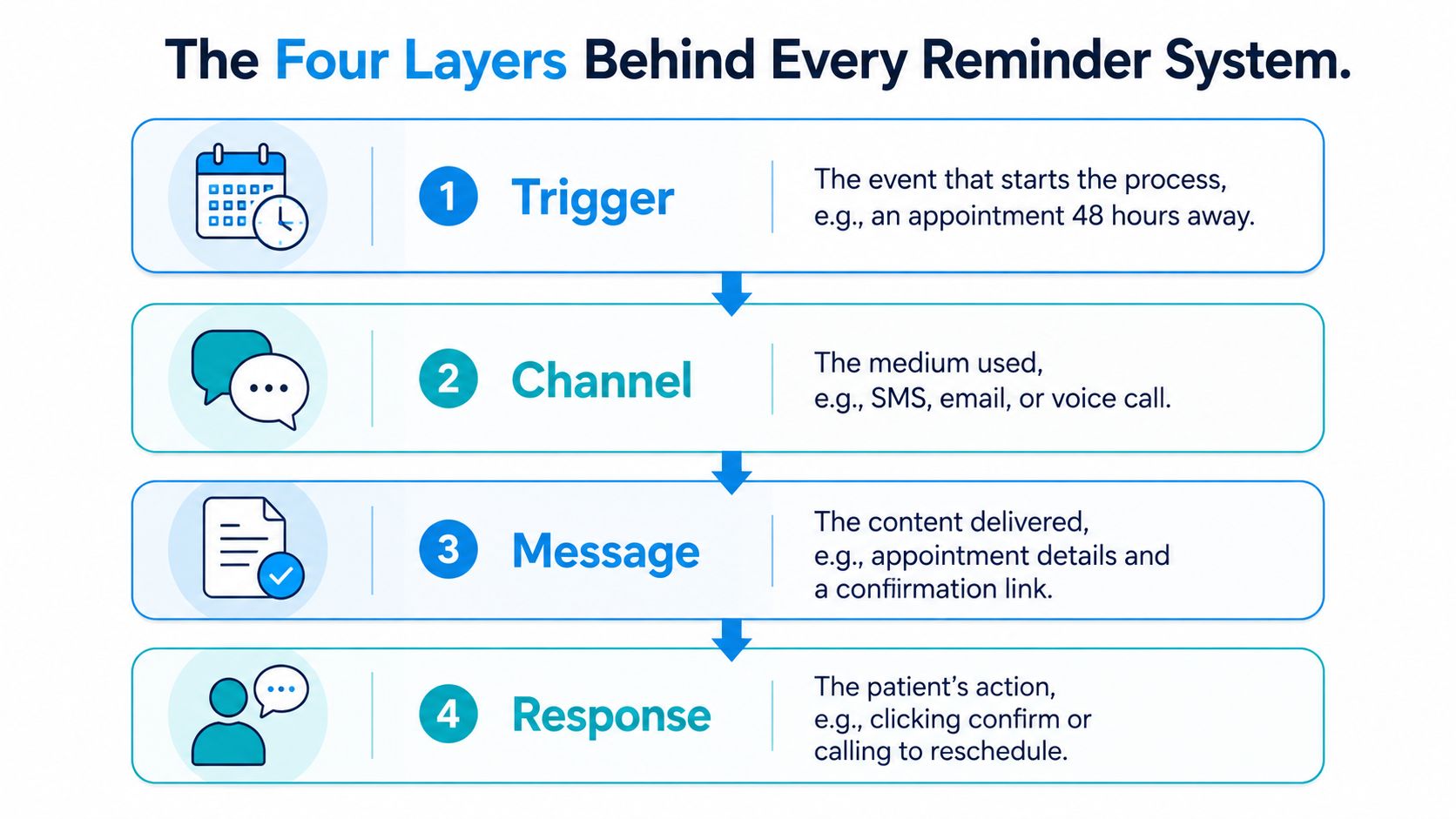
A reminder system has four layers, and weak implementations usually overinvest in the third. They write a message, connect an SMS provider, and assume the problem is solved. The operational gains appear only when the trigger, channel, message, and response work as one sequence.
Trigger
The trigger is the event that starts the workflow. It might be a new booking, an appointment approaching a defined time, a cancellation, or a customer who hasn't responded. A clinic can trigger a booking confirmation immediately, then schedule follow-up reminders as the visit approaches. A plumbing company can trigger a “technician on the way” message from a dispatch status.
The trigger must come from a reliable source of truth. If a calendar changes, the reminder platform needs the updated time, location, provider, and status before it sends anything.
Channel
The channel determines where the message appears. SMS is useful for fast action, email supports longer instructions, voice calls serve customers who need or prefer spoken communication, and push notifications work when customers actively use an app. Channel selection should follow customer preference and appointment risk, not internal habit.
Message
The message carries the operational detail. It should identify the business, state the appointment date and time, provide essential preparation or arrival information, and offer a single clear next action. Long explanations belong in linked instructions or a secure portal, not in the first reminder.
Response
The response layer is the differentiator. “Reply C to confirm or R to reschedule” turns a broadcast into a workflow. Confirmation should update the calendar. A rescheduling request should expose available slots. An ambiguous question should create a staff task rather than disappear into an inbox.
Operational rule: If a customer can receive a reminder but can't change the booking from that interaction, you've automated notification, not appointment management.
Your integration determines whether this loop works reliably. Review API connectivity for scheduling workflows to confirm that booking status, replies, and rescheduling actions can move between systems without manual copying.
Choosing the Right Channels for Your Audience
There isn't one universal reminder channel. Choose based on response latency, personalization depth, cost per send, consent friction, and customer preference. The channel that gets a fast reply isn't always the channel that carries complex instructions well.
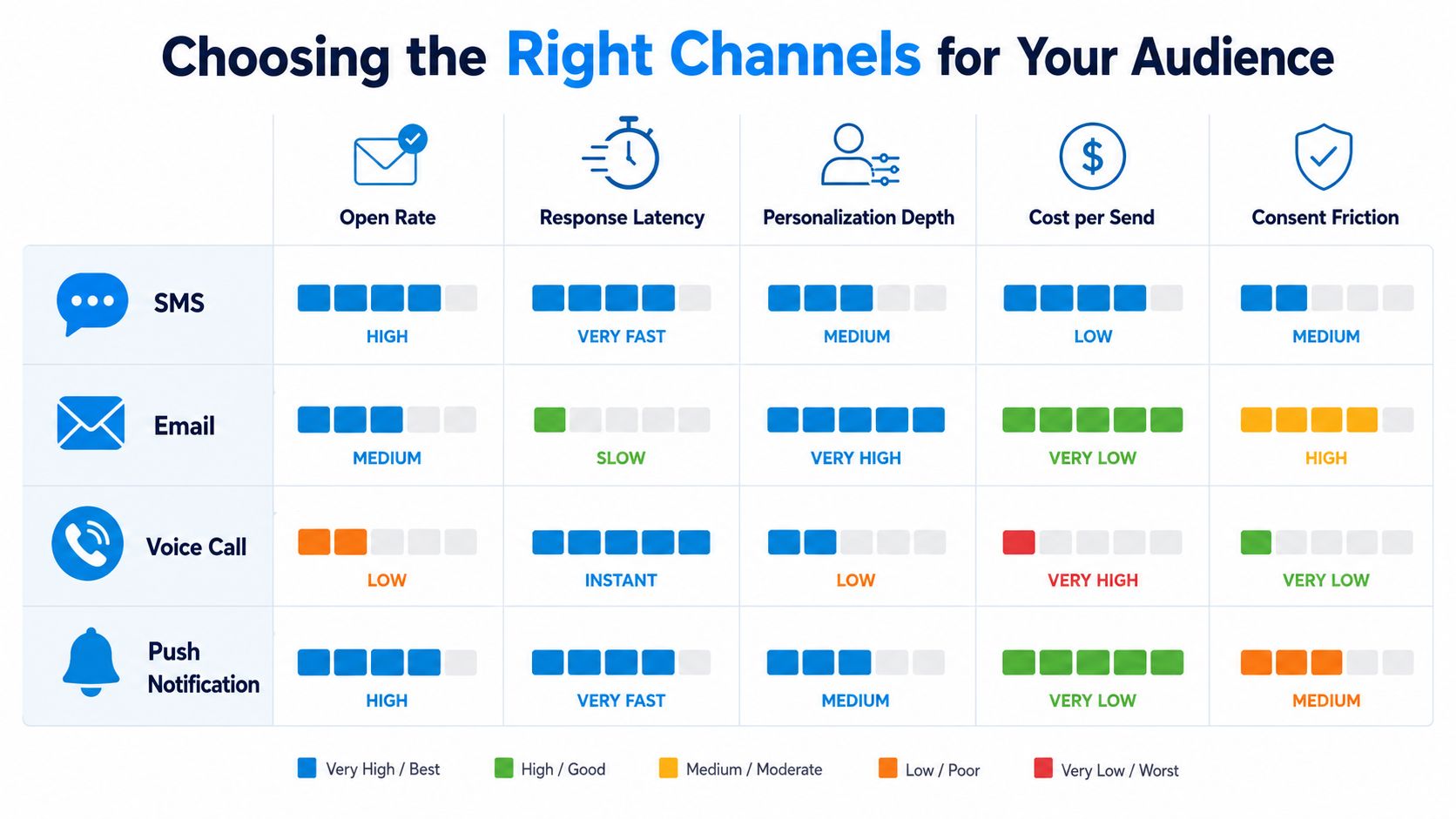
| Channel | Open or read behavior | Response latency | Personalization depth | Cost per send | Consent friction |
|---|---|---|---|---|---|
| SMS | Fast, highly visible | Low | Moderate | Usually efficient | Must honor permissions and opt-outs |
| Variable inbox attention | Moderate or slow | High | Usually efficient | Depends on list and communication rules | |
| Voice call | Direct, conversational | Immediate when answered | High | Higher than text or email | Requires careful permission and timing |
| Push notification | Strong for active app users | Low when enabled | Moderate | Efficient after app adoption | Requires app permission |
When SMS should lead
Use SMS for routine confirmations, short reminders, arrival prompts, and simple rescheduling. Keep the message scannable and include a reply code or a link. SMS works particularly well when the customer has already stated that text is their preferred channel.
When email carries the detail
Email is the better container for preparation instructions, forms, directions, parking information, or documents. Don't force every operational detail into a text. Send a short SMS that points to the relevant email or secure page.
When voice still wins
Use voice for high-stakes appointments, complex preparation, customers who don't respond digitally, and people who prefer spoken communication. Senior patients may need a call, and a home service customer facing a complicated access issue may resolve it faster by speaking with someone.
The strongest design is hybrid. Start with the customer's preferred channel, then escalate based on risk, lack of response, appointment value, or complexity. A scheduling platform such as a text scheduler app can support the text-first portion, but your rules should still define when email, voice, or human outreach takes over.
Message Templates That Actually Get Replies
A reminder should answer four questions quickly: Who is contacting me, what is booked, when and where is it happening, and what should I do now? Remove anything that doesn't support those answers.
The examples below use [bracketed fields] so your team can paste them into a scheduling platform and map each field to calendar data.
Booking confirmation
Plain-text version
Hi [First Name], your appointment with [Provider or Team] at [Business Name] is booked for [Day, Date] at [Time] at [Location]. Reply C to confirm, R to reschedule, or call [Phone].
Short variant
[Business Name]: [Day] at [Time] is booked for you. Reply C to confirm or R to reschedule.
The booking message should establish confidence, not create urgency. A customer who confirms immediately can be removed from unnecessary follow-up.
Pre-visit reminder
Plain-text version
Hi [First Name], this is a reminder for your [Appointment Type] at [Business Name] on [Day, Date] at [Time]. Please [Preparation Instruction]. Reply C to confirm or R to reschedule.
Short variant
Reminder, [Day] at [Time]. Please [Preparation Instruction]. Reply C or R.
Use one preparation instruction per message when possible. If the appointment requires several details, link to the full instructions in email or a secure portal.
Day-of reminder
Plain-text version
Hi [First Name], your appointment is today at [Time] at [Location]. Please bring [Required Item] or use [Arrival Instruction]. Reply R if you need help changing the booking.
Short variant
Today at [Time] at [Location]. Reply R if you need to reschedule.
Post-visit follow-up
Plain-text version
Thanks for visiting [Business Name], [First Name]. If you need follow-up support, reply HELP or call [Phone]. You can also [Next Step].
Short variant
Thanks for visiting [Business Name]. Reply HELP if you need follow-up support.
Use a single primary call to action. “Reply C to confirm or R to reschedule” works because the customer doesn't have to compose a sentence. For broader automation design principles, Supercenter's guide to marketing automation provides useful context on connecting messages to actions rather than treating them as isolated sends.
Timing and Frequency Strategies That Reduce No-Shows
Send two reminders by default, not one. In a randomized study of 54,066 patients, two automated reminders sent 3 days and 1 day before the visit reduced missed appointments to 4.4%, compared with 5.8% for one reminder sent 3 days before and 5.3% for one reminder sent 1 day before. The Permanente Journal study also found that, among high-risk patients, two reminders reduced missed visits to 20.5%, compared with 25.0% and 24.2% for the single-reminder approaches.
That gives operations teams a defensible default: send the first message early enough to expose a scheduling problem, then send a second message close enough to refresh memory and capture the reply.
A deployable cadence
- At booking, confirm the appointment details and give the customer a way to correct errors.
- Three days before, send the full reminder with preparation and a rescheduling action.
- One day before, request confirmation and suppress unnecessary follow-up after a confirmed response.
- On the day, remind only the customers who need an arrival prompt, or use a shorter message for high-risk appointments.
A later pragmatic randomized study covering 158,669 total visits found that adding a second text reduced no-shows in primary care from 9.1% to 8.4% and in mental health from 20.1% to 17.9%, while also reducing same-day cancellations. The study report gives the practical lesson: a second message can produce value even after the first reminder already exists.
Make confirmation operational
Don't treat confirmation as a vanity metric. When a clinic has a reliable confirmed list in the morning, the front desk can prioritize calls to unconfirmed patients, release open slots, and prepare staffing around expected arrivals. A law firm can move an unconfirmed consultation into an available slot. A home service brand can reassign a technician when a customer cancels early enough.
Working cadence: Three days protects rescheduling time. One day drives action. Same-day outreach belongs to exceptions, not every customer.
Where Reminders Fail and Who They Leave Behind
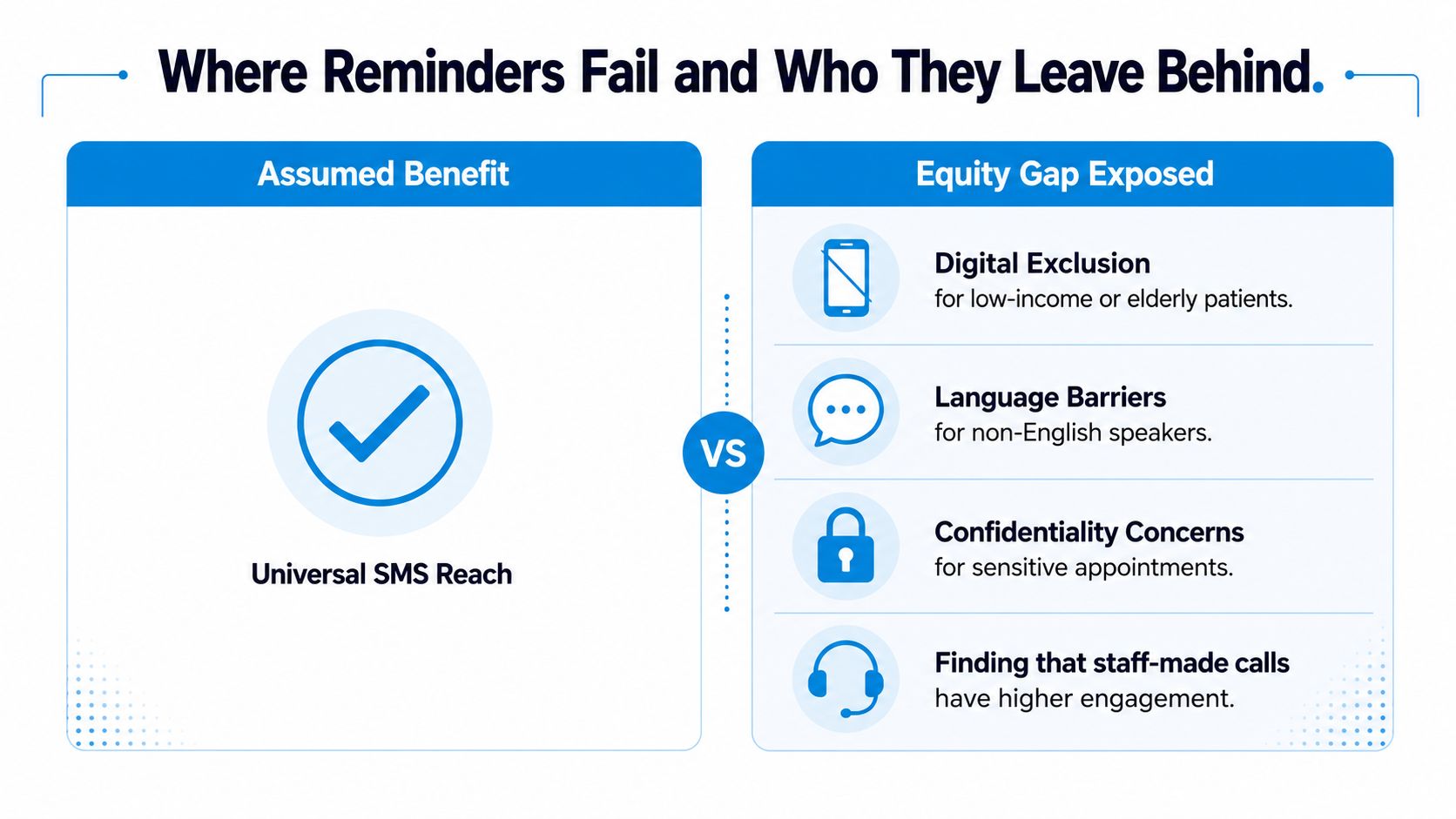
SMS-first is a useful default, but it isn't an equitable policy. A 2025 scoping review of 45 studies identified recurring barriers including digital exclusion, language challenges, confidentiality concerns, and socio-economic inequalities. The scoping review also found inconsistent equity reporting, which means a high aggregate response rate can conceal customers the system repeatedly fails to reach.
Screen your audience before choosing the default
If more than 20% of your customers are over 65, have a non-English communication preference, or lack consistent phone access, add a voice fallback and a human escalation path. That isn't a demographic assumption. It's a workflow safeguard.
Language support must cover the response layer, not only the outbound message. If the reminder is translated but the customer can't reschedule in the same language, the system still creates friction. Confidential appointments also need restrained content, with no unnecessary detail in a lock-screen notification.
Automation doesn't always outperform staff outreach. One outpatient comparison reported no-show rates of 13.6% for staff reminders, 17.3% for automated reminders, and 23.1% with no reminders. The comparative evidence supports a hybrid model, particularly for fragmented populations and higher-risk bookings.
Build an escalation queue for people who don't respond, have failed deliveries, request complex changes, or use a language the automated flow can't support. An AI receptionist can handle routine confirmations and route complex cases to a trained agent, but the handoff must be explicit and visible to staff.
Staying Compliant With HIPAA and TCPA Without Slowing Down
Compliance should be designed into the workflow before the first message goes out. For U.S. healthcare reminders, the cited TCPA healthcare-message exemption limits content to the provider's name and contact information plus appointment-related or similarly defined care content. It also excludes telemarketing and billing pitches, limits messages to one per day, and caps combined calls or texts at three per week. This TCPA compliance guide explains the operational boundaries.
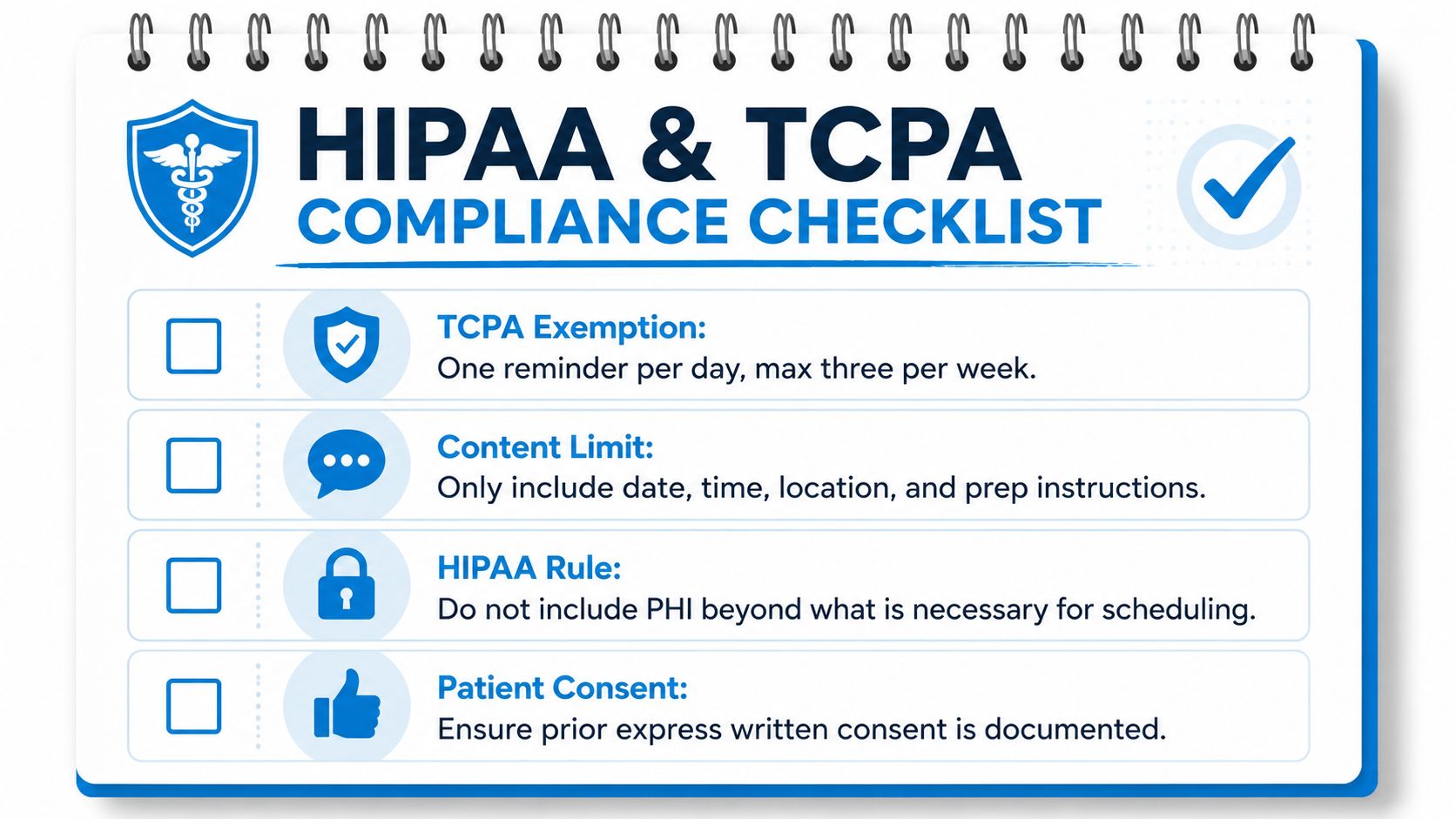
Use a pre-send checklist
- Limit the purpose: Keep the message tied to the appointment, arrival, preparation, confirmation, cancellation, or rescheduling.
- Minimize content: Include only the information needed for scheduling and attendance. Don't add clinical details that don't serve that purpose.
- Block promotion: Don't combine an appointment reminder with a marketing offer, billing pitch, or unrelated campaign.
- Honor opt-outs: Suppress future communications immediately when a customer opts out, and preserve that preference in the record.
- Audit the workflow: Check message frequency, channel permissions, template variables, delivery failures, and escalation behavior before launch.
Safe message pattern: “This is [Provider Name] at [Business Name]. Your appointment is [Date] at [Time]. Reply C to confirm or R to reschedule. Call [Phone] with questions.”
A compliant two-message sequence might send the appointment details first, then a later pre-visit instruction that remains directly related to the appointment. Legal practices, home service brands, and other non-healthcare businesses still need permission management, accurate identity disclosure, opt-out handling, and suppression rules, even when HIPAA doesn't apply.
For technical safeguards and message design considerations, consult this guide to encrypted text messages. Before launch, have your compliance owner approve the exact templates, data fields, integrations, and escalation rules. You can fix a weak conversion flow after launch. A privacy mistake is harder to unwind.
For healthcare teams evaluating scheduling systems, document the security and data-handling requirements in the same review as the operational requirements. Your HIPAA-compliant scheduling software should support both controlled communication and a traceable response history.
KPIs and a Launch Checklist You Can Run This Quarter
Measure the workflow by capacity recovered, not by how many messages the system sends. Your dashboard should connect confirmation rate, no-show rate, reschedule rate, recovered revenue per 1,000 reminders, and cost per confirmed attendance. Delivery and response data help diagnose the system, but attendance and recovered capacity determine whether it earns its place in the operating model.
The core dashboard
- Confirmation rate: Shows whether customers take the requested action.
- No-show rate: Measures the outcome the workflow is designed to change.
- Reschedule rate: Captures appointments saved through an alternative booking.
- Recovered revenue per 1,000 reminders: Connects recovered slots to your average booking value.
- Cost per confirmed attendance: Combines channel expense and staff escalation labor.
Run the launch in a controlled sequence:
- Define the current no-show and cancellation baseline.
- Set a commercial target tied to recovered capacity.
- Map booking, cancellation, rescheduling, and waitlist events.
- Select the primary channel by customer preference.
- Add a voice fallback for high-risk or digitally excluded customers.
- Write booking, pre-visit, day-of, and follow-up templates.
- Approve content with the operational and compliance owners.
- Connect the calendar, CRM, practice-management, or dispatch system.
- Configure confirmation, rescheduling, cancellation, and escalation rules.
- Add quiet hours, suppression rules, and opt-out handling.
- Test invalid numbers, changed appointments, duplicate bookings, and ambiguous replies.
- Pilot the workflow with a controlled group of appointments.
- Review no-shows, same-day cancellations, reschedules, replies, and staff workload.
- Expand the workflow, then review performance regularly.
Keep the business case simple. At a clinic with 200 appointments per week, a 2% no-show reduction represents roughly 200 additional visits per year, based on the arithmetic example specified for this launch model. Multiply those visits by your average contribution per appointment, then subtract communication and escalation costs. That is the number leadership should see, not an impressive send count.
The right implementation starts small but isn't passive. Launch the two-touch cadence, make every message interactive, monitor who remains unconfirmed, and let staff handle the exceptions that automation can't resolve.
Recepta.ai combines automated confirmations, reminders, scheduling, follow-ups, and inbound or outbound calls with human escalation when a conversation needs judgment. Visit Recepta.ai to see how its workflow can connect appointment data to two-way customer interactions and help your team protect more booked capacity.