Cleaning Service Booking: A Practical Workflow Playbook
A cleaning company can have a full calendar on paper and still lose profitable work every week. The phone rings while crews are inside homes, a website form waits until Monday, and a customer who wanted an answer now books the provider who replies first. The problem usually isn't demand. It's the handoff between inquiry, quote, schedule, payment, and confirmation.
A reliable cleaning service booking system treats every inquiry as a revenue workflow. It captures calls and forms, asks enough questions to quote accurately, gives customers a clear path to a slot, collects the right payment details, and keeps a human available when the request falls outside the routine. The global cleaning services market is already a large recurring-service category, with one estimate valuing it at USD 442.1 billion in 2025 and projecting USD 770.8 billion by 2033 at a 7.3% CAGR from 2026 to 2033. Another estimate places the market at USD 451.63 billion in 2025, growing to USD 859.20 billion by 2034 at a 7.50% CAGR. Grand View Research's cleaning services market analysis shows why booking execution matters at scale.
The Real Cost of a Broken Cleaning Booking Flow
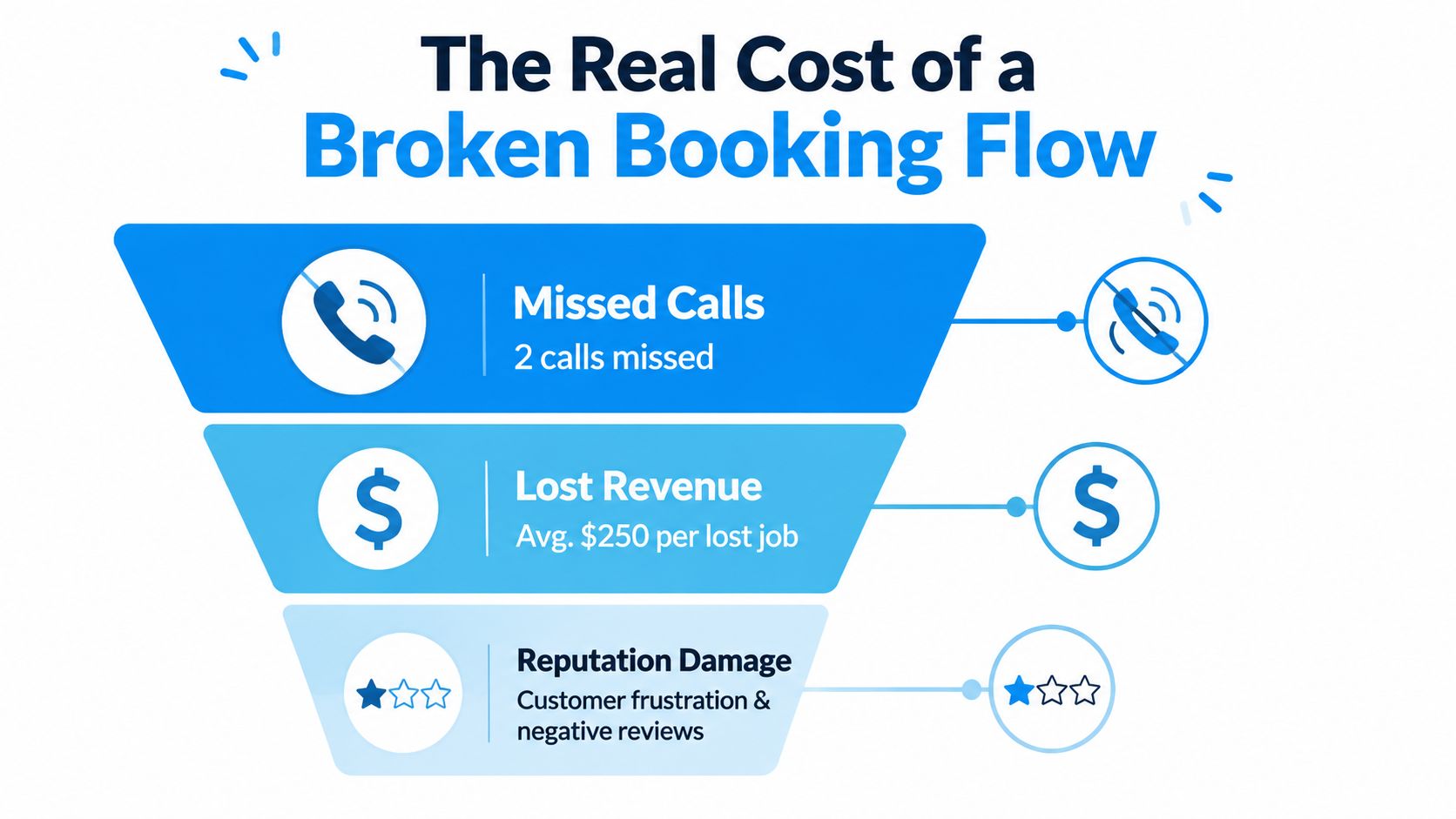
It's a Saturday morning in Tampa. A residential cleaning owner watches her phone light up while her crew is already on three jobs. She misses two calls. One voicemail never gets returned, and a quote that should have closed at $280 goes to a competitor who texts back in eight minutes.
That lost booking rarely appears as a clean line item in the accounts. Instead, it hides inside a chain of small failures. One lead calls once and disappears because there's no missed-call text-back. Another submits a form without enough property details, so the office has to chase basic information. A dispatcher double-books a slot because the team calendar isn't current, then issues a refund. A customer skips the appointment because no deposit or reminder protected the time.
Where the leakage starts
Each failure has a workflow cause:
- Missed calls: No immediate text tells the caller the business received the inquiry.
- Incomplete intake: No form captures bedrooms, pets, service frequency, access, or special requests.
- Unprotected appointments: No deposit, card-on-file request, or cancellation policy confirms intent.
- Unmanaged availability: No shared calendar accounts for crew capacity, travel, and buffers.
- Lost follow-up: No post-job sequence requests a review or offers a recurring appointment.
The impact is larger than the value of one abandoned quote. A cleaning company that generates $40,000 a month needs its booking process to collect the demand it already paid to attract. If staff spend their day reconstructing conversations, correcting calendar entries, and calling customers who should have received automatic reminders, the business pays for administrative friction instead of productive cleaning hours.
Practical rule: If a lead can enter your business through a channel, that channel needs an owner, an acknowledgment, and a next action.
A working booking system isn't a technology project sitting beside operations. It is the operating backbone that decides whether the company turns inquiries into routes, routes into completed jobs, and completed jobs into repeat revenue. For cleaning operators, it may be the cheapest salesperson they'll ever hire because it responds consistently without waiting for the office to become available.
Designing the Capture to Confirmation Workflow
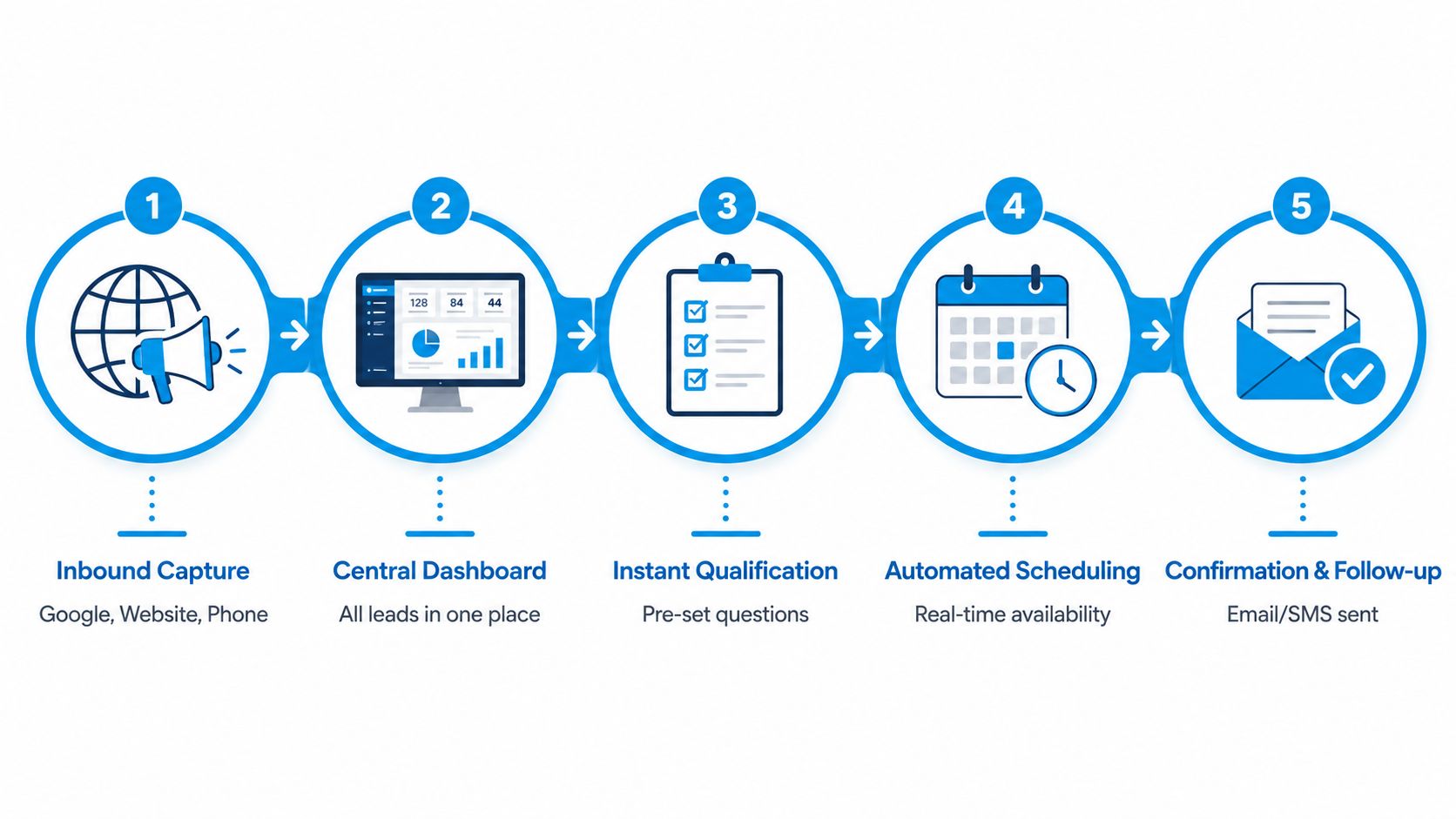
The strongest booking flows behave like one connected chain. A lead shouldn't have to repeat the same details on a phone call, a form, and a payment page. Capture the inquiry once, qualify it quickly, quote it clearly, and make confirmation the natural next step.
Start with one intake point
Every inbound surface should feed one inbox within 60 seconds, including a Google Business Profile form, website widget, Facebook lead ad, and ringing phone line. An automatic acknowledgment should fire immediately, even when a dispatcher still needs to review the request.
The acknowledgment can be simple: “Thanks for contacting Bright Home Cleaning. We received your request and will review the property details shortly. If you need help today, reply to this message or call us back.” It sets an expectation without pretending that a human has already reviewed the job.
Qualification should collect only information that changes the quote or assignment:
- Property size or approximate square footage
- Bedrooms and bathrooms
- Pets and heavy-traffic areas
- One-time, weekly, biweekly, or monthly frequency
- Last professional clean
- Access instructions, parking, gate codes, and alarm details
- Add-ons such as oven, fridge, laundry, or garage cleaning
Turn answers into a decision
A quote template should state the price or price range, identify what can change the final amount, and ask for a booking decision within 24 hours. Avoid sending a vague “we can probably fit you in” message. Customers need to know what the standard service includes, what costs extra, and which appointment windows are available.
For example, a customer requests a $180 biweekly clean through a website form. The form captures a two-bedroom home, one dog, a recent professional clean, and a keypad entry. The system tags the request as residential recurring service, checks the calendar, offers a Tuesday morning window, and sends the quote. The customer accepts, signs the service agreement, pays the deposit through Stripe or Square, and receives a calendar confirmation. With clean data and a prepared template, staff can move that form fill to a confirmed job in under 15 minutes of staff time.
Protect the appointment after the sale
Confirmation needs more than an email receipt. Create a calendar block that includes travel time and an operational buffer, then send a 24-hour text, a morning-of text, and the expected arrival window. Give customers an easy reschedule path instead of making them call an office that may be closed.
Most owners lose the handoff between stages. Marketing captures the lead, the owner quotes it manually, a dispatcher schedules it in a separate calendar, and nobody confirms that payment, crew assignment, access notes, and customer expectations agree. The fix is not more fields. It is a single record that follows the job from first contact through completion.
Choosing Scheduling Software That Fits Cleaning Operations
Cleaning operators shouldn't choose software from a generic feature checklist. The right platform has to reflect how crews move, how recurring work repeats, and how customers pay at or after the appointment.
Apply four filters first:
- Route density and travel buffers: Can dispatchers group nearby jobs and protect realistic travel time?
- Recurring job handling: Can the system preserve cadence, preferred windows, visit duration, crew size, and add-ons?
- Crew assignment logic: Can it distinguish a solo cleaner from a multi-person team and show who is responsible?
- Payment and tip capture: Can staff take deposits, cards, and tips without forcing every customer into unwanted recurring billing?
For recurring clients, the booking record should hold the fixed cadence, preferred day and time window, estimated duration, crew size, base price, and separately billed add-ons. A biweekly customer might be scheduled for Tuesdays from 9:00 to 11:00 with a two-person crew and oven cleaning as an add-on. Deelo's recurring client scheduling guidance illustrates the level of detail dispatchers need.
A practical shortlist
| Tool | Best For | Recurring Jobs | Route Buffers | Price Tier |
|---|---|---|---|---|
| Jobber | Small service companies wanting a polished all-in-one workflow | Strong | Available, verify configuration | Mid-market |
| Housecall Pro | Residential operators needing booking, payments, and customer communication | Strong | Available, verify route controls | Mid-market |
| ServiceTitan light tier | Growing operations evaluating deeper field-service controls | Strong | Stronger operational depth | Higher |
| Connecteam | Teams focused on workforce coordination and staff communication | Useful with setup | Depends on configuration | Low to mid-market |
| Workiz | Service businesses combining communication, scheduling, and dispatch | Useful | Available, verify crew workflows | Mid-market |
| Google Calendar plus Zapier | Owners building a lower-cost custom stack | Possible, often manual | Custom, but fragile | Low software cost |
Jobber and Housecall Pro are polished, but operators should check how easily they can export and reuse customer data. A Google Calendar plus Zapier stack can be inexpensive and flexible, but it becomes vulnerable when the dispatcher is sick, a workflow breaks, or a team member changes a field name.
Before month three, ask whether the tool can handle multi-crew teams on one property, surface customer notes at the job site, accept deposits without forcing recurring billing, and text from a local number rather than a short code. The cleaning business scheduling software comparison can help frame that evaluation.
A simple decision rule works well. Under 20 jobs a day, an all-in-one platform usually beats a custom stack because fewer handoffs need maintenance. Above 40 jobs a day, a flexible stack may win when route logic, data ownership, and specialized dispatch rules matter more than setup simplicity.
Connecting Your CRM Calendar and Payment Stack
The integration layer determines whether booking data remains useful after the customer submits the form. Start with the inquiry record, not the software brand. Capture the customer's name, address, square footage, service type, frequency, access details, and lead source in a consistent structure.
The CRM should assign tags for service category, recurring versus one-time work, and acquisition channel. A confirmed booking should then push into a shared calendar that respects team capacity, travel buffers, and recurring visit rules. Technician Google or Outlook calendars need two-way synchronization so a dispatch change reaches the people doing the work without a manual copy-and-paste step.
Map the operational handoffs
| System | Key Data Synced | Sync Direction | Failure Risk If Skipped |
|---|---|---|---|
| Lead form or phone system | Contact details, property information, source | Inbound to CRM | Incomplete records and slow quoting |
| CRM | Tags, customer history, service type, status | Two-way where supported | Leads routed to the wrong workflow |
| Scheduling calendar | Date, window, crew, duration, travel buffer | Two-way | Double bookings and stale availability |
| Payment processor | Deposit status, card authorization, invoice details | Two-way | Unprotected slots and manual collections |
| Review and follow-up system | Completion status, feedback request, reactivation date | Outbound and inbound | Missed reviews and weak retention |
Payment intent belongs inside booking, not in a separate administrative process. Use a deposit or card-on-file request to protect the appointment, then use the stored method for post-job invoicing and tipping when the customer has agreed to that arrangement.
Native integrations often cover the basic path but miss edge cases. Webhooks, Zapier-style automations, or a small middleware layer can pass a status change from the CRM to the calendar, trigger a payment request after confirmation, or create a follow-up task after completion. These workarounds need monitoring because automation that fails without warning is worse than a visible manual task.
The common failure points are duplicate contacts, missed tag routing, and stale calendar entries. Define one customer identifier, standardize field names, and create an exception queue for records that fail to sync. A useful CRM integration explanation can help teams document which system owns each field before connecting tools.
Scripts and Templates That Convert More Inquiries
Scripts should protect the essentials without making staff sound rehearsed. The best version gives an employee a short route through the conversation, then leaves room for judgment.
Use channel-specific language
Inbound call
“Thanks for calling ClearNest Cleaning, this is Maya. I can check availability for you. Is this a standard clean, a deep clean, a move-out, or another service? About how many bedrooms and bathrooms are there, do you have pets, when was the last professional clean, and how will the team access the property?”
If the customer answers quickly, close the qualification loop: “I have what I need to price the visit. I can offer Tuesday morning or Thursday afternoon. Which window works better?”
Missed-call text back
“Hi, this is Maya from ClearNest Cleaning. We missed your call, but we'd be glad to help. Reply with the property size, preferred service, pets, and best day, or call us back and we'll check availability.”
Web form follow-up
“Thanks for requesting a quote for your biweekly home clean. We have your two-bedroom property and dog noted. Was the home professionally cleaned recently, and is keypad access available? Once confirmed, I'll send the available appointment window and total.”
Live chat
“Are you looking for a one-time deep clean or recurring service? I'll need the bedroom and bathroom count, pets, last professional clean, and any access notes to recommend the right appointment.”
The phone call script resource offers a useful starting point for adapting language across service businesses.
Give the customer a clear next action
Confirmation text:
“Your cleaning is confirmed for Tuesday, 9:00–11:00 AM. The team will arrive within that window. Please secure pets, share access instructions, and reply here if you need to reschedule.”
Deposit request for a hesitant lead:
“We can hold the Tuesday morning slot once the deposit is received. The deposit applies to your cleaning total, and the confirmation message will include the reschedule policy. Would you like me to send the secure payment link?”
Reactivation message:
“Hi Jordan, we cleaned your home previously and wanted to check whether you'd like to schedule another visit. We can review your prior service notes and look for a recurring or one-time opening.”
A first-time deep-clean inquiry needs reassurance about scope, access, and what the team will inspect. A weekly client wants speed and continuity: “Your usual Thursday window is available. Should I keep the same crew and notes?”
When a customer objects to price, use a variation that protects scope: “I understand. The quote reflects the property size and the requested deep-clean tasks. I can remove the oven add-on and send the revised total.” Or use a value-based variation: “Our standard visit includes the rooms we discussed, and the deposit reserves the crew and arrival window. Would you prefer the standard clean rather than the deeper package?”
These are guardrails, not rigid scripts. Staff should sound human, but they shouldn't forget the questions that prevent an inaccurate quote.
Automation With a Human Escalation Path
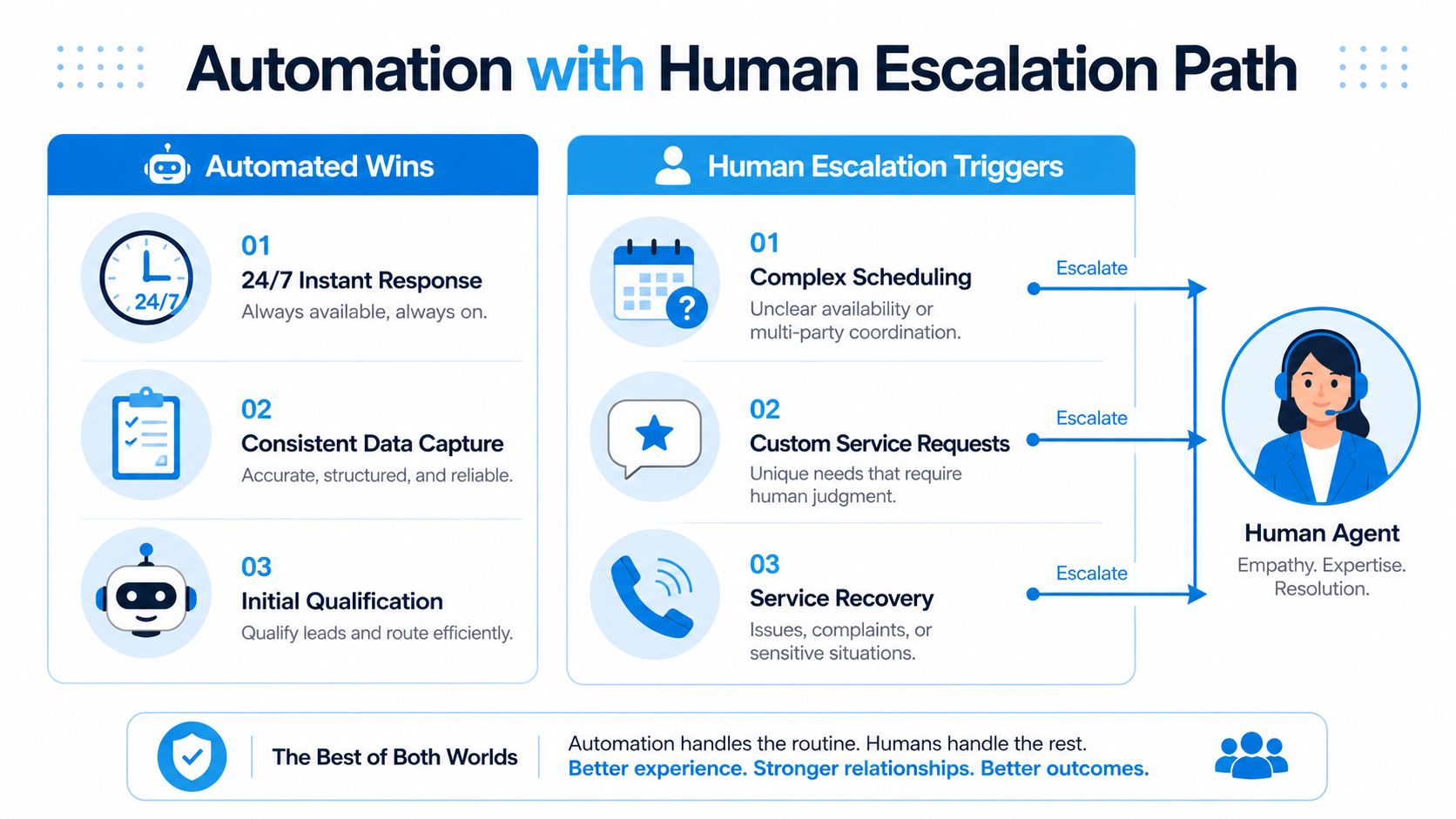
Fully automated booking doesn't maximize revenue for every cleaning inquiry. Automation handles speed and consistency well, but customers often want a real person when the property, timing, or risk is unusual. One survey reported that 87% would rather speak with a real person than an AI system when contacting a local home service, 82% had already asked to be transferred to a human, and 85% believed businesses should clearly disclose AI use. The survey summary from CMM highlights why an automated-only front desk can create friction.
Automate the predictable work
Use automation for instant acknowledgment, 24/7 lead capture, consistent qualification questions, and appointment scheduling for low-friction jobs. A routine recurring residential clean with clear access instructions shouldn't wait for an office employee to return from a route.
Escalate when uncertainty creates operational or customer risk. Useful triggers include:
- A job above the company's chosen dollar threshold
- Move-out or post-construction requests
- Hoarding or unusually hazardous conditions
- More than two clarifying questions from the customer
- Damage complaints, redo requests, or disputes about service quality
- Requests involving unusual access, fragile property, or strict timing
The handoff must carry context. The human agent should see the property details, prior customer history, requested service, lead source, conversation transcript, and the exact question that triggered escalation. Asking the customer to repeat everything makes automation feel like a barrier instead of assistance.
Staff the exception path deliberately
Set response expectations for escalated inquiries and assign coverage windows across time zones when the business serves multiple regions. Without clear ownership, every “human handoff” becomes a shared inbox that nobody watches.
Recepta.ai is one option for a cleaning operation that needs an AI receptionist to answer inbound calls, collect job details, schedule appointments, and escalate conversations to human support. Evaluate it against the same requirements as any other platform, especially calendar behavior, data logging, local-number texting, and the quality of context passed to the agent. The AI appointment booking overview provides additional product context.
Operating rule: Automate the routine, escalate the uncertain, and measure the two paths separately.
Track whether automated-only inquiries convert, whether escalated inquiries convert after human contact, and where customers abandon each path. That attribution shows whether automation is removing friction or just moving the bottleneck.
Metrics That Prove Your Booking System Is Working
A booking dashboard should help an owner decide what to fix on Monday morning. Five measures connect front-office behavior to revenue: lead-to-quote rate, quote-to-confirmation rate, first-touch response time, no-show and cancellation rate, and revenue per booked hour.
Use these formulas consistently:
- Lead-to-quote rate: Qualified leads with a quote divided by total qualified leads.
- Quote-to-confirmation rate: Confirmed bookings divided by quotes sent.
- First-touch response time: Time from inquiry receipt to the first acknowledgment or human response.
- No-show and cancellation rate: Missed or canceled appointments divided by total scheduled appointments over a 30-day baseline.
- Revenue per booked hour: Confirmed service revenue divided by scheduled cleaning hours.
Some industry guides put quote-request conversion at about 23%, while intelligent scheduling automation is reported to raise conversion to 67% and reduce administrative overhead by 68%. Treat those figures as directional benchmarks from the cleaning appointment booking playbook, not as promises for every operation.
No-shows are another visible warning. Service businesses commonly see 10% to 25% missed appointments without reminders, with published benchmarks averaging around 23%, while reminder-and-recovery sequences can reduce no-shows to roughly 3% to 5%. Schedly's scheduling statistics provides the cited benchmark and the recommended calculation method.
| Metric | Formula | Benchmark | Trigger Review If |
|---|---|---|---|
| Lead-to-quote rate | Quotes divided by qualified leads | Compare against your historical baseline and the cited 23% guide benchmark | Qualified inquiries remain unquoted |
| Quote-to-confirmation rate | Confirmed jobs divided by quotes | Compare against the cited 67% automation benchmark | Customers receive quotes but don't select slots |
| First-touch response time | Inquiry timestamp to first response | Review speed by channel | Calls and forms sit until staff are free |
| No-show rate | Missed appointments divided by scheduled appointments | Use the cited 10% to 25% unreminded range as a warning context | Reminders and rescheduling aren't reducing misses |
| Revenue per booked hour | Service revenue divided by scheduled hours | Establish your own route-level baseline | Busy days produce weak revenue density |
Pull the data from your CRM and scheduling platform through a weekly export or a Looker Studio view. Check email deliverability before trusting automated follow-ups, especially if confirmation messages go unanswered. An email spam checker can help identify whether booking emails are reaching customers reliably.
Print the scorecard for the Monday huddle. Assign one owner to each weak metric, review the specific failed bookings behind it, and change one workflow step before the next meeting.
Recepta.ai helps cleaning businesses answer inbound calls, capture job details, schedule appointments, and follow up while preserving a human escalation path for complex requests. Visit Recepta.ai to see how its receptionist workflow can connect your booking channels, calendars, and CRM records.