Customer Service Small Business: 2026 Playbook
A missed call at 4:47 p.m. often tells you more about your business than your marketing dashboard does.
If you're a plumber on a job, a dental office running behind, or a small law firm in back-to-back consultations, that call might be a new customer, a current client with an urgent issue, or someone ready to book. If nobody answers, they don't usually wait around. They call the next business.
That's why customer service in a small business isn't a soft skill or a nice extra. It's an operating system. The companies that treat it that way stop losing leads to voicemail, stop relying on memory and hustle, and start turning routine interactions into booked jobs, filled calendars, and repeat business.
Why Great Service Is Your Secret Growth Engine
Small businesses carry an enormous share of the economy. As of 2025, the United States had 36.2 million small businesses, representing 99.9% of all U.S. businesses, and those firms employed 62.3 million people, according to the U.S. Small Business Administration 2025 state profile. That scale matters because service problems that look small inside one shop are happening everywhere: missed calls, slow callbacks, unclear appointment windows, and inconsistent follow-up.
For a small operator, service usually breaks in ordinary moments. The owner answers calls until business picks up. Then the phone starts ringing while they're driving, quoting, installing, treating patients, or meeting clients. A front desk person gets overloaded. Messages pile up. Nobody notices the pattern because each missed interaction feels isolated.
Service goals that fit a real small business
You don't need a contact center to manage customer service well. You need a short list of standards that your team can follow every day.
Start with a handful of practical questions:
- Response speed: How fast do you reply to a new inquiry?
- Booking success: How often does an inquiry turn into an appointment or next step?
- Issue closure: Are common problems getting solved in one interaction?
- Follow-up discipline: Does every customer get a confirmation, update, or callback when promised?
If you want a simple framework, the customer service best practices guide from Recepta.ai is a useful reference point for setting standards around consistency and responsiveness.
KPIs that matter more than vanity metrics
Most small businesses don't need a wall of dashboards. They need a few numbers they can trust and act on.
Practical rule: If a metric doesn't help you change staffing, scripts, scheduling, or follow-up, it's probably not worth tracking.
Keep it simple:
- First Contact Resolution: Did the customer get their answer, booking, or next step on the first interaction?
- Customer Satisfaction: After a visit or call, ask one short question about how the interaction went.
- Net Promoter Score: Useful if you already have enough repeat customers and want to understand loyalty trends.
- Missed-call recovery rate: Of the calls you missed, how many received a callback and outcome?
- No-response leads: How many inquiries never got a live response at all?
A plumbing company can track this in a spreadsheet. Date, caller, reason for contact, answered or missed, callback sent, booked or lost. A dental office can add referral source and appointment type. That alone will expose patterns quickly.
What works and what doesn't
What works is boring on purpose. Clear service standards, one owner of the inbox and phone queue, and a routine for missed-call follow-up. What doesn't work is assuming good intentions will cover for weak process.
Great customer service small business teams don't win by sounding polished. They win by being reachable, clear, and reliable. That's what customers remember.
Map Your Customer Journey to Find Hidden Gaps
Most small businesses already know their customers fairly well. What they often haven't mapped is the sequence of interactions that determines whether a stranger becomes a paying customer and whether a paying customer comes back.
For an appointment-led business, that journey is rarely complicated. It's just full of places where communication drops.
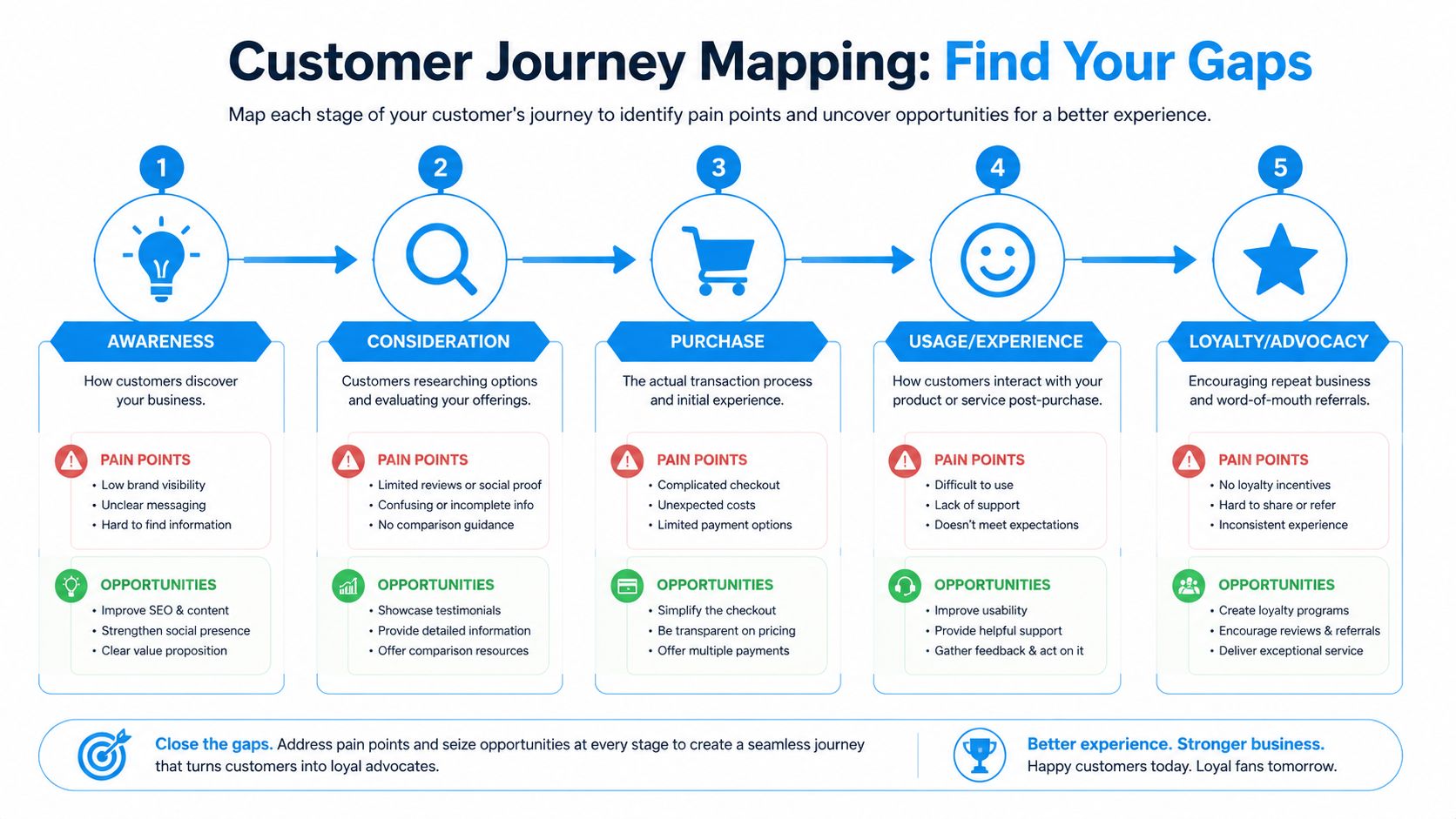
A simple map for a plumbing company or dental office
Take one customer type and walk through the path on paper.
For a plumber, it may look like this:
- Discovery through Google, referral, or yard sign
- First contact by phone, web form, or text
- Scheduling an estimate or service call
- Service delivery on site
- Payment and follow-up after the job
For a dental office, the stages are similar but the friction changes. Insurance questions, appointment reminders, rescheduling, and treatment follow-up all matter more than dispatch windows.
The omnichannel customer experience article from Recepta.ai is helpful here because it pushes you to view phone, text, web, and follow-up as one experience instead of separate tasks.
Where small businesses usually lose the customer
Many small business guides miss the fundamental operational issue. They talk about being responsive, but not about what happens when calls come in after hours or while staff are busy. The Warespace article on small business customer service highlights that this is a major underserved angle, and it matches what shows up in actual operations every week.
The common failure points are familiar:
- After-hours inquiries: A customer calls at night, hears voicemail, and moves on.
- Busy-period overflow: The front desk is helping one person while three others try to book.
- Incomplete intake: Staff answers the call but forgets to capture job type, urgency, or contact details.
- Weak follow-up: Someone says, "We'll call you back," and nobody owns it.
- Hand-off confusion: The office promises one thing, the field team knows another.
The biggest leak in many small businesses isn't poor attitude. It's unowned follow-up.
How to spot your hidden gaps fast
You don't need special software to start. Print your last week of calls, texts, and form submissions. Then mark each one with a simple label:
- Answered and resolved
- Answered but pending
- Missed and recovered
- Missed and lost
- Received after hours
- Needed escalation
Do this for one week and you'll usually find your biggest service problem. In home services, it's often missed-call recovery. In clinics, it's often scheduling friction. In professional services, it's often slow follow-up after the initial inquiry.
That map becomes your operating blueprint. Once you see where the customer gets stuck, it becomes much easier to fix the process instead of blaming the team.
Build Your Playbook with Essential Workflows and Scripts
A strong service culture is good. A repeatable service playbook is better.
Small businesses get into trouble when every employee answers differently, promises different timelines, or decides in the moment what counts as urgent. A playbook fixes that. It turns common interactions into standard workflows that are easy to train, easy to audit, and much easier to improve.
The core rule for scripting
Scripts shouldn't make your team sound robotic. They should make sure your team doesn't forget the important parts.
Use scripts for structure, not performance. The customer should feel heard. The employee should know exactly what to ask, what to confirm, and what happens next.
If you need examples to model from, the phone answering scripts guide from Recepta.ai is a practical starting point.
Small Business Customer Service Playbook
| Scenario | Goal | Key Steps / Script Snippet |
|---|---|---|
| New lead inquiry | Capture the lead and move to next step | Thank them for calling, ask what they need, collect name and contact info, confirm service area or fit, offer next available appointment or consultation. Script snippet: “I can help with that. Let me get a few details so we can get you scheduled correctly.” |
| Appointment scheduling | Avoid errors and reduce back-and-forth | Confirm service type, preferred time, address or location, special instructions, and best callback number. Close by repeating the appointment details. |
| Common complaint | De-escalate and solve or route correctly | Acknowledge the issue, restate the problem, set the next step, assign an owner. Script snippet: “I understand why that's frustrating. Let me confirm what happened and tell you exactly what we'll do next.” |
| Post-service follow-up | Strengthen retention and catch issues early | Send a same-day or next-day follow-up, ask if everything was completed as expected, invite feedback, and request a review only after confirming satisfaction. |
Four workflows worth writing down this week
The fastest way to improve customer service small business performance is to document the interactions that happen every day.
- New inquiry workflow: Decide who answers, what qualifies a lead, and when it should be booked versus routed for callback.
- Reschedule workflow: Give staff approved language and guardrails so they don't create calendar chaos.
- Complaint workflow: Define which issues a front-line employee can resolve and which go to a manager or owner.
- Review request workflow: Only ask after the customer confirms the job or appointment went well.
A few scripts that work in real life
For a pest control company:
“Thanks for calling. I can help get this started. Are you dealing with an active issue right now, or are you looking for a quote?”
For a dental office:
“We'd be glad to help. Are you calling for a routine visit, or is this something urgent?”
For a law office intake call:
- Start with reassurance: “You reached the right office.”
- Set boundaries early: “I can collect the basics and make sure the right person follows up.”
- Confirm next step: “You'll hear from us by tomorrow morning.”
Good playbooks reduce stress for staff because they remove guesswork. They also make service more consistent for customers, which is what builds trust.
Staffing and Training for Consistent Customer Care
In many small businesses, the “customer service team” is whoever picks up first. That might be the owner, a scheduler, a hygienist between patients, or a technician returning calls from the truck. Hiring more people isn't always the answer. Training the people you already have usually comes first.

The most effective small teams teach three things well: how to listen, how to guide the interaction, and how to hand off cleanly. That's why understanding the core duties of a front-line role matters. The overview of what receptionists do from Recepta.ai is useful because it shows that the job isn't just answering. It's triage, information capture, tone setting, and follow-through.
Train for consistency, not personality
You don't need everyone to sound the same. You do need everyone to cover the same essentials.
Focus training on:
- Active listening: Let the customer finish, then restate the issue in plain words.
- Positive control: Guide the call without rushing the person.
- Clear ownership: End every interaction with a named next step.
- Escalation judgment: Know when a manager, provider, or owner needs to step in.
A cleaning company office manager, for example, doesn't need to solve every billing dispute on the spot. They need to acknowledge the concern, gather the facts, and route it correctly without sounding evasive.
What a solid escalation rule sounds like
High-emotion and high-stakes conversations should never get trapped with the wrong person.
Use simple escalation triggers such as:
- Emotional calls: upset customer, complaint, or trust issue
- Money issues: billing conflict, refund request, disputed charge
- Sensitive cases: legal, medical, privacy, or reputation concerns
- VIP relationships: key referral partner, major account, long-term patient
If the issue affects trust more than logistics, escalate it.
That one rule prevents a lot of damage. Small businesses don't need a large service department. They need a team that knows how to handle the first minute well and when to involve the right human.
Smart Tech and Automation Your Business Can Actually Use
At 7:12 p.m., a homeowner calls a plumber about a leaking water heater. No one answers. If that call goes to voicemail and sits until morning, the job usually goes somewhere else.
That is the automation problem small businesses should solve first. Not flashy AI. Not a bloated software stack. Basic coverage for missed calls, after-hours inquiries, and routine requests that would otherwise disappear.
Start with one operational gap
Small teams get better results when they pick one problem and fix it well. The AWS guide to AI customer service for SMBs recommends reviewing a week of tickets and calls, grouping them by topic and volume, and setting only a few success metrics before expanding.
For a dental office, that first use case might be after-hours appointment requests. For an HVAC company, it might be missed-call text back and emergency triage. For a law office, it might be collecting intake details so the attorney starts with context instead of a blank slate.
The point is simple. Fix the gap that is already costing revenue or frustrating customers.
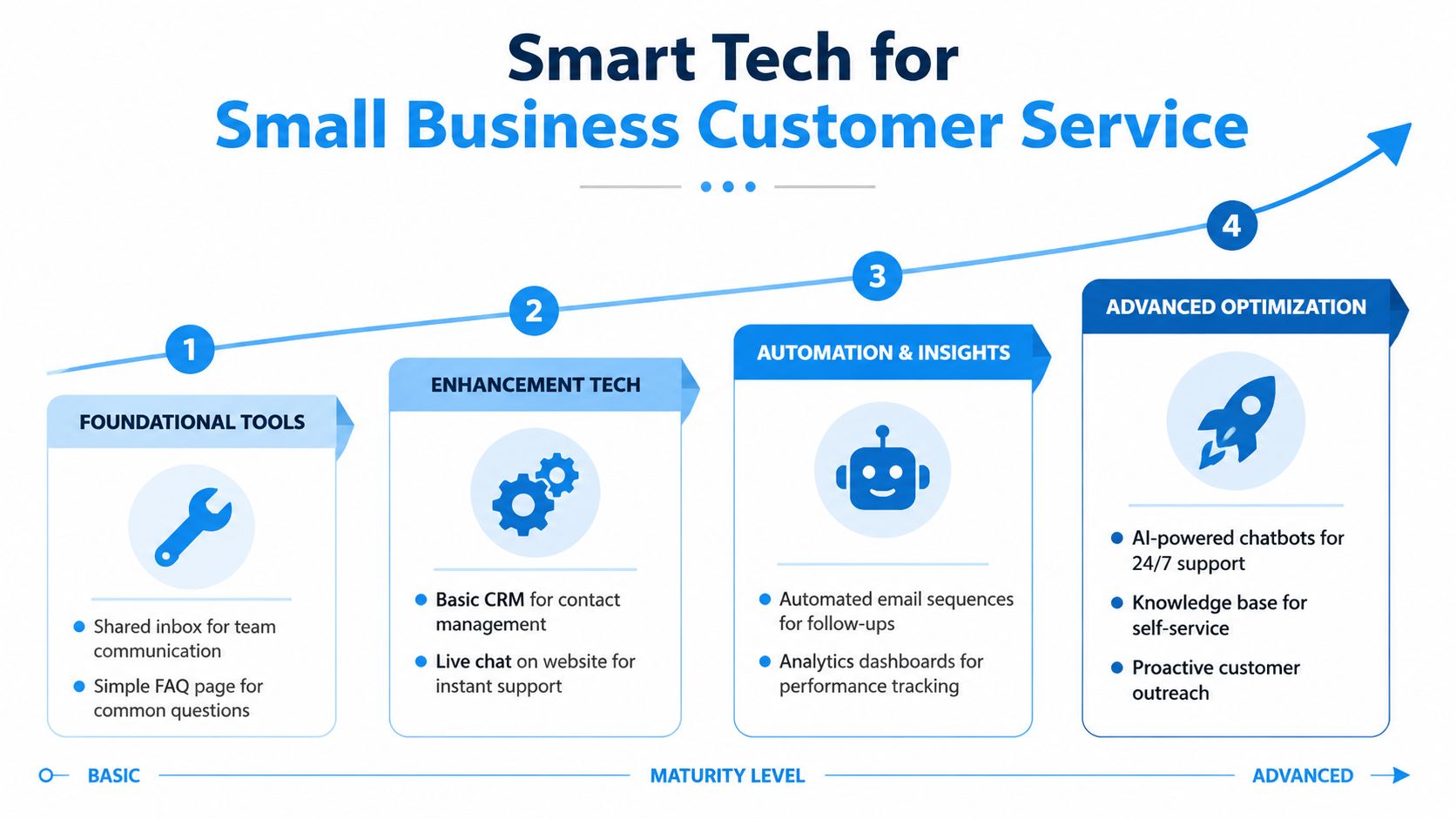
Use a maturity model that fits a small team
Small businesses do not need a full system replacement to improve service. They need tools that match how the business runs.
Layer one covers the basics. Shared inbox, reliable call forwarding, an up-to-date FAQ page, and a calendar the team trusts.
Layer two adds structure. A simple CRM, web chat, text confirmations, and a standard way to label inquiries.
Layer three adds practical automation. Missed-call text backs, appointment reminders, follow-up messages, and a dashboard that shows what came in and whether anyone handled it.
Layer four brings in AI for specific jobs. Voice answering, intake, knowledge-base responses, and routing based on urgency or topic.
That order matters. If your scheduling process is messy, adding AI just lets you create confusion faster.
Where automation helps, and where a person should step in
Analysts at Salesforce found that AI is handling a growing share of service work, while businesses continue investing in channels like chat and SMS, as shown in its customer service statistics roundup. Small businesses can use that shift without copying enterprise service models.
The best use cases are narrow and repetitive:
- Routine intake: new leads, appointment requests, location checks
- Status updates: confirmations, reminders, basic policy questions
- After-hours coverage: collecting details while staff is offline
- Routing: sending the issue to the right person with notes attached
Some interactions should go straight to a human or escalate fast:
- Upset customers
- Complicated service failures
- High-value estimates or consultations
- Financial, legal, medical, or privacy-sensitive issues
The Talkdesk article on small business customer service makes an important point. Automation works only when the handoff rules are clear.
A good setup sounds like this: if the caller wants to book a standard cleaning, the system can handle it. If the caller says they were charged twice, are in pain, or need emergency service tonight, the system gathers the basics and alerts the right person.
Define escalation paths before you turn anything on
This is the step owners skip.
An AI receptionist or automated workflow should never leave the customer wondering whether anyone is involved. Set the rules in advance. What counts as urgent. Who gets notified. How fast a person responds. What the customer hears while that handoff happens.
For example, a plumbing company might set these paths:
- No answer during business hours: capture the request, send an immediate text confirmation, and queue a callback within 10 minutes
- After-hours emergency: collect the issue, location, and callback number, then notify the on-call tech
- Billing complaint: log details and route to the office manager the next morning
- Repeat caller with a complaint tone: bypass automation and send to a person
That is how automation supports the human side instead of weakening it.
The real trade-off
Bad automation reduces payroll and increases irritation. Good automation protects revenue, saves staff time, and gives customers a clear next step.
A missed call from a new patient, a homeowner, or a parent trying to book a visit is not just a missed interaction. It is a missed chance to help, book, and build trust. The right technology closes that gap first, then handles repetitive work once the handoff rules are solid.
Measuring What Matters to Drive Real Improvement
Most service measurement in small businesses fails for one reason. It tracks activity instead of outcomes.
Counting calls is easy. Knowing whether those calls turned into resolved issues, booked appointments, or repeat business takes a bit more discipline. That discipline is what improves operations.

Look for operational signals, not vanity
Small and mid-size businesses get the most value from tools that produce real-time insight across interactions. NICE notes that aggregating touchpoints into a single dashboard supports faster escalation, better routing, and fewer unresolved issues in its guide to contact center digital transformation for smaller businesses.
That matters because service problems usually show up as patterns:
- Calls spike at certain times and nobody is available
- One type of complaint keeps repeating
- One employee resolves scheduling issues cleanly while another creates callbacks
- Website inquiries sit longer than phone leads
- Customers sound frustrated in the same part of the process
A weekly review that small teams will actually do
You don't need a quarterly presentation. You need a 20-minute weekly review.
Pull these items:
- Missed interactions: Which calls, texts, or forms didn't receive a timely response?
- Resolution quality: Which issues got solved in one touch, and which created repeat contacts?
- Escalation patterns: What kinds of situations needed owner or manager involvement?
- Customer sentiment: Where did frustration show up most often?
- Script failures: Which phrases or steps seem to create confusion?
For example, if a dental office sees repeated confusion around insurance verification, that isn't just a front-desk issue. It's a process issue. If a plumbing company sees callbacks piling up every afternoon, that's a coverage design issue.
Use data to coach, not punish
The fastest way to make dashboards useless is to turn them into scoreboards for blame.
Use them to improve handoffs, revise scripts, and shift staffing coverage. If one intake question consistently leads to better scheduling accuracy, make it standard. If after-hours contacts often need the same next-day follow-up, build that sequence into your system.
Good measurement closes the loop. It tells you whether your playbook is working in practice, not just whether your team stayed busy.
Your Path to Exceptional Customer Service
Exceptional service in a small business doesn't come from having a giant team or expensive software stack. It comes from building a system that catches what used to fall through the cracks.
That system starts with simple standards. Then it gets stronger when you accurately map the customer journey, write down the core workflows, train your team to handle the first interaction well, and use automation carefully where it improves access instead of harming trust.
The two biggest misses for many businesses are still the same. They lose value after hours, and they adopt automation without defining human handoff rules. Fix those, and your service operation starts pulling its weight as a growth engine instead of acting like a daily fire drill.
If you run a home service company, dental office, clinic, law firm, or another appointment-driven business, don't try to perfect everything at once. Start with the place customers disappear most often. For many teams, that's the phone.
Customer service small business performance improves fastest when you make the next interaction easier to answer, easier to route, and easier to close. Do that consistently, and you'll spend less time chasing missed opportunities and more time serving customers who got through.
If missed calls, after-hours inquiries, and inconsistent follow-up are costing you business, Recepta.ai is built for exactly that gap. It combines AI call handling with human escalation so your business can capture leads, schedule appointments, and respond professionally without forcing every interaction into automation.