Call Screening Software Guide to Boost Business Efficiency
You know the feeling. The phone rings, the front desk is already handling a walk-in, two calls go to voicemail, and one of them turns out to be a high-value lead who never calls back. At the same time, spam calls keep interrupting real work. Call screening software exists to stop that leak at the front door, qualify the caller, and push the right conversation into the right workflow before a human wastes time on the wrong one.
Introduction to Call Screening Software
A good receptionist does three things fast. They decide who needs attention now, who can wait, and who shouldn't get through at all. Call screening software tries to do that same job automatically, but with rules, transcripts, routing logic, and system handoffs that a person can't maintain at scale.
That matters because the market around screening has outgrown the old “block spam” idea. One independent estimate places the call monitoring software market at USD 2.8 billion in 2024, with growth projected to USD 6.4 billion by 2033 at a 9.6% CAGR from 2025 to 2033, showing that this category has become part of serious business operations rather than a niche telecom add-on (market estimate). A separate contact-center report ties the broader category to real-time call monitoring, agent assignment, and centralized reporting, which is exactly why screening now sits close to sales, service, and compliance workflows instead of living in isolation (contact center software market release).
Call screening functions as an intelligent gate, equipped with memory. The gate doesn't just open or close, it checks the caller, applies a policy, and decides where the call should go next. That's why businesses use screening to protect revenue, reduce interruptions, and make sure important calls don't disappear into voicemail.
A practical way to judge it is simple, does the tool only reject calls, or does it also log what happened, route the call, and hand the outcome to your CRM or team workflow. That question comes up again and again because the main value isn't just fewer interruptions, it's cleaner intake, better follow-up, and more reliable reporting. The rest of this guide walks through the concepts, features, integrations, compliance issues, vendor checks, and ROI signals that help teams make that call with confidence.
Understanding Call Screening Software Concepts
The category has moved well beyond basic caller ID. One market estimate puts call monitoring software at USD 2.8 billion in 2024 and projects it to reach USD 6.4 billion by 2033 at a 9.6% CAGR, which reflects how heavily businesses now depend on software that can identify, route, record, and analyze calls (market estimate). That growth makes sense when you look at the core mechanism, screening is no longer a manual yes-or-no decision, it's a structured workflow.
Screening is decisioning before answer
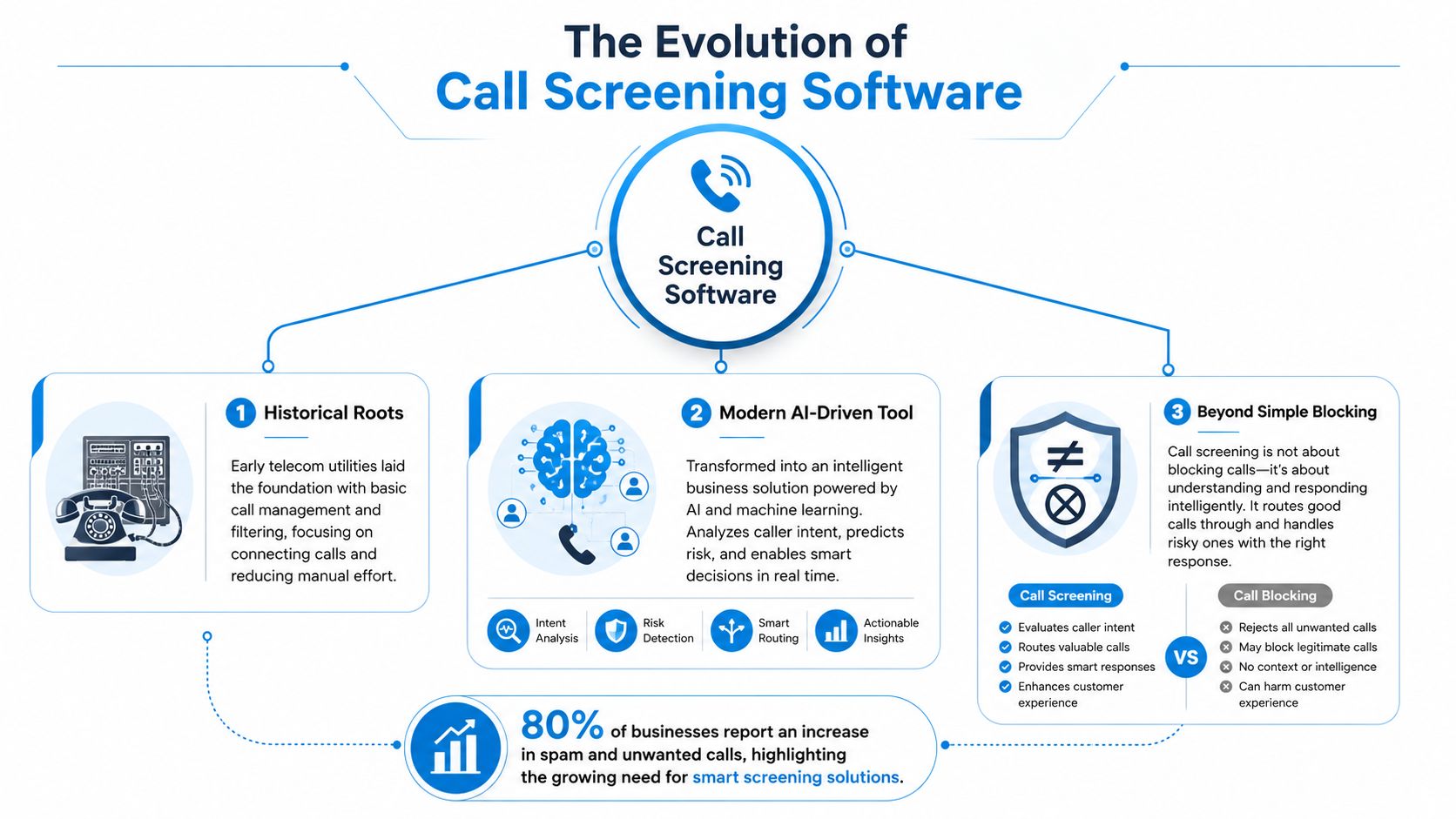
Modern screening uses real-time decisioning before answer. The system collects caller metadata or interaction signals, applies policy rules, and then routes, blocks, redirects, or ends the call based on those rules (technical pattern). That is different from a simple block list, because a block list only says no, while screening can still decide that the caller should reach an on-call technician, a nurse line, a sales queue, or a voicemail path.
Practical rule: if a tool can't explain why it made a decision, it's probably blocking, not screening.
That distinction matters for leaders because screening is a control layer, not just a filter. It can sit in front of a phone line the way a warehouse intake desk sits in front of a loading dock. The desk doesn't unload the truck, but it decides which dock the truck uses and whether the paperwork is complete.
The technology also shows up at the carrier or enterprise-network level. One platform description says inbound and outbound voice calls and SMS can be filtered with black or white lists while processing telecom signaling protocols such as CAMEL, INAP, MAP, and ISUP, which supports subscriber filtering, corporate filtering, and network protection from malicious external calls (carrier-level call screening). That architecture matters because it can filter earlier in the call path than audio-only methods.
For readers comparing consumer and business tools, Google's Phone app is a useful reference point for live transcription and suggested responses, and it illustrates why workflow handoff is the primary gap. If you need a broader technical backdrop, the company's own language around multilingual AI systems is also useful context for teams thinking about AI for seamless language translation, since call handling often touches cross-language communication.
For a business-oriented example of how the category is framed in practice, the overview at Recepta.ai's screening guide helps illustrate how screening and routing are being treated as operational functions rather than just phone settings.
Core Features and Workflows
The easiest way to understand the workflow is to compare it with a skilled front-desk employee who follows a script. The software listens for a call, checks whether it should be interrupted, asks for context if needed, and then decides whether the caller deserves a live handoff. In a home-services office, that might mean separating a leaking pipe from a routine estimate request.
The screening pipeline from ring to handoff
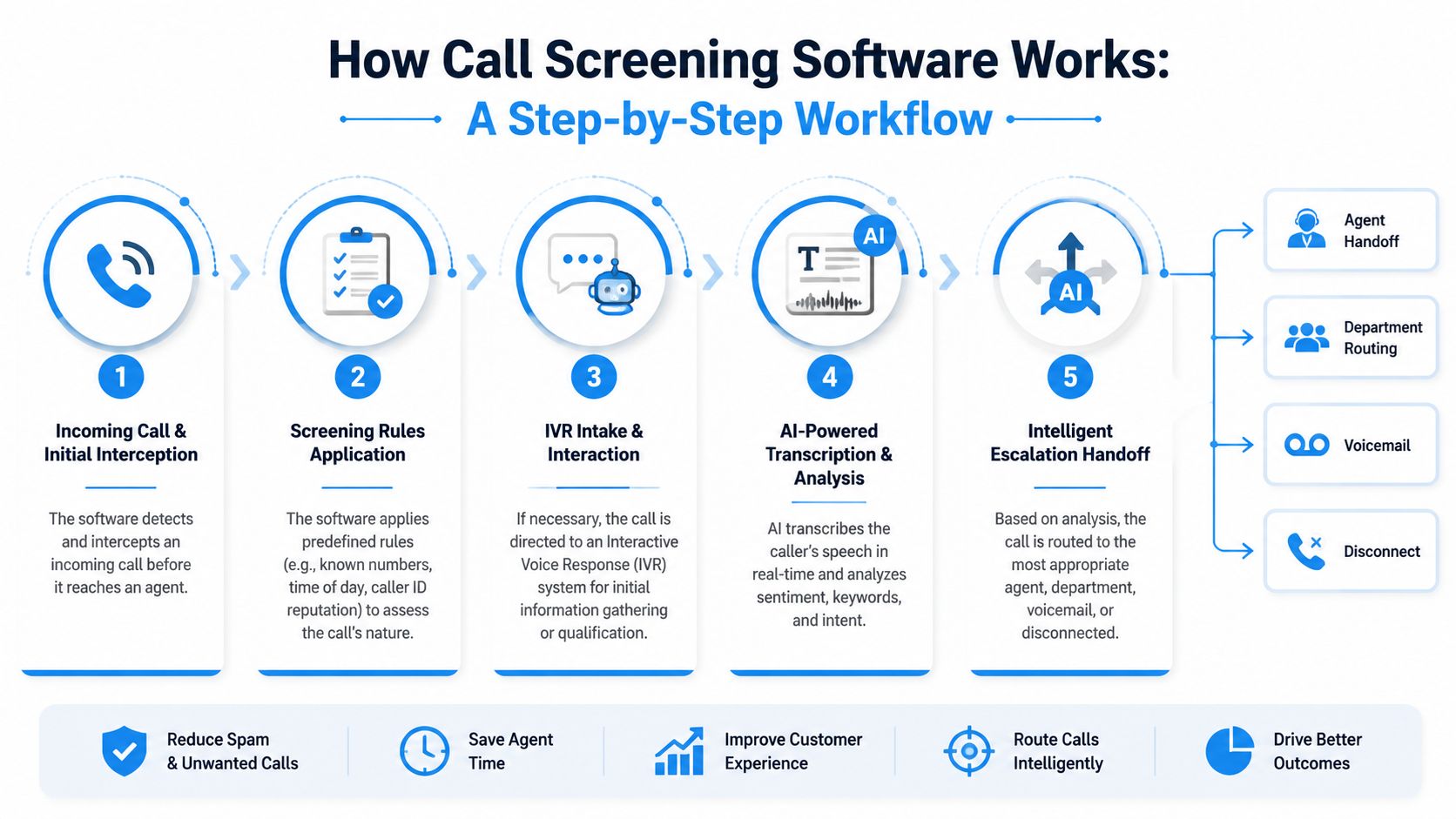
The first layer is the rule set. A system can look at caller history, time of day, reputation, and simple policy rules before the call reaches a person. That makes screening deterministic, which is useful when a business wants the same response every time a known spam source appears.
The second layer is IVR intake. Instead of making a receptionist repeat the same questions all day, the system can ask for a name, issue, urgency, or account detail. That is especially useful when staff are busy, because the caller still gets an immediate response rather than a dead ring.
The third layer is AI-powered transcription and analysis. The software turns speech into text in real time, then looks for intent and urgency. That is the point where a “call” becomes a structured record that can be read, searched, and routed.
The final layer is the handoff. A hot lead can go to sales, an urgent patient call can go to a live human, and a low-priority request can go to voicemail or a queue. The workflow below shows that sequence clearly.
Good screening software doesn't just answer, it decides what happens next.
The practical value is in reducing manual handoffs. If a plumbing company gets a burst-pipe call at 11 p.m., the system can route that to the on-call tech instead of letting the call sit in voicemail until morning. If the caller is just asking for a quote, the same system can capture details and create a record for follow-up.
For teams comparing products, it also helps to think about what happens after the call. The workflow should preserve the caller's intent, the transcript, and the disposition, so the rest of the business can act on it. That's where the internal flow described in Recepta.ai's call management overview is relevant, because screening only becomes useful when the outcome is carried into the next step.
Business Benefits and Outcomes
The payoff starts with fewer wasted calls, but it doesn't end there. Screening works best when it turns a ringing phone into a cleaner intake process, because the call becomes an event with context instead of a disruption with no record. That's why leaders should judge it against lead quality, agent time, and follow-up reliability, not just spam reduction.
What businesses actually gain
One independent reporting source says AI-driven screening boosts issue resolution by 14% per hour and reduces call handling time by 9% in larger call centers (AI screening gains). Those numbers matter because the economics of phone work depend on how quickly the right issue gets to the right person. If a team spends less time sorting misrouted calls, more time goes into solving the call that creates revenue or retains a client.
That also changes how missed calls are handled. A traditional voicemail box is passive. Screening can turn that same moment into a structured intake, so the caller leaves a reason, urgency, and callback context before a staff member ever picks up the thread. In practical terms, that means a dental office can separate an emergency toothache from a routine cleaning request, or an insurance agency can route a policy question to the correct queue instead of losing the lead in a general mailbox.
Where the ROI shows up
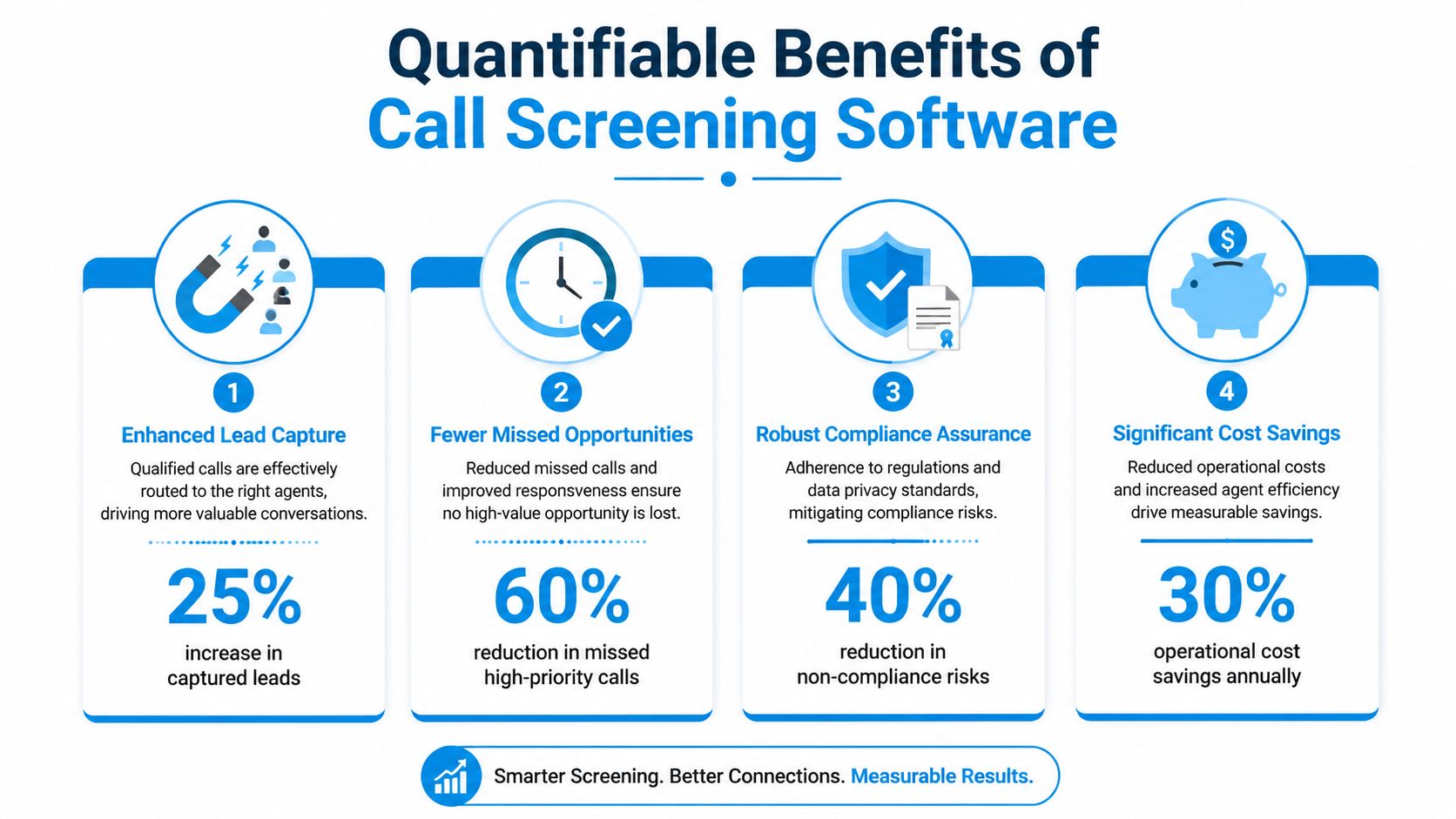
The strongest ROI usually appears in three places. First, lead capture, because qualified callers get routed faster. Second, agent productivity, because less time is spent on obviously irrelevant calls. Third, documentation, because the business gets records it can use for callbacks, reporting, or coaching.
If your team can't see the transcript, the reason for the call, and the final disposition, you're only getting half the value.
That's also why software with workflow logging feels different from a basic phone feature. The summary can feed the CRM, trigger a task, or create a follow-up note, so the business doesn't need someone to retype what the caller already said. For teams evaluating customer-service automation, the overview at Recepta.ai's AI benefits article is a useful reference for how AI can reduce friction when it's tied to a process, not used as a standalone gadget.
Industry Use Cases and Integrations
The same screening setup looks very different depending on the industry. A plumbing office cares about emergency routing. A dental practice cares about appointment intake. A law office cares about case qualification. A finance team cares about lead routing, documentation, and follow-up discipline.
How different teams use the same core idea
In home services, the call often starts with urgency. A burst pipe, a furnace outage, or a broken air conditioner needs a faster path than a generic estimate request. Screening can ask for the issue, capture the address, and send the call into the right workflow so the dispatcher doesn't have to start from scratch.
Healthcare and wellness teams use the same logic, but the tone has to be careful. A clinic may want to ask whether the call is routine, urgent, or about an appointment change, then route it to the correct queue. The goal is not just speed, it's avoiding friction for patients who are already stressed.
Law firms need a tighter intake step. Screening can ask the caller to briefly describe the matter, then create a record for a paralegal or attorney to review later. That saves attorneys from answering every unknown call while still keeping promising leads from disappearing.
Finance and insurance teams usually care about structured handoff. Screening can identify whether the caller wants a quote, a claim update, or account help, then push that into a CRM or task list. That creates a cleaner audit trail and a more reliable sales or service handoff.
The practical point is that screening is not just about blocking spam. One industry guide explains that it can answer basic intake questions and route urgent calls differently from routine ones, while also telling buyers to check integration, logging, and setup requirements (industry guide). This is a fundamental operational difference, because the call outcome needs to land somewhere useful.
For integration planning, the checklist should include CRM sync, calendar handoff, messaging alerts, and the ability to work with the current number. A receptionist can remember a missed call, but software has to write it down and push it into the system your team already uses. Without that loop, screening stays at the phone layer and never reaches the business layer.
Security and Compliance Considerations
Call screening also has a risk-management role. The FCC says voice service providers may block certain calls without consumer consent, specifically calls from unassigned, unallocated, or invalid numbers and calls from numbers on the Do Not Originate list, and it recommends anti-spoofing mechanics such as valid caller IDs and rate limiting, with automatic logging for compliance review (FCC call-blocking guidance).
Why compliance needs logging, not just blocking
That guidance matters because a blocked call should still leave a record. If the business later needs to review a suspected spoofing attempt, the software should show what was blocked, when it happened, and why the rule fired. In other words, compliance is not only about stopping bad calls, it's about proving that the system behaved consistently.
Businesses in sensitive fields also need to think about the human side of call fraud. A useful background read on vishing in cyber security helps explain why a screen that looks legitimate can still be malicious, especially when someone tries to exploit urgency or trust on the phone.
A screening policy without logs is hard to audit, and a log without a policy is just noise.
That's why blacklists and whitelists should be configured with care. A number that looks suspicious may still be a legitimate callback path, and a business should avoid rules that create avoidable friction for real customers. The practical answer is to combine blocking rules with reviewable logs and escalation paths, so the company can defend its decisions if a regulator, auditor, or client asks questions.
For teams handling recorded calls or regulated intake, the compliance workflow should also connect to retention and access controls. The internal overview at Recepta.ai's recording compliance guide is relevant here because screening, transcription, and recording often live in the same policy environment.
Evaluating Vendors and RFP Checklist
A vendor demo is easy to overrate. The true test is whether the product fits the way your team answers calls, stores records, and pushes work into the rest of the stack. That's why an RFP should ask about integration depth, routing logic, transcripts, and administrative control, not just phone coverage.
What to ask before you buy
Start with the workflow question. Does the tool screen before answer, or does it alert a human after the phone already rang? Then ask where the transcript goes, who sees the log, and how the disposition is stored.
Next, check the technical fit. If your staff uses a CRM, a calendar, and a shared inbox, the tool should connect to all three without turning the process into duplicate entry. If the setup requires heavy IT help, that should be visible early, not discovered after contract signature.
Here's a simple RFP structure you can reuse:
| Requirement | Why It Matters |
|---|---|
| CRM integration | Keeps call outcomes attached to the contact record and reduces manual re-entry |
| Calendar handoff | Lets booked appointments move straight into scheduling workflows |
| Transcript logging | Preserves the caller's intent for follow-up, coaching, and review |
| Escalation rules | Makes urgent calls reach the right person without delay |
| Current-number compatibility | Avoids replacing a phone number the business already uses |
| Compliance logging | Creates an audit trail for blocked or redirected calls |
| Setup support | Reduces launch friction and shortens time to value |
| Analytics visibility | Shows whether screening is improving routing quality and responsiveness |
A useful vendor should be able to explain how it handles both routine and urgent calls. It should also show where the data lands after the screening decision, because a clean call log is not enough if your team still has to chase the caller manually. If a product can't show structured outcomes, it probably won't save enough time to justify adoption.
For businesses looking at an AI receptionist alongside screening, Recepta.ai is one option that combines call handling, routing, and logging in one workflow. That's only useful if the tool matches your process, though, so the product fit should always come before the brand name.
Implementation Steps and Measuring ROI
A clean launch beats a fast launch. The easiest rollout follows six practical steps, number porting, rule configuration, IVR scripting, CRM integration, staff training, and a go-live checklist. If any of those are skipped, the first week of use usually turns into cleanup.
A rollout plan that people can actually follow
Start by deciding what the system should do with common call types. Then write the routing rules in plain language, so the business can review them without needing a developer in the room. After that, configure the IVR prompts and make sure the intake questions match how your staff already triages calls.
Once the workflow is set, connect the CRM and test the handoff. A legal firm, for example, can track call-to-case conversion for 90 days by comparing screened calls against retained matters, then review whether missed opportunities dropped and whether qualified calls got to the right person faster. That creates a real baseline instead of a guess.
Independent reporting on AI screening says issue resolution rises by 14% per hour and call handling time falls by 9% when screening helps teams capture intent up front (AI screening gains). Those are useful ROI markers because they connect screening to throughput, not just convenience.
Measure success with a small set of KPIs. Look at qualified calls routed, missed high-priority calls, callback speed, and how often staff have to re-enter call details by hand. If the numbers improve and the team complains less about noise, the implementation is probably working.
If you're ready to turn screening into a measurable workflow instead of a nicer phone setup, start by mapping your current call paths and identifying where leads, urgent requests, and spam are getting mixed together. Then evaluate a platform like Recepta.ai against your CRM, calendar, and escalation needs so the system doesn't just answer calls, it moves real work forward.