Dental Office Answering Service: A Practical Guide
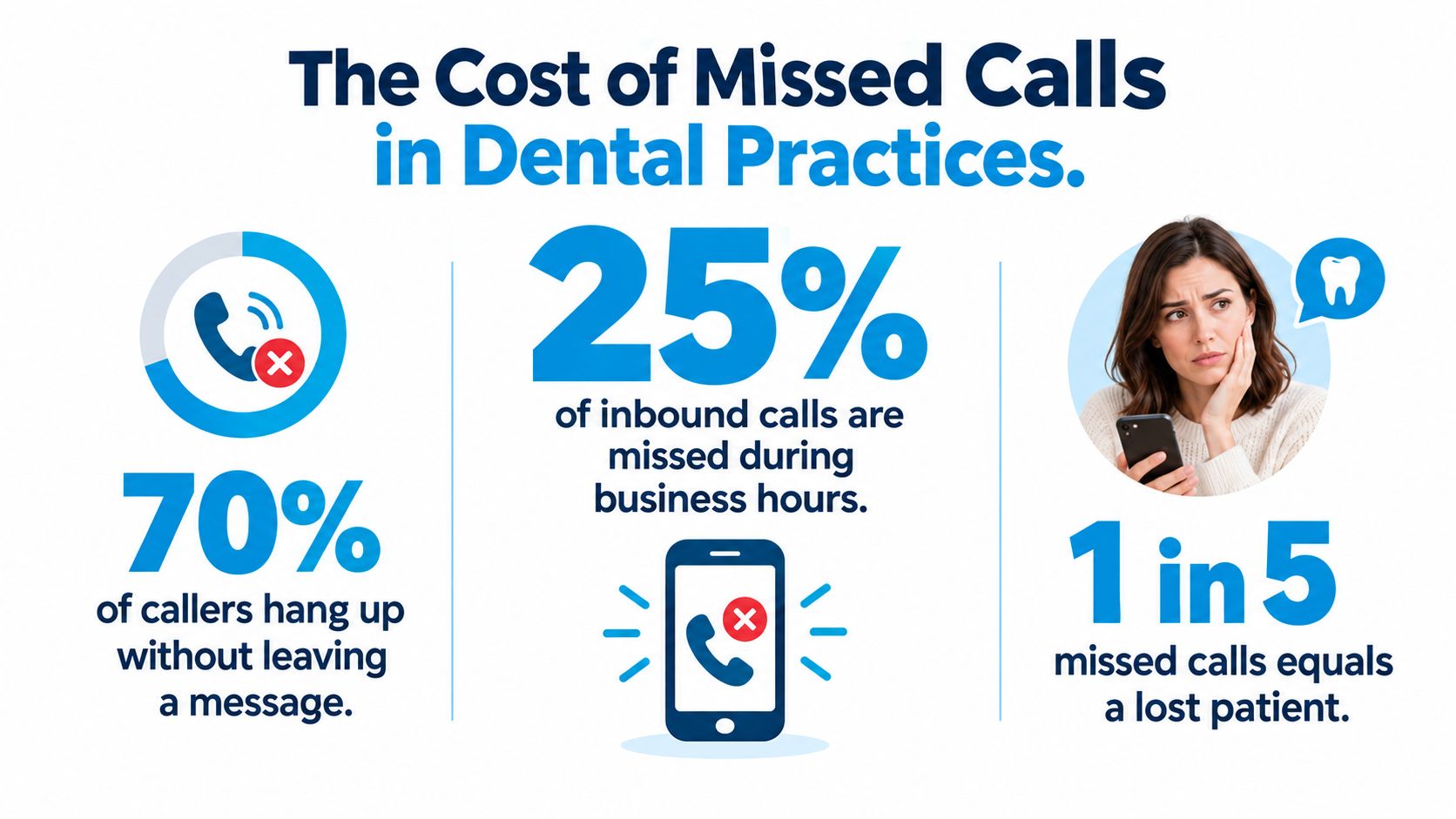
In a 2026 analysis of 4,280 patient calls across 26 dental practices, practices answered only 62% of inbound calls during normal business hours. That leaves 38% unanswered, according to Dental Economics' analysis of missed calls. A dental office answering service can recover some of that demand, but only if the practice draws a careful line between automation, human judgment, HIPAA responsibilities, and emergency escalation.
The decision isn't just whether to outsource the phone. It's whether a live agent, AI receptionist, or hybrid team can handle each call type without creating new scheduling errors or clinical risk. The practices that get the strongest operational result define that decision in advance, connect the service to the practice management system, and track performance during the first 30 days.
Why Dental Practices Are Losing Calls They Should Be Winning
At 10:15 on a Tuesday morning, a front desk may be doing three jobs at once. One staff member checks out a hygiene patient, another waits on an insurance payer, and the phone rings with a prospective patient asking about a broken tooth. Nobody answers before the caller disconnects.
That scenario is ordinary, not exceptional. The 2026 analysis cited above found that 38% of inbound dental calls went unanswered, while broader industry summaries place missed-call rates around 30% to 38%. One industry summary also notes that roughly 75% to 80% of missed callers don't call back, which makes voicemail a weak recovery process rather than a dependable intake channel. Those figures are discussed in the Dental Economics overview of missed-call economics.
The front desk bottleneck
The missed call is a margin problem, not just a marketing problem. A marketing campaign may generate the inquiry, but the practice earns nothing if the caller never reaches someone who can book, qualify, or route the request.
Three predictable operating gaps cause most daytime leakage:
- Lunch coverage: The office may have one person covering phones while other staff take breaks, creating a short period when every new call competes with check-in and check-out work.
- Simultaneous interactions: A receptionist can't calmly discuss insurance and appointment preferences while collecting payment from a patient standing at the counter.
- Late-afternoon congestion: Calls accumulate when patients leave work, staff finish clinical handoffs, and the voicemail inbox becomes the default overflow system.
After-hours creates a separate failure layer. Independent dental-industry reporting states that about 75% of missed dental calls happen after hours, and roughly 80% concern appointment scheduling, according to PracticeMojo's automated-call overview. A caller seeking a new-patient appointment at night, or asking to reschedule a morning visit, often has no reason to wait until the next business day.
A dental office answering service is therefore an operational fix. It doesn't create demand by itself. It gives existing demand a reliable path into the schedule, provided the service can distinguish routine bookings from calls that require a trained human or the on-call dentist.
What a Dental Office Answering Service Actually Does
A dental office answering service is a third-party phone operation that answers calls for the practice. Depending on the vendor, it may use live agents, AI voice agents, or a hybrid of both to collect caller details, schedule appointments, create follow-up tasks, and route urgent concerns.
A useful analogy is simple. Live agents are a staffed reception desk. AI agents are a self-service kiosk. A hybrid model is a kiosk with a human available when the interaction becomes complicated. Each model can work, but each handles uncertainty differently.
Consider a new patient calling about tooth pain:
- A live agent greets the caller, asks what's happening, collects insurance information, checks the calendar, and offers two suitable appointment times.
- An AI voice agent follows structured prompts, captures the reason for the visit, and writes an appointment into the calendar through a practice management integration.
- A hybrid service lets AI handle routine intake and availability, then transfers the caller to a live agent when the symptoms, emotional tone, insurance question, or scheduling constraint requires judgment.
The shared boundary matters more than the technology. These services can handle administrative intake, but they shouldn't diagnose, prescribe, or provide clinical treatment advice. Emergency workflows should identify risk and route the caller to the appropriate clinician or emergency service. They shouldn't attempt to resolve a medical situation through a script.
Live, AI, and Hybrid Answering Service Models Compared
| Capability | Live Agents | AI Voice Agents | Hybrid Model |
|---|---|---|---|
| Routine appointment booking | Flexible, conversational booking | Fast, structured booking with integration | AI handles standard cases, human handles exceptions |
| Complex scheduling | Strong judgment across providers and appointment types | Limited by configuration and calendar rules | Human escalation protects against booking errors |
| Emotional or anxious callers | Best suited to reassurance and nuanced conversation | May sound repetitive or fail to recognize distress | AI detects escalation triggers and transfers |
| Emergency intake | Follows a protocol and contacts the on-call clinician | Screens for configured red flags | AI gathers initial details, human or clinician takes over |
| Bilingual availability | Depends on the agent team | Depends on language support and testing | Language routing can combine automation and live coverage |
| Scalability | Requires staffing capacity | Handles concurrent routine calls | Expands routine capacity while preserving human oversight |
| Main trade-off | Higher staffing cost | Lower flexibility and greater configuration burden | More coordination, but better control over risk |
The right model depends on cost, control, and call complexity. A practice with mostly routine scheduling may benefit from AI-first coverage. A multi-doctor office with complicated appointment rules may need live support. Hybrid coverage is often the practical middle ground because it reserves people for calls where a rigid workflow could damage trust or create liability.
Benefits That Show Up on the Practice Dashboard
The value of a dental office answering service should appear in operational data, not in a vendor's promise. Start with the answer rate. If the service is working during business hours, the percentage of calls answered should rise, and the practice should see fewer abandoned calls, fewer unworked voicemails, and more complete caller records.
A health care call-center study defines abandonment as disconnecting before reaching an agent and treats it as an access and revenue problem. It also found that adding operational metrics improved prediction performance by 0.03 to 0.13 AUC, with real-time queue and staffing data among the dominant signals, as described in PracticeMojo's discussion of automated phone calls. The practical lesson is to monitor live load, not just monthly call totals.
Match each benefit to a measure
| Benefit | Metric to Watch | Realistic 30-60 Day Target |
|---|---|---|
| Missed-call recovery | Answered-call percentage during office hours | Establish a baseline, then reduce unanswered calls consistently |
| After-hours capture | New-patient and rescheduling requests logged outside office hours | Every eligible call receives a disposition, booking, or follow-up task |
| Lead quality | Service-qualified leads written into the PMS | Increase completed records and reduce incomplete callback queues |
| Booking performance | Appointment conversion within 24 hours | Compare service-handled calls with the previous internal baseline |
| Patient experience | First-call resolution, handle time, and CSAT when available | Improve resolution without forcing callers through unnecessary transfers |
| Staff capacity | Front-desk interruptions and reclaimed scheduling time | Reduce interruptions during check-in, checkout, and insurance work |
| Documentation | Call summaries and disposition accuracy | Make every escalation and booking auditable |
The strongest early signal is usually better call capture, not immediate production growth. A 26-practice study tracking 4,280 inbound patient calls found that 38% went unanswered, while new-patient calls converted at only 25%. Its analysis estimated that AI follow-up recovered $47,088 in a single month, a result detailed in the Peerlogic DSO case study. That figure shouldn't be treated as a promise for every practice, but it does show why missed-call recovery and structured follow-up belong in the same workflow.
Practical rule: Don't count a call as recovered merely because the system answered it. Count it as recovered when the caller receives the correct outcome, such as a booked visit, a complete callback task, or a documented escalation.
Track bilingual coverage separately if your patient population needs it. Also review whether summaries preserve the caller's wording, particularly when the caller reports pain, swelling, trauma, or a post-operative concern. A clean call trail can support service improvement and help the practice investigate a complaint.
For a practical view of the reporting layer, review dashboard analytics for receptionist performance. The first 30 days should reveal answer-rate and after-hours behavior. Production per new patient may require a longer observation period because the appointment must occur and generate value before the financial effect is visible.
HIPAA, Emergencies, and the Clinical Boundary
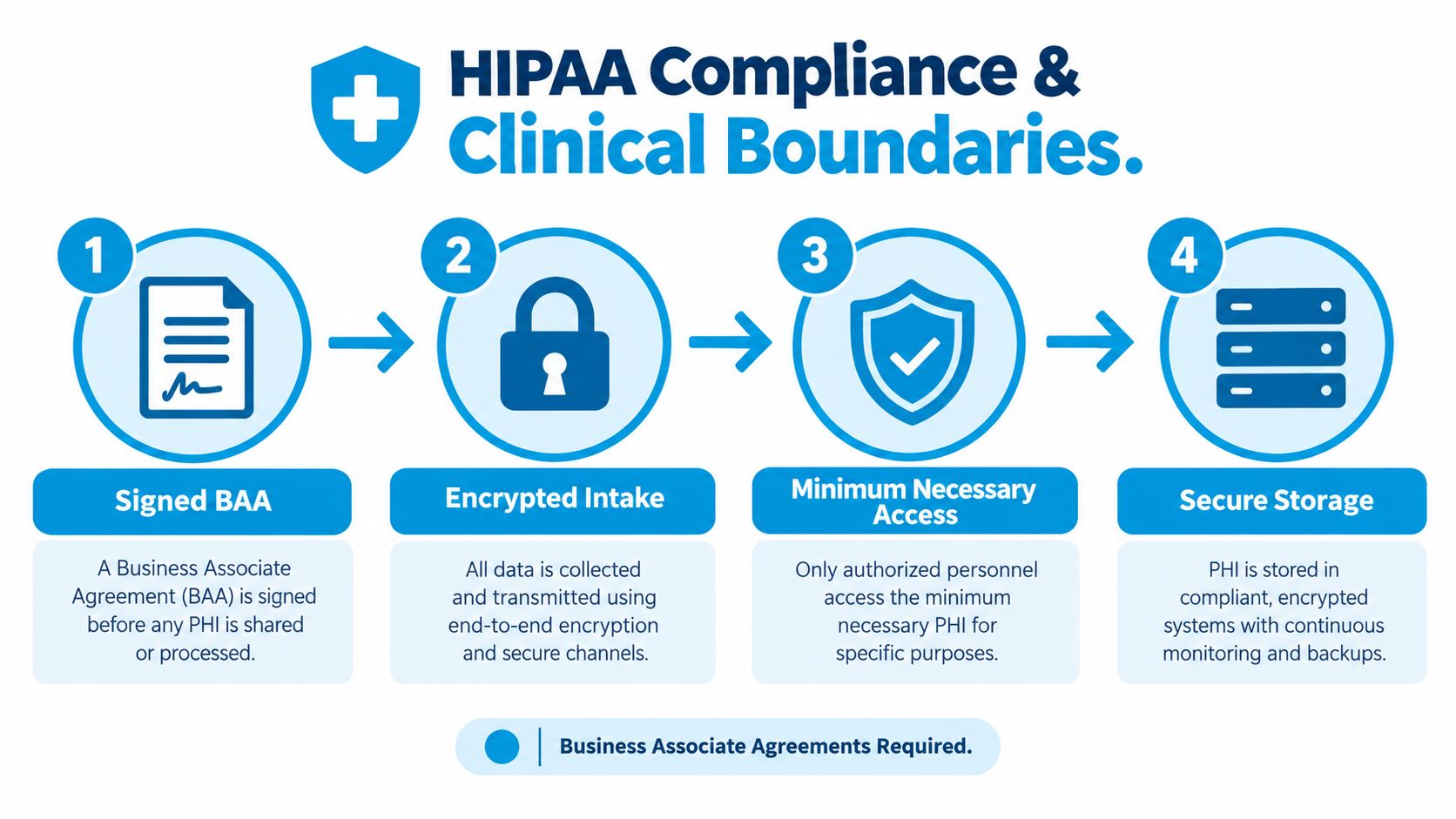
A vendor handling protected health information needs more than a “HIPAA-friendly” label. The practice should require a signed Business Associate Agreement, encrypted intake and messaging, minimum-necessary access, and restricted storage for recordings and transcripts. HIPAA protection applies to the full workflow, including the phone system, agent portal, calendar integration, text messages, and exported reports.
The HIPAA-compliant answering-service workflow should be documented before the first live call. If the service sends appointment confirmations or intake links by text, practices can also review guidance on HIPAA compliant texting with YipSMS Inc. and confirm that the selected process fits their compliance obligations.
Separate red flags from routine requests
The dentist should define what counts as an emergency. The service should never invent that definition. A practical protocol can divide calls into three routes:
- Immediate emergency: Severe bleeding, facial swelling that affects breathing, an avulsed permanent tooth, or a serious post-surgical complication triggers immediate transfer to the on-call clinician or emergency services according to the practice's written protocol.
- Urgent concern: Significant pain, swelling without airway symptoms, or a damaged restoration leads to a same-day or next-available appointment offer, with clinician escalation when the protocol requires it.
- Routine request: Cleaning appointments, records requests, billing questions, and standard rescheduling follow normal administrative workflows.
Agents and AI may collect demographics, insurance details, and the caller's own description of symptoms. They should not diagnose, prescribe, recommend pain relief, or tell the caller that a condition is harmless. That boundary protects patients and keeps administrative staff from stepping into clinical guidance.
A sample script might read:
Red-flag route: “I'm going to connect you with the on-call clinician now. If you feel your airway is closing or swelling is spreading to your throat, please hang up and dial 911 now.”
Urgent route: “I'll record exactly what you've described and look for the earliest appointment available today. I'll follow the office's urgent-care protocol if the schedule can't accommodate you.”
Routine route: “I can help with scheduling and send your request to the practice. I'll confirm the appointment details before we end the call.”
The script must also specify who receives the transfer, how long the agent waits, what happens if the clinician doesn't answer, and how the event is logged. A callback queue is not an emergency response plan.
Cost vs In-House Reception and Real ROI Numbers
Cost comparisons become useful only when they include the full burden of employment. An in-house receptionist may have a salary of $38,000 to $48,000, plus an estimated 28% burden of $11,000 to $13,500, before benefits, paid time off, coverage, and training are included. Those figures produce a fully loaded annual range of roughly $52,000 to $65,000 in the cited operating comparison, not a guaranteed market price.
Answering-service pricing is usually structured around usage and coverage. Shared live coverage may cost $300 to $1,200 per month, while dedicated after-hours and overflow support may run $2,000 to $4,500 per month, depending on the package and workflow. The relevant comparison is not “service fee versus salary.” It's incremental coverage versus the specific front-desk capacity the practice needs.
| Cost Category | In-House Receptionist | Live Answering Service | Hybrid AI + Human |
|---|---|---|---|
| Base labor or service expense | Salary plus employment burden | Monthly or usage-based service fee | Platform, usage, and human escalation fees |
| Coverage | Limited by shifts, breaks, and absence | Configurable overflow or after-hours coverage | Broad routine coverage with targeted human support |
| Training | Practice pays for hiring and training time | Vendor trains agents on the practice workflow | Vendor configures AI and trains escalation staff |
| Scheduling capacity | Direct control, but tied to staff availability | Agents need calendar and PMS access | AI can handle routine volume, people handle exceptions |
| Scaling | Requires another hire or shift change | Plan upgrade or coverage adjustment | Workflow and escalation capacity can be expanded |
| Hidden operational cost | Interruptions, turnover, voicemail work | Setup, integration, and usage overages | Configuration, QA, and exception handling |
| Best fit | High-touch, complex in-office coordination | Overflow and reliable live coverage | Mixed call types with measurable routine volume |
A simple break-even example illustrates the logic. If one recovered new-patient case is worth $1,800, recovering one such case from a missed call per week could cover most hybrid packages, based on the operating scenario supplied for this comparison. The practice should validate its own case value rather than assume every appointment has the same production.
For a fuller breakdown of service-fee structures, see the cost of an answering service. Practices comparing outsourced operational support with internal hiring may also find the discussion of managed IT vs hiring IT staff useful because the same questions apply: what work must remain internal, what capacity is variable, and what oversight does the vendor require?
Solo practices with fewer than 20 new patients monthly may benefit from shared live coverage, particularly during lunch and after hours. Multi-location groups handling 60 or more weekly calls may justify a dedicated line or AI-first hybrid model. Those thresholds are decision heuristics, not universal rules. The correct choice depends on call complexity, scheduling rules, and the value of recovered appointments.
Choosing and Implementing the Right Service
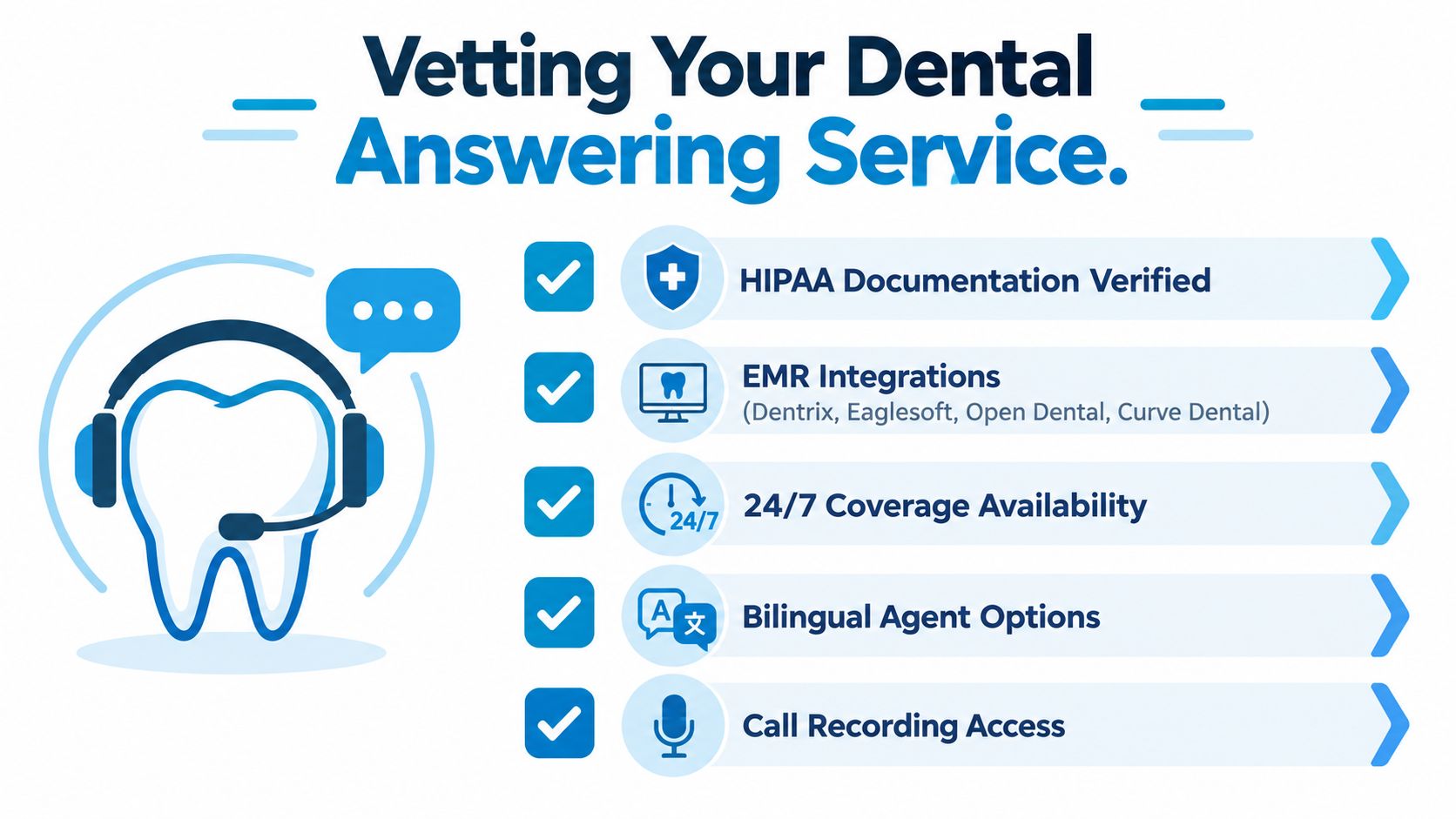
A vendor should pass a practical test before it passes a sales presentation. Ask for the signed BAA, the security documentation, and a demonstration using your actual appointment rules. Confirm whether the service can connect with Dentrix, Eaglesoft, Open Dental, or Curve Dental, and ask exactly what the integration can write back to the PMS.
Vendor evaluation checklist
- HIPAA documentation: Require the BAA and review how recordings, transcripts, texts, and agent access are protected.
- Calendar and PMS integration: Confirm live availability, appointment-type rules, provider restrictions, and write-back behavior.
- Coverage options: Test business-hour overflow, lunch coverage, weekends, holidays, and overnight calls.
- Bilingual support: Verify which languages are available and whether coverage applies after hours.
- Call recordings and summaries: Check whether authorized staff can review calls and whether summaries preserve critical symptom language.
- Escalation controls: Ask who receives urgent calls, how failed transfers are handled, and how every event is documented.
- Pricing transparency: Compare per-minute, per-call, monthly, setup, integration, and overage charges.
Red flags are easy to identify. Don't share patient data with a vendor that won't sign a BAA. Don't choose a scripted AI system that has no reliable human handoff. Be cautious about a 12-month contract without a trial period, especially before testing calendar write-back and emergency routing.
A controlled seven-step rollout
- Audit current calls: Review missed calls, abandoned calls, voicemail volume, after-hours demand, and common failure points.
- Document the top 15 intents: Include new-patient booking, hygiene scheduling, cancellations, rescheduling, insurance questions, records requests, billing, and symptom-related calls.
- Write scripts with dentist input: The dentist should define emergency categories, prohibited clinical language, and escalation rules.
- Configure the PMS and calendar: Test appointment types, provider availability, buffers, new-patient forms, and write-back.
- Run a two-week pilot: Use parallel call listening, test calls, and daily review of booking and escalation accuracy.
- Train the internal team: Teach staff how to accept warm transfers, review summaries, correct errors, and close the loop with callers.
- Go live with weekly QA: Review recordings, metrics, missed handoffs, and script changes during the first month.
Ask for a 14-day paid pilot rather than relying on a generic demonstration. Test both after-hours and overflow paths, place calls with ambiguous scheduling needs, and verify that summaries reach the practice management software by 7:30 a.m. if that's your morning operating requirement.
Sample Call Flows for Real Dental Scenarios
A good call flow sounds natural to the patient and precise to the practice. It gathers enough information to make the next action clear without turning an administrative conversation into an unofficial clinical consultation.
Flow A for a new patient on Tuesday morning
A caller reaches the office at 9:00 a.m. and says they're looking for a dentist because a tooth has started hurting. The agent greets them warmly, captures the caller's name and insurance carrier in under 20 seconds, and asks, “Can you tell me a little about what's going on with the tooth?”
The agent records the caller's description in the caller's own words, asks whether they're currently in pain, and checks the live calendar. Rather than saying, “We have availability,” the agent offers two specific options, such as a morning evaluation or an afternoon opening. Once the caller chooses, the system sends an appointment confirmation text and a digital intake form.
The agent should not promise a diagnosis or classify the condition beyond the practice's approved routing language. If the caller reports symptoms that fall outside routine scheduling, the call moves to the human escalation path.
Flow B for an after-hours emergency
At 9:15 p.m., a caller reports facial swelling. The AI receptionist identifies the symptom, asks the approved safety questions, and immediately starts the emergency escalation process. It transfers the call to the on-call dentist through the after-hours line while staying connected to collect the caller's name, callback number, location, and insurance details if the caller can safely provide them.
The live agent or AI should use the exact safety language approved by the practice:
“If you feel your airway is closing or swelling is spreading to your throat, please hang up and dial 911 now.”
The system must record whether the on-call clinician answered, whether the patient reached emergency services, and what follow-up action remains open. It shouldn't place a facial-swelling call into a routine morning callback queue.
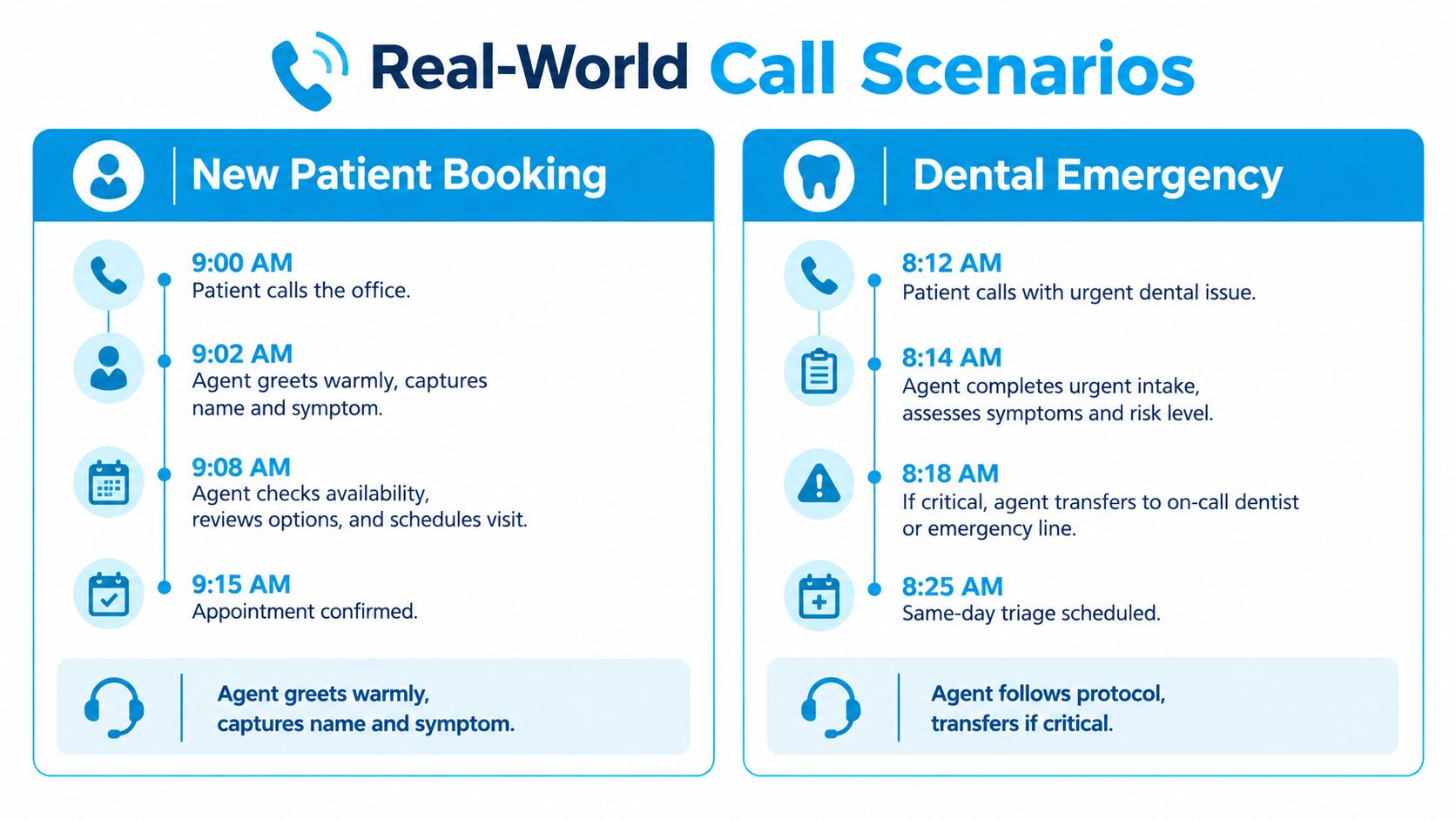
AI generally performs well on structured booking, office information, confirmations, and straightforward rescheduling. Humans remain stronger when the caller is distressed, the scheduling rules conflict, the request involves multiple doctors, or the patient's description requires careful escalation. Practices can adapt the scripts for answering phone calls to define those handoff points.
Metrics to Track and a Final Decision Checklist
Pull six numbers every week during the first 30 days. The point isn't to chase a universal benchmark. It's to identify whether the service is answering the right calls, producing usable outcomes, and respecting the clinical boundary.
- Missed-call recovery rate: A healthy service should recover most eligible calls, with a target above 85% in the supplied operating framework. A lower rate suggests routing, staffing, or integration problems.
- Average speed to answer: The target is under 20 seconds. Longer waits may indicate inadequate coverage or an overloaded queue.
- After-hours booking conversion: Review how many eligible after-hours callers book rather than receive only a message. A weak result can indicate that the calendar isn't accessible or the script asks for callbacks too often.
- New-patient appointments per 100 calls: Compare scheduled appointments with total new-patient calls. A low result may reflect poor qualification, limited availability, or an unclear offer of appointment times.
- Call-summary completeness: Check whether summaries include identity, reason for visit, requested appointment, symptom wording, disposition, and follow-up owner. Missing fields create work for the front desk.
- HIPAA audit event pass rate: Review access, storage, transmission, and documentation events. Any failure deserves investigation before the practice expands the workflow.
For model selection, use a short checklist. Call volume under 30 calls per day often favors AI or hybrid coverage. Complex multi-doctor scheduling usually needs live support. Any vendor handling patient data should provide a signed BAA and a SOC 2 report for review.
Track the six numbers weekly for the first month, then decide whether to scale, swap, or stay based on the data, not the sales pitch.
Recepta.ai combines conversational AI with trained human support for inbound calls, appointment scheduling, lead capture, follow-ups, and escalation, with integrations for calendars, CRMs, and practice systems. Visit Recepta.ai to evaluate whether its hybrid receptionist workflow fits your dental office's call volume, scheduling rules, and compliance process.