Scheduling Software for Service Industry: Buyer's Guide 2026

The average no-show rate across service industries is about 23%, and proper scheduling software with automated reminders can significantly reduce missed appointments while streamlining daily operations. The right platform also protects staff capacity, fills cancellations, and keeps customer, calendar, and dispatch data aligned.
That distinction matters. A booking widget can place an appointment on a calendar, but service operations need much more: accurate availability, qualified staff assignment, realistic buffers, compliant workforce rules, rapid rescheduling, and reliable handoffs between phone, web, mobile, and in-person channels. I've seen lightweight tools work well for a small team, then create dispatcher overload and duplicate records as volume grows.
This buyer's guide evaluates scheduling software for the service industry by operational resilience and integration depth, not by the number of booking buttons on the sales page.
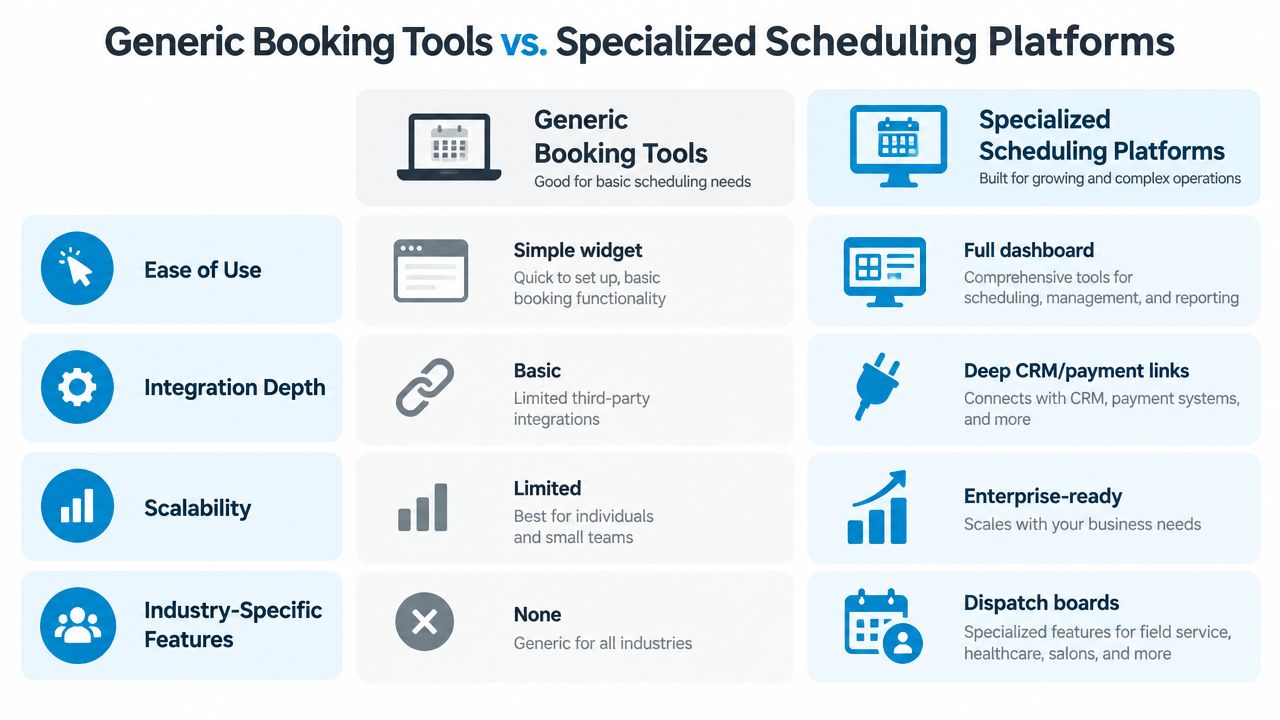
| Evaluation area | Generic booking tool | Specialized service scheduling platform |
|---|---|---|
| Availability | Basic calendar slots | Live availability by provider, location, service, and resource |
| Customer communication | One-way confirmations | Two-way reminders, rescheduling, and follow-up |
| Cancellations | Manual recovery | Waitlist auto-fill and alternate-slot offers |
| Workforce coordination | Separate staff calendars | Dispatch, skills, shifts, routing, and workload visibility |
| Integrations | Calendar-focused | CRM, payments, field service, analytics, and event workflows |
| Growth readiness | Suitable for simple operations | Designed for multi-location and higher-volume workflows |
The Hidden Cost of Poor Scheduling
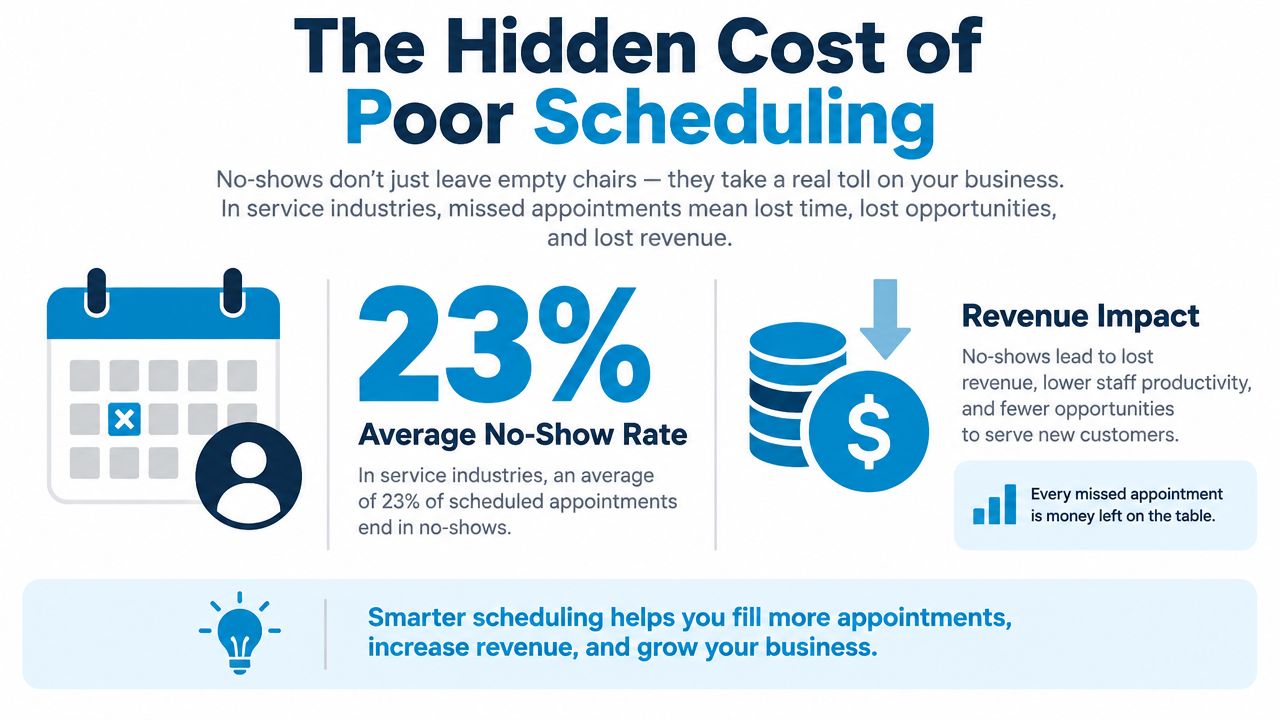
A missed appointment consumes more than an empty calendar slot. The business may lose travel time, room capacity, technician availability, and dispatcher attention before anyone can sell that time again. No-show statistics for service businesses documents the operational effect of missed appointments, but the practical question for operators is where the lost capacity appears in the workflow.
A useful diagnosis separates four failures that businesses often group under “scheduling”:
- Availability failure: The system offers a time even though the required provider, vehicle, room, or equipment is unavailable.
- Communication failure: The customer receives a confirmation but cannot respond, reschedule, or clarify details easily.
- Recovery failure: A cancellation stays open because no process contacts a suitable customer quickly.
- Compliance failure: A manager assigns shifts that conflict with wage, overtime, rest-break, or predictive-scheduling requirements.
A calendar widget handles appointment capture, and often only partially. A service platform must connect the request to the correct resource, employee, duration, and next operational action. A home-service booking may need to create a dispatch task and account for travel. A clinic visit may require a qualified provider and room. A salon may need to offer the opening to a waitlisted client before the day develops unproductive gaps. Operators looking for a practical dead time headache fix for salons should examine that recovery workflow, not just the booking screen.
Treat the schedule as an operating system
The schedule connects customer demand with labor capacity. At low volume, a shared calendar and manual checks may hold together. At higher volume, separate calendars, spreadsheets, inboxes, and dispatch boards turn employees into the integration layer. They re-enter details, confirm changes, resolve conflicts, and explain inconsistent information to customers.
That scale-specific trap matters during software selection. A tool can work for a small team because one coordinator knows every exception. The same tool can fail across locations or a larger dispatch operation when updates do not move reliably between booking, customer records, payments, routing, and workforce systems. Integration depth becomes an operational control, not a technical bonus.
Start with a workflow map. Follow a request from the phone call or website form through booking, reminders, arrival, service completion, payment, and follow-up. Mark every manual re-entry, approval, and cross-system check. Those handoffs expose administrative overhead more clearly than a feature list, as this analysis of administrative burden also addresses.
Set baseline measurements before switching
Record current schedule adherence, overtime, open-shift recovery time, labor cost variance, no-shows, and manual schedule changes before implementation. Compare the same measures afterward. A visually tidy calendar proves little if dispatchers still repair assignments by hand or staff continue working from stale records.
Common operator benchmarks include schedule adherence of 90% or higher, overtime below 10% of total hours, open-shift fill time below 2 hours, and labor cost within 3–5% of budget, as outlined in this service-industry scheduling benchmark guide. These figures are tests, not guarantees. The stronger platform is the one that reduces coverage gaps and manual coordination as volume rises.
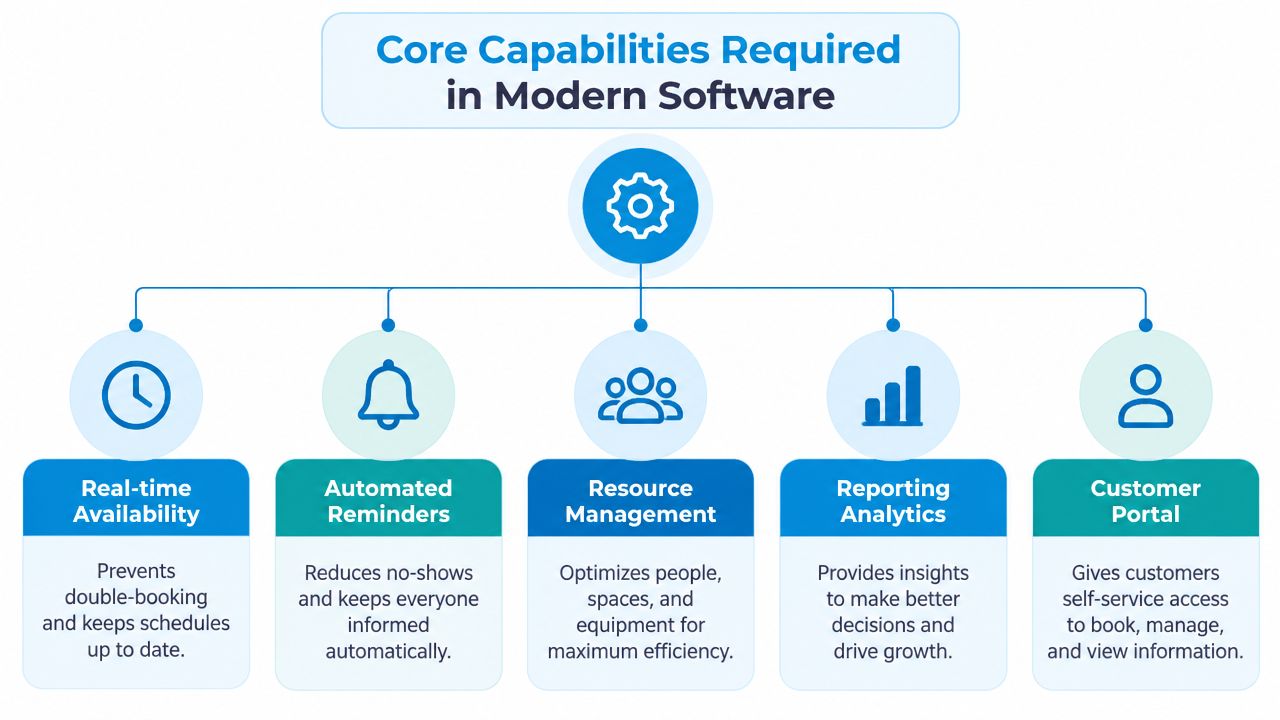
Core Capabilities Required in Modern Software
Service scheduling fails when a platform treats every appointment as an interchangeable block of time. A dental consultation, emergency plumbing visit, haircut, and equipment installation may all occupy a calendar slot, but they require different people, durations, resources, travel assumptions, and follow-up actions.
The requirements below form a connected operating model. Guidance for appointment-based businesses identifies real-time availability, smart templates, two-way reminders, waitlists with auto-fill, and event webhooks as the capabilities that address fill rate, no-show reduction, and operational latency in high-volume environments, as described in this service scheduling software evaluation.
Live availability must reflect real constraints
A reliable system checks availability across providers, locations, visit types, and resources. It shouldn't show a customer a time because a general calendar is empty. If a service requires a specific technician, room, vehicle, or piece of equipment, the availability engine must include that dependency.
For example, a mobile HVAC business might allow a standard maintenance visit in one zone while blocking a longer installation slot that would make the technician late for the next job. A clinic might show a follow-up appointment only when the appropriate provider and room are both available. These rules reduce double-booking and give dispatchers fewer exceptions to repair.
Templates turn estimates into repeatable rules
Smart templates should define visit length, setup time, cleanup time, buffers, and equipment rules. Without them, employees compensate with personal judgment, producing schedules that look full but cannot run on time.
Templates also help managers standardize service types. A “new patient consultation” can have a different duration and intake requirement from a routine follow-up. A plumbing diagnostic can carry a travel or parts-preparation rule that a simple inspection doesn't need. The test is practical: can a nontechnical manager update service rules without rebuilding every calendar?
Two-way messaging beats silent reminders
A confirmation that only says “your appointment is booked” leaves the business waiting for a customer who may need a different time. Two-way SMS and email let the recipient confirm, ask a question, or reschedule through a clear path. This keeps changes in the scheduling system instead of burying them in a shared inbox.
Waitlists recover cancellations
A waitlist becomes useful when it can match a newly open slot to customers based on service, provider, location, and acceptable timing. Auto-fill should request confirmation and update the schedule only after the customer accepts. Manual calling still has a place for sensitive or complex services, but the system should handle straightforward replacements without making a coordinator work through a contact list.
Webhooks connect the next action
An event webhook or queue should trigger downstream workflows immediately. A booking might create a CRM activity, notify a field-service board, send intake instructions, or prepare a payment request. A cancellation might release resources and notify eligible waitlisted customers. Use this short video as a visual introduction to how connected scheduling workflows can operate:
For teams assessing AI-supported workflows, this overview of AI appointment scheduling software is useful because the important question isn't whether automation exists. It's whether the automation completes the next operational step without creating another queue for staff.
Generic Booking Tools vs. Specialized Scheduling Platforms
Generic booking software is often the right starting point for a solo practitioner or a small service with fixed hours and simple appointment types. It creates a public booking page, blocks a calendar, and sends a confirmation. The problem starts when the business needs the schedule to make decisions instead of merely record them.
A generic tool commonly assumes that the customer knows the service, the correct provider, and the required duration. It may also assume that every channel leads to the same booking form. In practice, customers call, submit web requests, reply to texts, walk in, or ask an employee to change an existing appointment. If each route writes to a different record, staff must reconcile the schedule manually.
Where the lightweight option works
A basic booking tool can be effective when:
- Services are predictable: Each appointment has a stable duration and doesn't require complex equipment or travel logic.
- The team is small: One person can resolve exceptions without a dedicated dispatcher.
- The channel mix is narrow: Most customers use one booking page and staff rarely need to rebook on someone else's behalf.
- The records are simple: The business doesn't need a detailed service history, parts record, insurance workflow, or multi-step handoff.
That setup can keep implementation simple. It can also become a trap if the buyer mistakes ease of setup for long-term suitability.
What specialized platforms add
A specialized platform treats booking as one event in a larger workflow. It can route jobs by skill or territory, reserve resources, apply buffers, notify field staff, connect payments, and update customer history. The difference is visible during exceptions. When a client cancels, a resilient system can offer the opening to a waitlist, update the provider's workload, and notify the relevant teams without forcing three people to edit separate records.
Calendar synchronization still matters, especially for owners and providers who use Google Calendar. But calendar sync alone isn't an operating model. This guide to appointment scheduling with Google Calendar is helpful for understanding the distinction between personal calendar visibility and a complete service workflow.
Practical rule: If a dispatcher has to copy a booking into another system, the platform hasn't finished the job.
The scale test is more revealing than the feature list. A system that works for five technicians may fail at twenty-five because dispatcher workload, permissions, data quality, and pricing behavior change with growth. Before buying, ask the vendor to demonstrate a reschedule from a phone interaction, a web booking, and a field update. Watch whether all channels produce one consistent record.
Integration Ecosystem and Data Flow
Scheduling software earns its place in operations when every booking event reaches the people and systems that act on it. A calendar entry alone cannot prepare a dispatcher, update a clinician's record, or tell accounting to collect payment. Reliable implementations define the next action for each event, then connect the systems that own those actions.
Platforms may connect with over 2,500 tools, including CRMs, calendars, and industry-specific applications, according to Recepta's platform overview. That figure is less useful than the connection's behavior. An integration that exports a static file, misses cancellations, or cannot send updates back into the scheduling system adds administrative work instead of removing it. At higher volume, those gaps become queue backlogs, duplicate records, and dispatch errors.
Map events before choosing connectors
Start with operational events, not an app directory. Document what must happen when someone books, reschedules, cancels, arrives, completes a service, or fails to attend. Assign ownership for each record, including the appointment, customer profile, service notes, payment status, and consent data.
A plumbing company may need a booking to create a dispatch-board job, assign a service area, attach access notes, and pass payment status to accounting. A dental clinic may need patient history and visit type to remain connected while access controls and compliance requirements stay intact. A multi-location salon may need customer details, provider availability, and cancellation rules shared consistently across branches.
Distinguish sync from integration depth
A one-way calendar export confirms that an appointment exists. A deeper connection can receive a cancellation, update the CRM, release a resource, and start a waitlist workflow. Those outcomes affect staffing and customer communication differently.
Ask vendors whether connections support real-time updates, field mapping, error alerts, retries, duplicate prevention, and clear ownership of customer data. Test what happens when a connected application is unavailable. A resilient platform should queue events or expose an error for staff instead of discarding the change. Technical teams can use this API connectivity guide to assess whether a proposed architecture can support those handoffs.
Keep one reliable customer record
Data governance becomes harder as teams add tools. Decide which system owns customer identity, appointment status, service notes, payment state, and consent records. Then test edge cases, such as a customer changing a phone number during a reschedule or a staff member booking for an existing client.
A connected stack should not make employees memorize which system contains the latest truth.
Run integration tests through both normal and failure paths. Confirm that a successful booking updates every required system, while a rejected or delayed event produces a visible status, retry path, and clear owner. Dashboards must use the same operational events as the dispatch board, or managers will plan from conflicting data. A small team may tolerate manual correction, but higher-volume operations need data flow that remains dependable when exceptions arrive together.
Industry-Specific Use Cases and Workflows
The right workflow depends on what makes a service difficult to deliver. A booking system for a yoga studio doesn't need the same controls as a plumbing operation, and a healthcare practice can't treat patient scheduling like a generic consultation calendar.
Healthcare is the largest vertical in the appointment scheduling market, with 25% share, while SMBs account for over 50% of buyers, according to 2025 scheduling trend coverage. That combination creates a demanding market. Buyers need compliance-sensitive controls, but many also have limited administrative capacity.
Home services need dispatch intelligence
Consider a plumbing company handling calls during a busy morning. The receptionist should capture the address, problem type, urgency, access notes, and preferred window. The scheduler then needs to match the request to a qualified technician, account for geography and job duration, and put the work on the dispatch board.
If the customer calls back to change the time, the update should reach the technician and office team immediately. If another customer cancels, the platform should identify people who can accept the opening, rather than leaving the dispatcher to search through messages. A simple booking page won't manage those dependencies reliably.
HVAC teams face a related problem with seasonal demand. A maintenance visit may be routine, while a no-heat call needs priority handling and a technician with the right skills. Templates, routing rules, mobile updates, and customer messaging should work together so urgency doesn't get lost between intake and assignment.
Healthcare and dental workflows need controlled precision
A dental clinic should separate new-patient intake, routine cleaning, emergency treatment, and specialist visits. Each service can require a different provider, room, duration, consent process, and preparation step. The scheduling system should expose only valid combinations and preserve the patient record through confirmation, rescheduling, arrival, and follow-up.
Compliance isn't a checkbox added after implementation. It affects permissions, data retention, communication channels, auditability, and integrations. A platform that makes scheduling convenient but creates uncontrolled copies of sensitive information can increase operational risk.
Professional services need secure intake
A law firm or finance practice may need to collect enough information before offering a meeting, then route the request to the correct professional. Conflict checks, document collection, confidentiality, and payment rules can all affect whether the appointment should be confirmed immediately.
A customer-facing booking form should therefore be treated as part of intake, not as an isolated calendar. For studios and membership businesses, a specialized guide such as the best scheduling app for yoga studios can help compare class capacity, recurring sessions, instructor availability, and attendance workflows.
Multi-location businesses need shared rules
Franchises and regional operators often centralize reporting while allowing local teams to manage staff and resources. The platform should support location-specific hours, service catalogs, provider permissions, and escalation rules without creating separate customer identities in every branch.
Test a cross-location reschedule before signing. The customer should be able to move to another location without staff rebuilding the record from scratch, and managers should still see the change in the correct operational reports.
Measurement Benchmarks and Evaluation Checklist
A scalable scheduling purchase should start with operating outcomes, not polished screens. Define which results the system must improve, how each result will be recorded, and who responds when performance slips. If a vendor cannot show the event, rule, or workflow behind a metric, treat the metric as decorative.
Use measurable thresholds as evaluation markers, not promises. Useful reference points include 90% or higher schedule adherence, overtime below 10% of total hours, open-shift fill time below 2 hours, and labor cost within 3–5% of budget, as summarized in this operator benchmark reference. Your baseline, labor model, service mix, and local rules will determine what improvement is realistic. Compare vendors against the same baseline rather than accepting each supplier's preferred measures.
Build a scorecard around failure points
| Question | Evidence to request |
|---|---|
| Can the platform model real availability? | A live demonstration with providers, locations, visit types, buffers, and resources |
| Can it recover cancellations? | A waitlist workflow that offers a slot and updates the schedule after acceptance |
| Can staff manage changes? | Mobile and dispatcher views showing the same update |
| Can it enforce labor rules? | Validation for overtime, rest breaks, minimum time between shifts, and applicable Fair Workweek rules |
| Can systems exchange events? | API or webhook documentation, retry behavior, error logging, and field mapping |
| Can managers measure results? | Reports for adherence, overtime, fill time, labor variance, no-shows, and manual changes |
Workforce scheduling software should enforce relevant labor requirements, including minimum wage, overtime, rest breaks, minimum time between shifts, and Fair Workweek or predictive-scheduling rules where they apply, as described in workforce management guidance from Fourth. A multi-location restaurant, for example, should validate a schedule before publication instead of exposing employees to a prohibited shift pattern after arrival.
Test the scale-specific trap
Run the same workflow with a small team and a larger operating model. A platform that suits five technicians may become difficult at twenty-five when dispatcher workload, permissions, migration, pricing, and data governance place greater demands on the system. Ask the vendor to demonstrate how new locations, service types, roles, integrations, and historical records are added without manual reconstruction.
Scale testing should include failure recovery. Cancel a visit, change a provider, create an urgent request, fail a payment, and resend an integration event. Record how many actions require staff intervention, how quickly the schedule and customer record update, and whether errors appear in an accessible log.
Do not accept “automation” as proof of reduced work. Some vendor guidance warns that basic job tracking can be marketed as automation while staff still supervise every assignment and handoff, as discussed in this field-service software analysis. Count the human steps left after a booking, cancellation, failed payment, or urgent request.
Choose the platform that fails visibly and recoverably, not the one that looks simplest during a perfect demo.
Recepta.ai is one option for service businesses that need an AI receptionist to handle inbound and outbound calls, capture leads, book appointments, and follow up through call, SMS, and email while syncing with calendars, CRMs, and industry systems. It may fit a broader scheduling stack when phone intake and human escalation create significant operational delay.
Before committing, run a controlled pilot with real service types and real exception paths. Measure the baseline, involve dispatchers and frontline staff, inspect every integration, and require a migration plan that will not force an expensive replatforming exercise as volume increases. A tool earns its place when it remains manageable under pressure, not only when the demo follows the happy path.