The Cost of Answering Service: 2026 Guide to Pricing
Most small businesses pay $100 to $400 per month for 100 to 200 call minutes, but that sticker price is usually far smaller than either the $60,000 to $65,000 annual cost of an in-house receptionist or the revenue lost when calls go unanswered. If you're evaluating the cost of answering service options, the smart question isn't just “What will I pay?” but “What does it cost me when nobody answers?”
A lot of pricing guides stop at monthly fees. That's useful, but incomplete. For a home service company, medical office, law firm, or multi-location operator, a missed call isn't just an inconvenience. It can be a job that goes to a competitor, an intake that never happens, or a lead your staff forgets to call back.
That's why the cost of answering service decisions should be measured two ways. First, look at the direct monthly bill. Second, look at the total cost of failure: missed revenue, overloaded staff, manual admin, and the operational drag of a phone system that doesn't match how your business runs.
Why Every Missed Call Has a Price Tag
Small businesses lose 12% to 24% of potential revenue from unanswered calls, according to ReadyToTalk's breakdown of missed-call costs. In home service and healthcare businesses, one missed call can mean losing a $500 to $2,000 job, which changes the conversation immediately. The core issue often isn't the monthly service fee. It's the revenue drain that comes from relying on voicemail.
That matters because owners often compare an answering service to “doing nothing,” as if doing nothing is free. It isn't. If your front desk is already stretched, if technicians are answering from the field, or if intake only happens during business hours, you're already paying for gaps in service.
Start with the real business problem
If calls come in when your team is busy, after hours, during lunch, or while someone is helping a customer in person, those calls don't disappear. They turn into one of three outcomes:
- A lost sale: The caller hangs up and books elsewhere.
- A delayed response: Your team calls back later, after the prospect has moved on.
- An internal distraction: Staff stop what they're doing to answer phones, which creates mistakes and slows core work.
A plumbing company is a simple example. Emergency calls don't arrive on a neat schedule. During a busy week, a minute-based service can get expensive fast, but missing those calls is often worse because urgent callers usually choose the first business that answers.
Practical rule: If a single new customer is worth more than your monthly answering service bill, missed-call prevention is a revenue decision, not an admin expense.
The three billing structures that shape your costs
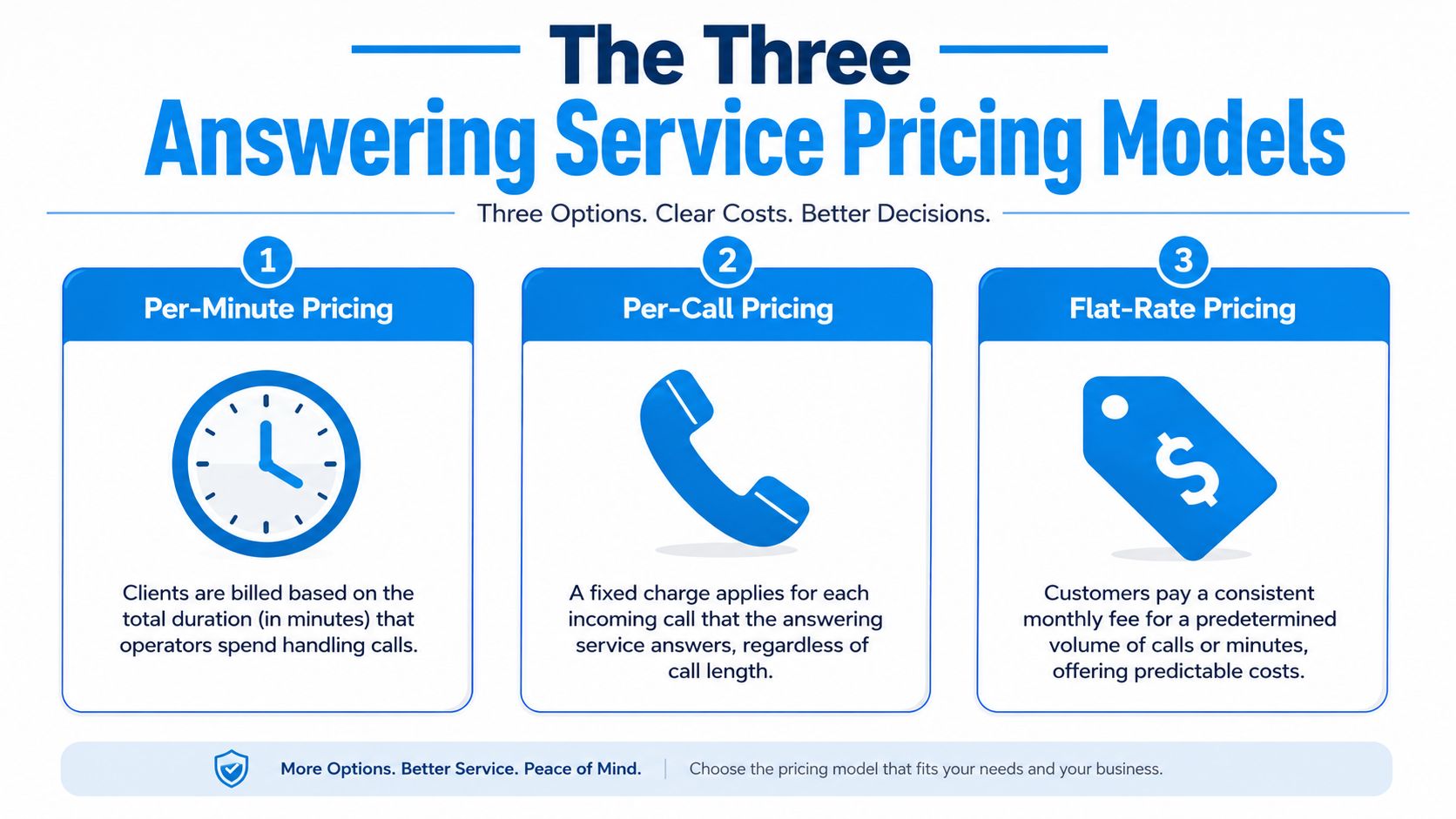
Most answering services fall into three broad pricing models:
- Per-minute pricing, where you pay for agent talk time.
- Per-call pricing, where each answered call triggers a charge.
- Flat-rate pricing, where you pay one monthly fee for a defined level of coverage or volume.
Those models sound similar on a sales page. In practice, they behave very differently when your call patterns change. A low-volume dental office, a high-volume HVAC company, and a legal intake team shouldn't buy the same billing structure just because the base monthly fee looks attractive.
The Three Answering Service Pricing Models Explained
The pricing model matters as much as the headline monthly price. Two plans can look close on paper and behave very differently once call volume rises, call length changes, or seasonal demand hits.
Per-minute pricing
Per-minute billing works like a taxi meter. The longer the conversation runs, the higher the cost climbs. This can work well if your business has low call volume or short, controlled calls.
Most live providers charge $0.65 to $1.75 per minute or $2.50 to $4.50 per call, and AMBs Call Center's pricing example shows how fast usage can add up: a clinic receiving 150 calls averaging 3 minutes each at $1.50 per minute would incur $675 in monthly usage fees beyond any base plan.
For a home services company, this model can become expensive during weather spikes, outages, or seasonal surges. A plumbing business may love the lower starting cost in a quiet month and hate it when emergency calls stack up.
Best fit: businesses with lighter or unpredictable volume that want to avoid paying for unused capacity.
Weak spot: long calls, detailed intake, and peak-season overages.
Per-call pricing
Per-call billing is simpler to understand. Every answered call gets billed at a fixed amount, regardless of length. That can make forecasting easier if your calls are short and fairly consistent.
A pest control company that mostly fields “Can you come out tomorrow?” calls may find this model manageable. But if your team handles wrong numbers, repeat callers, or detailed screening, the bill can still creep up because every interaction counts.
Here's the trade-off in plain terms:
| Pricing model | Works well when | Usually breaks down when |
|---|---|---|
| Per-minute | Calls are short and volume is modest | Calls run long or demand spikes |
| Per-call | Calls are brief and repeatable | High call counts include low-value calls |
| Flat-rate | Budget stability matters most | You consistently underuse the plan |
Flat-rate pricing
Flat-rate pricing behaves more like a monthly pass. You pay a fixed amount for a bundle, or for a plan designed to absorb heavier usage without constant overage anxiety. The market has been transformed by AI and hybrid models.
AI-powered answering services now offer flat monthly plans ranging from $25 to $250, while traditional live agents often cost $150 to $1,200 monthly, according to Ever Help's pricing comparison. Hybrid AI-human models run $100 to $350 monthly and deliver 15% to 25% savings versus pure live services by using AI for screening and routing before escalating complex calls.
That structure is attractive for businesses with uneven volume. An HVAC company in summer or winter doesn't want the busiest month to become the most financially painful month.
For a broader look at how virtual receptionist plans are packaged, review virtual receptionist pricing options.
If your call volume swings with seasonality, weather, or ad campaigns, flat-rate or hybrid pricing usually gives you fewer billing surprises than a pure usage model.
Uncovering the Hidden Costs and Value Drivers
A low monthly rate can still produce an expensive result if calls are handled slowly, entered manually, or routed poorly. The question is not just what the service costs. It is what your business pays when follow-up breaks down after the call.

What pushes the bill up
Higher fees usually come from labor, risk, and complexity. If your provider covers nights and weekends, follows compliance rules, books appointments, or runs custom intake scripts, the price rises because each call takes more handling and more oversight.
A medical clinic, law office, and home service company can all buy an answering service, but they are not buying the same operating model. Secure intake, conflict checks, dispatch rules, bilingual coverage, and escalation trees all add time and training. Those costs are reasonable if they protect revenue or reduce internal labor. They are wasteful if you pay for features your team never uses.
Common cost drivers include:
- After-hours coverage: More schedules, more escalation paths, and less room for error.
- Industry-specific scripting: Detailed intake takes longer and needs tighter quality control.
- Scheduling or dispatch: Appointment booking and field coordination create more steps than basic message taking.
- Compliance workflows: Secure handling, auditing, and documentation add process overhead.
What actually improves ROI
The strongest value driver is not a longer feature list. It is a shorter path from answered call to booked job, qualified lead, or resolved request.
AI and hybrid models commonly outperform traditional live-only services on ROI. AI can answer routine questions, gather caller details, screen spam, and push data into your CRM or scheduling system automatically. Human agents then step in for complex calls, upset customers, or high-value leads. That split matters because you are not paying a person to do repetitive work your software can handle faster and more consistently.
The operational gain is straightforward. Fewer voicemails to sort. Less retyping. Fewer missed handoffs. Faster callbacks.
Smith.ai's comparison of AI receptionists and traditional answering services notes that AI receptionists can integrate with business tools and automate routine front-desk tasks. For small businesses, that matters more than a feature checklist. Every manual handoff your staff avoids is time they can spend closing work, serving customers, or billing clients.
I usually tell owners to test one point first. Ask how a new lead moves from inbound call to your calendar or CRM. If the answer involves an emailed message, a sticky note, and someone entering details later, your labor cost is higher than the quote suggests.
A smarter way to compare quotes
Compare providers based on workflow savings, not just package price.
- Check the handoff quality: Do you get usable summaries with next steps, or generic messages that force staff to call back for basics?
- Review integration depth: Can the service update your CRM, scheduler, or dispatch tool automatically?
- Look at escalation rules: Can AI handle simple calls and pass revenue-critical calls to a trained person without delay?
- Ask about exception handling: What happens when a caller goes off script, has an urgent issue, or needs a transfer right away?
If you want a structured way to measure those overhead costs, this guide on how to calculate operating expenses helps when comparing admin-heavy workflows and hidden labor.
Answering Service vs In-House Receptionist A Cost Breakdown
The financial comparison becomes much clearer when you stop treating an answering service like a convenience purchase and start comparing it to the true cost of staffing the same coverage internally.
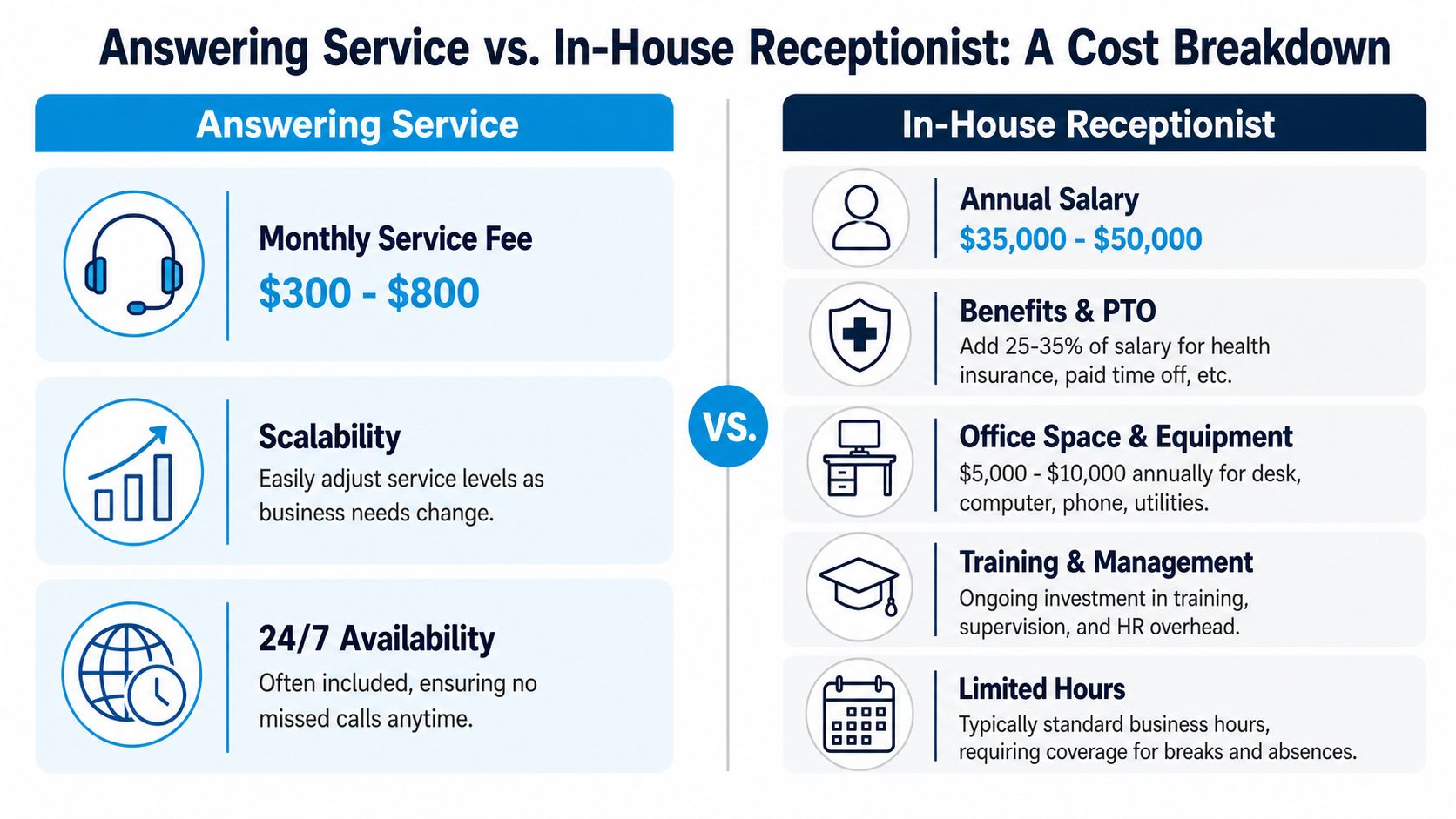
A full-time in-house receptionist carries a true annual cost of $60,000 to $65,000 when salary, benefits, taxes, and workspace are included. By contrast, an answering service can provide equivalent coverage for $1,500 to $4,800 per year, which represents an 80% cost reduction, according to CallJolt's industry statistics guide.
That gap is why many small businesses outgrow the “we'll just hire a receptionist” approach before they realize it.
Where in-house staffing gets expensive
A receptionist isn't just a salary line. Their full cost includes paid time off, payroll taxes, onboarding, workstation setup, supervision, and the fact that one person can't cover nights, weekends, breaks, or sick days without backup.
Here's the practical difference:
| Option | Cost pattern | Operational limits |
|---|---|---|
| In-house receptionist | High fixed annual commitment | Limited hours, coverage gaps, hiring and training burden |
| Answering service | Lower monthly operating expense | Quality depends on script design and provider fit |
For many owners, the in-house option feels safer because the person is “yours.” But if your business needs broad availability more than constant on-site presence, that logic often falls apart.
A local insurance office is a good example. It may need professional call handling all day, but not enough front-desk work to justify a full-time employee plus coverage backup.
Coverage matters as much as cost
This comparison video highlights the operational differences in a more visual format.
An answering service also scales better. If your campaign generates extra inbound calls, or your busy season arrives early, you can usually expand coverage faster than you can recruit, hire, and train staff.
For a better sense of what front-desk work includes before making that staffing choice, this overview of what receptionists do helps clarify which tasks must stay internal and which can be outsourced.
Many businesses don't need a person sitting at a desk for forty hours a week. They need consistent call coverage, accurate intake, and fewer missed opportunities.
Calculating Your Potential ROI With Practical Examples
ROI gets simple when you stop guessing and start with your own missed calls, customer value, and current staffing pressure.
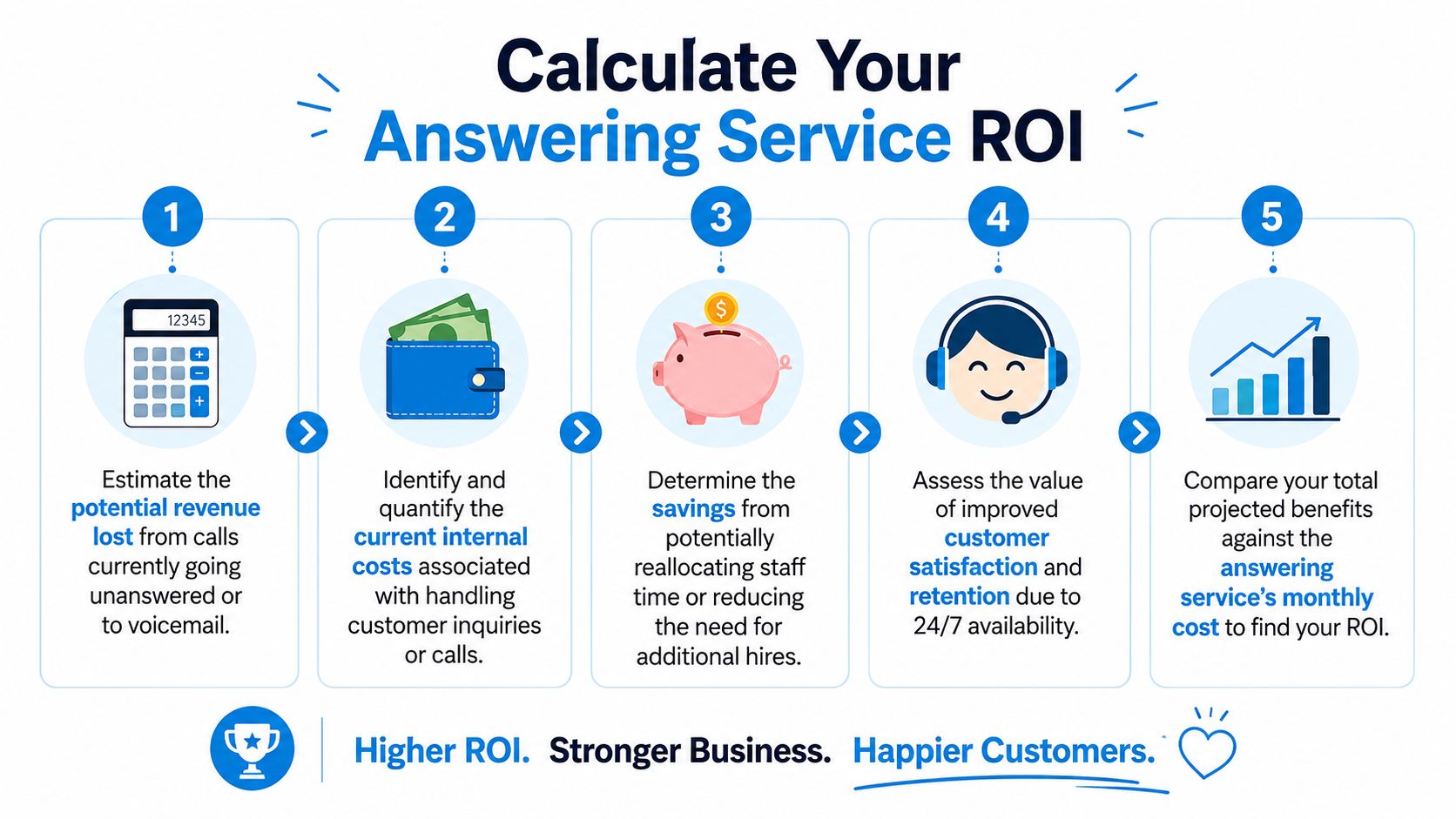
A three-step way to run the math
Use this framework:
- Estimate the value of a new customer or case.
- Count the calls that currently go unanswered, to voicemail, or to delayed callback.
- Compare the likely recovered revenue against the monthly service cost.
That's not perfect accounting. It's practical decision-making. If you know a single booked job, signed client, or scheduled consultation is worth meaningful revenue, the ROI often becomes obvious quickly.
For businesses that want to tighten the lead side of the equation, this guide on how to calculate cost per lead helps frame the numbers properly.
Example one: HVAC company
ReadyToTalk notes that for home service businesses, a single missed call can mean losing a $500 to $2,000 job in categories where urgency matters and voicemail performs poorly. For an HVAC company, that's a realistic way to think about winter no-heat calls or summer breakdowns.
Suppose your team misses a handful of high-intent calls during nights, weekends, or dispatch-heavy hours. You don't need many recovered jobs for the monthly service fee to pay for itself. That's especially true if your current process relies on technicians answering while driving, working, or moving between calls.
The operational benefit matters too. A strong answering setup can qualify the call, collect the issue, log urgency, and route it correctly so the field team isn't interrupted every time the phone rings.
Example two: Law firm
The law firm math works differently, but the logic is the same. Legal intake is often high value, and callers usually contact more than one firm. If your intake process depends on someone being available at the exact moment a call comes in, you're leaving too much to chance.
Consider the cost of failure lens. The right comparison isn't “service fee versus zero.” It's “service fee versus lost matters, delayed intake, and the staff time spent chasing callbacks.”
A law firm doesn't need every call answered by a senior attorney. It needs every serious caller screened, captured, and routed without delay.
The extra savings owners forget to count
ROI isn't only recovered revenue. It also includes time your current team gets back when they stop juggling phones and manual follow-up.
Think through these hidden gains:
- Fewer interruptions: Office staff can finish billing, scheduling, and patient or client support tasks.
- Cleaner records: Better intake reduces errors and duplicate data entry.
- Less hiring pressure: Some businesses avoid adding another admin role by improving coverage instead.
- Better consistency: Call handling stays stable even when your internal team is busy or unavailable.
That's why a lower sticker price alone doesn't always win. The best option is the one that captures revenue and reduces operational friction at the same time.
A Checklist for Choosing the Right Provider
A cheap plan becomes expensive fast if it mishandles lead calls, floods you with overages, or forces your staff to clean up bad intake. Provider selection is really a risk decision. You are choosing how often calls get captured correctly, how much staff time gets pulled off real work, and whether your monthly bill stays predictable.
Price still matters. So does billing structure. Industry pricing snapshots from providers such as Ruby show how quickly costs rise as live answering volume increases, especially if your call flow includes screening, scheduling, or transfers instead of quick message-taking. That is one reason flat-rate AI or AI-first hybrid models can produce better ROI for small businesses with uneven call volume.
Questions that reveal the real fit
Use these questions in demos and sales calls:
- What counts as billable usage? Ask how they treat hang-ups, spam, wrong numbers, transfers, hold time, and partial minutes.
- What happens when volume spikes? Get a direct answer on after-hours surges, lunch rushes, seasonal demand, and outage backup.
- How is the AI trained on my business? Ask who builds the call flows, how they handle your services and terminology, and how updates are made when your process changes.
- How customizable are the AI-to-human escalation rules? You need to decide which calls stay automated and which calls go to a person immediately.
- How do you integrate with my CRM, calendar, and scheduling tools? If the answer is weak, your team will do the data cleanup.
- Can you support my exact intake workflow? A legal intake, service dispatch, and medical scheduling process should not use the same script.
- What reporting will I get each month? You should be able to see answered calls, escalations, booked appointments, abandoned calls, and trends by time of day.
What separates a strong provider from a costly one
Strong providers usually share a few traits. They fit your real call pattern, document billing clearly, and show exactly how routine calls are automated without letting high-value calls fall through. They also make setup concrete. You should see sample scripts, routing logic, escalation paths, and the systems they write data into.
Weak providers are usually easy to spot once you ask the right questions:
- The base plan is too small for your volume. The monthly fee looks low until overages erase the savings.
- Every call is priced like it needs a live agent. That rarely makes financial sense if a large share of calls are simple scheduling, FAQs, or basic screening.
- The AI sounds flexible but has no real training process. That leads to poor answers, bad routing, and frustrated callers.
- Escalation rules are vague. If nobody can explain when a human steps in, expect missed urgency and inconsistent service.
- Integration is partial. A provider that only sends emails may create more admin work than it removes.
A simple selection filter
Before you sign, score each provider on these three areas:
| Decision area | What to look for |
|---|---|
| Cost control | Clear billing rules, realistic volume fit, predictable monthly spend, manageable overages |
| AI and workflow fit | Business-specific training, configurable call flows, accurate intake, useful reporting |
| Escalation quality | Clear triggers for human takeover, fast transfer paths, good handling of urgent or sensitive calls |
The right provider does more than answer the phone. It reduces the cost of failure. That means fewer missed revenue opportunities, fewer interruptions for your team, and a call-handling model that does not get more expensive every time volume increases.
The Real Cost Is the Opportunity You Miss
The phrase cost of answering service can be misleading because it pulls attention toward the monthly fee and away from the bigger financial issue. Most businesses don't struggle because an answering service is expensive. They struggle because missed calls, delayed follow-up, and fragmented intake damage revenue.
A smart buying decision looks at both sides of the ledger. On one side, you have plan fees, usage models, and add-ons. On the other, you have missed jobs, unbooked appointments, overloaded staff, and the cost of handling calls poorly. For many businesses, the second side is far more expensive.
That's why flat-rate AI and hybrid models deserve serious attention. They give owners more predictable budgeting, broader coverage, and a better way to reserve live staff for calls that need judgment or empathy. Pure live service still has a place, especially in sensitive workflows. But paying live-agent rates for every routine call often isn't the best use of budget.
The practical goal isn't to buy phone coverage. It's to build a system that captures demand when it appears, routes it correctly, and keeps your team focused on work that moves the business forward.
If you want a modern option that combines AI efficiency with human backup, Recepta.ai is built for exactly that. It helps businesses answer calls around the clock, capture leads, schedule appointments, sync with existing tools, and escalate to trained agents when a live handoff matters. For owners who are done losing opportunities to voicemail, it's a practical way to improve coverage without taking on the cost and complexity of another full-time hire.