Home Service Business Software Complete Explainer
Monday starts with three voicemails, two text messages on a personal phone, one technician asking where to go next, and a customer insisting they were promised a morning slot. The office manager has a spreadsheet open, a paper calendar on the desk, and a whiteboard that was accurate for about an hour. By lunch, someone has double-booked a service window, an estimate request is still sitting in voicemail, and nobody is fully sure which invoices were already sent.
That situation is common in plumbing, HVAC, cleaning, pest control, and electrical businesses. It usually doesn't mean the team is careless. It means the business has outgrown memory, sticky notes, and disconnected apps.
Most owners start by looking for one system that will “fix everything.” Sometimes that works. Often it doesn't. Growing teams usually need something more practical: a core system for records, a scheduling layer that reflects real availability, and communication tools that catch calls and move information into the right place. That's why the smarter conversation around home service business software isn't only about buying a CRM. It's about connecting the tools you already use, then adding missing pieces without blowing up daily operations.
Why Home Service Business Software Matters
A small service company can survive on hustle for a while. One person answers the phone, another updates the schedule, and technicians call in when they're running late. The cracks start showing when call volume climbs or jobs become less predictable.
A missed call in a home service business isn't just a missed conversation. It can be a same-day plumbing emergency, a tune-up that turns into a maintenance customer, or a quoted job that goes to the company that answered first. Manual systems create lag at every step. Customers wait longer, office staff re-enter the same information, and technicians leave the yard without the details they need.
The single source of truth problem
The biggest operational change software creates is simple. It gives everyone one place to look. Customer notes, job status, technician assignments, invoices, and follow-up tasks stop living in five different places.
That matters because confusion compounds fast:
- The office hears one thing: “Mrs. Lopez needs afternoon service.”
- The technician hears another: “This is an all-day install.”
- The invoice says something else: “Standard repair.”
- The customer remembers the promise: “You said someone would text before arrival.”
A connected software stack reduces those handoff errors. It also makes the business less dependent on one person “just knowing everything.”
Practical rule: If your schedule, customer notes, and invoicing live in separate systems with no sync, your team is spending energy on translation instead of service.
The broader market is moving in that direction fast. The global home services management software market was valued at approximately USD 2.9 billion in 2024 and is projected to reach around USD 9.4 billion by 2033, reflecting a CAGR of 12.6% from 2025 to 2033, according to DataHorizzon Research's home services software market analysis. That growth tells you something practical. More operators now treat software as operating infrastructure, not as an optional admin add-on.
For smaller teams, the goal isn't to copy a national franchise. It's to build a calmer operating system. Tools such as AI reception, scheduling automation, and synced records can help do that, especially for firms looking at solutions for small business workflows without adding another full-time admin hire.
Understanding Home Service Software Types
Home service business software isn't one category. It's a stack of tools that handle different jobs. If you lump them all together, demos get confusing fast because one platform may be strong in dispatch and weak in invoicing, while another has a polished CRM but limited field workflows.
This visual makes the core categories easier to map.
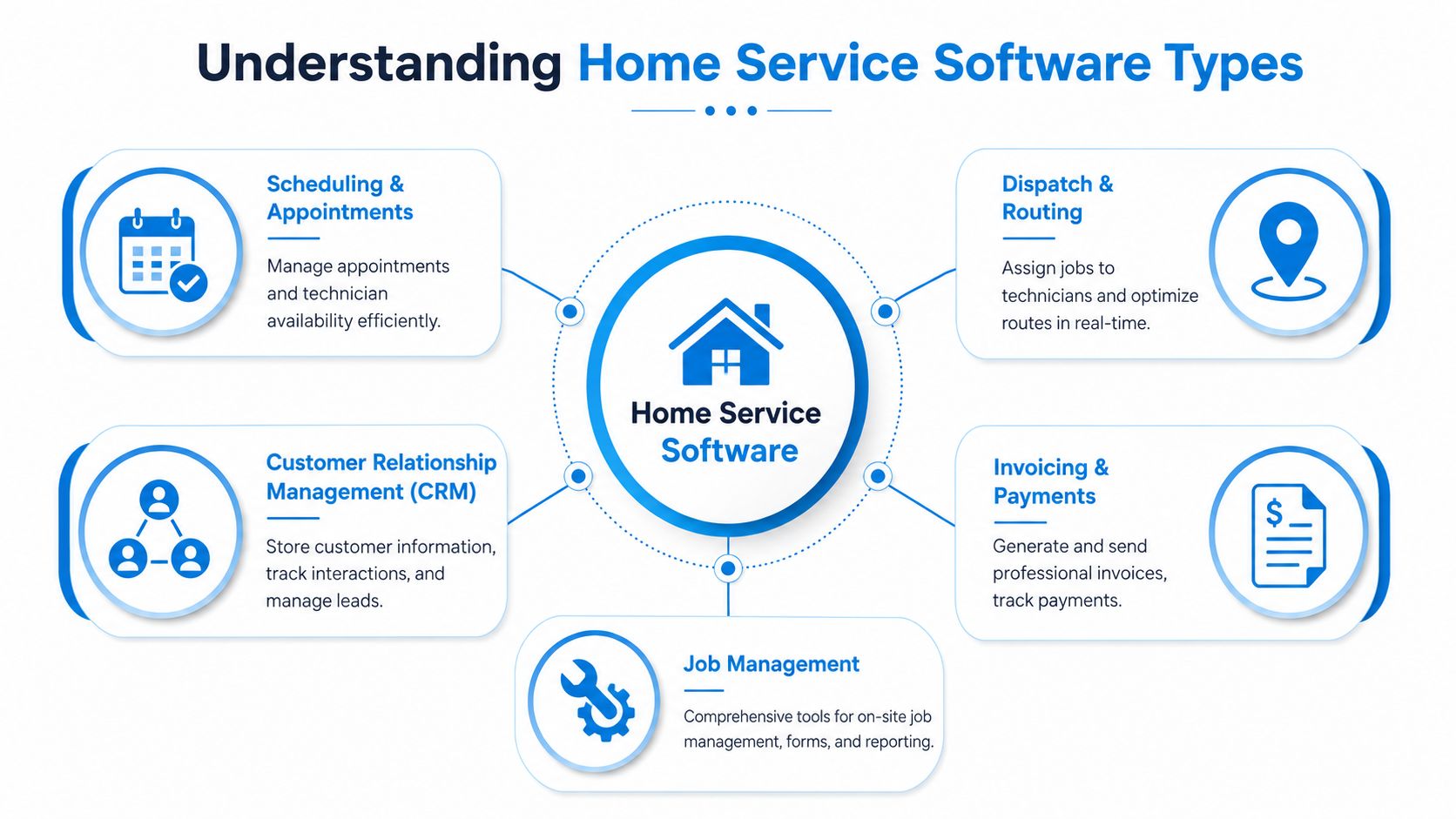
Scheduling software
Think of scheduling software as an air traffic control tower. Its job is to decide when work can happen and which openings are usable. A basic calendar only shows empty space. Good scheduling software also accounts for technician availability, job duration, service area, and appointment rules.
A cleaning company, for example, may need recurring weekly appointments. An HVAC company may need to hold emergency capacity open. A remodeling contractor may use appointment scheduling for estimates, not field dispatch. Same category, different operating logic.
Look for scheduling tools when your main pain is booking friction:
- Phone tag slows booking
- Office staff manually confirm every slot
- Technicians get booked without travel time in mind
- Sales consultations need self-serve scheduling
For trade-specific teams, this often overlaps with cleaning business scheduling software or similar vertical tools that handle recurring visits, notes, and staff coordination.
Dispatch software
If scheduling is the tower, dispatch is the runway manager. It takes booked work and assigns it to the right person at the right time. Dispatch tools matter most when jobs move during the day. Emergencies come in. A technician gets delayed. Another finishes early. Someone calls out sick.
Dispatch software answers practical questions:
- Who's closest?
- Who has the right skill set?
- Which route creates the least wasted drive time?
- What should the customer be told?
Route logic, technician status, and GPS views become particularly useful. Dispatch software is less about the calendar and more about execution in motion.
A short walkthrough helps if you want to see one version of how platforms present the category:
CRM software
A CRM is the customer memory of the business. It stores names, addresses, call history, estimates, past jobs, tags, lead sources, and follow-up notes. Without it, teams rely on inbox searches, text threads, and somebody's recollection.
A plumbing office might use the CRM to note:
- customer prefers text before arrival
- water heater is under warranty
- prior job had a parts delay
- spouse approves estimates over the phone
Those details save time and reduce awkward repeat questions.
A CRM doesn't just store contacts. It stores context, and context is what helps a small team sound organized.
Invoicing and payments
Invoicing tools are the cash register and paper trail. They turn completed work into a bill, track payment status, and help the office reconcile what happened in the field with what should hit accounting.
This category matters because delays often happen after the wrench is put down. If technicians finish work but paperwork sits in a truck or on a clipboard, cash collection slows and billing disputes rise.
Field mobile apps
Field apps are the toolbox in the technician's pocket. They let crews view job details, upload photos, complete checklists, collect signatures, and update status from the field.
For office staff, mobile completion matters because it shortens the gap between “job done” and “next action taken.” For technicians, it reduces callback confusion. For customers, it creates cleaner communication.
Here's the simplest way to think about the stack:
| Software type | Main job | Best analogy |
|---|---|---|
| Scheduling | Books time correctly | Air traffic control |
| Dispatch | Sends work to the right tech | Runway manager |
| CRM | Stores customer memory | Filing cabinet with search |
| Invoicing | Bills and records payment | Cash register |
| Field mobile app | Guides on-site work | Digital toolbox |
Must Have Features for Home Service Software
Feature lists get bloated in demos. Vendors love to show dashboards, colorful reports, and big menus. Owners should stay focused on the features that remove friction from the actual workday.
The easiest test is this: when a lead comes in, can your system capture it, book it, assign it, support the field tech, invoice it, and follow up without anyone copying data by hand into three places?
Features that reduce front-office friction
The front office usually feels the pain first. Calls come in while someone is already speaking with a customer. New requests arrive after hours. A technician asks for an address while another customer wants to reschedule.
The most useful capabilities here are:
- Calendar sync: Prevents one calendar from showing “open” while another already holds a booking.
- Bidirectional SMS: Lets customers confirm, reschedule, or respond without long call chains.
- Lead capture forms: Pushes website inquiries into the same workflow as phone requests.
- Call notes tied to customer records: Keeps details from disappearing into someone's notebook.
- Automated reminders: Reduces no-shows and “I forgot” conversations.
Practical example: a pest control office gets a web lead at night. Instead of waiting until morning, the system logs the request, creates a customer profile, and queues a response. The office starts the day with a scheduled next step, not a pile of unworked inquiries.
Features that improve field efficiency
Software should help technicians move, not just report what already happened. One of the clearest examples is routing. Implementing route optimization algorithms within home service dispatch software directly reduces fuel consumption and drive time by 15 to 25 percent, and boosts customer retention by 15 percent, according to Catalyst for the Trades on home service tech stacks.
Those numbers matter because route optimization isn't a nice-to-have. It changes margin and customer experience at the same time.
Key field features include:
Dynamic route optimization
Good dispatch software updates routes when traffic changes or urgent calls come in.Custom job checklists
A maintenance visit shouldn't rely on memory alone. Checklists standardize service quality.Offline mobile access
Technicians still need forms, notes, and photos when signal drops in a basement or rural area.Photo and signature capture
Useful for approvals, proof of work, and reducing disputes.Status updates from the field
“On the way,” “arrived,” and “completed” should update without a phone call to the office.
The best field feature is usually the one that prevents one more back-and-forth call between the office and the truck.
Features that speed up billing and follow-up
A lot of software buying happens because owners want better scheduling. Fair enough. But many teams get their return from faster handoff after the job.
Use this checklist during demos:
- Can technicians generate or trigger invoices from the field?
- Can payment links go out automatically after job completion?
- Can follow-up tasks be assigned by job type?
- Can the office see unpaid work without exporting a report?
- Can estimates, approvals, and invoices stay tied to one customer record?
A practical example from a plumbing team: after a completed water heater install, the technician submits photos and marks the job complete. The system triggers the invoice, records payment status, and creates a reminder to follow up on a maintenance plan. Without that chain, each step depends on somebody remembering.
Integration Requirements for Seamless Workflows
Most software problems in home services aren't caused by a bad tool. They're caused by a good tool that works alone.
That's why growing operators run into the fragmented tool stack paradox. 60% of small service businesses use 5+ disconnected tools, yet monolithic platforms often fail past 5 technicians or $1M revenue, as noted by Owned and Operated's review of essential home service software. In plain language, small teams often stitch together Google Drive, spreadsheets, calendars, phone systems, CRMs, and payment apps. Then they're told the answer is to replace everything at once.
Usually, that's where rollout pain begins.
A practical modular stack
Take a plumbing company with these tools:
- a CRM for customer records
- scheduling software for bookings
- dispatch software for field assignments
- an AI receptionist for after-hours and overflow calls
- Google Calendar for team visibility
- accounting software for reconciliation
That stack can work well if data flows cleanly.
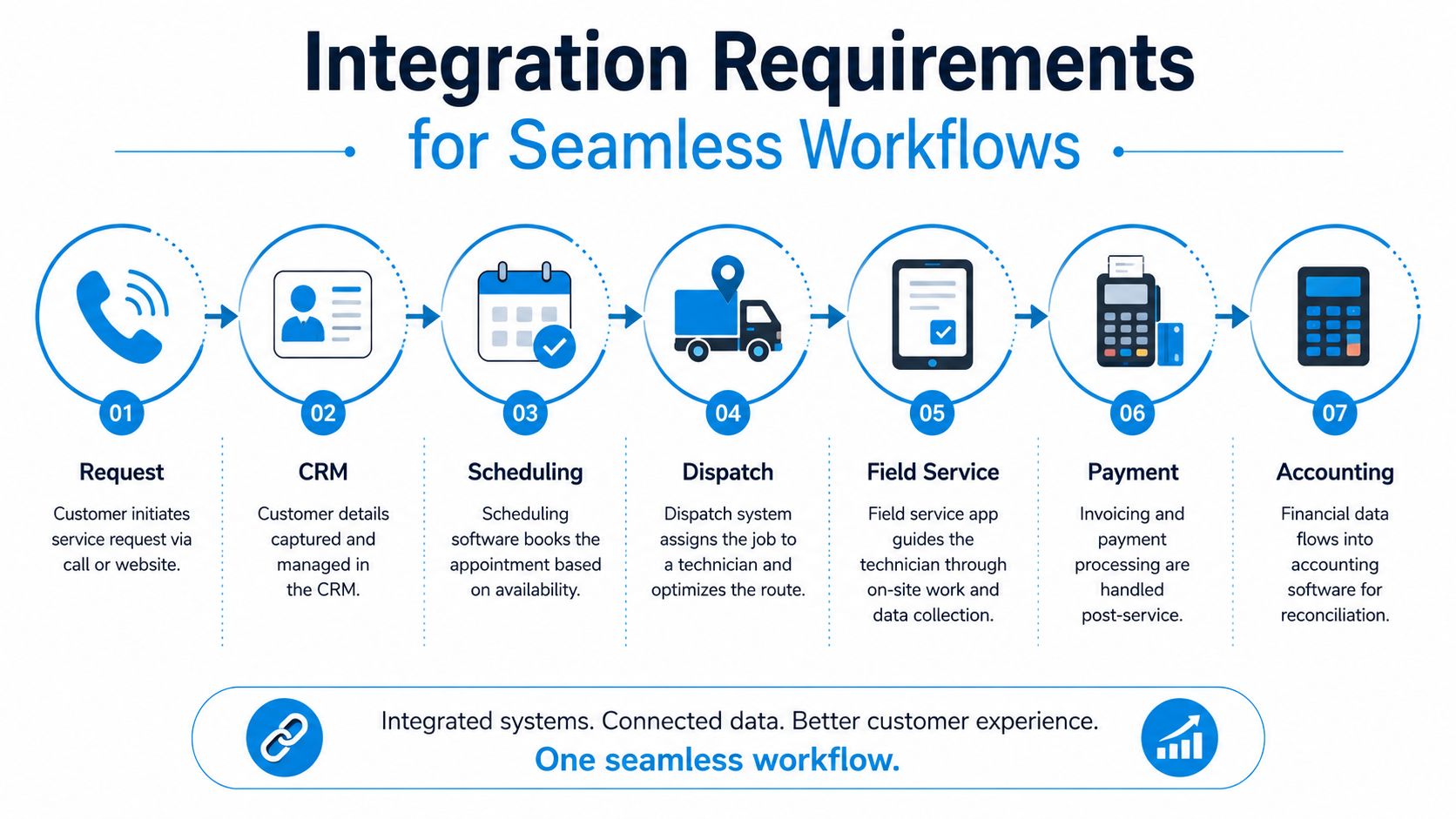
A healthy workflow looks like this:
- Customer calls or submits a web request.
- The intake tool captures name, address, issue type, and preferred time.
- The CRM creates or updates the customer record.
- Scheduling checks availability and books the job.
- Dispatch assigns the technician.
- The customer receives confirmation and updates.
- The completed job syncs to invoicing and accounting.
What to ask vendors
You don't need to be technical to ask smart integration questions. You need to know where information should move without retyping.
Ask each vendor:
- Does it have an API? That means another system can send or retrieve data.
- Does it support webhooks? That means it can trigger actions when something happens, like a new lead or completed job.
- What fields sync both ways? Contact info alone isn't enough. Notes, tags, appointment status, and payment status matter too.
- What breaks if the sync fails? You want retry logic, alerts, or fallback workflows.
- Can the system coexist with our current stack during rollout? That question saves a lot of migration pain.
For teams trying to manage third-party integrations, it helps to draw the workflow on one page before buying anything. If nobody can explain the path from incoming lead to completed invoice, the stack isn't ready.
Where AI receptionists fit
An AI receptionist should sit near the front of the workflow, not off to the side. Its value comes from catching demand and pushing structured information into the system you already use.
A simple example: a customer calls after hours about a clogged main line. The AI receptionist collects the issue, urgency, service address, and preferred callback path. That record enters the CRM, the dispatcher sees it first thing, and the customer receives confirmation instead of voicemail silence.
If your communication stack is messy, resources that show how to streamline communications via integrations can help you think through text, call, and system handoffs before you commit to another app.
Implementation Checklist and Timeline
Buying software feels quick. Implementing it isn't. Most rollouts go sideways for predictable reasons: unclear ownership, messy customer data, rushed training, and trying to change every workflow at once.
A steadier approach is to roll out in phases with one accountable owner per workstream. Even if your software vendor offers onboarding, your internal team still needs to decide what “done” looks like.
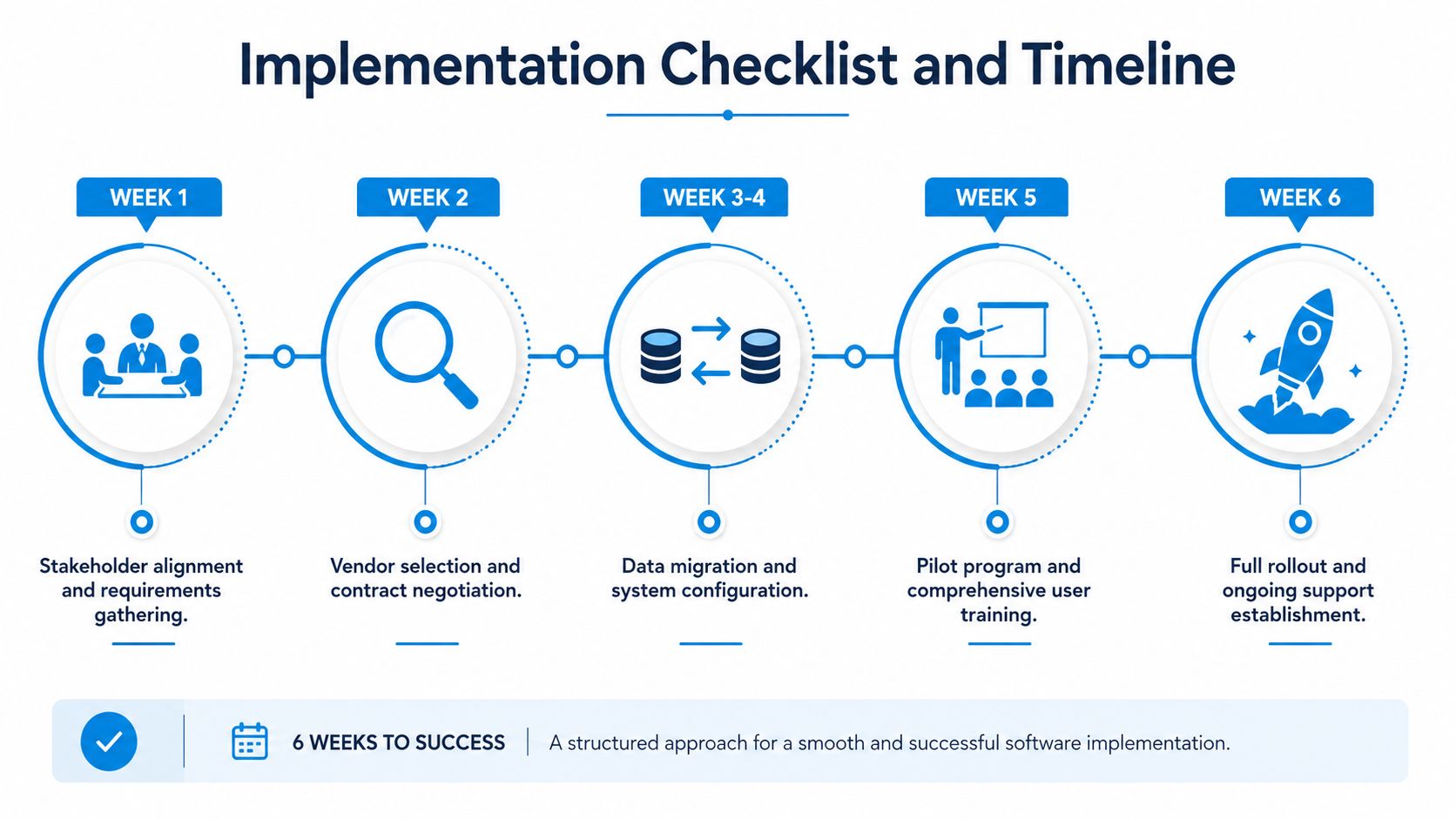
Weeks 1 and 2 alignment and vendor decision
Start with operations, not features. Write down the current workflow from first contact to payment collection. Mark where work gets delayed, lost, or re-entered.
During this phase, assign clear roles:
| Owner | Responsibility | Deliverable |
|---|---|---|
| Owner or GM | Final decisions | Approved priorities |
| Office manager | Current workflow mapping | Process document |
| Dispatcher | Scheduling and route requirements | Dispatch rules |
| Technician lead | Field app feedback | Mobile checklist needs |
| Bookkeeper | Invoice and accounting requirements | Billing flow notes |
Use those notes during demos. Without them, teams evaluate software based on appearance instead of fit.
Red flags in this phase:
- No one owns the project
- The team wants to replace everything at once
- Nobody has defined required integrations
- Demo questions stay at the feature level only
Weeks 3 and 4 migration and configuration
Many teams underestimate this work. Customer records usually need cleanup. Duplicate contacts, inconsistent addresses, and missing service notes can undermine a rollout.
Handle migration in layers:
- Clean customer data first
- Import only necessary historical records
- Set up job types and service categories
- Create technician permissions
- Build templates for reminders, invoices, and checklists
A practical example: an HVAC company may create separate workflows for emergency repairs, maintenance visits, and estimate appointments. If all three live under one generic job type, reporting and automation become messy later.
Field note: Don't migrate every old note just because you can. Bring over the information your team will actually use.
Week 5 pilot with a small crew
Don't flip the switch company-wide first. Pick one crew, one dispatcher, and one office coordinator. Run the new workflow in parallel with a simple fallback plan.
A good pilot tests:
- booking a new customer
- rescheduling
- dispatch changes during the day
- field completion
- invoice generation
- follow-up communication
Keep a daily issue log. Short notes are enough: “job tags didn't sync,” “tech couldn't upload photo in low signal,” “appointment reminder went out with wrong window.” Those details shape your final setup.
Week 6 training and launch readiness
Training works better when it's role-based. A dispatcher doesn't need the same session as a field technician. A bookkeeper doesn't need the same dashboard as the owner.
Break training by job function:
- Office team: intake, booking, customer updates, rescheduling
- Dispatch team: assignment rules, exceptions, route changes
- Technicians: mobile use, status changes, photos, signatures
- Finance staff: invoices, payments, export or accounting sync
- Managers: reporting, permissions, exception handling
Then run a launch checklist:
- Customer communication templates approved
- User permissions tested
- Mobile logins active
- Fallback contact method documented
- Support contacts saved
- One person assigned to triage day-one issues
After launch optimization
Go-live is the start of the practical learning period. Watch where employees still leave the system and return to old habits. If dispatchers text technicians outside the platform because the app is too slow or unclear, that's a workflow issue worth fixing.
Use a simple review rhythm in the first weeks after launch:
- what took longer than expected
- what users avoided
- what customers noticed
- which automations fired correctly
- where manual work still exists
The businesses that succeed with home service business software usually aren't the ones with the fanciest setup. They're the ones that implement in a sequence the team can absorb.
Pricing Considerations and Calculating ROI
Software pricing gets confusing because vendors package value in different ways. One charges by account tier. Another charges per technician. A third adds fees for payments, texting, or integrations. The monthly price on the website rarely tells the whole story.
That doesn't mean you need a complicated financial model. You need a practical worksheet built around the work your team already does.
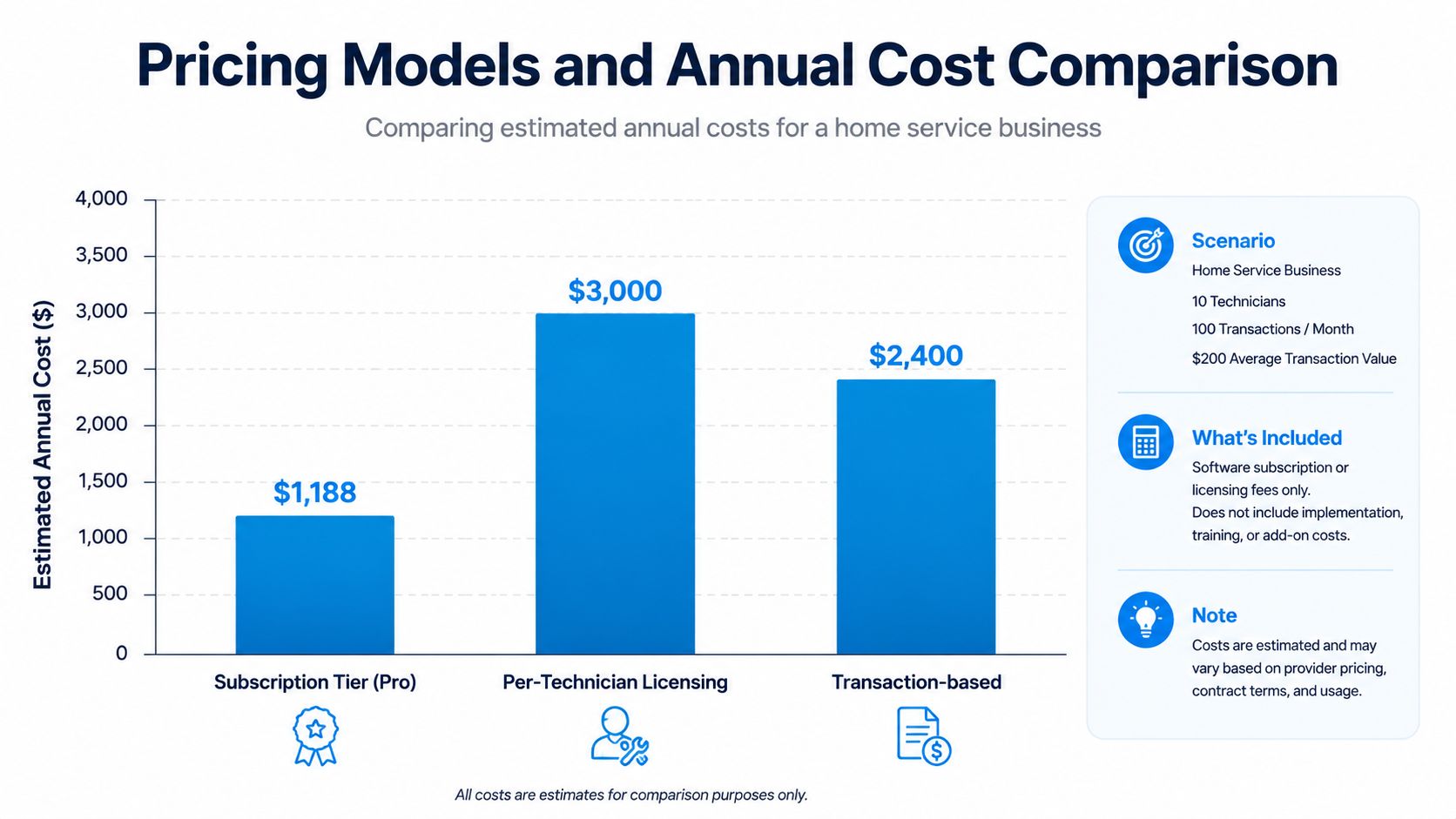
Common pricing models
Here's how most home service business software pricing behaves:
- Subscription tier: One monthly price for a feature bundle. Good for predictable budgeting, but advanced workflows may sit behind higher plans.
- Per-technician licensing: Costs scale as field headcount grows. Fair when every technician needs deep app access.
- Transaction-based pricing: Payment or booking fees rise with volume. Sometimes inexpensive at first, then less attractive as the business grows.
- Integration or add-on fees: Phone, SMS, advanced reporting, or accounting sync may cost extra.
The point isn't to avoid any one model. It's to ask what cost grows when your team grows.
A simple ROI worksheet
Skip the vanity metrics. Estimate returns from the parts of the operation you can observe directly.
Use categories like these:
- Admin time saved from less re-entry and fewer manual reminders
- Fuel and drive savings from better routing
- Faster billing from field-to-invoice workflows
- Lead capture improvement from fewer missed calls and better follow-up
- Operational fixes from clearer job and customer records
A dedicated CRM is especially useful here because it helps teams track completion times and follow-up notes, measure where leads originate, and adjust inventory practices based on patterns in the work, as described by CI Web Group's guide to reporting metrics for home service success.
For example, if your records show repeated delays tied to parts availability, you can change ordering habits. If your notes show one lead source produces better jobs, you can prioritize it. ROI often comes from those process corrections, not just from reducing software clicks.
A software budget makes sense when the system helps your team recover time, reduce avoidable waste, or tighten handoffs that currently leak revenue.
What to watch for in proposals
When comparing quotes, ask for:
- Implementation costs in writing
- Any setup or training fees
- Limits on users, texts, or calls
- Extra charges for integrations
- Support levels after onboarding
Some businesses overbuy. Others buy a cheap tool, then bolt on enough extras that the total cost ends up higher. The smarter purchase is usually the one that fits your current workflow and leaves room to layer new tools without forcing a full restart later.
Security and Compliance Best Practices
Home service teams collect more sensitive information than they sometimes realize. Names, addresses, access instructions, payment details, internal job notes, and call recordings can all sit inside the software stack. If that stack is loose, the risk isn't abstract. It shows up in shared logins, exported spreadsheets, and technicians storing customer details on personal devices.
A good way to think about software security is to compare it to a shop with keys, cabinets, and alarms. Not everyone needs every key. Important materials shouldn't be left on the front counter. And you want to know who entered, when, and what they touched.
Core controls that matter
Start with the basics:
- Role-based access: Dispatchers, technicians, office staff, and finance users should not all see the same data.
- Encrypted data handling: Payment and customer records should be protected in transit and at rest.
- Secure mobile workflows: Field staff need access, but that access should be controlled if a phone is lost or replaced.
- Audit trails: Managers should be able to review key changes and user actions.
- Password and login controls: Shared credentials create invisible risk.
If a vendor talks only about convenience and not about access controls, ask harder questions.
Compliance depends on your service model
Not every home service company faces the same obligations. Payment processing often raises PCI-related concerns. Healthcare-adjacent operations, such as certain in-home wellness or medical support services, may have additional privacy requirements. Franchise and multi-location businesses often need stronger permission structures because more users touch customer records.
Use vendor conversations to verify:
- What certifications or security reviews do they maintain
- How they handle stored recordings or transcripts
- How quickly they notify customers about incidents
- Whether deleted records are removed or merely hidden
- How backups and recovery work
For teams reviewing communication and intake tools, a checklist based on data security best practices can keep evaluation grounded in actual controls instead of broad marketing claims.
Practical habits inside your business
Even secure software can be undermined by weak internal habits. Set rules for:
- technician device access
- who can export customer lists
- where payment data can be discussed or stored
- how former employees are removed from systems
- what happens when suspicious activity appears
The strongest setup combines capable software with disciplined team habits. One without the other leaves a gap.
Real World Use Cases and Vendor Evaluation
Some companies need a broad field service platform. Others need a lighter stack with stronger scheduling or communication layered in. The right answer depends on the operating model, not on who has the biggest booth at a trade show.
That matters because the U.S. market is concentrated. ServiceTitan and Housecall Pro dominate roughly 60 to 70 percent of the U.S. field service management software market, according to US Tech Automations' comparison of home services automation. Big platforms deserve a look, but market share alone doesn't decide fit.
Use case one small plumbing team with a layered stack
A two-technician plumbing company often doesn't need to rip out every system. It may already have a workable CRM and a booking tool that customers understand. The weak point is usually intake. Calls hit voicemail after hours. Estimate requests wait too long. Office staff spend mornings reconstructing who called and what they needed.
A modular fix looks like this:
- keep the existing CRM
- keep the booking workflow customers already use
- add an AI receptionist that captures calls and appointment requests
- push intake data into the CRM automatically
- let the office confirm or adjust edge cases
That approach lowers change fatigue because the team doesn't have to relearn every screen at once. One option in this category is Recepta.ai, which handles inbound calls, appointment scheduling, lead capture, and follow-ups while syncing with connected tools. In a home service workflow, that makes it a front-end communication layer rather than a full replacement for dispatch, invoicing, or field operations.
Use case two multi-location operator preserving what works
A larger cleaning or pest control operator has a different problem. Too many local workarounds. One branch uses one process, another uses a different one, and leadership can't get consistent records. The temptation is to force every location into a single platform overnight.
That can backfire if one specialized scheduling tool already fits the business well. A better move is often to standardize the shared backbone first, then preserve the best-fit appointment layer while integrating the rest around it.
A practical vendor scorecard helps:
| Evaluation area | What to test in demos |
|---|---|
| User experience | Can office staff complete core tasks without hunting through menus? |
| Integration ease | Can records move cleanly between CRM, scheduling, payments, and accounting? |
| Workflow fit | Does the software match service calls, recurring jobs, or project work? |
| Support quality | Who helps after onboarding when the team hits real-world exceptions? |
| Total cost | What will this stack cost after add-ons, extra users, and integration needs? |
How to compare vendors without getting dazzled
Don't ask, “Which platform is best?” Ask narrower questions:
- Which one fits our dispatch model?
- Which one can coexist with our current stack?
- Which one creates the least disruption for field staff?
- Which one gives us the cleanest data handoff?
For trade-specific research, a practical guide for home service professionals can help frame comparisons across HVAC-focused tools and broader field service platforms.
If a vendor wins the demo but can't explain your real workflow, the demo doesn't matter much.
The strongest software choice usually isn't the one with the longest feature list. It's the one your office will effectively use, your field team won't fight, and your future integrations won't break.
If your team is missing calls, juggling disconnected tools, or trying to add an AI receptionist without replacing the rest of the stack, Recepta.ai is worth a look. It's built to capture calls, book appointments, log details, and pass information into the systems you already use, which makes it useful for home service businesses that want a modular upgrade instead of a full software reset.