How to Qualify Sales Leads: A Proven Playbook for Faster Wins
To qualify a sales lead, you have to figure out if they're just window shopping or if they have a real intention to buy. It's a process of systematically checking if a lead is the right fit, has a genuine need, and is actually ready to make a move. This all comes down to defining who your ideal customer is, scoring leads based on who they are and what they do, and asking smart questions to confirm they're worth your sales team's valuable time.
Stop Wasting Time on Unqualified Leads
Chasing every single inquiry that comes your way feels productive, doesn't it? In reality, it’s the fastest way to burn out your sales team and miss your revenue targets. The problem usually isn't a lack of leads—it's the lack of a smart system to spot the right ones.
This guide gives you a data-backed framework to qualify prospects effectively and move beyond gut feelings. It's about building a repeatable process that filters out the noise, so your team can focus on conversations that actually close. To really make a difference, you need strategies that generate qualified leads from the very start.
The True Cost of Poor Qualification
Getting lead qualification wrong isn't just a small hiccup; it's often called out as the #1 challenge in sales. It’s the main reason 67% of deals fall apart, and an eye-watering 80% of marketing leads never turn into sales.
The numbers don't lie. While companies that properly nurture their leads see 20% more sales opportunities and a 451% jump in qualified prospects, a shocking 65% of marketers don't have any lead nurturing process in place. They're missing out on deals that are, on average, 47% larger.
It's important to remember the difference between a lead and a prospect. A lead is just someone who's shown a flicker of interest. A prospect, on the other hand, is a lead you've actually vetted and confirmed is a potential fit for what you offer.
A Real-World Qualification Scenario
Picture a busy home services company juggling everything from emergency plumbing disasters to routine HVAC check-ups. Before they had a system, every call was treated with the same urgency. A team member might spend 15 minutes on the phone with someone just getting a quote for a kitchen remodel, while a customer with a burst pipe waits on hold.
Then, they started using an AI receptionist. Almost overnight, they could distinguish between a frantic "my pipe just burst!" call and a casual "I'm thinking about a remodel" inquiry. The AI just asks a couple of simple questions upfront: "Is this for an immediate repair or a future project?" and "Can you tell me a bit about the issue?"
Based on those answers, the system springs into action:
- Emergency Leads: Instantly routed to a live technician for immediate dispatch.
- Project Inquiries: Automatically scheduled for a follow-up call with a sales consultant.
- General Questions: Added to an email list for future marketing updates.
This simple workflow completely changed their operations. High-priority leads got the instant attention they needed, while lower-priority inquiries were nurtured without derailing the entire team. It's a perfect example of how an intelligent front-end system can act as your first line of defense in lead qualification. To see how technology can help here, take a look at our guide on lead management software for small business.
Defining Your Ideal Customer Profile
Before you can even think about qualifying leads, you need to know exactly who you're looking for. It's a common mistake to chase anyone who shows a flicker of interest, but that’s a recipe for a burnt-out sales team and a leaky pipeline.
The entire foundation of a smart qualification process is a rock-solid Ideal Customer Profile (ICP). This isn't about guesswork or wishful thinking; it’s a data-backed description of the perfect company that gets the most value from what you sell.
Think of it as the blueprint for every account your sales team should be targeting.
ICP vs. Buyer Persona: What’s the Difference?
People often mix up an Ideal Customer Profile with a Buyer Persona, but they’re two sides of the same coin. Nailing this distinction is essential for getting your marketing and sales efforts to work together seamlessly.
An Ideal Customer Profile (ICP) is all about the company. It’s built on firmographics—the hard, factual data that defines the organizations you want as customers.
A Buyer Persona zooms in on the people inside those companies. This is where you detail the individuals who actually make the buying decisions, focusing on their specific job roles, daily frustrations, and what motivates them.
Let's look at a quick example. Say you sell project management software:
- Your ICP might be: B2B tech companies in North America with 50-250 employees and annual revenue between $5M and $50M. This tells your team exactly which companies to go after.
- A key Buyer Persona could be "David the Engineering Manager." David is 38, constantly fighting missed deadlines because he can’t see who’s working on what. He’s driven by shipping projects on time and under budget. This tells your team how to talk to the decision-maker.
A sharp ICP keeps you from wasting cycles on bad-fit companies, while detailed buyer personas give you the language to connect with the right people inside those companies.
How to Build Your Ideal Customer Profile
Crafting a useful ICP means looking inward at your best customers and outward at the market. The best place to start is with your top 10-20 happiest, most successful clients. What do they all have in common?
You're looking for patterns across these key firmographic points:
- Industry/Vertical: Do your best customers tend to be in healthcare, e-commerce, or another specific niche? For example, you might find that 70% of your top clients are in the SaaS industry.
- Company Size: How many employees do they usually have? This helps you avoid businesses too small to afford you or so big your team gets lost in bureaucracy. Actionable Step: Pull a report from your CRM and find the median employee count of your top 20 accounts.
- Annual Revenue: What’s the sweet spot, financially, for your most profitable accounts?
- Geography: Are they clustered in a particular city, region, or country?
- Tech Stack: Do they use complementary software, like a specific CRM, that makes your product an even better fit? Example: If you sell a marketing automation tool, you might discover that customers who also use Salesforce have a 50% higher retention rate.
Once you've dug into your own data, do some market research to see if there are other segments out there that fit the profile but that you haven't reached yet. This whole exercise gives your team a clear, actionable definition of a "good" lead before they ever pick up the phone. A deep understanding of who you're talking to is the absolute first step to build rapport with customers and have a real conversation.
From Profile to Persona: Uncovering the "Why"
With your ICP set, it’s time to bring your buyer personas to life. This part is less about data points and more about understanding the "why" behind their behavior and decisions.
To build a persona that actually helps your sales team, you need to get inside their head. Answer these questions:
- What’s their job title and role? (e.g., Marketing Director, Head of Operations)
- What are they responsible for? What does a "win" look like in their job?
- What are their biggest professional headaches or "pain points"? This is the gold you’re digging for in qualification.
- What goals are they trying to hit? (e.g., increase team efficiency by 15%, cut operational costs)
- Where do they hang out online? (e.g., specific industry blogs, LinkedIn groups, trade publications)
For a home services company, a persona might be "Busy Brenda." She’s a homeowner who values reliability and clear communication above all else. Her biggest pain point is the sheer frustration of contractors not showing up on time. That single insight tells you exactly how to approach and qualify leads who fit her profile.
Building a Practical Lead Scoring Model
Alright, you’ve nailed down your Ideal Customer Profile. Now what? This is where lead scoring comes in. It’s how you take that perfect customer vision and make it actionable, turning lead qualification from a gut-feel guessing game into a repeatable, data-driven process.
Think of it this way: instead of your sales team treating every new lead the same, you’ll have a system that automatically flags the best opportunities. By assigning points based on who a lead is and how they're engaging with you, you can instantly separate the hot prospects from the tire-kickers. It’s all about focusing your team’s energy where it will have the biggest impact.
Explicit vs. Implicit Data: The Two Sides of the Scoring Coin
A really solid lead scoring model is built on two types of information: who the lead is (explicit data) and what they do (implicit data).
Explicit data is the stuff people tell you directly. It’s the firmographic and demographic details from forms—job titles, company size, industry, location. This tells you if they fit your ideal profile on paper.
Implicit data, on the other hand, is all about behavior. It's the digital body language you track—pages they visit on your site, emails they open, content they download. This tells you how interested they are right now.
You absolutely need both. I've seen plenty of leads who look perfect on paper (great title, right company size) but show zero engagement. They're cold. Conversely, you might get a super-engaged lead from a slightly smaller company who is clearly ready to buy. A good model helps you find the sweet spot.
Putting Points on the Board
This is where the magic happens. You assign positive and negative point values to different attributes and actions. The first step is to decide what score makes a lead "sales-ready." For many teams, that magic number is around 100 points.
Let’s walk through a real-world example for a financial advisory firm that targets established businesses.
Here’s a simplified look at how they might set up their scoring:
Explicit (Fit) Scoring:
- Company Revenue > $5M: +25 points
- Industry (Manufacturing, Tech): +20 points
- Job Title (C-Suite, Director): +15 points
- Uses a personal email (gmail, yahoo): -15 points
Implicit (Engagement) Scoring:
- Requested a consultation: +30 points
- Visited 'Retirement Planning' page 3+ times: +15 points
- Downloaded 'Tax Strategies' whitepaper: +10 points
- Unsubscribed from newsletter: -25 points
With this system, a Director of Finance at a $10M tech company who requests a consultation immediately gets a score of 70 (15+25+30). That’s a hot lead, and the sales team knows to jump on it right away. The beauty is that you can build this logic directly into your CRM. To get a better sense of how that works, check out our guide on the benefits of effective CRM integration.
A quick pro-tip: A lead's score shouldn't be static. If a once-hot lead goes dark for 90 days, you should have a "score decay" rule that automatically reduces their points. For example, you can set a rule in your CRM to subtract 5 points every 30 days of inactivity. This keeps your pipeline clean and your data accurate.
Let Technology Do the Heavy Lifting
Manually scoring leads is a non-starter. Modern tools, especially those with AI, are what make this entire process work seamlessly. In fact, AI-powered systems can improve scoring accuracy by 40% and help lift conversion rates by 20% or more. For top-performing sales teams, that can translate to a 25-35% increase in conversions and a qualification process that’s 3x faster. These are serious numbers, and you can dig into more of them in these recent lead generation statistics.
This is where tools like AI receptionists become incredibly powerful. They can pick up on critical buying signals from the very first phone call. When a prospect calls in, the AI can ask a few smart, qualifying questions. It listens for keywords like "urgent," "budget," or specific service names and can automatically add points to that lead's score in your CRM in real time.
Suddenly, you've created a live feedback loop. Your lead scores are no longer just based on web forms and email clicks; they're informed by actual conversations. This makes your scoring far more predictive and, just as importantly, frees up your team from tedious manual data entry.
Crafting Your Qualifying Questions and Scripts
A data-driven lead scoring model is only as smart as the information you feed it. To really get a handle on who's a hot prospect and who's just kicking tires, you have to move beyond surface-level questions. It's about learning to uncover a person's real needs, their actual challenges, and their true buying intent.
The right questions, asked at the right time, are what turn a dead-end chat into a genuine opportunity. This is about crafting queries that make people think. Instead of asking, "What are your needs?" which almost always gets you a vague, unhelpful answer, you need to dig into the reality of their day-to-day operations. It’s the difference between asking if they need a new tool and understanding the costly, frustrating problem the right tool would actually solve.
Moving Beyond the Obvious Questions
The entire point of your qualifying questions is to pull out the specific data points your lead scoring model needs to work. These questions should be open-ended, encouraging the lead to talk about their budget, who makes the decisions, their biggest headaches, and their timeline—all without making them feel like they’re being grilled.
Generic questions just get you generic answers. Let's look at some real-world examples that cut right to the heart of the matter:
- For a Commercial Real Estate Agent: Don't ask, "Are you looking for a new office?" Instead, try, "What are the key operational bottlenecks your current space creates for your team?" This uncovers real pain points like workflow chaos or a lack of collaborative space, which are powerful motivators for a move.
- For a Digital Marketing Agency: Skip "What are your marketing goals?" and ask, "Six months from now, what does a huge win from this campaign look like, and what’s the one metric that will tell us we got there?" This creates instant clarity and ties your work directly to their definition of success.
- For a Home Services Company (HVAC): Instead of just asking, "Is your AC working?" try, "Have you noticed your energy bills creeping up or that some rooms are way colder than others lately?" This connects your service directly to a tangible financial pain point—high utility costs.
These questions do more than just collect data; they kick off a consultative conversation that positions you as a problem-solver from the get-go. Building this kind of dialogue is a critical skill, and you can sharpen it by learning how to keep a conversation going with customers.
The best qualifying questions don't feel like a checklist. They feel like a natural conversation where you're genuinely trying to figure out if you can help. This is how you build trust and get prospects to open up and share the very information you need to qualify them.
Structuring Your Scripts for Consistent Results
Once you’ve nailed down your core questions, it’s time to organize them into scripts. A solid script ensures that every single lead gets the same high-quality experience and that you consistently capture the data you need for accurate scoring. It doesn't matter if it's your top salesperson or an AI assistant handling that first touchpoint.
A script isn’t meant to be read like a robot. Think of it as a flexible framework—a guide that makes sure the conversation hits all the key checkpoints.
A simple but effective script structure looks like this:
- The Opener: A quick, friendly introduction to break the ice and build a little rapport. Example: "Hi, thanks for calling [Company Name]. I'm just gathering a little info to make sure I connect you with the best person to help. Is that okay?"
- Pain Discovery: A few of your best open-ended questions designed to uncover their challenges and goals (like the examples we just covered).
- Qualification Probes: More direct questions to confirm if they fit your Ideal Customer Profile (ICP) and match your scoring criteria. Example: "Just so I'm clear, are you looking for a solution for a team of around 50, or is it larger than that?"
- The Next Step: A crystal-clear call to action, whether that’s booking a demo, scheduling a follow-up with a specialist, or politely disqualifying the lead. Example: "Based on what you've said, it sounds like a chat with our product specialist, Sarah, would be really valuable. She has an opening tomorrow at 10 AM. Does that work for you?"
Let AI Do the Heavy Lifting with Smart Scripts
This is where things get really interesting. An AI-powered receptionist can run the initial part of your script flawlessly, 24/7. You can program it to ask your top two or three qualifying questions on every single inbound call, ensuring nothing slips through the cracks.
Imagine a law firm using their AI receptionist to ask:
- "So I can get you to the right person, could you briefly tell me what your legal matter is about?"
- "Have you been served with any documents or are you facing an immediate deadline?"
Based on the responses, the system can instantly gauge the lead's urgency. It can then route a high-intent call directly to an attorney’s line or, for a less urgent matter, schedule a consultation for the next day. All the while, it’s logging this crucial information into your CRM, updating the lead's score in real-time. This simple setup ensures no high-value lead is ever missed while fiercely protecting your team’s time.
Automating Your Lead Qualification Workflow
Okay, you’ve done the foundational work. You know who your ideal customer is, you’ve built a scoring model that actually works, and you have your go-to qualifying questions ready. Now for the fun part: putting it all on autopilot.
This is where you build an automated workflow that turns your solid strategy into a hands-off engine for your sales pipeline. The goal here is simple: eliminate the manual fumbling and ensure every single lead gets the right response, instantly. This isn't just about being efficient; it’s about speed. In B2B sales, getting back to a lead within the first hour can increase your odds of qualifying them by a staggering 7 times. Automation guarantees your best leads never have to wait.
Mapping the Automated Journey
Let's walk through what a top-tier automated workflow actually looks like from the moment a prospect makes contact. This whole sequence can unfold in seconds, without anyone on your team lifting a finger.
It all starts with that first touch. A prospect calls your business. Instead of hitting a clunky IVR or, even worse, voicemail, they're greeted by an AI receptionist. This tool immediately gets to work, asking the key qualifying questions you’ve already crafted to understand their needs and how serious they are.
The AI captures their answers, creates a summary, and logs the full transcript directly into your CRM. That action is the trigger. From there, the real magic happens.
This entire automated sequence is your secret weapon for converting inbound interest into qualified pipeline. It ensures every lead is vetted, scored, and routed to the right destination—whether that's a top sales rep's calendar or a long-term nurture sequence—without any manual delay.
The process of uncovering what they need, structuring your questions, and capturing that data is the backbone of this whole system.
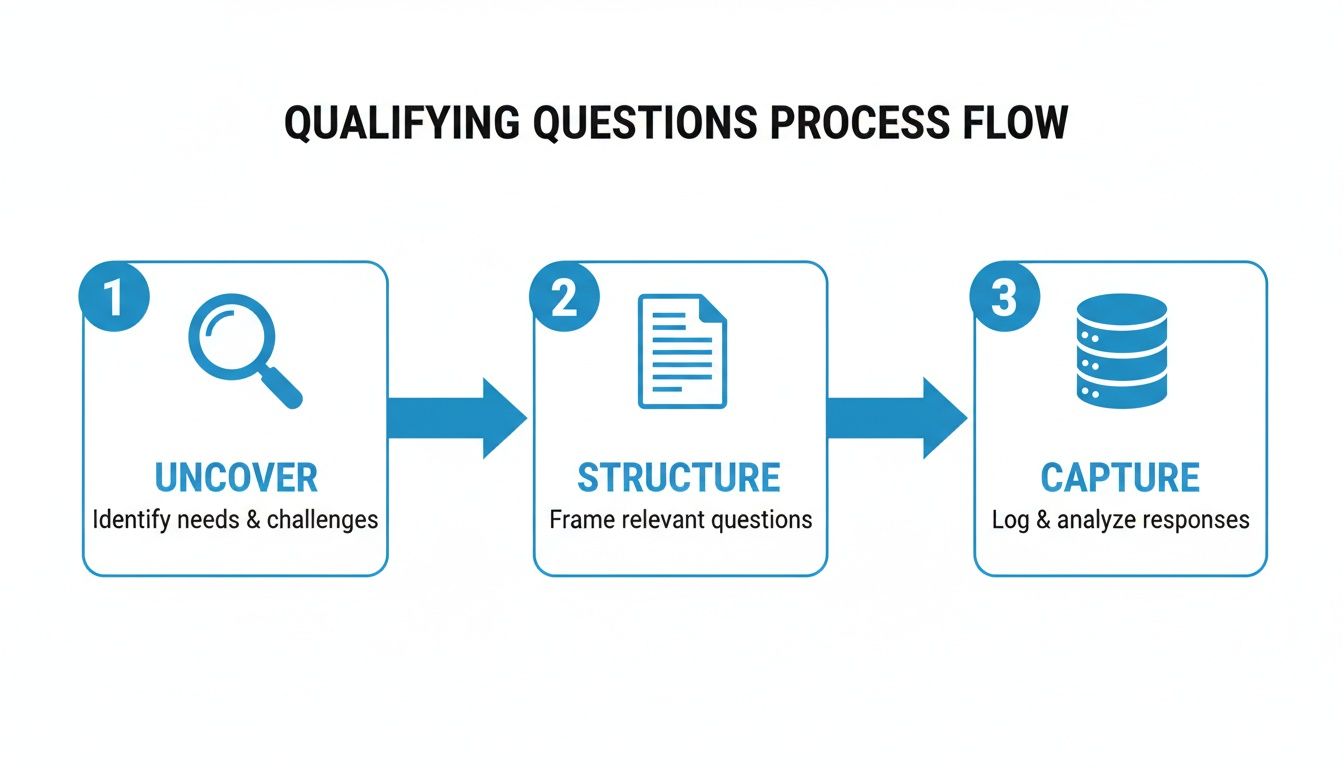
This flow shows how automation first uncovers intent, then organizes that information with targeted questions, and finally captures it in your CRM to kick off the next step.
Building Your Workflow in a CRM
Setting this up in a modern CRM like HubSpot is more straightforward than you might think. You’re essentially just creating a series of "if this, then that" rules based on the lead score you developed earlier.
Here’s a practical example of how you could set up your rules:
Rule 1: For the Red-Hot Leads
- Trigger: Lead score is greater than 80.
- Action 1: Instantly assign the lead to a senior sales rep.
- Action 2: Fire off a notification (email or Slack) to that rep with the lead's info and the call summary.
- Action 3: Automatically create a "Follow-Up Call" task in the rep’s calendar, due within the hour.
This rule gives your best leads the VIP treatment, connecting them with an expert while their interest is peaked.
Rule 2: For the "Not Yet" Leads
- Trigger: Lead score is between 35 and 79.
- Action 1: Update the lead's status to "Marketing Qualified."
- Action 2: Drop the lead into a long-term email nurture sequence filled with helpful content and case studies.
- Action 3: Create a task for a junior sales development rep to check in after 30 days.
This second rule keeps your brand on the radar for prospects who are a good fit but aren't ready to buy today, warming them up for a conversation down the road.
The Power of Real-Time Integration
This whole automated system lives or dies by the connection between your communication tools and your CRM. In fact, 67% of sales teams say poor qualification is the main reason they lose deals, and it often boils down to crucial information getting lost in translation between systems. You can dig into more stats about how AI is transforming the sales landscape on landbase.com.
When a tool like an AI receptionist can integrate with over 2,500 other platforms, it means every conversation is logged in your CRM the second it ends. This instant data sync is what allows your automated rules to fire correctly.
An AI-driven system can even improve scoring accuracy by as much as 40%, making sure your workflows are always acting on the best information. This cuts out the manual data entry and delays that let great opportunities slip through the cracks, making your entire sales process faster, smarter, and ultimately, more profitable.
Common Questions About Qualifying Sales Leads
As you start dialing in your lead qualification process, a few key questions always seem to pop up. Honestly, they're the same questions I've heard from sales and marketing teams for years. Getting the answers right is what separates a smooth-running growth engine from a system full of friction.
Let's break down some of the most common hurdles you'll face.
What Is the Difference Between an MQL and an SQL?
This is probably the most fundamental question, and for good reason. The MQL vs. SQL distinction isn't just jargon; it’s the critical handoff point where a lead passes from the marketing team's world into the sales pipeline. Getting this wrong is a recipe for misalignment and finger-pointing.
Think of it like this: an MQL (Marketing Qualified Lead) is someone who looks like a good fit on paper and has shown some interest. They’ve downloaded an ebook or signed up for a webinar. They're on the radar, but they haven't raised their hand and said, "I'm ready to talk about buying."
An SQL (Sales Qualified Lead), on the other hand, is an MQL who has crossed a clear threshold of intent. They’ve been vetted and have signaled they're ready for a sales conversation—maybe by requesting a demo, asking about pricing, or fitting a specific qualification framework like BANT or CHAMP.
The real goal isn't just to generate a mountain of MQLs. It's to build a reliable process that consistently turns the right MQLs into SQLs. That single metric tells you almost everything you need to know about the health of your marketing and sales alignment.
How Often Should I Update My Lead Scoring Model?
Your lead scoring model can't be a "set it and forget it" project. I've seen too many companies build a beautiful model, then watch it slowly become useless because they never revisit it. Markets change, customer behavior shifts, and your own product evolves.
A good rule of thumb is to review your scoring model at least quarterly.
Get your sales and marketing leaders in a room and dig into the data from your recent wins and losses.
- Did your highest-scoring leads actually close? If you have a bunch of high-scorers stalling out, you’re probably overvaluing certain actions.
- Did any low-scoring leads turn into amazing customers? This is a goldmine. It means there's a buying signal you're completely missing in your current model.
For example, if you find that leads who attend your weekly product demo convert at a 30% higher rate than those who don't, it’s a no-brainer—that action needs more points. These regular, data-driven check-ins keep your qualification engine tuned to what's actually happening on the ground.
Can I Qualify Leads Without a CRM System?
Technically, yes, you could try. You could use a massive spreadsheet, a web of sticky notes, and a whole lot of manual effort. But let me be blunt: it’s a terrible idea. It’s wildly inefficient, riddled with errors, and completely falls apart the second you start to grow.
A Customer Relationship Management (CRM) system is the central hub for your entire qualification process. It's not a luxury; it's essential infrastructure.
It's the single place where you can:
- Automate your scoring rules to run 24/7 in the background.
- See every single touchpoint—every email, call, and website visit—in one clean timeline.
- Build workflows that instantly route hot leads to the right salesperson.
- Pull reports that tell you what’s working and, more importantly, what’s not.
Even a basic CRM like HubSpot or Zoho CRM provides one of the highest ROIs you'll find. It takes qualification from a chaotic, manual chore and turns it into a structured, automated system that actually drives revenue.
What Are the Most Important Metrics to Track?
You can't fix what you can't see. To really understand if your qualification process is working, you need to ignore the vanity metrics and focus on a few key performance indicators (KPIs) that tell the true story.
These are the numbers that actually matter:
- MQL-to-SQL Conversion Rate: This is the big one. It tells you what percentage of leads that marketing deems "qualified" are actually accepted by the sales team. If this number is low, you have a major disconnect between what marketing is generating and what sales considers a real opportunity. Actionable Example: If marketing passes 100 MQLs to sales in a month, and sales only accepts 20 as SQLs, your conversion rate is 20%. This signals that your MQL definition is likely too broad.
- Lead-to-Opportunity Rate: Of all the leads your sales team engages, how many turn into actual, pipeline-worthy deals? This KPI is a direct reflection of your lead quality.
- Time-to-Conversion: How long does it take for a person to go from a brand-new contact to a sales-ready lead? The faster, the better. A long cycle means you're letting leads go cold before you ever engage them.
Keeping a close eye on these three KPIs will quickly expose any bottlenecks or weak spots in your funnel, showing you exactly where you need to focus your efforts.
Stop missing calls and letting qualified leads slip away. Recepta.ai provides a 24/7 AI receptionist that captures, qualifies, and routes every lead, ensuring you never lose another opportunity. Get started with a 30-day risk-free trial today!