After Hours Answering Service Medical Solutions
At 10 p.m. on a Friday, the calls that reach a medical practice rarely fit neatly into one category. A parent wants to know whether a fever can wait until morning. A post-op patient is worried about swelling. Someone else just needs to confirm whether a refill request can be handled on Monday. The operational problem isn't only answering the phone. It's sorting risk correctly, documenting the interaction, and protecting the on-call clinician from getting pulled into every non-urgent question.
That's why an after hours answering service medical workflow has changed. Basic coverage used to mean “someone picks up.” That's no longer enough. The practices that run this well use a structured escalation matrix, HIPAA-safe message handling, and a hybrid workflow that keeps routine traffic away from physicians while moving urgent calls fast.
Why Your Practice Needs More Than Voicemail After Hours
A voicemail box can't tell the difference between a billing question and a symptom that needs attention tonight. It records both the same way, then leaves the practice to untangle the risk later. That creates three problems at once. The patient feels abandoned, the clinician gets incomplete information, and the practice loses any chance to intervene in real time.
The damage shows up in ordinary situations. A patient calls after a medication reaction starts. They hear a greeting, leave a message, then sit with uncertainty. Another patient doesn't leave a message at all because waiting feels pointless. According to patient satisfaction findings on after-hours response expectations, 60% of patients are unwilling to hold for more than one minute when contacting their healthcare providers. If patients won't wait on hold, they're even less likely to trust a voicemail-only process after hours.
What voicemail gets wrong
Voicemail is passive. Medical after-hours communication has to be active.
- It captures, but doesn't assess: A recorded message doesn't clarify symptom severity, confirm callback details, or check whether the patient should seek immediate care.
- It increases callback chaos: Staff start the next morning with a queue of messages that vary in urgency but look identical in the inbox.
- It frustrates patients: People calling after hours are often anxious already. Silence or delay makes that worse.
Practical rule: If your current system treats every after-hours call as a message for later, it isn't a communication system. It's a liability handoff.
A better model uses a live process that routes calls based on urgency, not just time of day. That's the shift most practices need to make. If you're comparing options, this overview of after-hours answering services for modern practices is a useful starting point because it frames after-hours coverage as an operational system, not just overflow reception.
What a live system changes
A live service does more than reassure callers. It creates a decision path. Routine messages can wait. Concerning symptoms can be escalated. Emergencies can be directed immediately. That's the difference between “coverage” and care continuity.
How a Medical Answering Service Actually Works
A strong medical answering service works like an air traffic controller for patient calls. It doesn't practice medicine by itself. It routes the right communication to the right destination, at the right speed, with the right documentation.
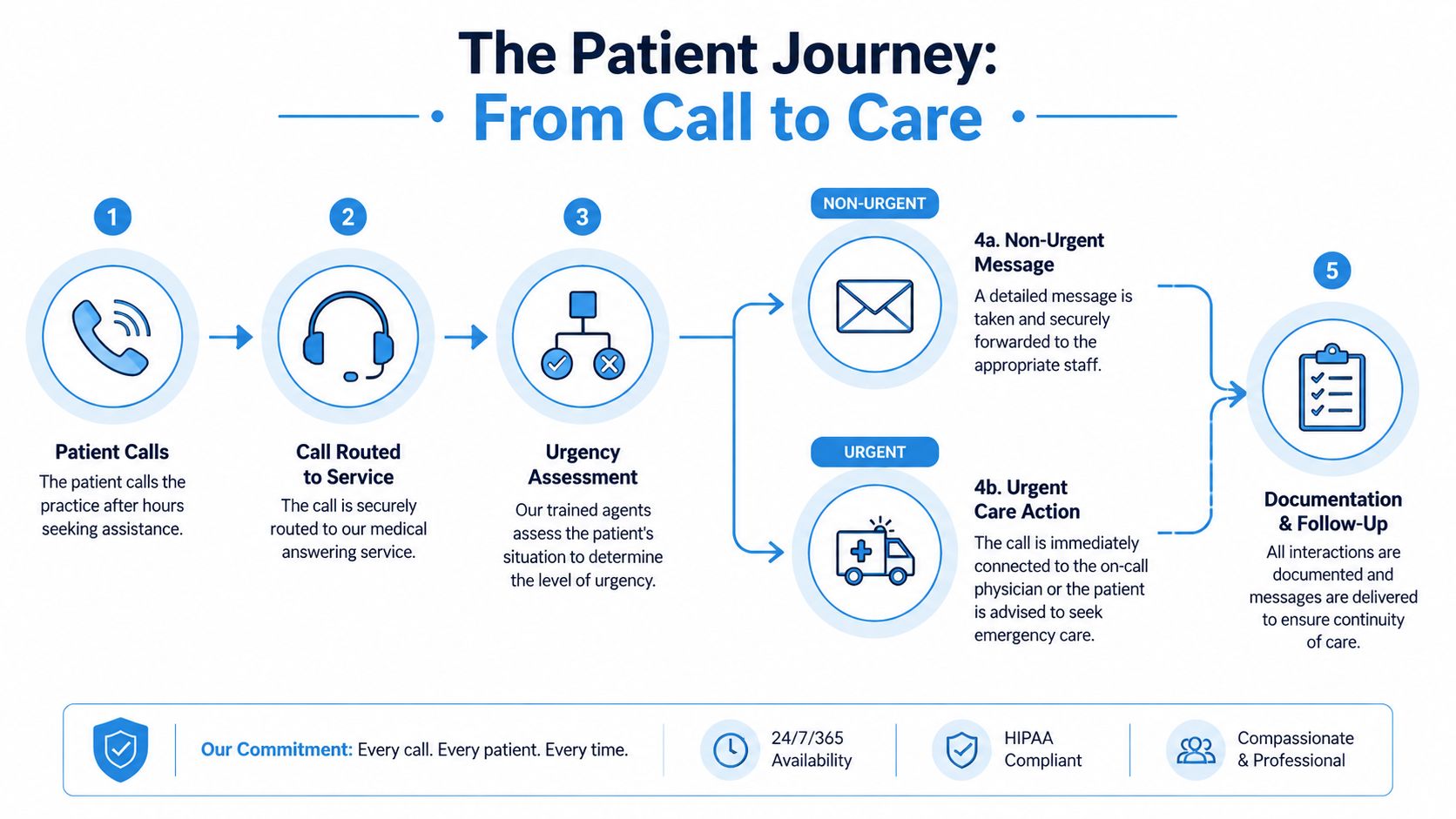
When a patient calls after hours, the service answers using the practice name and follows the instructions the practice has already defined. In most setups, the person taking the call is not a clinician. According to Triagelogic's description of medical answering service workflows, most medical answering services utilize nonclinical operators who follow scripted intake procedures to collect basic information such as name, callback number, and reason for call, then escalate urgent messages according to preset instructions from the practice.
The basic workflow
Here's what that usually looks like in practice:
The patient calls after hours
The call forwards from the main office number to the answering service. The patient shouldn't feel like they've been dropped into a generic call center.The operator gathers the essentials
They confirm identity, callback number, and the reason for the call. If your script is weak, quality can be compromised. Vague intake leads to vague escalation.The call is sorted by protocol
A routine refill request might be logged for the morning. A post-procedure symptom might trigger immediate notification to the on-call clinician. Chest pain or severe distress should trigger emergency instructions based on the practice's protocol.The handoff is documented
The disposition matters as much as the call itself. If the operator paged the physician, noted a next-day callback, or instructed emergency care, that action has to be recorded clearly.
The difference between message taking and managed routing
A low-grade service acts like a digital sticky note. It records whatever the caller says, then sends an email or text with minimal structure. That may be cheap, but it pushes essential operational work back onto your team.
A medical-grade service is different because it uses a call tree, an escalation matrix, and a documentation standard. For example, a family practice might tell the service to hold routine lab-result questions for the morning, but route pediatric high-fever calls to the on-call doctor right away. A surgical group might require immediate escalation for bleeding, medication reactions, or wound concerns, while appointment-change requests wait for business hours.
A service becomes useful when it reduces decision-making at 2 a.m., not when it creates another inbox to clean up at 8 a.m.
If you want to see how this type of routing fits into front-desk operations, this guide to an answering service for medical offices lays out the practical handoff model well.
Ensuring HIPAA Compliance and Protecting Patient Data
Many practices ask whether a vendor is “HIPAA compliant” as if that phrase alone settles the issue. It doesn't. Compliance is a set of legal obligations, technical safeguards, and operational controls. If a service can't explain those controls clearly, don't hand them patient calls.
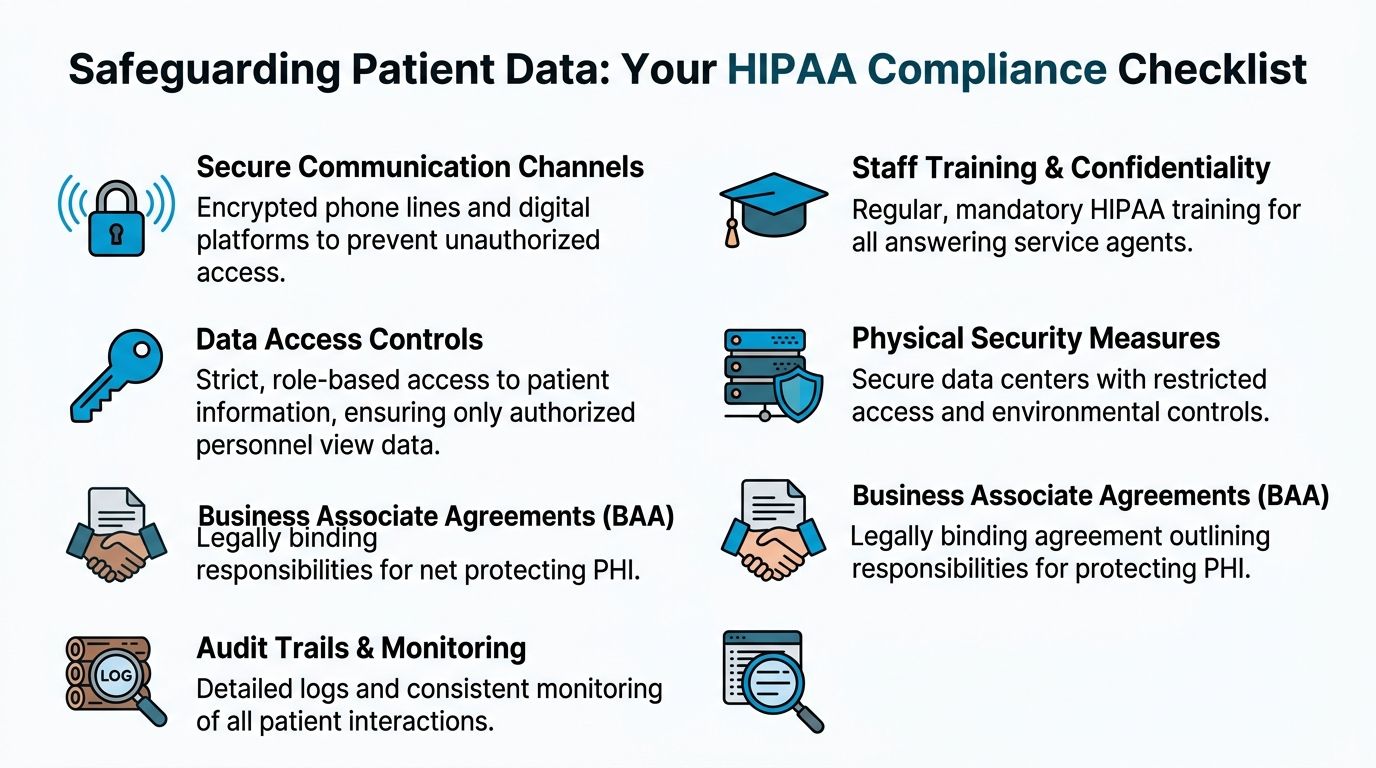
According to Duke Health's guidance on after-hours call technology, HIPAA-compliant after-hours medical answering services mandate the use of a Business Associate Agreement and role-based access controls to ensure encrypted voice and text transmission. That requirement isn't optional. If a third-party vendor handles protected health information without those safeguards, the practice is exposed.
The non-negotiables
Start with the Business Associate Agreement, or BAA. No BAA means no vendor relationship. It defines how the vendor handles protected health information and assigns responsibilities if something goes wrong.
Then verify the technical controls:
- Encrypted communication: Voice, text, and message delivery should move through secure systems rather than ordinary consumer messaging.
- Role-based access: Agents shouldn't see more patient information than they need to do their job.
- Audit records: Each interaction should leave a timestamped trail showing what was received, where it was routed, and whether delivery was confirmed.
- Controlled documentation flow: Messages should land in a secure system that supports follow-up and review.
Where practices make avoidable mistakes
The most common failure isn't malicious. It's sloppy workflow design.
A practice signs with a vendor, forwards calls, and assumes the rest is handled. Then someone discovers that urgent messages were being sent to a personal phone without a documented trail, or that intake notes were incomplete, or that access permissions were too broad. The label “HIPAA compliant” didn't protect them because they never validated the actual process.
Use a vendor review checklist that includes questions like these:
| Compliance area | What to verify |
|---|---|
| BAA | Is the agreement signed before go-live? |
| Message security | Are voice and text transmissions encrypted? |
| Access control | Can the vendor show role-based permissions? |
| Logging | Is there an immutable record of call handling and delivery? |
| Workflow integration | Can urgent and routine calls be documented in a closed-loop process? |
Don't buy compliance language. Buy documented controls.
Practices should also think beyond the phone tree. If your digital presence includes appointment requests, contact forms, or intake pages, your privacy posture has to stay consistent across every patient touchpoint. For behavioral health and private practices, Solo's guide to therapist website builders is a useful reference because it highlights how website choices and patient communications intersect operationally, not just aesthetically.
For a more focused look at what to expect from a HIPAA-compliant answering service, pay attention to whether the vendor explains the controls, the auditability, and the handoff path in plain language. If they can't do that during sales, they probably won't do it well at 1 a.m.
Compliance has to support care
Security controls shouldn't slow down urgent communication. The right setup protects data while still getting the right message to the right clinician fast. That balance matters. A secure system that delays escalation is broken in a different way.
Choosing Your Workflow AI vs Human or a Hybrid Model
The workflow question isn't whether humans are better than technology. A better question is which tasks belong to each. After-hours call handling includes empathy, judgment, repetition, documentation, and routing. No single model does all of that equally well.
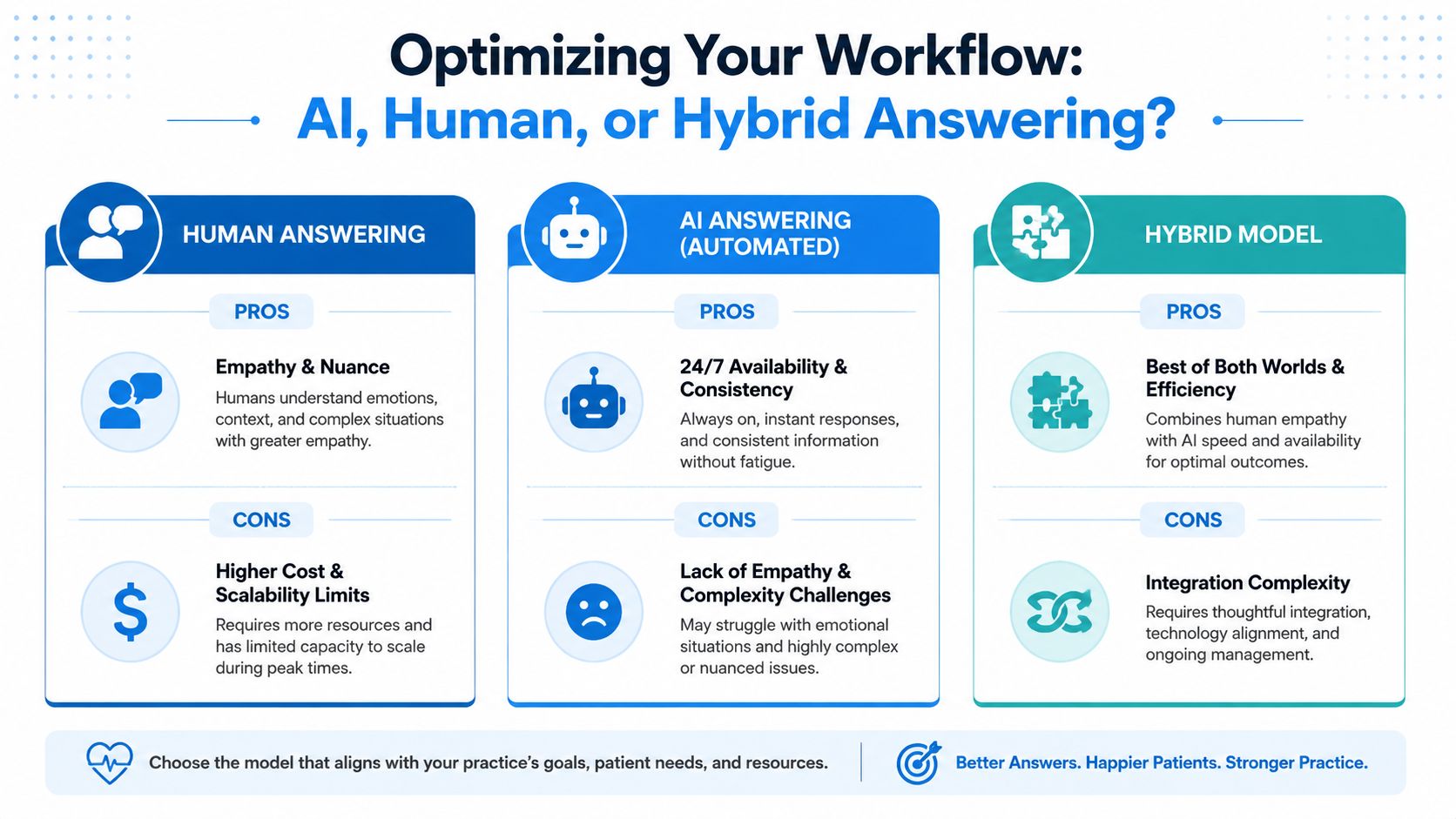
A purely human service can feel warm and flexible. It's often better when callers are distressed, confused, or hard to categorize. But human-only models can become expensive, uneven, and harder to scale when call volume spikes. Training quality also varies. Two agents may handle the same scenario differently if the workflow isn't tightly managed.
Human-only works best when nuance dominates
Human operators are strongest when the practice gets emotionally charged calls, specialty-specific language, or situations where callers need reassurance before they can even explain the issue.
Examples:
- Oncology follow-up calls where patients are frightened and need calm intake.
- Pediatrics, where a parent may describe symptoms in a scattered way.
- Post-op calls that require careful listening before routing.
The downside is operational. Human teams still need scripts, escalation rules, QA review, and schedule coverage. Without that discipline, “live answering” turns into inconsistent intake.
For a broader view of how businesses divide automation and human support, Bruce and Eddy's customer service automation strategies offer useful thinking on task allocation, especially around what should never be left entirely to automation.
AI-only handles repetition well but struggles with edge cases
AI systems don't get tired, and they don't forget the script. That makes them useful for repetitive administrative work such as appointment requests, location questions, refill-routing prompts, or standard office instructions.
According to Triagelogic's explanation of AI-enabled after-hours answering, advanced AI-enabled medical answering platforms employ Natural Language Processing to analyze patient intent, symptom severity, and urgency levels in conversational language, confirming details before acting, while a human-in-the-loop architecture ensures calls requiring empathy are instantly escalated to trained agents.
That tells you where AI fits well. It can interpret intent and standardize intake. It should not be the final layer for every sensitive or ambiguous call.
Here's a useful overview before comparing vendors:
Why the hybrid model is usually the practical answer
The most effective setup for after-hours medical communication is often a hybrid model. AI handles repetitive intake, validates details, and filters routine requests. A trained person steps in when the call becomes emotional, clinically concerning, or too ambiguous for automation.
That model protects on-call time better than a simple “every message goes to the doctor” process. It also gives patients a smoother experience than a rigid phone tree.
A practical example looks like this:
- Routine request: A patient calls to ask whether the office received a referral. AI captures the request and queues it for the next business day.
- Borderline symptom call: A patient describes medication side effects in everyday language. AI gathers the basics, recognizes symptom-related urgency, and transfers the interaction to a trained agent.
- High-risk scenario: A caller reports severe symptoms. The workflow triggers urgent escalation immediately according to protocol.
One tool can fit as part of the option set. Recepta.ai's AI call answering service is one example of a platform built around conversational AI with human escalation, which matches the kind of after-hours workflow many practices now need.
The right model doesn't ask whether AI can replace staff. It asks which calls should never reach your physician in the first place, and which ones should never wait.
A Practical Checklist for Selecting the Right Service
Vendor selection gets messy when practices compare demos instead of workflows. A polished sales call doesn't tell you how the service will handle a worried post-op patient, a medication question on a holiday, or a misrouted pediatric call at midnight. The only reliable way to choose well is to score vendors against a checklist tied to your actual operations.
A key benchmark is responsiveness. According to guidance on after-hours answering performance for medical providers, high-performing medical providers aim to answer patient calls within three to five rings. That's a practical standard to ask about during evaluation because slow pickup undermines everything else in the workflow.
Use this scorecard during vendor reviews
| Criteria | What to Look For | Vendor 1 Score (1-5) | Vendor 2 Score (1-5) |
|---|---|---|---|
| Medical experience | Can they explain workflows for your specialty and call types? | ||
| Answer speed | Do they target responses within three to five rings? | ||
| Escalation design | Can they build a custom on-call matrix instead of using a generic script? | ||
| HIPAA controls | Can they show the BAA, access controls, and secure messaging process? | ||
| Documentation quality | Are messages structured, timestamped, and easy for staff to act on? | ||
| EHR or EMR fit | Can the workflow connect cleanly to your existing systems? | ||
| Schedule management | How easily can your staff update the on-call rotation? | ||
| QA and training | How are agents trained on your specific instructions? |
The questions worth asking live
Bring real scenarios into the conversation. Don't ask only, “Do you handle urgent calls?” Ask what happens when a patient reports swelling after surgery, when a parent calls about a child's high fever, or when the on-call clinician changes at the last minute.
Use prompts like these:
- “Show me your escalation logic.” Ask the vendor to walk through a routine message, a borderline symptom call, and an emergency instruction path.
- “How do you train on our script?” Generic intake training isn't enough for specialty care.
- “What does the clinician receive?” A clean, actionable message is different from a transcript dump.
- “How do we update coverage rules?” If the process is clunky, your staff will work around it and errors will follow.
Watch for red flags
Some warning signs show up quickly:
- Overreliance on generic scripting: If every specialty gets the same intake logic, the service won't age well in a real medical environment.
- Weak operational ownership: If the vendor can't name who maintains protocols, quality slips over time.
- No practical test period: You should be able to validate call types, routing, and after-hours handoffs before fully relying on the system.
Ask vendors to role-play one ordinary call and one bad night. That tells you more than a slide deck.
A good after hours answering service medical partner should feel like an extension of your front desk and your on-call process, not a detached message bureau.
Implementing Your Service and Calculating ROI
Implementation fails when practices stop at forwarding the phone. The service needs a written escalation matrix, updated on-call schedules, routing rules by call type, and staff agreement on what belongs in the queue for morning versus what must be escalated immediately. Build that before go-live, then test it with realistic scenarios.
The financial case is usually easier than teams expect once they stop looking only at line-item cost. According to 2026 pricing guidance for medical answering services, the average cost of a professional after-hours medical answering service plan in the United States ranges between $1.75 and $2.25 per minute, with monthly costs for a practice handling 500 calls typically falling between $1,075 and $1,175. The question isn't whether that costs money. It does. The question is what it prevents.
A simple ROI lens
Use three buckets:
- Revenue protection: Fewer patients abandon the practice because they couldn't reach anyone.
- Risk mitigation: Better documentation and cleaner escalation reduce the chance of missed or delayed follow-up.
- Staff efficiency: Physicians and managers spend less time sorting non-urgent overnight noise.
A simple internal worksheet can look like this:
| ROI component | What to estimate |
|---|---|
| Monthly service cost | Use the vendor quote or expected call volume |
| Time returned to staff | Estimate hours no longer spent chasing voicemail and incomplete messages |
| Avoided disruption | Note how many calls can be filtered before reaching the on-call clinician |
| Service quality value | List patient access and documentation benefits that support retention and continuity |
If your practice also invests in demand generation, after-hours responsiveness protects the value of those efforts. A patient who calls after seeing an ad still expects someone to answer. Teams thinking about acquisition efficiency often find it useful to review Aim Set Win's Google Ads expertise alongside call-handling operations, because marketing spend leaks fast when the phone experience breaks after business hours.
Frequently Asked Questions About Medical Answering Services
Is medical answering service pricing usually per call or per minute
Many services bill by usage model, and one common structure is per-minute pricing. The practical difference is budgeting. Per-call models can look simple, but they may hide complexity when calls run long or require multiple actions. Per-minute models make it easier to connect cost to call duration and staffing intensity, which is useful if your after-hours volume swings by season or specialty.
Can an after-hours service schedule appointments directly in our system
Sometimes yes, but it depends on the vendor's integration model and your internal rules. Some practices allow direct scheduling only for defined visit types. Others let the service collect appointment intent and push it into a staff work queue for confirmation the next morning. The safer approach is to decide this by scenario, not as a blanket yes-or-no. Straightforward follow-ups may be schedulable. Complex visits often need staff review.
How do we keep the on-call schedule updated without creating new admin work
The answer is process discipline. Assign one owner, usually the practice manager or lead supervisor, to update the on-call roster in one place and confirm receipt with the service. Avoid informal changes by text or side conversations. The cleaner the ownership, the fewer misroutes you'll see when coverage changes on weekends or holidays.
What's the biggest mistake practices make after signing
They assume the vendor will figure out the workflow. The practice still has to define urgency categories, escalation rules, and message standards. The service can execute the process, but it can't invent safe clinical routing on your behalf.
If your practice is rethinking after-hours communication, Recepta.ai is one option to evaluate for a workflow that combines conversational AI with human escalation. The practical test is simple. Can it capture routine demand without losing empathy, route urgent issues cleanly, and fit the way your clinicians already work after hours.