Best Phone System for Healthcare: 2026 Buyer's Guide
At many practices, the busiest part of the day isn't a clinical workflow. It's the phone.
The front desk is checking in patients, collecting copays, answering a refill question, handling a referral request, and trying to catch the third ring before the caller hangs up. Then the morning surge hits. A lab call comes in, a new patient wants to book, an existing patient needs directions, and someone else is trying to confirm whether their prior authorization paperwork was received. When the phone setup is weak, every one of those moments turns into friction.
That's why choosing the right phone system for healthcare isn't a minor IT purchase. It's an access decision, a compliance decision, and a trust decision. The practices that get this right usually aren't the ones with the fanciest feature list. They're the ones that build a system patients can reach, staff can use, and leadership can govern.
The Communications Bottleneck in Modern Healthcare
A common scene in outpatient care looks the same whether the practice is primary care, specialty care, dental, or behavioral health. Two front-desk staff members are juggling in-person arrivals while the phone keeps lighting up. One caller gets placed on hold. Another reaches voicemail. A third hangs up and calls a competitor.
That chaos isn't a perception problem. It's a volume problem.
Medical practices receive an average of 53 inbound calls per physician per day, and a four-physician practice handles over 200 calls daily, with 38% of calls landing in the first and last hours of operation according to medical practice phone statistics. Those rush-hour patterns are exactly when check-in traffic is heaviest, which is why even good staff often look overwhelmed on paper-thin phone setups.
Where the old model breaks
In the field, the biggest failure point usually isn't effort. It's that the phone system was never designed for healthcare traffic. A generic business line with basic hold and transfer functions can't separate urgent clinical calls from routine scheduling, can't route by provider or location cleanly, and can't absorb spikes without dropping patient access.
A modern phone system for healthcare changes that by treating calls as part of patient access operations, not background noise. It can route symptom calls differently from billing calls, send simple scheduling requests into automation, and keep escalation paths visible when a person needs to step in.
Practical rule: If your front desk has to rely on sticky notes, voicemail, and memory to manage inbound demand, the phone system is already costing the practice more than the monthly invoice suggests.
Continuity matters here too. If communication breaks down between visits, patients feel it as fragmented care. That's one reason this explainer from Orange Neurosciences on patient outcomes is worth reviewing. It frames access and follow-through as part of clinical consistency, not just customer service.
What this looks like in practice
A practical improvement might be as simple as splitting your call flow into three lanes:
- Urgent clinical concerns go to trained staff with an escalation protocol.
- Routine scheduling and confirmations go through automated intake.
- Administrative requests route to the right team or callback queue.
Practices that want to improve the patient side of this workflow usually start by tightening both call handling and front-desk communication together. This guide on how to improve patient experience is useful because it treats responsiveness as a system issue, not a scripting issue.
What Defines a Modern Healthcare Phone System
A modern healthcare phone system isn't a box mounted in a closet. It's a software-based communications layer that connects calls, routing logic, staff availability, and patient workflows in one place.
The technical foundation is usually VoIP, or Voice over Internet Protocol. In plain language, that means voice traffic moves through internet-based infrastructure instead of old copper-line phone architecture. For a medical office, the difference isn't abstract. It determines whether your system can adapt when schedules change, staff float between sites, or call demand spikes without warning.
Think digital nervous system, not phone closet
Legacy PBX systems behave like rigid building wiring. They can work, but every change tends to require extra setup, vendor involvement, or awkward workarounds. Adding locations, changing call trees, routing after-hours overflow, or supporting remote staff often becomes harder than it should be.
A strong phone system for healthcare behaves more like a digital nervous system for the practice. It knows where calls should go, which workflows should stay automated, and when a human should intervene. That's what makes features like smart routing, call queues, voicemail transcription, and cross-location handling possible without turning every adjustment into a project.
What to look for in the core design
When I assess systems, I don't start with the dashboard. I start with how the platform handles daily operational reality.
A modern setup should support:
- Centralized administration so managers can update call flows, hours, provider routing, and departments without waiting on a telecom technician.
- Flexible user handling so staff can answer from desk phones, secure softphones, or approved mobile workflows depending on policy.
- Location-aware routing for multi-site groups, satellite clinics, and provider-specific schedules.
- Workflow hooks that connect calls to downstream actions, not just ring sequences.
For teams comparing architectures, this overview of a call management application is a helpful reference because it shows how routing, logging, and response workflows fit together.
Old systems move calls. Modern systems manage intent.
That distinction matters. In healthcare, the phone line isn't only for conversation. It's often the first point of triage, the fallback for confused patients, and the safety net when digital channels fail.
Must-Have Features for Compliance and Patient Experience
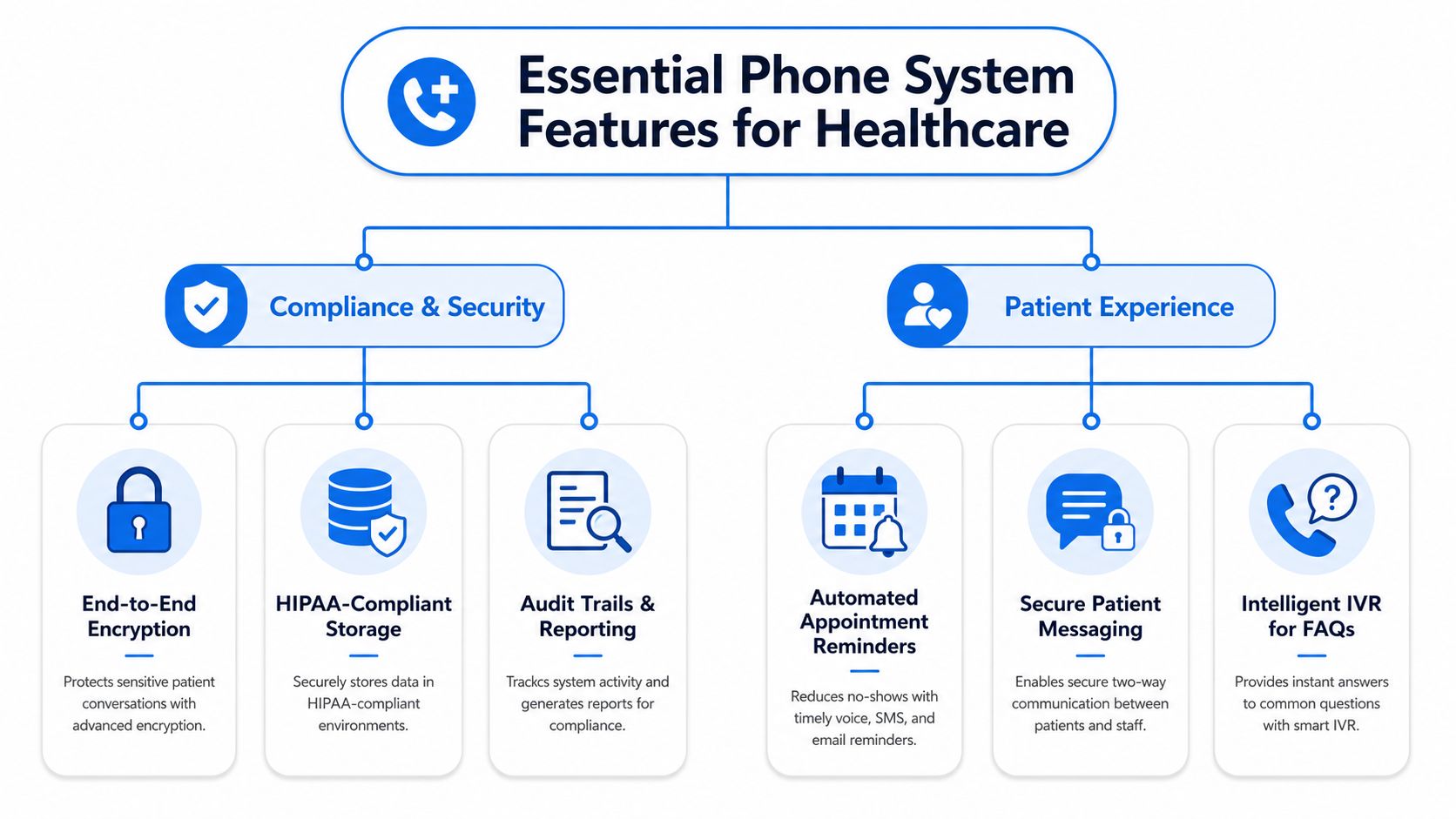
Some features are optional. Others are essential. In healthcare, the line between the two is usually clear once you look at compliance exposure and patient access together.
Security that protects voice traffic
A vendor isn't HIPAA-ready because they use the word “secure” on their website. For voice communications, the key question is whether the system uses Transport Layer Security (TLS) and Secure Real-time Transport Protocol (SRTP) to encrypt voice and data so protected health information remains cryptographically inaccessible during transmission, as outlined in this HIPAA phone system requirements guide.
In practical terms, that means if a patient discusses symptoms, medications, insurance details, or scheduling tied to treatment, the voice path itself must be protected in transit. If it isn't, you're not dealing with a minor technical omission. You're carrying compliance risk.
A useful primer for smaller organizations that need to sanity-check their broader controls is this guide to HIPAA compliance for small businesses.
Integration that reduces manual failure
The best phone systems don't force staff to retype what the call already captured. They pass context into the systems your team works from.
Examples that matter:
- Scheduling sync so an appointment booked over the phone appears in the calendar or practice workflow without duplicate entry.
- Caller recognition so returning patients can be matched to existing records before staff ask repetitive questions.
- Call notes and summaries that attach to the right workflow, reducing the risk that a refill request or referral callback disappears into an inbox.
A healthcare practice that wants AI reception, secure routing, and workflow support in one layer might evaluate tools such as HIPAA-compliant answering service options, including hybrid models that combine automation with live escalation.
Patient-facing workflows that actually help
Plenty of systems advertise IVR, reminders, and self-service. The true test is whether those features reduce friction instead of adding it.
Here's what tends to work:
- Appointment reminders and confirmations that let patients respond quickly without waiting for staff.
- Intelligent IVR for common questions such as office hours, directions, fax requests, or provider prompts.
- Structured callback queues for non-urgent requests, so patients know they're in line instead of trapped in hold music.
What doesn't work is burying patients under endless menu trees. If a caller has to press through multiple branches just to reach a human for a prescription issue, the system is solving labor pressure by creating trust damage.
Audio-first access for patients who can't rely on broadband
One of the most overlooked buying criteria is support for audio-only clinical and quasi-clinical workflows. That matters in rural and underserved areas where broadband access is weak or unreliable.
The equity case is straightforward. Research discussed in this analysis of digital deserts and healthcare access notes that many healthcare-underserved communities are located in digital deserts, while 97% of American adults still rely on phones for access. If your workflow assumes every patient can complete a video visit, use a portal, or upload forms from a strong connection, you're building access around the wrong channel for part of your population.
A practical example is triage scheduling. If a patient can't maintain a video connection, the phone system should still support secure intake, routing, and follow-up without pushing them into a dead end.
Build for the patient who has the least technical flexibility, not the one with the newest smartphone.
AI that knows when to stop talking
AI reception can help with repetitive traffic such as appointment requests, directions, basic intake questions, and after-hours message capture. It struggles when patients are distressed, confused, or dealing with sensitive medical concerns.
That's why the strongest systems don't pursue full automation. They use AI for structure and speed, then hand off fast when context, empathy, or clinical judgment is needed. In a specialty practice, for example, an AI layer can gather callback details for a test-result question, but it shouldn't improvise reassurance or trap the caller in loops when they're anxious.
The Tangible Benefits and ROI of Upgrading
The business case for a better phone system usually shows up before anyone runs a formal analysis. The front desk stops firefighting as much. Fewer calls vanish into voicemail. Patients reach the right person faster. Managers spend less time patching holes with extra labor.
That's the operational side. The financial side follows.
A modern phone system for healthcare helps reclaim demand that the practice already earned. If callers can book, confirm, ask routine questions, and reach after-hours support without friction, fewer interactions die at the access point. It also gives managers cleaner visibility into where staff time is going, which is hard to get from disconnected phones and handwritten messages.
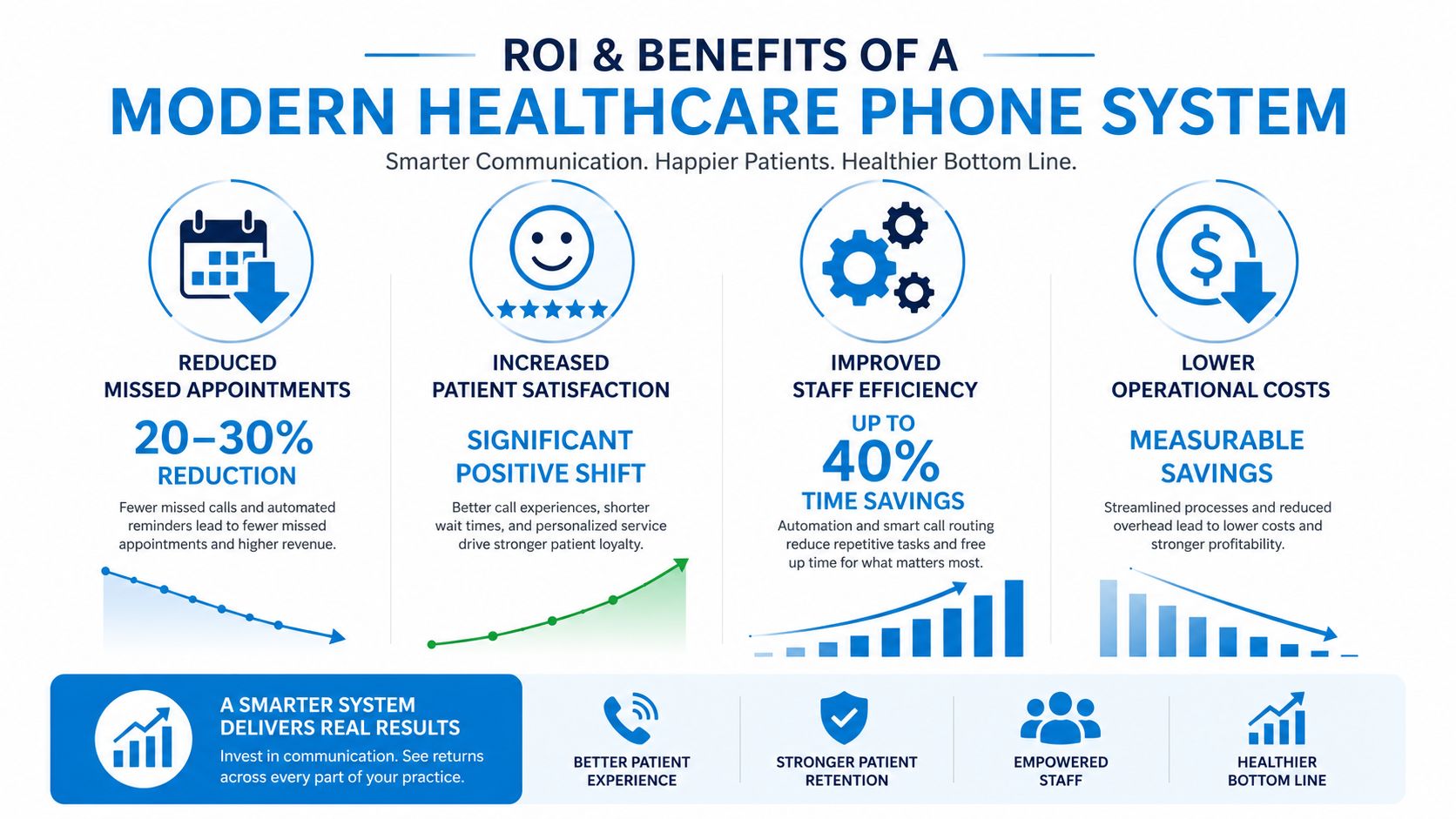
Here's a visual summary of the business impact teams usually evaluate:
Where practices usually see the return
Three return channels matter most.
First, administrative efficiency. Automation handles repetitive interactions that don't require trained clinical or front-desk attention, which lets staff focus on patients standing in front of them or on calls requiring judgment.
Second, capacity recovery. A better queue, callback process, and after-hours workflow capture requests that older systems often lose. The practice doesn't have to create demand. It just has to stop leaking it.
Third, retention and experience. In healthcare, being easy to reach influences whether patients stay. The phone remains a trust touchpoint long after online scheduling went mainstream.
This short video gives a useful look at how modern business phone workflows support those outcomes in day-to-day operations.
The trade-off leaders should evaluate honestly
An upgrade doesn't automatically save money if the system is hard to administer or if routing logic is poorly designed. I've seen practices buy feature-rich platforms and still create front-desk bottlenecks because no one redesigned the call flow.
That's why cost evaluation should include setup effort, staffing impact, after-hours handling, and who owns system changes internally. This breakdown of after-hours answering service cost is useful for comparing what you're paying for today versus what you're getting.
If your staff still acts as the glue between broken workflows, the phone system hasn't modernized anything. It's just moved the mess to a new interface.
Your Evaluation Checklist for Choosing a System
Vendor demos are polished. Procurement decisions shouldn't be.
When a healthcare group compares phone platforms, the winning choice usually comes from the questions asked after the sales walkthrough. You're not buying hold music and extensions. You're choosing how patient access, protected data, and staff workflows will behave under pressure.
Questions that expose weak vendors
Use the checklist below during demos and contract review.
| Criteria | What to Ask / Verify | Importance |
|---|---|---|
| BAA readiness | Will the vendor sign a Business Associate Agreement, and is that process standard or treated as a special exception? | Essential for HIPAA governance |
| Encryption details | Ask which controls protect voice and related data in transit, and have the vendor explain their approach plainly | Confirms whether security claims are real |
| Access controls | How are user permissions, call recordings, transcripts, and admin rights segmented by role? | Limits internal overexposure to PHI |
| Audit visibility | Can your team review logs, call activity, and configuration changes when investigating incidents? | Supports accountability and troubleshooting |
| EHR or EMR integration depth | Does the system only pass basic notifications, or can it support real scheduling and workflow handoff? | Prevents duplicate entry and dropped tasks |
| Human escalation design | How does the system transfer sensitive, urgent, or emotionally complex calls to a person? | Protects patient trust |
| Multi-site handling | Can the system route by location, specialty, provider, or time-of-day without custom hacks? | Important for growth and resilience |
| Reporting usefulness | Are reports operationally useful, or are they just generic telecom metrics? | Helps managers improve workflows |
| Training and onboarding | Who trains staff, who configures call flows, and what happens after go-live? | Reduces adoption failure |
| Pricing clarity | What is included, what counts as add-on usage, and which support services cost extra? | Prevents surprise spend |
What to listen for in the answers
Some vendor answers sound acceptable until you hear the wording closely.
Watch for these patterns:
- “We can probably support that.” That often means custom work, delays, or no mature workflow behind the promise.
- “Our AI handles everything.” In healthcare, that's usually a warning sign unless the vendor can describe exact human handoff rules.
- “Integration is available.” Ask whether that means one-way notifications, read-only sync, or actual workflow action.
- “It's secure.” Push for concrete explanation in ordinary language. Vague reassurance isn't a control.
A short list to bring into every demo
Bring your real scenarios, not hypothetical ones:
- A patient calls after hours with a medication concern.
- A new patient wants to schedule at the nearest location.
- A distressed caller needs a human immediately.
- Front desk staff are checking in patients during a heavy call spike.
- A provider's schedule changes mid-day.
If the vendor can't walk those through cleanly, the system probably won't hold up in your practice either.
Implementation Steps and Common Pitfalls to Avoid
Most phone migrations are sold as simple. They rarely are.
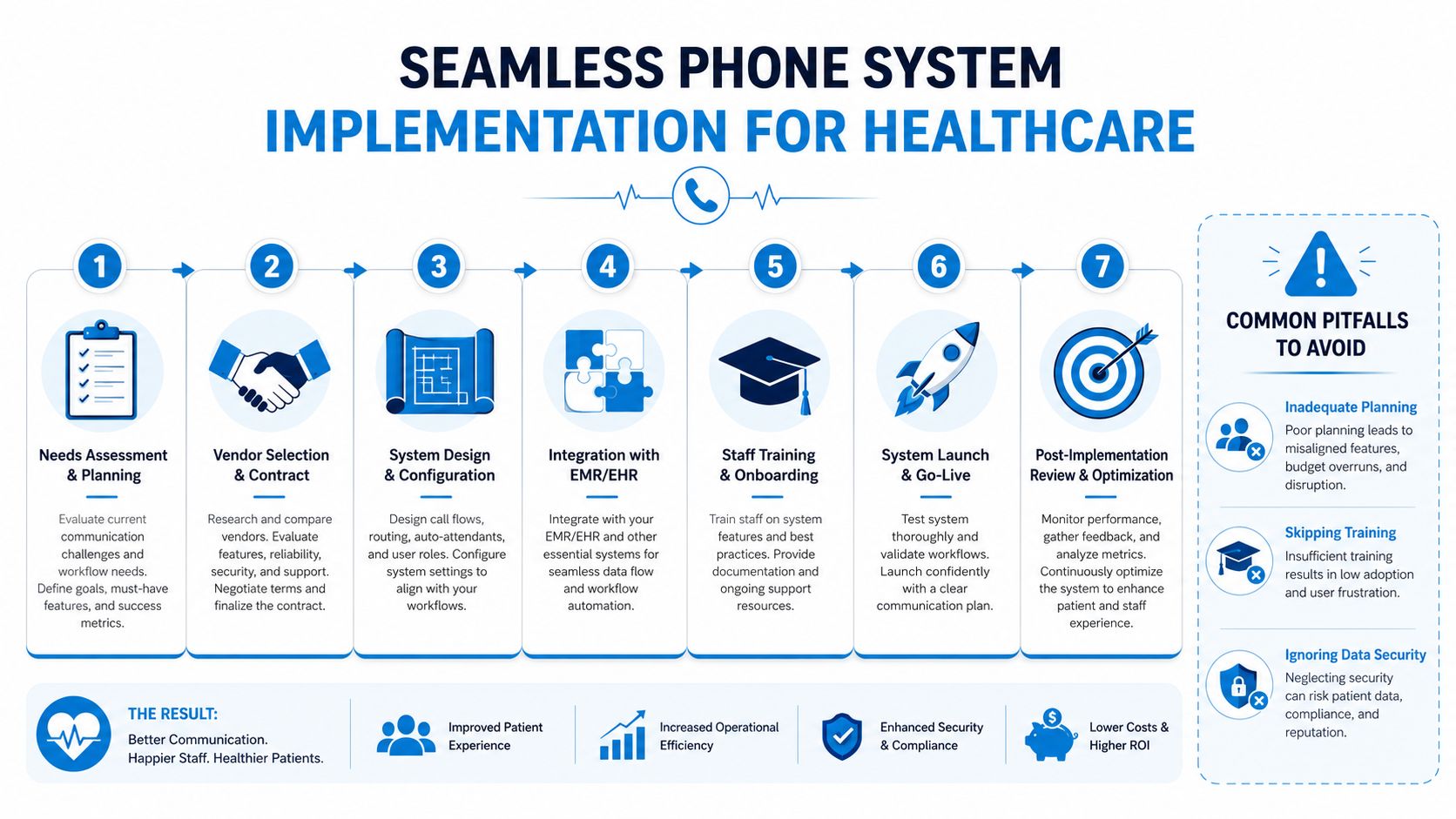
The technology can be straightforward. The workflow redesign isn't. Number porting, call-tree setup, user permissions, integrations, recordings, after-hours logic, and staff training all interact. If one piece is weak, the whole launch feels shaky to patients even when the underlying platform is solid.
What a clean rollout usually includes
A reliable implementation sequence looks like this:
- Needs mapping based on actual call types, not org-chart assumptions.
- Call-flow design for business hours, lunch coverage, overflow, after-hours, and urgent routing.
- Integration setup with scheduling, messaging, or practice systems where appropriate.
- Number porting and testing before go-live, including edge cases.
- Role-based staff training so front desk, managers, and clinical staff each know their part.
- Go-live support with someone available to adjust routing quickly during the first days.
For larger groups and multi-site organizations, architecture matters more than people expect. Teams comparing broader communication environments may find this guide to enterprise Teams phone system configuration useful as a reference point for how complexity grows across locations.
The pitfall that causes the most damage
The most expensive mistake isn't usually technical. It's assuming automation can replace human reassurance in every workflow.
Experts warn that without “diverse people” helping contribute to models and without clear human escalation paths, AI can worsen disparities. They also note that trust in healthcare is restored “heart to heart, human to human”, which is why under-resourced clinics often need hybrid AI-plus-human models rather than pure automation, as discussed in this piece on AI and underserved communities.
That warning shows up in real implementations. If an AI receptionist can schedule straightforward visits but can't recognize fear, confusion, language friction, or repeated failed attempts to get help, patients feel dismissed.
Don't judge an AI phone workflow by how it handles the easy call. Judge it by what happens when the caller is upset, vulnerable, or unclear.
Other mistakes that show up fast
- Skipping training: Staff need repetition, not a one-time walkthrough.
- Copying old call trees: A new platform with old logic still produces old problems.
- Ignoring governance: Someone has to own permissions, recordings, escalation rules, and updates.
- Underbuilding for growth: A single-site design often breaks once providers, departments, or locations expand.
If you're evaluating specific tools, Recepta.ai is one example of a hybrid model that combines AI call handling with human escalation and workflow integrations, which is the direction many healthcare groups now prefer over fully automated reception.
Future-Proofing Your Practice Communication
The right phone system for healthcare does more than answer calls. It protects access when the front desk is slammed, supports compliance when sensitive conversations happen, and keeps trust intact when patients need a person instead of a menu.
Practices that age well operationally usually make one mindset shift. They stop treating telephony as plumbing and start treating communication as clinical infrastructure. That changes how they buy, implement, and govern the system.
What will matter most going forward
The durable model isn't all-human or all-automation. It's selective automation with visible human backup.
That means:
- Automate routine demand so staff aren't buried in repetitive work.
- Preserve human handoffs for nuance, distress, and clinical ambiguity.
- Design for access equity so patients who rely on phone-first communication aren't pushed aside.
- Review workflows regularly because schedules, staffing, and patient expectations don't stay fixed.
The practices that will communicate best over the next few years won't be the ones with the most features. They'll be the ones that combine operational resilience with human empathy, then make that combination easy for patients to feel on every call.
If your practice is reevaluating how it handles patient calls, after-hours coverage, scheduling, and human escalation, Recepta.ai is worth a look. It provides an AI receptionist platform with white-glove human support, along with scheduling, routing, and workflow integrations that fit healthcare communication needs without forcing a fully automated model.