
Lead Qualification Automation: How It Works in 2026
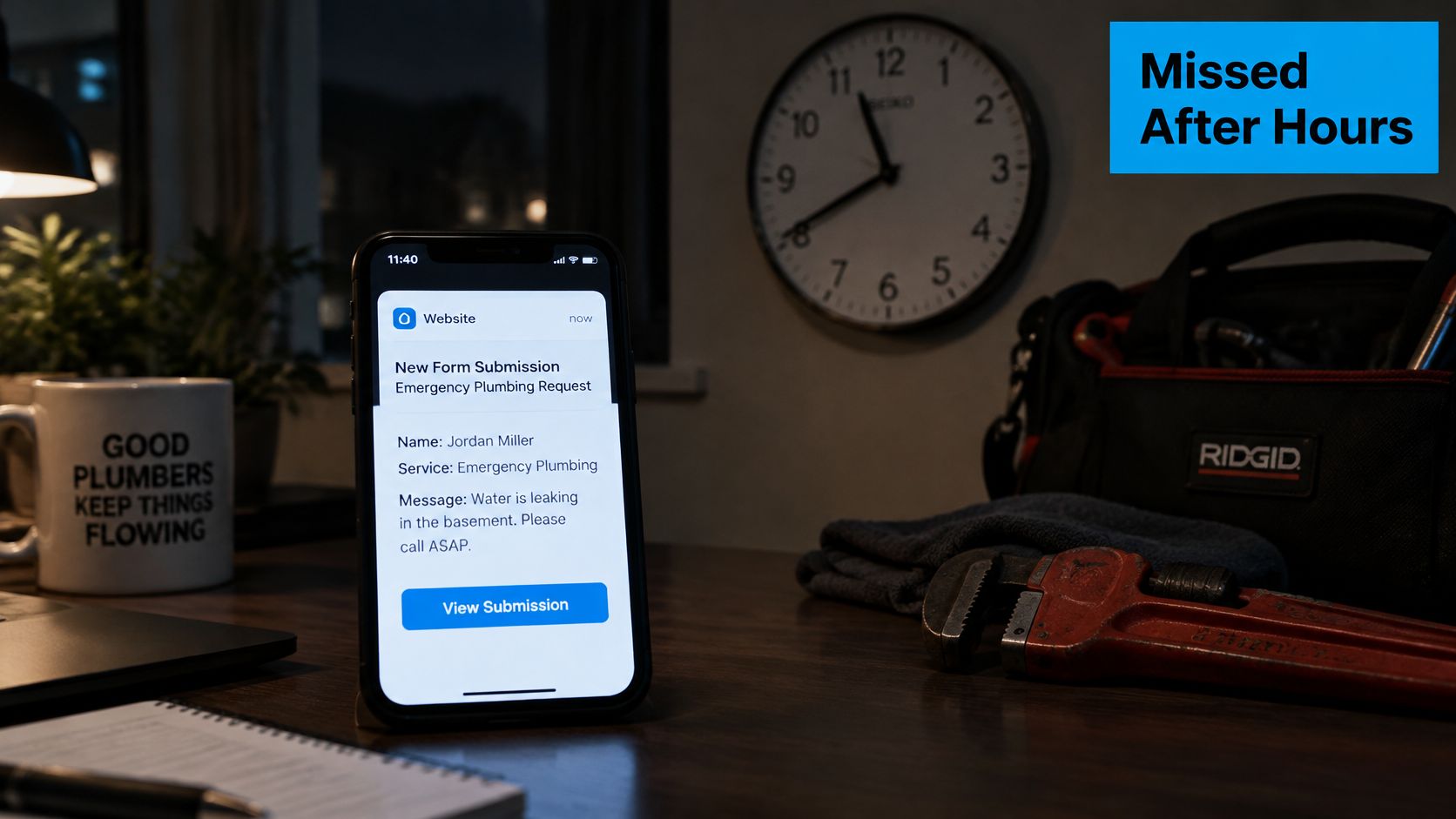
A homeowner submits your plumbing form at 11:40 p.m. A pipe has burst, water is spreading, and they need someone who can help now. Your office sees the inquiry the next morning, but the homeowner has already booked a competitor.
Lead qualification automation closes that operational gap by collecting useful information and choosing the next action while your team is unavailable. But speed alone isn't enough. Before a system decides which leads deserve attention, it needs to decide whether the information behind that decision is trustworthy.
What Automated Lead Qualification Does for Your Pipeline
Lead qualification means deciding whether an inquiry matches what you sell, falls inside your service area, describes a real need, and warrants action now or later. For the plumber, that means checking the service address, the type of problem, and whether emergency dispatch is appropriate.
Think of a hotel front desk. Staff check the reservation, confirm the guest's details, and identify special requests before involving a manager. Qualification automation performs that initial check-in for your business, while people retain responsibility for exceptions, sensitive conversations, and closing the sale.
An after-hours inquiry needs more than an unread notification.
Capture, Qualify, and Route
The work falls into distinct layers:
- Capture: Preserve the inquiry, contact details, channel, and arrival time.
- Qualify: Ask standard questions, record answers, check eligibility, and assess readiness.
- Route: Assign the appropriate next action, including booking when the rules allow it.
A processed lead can reach a sales call, a nurture sequence, or a parked record. These aren't interchangeable outcomes. Nurture means the person may be a fit but isn't ready; parking means outreach should pause until something changes or someone resolves an issue.
Manual evaluation is still common. In 2024, 56% of surveyed companies evaluated leads manually for lead scoring, according to the Zurich University of Applied Sciences study.
The connection to managing a sales pipeline is straightforward: every qualification outcome should produce a visible status, owner, and next action. Otherwise, automation merely creates another inbox.
Qualification is a set of decisions you can write down before choosing a tool.
How the Automated Qualification Workflow Runs
A useful workflow makes each decision inspectable. Staff should be able to open a record and understand what arrived, what the prospect said, and why the system chose a particular route.
The diagram shows the major operational components. In implementation, acknowledgment should happen promptly rather than waiting for enrichment or scoring to finish.
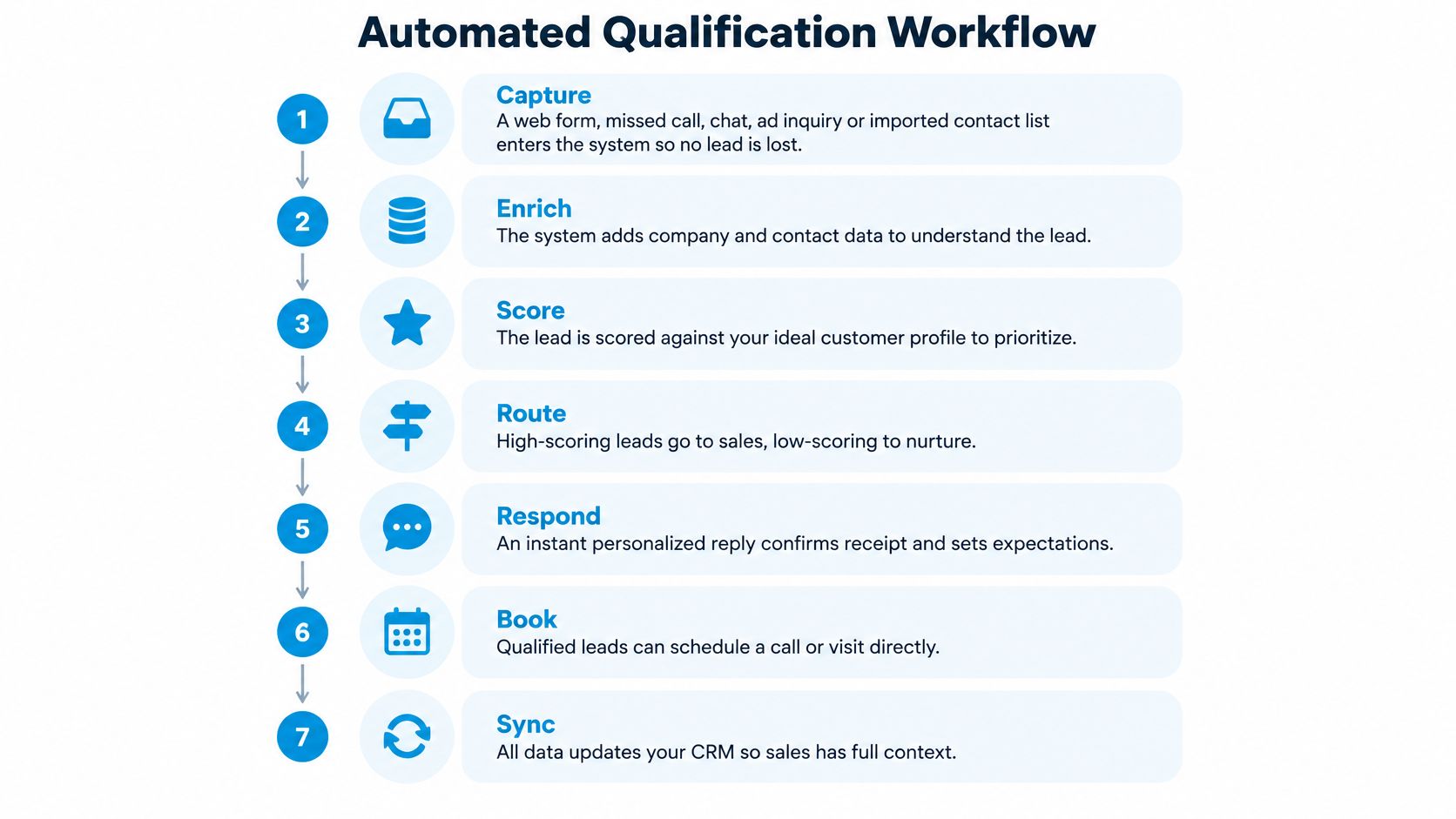
The Operational Sequence
Capture the inquiry. A web form, missed call, web chat, ad inquiry, or imported contact enters the workflow with its original timestamp and source. Imported contacts should retain their provenance and permission status rather than being treated automatically as fresh inbound requests.
Validate and deduplicate. Confirm that the required contact fields are usable, then match the inquiry against existing records. A returning prospect should update an existing history instead of receiving overlapping outreach from separate records.
Acknowledge and ask. Confirm receipt and ask a short set of standard questions about service need, location, urgency, and preferred time. For a cleaning company, that might mean asking whether the property is residential or commercial, where it's located, and what kind of cleaning is needed.
Score the usable answers. Apply eligibility checks before ranking buying readiness, and leave unknown information marked as unknown. A missing address shouldn't become an out-of-area decision, and a guessed service type shouldn't carry the same weight as a direct answer.
Route to an action. Send ready, eligible inquiries to the responsible team or an available booking calendar, place developing opportunities into appropriate nurture, and park records that shouldn't receive active outreach. Include the answers behind the decision so staff don't have to restart discovery.
Escalate exceptions. Transfer ownership when the response timer expires, confidence is insufficient, or the inquiry includes an urgent symptom or safety concern. The fallback needs a named recipient and a backup, not merely an unattended notification.
Log the result. Record each state change, assignment, communication attempt, booking, and final disposition. This makes it possible to distinguish a broken integration from an unanswered alert or an incorrect qualification rule.
For website-specific question design, Captiwate's guide to qualifying high-intent website visitors provides a useful companion to the operational sequence.
A Cleaning Request After Hours
Say a cleaning request arrives at 9 p.m. The prospect confirms a supported address, selects a standard cleaning service, and chooses an available appointment, so the team starts the morning with a booked slot rather than an unanswered form.
If the request instead describes hazardous material, the workflow should stop ordinary booking and seek human review. The difference isn't a more elaborate score. It's an explicit exception rule.
At Recepta.ai, we capture and qualify leads against each customer's custom criteria and screen for fit immediately. The criteria still need to come from the business, including what qualifies, what doesn't, and what requires review.
For an additional walkthrough, the video below offers another way to examine the process.
Before activating the workflow, ask: Can you name the owner of every step, including failures?
Response Time Benchmarks That Set Your Speed Target
Set a sub-five-minute operating target for acknowledgment and the first appropriate contact attempt. That number is a workflow target, and an automatic receipt by itself does nothing to qualify the lead.
The published benchmarks separate three events: sending something, reaching someone, and establishing a qualifying conversation. Your reporting should keep them separate too.
Response Time Windows and Qualification Odds
| Response window | Qualification effect | Evidence |
|---|---|---|
| Within 5 minutes | Target for automated acknowledgment and first call | The 2007 study of more than 15,000 leads found about 100 times higher contact odds and 21 times higher qualification odds than a first call at 30 minutes, as summarized in the Artemis speed-to-lead benchmark. |
| Within 1 hour | Nearly 7 times as likely to qualify as companies waiting an additional hour | The 2011 Harvard Business Review findings included a separate analysis of approximately 1.25 million leads, as detailed in the Omago response-time review. |
| 1 to 24 hours | A slower operational window, not a separately established qualification multiplier | 16% of audited companies responded in this window in the same Harvard Business Review audit. |
| More than 24 hours | Contact after at least 24 hours was associated with substantially lower qualification likelihood than first-hour contact | First-hour contact was more than 60 times as likely to qualify; 24% of audited companies replied after 24 hours, while 23% never replied in the same audit. |
These benchmarks concern contact and qualification, not closed-won revenue. The U.S. evidence should shape your initial design, then be tested against your own market, services, and customer behavior.
The earlier comparison supports a short response target because it measures a practical obstacle: whether staff can still reach and engage the prospect. It does not establish that every business will achieve the same multiplier.
The same Harvard Business Review audit found that only 37% of 2,241 U.S. companies answered a test web lead within an hour; among those replying within 30 days, average first response was 42 hours. Those figures describe company behavior, while the lead analysis describes qualification likelihood. Keep them apart in your reporting.
Speed solves the reach problem. A call placed in two minutes still stalls if the record arrived without a service address, a usable phone number, or enough detail to judge fit. Treat data completeness as part of the response window. When an inquiry lacks what a qualification decision requires, the workflow should flag the gap and route the record to a person, because a fast acknowledgment that cannot produce a decision is only a fast acknowledgment.
Measure the Handoffs, Not Just the Reply
Timestamp creation, enrichment completion, first attempt, connection, qualification, appointment, and disposition. If the acknowledgment is instant but the assigned representative never calls, the delivery metric looks healthy while the prospect still waits. An SLA timer works like a relay stopwatch: clocking the opening leg tells you nothing about the handoffs.
Start a service-level agreement, or SLA, timer when the inquiry arrives. Define who receives the first alert, who takes over when the timer expires, and what happens outside staffed hours.
For a practical approach to increasing qualified leads, evaluate qualification rate by response-time bucket, channel, and segment. A commercial replacement inquiry and an emergency residential repair shouldn't disappear inside the same average. Bucket-level reporting also exposes where slow response is really slow data: a lead that waits eight hours for an enrichment step fails the five-minute target even when the first email went out in seconds.
Practical rule: Count a delivered message as a delivered message. Count a qualifying conversation only when the prospect has actually supplied enough information to support that decision.
Score Bands and Criteria That Decide Routing
Start with the criteria, not the point values. A score is useful only when staff understand what earns it and which action follows.
BANT organizes qualification around budget, authority, need, and timing. The Selling Signals BANT guide describes approaches that accept three of the four conditions, while stricter teams require all four, and illustrates a commercial HVAC inquiry with a confirmed replacement need, approving authority, and a 60-day timeline despite an undisclosed budget.
That lead can go to sales with a budget-discovery task. Rejecting it because the budget field is blank would confuse missing information with negative information.
Separate Fit From Intent
Fit variables describe whether you can serve the inquiry: service area, job type, property type, or supported matter. Intent variables describe readiness: urgency, requested date, and meaningful engagement.
A local business researching next year's HVAC replacement may fit perfectly without needing an immediate sales call. Conversely, an urgent request outside your service area doesn't become eligible just because the prospect is ready to buy.
For a hypothetical law-firm workflow, points could reflect a consultation request, a local phone number, a stated legal matter, and a decision timeline. A record scoring 60 or more would reach intake, a score of 40 would receive educational follow-up and a missing-information task, and a score below 35 would remain suppressed until new engagement, following the example in the LeadScrape qualification-scoring model.
Score Bands and the Action Each One Triggers
| Score band | Lead tier | Automated action | Human involvement |
|---|---|---|---|
| 60 or higher | A-lead | Route for sales contact within 24 hours | Sales representative calls within 24 hours |
| 35 to 59 | B-lead | Send educational follow-up and a missing-information task | Review if the lead replies or the task stalls |
| Below 35 | C-lead | Park or suppress until new engagement | None until new engagement, unless an exception requires review |
These are example thresholds, not a universal scoring standard. The model's sales-contact deadline is a routing ceiling, not a reason to delay acknowledgment or leave urgent inquiries unattended.
Review Outcomes Before Changing Weights
The documented model recommends reviewing cutoffs after 90 days against actual conversions. Compare each band's consultations and conversions with the action it received, rather than assuming a higher score proves better qualification.
Stimulead's discussion of measuring pipeline lift from lead scoring is useful when deciding whether a scoring change improves downstream performance. Record the rule version so you can distinguish better criteria from changes in the mix of incoming leads.
Where Automation Falls Short and When Humans Take Over
A scoring model running on a broken database automates bad decisions faster. If an old address overrides a new one or duplicate contacts split the conversation history, even consistent rules can produce the wrong outcome.
A 2025 CRM-management survey cited in VoiceDial's lead-qualification software coverage found that 76% of respondents considered less than half of their CRM data accurate and complete, 45% said their data wasn't ready for AI use, and poor-quality data was associated with an average loss of 16 deals per quarter. That's an association reported in industry coverage, not a forecast for your business.
Data readiness should therefore be the first qualification gate.
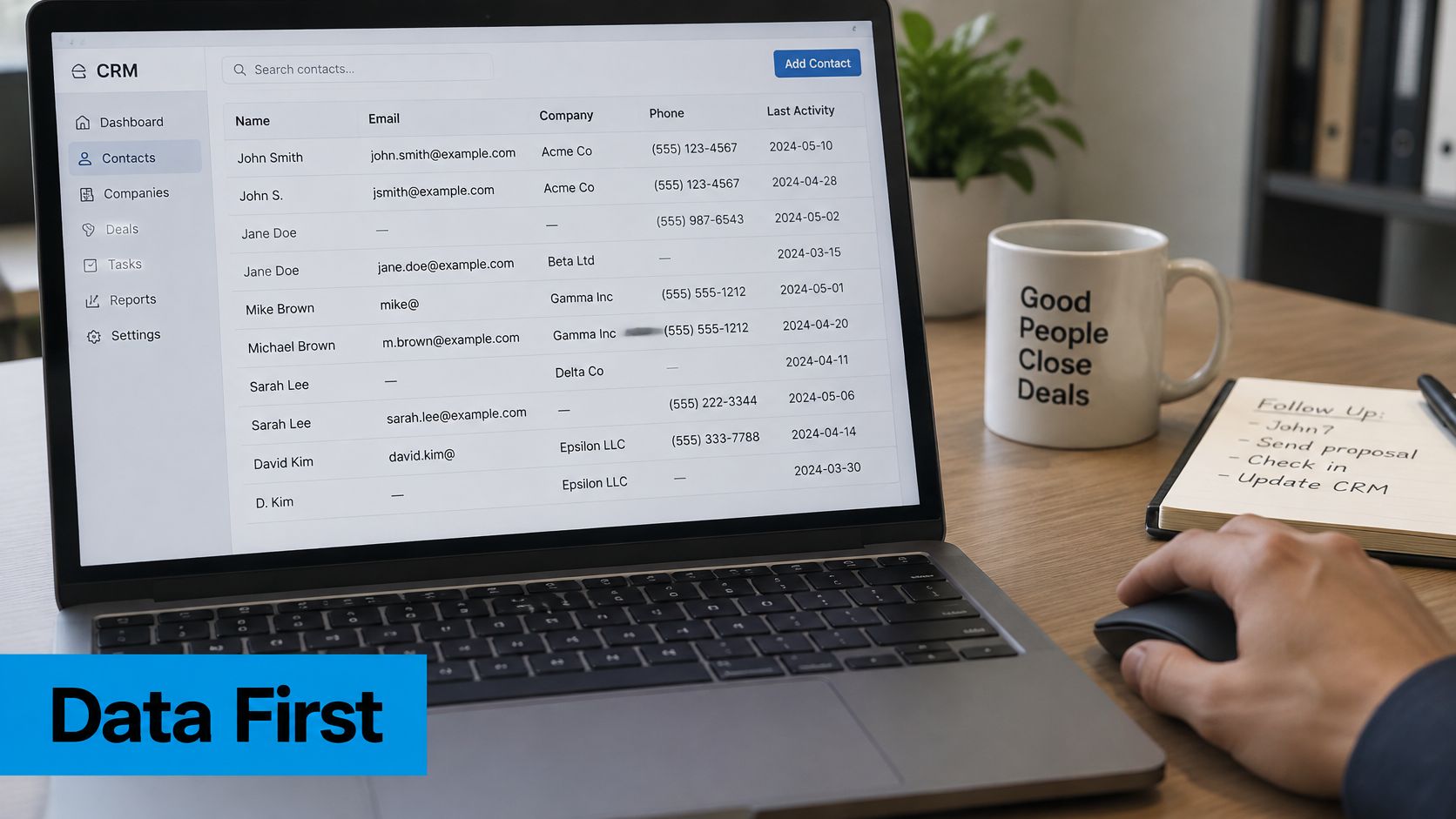
Check Readiness Before Assigning a Score
- Measure field completeness. Review phone, service area, job type, and timeline separately. A record can have a valid email while still lacking the information needed for routing.
- Reconcile duplicates. Match phone and email before scoring, and preserve conflicting values for review rather than overwriting them.
- Label the evidence. Store explicit answers separately from inferred intent, with the source and collection time attached. A prospect's requested appointment date is stronger evidence of timing than a website visit.
Set confidence thresholds using reviewed examples from your own intake. Require verified mandatory fields and no unresolved contradictions for automatic eligibility decisions; route uncertain classifications to a review queue.
A model's confidence number isn't automatically a reliable probability. Check whether cases labeled high confidence receive agreement from reviewers before using that label to authorize routing.
Abstention is a valid outcome: The system can preserve the inquiry and request human judgment without assigning a misleading score.
Make Human Review Specific
Route an urgent dental symptom to staff immediately under the practice's protocol, not into routine nurture. Send a cancellation request to a patient coordinator, a sensitive or conflict-prone legal matter to an attorney-level reviewer, and an insurance claim with a deadline to a claims handler.
Our division of responsibility is explicit: AI handles FAQs, intake, and qualification, while humans handle escalations and edge cases. A dependable lead follow-up system also pauses conflicting automated outreach while a person owns the exception.
Review false positives, false negatives, missing-field rates, duplicate records, and revenue conversion by score band each month. A false positive is a lead incorrectly advanced as qualified; a false negative is a suitable lead incorrectly rejected or parked. Review samples of parked records, or those missed opportunities may never appear in your dashboard.
Connecting Qualification to Your CRM and Sales Workflow
Say a plumbing form arrives at 10:00 a.m. The system confirms receipt, asks whether the issue is an emergency, captures the service address, assigns the next available technician, and starts the response timer, with an alert reaching the on-call technician before five minutes pass, following the practical workflow described in Parallel's inbound qualification guide.
The important integration question isn't whether the systems connect. It's whether the technician receives an actionable record with the right address, urgency, owner, and communication history.
This diagram shows how the form's answers become operational information.
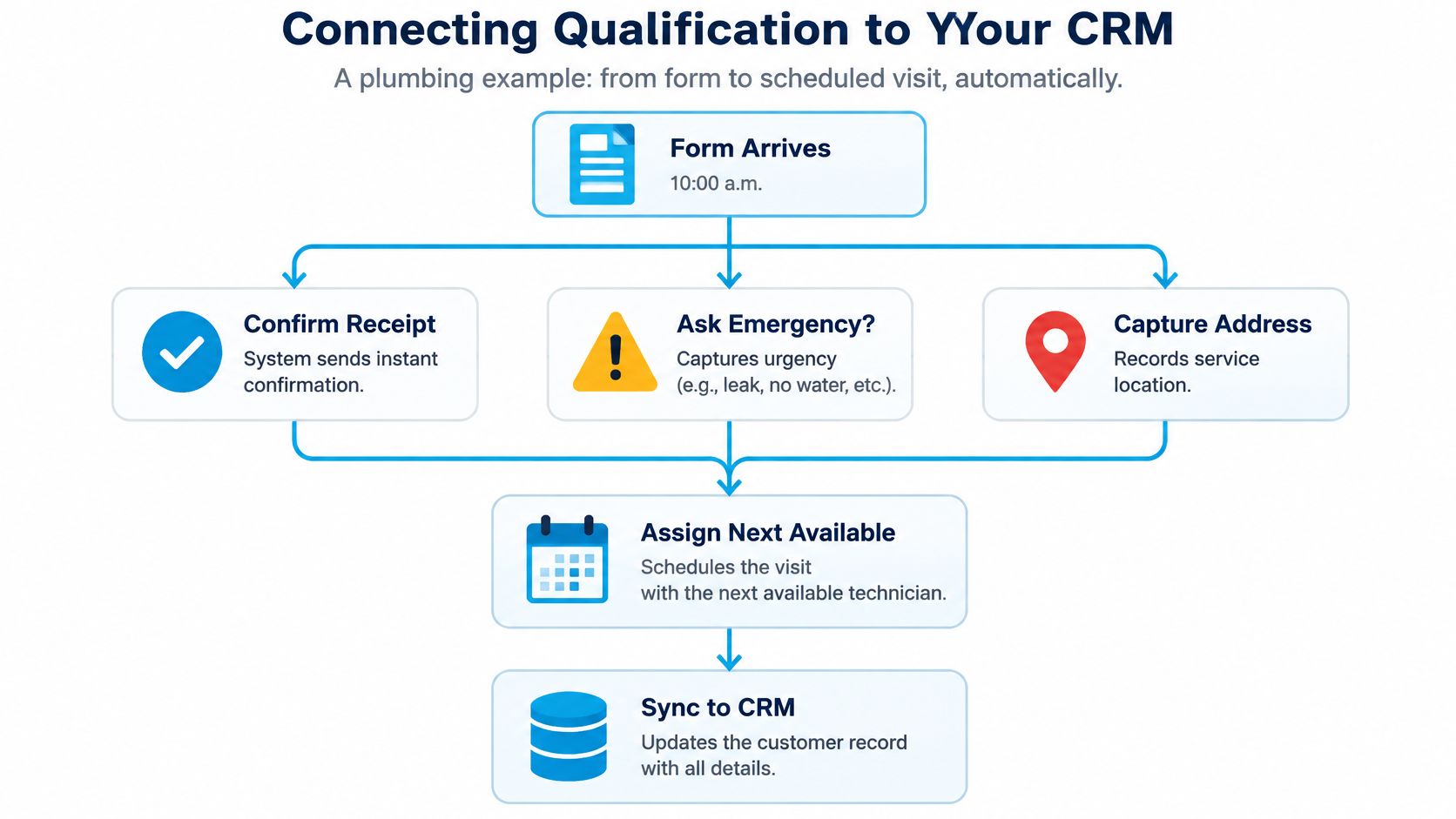
Write Records When Events Happen
Create or update the CRM record immediately rather than waiting for a nightly batch. Normalize phone and email for matching, apply eligibility rules, then select the appropriate permitted channel.
Use a bounded retry cadence with stop conditions for a reply, booking, opt-out, disqualification, or human takeover. Without stop conditions, separate systems can keep contacting someone after the inquiry has already been resolved.
Record opt-in before an automated text or call under your consent workflow, and honor opt-outs at the CRM-record level before the next attempt. Keep permission status separate from qualification status: a suitable lead isn't automatically permission to contact through every channel.
Connect Scheduling and Ownership
Typical destinations include HubSpot, Salesforce, legal practice systems such as Clio, and Zapier for less common connections. We send call details automatically to a customer's CRM or Zapier and support those named systems and many more.
Depending on setup, we can book or modify appointments, create or update CRM or practice-management records, and trigger follow-up tasks. The underlying CRM telephony integration pattern doesn't depend on a particular vendor: the calendar event and customer record should describe the same commitment.
Before launch, verify:
- Field mapping: Service address, urgency, and job type reach the intended fields.
- Ownership: Every actionable record has an assigned person or monitored queue.
- Timestamps: Original arrival and subsequent actions remain distinguishable.
- Duplicate handling: A repeat submission updates the correct record without duplicate outreach.
- Alert delivery: A human receives the notification on a phone within the configured SLA.
- Booking consistency: Confirmed appointments appear in both the calendar and CRM.
- Permission controls: Opt-outs block the next contact attempt across connected workflows.
Pick Your First Automation and Measure It
Start with speed-to-lead on your highest-volume inbound channel. It offers a clear arrival event, a measurable first action, and enough repeated activity to expose broken handoffs.
Before launch, record current response times and CRM field completeness as your baseline. Keep the pilot narrow enough that you can explain why each lead received its outcome.
Roll Out in a Controlled Order
- Choose the channel. Select web forms, missed calls, or chat rather than launching everywhere.
- Write fit and intent criteria. Identify mandatory evidence and unresolved cases.
- Define bands and actions. Give each routing outcome an owner and next step.
- Set the SLA and escalation path. Include backup coverage and after-hours handling.
- Connect the CRM. Test permissions, assignments, writebacks, and alerts.
- Run a 30-day pilot. Treat this as a proposed testing window, with manual review available throughout.
For a hypothetical plumbing pilot, track whether a form arriving at 10:00 a.m. produces an on-call alert within five minutes during the first two weeks. Also measure first-attempt time, qualification rate by response bucket, channel and segment, escalation share, false positives, and false negatives.
Decide What Earns Expansion
Our onboarding follows four steps: tell us about your business, upload or build your scripts, set routing rules, and connect your calendar. Those decisions are easier when you arrive with a written definition of fit and a named exception owner.
Compare pilot outcomes with the baseline, including data completeness and reviewer corrections, not just booking volume. At the score-cutoff review, decide whether to keep the automation, adjust its rules, or expand to the next channel. Expand only when staff can explain the decisions and reliably recover the exceptions.
Recepta.ai combines AI intake and lead qualification with human support for escalations, helping you turn custom qualification rules into practical call handling and follow-up. Visit Recepta.ai to arrange the 15-minute introductory pricing call, describe your call volume and coverage hours, and hear the AI live using the customer experience you want to create as the starting point.