
How to Book Appointments Over the Phone: Scripts and Steps
A nationally benchmarked U.S. survey run from October 16 to November 7, 2024 found that 72.1% of respondents had used a phone call to schedule at least one medical appointment, against 40.6% who scheduled in a provider's office and 34.1% who used an online portal (PubMed Central). The portal didn't replace the phone. It sits beside it, and it handles less than half the volume.
That's both the opportunity and the leak. A booking call is a short, high-value transaction with half a dozen places to fail: the greeting, the qualification, the two-slot close, the read-back, the reminder, the callback after a missed call. Get them right and the calendar fills with the right work. Miss one and the caller dials someone else before you finish the sentence.
What follows is the workflow I'd hand to any reception team: scripts for the call itself, replies to the objections that stall it, a confirmation and reminder cadence that holds the slot, a decision tree for callers who can't get through, and the consent rules that keep automated reminders on the right side of the line.
Why Phone Booking Still Wins
The phone is the front door, and not only for older customers. Callers choose it because it asks nothing of them: no password, no app, no form that times out while they hunt for an insurance card. Someone with a burst pipe at six in the evening doesn't want a portal. They want a person who can say "Thursday, between eight and ten."
That convenience puts the weight on the conversation. A call that only records a preferred time isn't a booking; it's a message. The call has to identify the caller and a number to reach them, clarify why they need the appointment, confirm eligibility or service requirements where they apply, offer available times, and repeat the date, time, location and next steps before anyone hangs up. Skip the qualification and you've dropped a four-hour job into a fifteen-minute slot. Skip the read-back and you've booked a no-show.
The test of a booking call: when the caller hangs up, can they repeat the day, the time, the address and what to bring? If not, the slot isn't confirmed. It's a guess.
This guide is for the people answering those calls: receptionists, office managers and owners across home services, healthcare, legal and finance, where every unanswered ring and unclaimed slot shows up in the revenue line. Nine steps, a question bank, a reminder cadence, escalation routes, and automation used only where it adds real value.
The Phone Booking Workflow From First Ring to Confirmed Slot
Nine steps, in order, on every call. Rehearse the script lines out loud until they sound like speech rather than reading, then put them in your call-notes template so nobody improvises the opening at 8:58 a.m.
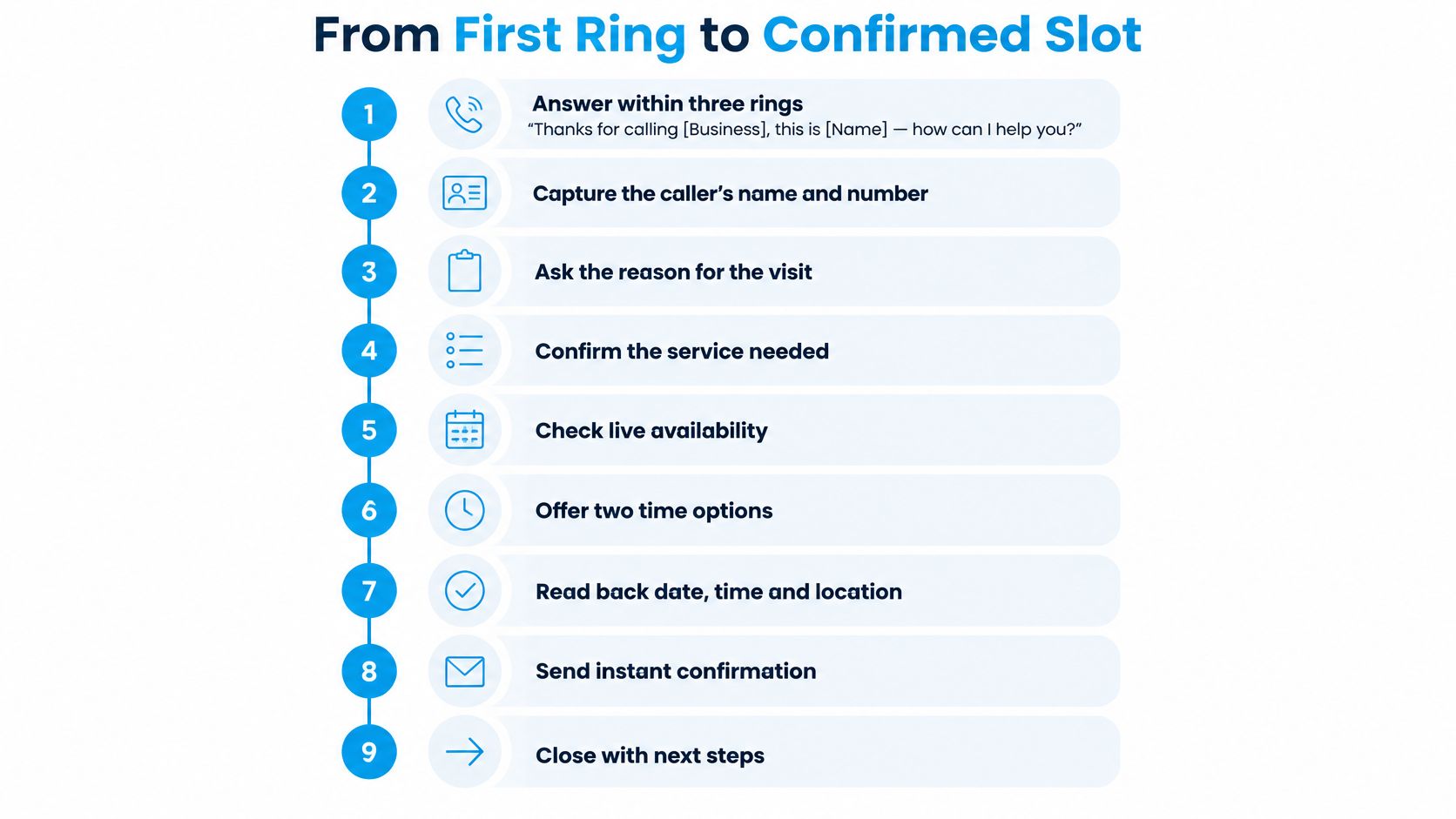
Answer inside three rings, with the same words every time. "Thanks for calling [Business], this is [Name]. How can I help you today?" Three rings is the working target: long enough that you aren't gasping, short enough that the caller doesn't assume voicemail picked up.
Take the name and callback number before anything else. "Can I grab your name and the best number in case we get cut off?" A dropped call with a number on file is a two-minute callback. A dropped call without one is a lost lead.
Ask what the appointment is for, in the caller's own words. "What can I book for you today?" Then stay quiet and let them finish. The first sentence usually names the service; the second names the urgency.
Qualify with three or four questions, never eight. New or returning, service type, urgency, location. For HVAC that's "Is this a routine tune-up or a no-heat emergency?" A dental office asks "Is this a cleaning, or is something bothering you?" A law firm asks "What kind of matter is this, and is there a court date or filing deadline?"
Offer two real slots, not an open menu. "I have Tuesday at 10 or Wednesday at 2. Which works better?" An open "when would you like to come in?" hands your scheduling problem to the caller, who then names a time you don't have and starts negotiating against your own calendar.
Capture what the technician or provider will need. Address with unit number, email, gate code, parking note, and one line of job notes: "Upstairs bathroom, shutoff valve under the sink is stiff." That single line saves ten minutes on site.
Read everything back and wait for a yes. Date, arrival window, full address, provider or technician name, price or range, preparation instructions, cancellation policy, reference number. Read it slowly, then ask: "Have I got that right?"
Close with what happens next. "You're confirmed for Tuesday at 10. We'll text a confirmation now and a reminder the day before. If anything changes, reply to that text." The caller should never have to wonder whether it went through.
Log the outcome and put it on the calendar before you touch the next call. Outcome category, notes, and the entry itself. A booking reconstructed from memory at 5 p.m. is how two customers end up in one slot.
Where Most Bookings Are Won and Lost
Steps 5 and 7 do more for your calendar than the other seven combined. The two-slot close keeps the choice real but bounded, so the caller picks instead of shopping. The read-back is where quiet errors surface: the caller who thought you said Wednesday, the one who assumed the appointment was at the nearer branch, the one who didn't know the price included a call-out fee.
For a multi-location practice, that read-back has a second job: confirming which site. Keep every branch's address and hours in front of the scheduler, the way a dental group publishes its Langley and Oakridge clinic locations with addresses and hours on one page, so nobody reads back the wrong street.
The same nine steps change shape by trade. A plumber's step four asks whether water is actively leaking. A dental office's asks whether the visit is a cleaning or a problem. A law firm's asks about deadlines and the opposing party. Keep the structure, swap the nouns.
Qualification Questions and Objection Scripts
Qualification protects the calendar. Four good questions catch a mismatch before it turns into a cancellation, and they cost under a minute. Group them by the work you do, not by a generic intake form.
Home services. "Is this routine or an emergency?" "Are you the owner or a tenant?" "How old is the unit, and when did it last run?" A tenant answer changes the booking, because major work often needs the landlord's approval first.
Healthcare. "Are you a new or existing patient?" "What's the reason for the visit?" "Which insurance will you be using?" A new patient needs a longer slot, and an insurance question answered on the call prevents a front-desk argument later.
Professional services. "What type of matter is this?" "Is there a deadline I should know about?" "Who else is involved in the decision?" A filing deadline sends the call to a partner's calendar, not the general queue.
The same instinct applies outside the trades. Someone choosing support during pregnancy needs a list of questions to ask a doula before they commit, and the scheduler's job is to book the consultation that answers them, not to talk the caller into a package on the first call.
Write the bank down as a documented lead qualification process so every receptionist asks the same questions in the same order, and so a new hire inherits judgement instead of guessing at it.
Objection Scripts That Keep the Call Moving
| Objection | What it usually means | Response script |
|---|---|---|
| I need to think about it | Uncertain about value or timing | "Fair enough. Is it the price, the timing, or what's included that you want to think through?" |
| That costs more than I expected | Price sensitivity | "That covers the call-out, the parts and the warranty. If you'd rather start smaller, I can book the diagnostic visit on its own." |
| I'm not sure of my schedule yet | Fear of committing | "I can hold Tuesday at 10 for you until this time tomorrow and text the details. Reply YES and it's yours." |
| Just send me some information | Not ready to decide on the call | "Happy to. What's the best mobile number? I'll send a two-line summary and you can reply yes or no." |
| How do I know this is legitimate? | Scam caution | "Good question. I'm [Name], extension [X]. Hang up and call the number on our website, and you'll get me or my team." |
| I had a bad experience before | Trust gap | "I'm sorry that happened. Here's what's different now, and I'll note it on your account so nobody repeats it." |
| Can I book it cheaper later? | Waiting for a deal | "This rate holds until [date], and you can move the appointment free of charge up to 24 hours before." |
Two of these carry most of the weight. "I need to think about it" is almost never about thinking; it's a price, timing or scope question the caller hasn't said out loud, so name all three and let them pick. "That's more than I expected" is not a request for a discount. Restate what the number buys, then offer a smaller starting scope. Discount first and you teach every caller that your opening price was soft.
Every objection gets a two-sentence answer followed by a question that moves the booking forward. A caller who keeps asking questions without answering yours is telling you the fit is wrong, and it's cheaper to learn that on the call than at the door.
Accessibility, Language and Noisy Calls
Standard scripts assume the caller hears clearly, speaks the dominant language fluently, and will remember what you said. Each assumption needs a fallback, because the callers who fail those assumptions are often the ones with the most urgent need.
A 2025 report on healthcare access for people with hearing loss found that nearly half of participants faced appointment-scheduling challenges, citing background noise, unclear speech and phone-only communication as barriers to catching dates and times (European Federation of Hard of Hearing People). The same research found 80% of patients wanted to schedule from home or a mobile device, while 55% of providers said patients were unsure how to use self-scheduling and 37% named educating patients about digital tools as a major challenge.
So build the fallback into the read-back:
Noise or unclear speech: slow down and send the details in writing. "I'm going to read the time once more, slowly. Tuesday, the fourteenth, at ten in the morning. I'm texting that to you now. Reply YES to confirm."
Language: offer an interpreter line or a written summary in the caller's preferred language, and spell out the day, the date and the time rather than saying "next Tuesday."
Memory: send the summary before the call ends, with a reference number, so the caller never depends on recall.
Don't assume the online form covers everyone. Keep a phone route open and staffed, because the caller who can't use self-scheduling is exactly the one who needs a person.
Verification without friction: if a caller doubts the call is genuine, don't argue. Give your name, the business name and an extension, then invite them to hang up and dial the number printed on the website or the last invoice.
Log any adjustment on the account, in plain text: "prefers SMS," "slow speech," "interpreter, Spanish." The next call then starts in the right format instead of asking again.
Confirming Details and Syncing the Calendar
A booking becomes real when the calendar entry exists and the caller has heard the details back in plain language. Read the confirmation at the end of the call, out loud, in this order: date, arrival window, full address with parking or access notes, provider or technician name, preparation instructions, price or range, cancellation policy, and a reference number. If one item is missing, that gap usually shows up later as a late arrival, a wrong-address call, or an empty chair.
Create the entry while the caller is still on the line. Service type, duration, assigned provider, address and a new-or-returning tag belong in the scheduling system during the conversation, not in a notebook for cleanup after lunch. Every confirmation and reminder should fire from that same entry, because a booking retyped from memory is how two callers end up holding the same Tuesday slot.
| Touchpoint | When | Channel | Message focus |
|---|---|---|---|
| Instant confirmation | At booking | SMS and email | Date, time, address, reference number, reschedule link |
| Human confirmation call | About 7 days before high-value visits | Phone | Confirm details, ask for an arrival plan, surface transport or prep barriers |
| Reminder | 24 hours before | SMS | Confirm, reschedule or cancel with one reply |
| Day-of nudge | Morning of the visit | SMS | Provider name, ETA window, direct contact number |
| Rebooking follow-up | 1 to 2 days after the visit | SMS or email | Thank you, review prompt, next appointment offer |
The human touchpoint earns its keep on high-value visits. In a randomized trial of high-risk primary-care patients, a structured telephone call about seven days before the appointment cut no-shows from 29.2% to 22.8%, a 6.4-percentage-point absolute reduction, and the same paper's review summary reports telephone reminders reducing no-shows from 20.99% to 7.07% in one implementation, with results varying by population and workflow (Journal of General Internal Medicine). The call works because the patient has to say how they will get there and what still might block the visit, while there is time to fix it.
The failure patterns are boringly consistent: relying only on automated reminders, losing cancellation notes in free text, booking too far ahead, and never checking whether the caller understood the location or what to bring. Lead time matters because longer lead times can increase failure to attend. When a caller asks for a date far out, offer the nearest workable slot first, then keep the later option as a second choice rather than the default.
Put cancellation terms inside the read-back for a reason. A caller who first hears about a fee at the front desk will argue about it; a caller who hears it before agreeing has made a cleaner commitment. Practices that publish their no-show fees for treatments give the scheduler a sentence to read instead of a policy to invent.
Measure the result from the appointment booking calendar, not from a spreadsheet someone updates on Fridays: reminder reach, confirmation rate, reschedule rate, no-show rate and recovered-slot value. Those five numbers show whether calling produces filled appointments or just motion.
Escalation Routes When a Call Stalls
The failure mode nobody writes about is the call that never reaches a human. In a 2025 national assessment, researchers contacted 3,656 physician offices and could identify a first available appointment at only 1,391 of them, after hitting automated telephone sequences that never led to a scheduler and recordings saying the office was temporarily not taking calls (AMN Healthcare physician appointment wait times). In a separate 2025 U.S. survey reported in the same assessment, 59% of respondents said it was difficult to contact their doctor to make an appointment, and roughly 40% struggled to find specialty care or get in touch with their doctor.
When the menu loops, work the ladder in this order, and stop as soon as you reach a person:
Try the scheduling extension once, not three times. Repeated attempts at the same number produce nothing new.
Request a callback with a specific window. "I'm free between 2 and 4 this afternoon. Can someone call then?" A named window gets returned more often than "as soon as possible."
Switch channels. Use the published text line or online booking, then confirm the booking landed.
Call the central scheduling desk if the practice or company runs one, since branch phones often go unanswered during clinic hours.
Document the attempt with a timestamp. Who you called, when, what the recording said, and what you did next.
Voicemail is a last resort, not a destination. If a call ends in a recording, the caller's number should already be in a callback queue with an owner and a deadline, not in a mailbox nobody plays.
Escalate to a human when the question is beyond the scheduler's authority: a clinical concern, a legal or billing dispute, or an upset caller. Warm-transfer with context ("Mr. Hale is calling about a reschedule after a cancellation fee, and he's already frustrated"), and use a written how to transfer calls script so the receiving colleague isn't starting from zero.
| Outcome | What it means | Next action |
|---|---|---|
| Booked | Appointment scheduled on the call | Sync to the calendar and send instant confirmation |
| Confirmed | Caller already had the visit scheduled | Verify date and time and queue the reminder |
| Declined | Caller said no for now | Log the reason and set a follow-up date |
| Unreachable | No answer or voicemail | Add to the callback queue with a retry window |
| Callback requested | Caller asked for a specific time | Assign an owner and a response deadline |
| Escalated | Question beyond the scheduler's authority | Warm transfer or a structured message with a deadline |
Classify every attempt into one of those six and the phone line stops being a cost centre and starts being a funnel you can read.
Automating Bookings and Reminders Safely
Automation removes busywork, not people. The calls worth automating are the ones nobody enjoys: after-hours answering, instant confirmations, reminder texts, callback queues for missed calls, and outreach to leads who never booked.

The scale automated offers can reach is worth seeing. A 2023 study of an automated medical-appointment waitlist, published in 2025 in Applied Clinical Informatics, recorded 1,019,698 appointment offers for 229,998 appointments, sent to 164,248 patients (Applied Clinical Informatics). No reception desk matches that by hand, and it's the strongest argument for letting software chase cancellations while staff take the conversations that need judgement.
Whatever sends the message, the booking has to land in one place. Write the appointment into Calendly, your CRM or the practice management system during the call so confirmations, reminders and follow-ups all trigger from a single record. We place confirmed appointments directly on the business's calendar and trigger the follow-ups from that entry, which is the difference between a reminder system and a reminder hope. When a caller needs something more nuanced than booking, the AI hands off to a human receptionist working from the business's playbook rather than improvising.
Then there are the rules. Non-emergency autodialed or prerecorded calls to wireless numbers generally require the recipient's prior express consent, and prerecorded telemarketing requires prior written consent, which can be collected on paper or electronically, including through a website form or a telephone keypress (FCC guidance on unwanted communications). A clinic can gather that consent on its own booking form, log it with a timestamp, and still offer a live agent or keypad route to change the appointment. A manually dialed staff call isn't the same technology category, but verify local privacy and telemarketing rules before you dial.
Every automated call needs an exit, and the FCC robocall order treats an in-call opt-out as part of the deal. Build it into the script: "Your appointment is Tuesday at 10 a.m. Press 1 to confirm, press 2 to reschedule, or press 9 to stop future automated calls." Log the keypress, suppress automated calls after an opt-out, and give the caller a live number for anything else.
Keep diagnoses, legal details and account numbers out of automated messages. "Please contact us about your appointment at [number]" carries everything a voicemail should, and nothing a stranger shouldn't hear.
Pair the messages with a visible automated appointment reminders log that records what went out, what came back and who responded. A reminder you can't audit is a reminder you can't defend when a patient says they never got it.
Roll Out Your Phone Booking Playbook
Five days is enough to get this running. Don't write a binder; write the lines people will say.

Day one: write the greeting and three to five qualification questions for your service, in plain language.
Day two: load the objection scripts into your call notes or CRM snippets, so they appear on screen mid-call.
Day three: set the confirmation and reminder cadence, plus the calendar fields every booking must contain.
Day four: define escalation rules, callback windows, and who owns an unreachable caller.
Day five: listen to five recorded calls and tighten the weakest script. Not all five. The weakest one.
Then track three numbers weekly: bookings per 100 calls, no-show rate, and callback response time. For a reference point, a multi-center healthcare outreach program completed 548,089 call attempts over seven months and booked 66,238 new appointments, 12.1% of attempts, or 14.6% after excluding wrong numbers, deceased patients and people already booked; another 16.6% of calls confirmed existing follow-up care, while 25.7% of attempts never reached the intended person (PubMed Central). A team that classifies its own outcomes the same way can see exactly where slots leak.
If you'd rather not hire for the after-hours shift, our onboarding runs in four steps: tell us about your business, upload or build your scripts, set routing rules, and connect your calendar. A receptionist is created in 15 minutes, and calls can be received as soon as setup finishes.
At the end of week one, review the scorecard and pick the single metric that moved least. Fix that one before adding anything new.
Recepta.ai answers the calls your team can't get to, books the appointment on your calendar during the conversation, and sends the confirmation and reminders from that same entry so nothing depends on a note written after the fact. It covers after-hours, overflow and callback follow-up, and hands the nuanced calls to a trained human receptionist using your scripts. If your phone line is still the front door, visit Recepta.ai to see how the booking workflow runs end to end.