Outbound Call Automation: A Practical Guide for Modern Teams

At 8:47 a.m., Maya, who runs a 12-person HVAC company in Phoenix, already has 31 voicemails waiting from yesterday. Two technicians are stalled because customers haven't confirmed arrival windows. Her estimate list is untouched, while the office manager answers callbacks and chases overdue invoices. Nothing is wrong with the team's effort. The problem is that callbacks, reminders, follow-ups, win-backs, and collections all compete for the same limited dial time.
Outbound call automation helps by handling repeatable calling work through software, rules, and integrations. But the useful question isn't, “How many numbers can the system dial?” It's, “Can the system call the right person, at the right time, with the right permission, and prove what happened?”
The Daily Call Crunch That Automation Solves
Maya's morning workload contains several jobs that look small individually. A coordinator needs to confirm tomorrow's appointments, call back web leads, remind customers about unpaid balances, and check whether last month's estimates are still active. Each task requires a phone call, but not every call requires a trained employee to dial, wait through ringing, leave a standard message, and update the CRM.
That repetition creates an operational bottleneck. A promising estimate can sit untouched while the team handles a routine reminder. A customer who wants to reschedule may call twice because nobody returned the first message. The staff isn't choosing to ignore revenue. They're sorting urgent interruptions from important work with incomplete information.

A well-designed workflow takes the mechanical parts off the team's plate:
- Callbacks: Contact a new inquiry, confirm the reason for the call, and route urgent requests.
- Reminders: Reach customers before appointments, payments, renewals, or scheduled service.
- Follow-ups: Check whether a quote needs clarification or whether a prospect is ready for a conversation.
- Win-backs: Reconnect with past customers using a controlled message and a clear opt-out path.
- Status updates: Ask for missing information and write the result back to the relevant system.
The broader issue resembles the administrative burden created by repetitive business tasks. Automation doesn't remove judgment. It creates room for the office manager to handle exceptions, help a frustrated customer, or close a valuable estimate instead of spending the morning repeating the same opening line.
Practical rule: Automate the predictable action first. Keep humans responsible for judgment, negotiation, sensitive situations, and any call where context matters more than speed.
For Maya, the first win might be a confirmation workflow. The system checks the appointment record, calls during an eligible local-time window, records whether the customer confirmed or requested a change, and sends exceptions to a person. That narrow starting point can reduce the morning pileup without turning the entire customer experience over to a machine.
What Outbound Call Automation Actually Is
Outbound call automation is software that selects contacts, places calls, screens outcomes, follows call logic, and records results without requiring an employee to manually press a button for every record.
A postal-mail analogy makes the distinction easier. A manual worker carries one letter to the post office at a time. An automated operation pre-sorts the letters, groups them by destination, routes them through the right process, and reports what was delivered. The truck doesn't decide every personal message. It handles movement and sorting so people can focus on work that needs a human touch.
Four building blocks appear in most systems.
The contact record
The contact list isn't just a spreadsheet of phone numbers. It should include the person or company, the reason for outreach, relevant CRM context, permission history, opt-out status, time zone, and prior outcomes. A consent flag without provenance is weak. A useful record tells the dialer where permission came from, when it was captured, which seller it covered, and whether the person later revoked it.
The dialer engine
The dialer engine places the call, manages pacing, identifies an answer or voicemail, and routes the result. Depending on the setup, it may call one contact for one available representative, place multiple attempts for a predictive queue, or run an agentless notification.

The call logic
Call logic is the decision tree behind the conversation. It determines what happens when someone answers, asks to reschedule, says they aren't interested, reaches voicemail, or requests a human. Simple campaigns use prerecorded prompts. More flexible campaigns use conversational AI that can recognize intent and collect structured details.
The analytics layer
Analytics turns activity into operational feedback. It should show attempts, answers, dispositions, transfers, opt-outs, failed calls, retries, and compliance checks. Without that layer, a team may know that calls were placed but not whether the workflow produced confirmed appointments or qualified conversations.
Automation doesn't mean removing people. It means reserving people for calls that need empathy, authority, or expertise. Teams comparing platforms can also review resources about outbound systems for B2B teams when they need to connect dialing, CRM data, routing, and human follow-up.
The final distinction matters. A human-assisted predictive dialer finds answered calls for representatives. A fully autonomous voice agent conducts the conversation itself, within defined boundaries. Both automate dialing, but they require different scripts, safeguards, escalation rules, and quality reviews.
The Core Technology Approaches Explained
There isn't one correct form of outbound call automation. The right choice depends on how much conversation the workflow requires and where a human should enter.
IVR-driven outbound
An interactive voice response system uses prerecorded messages and keypad or spoken choices. It works well for one-way or tightly structured tasks, such as an appointment reminder, payment prompt, service notification, or short survey.
An IVR is usually the simplest option to control. The message is consistent, the choices are limited, and the system can record whether the recipient confirmed, declined, or requested a callback. Its weakness is equally clear: when the recipient asks an unexpected question, the flow can become frustrating or send the call to a representative.
Predictive dialing
A predictive dialer places calls for a representative queue and connects answered calls to available agents. It suits high-volume sales, collections, and follow-up operations where trained employees still handle the persuasive or sensitive part of the conversation.
The system can improve agent utilization, but it introduces pacing and abandonment risks. Leaders should ask vendors how the dialer manages answer detection, abandoned calls, retry rules, caller identification, and suppression checks. More dialing capacity doesn't fix poor data or weak consent records.
Conversational AI voice agents
A conversational AI voice agent handles natural back-and-forth, within a defined workflow. It can qualify a lead, collect a preferred appointment time, confirm information, or identify when a caller needs a human.
This approach offers flexibility, but it also carries more failure modes. The agent can misunderstand an answer, overstep its authority, or sound inappropriate in a sensitive situation. It needs clear boundaries, disclosure, immediate opt-out handling, and a reliable handoff.
| Technology | Best For | Human Involvement | Typical Cost | Key Risk |
|---|---|---|---|---|
| IVR | Reminders, notifications, surveys, simple payment prompts | Needed for exceptions | Usually the lightest operational model | Rigid conversations and poor handling of unexpected questions |
| Predictive dialer | High-volume prospecting, follow-up, and collections queues | Representative handles connected calls | Depends on seats, usage, and campaign volume | Pacing, abandonment, and weak list governance |
| Conversational AI | Qualification, callbacks, booking, and structured service conversations | Takes escalations and sensitive cases | Depends on usage, integrations, and oversight | Misunderstanding, unclear disclosure, or over-automation |
Latency matters too. An IVR responds quickly but offers little interpretation. A predictive dialer can move a queue efficiently but depends on agent availability. Conversational AI may need more processing and testing, yet it can manage varied answers that would break a fixed script. A practical evaluation should test real calls, not just a vendor demonstration.
For customer-support workflows that need more context than a basic menu, teams can compare the operating model with guidance on conversational AI for customer support.
Real Use Cases Worth Automating First
The safest starting point is a narrow workflow with a clear success condition. Three patterns show how the handoff should work.
Lead nurturing for a B2B software company
A B2B SaaS company receives 2,000 weekly cold leads and has a four-person sales team, according to the scenario. The team can't give every new record a thoughtful first conversation. A conversational AI agent can call eligible contacts, ask about the business problem, capture budget and timeline, and transfer a prospect when the answers meet the team's qualification rules.
The human handoff happens when the prospect shows relevant intent or asks for detailed product guidance. The representative receives the call reason, qualification answers, and consent history instead of starting from an empty screen. Contacts who decline, request no further calls, or aren't ready should receive the correct disposition rather than endless retries.
Appointment reminders for a dental practice
A dental practice estimates that a missed appointment costs $180 per empty chair, based on the scenario. Its reminder workflow can call 48 hours and 2 hours before each visit, using a one-key option to confirm or request a reschedule.
The system should use the patient's local time zone and route a reschedule request to staff. It shouldn't force a patient through a long automated conversation when the person needs to discuss treatment, billing, accessibility, or an urgent concern. A short reminder is a good automation candidate because the desired outcome is easy to define.
Late-stage collections for a regional lender
A regional lender can use a soft-tone conversational AI flow to explain available payment-plan options and capture a stated preference. The system should transfer hardship cases to a trained representative, because financial difficulty often requires discretion, policy interpretation, and empathy.
The technology doesn't replace collections judgment. It creates a consistent first step and gives human staff better context at escalation. Data quality matters before dialing begins, so teams reviewing contact enrichment may also find a comparison of top skip tracing alternatives useful when evaluating how records are sourced and maintained.
| Use Case | Best Technology | Typical Volume | Primary KPI |
|---|---|---|---|
| Lead nurturing | Conversational AI with human transfer | Large recurring lead queues | Qualified conversations or meetings |
| Appointment reminders | IVR or tightly scripted voice automation | Scheduled customer lists | Confirmed, rescheduled, or attended appointments |
| Collections follow-up | Conversational AI with specialist escalation | Delinquent-account queues | Promise-to-pay or completed arrangement |
Each example has a defined stopping point. That stopping point is more important than the voice technology. If the system can't explain when it should stop, transfer, suppress, or close the record, the workflow isn't ready for production.
Metrics That Tell You If Automation Is Working
A dashboard full of dials can make a weak campaign look busy. Measure the path from attempt to acceptable outcome, and review each use case separately.
Connect rate
Connect rate equals answered calls divided by total attempts. One large outbound data study reported the strongest connection times as 11:00 AM, followed by 9:00 AM and 12:00 PM. For true cold calls without prior history, the reported peaks were 8:00 AM, then 9:00 AM and 10:00 AM. These findings come from the Car Wars outbound data study.
Use the result to test scheduling, list quality, and retry timing. For example, a team might place first-touch cold calls in the earlier morning window and reserve later-morning attempts for follow-ups, while still enforcing legal local-time limits.
Answering machine rate
Answering Machine Rate, or ASR in this context, shows how often attempts reach voicemail or an answering machine rather than a live person. The assigned benchmark describes keeping ASR under 8% as a signal of cleaner contact data and compliant calling windows. If it rises, inspect number quality, caller ID reputation, calling times, and retry rules before increasing volume.
Conversion to outcome
Define one outcome for each campaign. A SaaS team might count a qualified meeting, a dental practice might count a confirmed appointment, and a lender might count a promise-to-pay. Don't blend these into one grand conversion number, because a successful reminder and a successful sales qualification represent different operational work.
Track the stage where the system loses people. If calls connect but few outcomes occur, improve the script or qualification logic. If outcomes are strong after a human transfer, invest in faster and better handoff context.
Opt-out rate
Opt-out rate is the early warning signal for relevance and compliance. A sudden increase may indicate unclear introductions, poor targeting, excessive retries, or a message that doesn't match the recipient's expectation.
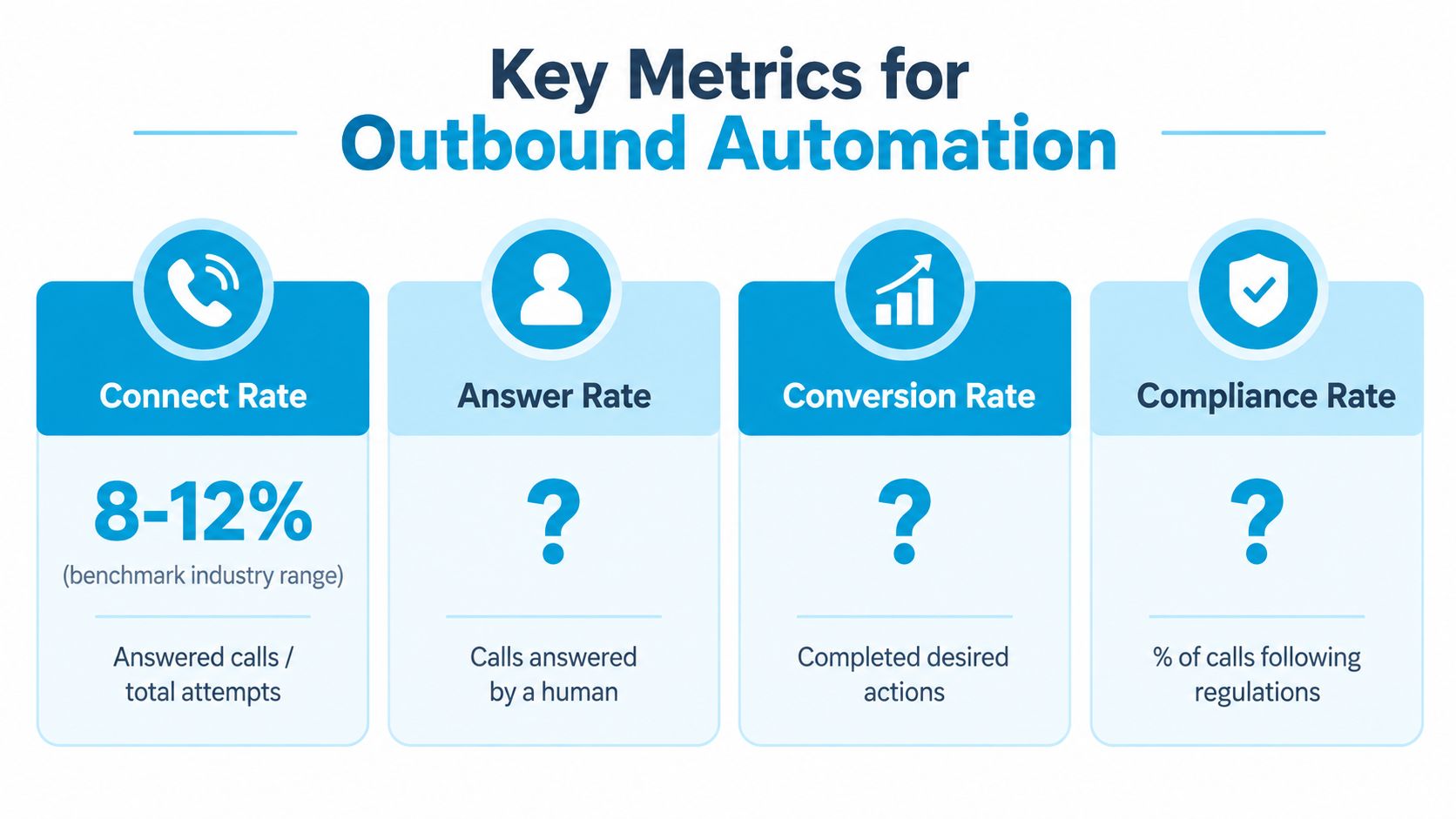
A practical scorecard should show the metric, the campaign, the date range, and the operational lever. Call detail records provide the evidence needed to investigate individual outcomes, so teams can pair this framework with call-detail reporting guidance.
Review the scorecard weekly during a pilot. If the numbers move in the wrong direction, change one controllable factor at a time, such as list freshness, call windows, retry frequency, or disclosure clarity.
The Compliance Architecture Most Teams Underestimate
Many owners treat compliance as a legal review completed before launch. Mature teams treat it as runtime architecture. The dialer should decide whether a call is allowed immediately before placing it, not rely on a spreadsheet that was accurate when someone imported the list.
The historical context explains why this matters. Congress passed the Telephone Consumer Protection Act on December 20, 1991, addressing intrusive telemarketing and automated calls, including computerized autodialing systems and prerecorded messages. Autodialers using stored number lists existed at least as far back as 1968, according to a Supreme Court amicus brief cited in 2020, and predictive dialer growth helped fuel the public pressure that preceded the law's passage. See the Congressional TCPA document and the Supreme Court amicus brief.
Four controls belong inside the dialer
Consent provenance: Store where and when permission was granted, what seller it covered, and whether it was written or recorded. The FCC's treatment of AI-generated voices as artificial or prerecorded voices makes this record especially important. Telemarketing robocalls to consumers generally require prior express written consent, and the one-to-one consent rule ties consent to a single identified seller. The FCC AI calling analysis explains the effect on outbound design.
Global suppression: Sync internal opt-outs, applicable Do Not Call records, and relevant jurisdictional lists across every campaign. The FCC telemarketing guidance states that lists should be scrubbed against the National Do Not Call Registry at least every 31 days, opt-outs should be processed immediately, and audit records should retain consent, revocation, and call-attempt information.
Caller-ID discipline: Use an identity that matches the seller associated with consent. Never spoof the caller ID or make it difficult for a recipient to understand who is calling.
Time and time-zone gating: Enforce calls no earlier than 8:00 a.m. and no later than 9:00 p.m. in the recipient's local time, with daylight-saving changes handled automatically. The time-zone-aware outbound calling guidance describes routing numbers outside the eligible window into a later queue.

A fifth practical safeguard supports all four: place a disclosure before the AI begins speaking, capture the opt-out immediately, and propagate that instruction across connected systems. A call can be technically successful and still fail if the platform can't prove permission at call time.
Healthcare operators should also account for privacy and sensitive information when choosing call recording, storage, and escalation practices. A practical HIPAA guide for medical practices can help teams frame those operational questions. For recording controls and retention decisions, review call recording compliance practices.
Rolling Out Outbound Automation Without Breaking Trust
A careful launch keeps the first experiment small enough to understand. Don't begin with every customer, every campaign, and every type of conversation. Select one use case and one segment, then run the automated workflow beside human callers for a week so the team can compare outcomes and listen for failure patterns.
Start with a contained pilot
Choose a workflow with a clear result, such as confirming scheduled appointments or following up on recent quote requests. Exclude sensitive cases and contacts with incomplete permission history. Give one person ownership of daily review, including failed calls, unexpected answers, escalations, and opt-outs.
The pilot should test more than the script. Check whether CRM fields arrive correctly, whether the system respects local time, whether suppression happens before dialing, and whether a representative can see the reason for transfer.
Scale only after instrumentation
At the next stage, log every suppression check, disclosure played, escalation, and final disposition. Route exceptions to a named human queue. A stuck caller shouldn't loop through the same prompt or create repeated attempts because no system owner received the failure.
Conversational AI should enter gradually. After-hours callbacks and low-stakes reminders offer a contained environment for testing recognition, tone, and escalation. Live sales conversations require more testing because a misunderstanding can affect trust and revenue.
Write the handoff before launch
The handoff rule should answer three questions:
- Ownership: Which person or team receives the call?
- Context: Which three facts must travel with the transfer?
- Permission: Where does the representative see consent, disclosure, and opt-out history?
A useful transfer might include the contact's stated need, the requested next step, and the relevant record identifier. The representative shouldn't ask the customer to repeat information the system already collected.
Schedule a 30-day trust review covering opt-out rate, complaint rate, retry patterns, and unresolved escalations. If a threshold is breached, throttle or pause the workflow, identify the cause, and require review before expanding to another segment.
Putting It All Together
Four decisions determine whether outbound call automation becomes a dependable operating process or just a faster way to create problems.
First, match the technology to the job. Use a predictive dialer when representatives handle a high-volume queue, IVR for reminders and surveys, and conversational AI for variable callbacks or qualification. Don't select the most advanced tool before defining the customer outcome.
Second, configure the controls before the first ring. The system needs consent validation, seller-specific routing where required, suppression checks, disclosure, immediate opt-out capture, local-time gating, and audit logging inside the workflow.
Third, review a focused scorecard. Track connect rate, ASR, conversion to the campaign outcome, opt-out rate, and complaint rate. Separate campaigns by purpose so a strong reminder workflow doesn't hide a weak prospecting workflow.
Fourth, expand in stages: pilot, instrumented scale, partial AI handoff, and broader deployment. The result should be fewer repetitive dials for staff, more relevant conversations for recipients, and a clear record of why each call was permitted.
Recepta.ai combines conversational AI with human support for inbound and outbound calls, including appointment booking, confirmations, reminders, lead capture, and follow-ups. If you want to evaluate an outbound workflow with escalation and connected records, visit Recepta.ai and map one contained use case before expanding.