Outbound Call Service: A Practical Guide to Strategy and ROI
You can feel it in the queue before lunch even starts. The web form is filling up, the phones are ringing, and your team is still chasing callbacks from yesterday because half the leads went cold before anyone touched them. That's the pressure behind outbound call service work, not how many dials you can stack up, but whether the right person gets the right call while the lead still has intent.
A lot of teams keep asking the wrong question. They ask whether outbound calling is still useful, when the better question is which moments justify a live call, which ones should go to text or email, and how to keep legitimate calls from getting ignored. The market is still large and expanding, with the global outbound services call and contact center outsourcing segment valued at US$39,380.6 million in 2024 and projected to reach US$70,049.3 million by 2030 at a 10.8% CAGR (Grand View Research). That doesn't look like a fading tactic. It looks like a category that's being forced to mature.
Why Outbound Call Services Still Matter in a Phone-Avoidant Market
A homeowner submits an emergency plumbing form, then the callback waits until the end of the day. A dental patient asks about a recall appointment, but the reminder sits in an inbox that never gets opened. By the time the phone rings, the need has cooled or the job has already gone elsewhere.
That is where outbound call service still earns its place. Microsoft's outbound best-practices guidance says outbound calls work best when they are timely, relevant, and action-oriented, because the call has to justify the interruption fast in a phone-avoidant market (Microsoft outbound best practices). In home services and healthcare, that usually means emergency requests, appointment confirmations, post-quote follow-ups, recall reminders, and other moments where waiting costs you the lead.
The channel choice matters too. Outbound teams initiate the contact, while inbound teams wait for the customer to call in. If you need a quick refresher on that split, the inbound call vs outbound call comparison is a useful reference for sorting which jobs belong in each motion. The operational point is straightforward. A call is not a default touch. It is the right tool when speed, context, and human judgment matter more than passive nurture.
For a live campaign, the hidden variable is not just whether you dial. It is how fast you dial, what caller identity the prospect sees, and whether the agent reaches the lead before the signal cools. A contact that is still warm at five minutes can go flat by the next block, especially in service categories where the buyer is comparing options quickly. That is why the schedule, the caller reputation, and the handoff from form fill to first attempt often matter more than raw list size.
Practical rule: if the lead is urgent, specific, and tied to one action, the phone still beats a slower channel.
That also explains why volume blasting keeps underperforming. Recent best-practice guidance favors tighter timing, branded calling, and selective outreach over raw dial count, and the teams that win treat outbound like a precision follow-up system rather than a megaphone (Convoso strategy guidance). The top scripts for real estate agents show the same pattern in a different vertical, where the first few words, the caller identity, and the timing of the call do more work than a long pitch.
Types of Outbound Call Services and When to Use Each
A campaign can have a large list and still miss the mark if the service model does not fit the work. The decision starts with the agent's role in the conversation, the complexity of the offer, and how much control the team needs over pacing and compliance. A fully automated dialer fits repetitive outreach with a simple message. Human-led outreach fits expensive leads, consultative conversations, and situations where the compliance risk is higher.
Preview dialing gives the agent time to review the lead before the call. That suits high-value appointments, insurance quotes, legal intake, and any case where context matters more than speed. Progressive dialing balances pace and control, so it works well for structured follow-up, home services lead qualification, and appointment-setting teams that need steady throughput without sacrificing conversation quality. Predictive dialing uses statistical pacing to connect more contacts before agents are free, so it shows up in larger campaigns where occupancy and call flow need tight management.
The choice changes utilization and answer efficiency. Outbound operations are a matching problem between campaign intent, pacing, and compliance constraints (Ansafone outbound requirements). A team that wants scale also needs CRM integration, analytics, quality monitoring, and security controls, because dial volume alone does not keep a program stable.
Blended AI and human support work best when the system handles routine coordination and hands the right moments to a person. Recepta.ai fits that model as one option, since it handles inbound and outbound calls, appointment scheduling, lead capture, and follow-ups, then escalates to trained agents when human support is needed. In healthcare and home services, the first touch may be routine, but the next touch often needs judgment or empathy.
That same fit question shows up in contractor pipelines too. The discussion around paving leads service options is a useful adjacent example, because the service model has to match the lead source and the speed of response, not just the channel.
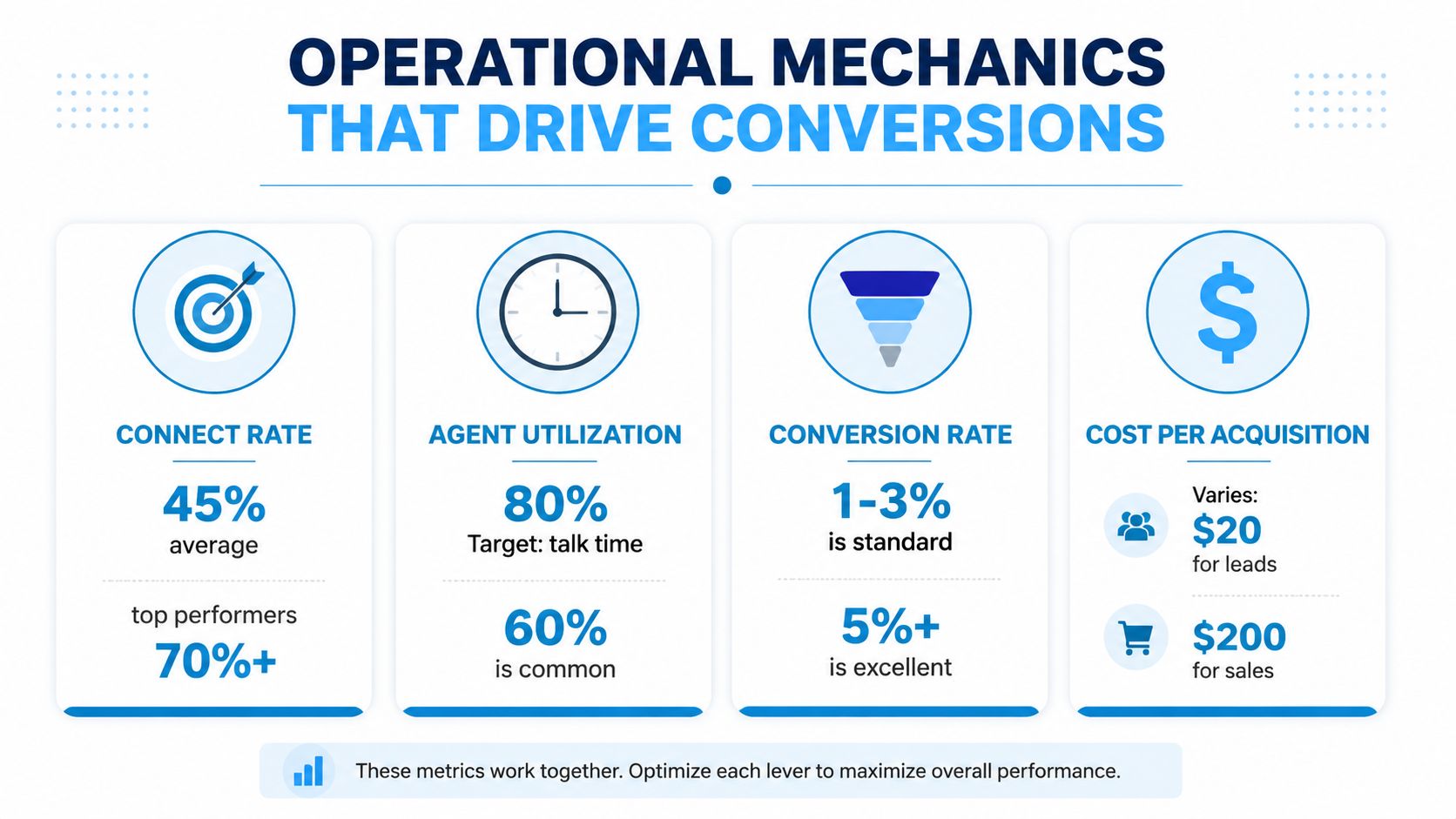
The operational signals matter more than vanity numbers. Connect rate, agent utilization, conversion rate, and cost per acquisition tell you more about whether the service is working than dial count ever will.
The Operational Mechanics That Drive Conversions
A lead that gets called while intent is still hot behaves differently from one that sits in a queue. If a web lead is contacted within the first 5 minutes after submission, it is reported to be 100 times more likely to answer than a lead contacted later (Smith.ai outbound call statistics). That is an operations problem, not a script problem.
Speed beats delayed callback blocks
Home service campaigns show this clearly. If a plumbing lead comes in at 2:00 p.m., route it immediately to an available caller instead of batching it for the evening. In healthcare, appointment requests and recall lists need the same treatment. The first touch matters because the lead is still active when the phone rings.
Cadence matters too. One source reports that Wednesdays are the best day for cold calls, the strongest time window is 4:00 p.m. to 5:00 p.m., and the second-best window is 11:00 a.m. to 12:00 p.m. (Novocall outbound call statistics). The same source says the late-morning slot still sees a 71% difference in the number of conversations versus the top window. That is enough to shape call blocks, especially when you are working with a small team and limited overlap.
Data quality changes the math just as much as timing does. Cognism's 2026 benchmark logged 449,933 SDR cold calls and 1,962 AE warm calls, with answered rates of 13.3% for cold outreach and 14.4% for warm outreach. Verified contact data nearly closed the gap between cold and warm calling in that study (Cognism State of Outbound 2026). The same dataset also recorded 922,770 minutes spent on SDR calls and 16,392 minutes on AE calls, with average call durations of 2.0 minutes for SDRs and 8.3 minutes for AEs. Precision is replacing brute volume as the main performance lever.
Quality lists, fast routing, and the right call window usually beat a bigger dial target.
For script design, keep the ask narrow. While there are top scripts for real estate agents, the core principle is universal, a concise first sentence and one clear next step usually outperform a rambling opener. Recepta.ai's outbound call script resource supports that same approach because the script has to fit the timing, not fight it.
Compliance, Caller Reputation, and Deliverability Best Practices
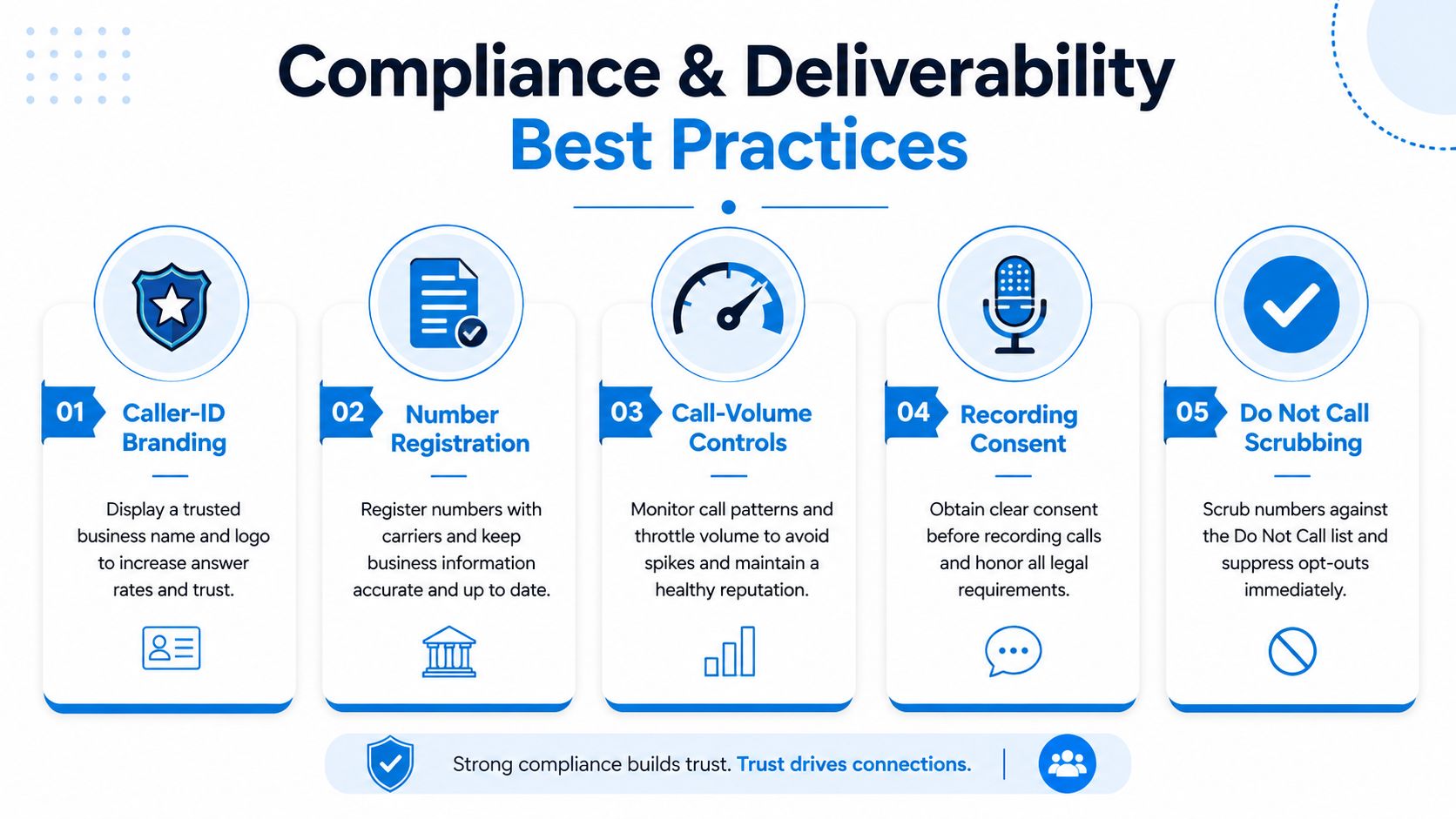
Compliance and deliverability have to be managed together. If the caller ID looks unfamiliar, the number is not registered, or the pacing feels like spam, the call may never get a fair hearing. That is a deliverability problem first, and a legal problem second.
Start with caller-ID branding and number registration. Legitimate outbound calls can still be flagged when the caller identity is unclear or the number is not recognized by carriers and recipients. The practical fix is to register numbers where required, keep caller naming consistent, and avoid rotating too many identities from the same campaign. That consistency matters more in high-volume programs, because every new number has to earn trust again.
Caller reputation also depends on how hard you push each line. Tight call-volume controls, sensible pacing, and timing that matches your audience help keep a number from getting labeled the wrong way. A home services team may want one line reserved for urgent response work and a different line for nurture or review requests. An insurance team usually needs the same discipline, with one clean number for quote follow-ups and another for reminder calls instead of sending every list through a single identity.
A trusted number gets answered more often than a loud number.
For regulated programs, the recording workflow matters as much as the call flow. Outbound systems should support pause/resume and DTMF masking or tokenization so payment data or PHI does not end up in recordings or screen captures (Ansafone outbound requirements). That matters in healthcare, where a dental clinic may need recall and billing calls that keep sensitive details out of recorded segments, and in finance or insurance, where card data or policy details can appear mid-call.
The operating rule is plain. Register the number, brand the caller ID, scrub do-not-call lists, keep call-volume controls tight, and make the recording system stop when sensitive data appears. Those are the habits that protect both the customer and the campaign. If your team uses an outsourced model, the same controls should be built into the process from day one, not patched in after a drop in answer rate. Recepta.ai's outsourced call center solutions discussion is useful here because the vendor model still has to respect the same compliance and deliverability basics.
KPIs, CRM Integration, and Automation That Closes the Loop
A campaign improves only when the numbers trigger the next action inside the system. If the KPI review sits in a spreadsheet until Friday, the team is already working stale information. The call result needs to land in the CRM, calendar, and service workflow as soon as the conversation ends.
Conversion rate is calculated as successful outcomes divided by connected or contacted calls, multiplied by 100 (Ansafone metrics). First-call resolution is issues or objectives resolved on the first call divided by total relevant calls, multiplied by 100. The formulas are simple, but they tighten reporting and keep the team honest about what counts as a win. A dental recall campaign can track appointments booked against connected calls, while separately measuring how many billing questions are resolved in the first conversation.
| KPI | Formula | Example Use Case |
|---|---|---|
| Conversion rate | Successful outcomes ÷ connected or contacted calls × 100 | Measure booked appointments from contacted leads |
| First-call resolution | Issues or objectives resolved on first call ÷ total relevant calls × 100 | Measure how many patient or customer questions are handled in one conversation |
| Answer rate | Answered calls ÷ placed calls | Compare cold outreach blocks and warm follow-ups |
| Average call duration | Total call time ÷ number of calls | Spot whether agents are rushing or getting bogged down |
CRM integration keeps those numbers usable. Outbound platforms should push call summaries, outcomes, and follow-up tasks into the CRM so the next agent does not start from zero. Recepta.ai's best call tracking software discussion is useful because tracking without workflow is only reporting.
Value lies in operational consistency. In home services, a missed call can become a same-day booking if the status updates immediately and the follow-up task is assigned without delay. In healthcare, an unanswered call can move into a reminder task or callback queue without manual admin. Good automation also helps with speed-to-lead, which is where many outbound programs either recover a hot lead or let it go cold. Dialer mode matters here too, because preview, progressive, and predictive pacing each create different handoff pressure for the CRM and the team.
Outbound leaders should review the path from call result to next action, not just the number of dials. If a closed-lost disposition never triggers a reattempt, or a booked appointment never creates a calendar entry, the campaign looks busy while the pipeline leaks. When integrations are set up well, the program stops acting like a black box of calls and voicemails and starts working like a measured workflow that sales, service, and operations can manage.
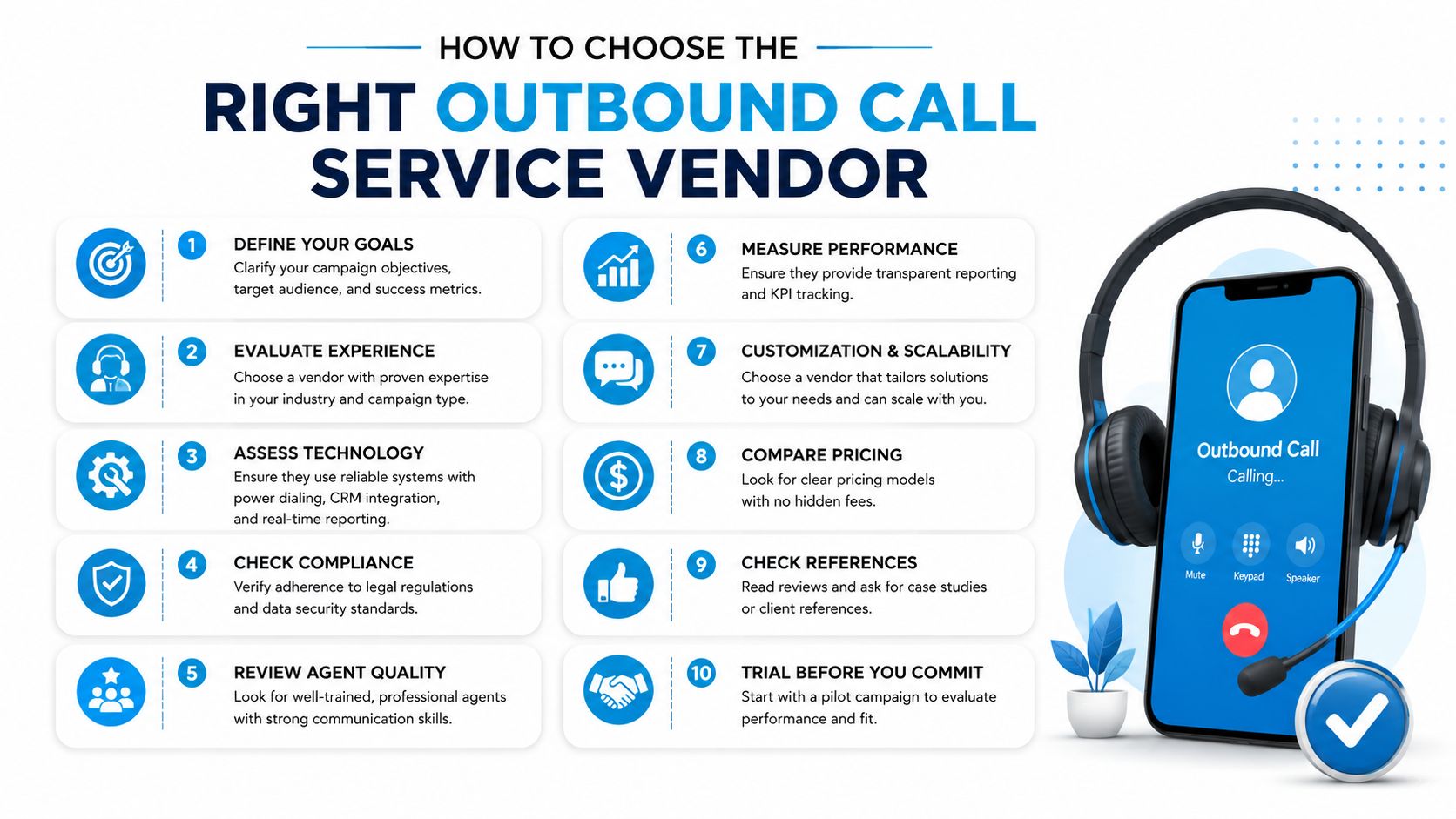
How to Choose the Right Outbound Call Service Vendor
Choose for operational fit, not feature glitter. A vendor can have a long feature list and still fail if it cannot support your lead speed, caller reputation, or compliance burden. The test is whether the platform matches the way your team works, especially when response time and callback quality affect conversion.
Dialer mode should be the first filter. If your campaign needs prep time and a high-trust conversation, preview dialing belongs on the shortlist. If your team needs structured throughput, progressive pacing usually makes more sense. If scale is the goal and the call center can handle heavier automation, predictive pacing may fit better, but only if compliance controls and abandonment management are solid.
Caller reputation deserves the same level of scrutiny. A dialer that burns through numbers too fast can hurt answer rates even when the script is strong. The right vendor should help you control volume, manage branded caller ID, and keep outbound traffic in a range that does not make every new call look suspicious to the person picking up.
Integration depth matters next. A vendor should connect cleanly to your CRM, calendar, and industry systems so appointments, lead status changes, and call summaries update without manual re-entry. That matters in home services, healthcare, legal intake, insurance, and franchise operations, where a delayed status update can create a missed handoff or a stale lead.
For a deeper look at vendor evaluation and service models, review these guidelines for outsourced call center solutions.
What to evaluate before you sign
- Speed-to-lead support: Ask how the system routes fresh leads and whether it can prioritize them over older tasks.
- Caller reputation controls: Confirm number registration, branded caller ID support, and volume controls.
- Compliance readiness: Check whether the platform supports recording safeguards, list scrubbing, and region-specific workflows.
- Analytics quality: Look for call summaries, disposition reporting, and campaign-level visibility.
- Blended staffing options: Make sure the vendor can support both automation and human escalation when needed.
Recepta.ai is one vendor option in this category. It combines conversational AI with human support, handles inbound and outbound calls, integrates with 2,500+ tools, and includes real-time analytics and call summaries. The publisher also cites reported outcomes such as up to 30% more qualified leads, 80% cost savings versus in-house reception, and 15× ROI, but those figures only matter when the operational model matches the business use case.
A practical vendor review should end with one question. Can this system help the right person call back the right lead fast, while keeping the number trusted and the workflow clean?
Implementation Steps Tailored to Your Industry
Start with one campaign, one lead source, and one outcome. A plumbing company might launch around emergency web forms and same-day callbacks. A dental clinic might begin with recall and billing follow-ups. In both cases, the first job is to define the action you want from the call before anyone writes a script.
Build the flow around that action. Connect the CRM, calendar, and call routing so the lead lands in the right queue immediately. Add compliance checks before launch, then train the agent or AI workflow on exactly one next step, book, confirm, qualify, or escalate.
- Pick the highest-intent use case. Use emergency repairs, appointment confirmations, or post-quote follow-up first.
- Set the call path. Decide whether the campaign needs preview, progressive, predictive, or blended AI and human handling.
- Write a short script. Keep the opening direct and the ask narrow.
- Connect systems. Make sure the CRM and calendar update automatically.
- Check compliance. Confirm caller ID, scrubbing, and recording safeguards before the first dial.
- Launch a pilot. Start small enough to see what's working.
- Review call summaries daily. Fix friction quickly.
- Coach on dispositions. Tighten the handoff between call outcome and next action.
The first 30 days should answer one question, are better leads, faster routing, and cleaner follow-up improving the outcome, or just creating more activity. If the answer is yes, expand the workflow. If not, fix the handoff before adding more volume.
Recepta.ai handles inbound and outbound calls with AI receptionist support and human escalation, which makes it a practical fit for teams that want calls to turn into bookings, follow-ups, and clean CRM updates instead of extra admin. If you're building an outbound call service that has to protect speed-to-lead, caller reputation, and compliance at the same time, visit Recepta.ai and see how that workflow can be set up for your team.