Performance Monitoring Systems: A Small Business Guide
A customer tries to book a plumbing visit at 8:10 p.m. The page hangs for a few seconds, the confirmation button never finishes loading, and they back out. They don't call. They don't email. They move to the next company on Google.
Most small businesses never see that moment happen. They just feel it later as a slower week, a puzzling dip in leads, or front-desk staff saying, “Phones were weird this morning” without anything concrete to diagnose.
That's why performance monitoring systems matter. For a service business, they're not just IT tools. They're a way to see whether your revenue paths are working: web forms, scheduling software, phone systems, patient portals, payment pages, franchise dashboards, and every handoff in between.
Beyond Guesswork What Is Performance Monitoring
At 7:45 a.m., your office opens, calls start coming in, and the first online requests of the day hit your booking system. If the page slows down, the phones route badly, or the patient portal stalls, customers do not file a technical report. They leave, call a competitor, or show up frustrated.
Performance monitoring is the system that catches those problems while they are happening. It works like a car's dashboard. You do not wait for smoke from the hood to find out something is wrong. You watch the gauges that show whether the business can keep taking calls, bookings, payments, and form submissions without friction.
For a small service business, that usually means tracking the parts of the customer journey that produce revenue and keep operations moving:
- Booking and contact forms so mobile visitors can submit requests without delay
- Phone and call-routing systems so leads reach the right person during peak periods
- Scheduling and dispatch tools so staff can assign work without slowdowns or failed updates
- Payment, estimate, and intake flows so customers can finish the next step without errors
A home services company may use monitoring to catch a quoting tool that freezes on certain phones. A medical practice may use it to spot a patient portal issue before the front desk gets buried in manual rescheduling. The technical symptom looks small. The business effect is not.
Reactive businesses usually discover trouble through scraps of evidence. A receptionist hears, “Your form didn't work.” A manager notices fewer appointments than usual. Someone reports the system was slow for a while, but nobody knows when it started or how many customers gave up.
That gap matters because service businesses run on repeatable handoffs. Monitoring shows where those handoffs break under real conditions, and it pairs well with disciplined process standardization for service operations so teams can respond the same way every time a problem appears.
The practical goal is simple. Watch the customer path first. If people cannot call, book, pay, or complete intake, revenue slips before anyone inside the business has a clear explanation.
As systems get more connected, basic uptime checks stop being enough. A website can be “up” while a third-party scheduler, payment service, map tool, or API call is failing in the background. This overview of cloud-native application observability is useful for owners whose customer experience now depends on several connected services rather than one website and one office server.
The Four Views of Your Business Engine
A single “system status” view is not enough to run a service business well. Owners need four distinct views because problems show up in different places. A server issue affects staff speed. A form error kills lead capture. A slow mobile page frustrates a customer who was ready to book.

These four views work like a car dashboard. One gauge shows fuel. Another shows engine temperature. Another warns about tire pressure. You would not drive by looking at only one.
Infrastructure monitoring
Infrastructure monitoring covers the foundation. Internet connection quality, server availability, storage, memory, and network health all sit here.
For a home services company, this can explain why office staff cannot hear callers clearly through a VoIP phone system. For a medical practice, it can explain why check-in stations lag during the morning rush. Customers do not care whether the root cause is bandwidth, hardware, or a cloud outage. They care that calls drop, forms stall, and the front desk moves slowly.
This view matters because weak infrastructure creates downstream problems that look like staffing or process issues.
Application monitoring
Application monitoring focuses on the software your team and customers use. Scheduling tools, intake portals, CRMs, payment pages, estimate builders, and patient or customer messaging systems all belong in this layer.
A booking page may load and still fail when a customer presses submit. A CRM may accept leads but stop assigning them to the right person. In both cases, the system appears available while revenue and response time suffer.
Good application monitoring sets a normal baseline, then flags drift before the problem becomes obvious to customers. That gives an owner time to fix a broken workflow before a day of leads disappears.
User experience monitoring
User experience monitoring measures what customers experience on real devices, browsers, and connections.
That view is often missing in small businesses. Staff test the site from a fast office connection and assume everything is fine. Meanwhile, a homeowner on an older phone waits for a quote form to load, gives up, and calls a competitor. A patient trying to complete intake from a parking lot refreshes the page three times and walks inside already annoyed.
That is a customer service problem, not just a technical one.
If marketing is driving traffic, this is also where conversion performance connects to monitoring. MarTech Do helps track marketing KPIs that show whether traffic is turning into actual inquiries instead of disappearing during the handoff.
Business transaction monitoring
Transaction monitoring follows the full path that produces revenue. It checks whether the steps complete in sequence, not just whether each tool is online.
For a clinic, that path might be ad click, appointment request, confirmation, intake, visit, payment. For a plumber, it might be search visit, quote request, CRM assignment, outbound call, scheduled job, invoice. This is the view that helps owners answer the question that matters most: where exactly are we losing customers or cash?
It also makes operational cleanup easier. Teams that document repeatable handoffs through service process standardization can isolate whether the failure sits with staff follow-through, software configuration, or a broken connection between tools.
What to Measure KPIs That Actually Matter
A plumbing company can answer every call by noon and still lose work if the quote form fails on mobile. A clinic can have solid staff coverage and still frustrate patients if portal logins stall during check-in. Good monitoring starts by measuring the points where customers feel friction and where revenue slips away.
That usually means a short KPI list, not a crowded dashboard.
Start with business outcomes, not raw system data
Owners need measures that help them decide what to fix first. Server metrics have their place, but service businesses usually get more value from tracking booking completion, abandoned calls, portal response time, missed follow-up tasks, and response time to new leads.
The test is simple. If a number gets worse, does it hurt customer trust, slow lead handling, or reduce booked work?
For example, a home services company may find that call abandonment matters more than page views because missed calls happen when intent is highest. A healthcare practice may care more about portal login success than total website traffic because patients use the portal to complete forms, confirm appointments, and pay bills. Those are operating metrics with direct business consequences.
Key Performance Indicators by Business Type
| Business Vertical | Top KPI to Monitor | Why It Matters |
|---|---|---|
| Home Services | Lead form submission success | If prospects cannot send a request without errors, jobs are lost before anyone on your team can respond |
| Home Services | Call abandonment rate | High abandonment points to staffing gaps, routing problems, or hold times that push callers to competitors |
| Healthcare and wellness | Patient portal load time | Slow portals frustrate patients and increase routine calls to the front desk |
| Healthcare and wellness | Booking success rate | Confusing scheduling flows create delays, no-shows, and extra admin work |
| Legal | Intake form completion rate | Many consultations begin with a form, so friction here cuts into new client volume |
| Legal | Response time to new inquiries | Faster follow-up builds trust while prospects are still deciding whom to hire |
| Insurance and finance | Quote request completion | A broken quote path stops the sales process before an advisor can step in |
| Franchises and multi-location teams | Location-level dashboard availability | Operators need consistent visibility by site to catch local problems early |
| Any service business | First-call resolution | Repeat calls for simple issues raise labor costs and weaken the customer experience |
| Any service business | CRM follow-up completion | Leads are often lost during handoffs, not because demand disappeared |
A practical KPI filter
Before adding a metric, run it through four checks:
- Revenue test: If this worsens, can it reduce booked jobs, consultations, or collections?
- Customer test: Does it affect how easily someone can reach you, schedule, or get help?
- Action test: If it turns red, does a specific person know what to do next?
- Owner test: Can it be explained in one plain sentence?
If a metric fails those checks, it probably belongs in a technical log, not on an owner dashboard.
A strong marketing layer also helps connect demand generation to operational follow-through. If you want a simple refresher on campaign-side metrics, MarTech Do helps track marketing KPIs in a way that is useful when you are tying ad spend to lead handling.
For call-heavy businesses, pairing service KPIs with call detail reporting gives a clearer view of which inquiries were answered, missed, delayed, or routed poorly.
The Tangible Benefits of a Data-Driven Business
Monday at 8:05 a.m., the phones are backing up, two web inquiries never reached the scheduler, and a patient or homeowner who was ready to book goes to the next provider. That is what poor monitoring looks like in a service business. The loss is not abstract uptime. It is missed revenue, frustrated customers, and a front desk team forced to clean up preventable problems.

Revenue protection
A monitoring system works like a dashboard in a work truck. You do not need every mechanical detail while driving. You need early warning when fuel is low, the engine is overheating, or tire pressure is dropping.
Business monitoring does the same job for lead flow and service delivery. If booking forms start failing, call volume spikes beyond staff capacity, or confirmations go out late, owners can respond before a short disruption turns into a week of lost appointments. In home services, that often means fewer booked jobs. In healthcare, it can mean empty slots, delayed intake, and lower patient satisfaction.
Better customer experience
Customers judge the business they can see. They do not separate your office process, website speed, phone handling, and follow-up messages into different categories.
If a family tries to schedule urgent care and gets stuck on a slow intake form, that feels like poor service. If a plumbing lead leaves a voicemail and hears nothing back for three hours, that feels like poor service too. Monitoring helps catch these breakdowns where they happen, in response times, handoffs, confirmations, and scheduling steps.
Fast follow-up builds trust.
Operational efficiency
Good monitoring often settles a common argument inside small businesses. Is the problem staffing, training, software, or process?
Usually it is a mix, and the value of monitoring is that it shows where to start. One clinic may have a clean call answer rate but poor intake completion. One HVAC location may answer quickly but lose leads during dispatch handoff. Once that pattern is visible, managers can change routing, adjust schedules, retrain one step in the process, or fix a broken integration instead of adding headcount and hoping it helps.
That saves money, yet even more, it reduces rework. Fewer repeat calls. Fewer manual corrections. Fewer angry customers asking why no one called them back.
Smarter investment decisions
Data changes how owners buy tools and judge vendors. Instead of asking whether a platform has more features, they can ask a harder and more useful question. Did it improve response time, booking completion, or first-contact resolution?
That matters in service businesses where software touches real customer moments. A new phone system, scheduling tool, chatbot, or follow-up workflow should earn its place by removing friction, not by adding another dashboard no one checks. If your team is reviewing options for phone, chat, intake, and follow-up workflows, this guide to the benefits of AI in customer service gives a practical view of where automation helps and where human handling still matters most.
The payoff of a data-driven business is simple. Problems get spotted sooner, staff spend less time guessing, and customers get a smoother path from first contact to completed service.
Choosing Your System and Getting Started
The wrong way to buy a monitoring system is to start with feature lists. The right way is to start with failure points in your business.
What to look for in a tool
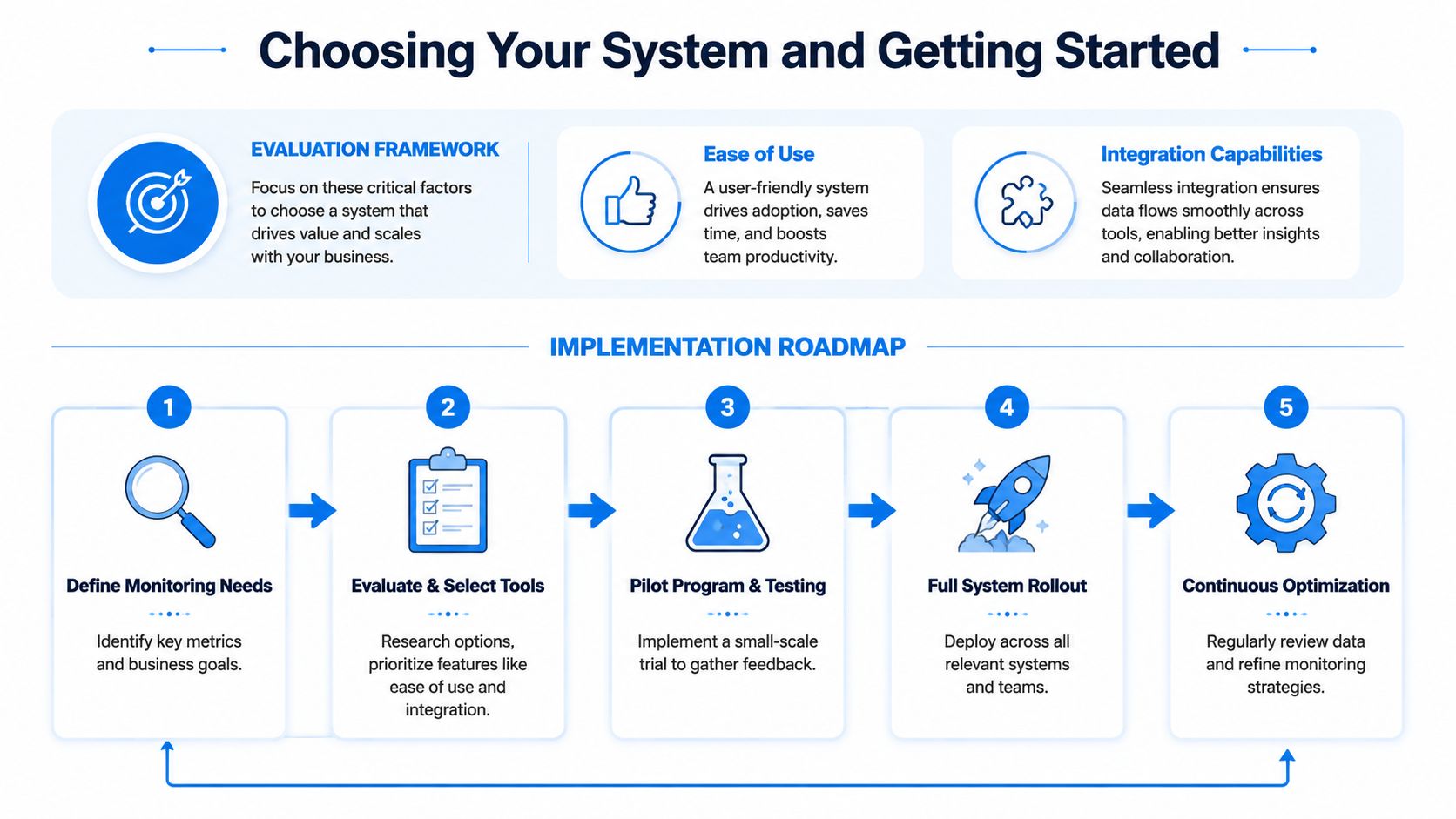
For a small business, the strongest monitoring platform usually isn't the one with the most technical depth. It's the one your team will actively use.
Look for:
- Clear business-level dashboards: You want “booking form slower than normal,” not a wall of infrastructure graphs no one understands.
- Good integrations: CRM, calendar, phone, web forms, and scheduling tools should connect cleanly.
- Useful alerting: If the system screams all day, staff will ignore it.
- Role-based visibility: Owners, office managers, and technical vendors don't all need the same view.
- Workflow support: Some tools monitor well but don't help teams turn insight into action.
If communications are central to your operation, one option in this category is Recepta.ai, which handles inbound and outbound calls, appointment scheduling, lead capture, follow-ups, and integrations with business systems. In a monitoring context, tools like that are useful when they don't just surface issues, but help route the next action.
Don't optimize for the average customer
This point gets missed often. A system can look successful overall while failing specific groups.
Health system guidance stresses that indicators should be reliable, valid, and sensitive to declines in vulnerable subpopulations. In plain language, don't choose a setup that looks fine in aggregate while hiding poor outcomes for older patients, non-technical users, certain locations, or staff roles with different workflows, as discussed in this NCBI health system guidance.
The best dashboard in the world is still dangerous if it trains you to ignore the people who don't fit the average pattern.
A simple five-step rollout
Define the moments that matter most
List the actions that create revenue or service continuity: new calls, bookings, intake forms, estimate requests, renewals, payments.Map the systems behind those moments
Identify which tools support each step. Website, phone platform, calendar, CRM, portal, or billing software.Choose one primary monitoring view first
Many teams should start with transaction monitoring or customer-facing alerts instead of deep technical telemetry.Set a small alert set
Start with failures that deserve immediate attention: booking errors, missed calls, portal outages, or delayed follow-up creation.Review weekly and adjust
A monitor that's never reviewed becomes wallpaper. A short weekly review keeps thresholds, ownership, and workflow changes aligned.
If your stack is already spread across several tools, CRM integration becomes a practical selection criterion, not a nice extra. Monitoring is far more useful when failures can trigger records, tasks, or follow-up steps automatically.
From Data to Action with Dashboards and Alerts
A dashboard by itself doesn't fix anything. It only becomes valuable when it changes what people do next.
That's where many performance monitoring systems fail in the field. They collect data well, but they don't create clear actions for office managers, dispatchers, front-desk staff, or owners.
Build dashboards around decisions
A useful dashboard doesn't force a busy owner to interpret technical signals.
Instead of showing a metric like server utilization, show the business translation:
- Booking form slower than normal
- Call abandonment rising this morning
- Patient portal errors affecting mobile users
- One location has delayed lead follow-up tasks
Those labels tell someone what's wrong in plain language. Better still, they suggest who should look at it first.
For a multi-location cleaning business, one dashboard might summarize unanswered calls, quote request delays, and job confirmation failures by branch. For a law office, it might center on intake completion, callback lag, and appointment confirmation status.
Make alerts specific enough to act on
Most alert fatigue comes from vague warnings. “System issue detected” doesn't help anyone.
Better alerts include three ingredients:
- What changed: booking completion dropped, calls are backing up, portal is timing out
- Where it changed: specific location, device type, page, or team
- What to do next: reroute calls, test the form, notify the vendor, assign manual follow-up
This is also where monitoring can connect to day-to-day workflows. If a web intake form fails, the system should create a task for manual outreach. If calls spike past capacity, it should notify the office manager. If a reminder flow stalls, someone should know before patients or customers start missing appointments.
Watch behavior, not just numbers
The key operational question isn't just whether monitoring exists. It's how people behave after seeing the data.
A Harvard Business School paper on real-time monitoring in a quick-service setting points to the core issue: how managers and employees respond to visibility, and how to prevent monitoring from becoming noise, gaming, or burnout. Sustained gains come from useful responses to data, not short-term compliance, as discussed in the HBS paper on behavioral response to monitoring.
Don't ask, “What can we measure?” Ask, “What will someone change within 10 minutes of seeing this?”
That question keeps dashboards honest. If the answer is “nothing,” the metric probably belongs in a technical log, not on a business-facing screen.
Your Monitoring System Is a Compass Not a Report Card
The healthiest way to use performance monitoring systems is to treat them as navigation tools.
They should help your team see what's working, catch friction early, and respond faster when a customer path starts breaking down. They shouldn't become a blame machine. When monitoring turns into surveillance or scoreboard management, people hide problems instead of solving them.
Used well, monitoring creates a shared view of reality. The owner sees where revenue leaks. The office manager sees where workflows stall. Staff get clearer signals about what needs attention now. Customers feel the result as smoother booking, faster response, and fewer frustrating handoffs.
That's the value. More clarity. Better timing. Fewer preventable losses.
A small business doesn't need a giant enterprise platform to get there. It needs the right signals, the right thresholds, and a habit of turning visibility into action.
If you want a practical way to connect call handling, lead capture, scheduling, and follow-up with real operational visibility, Recepta.ai is worth a look. It combines AI reception workflows with human escalation, integrates with business tools, and helps teams act on customer interactions instead of letting missed calls and broken handoffs disappear unnoticed.