Phone Answering Service for Small Business: 2026 Guide
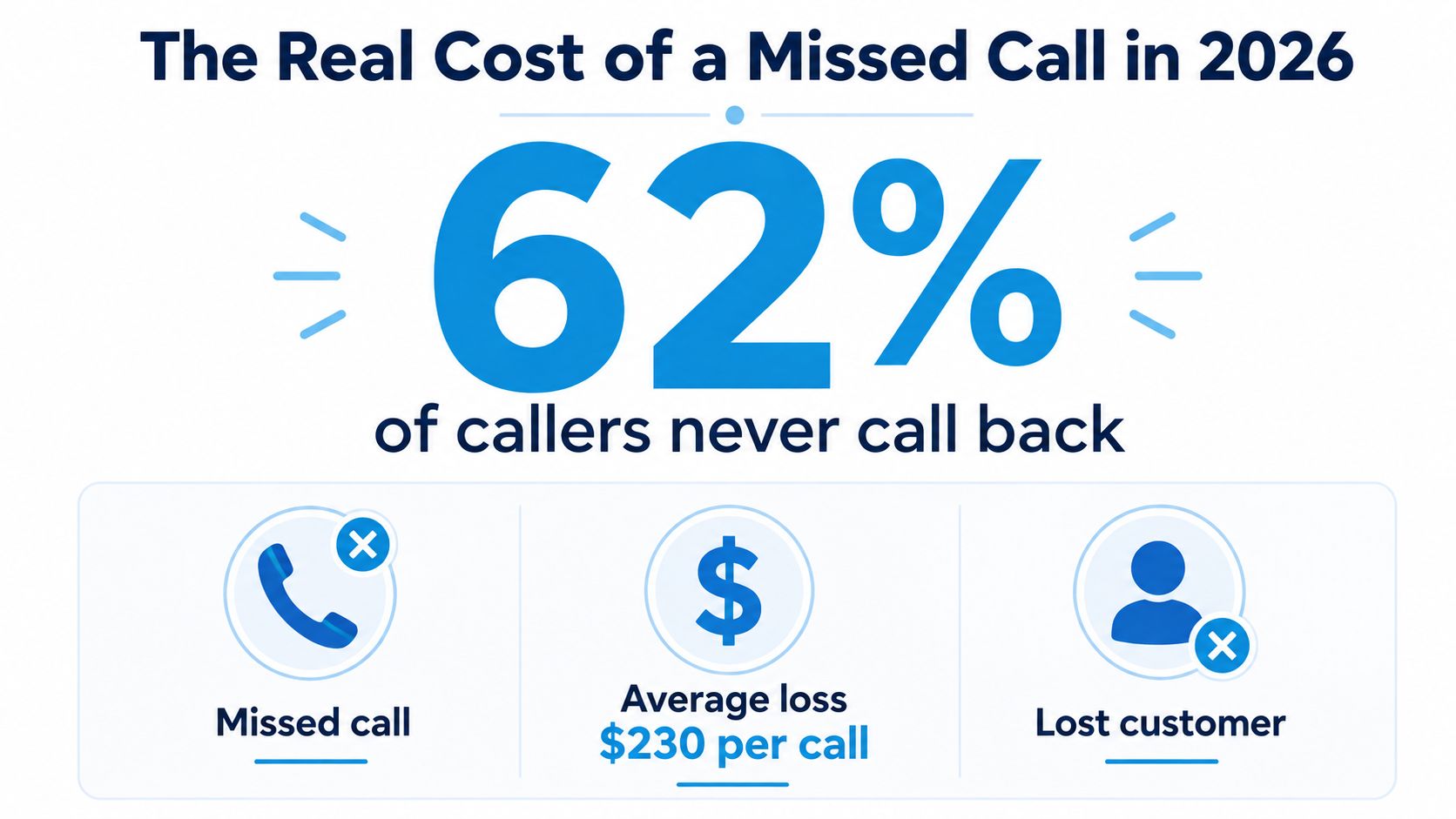
A small business doesn't lose calls in the abstract, it loses jobs, appointments, and repeat work. A widely cited 2024 benchmark found that only 37.8% of inbound calls reached a live person, while 62.2% were effectively missed, split between voicemail and no response at all, which is exactly why a phone answering service for small business is a revenue-recovery system, not an office perk. If your phone rings and nobody answers, the customer usually doesn't wait.
A critical mistake is treating missed calls like an annoyance. A missed call often becomes a lost lead, and industry reporting puts the value of a missed call at about $1,200, with some analyses estimating annual losses of about $126,000 for a small business. Even worse, 85% of callers who reach voicemail never call back, so the lead doesn't just pause, it disappears. For a practical framework on how that lost demand affects customer value over time, Come Together Media's CLV insights are worth reading before you decide whether to keep letting voicemail do the damage.
If you want a simple first fix, start by replacing generic voicemail with a missed-call recovery message. This missed call message guide is useful because the first job is to capture the caller before they leave, not to apologize after they're gone.
How Much a Missed Call Costs Your Business in 2026
The hard truth is simple. If your business depends on the phone, every unanswered ring is a sale that never reaches your pipeline. A benchmark from 411 Locals showed small businesses answering only 37.8% of inbound calls with a live person, while 37.8% went to voicemail and 24.3% got no response at all, which means roughly 62.2% of calls were missed. This is an operational leak, not a customer service issue.
You cannot fix that leak with goodwill. If 85% of voicemail callers never call back, the missed call usually ends the opportunity, it does not just delay it. That hits home services, healthcare, legal intake, and any business where the caller already has intent and is choosing the first company that picks up.
Practical rule: if a caller reached for the phone, they are already past awareness. Your answer speed decides whether that intent becomes revenue.
The money side is just as blunt. Independent industry reporting commonly places the average value of a missed call at about $1,200, and some analyses put annual losses for a small business at about $126,000. You do not need those numbers to be perfect to know the direction of the problem. If your team misses even a handful of high-intent calls every week, the drag is real, and the gap shows up in booked jobs, consults, and retained customers.
A phone answering service for small business is useful because it captures demand you already paid to create. I would treat it as a recovery system, not an office convenience. It gives your team a second chance at calls they cannot consistently catch during lunch, after hours, or during peak load. If the phone is how people buy from you, missed calls are lost inventory.
For a practical first step, tighten your missed-call follow-up with a clear missed call message template, because the first job is to reach the caller before they move on.
For a practical framework on how that lost demand affects customer value over time, Come Together Media's CLV insights are worth reading before you decide whether to keep letting voicemail do the damage.
What a Phone Answering Service Does
A real answering service is a virtual receptionist, not a glorified voicemail box. It answers the call, greets the caller with your company name, captures intent, and decides whether the call should be booked, transferred, or turned into a message. Recepta.ai describes that model plainly in its answering services company overview, and that is the right mental model for owners who want the phone handled without chaos.
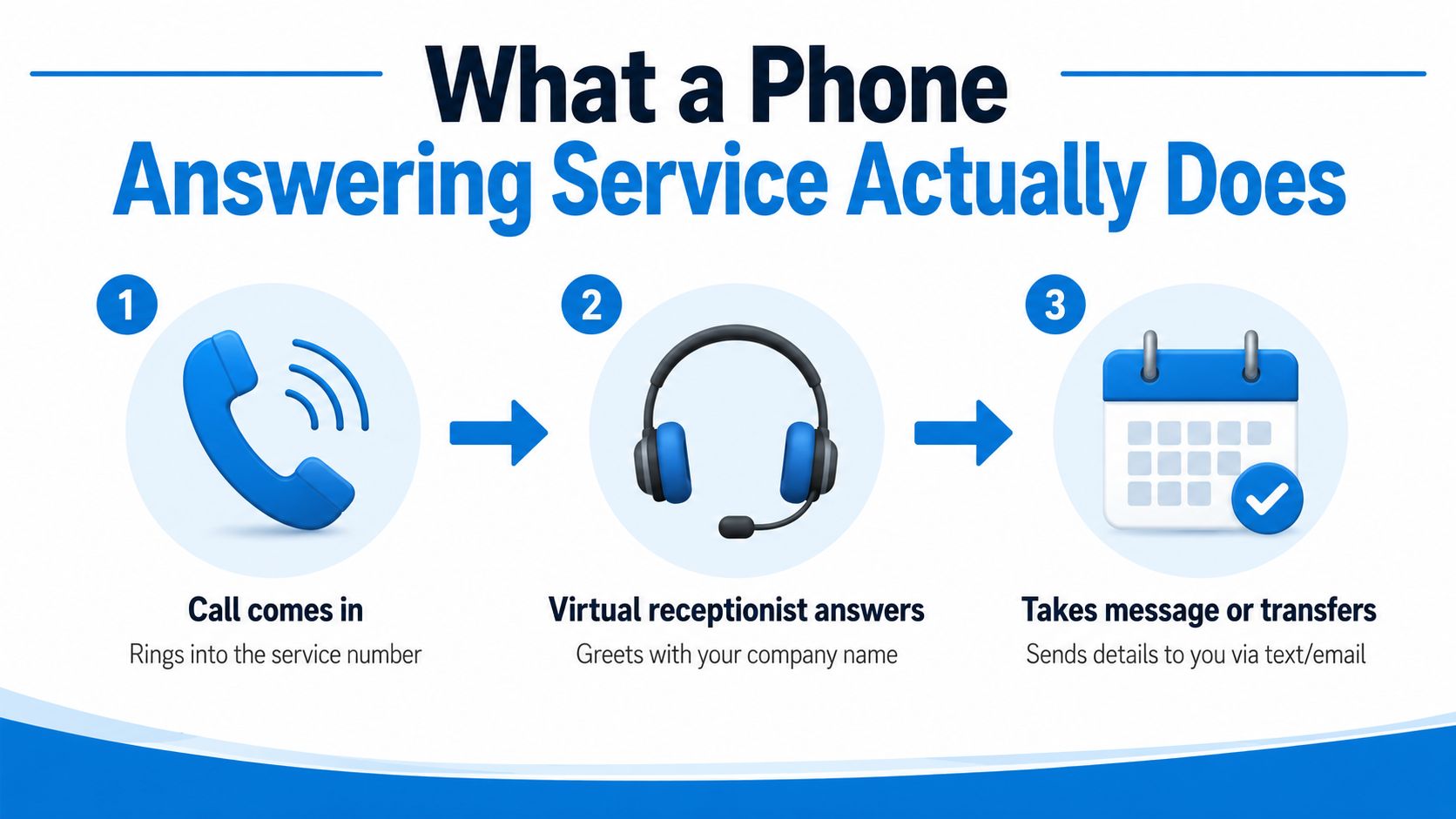
The modern version is a workflow, not a script
Old-school answering services mostly relayed messages. The modern version is an intake workflow. The service collects the caller's name, issue, urgency, and callback preference, then routes the call based on those details before the caller hangs up. That matters because callers do not wait around, and after-hours calls are common enough that coverage has to be built into the process from day one.
A good setup does more than answer. It books appointments, qualifies leads, routes by language or intent, and sends call summaries into the systems you already use. That is why lead capture resources like Growform on improving lead capture belong in this conversation, because every call is a conversion path that needs structure, not guesswork.
Which calls get handled, and which should move to a person
Use the service to handle repetitive, rules-based calls automatically. That includes appointment requests, basic message capture, hours-and-location questions, simple status checks, and first-pass lead qualification. Those calls follow a pattern, so the service should collect the facts and move on.
Escalate urgent, sensitive, or high-value calls to a human. A new patient with a broken tooth, a homeowner with an active leak, or a legal intake with deadline pressure needs a live person who can judge tone, urgency, and next steps fast. That is the part buyers miss. The best service is not the one that answers everything itself. It is the one that knows exactly when to stop and hand the call to your team.
What separates it from a call center
Call centers prioritize scale and volume. Virtual receptionists focus on brand fit, scheduling, message capture, and escalation. For a dental office, that means an after-hours cleaning request gets booked or flagged before morning. For a law firm, it means a new-case inquiry gets captured cleanly instead of sitting in a voicemail inbox no one checks fast enough.
My rule: if a business cannot justify a full-time front desk hire, the phone still needs a front desk workflow. That is what this service replaces.
The right service protects intent long enough for your team to act on it. That is the job.
Understanding Phone Answering Service Pricing
The biggest mistake buyers make is comparing sticker prices without checking how billing works. A low-cost plan that charges by the minute can get expensive fast if calls run long, get emotional, or require back-and-forth. A flat subscription can look higher on paper and still cost less once you add after-hours coverage, booking, summaries, and CRM sync.
The three pricing structures that matter
Per-call pricing is the easiest model to understand because you pay for each handled call. It usually fits businesses with predictable call length and moderate volume, especially when most calls are simple. Per-minute live-agent billing works for businesses that want a person on the line, but it climbs quickly when callers need reassurance, explanations, or detailed intake.
Software-based systems work differently. Industry comparisons note entry pricing as low as $19/user/month for inbound handling software, which is why AI-first or hybrid platforms can fold several line items into one predictable fee. That makes sense if you want scheduling, routing, and logs in one place instead of paying separately for each piece.
Here's how I'd consider it:
| Model | Typical Cost | Best For | Limitations |
|---|---|---|---|
| Per-call | Variable by call | Predictable message capture and low-complexity calls | Can still climb if volume spikes |
| Per-minute live agent | Variable by talk time | Brands that need a real person on sensitive calls | Harder to forecast, expensive when calls run long |
| Flat software subscription | Predictable monthly fee | Businesses that want routing, booking, and transcripts in one stack | May need tighter scripting and setup discipline |
The hidden cost is the time your team spends rekeying notes, chasing missed details, and calling people back late. I'd treat phone answering service pricing guidance as a budgeting tool, not a shopping list.
If your calls are short and repetitive, a flat system usually wins. If your calls are long and emotionally sensitive, live-agent billing can make sense, but only if the value of the call justifies the cost.
Industry-Specific Use Cases That Actually Work
A plumbing company, a dental clinic, a law firm, and an insurance agency do not need the same call flow. They all need the phone answered, but the reasons are different, and that changes the workflow. The smartest setup matches the type of call to the right response, not just the cheapest service tier.
Plumbing emergency calls
A burst pipe call should never go to voicemail. The service should answer immediately, capture the address, the nature of the leak, and whether water is still running, then escalate to the on-call tech or dispatcher. In this case, the goal is speed and triage, because the caller is usually looking for the first available professional, not a polished conversation.
Dental after-hours booking
A dental clinic can use the answering service to book cleanings, new-patient visits, and callbacks after hours. CloudTalk's dental example fits well here, because the service can book appointments into the calendar and route urgent issues to staff instead of making the patient wait until morning. That's a better patient experience and a cleaner front-desk queue the next day.
Law firm intake
A law firm needs structured intake, not casual chit-chat. The answering service should collect the caller's name, contact details, case type, and urgency, then send it to the intake team or attorney on duty. Ruby's guidance on high-touch industries is relevant here, because law is one of those areas where professional call handling shapes trust, and the firm may not want the overhead of a full-time receptionist.
Insurance lead qualification
An insurance agency should use the service to sort new leads from service calls. A new prospect can be qualified with a short script, then routed to the right producer. Existing policyholders asking for ID cards or status updates can follow a lighter path, which keeps sales staff focused on revenue calls.
The pattern is the same in all four cases. Capture the caller, identify the call type, and move the right call to the right person fast.
AI vs Live Human vs Hybrid by Call Type
The cleanest buying decision isn't “AI or human.” It's which call types need automation and which ones need empathy. That's the part most buyer's guides skip, and it's where small businesses waste money by paying human rates for routine calls or using AI where a human should step in.
New leads and appointment requests
AI is the right fit here. These calls are structured, repetitive, and easy to route with a script, especially when the system can text a booking link or add the appointment directly to a calendar. Recepta.ai, for example, handles inbound calls, appointment scheduling, lead capture, and escalations, which is exactly the kind of workflow you want on predictable intake paths.
Existing customer issues
Live human agents shine when the caller already has frustration, nuance, or backstory. A billing issue, a service complaint, or a case-specific question often needs judgment more than speed. AI can still collect the basics, but if the conversation is complicated, a human saves time by avoiding back-and-forth.
Urgent emergencies
Use hybrid handling. Let automation answer instantly, gather the critical facts, then hand off to a human or on-call team when the script detects urgency. That approach fits plumbing, medical, and legal scenarios where the first minute matters, but the caller still needs a real person once the issue is confirmed.
The decision rule I'd use
- AI-only: best for lead capture, booking, and repetitive questions.
- Live human only: best for high-empathy, high-complexity calls.
- Hybrid: best for urgent service calls, legal intake, and any business that can't afford to lose either speed or sensitivity.
AI call answering service guidance is most useful when it helps you map call type to escalation, not when it just lists features. That's the workflow lens that keeps your phone from becoming a bottleneck.
Integrations, Security, and Compliance Basics
A phone answering service has to plug into your workflow or it's just another inbox. At minimum, I want it syncing with your CRM and calendar so staff don't re-enter the same data twice. Industry guidance also points to editable call flows, voicemail-to-email, SMS follow-up, real-time transcription, and skills-based routing as the controls that turn answering into actual operations.
What to ask for
CRMs matter because they turn a call into a record. Calendars matter because booking should happen during the call, not three hours later. If your business lives in a specialized system, make sure the service can push notes, transcripts, or booked appointments into that stack without manual copying.
Compliance is essential in regulated work. HIPAA matters for healthcare because patient information can't be handled casually. PCI matters if payments are taken on the phone. Call recording consent matters because you need to know how recordings are disclosed and stored, especially when calls are routed across states or teams.
Ask the vendor who can see the transcript, where the data lives, and how call summaries are logged. If they can't answer that quickly, keep shopping.
The practical filter is simple. Ask whether the system supports CRM sync, calendar sync, recording consent handling, automatic logging, and role-based access. If the answer is vague, the product isn't ready for a serious business.
Decision Checklist and ROI Calculation
Don't buy based on feature pages. Buy based on the call types you lose today. If your business depends on new leads, appointment requests, urgent dispatch, or sensitive intake, the service has to match that reality before anything else.
What I'd check before signing
- Call type fit: Does it handle leads, bookings, service issues, and emergencies the way your staff would?
- Hours covered: Does it answer when your team doesn't, especially evenings and weekends?
- Integration depth: Does it write into your CRM and calendar without manual cleanup?
- Escalation rules: Does it know when to book, message, transfer, or wake someone up?
- Reporting: Does it show call volume, resolution, and missed-call rates so you can improve it?
The ROI math should be boring. If you capture 40 additional calls a month and each one is worth about $1,200, you're looking at a large amount of recovered value before you even count repeat work or referrals. That's why I always push owners to measure results with a real marketing lens, and how to measure marketing ROI effectively is a useful reference for tying phone response back to revenue.
| Answering Service Pricing Models Compared | |||
|---|---|---|---|
| Model | Typical Cost | Best For | Limitations |
| Per-call | Variable | Predictable call handling | Can rise with volume |
| Per-minute live agent | Variable | High-touch human calls | Harder to forecast |
| Flat subscription | Predictable | Mixed workflows and after-hours coverage | Needs solid setup |
| Hybrid AI plus human | Mixed | Businesses with both routine and sensitive calls | Requires clear escalation rules |
My position is blunt. If a vendor can't report on missed calls, resolution, and how many calls became real opportunities, they're giving you activity, not control.
Onboarding in 14 Days and What to Measure Next
Start with a risk-free trial, not a long contract. A 14-day setup is enough time to port the number, draft the call flow, connect the calendar and CRM, and run real tests before staff starts relying on it. That's how you find out whether the service fits your business or just looks good in a demo.
Days 1 through 3 should cover number porting, call flow design, and script drafting. Days 4 through 7 should cover calendar and CRM integration, then live testing with real scenarios. Days 8 through 14 should be team training, call summary review, and launch adjustments so the handoff works in practice, not just on paper.
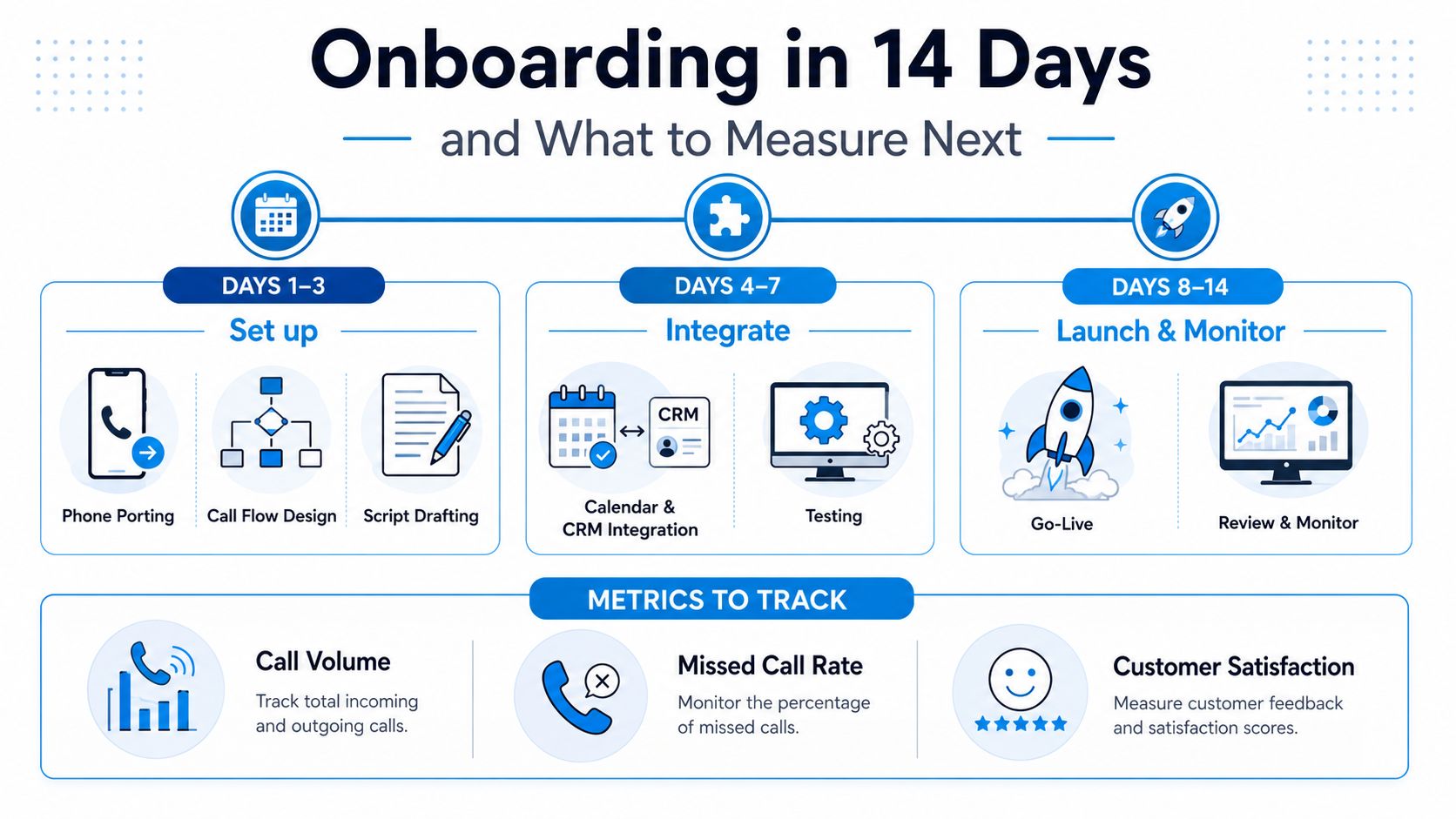
After launch, use a simple 30-60-90 rhythm. At 30 days, judge handoff quality. At 60 days, judge lead conversion lift. At 90 days, judge full ROI and whether the service is still capturing the right calls.
If you want a system that answers calls 24/7, captures lead details, books appointments, and escalates when a human is needed, take a hard look at Recepta.ai. It's built for the exact phone workload small businesses keep losing to voicemail, and it's worth testing against your own call mix before you commit.