Generative AI for Customer Service: A Practical Guide
13.8% is the number that should reset how you think about generative AI for customer service. In a 2023 NBER study of a large support operation, agents using a generative AI assistant resolved 13.8% more customer issues per hour, or about 0.30 additional calls per hour after controls, with gains of about 35% for the lowest-skilled and least-experienced agents (NBER working paper). That matters. But many still aim this technology at the wrong target.
They chase deflection.
That's a mistake. If your bot “contains” a customer, then drops context on escalation, forces the customer to repeat everything, or gives a weak answer that creates a callback tomorrow, you didn't win. You delayed work and damaged trust. The useful question is whether generative AI for customer service helps teams resolve more issues cleanly, faster, and with a better handoff when a human needs to step in.
I've seen this most clearly in inbound-heavy environments. The teams that get real value don't start with lofty autonomy claims. They start with missed calls, after-hours messages, repetitive scheduling traffic, agent note-taking, and broken escalation paths. Then they wire AI into the systems that run service: telephony, CRM, calendars, knowledge bases, and routing rules.
That's where this technology earns its keep.
What Generative AI for Customer Service Actually Means
At 7:42 p.m., a homeowner calls about a leaking water heater. Nobody answers. The call rolls to voicemail. The next morning, someone calls back, reads from a script, asks the customer to repeat the problem, and still has to check the schedule manually. That's not a staffing issue alone. It's a workflow issue.
Generative AI for customer service is software that produces a live, context-aware response to a customer question across voice, chat, email, or SMS. It pulls from your knowledge base, CRM history, prior conversation context, and operating rules to move the interaction forward.
What it is and what it isn't
It is not a prettier IVR.
It is not a decision-tree chatbot with better copy.
And it is not a substitute for trained agents handling disputes, sensitive medical questions, legal nuance, or angry customers who need judgment and empathy.
The practical difference from traditional automation comes down to three things:
- Intent over keywords: It interprets what the customer means instead of waiting for an exact phrase match.
- Composed answers over menu picks: It writes a response based on your approved knowledge instead of forcing the customer through button trees.
- State across channels: It can carry context from chat to call to email so the next step starts where the last one ended.
Practical rule: If the system can't carry the reason for contact, the promised next step, and the relevant account context into a handoff, it isn't helping service. It's just moving traffic around.
That distinction matters because a lot of companies still label basic automation as AI transformation. The better frame is closer to a working service teammate. It can answer common questions, capture details, summarize conversations, route correctly, and trigger operational tasks when the request fits the rules.
If you want a useful contrast between older scripted support flows and more modern conversational systems, this guide on conversational AI for customer support is a solid companion read.
The KPI that matters
The point isn't to keep customers away from humans at all costs. The point is to solve the issue with the least friction.
That's why the headline KPI in this article is resolution, not deflection. Everything else follows from that.
The Core Capabilities That Move Service Numbers
Most AI demos oversell personality and undersell operations. In production, four capabilities change service performance.
The four capabilities that matter
The first is intent understanding and answer generation. The system reads or hears a free-form question, pulls the right answer from your docs, and responds in plain language. That removes the script-matching bottleneck that slows both bots and agents.
Second is contextual memory across channels. The conversation, ticket history, and CRM context follow the customer from SMS to chat to voice. That cuts the repeat-the-problem tax that customers hate and supervisors usually underestimate.
Third is agent assist and after-call summarization. AI drafts replies, suggests next steps, and writes structured notes back to the CRM. This reduces wrap-up work while keeping records usable.
Fourth is workflow execution. The model doesn't stop at answering. It books appointments, opens tickets, updates records, and triggers follow-ups through your CRM, calendar, and telephony stack. That's the difference between a talking FAQ and an operational tool.
A lot of the value in personalizing customer interactions with AI comes from this exact shift. Better service personalization isn't just tone. It's using context to complete the next action correctly.
Four Capabilities and Their Service Impact
| Capability | What It Changes for the Team | Primary Metric Moved |
|---|---|---|
| Intent understanding and answer generation | Agents spend less time translating vague customer questions into internal language | Resolution speed |
| Contextual memory across channels | Customers stop repeating themselves when they move between chat, voice, and email | Escalation quality |
| Agent assist and after-call summarization | Reps finish notes faster and keep CRM records cleaner | Handle time |
| Workflow execution | Service teams turn conversations into booked jobs, tickets, and follow-ups without manual re-entry | Completion rate |
Why domain fit beats model hype
A benchmark spanning 8.1k examples and 21 datasets found that customer-service quality depends heavily on domain-specific instruction tuning. That work used 90k multi-task instruction samples to inject telecom knowledge and found that open-source models could outperform closed-source models in several settings, which is a useful reminder that domain adaptation often matters more than raw model scale (customer-service benchmark study).
That tracks with what operators see on the floor. A generic model can sound polished and still fail your actual workflow. A narrower model with better grounding may sound simpler and resolve more issues.
If you're evaluating voice specifically, look at systems designed for action, not just conversation, such as an AI voice agent for customer service that can authenticate, route, and book rather than only answer.
A Phased Implementation Roadmap for Real Teams
Small ops teams don't need a giant AI transformation program. They need a rollout they can control, measure, and reverse if it goes sideways. The cleanest path is phased.
A 2024 Microsoft contact-center report found that 70% of respondents at organizations moving forward with genAI in the contact center are aiming for better customer experience, while 42% of organizations not yet moving forward say unprepared tech infrastructure is blocking adoption (Microsoft contact-center report). That's why I prefer a roadmap that starts small and uses your actual systems early.
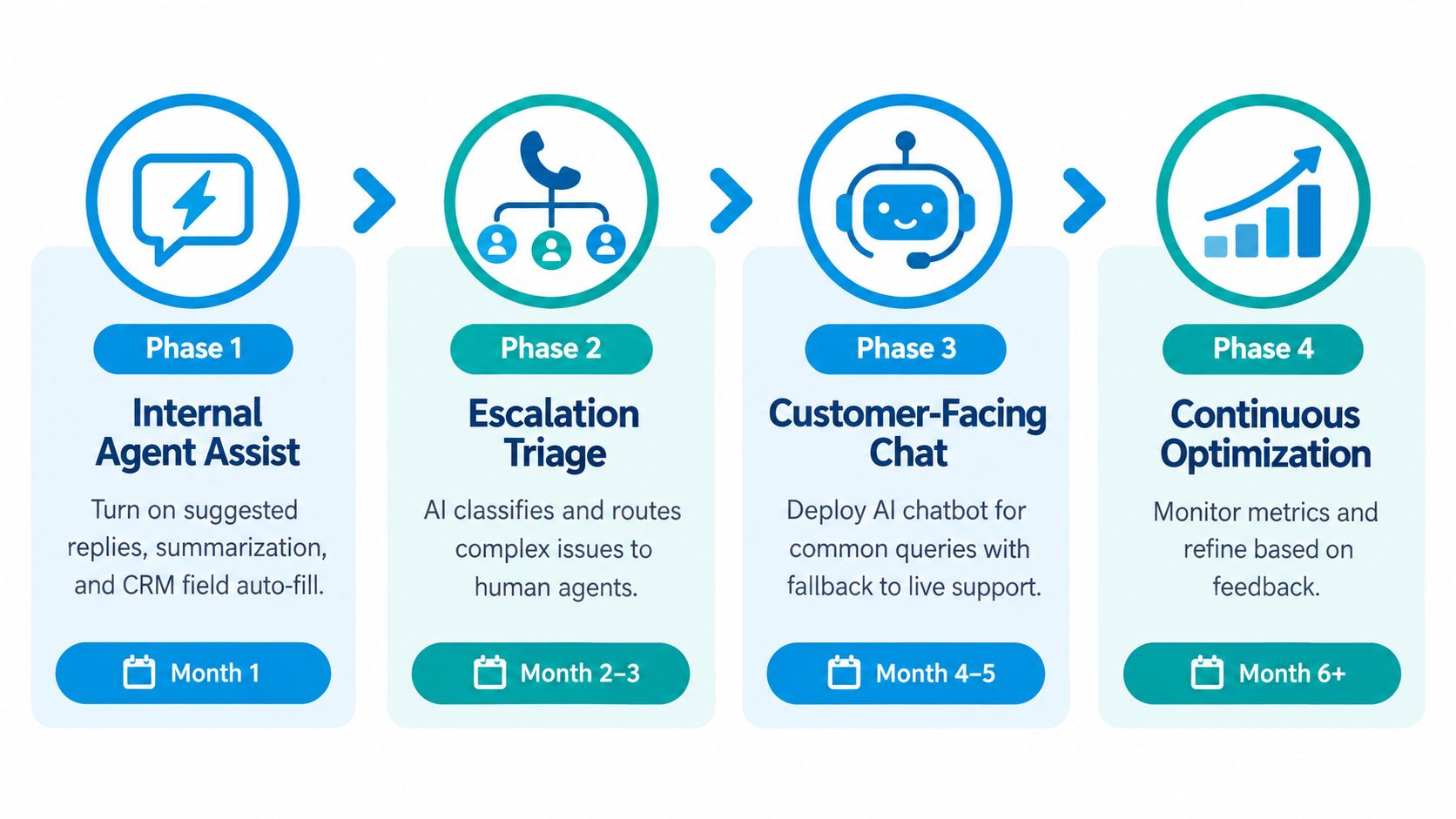
Phase 1 through Phase 4
Internal agent assist first
Turn on suggested replies, summarization, and CRM field auto-fill behind the agent desktop. Keep it internal for the first stretch so you can baseline handle time, note quality, and agent adoption without customer-facing risk. This is the lowest-drama starting point.Text channels next
Launch chat and email automation for your most repeatable intents. Good early candidates are scheduling questions, hours, service area checks, prep instructions, and basic status requests. Review every unresolved thread, and build a hard escalation rule for confusion, frustration, or policy edge cases.Voice and appointment flows after that
Connect telephony, calendar, and CRM so the system can answer, authenticate, book, and route. Start with after-hours and overflow traffic. Those windows usually have the clearest pain and the least political risk.Proactive outbound last
Once the inbound experience is stable, add confirmations, reminders, review requests, follow-ups, and win-back outreach. Outbound automation gets much easier when your intake logic is already clean.
What to pilot first and what to defer
Start with work that is high-volume, low-emotion, and rules-driven.
- Pilot first: Scheduling, FAQs, order or appointment status, office information, lead capture, and after-hours intake
- Defer: Refund fights, complaints, cancellations with penalties, regulated disclosures, and anything that requires negotiation or clinical judgment
Don't let the first live use case be the one your supervisors dread handling themselves.
The trap is rolling AI out where your current process is already messy. If your calendar rules are inconsistent, your CRM fields are unreliable, or your escalation ownership is fuzzy, the model won't fix that. It will expose it faster.
Where It Shows Up Across Service-Heavy Industries
Tuesday morning, a four-truck HVAC company opens the office and finds four voicemails, a full booking board, and two messages asking whether anyone can still come out today. Generative AI stops being abstract. It takes the missed contact, captures the job type, checks the service area, offers the next available slot, and routes anything urgent to the on-call path.
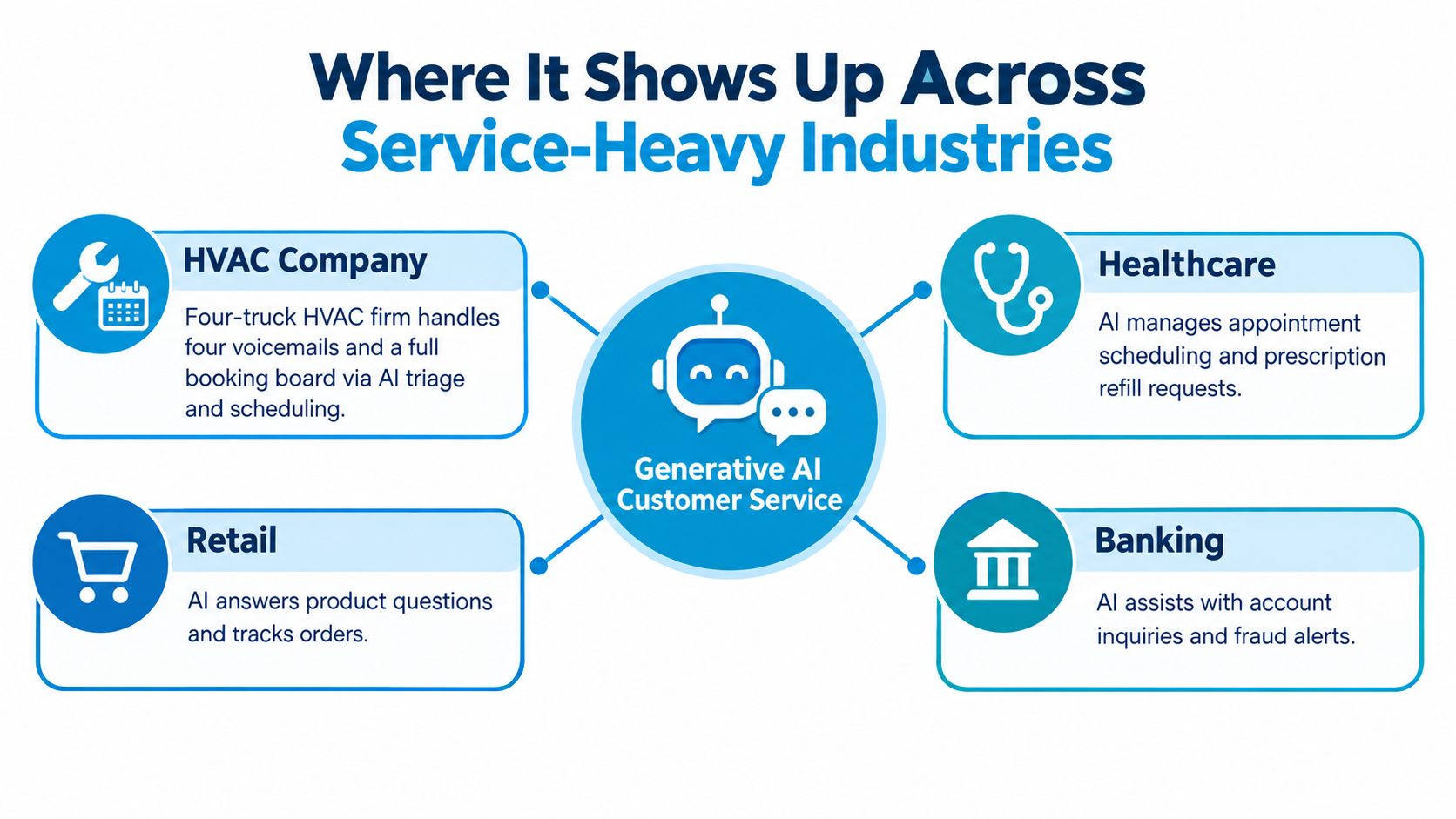
Home services
Maria calls after dinner because her water heater is leaking. The AI answers, asks whether there's active flooding, confirms the zip code, captures photos by SMS if that's part of your process, and offers an emergency window or the first morning slot. If the request sounds unsafe or emotionally charged, it escalates with the summary attached.
For teams using systems like ServiceTitan or Housecall Pro, this matters because intake quality determines dispatch quality. A vague lead wastes a truck roll. A structured lead gets booked correctly.
Healthcare and wellness
James needs to reschedule a dental cleaning and asks whether he should avoid eating before the visit. AI can handle the scheduling and approved prep instructions. It should not freelance on clinical questions.
That means strict rules. Insurance basics, directions, forms, appointment changes, and office policies are fine. Symptoms, medication questions, post-procedure complications, and anything diagnostic should escalate immediately with the conversation transcript and caller details.
In healthcare, the safest AI answer is often a precise handoff, not a clever response.
Multi-location retail and franchise operations
Tanya wants to know whether the north-side location has a product in stock and whether the downtown store honors the same promotion. AI can route by location, use store-specific hours and inventory rules where available, and keep brand language consistent across every touchpoint.
Central ops usually sees the hidden mess. One location updates holiday hours. Another doesn't. One franchisee follows the approved cancellation script. Another improvises. AI forces standardization because it needs explicit rules.
Three quick mini-stories show the pattern. Maria's missed HVAC call gets recovered and booked. James's dental reschedule gets confirmed while a clinical question is handed to staff. Tanya gets routed to the right store without bouncing between locations. Different industries, same principle. Resolution improves when intake, context, and escalation are designed together.
Build, Buy, or Hybrid and How to Choose
This decision gets framed as a model question too often. It's really an integration and operating model question. If the system can't work with your phone stack, CRM, scheduling rules, and reporting layer, it doesn't matter how impressive the demo sounded.
The three paths
Build means you use an LLM API and create your own logic, guardrails, routing, observability, and integrations.
Buy means you adopt a vertical SaaS product such as an AI receptionist or contact center platform that already includes telephony, workflows, dashboards, and connectors.
Hybrid means you own part of the orchestration and business logic but rely on third-party infrastructure for pieces like voice, CRM connectors, analytics, or channel delivery.
Build vs Buy vs Hybrid at a Glance
| Dimension | Build | Buy | Hybrid |
|---|---|---|---|
| Time-to-value | Slowest | Fastest | Moderate |
| Control over prompts and data flow | Highest | Lowest to moderate | High in key areas |
| Calendar, CRM, and phone integration depth | Depends on your team | Usually strong in core use cases | Strong if designed well |
| Year-one operating complexity | Highest | Lowest | Moderate to high |
| In-house engineering lift | Heavy | Light | Targeted |
Which path fits which team
For a sub-50-seat team, buying is usually the sane choice. You likely need speed, proven flows, and less maintenance. You do not need to spend months building call routing and appointment logic from scratch.
For a 500-seat contact center, hybrid often wins. You need control over orchestration, governance, QA, and reporting, but you probably don't want to rebuild telephony plumbing and every connector in-house.
Pure build fits a narrower group: teams with engineering depth, unusual workflow requirements, and the appetite to own testing, guardrails, maintenance, and failure handling long term.
An AI receptionist category can be the right buy path for service businesses that care most about inbound calls, scheduling, lead capture, and after-hours coverage. This overview of the best AI receptionist options is useful if that's your starting point. Recepta.ai is one example in that category, combining AI-driven intake with human escalation for calls, booking, and follow-up workflows.
Measuring Resolution and ROI the Right Way
An impressive deflection rate can hide a lousy service experience. If the customer comes back later, asks again in another channel, or reaches a human who has no context, the original interaction didn't resolve anything.
That's why I'd make resolution the top-line KPI: the customer's intent is fully addressed in one interaction, with no reopen and no human rescue unless escalation was the correct outcome.
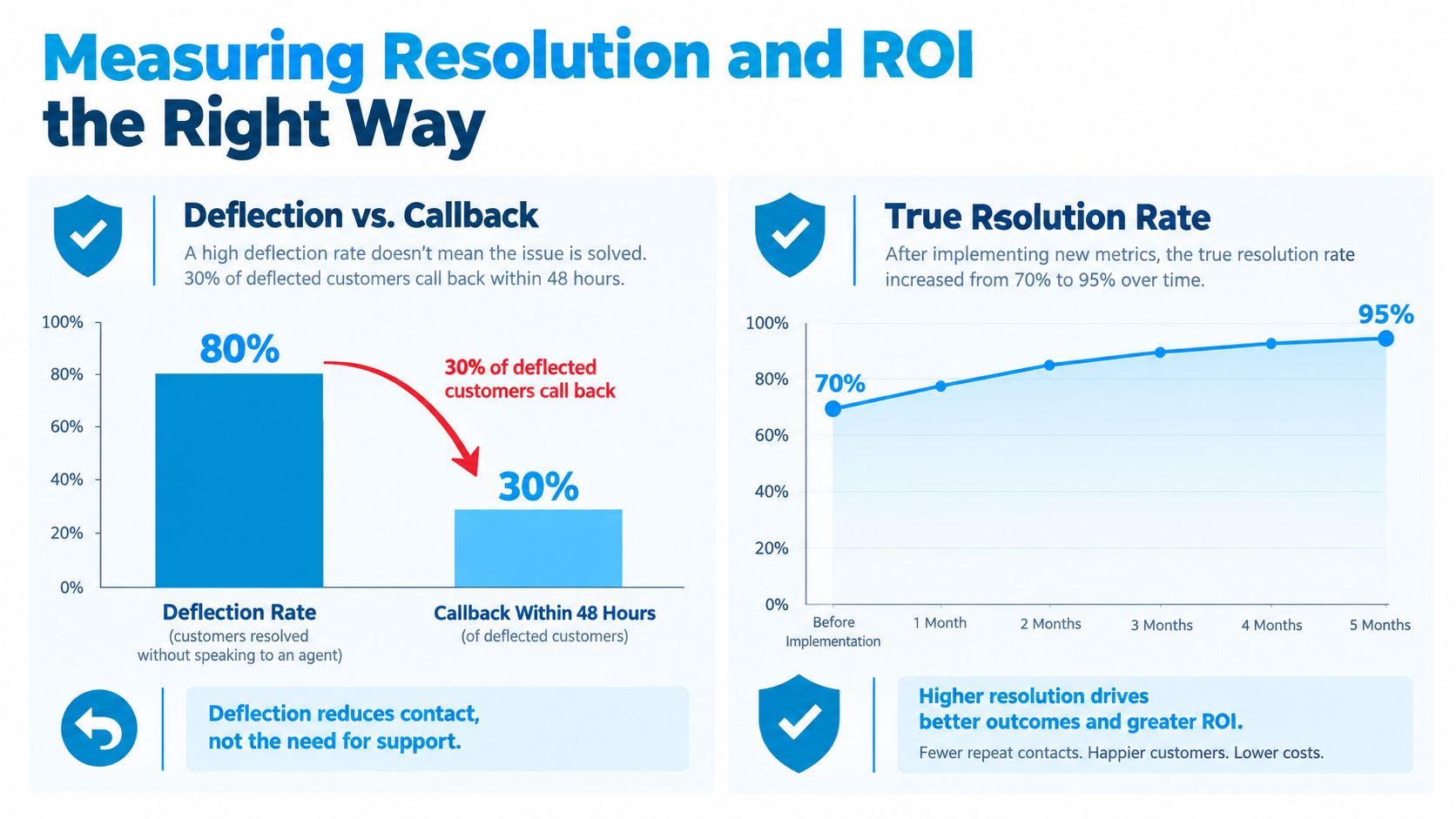
What to measure
Track a short set of metrics that reflect whether the workflow worked.
- First contact resolution: Did the issue get closed in the first interaction?
- Reopen rate: Did the same issue return within your chosen window?
- Escalation rate: How often did AI hand off to a human, and was that handoff appropriate?
- Assisted handle time: Did AI make human agents faster on the interactions that still needed them?
- Satisfaction on AI-handled contacts: Did customers feel helped, not trapped?
A 2026 industry angle worth taking seriously is that teams often optimize for containment while missing what happens after the transfer. Multiple sources summarized in this analysis argue that AI performs best on structured requests, while value drops when escalation loses context or when sentiment-heavy cases are forced through automation. The same review also notes that 87% of customers still want access to a human agent when AI is used in customer service, and that many firms have deployed AI somewhere in the journey without connecting it well across departments (analysis of what actually works in 2026).
How to turn that into ROI
Use a simple model:
- Hours saved: Time reduced from summarization, note entry, routing, and repetitive responses
- Recovered demand: After-hours bookings, saved missed calls, and captured leads
- Quality impact: Fewer reopens, cleaner handoffs, and lower service friction
If you need a practical framework for thinking through the measurement side, this practical chatbot ROI guide is worth reading alongside your internal finance assumptions.
This is also the right point to tighten your service metric definitions. A team that cares about first call resolution will make better AI decisions than a team staring only at containment.
Later in the rollout, review visual trendlines, not just aggregate totals.
Compliance, Security, and the Human Handoff
Risk isn't a final approval step. It's part of the design. If you bolt compliance on after the workflow is already live, you'll end up rewriting prompts, connectors, and permissions under pressure.
Recent coverage shows why this becomes the blocker. Compliance was cited by 50% of respondents, security by 48%, and disconnected systems by 45% as barriers to orchestrating AI across customer operations. The same reporting noted that only roughly one-fifth to one-third of organizations have generative AI integrated across multiple functions, and independent CX research found only 28% of organizations are confident they can fully extract the potential of AI agents (SiliconANGLE coverage on adoption and orchestration).
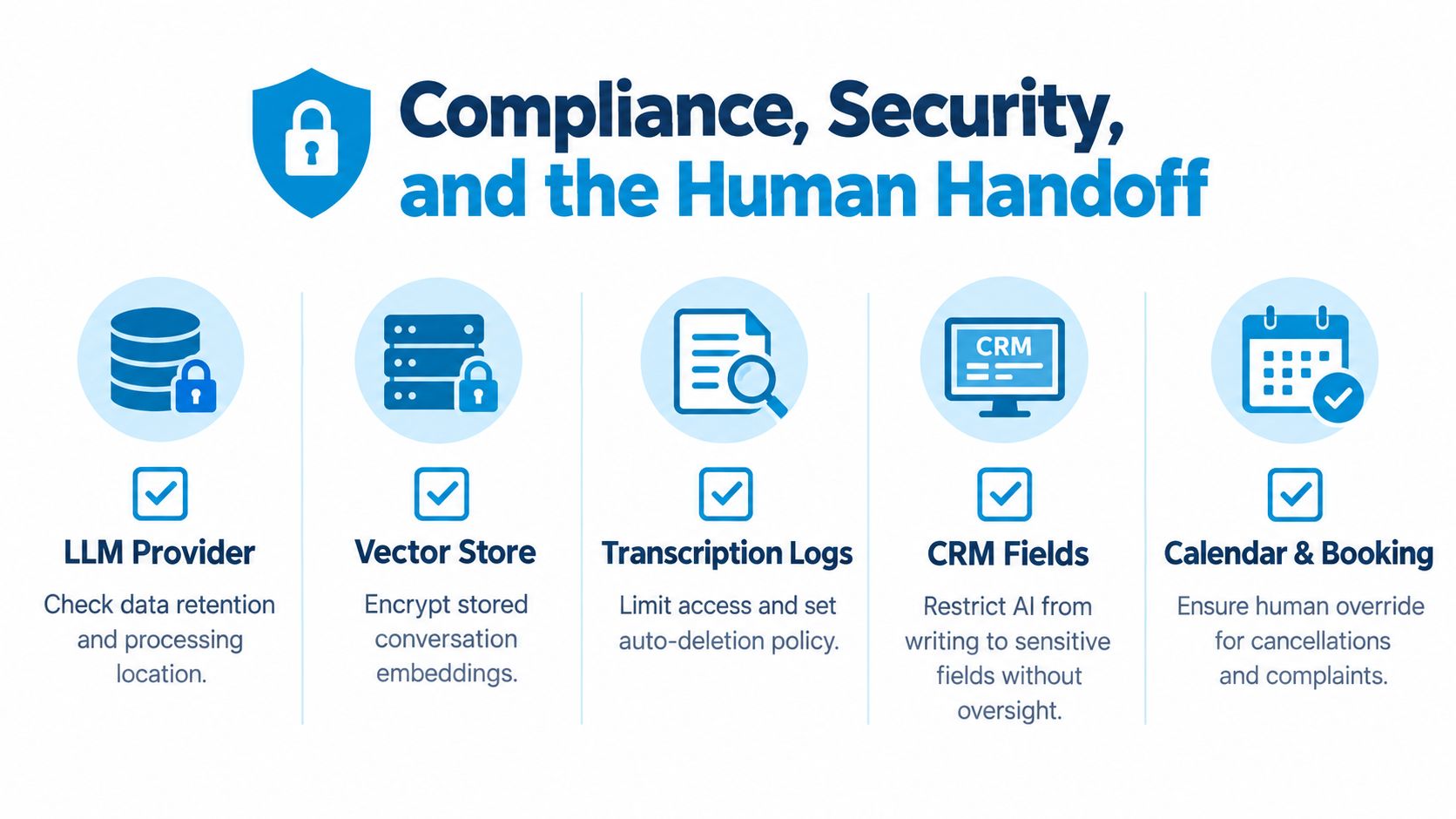
Where the data actually lives
In a typical stack, customer data may touch:
- The LLM provider for prompt processing
- A vector store for retrieval and grounding
- Transcription logs for voice and chat records
- CRM fields where summaries and dispositions are written
- Calendar holds that reserve or modify appointments
Each layer needs rules for encryption, retention, access, and logging. Teams often secure the CRM and forget the transcript store. That's sloppy and risky.
A practical go-live checklist
Run this before launch:
- Redact PII before prompts: Strip sensitive data where it isn't required for the task
- Capture consent where needed: Especially for recorded voice interactions
- Check data residency: Match vendor processing location to your policy and regulatory needs
- Review vendor controls: Confirm audit logs, access controls, and relevant attestations or eligibility
- Lock down write permissions: Don't let AI edit sensitive fields without rules or oversight
- Define escalation triggers: Billing disputes, legal language, repeated low-confidence turns, customer requests for a human, and emotionally loaded complaints
- Design the handoff payload: The human should receive intent, summary, account context, prior steps taken, and promised next action
The handoff is the trust boundary. If the human starts cold, the AI already failed.
You should also disclose clearly that the customer is interacting with AI and tell them how to reach a person. That sentence alone can prevent frustration when the issue needs judgment rather than speed.
Putting It All Together Week by Week
AI rollouts fail when teams treat launch as the finish line. The better approach is an operating cadence. Daily review improves weekly tuning. Weekly tuning improves monthly ROI. That's how a decent deployment turns into a strong one.
Daily review rhythm
Every day, pull a small sample of AI-handled interactions and review them like QA.
Look at five to ten calls, chats, or message threads. Tag what worked, what misfired, and what should have escalated earlier. Don't just score language quality. Score operational outcomes. Did it capture the right details? Did it route correctly? Did it leave the CRM usable?
A comparative evaluation of customer-service QA models found that quality is multi-dimensional. GPT-4.1 led overall with a score of 4.146, while LLaMA-3.1-8B-Instruct scored 3.794 and slightly beat Gemini-2.5-Flash at 3.769, with some smaller fine-tuned models performing competitively on human-likeness and tone. The practical takeaway is simple: choose for context continuity, tone, and task fit, not only for fluency (Frontiers evaluation of customer-service QA models).
That's exactly what daily review should test.
Weekly improvement cycle
Once a week, get the support lead, ops owner, and whoever manages knowledge content in the same meeting. Review escalations, inspect low-confidence turns, and update prompts or source documents.
Use a short agenda:
- Review failed resolutions: Find the top reasons customers still needed rescue
- Fix stale knowledge: Remove outdated hours, policies, scripts, and location details
- Tighten escalation rules: Add triggers where the AI held on too long
- Audit structured outputs: Check CRM notes, dispositions, booked appointments, and callback promises
This part matters more than most vendors admit. A rough industry pattern shows generative AI is still more common in agent support than in direct customer-facing deployment. In one 2024 survey summary, 42% of organizations said they use generative AI to support agents while only 29% apply it to customer-facing scenarios (Execs In The Know summary). That's not timid. It's practical. Teams learn faster when they start behind the desk.
Monthly business review
Every month, compare current performance against your pre-AI baseline. Use the same definitions every time. Resolution rate, reopen rate, assisted handle time, booked-and-kept appointments, and missed-call recovery are enough for a serious review.
If your numbers improved but complaints about repetition rose, your handoff design is weak. If handle time dropped but reopens increased, your AI is rushing bad answers. If after-hours capture improved but no-shows rose, your confirmation workflow needs work.
A clean 30-60-90 progression
For the first month, keep the system on agent assist and internal review. Let the team build trust in summaries, suggested replies, and CRM writing.
In the next stretch, turn on chat and voice for a narrow set of intents. Scheduling, office information, appointment confirmations, and basic intake are enough. Keep a kill switch and watch escalations closely.
Then expand into appointment workflows and after-hours coverage with complete handoff paths. That's where you start seeing compounding value because the AI isn't just answering. It's moving work to completion.
The broader adoption pattern backs this up. An 8x8 survey found 52% of organizations had already invested in conversational AI, 44% planned to adopt it, and only 4% had no plans. The same report says almost a third already use generative AI in the contact center, which fits the phased rollout pattern from internal assistance toward customer-facing automation (8x8 state of conversational AI report).
Two examples make the cadence concrete. A home services team can cut repeat calls by tightening after-hours intake, reviewing failed triage every day, and rewriting weak dispatch prompts every week. A multi-location operator can shorten the path from booking to confirmation by cleaning store-specific knowledge, auditing transfer quality, and fixing location routing before expanding channels. Neither result comes from a one-time launch. It comes from operating discipline.
If your team is missing calls, losing after-hours bookings, or forcing customers to repeat themselves on every handoff, Recepta.ai is built for that exact problem. It combines AI-driven inbound and outbound service workflows with human escalation, scheduling, and CRM-connected follow-up so you can improve resolution without betting the customer experience on full automation. See how it works at Recepta.ai.