Receptionist vs Administrative Assistant: A Hiring Guide
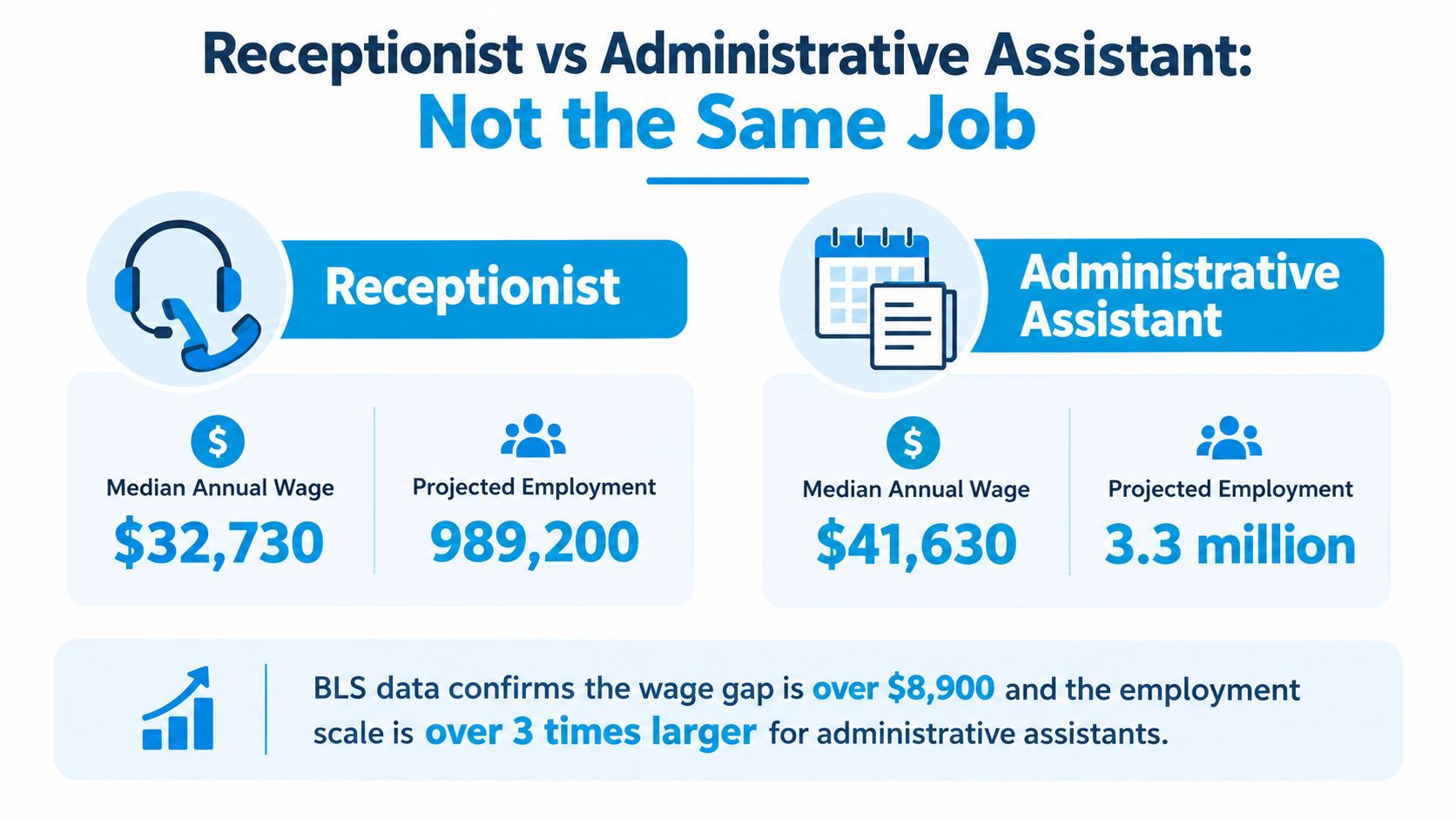
Administrative assistant roles are about 1.9 times larger than receptionist roles in U.S. employment, and the median annual pay is $47,540 versus $38,010. If you're deciding between a receptionist and an administrative assistant, don't treat it like a title choice. Treat it like a workflow design choice.
I've staffed both across clinics, law offices, trades businesses, and service companies. The mistake owners make is simple. They hire one person and expect that person to be excellent at two different jobs: instant front-desk response and multi-step back-office coordination. Those are not the same operating rhythm, and the labor market prices them differently for a reason.
If your business lives or dies by answering calls, welcoming visitors, and booking fast, hire for front-desk performance. If your business is choking on calendars, paperwork, vendor follow-up, billing support, and internal handoffs, hire for administrative throughput. That's the receptionist vs administrative assistant decision.
Why the Two Roles Are Not the Same Job
Administrative assistant roles employ far more people and command higher pay than receptionist roles, as noted earlier. That gap exists because employers are buying different kinds of work, not dressing up the same job with different titles.
The clean way to separate these jobs is by workflow.
A receptionist owns the front-desk workflow. That means handling interruptions well, answering and routing fast, greeting visitors, capturing basic intake, and protecting response time during business hours. O*NET groups that work under receptionists and information clerks, with the core function centered on answering inquiries and directing people to the right destination (O*NET occupational taxonomy).
An administrative assistant owns full-cycle admin workflow. That role carries tasks from start to finish across calendars, documents, vendor coordination, office systems, billing support, records, and follow-up. The standard is not friendliness under interruption. The standard is completion, accuracy, and handoff control across multiple steps.
That distinction matters more than the title on the offer letter.
Owners get in trouble when they hire for coverage and hope for throughput. Front-desk work breaks concentration by design. Administrative work depends on concentration. Put one person in both lanes all day and you usually get slower call handling, missed details, and half-finished admin tasks sitting in limbo.
Use a simple rule. If the task starts with an inbound trigger, a ringing phone, a walk-in, a new inquiry, a delivery, it belongs in the receptionist lane. If the task requires follow-through across several steps after intake, it belongs in the administrative assistant lane.
A hybrid model often works better than forcing one employee to do both. Let a human receptionist handle high-value conversations, exceptions, and in-person traffic. Let AI handle overflow call answering, after-hours capture, routine FAQs, and basic scheduling. Then assign an administrative assistant to the work that needs judgment, persistence, and clean execution across systems. If you want a tighter view of the front-desk side, this guide on what receptionists do breaks down the customer-facing responsibilities clearly.
Here is the recommendation I give small service businesses. Hire a receptionist when missed calls, slow response, or poor first impressions are costing you revenue. Hire an administrative assistant when the bottleneck is follow-up, paperwork, coordination, and internal drag. Split the role, human plus AI, when you need both fast intake and steady back-office output.
Receptionist vs Administrative Assistant Defined by Daily Work
Daily work shows the split faster than job titles do. A receptionist manages live intake. An administrative assistant manages follow-through after intake. That distinction matters because the work runs on different rhythms, different KPIs, and different failure points.
Independent role descriptions back up that split. Receptionist duties center on phones, visitors, routing, the reception area, and straightforward scheduling. Administrative assistant duties extend into mailings, database upkeep, invoices or checks, file creation, meeting coordination, inventory tracking, travel planning, and calendar management (role comparison from Family Eldercare).
Daily Task Profile Receptionist vs Administrative Assistant
| Task Category | Receptionist | Administrative Assistant | Primary KPI |
|---|---|---|---|
| Incoming calls | Answers, qualifies, routes, checks voicemail | Steps in only when tied to ongoing work or executive support | Answer speed, routing accuracy |
| Visitor handling | Greets, signs in, directs, manages waiting area | Covers only as backup | Check-in consistency |
| Appointment booking | Books standard appointments | Manages complex calendars, conflicts, and dependencies | Booking accuracy |
| Data entry | Captures basic intake, updates contact details | Maintains records, documents, and databases | Record completeness |
| Mail and packages | Receives and hands off | Sorts, tracks, prepares outgoing mailings | Turnaround time |
| Meetings | Confirms appointments or room availability | Coordinates agendas, materials, rooms, and attendees | Coordination accuracy |
| Billing support | Limited support | Prepares invoices, follows up on payments, supports reconciliations | Error rate |
| Supplies and vendors | Minimal involvement | Orders supplies, tracks stock, follows up with vendors | Completion reliability |
The easiest way to staff this correctly is to map work by workflow stage.
A receptionist owns the first five minutes. They pick up the call, greet the walk-in, answer the routine question, book the basic appointment, and make sure the next handoff is clean. If you run a dental office, that means keeping patient calls from spilling to voicemail and keeping the front desk calm during arrival rushes. If you run a home service company, it means catching new job requests while the field team is busy.
Their scorecard should stay tight:
- Call answer and missed-call recovery
- Routing accuracy
- Visitor experience
- Basic scheduling accuracy
If you are hiring for a healthcare front desk, reviewing an entry-level medical receptionist resume helps you spot whether a candidate has handled intake volume, patient scheduling, and front-desk traffic.
An administrative assistant owns everything that happens after the first handoff. They chase missing information, update records, prepare paperwork, coordinate meetings, keep calendars from colliding, and make sure work closes instead of stalling halfway through. This role protects output, not just access.
That difference gets missed in mixed-role job posts. Owners write one description that includes phones, visitors, invoices, vendor follow-up, data cleanup, calendars, reports, and supply ordering. The result is predictable. The urgent work wins. The important work waits.
Use a simple decision matrix:
| If the task is mostly about... | Put it with... |
|---|---|
| Immediate response, live interaction, first impressions | Receptionist |
| Multi-step follow-up, coordination, documentation, completion | Administrative assistant |
| Routine call overflow, after-hours capture, FAQ responses, basic scheduling | AI receptionist or workflow automation |
| Repetitive record updates and copy-paste admin work | Process automation |
That last row is where small businesses usually waste labor. If your admin hire is spending hours on repetitive updates, status changes, and document movement, use data entry automation for repetitive office tasks so the person handles exceptions, approvals, and coordination instead of manual rekeying.
Here is the blunt hiring test. If success depends on staying available every minute, hire for reception. If success depends on finishing a chain of tasks accurately across systems and people, hire for administrative support. If you need both, split the workflow instead of forcing one person to switch lanes all day.
Salary, Job Market, and What That Means for Hiring Cost
A pay gap of roughly $9,500 a year looks small on paper. It gets expensive fast when you assign the wrong workflow to the wrong role.
Owners who compare these jobs by hourly rate miss the cost driver. Hiring cost comes from interruption load, task complexity, training time, and how hard the person is to replace once they learn your systems. Reception work is easier to price. Full-cycle admin work is harder to scope, harder to backfill, and usually more expensive than the wage line suggests.
As noted earlier, federal wage and outlook data shows administrative assistant roles generally sit above receptionist roles on pay, while both categories still see meaningful annual openings. That matters because market supply is only part of the decision. Workflow fit matters more.
Receptionist vs Administrative Assistant Pay and Hiring Cost
| Role setup | Direct pay pattern | Hidden cost risk | Better use case |
|---|---|---|---|
| Pure receptionist | Lower pay floor | Missed calls, weak coverage at lunch or peak hours | High call volume, walk-ins, constant scheduling traffic |
| Pure administrative assistant | Higher pay floor | Expensive idle time if the job turns into phone coverage | Multi-step coordination, billing support, document follow-up, reporting |
| Blended front desk plus admin | Pay drifts upward because scope expands | Context switching, slower completion, faster burnout | Only works if volume is low and workflows are tightly defined |
| Human plus AI split | Lower live coverage cost per task handled | Poor setup creates handoff errors | After-hours capture, repetitive intake, routine scheduling, FAQ traffic |
That third row is where small businesses overspend.
A blended role looks efficient because one person "does everything." In practice, the front-desk work interrupts the admin work all day. The employee never gets a clean hour to finish reconciliations, chase signatures, close out forms, or clean up records. You are not buying flexibility. You are buying delay.
Independent market references are still useful for calibrating offers. This roundup of receptionist salary data helps small employers sanity-check local ranges, especially if they are hiring for a true front-desk role rather than a bundled office support job.
Use a simple hiring rule. Pay for reception when responsiveness is the bottleneck. Pay for administrative support when completion is the bottleneck.
If you need both, split the work on purpose. Put live call handling, appointment capture, and routine inbound questions with a receptionist or AI layer. Put document-heavy follow-up, vendor coordination, reporting, and system cleanup with an administrative assistant. That structure usually costs less than forcing one person to switch lanes every ten minutes.
The biggest hiring mistake is not underpaying. It is hiding two jobs inside one title. If your office keeps piling clerical cleanup onto whoever answers the phone, read this breakdown of administrative burden in growing teams. It explains why labor costs rise even when headcount does not.
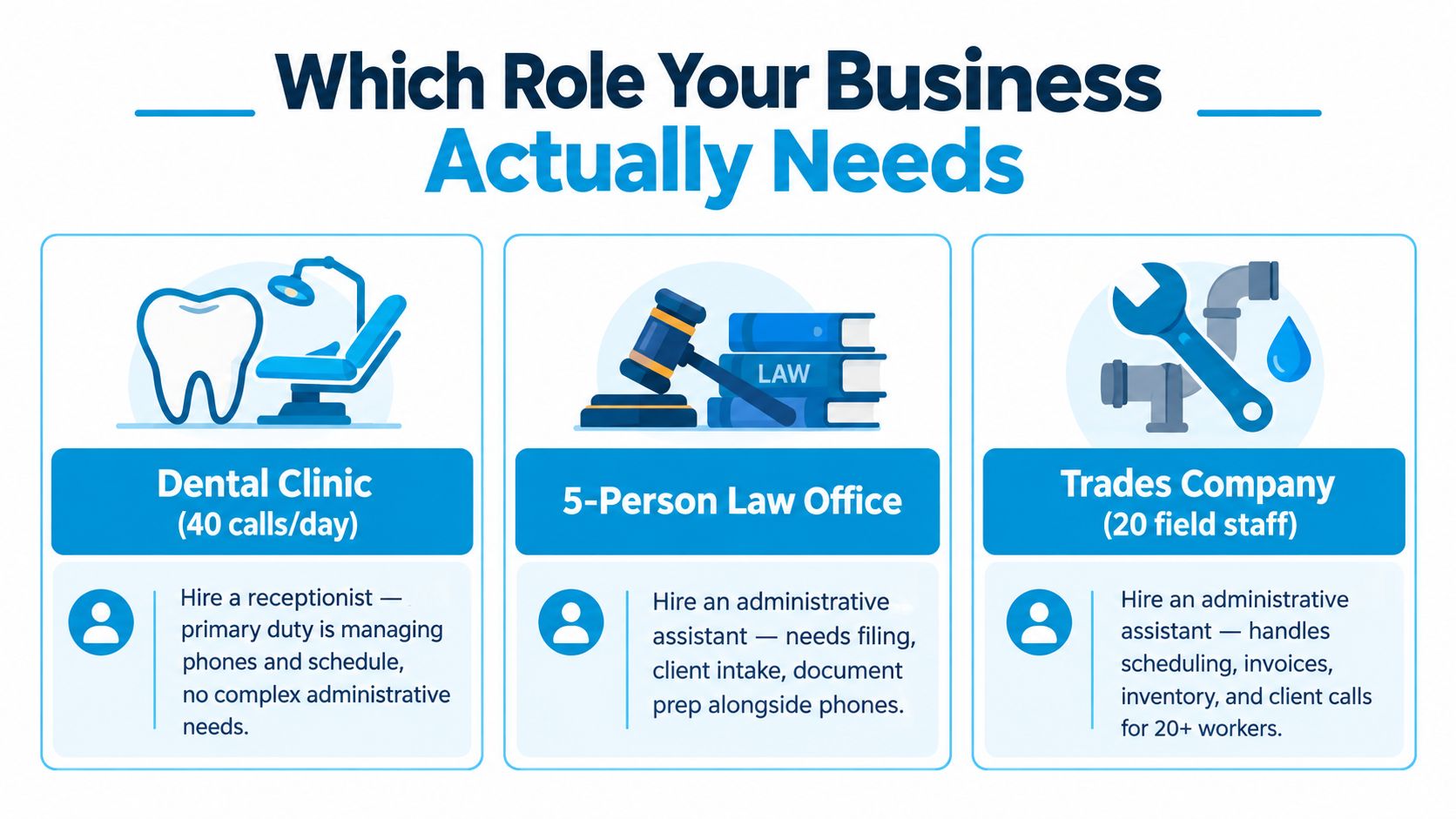
Which Role Your Business Actually Needs
A bad hire here does not fail because the person is weak. It fails because the workflow is wrong.
Pick the role based on where work breaks. If your business loses money at the first point of contact, hire for front-desk coverage. If it loses money after the handoff, hire for follow-through, coordination, and backlog control.
Scenario one dental clinic
A single-location dental clinic usually needs a receptionist first. The constraint is live traffic. Phones ring, patients arrive, appointments shift, and the day falls apart fast if nobody owns that flow in real time.
The receptionist job in this setting is simple to define. Answer calls, book and confirm appointments, handle check-ins, route routine questions, and protect the schedule from avoidable gaps.
Hire a receptionist when you see signs like these:
- Voicemail stacks up during busy periods
- The schedule has empty chair time because changes are missed or handled late
- The front desk keeps choosing between the ringing phone and the patient standing in front of them
Do not load this person up with reporting, insurance cleanup, or long blocks of back-office follow-up unless you are comfortable with slower response times. Front-desk work wins every interruption battle.
Scenario two law office
A five-person law office usually needs an administrative assistant before it needs a polished front desk. The risk is not a missed greeting. It is incomplete intake, missed deadlines, disorganized calendars, unsigned documents, and billing delays.
An administrative assistant keeps the file moving after the client interaction starts. That includes document handling, scheduling across multiple people, follow-up, status tracking, and record accuracy.
If attorneys keep asking, "Who is following up on this?" you do not have a reception problem. You have a workflow completion problem.
Scenario three trades company
A trades company often starts by saying it needs someone to answer the phone. What it usually needs within a few months is someone who can run the office workflow from inquiry to payment.
That means booking estimates, confirming jobs, updating the calendar from field changes, chasing invoices, tracking parts, and keeping customer records clean. A posting for a combined receptionist and administrative assistant role shows how often businesses bundle those tasks together, including invoicing, payment collection, and software reconciliation alongside front-desk duties (combined role example).
That title hides two different jobs. One is reactive and interruption-heavy. The other needs uninterrupted follow-through.
Use a workflow test, not a title test
Make the decision by sorting the work into two lanes:
| Workflow lane | What belongs there | Better fit |
|---|---|---|
| Front-desk lane | Answering calls, greeting visitors, basic scheduling, message taking, routine FAQs | Receptionist |
| Full-cycle admin lane | Documents, billing support, follow-up, records, vendor coordination, deadline tracking | Administrative assistant |
Now ask one hard question. Where does the backlog hurt more?
If missed calls and slow response cost you appointments, hire a receptionist. If unfinished tasks, sloppy records, and weak follow-up cost you money, hire an administrative assistant.
If both lanes are breaking, do not force one person to switch roles all day. Split the work on purpose. Put repetitive inbound coverage in the front-desk lane. Put completion work in the admin lane. That setup is easier to manage, easier to measure, and easier to improve with a human-plus-AI model later.
The Hybrid Option Humans Plus an AI Receptionist
Administrative support is still overwhelmingly handled on-site. Analysts at Robert Half found these roles are 93% fully on-site, 5% hybrid, and 2% remote in their administrative and customer support hiring update. That creates a practical hiring problem for small businesses. You need phones covered all day, but you do not need a full-time person spending half that day repeating the same answers.
The right hybrid model splits the workflow instead of forcing one employee to do two incompatible jobs. Let AI own the repetitive front-desk layer. Let a human own the exception handling and the completion work that moves the business forward.
What the hybrid model looks like
| Workflow area | Human-only setup | Hybrid setup |
|---|---|---|
| Routine inbound calls | Staff member answers every call | AI answers, routes, logs, and handles standard questions |
| After-hours calls | Voicemail, callbacks, or overtime | AI captures details and routes urgent issues |
| Basic scheduling | Human books every appointment | AI books straightforward appointments, human resolves conflicts |
| In-person visitors | Same person gets interrupted constantly | On-site human handles walk-ins and handoffs |
| Escalations | Mixed in with routine calls | Human takes sensitive, unusual, or high-stakes cases |
| Admin follow-through | Squeezed between interruptions | Human gets protected time for billing, records, and coordination |
That setup works because front-desk work is high-volume and pattern-based. Full-cycle admin work needs concentration, context, and follow-through.
If you need a clear definition, what an AI receptionist does usually includes answering inbound calls, collecting intake details, booking simple appointments, and passing edge cases to a person. Recepta.ai fits that model. It handles the repetitive phone layer while keeping human escalation in the loop.
Use this decision matrix
Do not ask whether AI can replace a receptionist. Ask which tasks are stable enough to standardize.
| Task type | Put it with AI | Keep it with a human |
|---|---|---|
| Repetitive phone questions | Yes | No |
| Basic lead capture | Yes | No |
| Straightforward scheduling | Yes | No |
| Appointment reminders and confirmations | Yes | No |
| Upset callers or sensitive complaints | No | Yes |
| Legal, medical, or financial nuance | No | Yes |
| Vendor follow-up and internal coordination | No | Yes |
| In-office greeting and physical paperwork | No | Yes |
This is the mistake I see most often. Owners buy phone automation, then expect it to cover judgment-heavy work. It will not. Use it to remove repetition, not discretion.
If you want a parallel example of software handling first-pass work before human review, this explanation of Anna's screening shows the same operating logic.
My recommendation
Use the hybrid model when call volume is high, visitor traffic is moderate or low, and your admin backlog is hurting service quality. In that setup, AI covers the front-desk lane consistently. Your human staff stops getting dragged into constant interruption and can finish the work that affects cash flow, records, and customer follow-through.
That is advantage. Better coverage on the phone, better completion in the back office, and a cleaner division of labor.
Sample Job Descriptions and Interview Questions You Can Use Today
Bad hires usually start with bad job ads. Owners blend front-desk coverage, calendar control, vendor follow-up, inbox cleanup, and billing support into one role, then wonder why the person struggles by week two. Write the ad around the workflow you need covered.
If the job is first-contact work, hire for front-desk execution. If the job is follow-through across records, deadlines, and coordination, hire for full-cycle admin support. If you need both, split the lanes on purpose and decide which tasks stay with a person and which ones can be standardized with AI.
Receptionist job description snippet
Use this version when the role owns the front desk and the phone lane.
We're hiring a receptionist to handle first contact for our business. You will answer inbound calls, greet visitors, route messages, schedule appointments, confirm basic details, and keep customer records current in our CRM or practice management system. You will manage interruptions all day without losing accuracy. Success in this role means calls get answered, appointments are booked correctly, urgent issues reach the right person fast, and visitor and voicemail handoffs do not fall through the cracks.
You should be comfortable on the phone for most of the day, steady under pressure, and disciplined about data entry. This is a coverage role first. It is not a back-office coordinator role with a little phone work mixed in.
Interview questions
- A caller wants to book, another wants a status update, and a visitor just walked in. What do you handle first, and why?
- Walk me through your process for routing a call when the owner is unavailable but the caller says it is urgent.
- What checks do you use to prevent scheduling errors?
- How do you document a call while keeping the conversation moving?
- Tell me about a time you had to stay calm while the front desk got busy.
Administrative assistant job description snippet
Use this version when the role owns follow-through after the initial contact is over.
We're hiring an administrative assistant to keep office work moving from start to finish. You will manage calendars, prepare documents, maintain records, follow up on open items, coordinate with vendors, support billing or expense tracking, and keep recurring administrative tasks on schedule. You will work across multiple systems and push work to completion without constant supervision.
Success in this role means fewer dropped handoffs, cleaner records, tighter follow-up, and deadlines that do not slip. This is a completion role. It is not a reception seat with extra paperwork piled on top.
You should be organized, persistent, and comfortable chasing missing information. Strong candidates do not just organize tasks. They close loops.
Interview questions
- Tell me about a process you cleaned up after inheriting it from someone else.
- How do you handle competing calendar requests from people who all think they are the priority?
- Walk me through how you track tasks that depend on other people responding.
- Describe a time you found an error in records, billing, or scheduling before it created a bigger problem.
- What system do you use to make sure recurring tasks get finished each week or month?
Two fast screening tasks
Do not rely on polished interview answers. Test the actual work.
- Receptionist screen: give the candidate four front-desk scenarios, such as a new booking call, a late patient or client, an upset caller, and a message for a manager. Ask them to prioritize, route, and document each one.
- Administrative assistant screen: give the candidate a short packet with a messy calendar, a missing document, a vendor follow-up, and a billing exception. Ask them to organize the work and explain what they would do first, second, and third.
These exercises take about fifteen minutes. They will tell you whether the candidate can run the workflow, not just talk about it.
One more recommendation. If you plan to use a hybrid human-plus-AI setup, say that in the posting. Candidates should know whether AI will handle repetitive call capture and scheduling while the human owns exceptions, follow-up, and judgment-heavy work. Clear division of labor gets better applicants and fewer mismatched hires.
Decision Checklist and Hiring Matrix for Small Businesses
Small businesses usually miss the hire because they hire by title instead of by workflow. That is the expensive mistake.
Use this section to decide who should own front-desk flow, who should own full-cycle admin work, and which tasks an AI tool should absorb before you add payroll.
Hiring Decision Matrix by Workflow Load
| What is breaking first | What that usually means | Best hire or setup | Why this setup works |
|---|---|---|---|
| Missed calls, slow callbacks, scattered messages, poor booking coverage | Your front-desk workflow is under-covered | Receptionist, or AI receptionist plus part-time human coverage | The problem is speed, routing, and consistent first response |
| Calendar conflicts, billing follow-up, document errors, vendor chasing, task drop-off | Your back-office workflow is under-owned | Administrative assistant | The problem is coordination, follow-through, and accuracy across multiple processes |
| Phones are busy and admin work is also piling up | You have two jobs hiding inside one job post | Split the roles, or use AI for intake and scheduling plus a human admin assistant | Front-desk work interrupts. Admin work requires uninterrupted blocks |
| Physical visitors, deliveries, waiting room issues, plus steady call volume | You need on-site presence | In-person receptionist, with AI handling overflow after hours or at peaks | A remote setup cannot greet people, receive packages, or manage the lobby |
| Uneven call volume, recurring scheduling, estimates, invoices, and owner follow-up gaps | You need a hybrid workflow, not a generic office hire | AI receptionist for routine capture and scheduling, human support for exceptions and follow-up | The repetitive part can be automated. The judgment-heavy part should stay with a person |
Do not force one employee to answer every interruption and still expect clean admin output by deadline. That setup fails in predictable ways. Phones get answered, but the follow-up slips. Or the admin work gets done, but calls go cold.
Pre-hire checklist
Before you write the job ad, map the work for one week.
- Count front-desk interruptions: calls, texts, voicemails, walk-ins, reschedules, cancellations, and basic status questions.
- Count back-office handoffs: billing questions, missing paperwork, document processing, vendor coordination, inbox follow-up, and records cleanup.
- Mark what requires physical presence: greeting visitors, handling keys, mail, supplies, signatures, or a waiting room.
- Mark what repeats and follows rules: appointment booking, intake capture, confirmation messages, routine FAQs, and after-hours call capture.
- Mark what requires judgment: escalations, conflict resolution, exception handling, billing decisions, and owner-facing coordination.
That last split matters most. Rule-based work can move to AI or lower-cost coverage. Judgment work needs a person with context and discipline.
The 60 percent rule
Use a simple threshold.
If roughly 60 percent of the pain in your week comes from inbound contact and first-response work, hire for the front desk.
If roughly 60 percent comes from follow-up, coordination, records, billing support, and task management, hire an administrative assistant.
If both sides are heavy, stop trying to invent a superhero role. Build a hybrid model and assign clear ownership.
A practical small-business matrix
Use this version if you want a faster call.
| Business type or stage | Workflow pattern | Recommended setup |
|---|---|---|
| Solo owner, low visitor traffic, sporadic calls | Light front desk, light admin, owner still close to the work | AI receptionist plus part-time admin help |
| Busy clinic, salon, legal office, or home services scheduler | Constant inbound volume, fast response matters | Receptionist first |
| Professional office with modest calls but steady paperwork and coordination | Lower interruption load, heavier follow-through load | Administrative assistant first |
| Growing service business with both inbound demand and messy internal follow-up | High interruptions and high admin drag | Receptionist or AI for intake, plus admin assistant for full-cycle follow-through |
| Multi-location or high-volume office | Front desk and admin are both real functions | Separate ownership for each workflow |
Hire for the bottleneck, not for the title that sounds more senior. That is the decision rule owners should use.
Common Questions Business Owners Ask After Comparing the Roles
Can a receptionist grow into an administrative assistant
Yes. In fact, that is one of the better internal promotion paths for a small service business.
A strong receptionist already knows your customer flow, your scheduling pressure points, and which requests turn into avoidable chaos. What they usually do not own yet is full-cycle admin work: records, billing support, document accuracy, follow-up, and task closure. Promote them only if they can handle work that requires fewer interruptions and more precision.
Train in stages. Keep front-desk coverage in place, then add one admin lane at a time. Start with document handling and simple follow-up. Add billing support and system ownership after they prove they can close loops without constant reminders.
Can one person do both jobs
Yes, but only in a narrow operating window.
One person can cover both roles when inbound volume is predictable, walk-ins are limited, and admin work does not carry tight deadlines. Once calls and interruptions pick up, the role splits itself whether you admit it or not. The person answers what is urgent and delays what is important.
The work that slips first is usually follow-up, paperwork accuracy, and deadline-driven admin.
If you keep trying to force both functions into one seat, use a clean split. Let AI handle first-response traffic, message capture, and basic scheduling. Give the human ownership of the tasks that require judgment, exception handling, and completion.
Do virtual receptionists count
They count for front-desk workflow only if your front desk is mostly phone and message traffic.
A virtual receptionist can answer calls, capture lead details, book straightforward appointments, and route messages. That covers a real business need. It does not cover in-office traffic, visitor handling, package receipt, waiting room management, or the small interruptions that happen inside a physical location.
Use a virtual option when the bottleneck is response speed, not office presence.
Do job titles affect payroll and classification
Yes, but duties matter more than titles.
Payroll treatment should follow the actual work, who controls the schedule, and whether the role meets overtime rules. Do not guess. A polished title will not protect you if the day-to-day job says otherwise.
Classify the work you are assigning.
AI changes this decision because it removes repetitive call handling and basic intake, which frees your human hire to focus on either front-desk coverage in person or full-cycle admin work.
The practical question is not receptionist or administrative assistant. The practical question is which workflow needs a human owner, which tasks can be automated, and where a hybrid setup gives you better coverage for less cost.
If your business needs better call coverage without forcing one person to juggle every front-desk and admin task, Recepta.ai gives you a practical middle ground. It handles inbound communication, scheduling, and escalation workflows so you can decide whether your next human hire should focus on visitors, admin throughput, or both in a cleaner hybrid setup.