What Is an Answering Service and How It Works in 2026
An answering service is a third-party team or system that picks up, routes, and acts on a business's inbound calls when in-house staff can't. For a small business owner, that can mean turning a Saturday emergency call from voicemail into a captured lead, an urgent alert, or a booked appointment.
A one-person plumbing company may be repairing a burst pipe in a basement when the phone rings. The owner can't answer, the caller leaves no message, and a valuable Saturday job goes elsewhere. That's the missed-call problem in its simplest form. The question isn't only whether someone answers. It's what happens after the phone is picked up.
What Is an Answering Service and the Four Jobs It Performs on Every Call
Historically, an answering service was a human extension of a business. The first commercial telephone switchboard opened in New Haven, Connecticut, in January 1878, and the first dedicated telephone answering service is reported to have been established in Richmond, Virginia, by 1923 as Mrs. Smith's Doctors Exchange. The model later expanded from medical clients to commercial customers by 1933 and moved from a home-based operation into a formal office by 1955, according to this history of telephone answering services.
Today, the basic idea remains familiar. A service receives calls when your owner, receptionist, dispatcher, or office team can't, then follows instructions that turn the conversation into a useful next step.
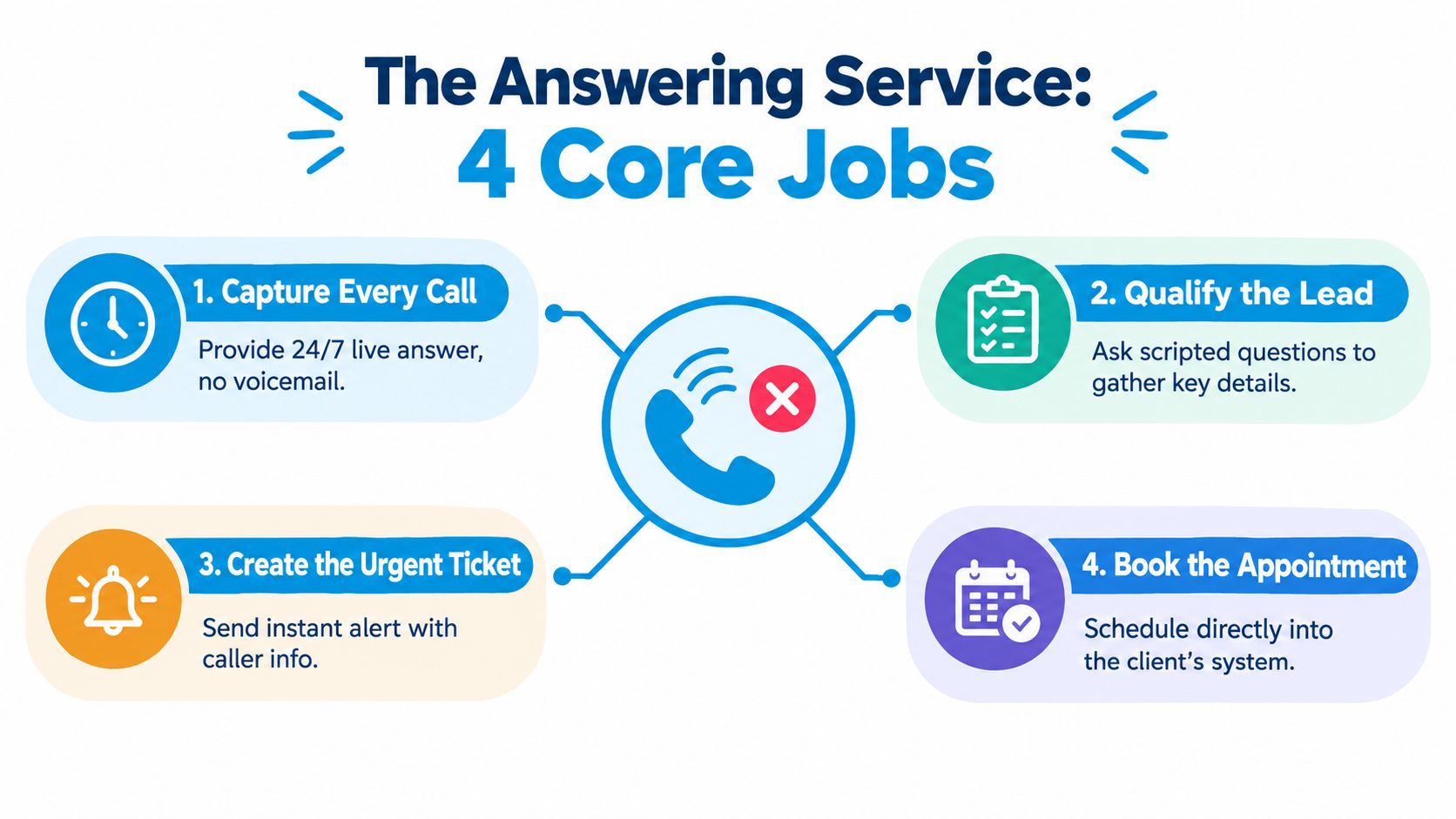
The four repeatable jobs
Answer the call. The agent or system uses your approved greeting, such as “Thank you for calling Smith Plumbing. How can we help?” This keeps the caller connected to your business rather than sending them directly to voicemail.
Capture useful details. The service records the caller's name, phone number, reason for calling, location, urgency, and any other information your team needs. A good intake process separates a burst pipe from a routine quote request.
Route the conversation. The call may go to an on-call technician, a sales queue, a scheduler, a support desk, or a message inbox. Routing is the behind-the-scenes decision that determines whether the caller reaches the right person without unnecessary transfers.
Trigger the next action. The service can send a text summary, create a ticket, notify an employee, schedule an appointment, or arrange a warm transfer. Message-taking is only useful when someone receives it and knows what to do next.
Practical rule: Treat the answering service as a small operating process, not as a replacement for voicemail.
The industry has become a substantial business category. A 2025 estimate places the phone answering services market at USD 4.60 billion, with a projection of USD 6.96 billion by 2032 at a 6.1% CAGR, while another market view estimates USD 5.64 billion in 2024 and USD 12 billion by 2035 at a 7.1% CAGR. U.S. industry data also indicates $2.5 billion in sales in 2025, as described in this phone answering services market overview.
How an Answering Service Actually Handles a Call Step by Step
Take a plumbing company with two technicians. A homeowner calls because water is spreading from a burst pipe. The call should move through a defined path instead of landing as an unclear note that someone may read later.
From ring to response
First, the caller dials the company's normal number. During the company's configured coverage hours, the answering service picks up using a custom greeting. The caller doesn't need to know that the call has been forwarded or handled outside the plumbing office.
Next, the agent asks focused questions. They capture the caller's name and number, identify the problem as a burst pipe rather than a quote request, and confirm the service address. Those questions protect the technician from arriving without the information needed to make a decision.
The system then applies the company's escalation rules. During service hours, a qualifying emergency can receive a live transfer to the on-call technician's cell. After hours, the service can place the call in an urgent queue and send the owner a callback alert with the caller's details and the configured response expectation.
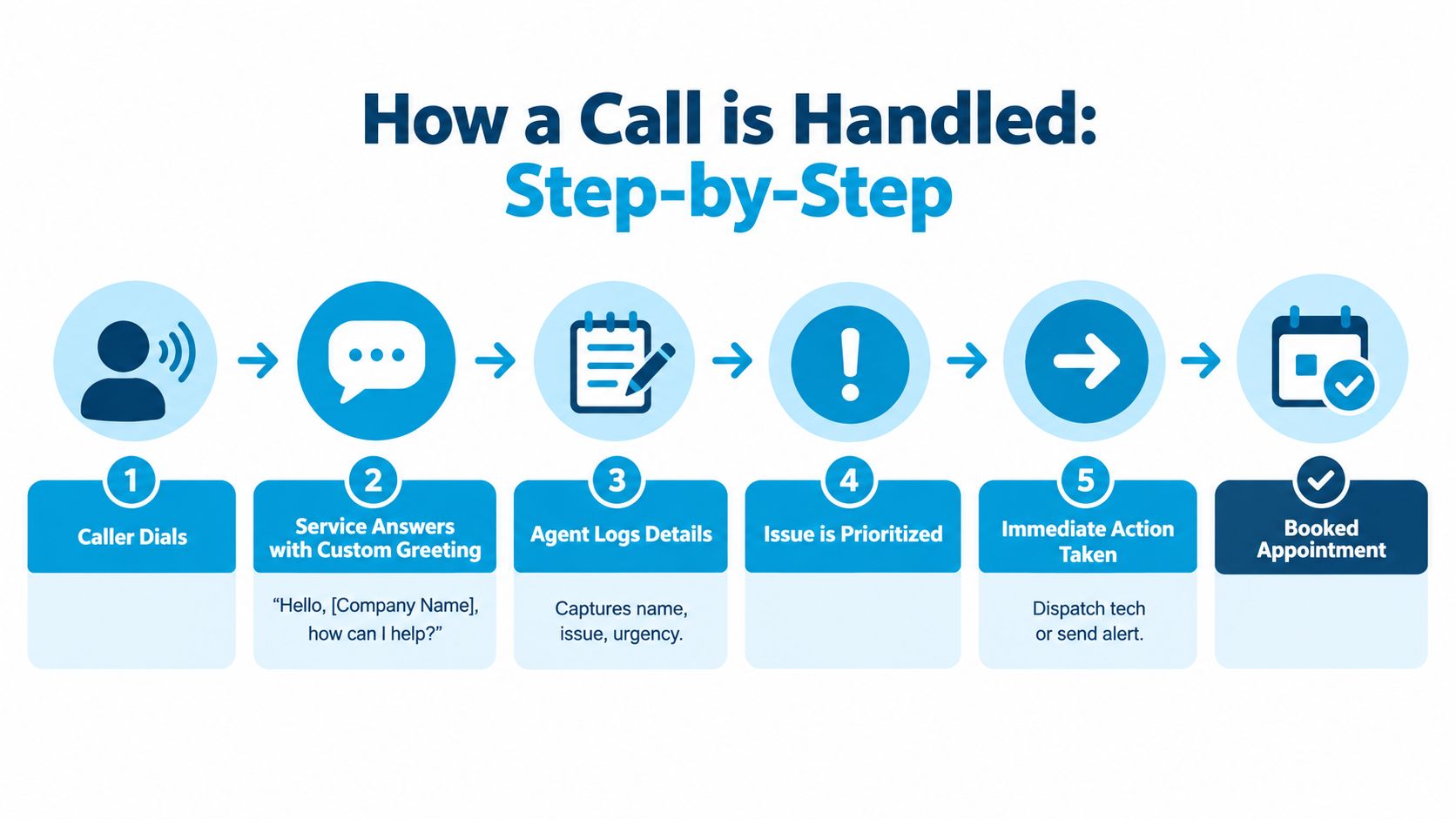
A text summary can then reach the owner's phone, while the call record enters the company's CRM or job-scheduling application. The final step is closure. The technician accepts the job, the scheduler books the earliest available slot, or the team follows up with the caller during the next business period.
Technical routing is central to this process. Calls are assigned according to intent, caller input, and circumstances, with the aim of reaching the appropriate queue or agent. The operational metrics commonly include answer rate, service level, and abandonment, with abandonment calculated as abandoned calls divided by total offered calls in the relevant call-center calculation guidance.
For a broader look at always-on automated coverage, see this guide to a 24/7 AI answering service.
The caller's experience depends on the handoff. A fast greeting followed by a vague message still creates work for the owner. A structured intake, clear escalation, and logged follow-up create a reliable customer journey.
The Four Main Types of Answering Service and When Each One Fits
The right model depends on the kind of conversation your callers expect. A dental patient, a legal prospect, a homeowner with a flooded kitchen, and a customer checking an order may all need phone coverage, but they don't need the same kind of interaction.
| Model | Best fit | Typical monthly cost | Caller experience |
|---|---|---|---|
| Live agent service | Medical offices, legal intake, sensitive customer conversations | Varies by provider and usage | A trained human answers, asks questions, and handles nuance |
| Virtual receptionist | Service businesses that need scheduling, intake, and callbacks | Varies by provider and usage | A remote receptionist represents the business and may book the call |
| Automated or IVR-only system | Low-touch order lines and simple routing | Varies by provider and usage | A recorded menu guides the caller through limited options |
| AI or hybrid service | After-hours coverage, lead qualification, and mixed call complexity | Varies by provider and usage | An AI system handles routine requests, with human escalation when configured |
Live agents
A live service fits a law firm receiving sensitive intake calls or a medical office where callers may need patience and empathy. The agent can follow a script, but they can also recognize when a caller is confused or distressed and escalate appropriately.
Virtual receptionists
A virtual receptionist is more than a message desk. For a home-services company, the receptionist may collect the property address, identify the job type, check availability, and place an appointment on the scheduling calendar.
Automated systems
An IVR or auto-attendant works when the caller needs a narrow set of choices, such as checking an order status or selecting a department. It's efficient for predictable requests, but it can frustrate callers whose needs don't fit the menu.
AI and hybrid models
AI can handle routine questions and appointment requests, while a human takes over when the call needs judgment or sensitivity. That makes a hybrid setup useful for a growing company that wants broad coverage without treating every conversation as a high-touch interaction.
After-hours coverage deserves special attention. One 2024 study across 85 small businesses found that only 37.8% of inbound calls were answered by a live person, while a large 2022 dataset found that call-to-booking rates can fall by more than half after 6 p.m., according to this after-hours missed-call analysis.
How Much an Answering Service Costs and What Drives the Price
A missed call can cost more than the time spent answering it. A caller may need an appointment, a quote, or a quick answer before choosing another business. The price of coverage therefore depends on two parts: how the provider bills for phone time, and what happens after an agent picks up.
Providers commonly charge by minutes, calls, or a package that combines usage with a monthly minimum. A typical live-agent range is roughly $1 to $2.50 per minute or $0.70 to $1.50 per call, with monthly minimums around $50 to $200, as outlined in this answering service cost guide. Actual quotes depend on the service design.
| Pricing model | Typical range | Best for |
|---|---|---|
| Per minute | $1 to $2.50 per minute | Businesses with predictable conversation length |
| Per call | $0.70 to $1.50 per call | Businesses that want simpler usage tracking |
| Monthly minimum | $50 to $200 | Low-volume businesses that still need coverage |
| Custom package | Provider-specific | Teams needing integrations, scheduling, escalation, or dedicated support |
A two-technician plumbing shop receiving about 250 calls a month might compare a per-call plan with a per-minute plan. Under a per-call range, the usage portion would be $175 to $375 before additional services or minimums. The example does not predict a quote. It shows why call length and billing structure matter.
What moves the bill
- Call volume and duration: More calls and longer conversations increase usage.
- Coverage window: Nights, weekends, holidays, and emergency routing may require a broader plan.
- Scheduling: Direct calendar booking usually requires more workflow configuration than message delivery.
- Message delivery: Text, email, CRM entries, and alerts can affect the package.
- Bilingual support: Additional language coverage may change staffing requirements.
- Integrations: Connecting a CRM, helpdesk, calendar, or scheduling application adds setup and maintenance work.
- Dedicated agents: A dedicated team may cost more than shared coverage.
The useful calculation is not only the phone bill. Compare it with the revenue, customer trust, and technician time preserved when calls are answered and routed properly.
Operational performance also affects value. A common contact-center target is the 80/20 service level, meaning 80% of inbound calls answered within 20 seconds. A healthy abandonment rate is typically 5% to 8%, while 10% or higher can indicate queue stress. These benchmarks are summarized in the call-center KPI benchmarks.
Key Features That Separate a Basic Call Desk From a Real Call Partner
At 8 a.m., an HVAC dispatcher may need a short message. At midday, the same company may need a live transfer while the dispatcher is inside a customer's home. A dental clinic faces a different rhythm, with appointment requests, cancellations, patient questions, and limited access to sensitive information.

A busy HVAC day
An HVAC customer calls during a technician's appointment. Intelligent routing identifies the call as a repair request and sends it to the correct queue. If the technician is available, a warm transfer gives them context before the caller joins, rather than forcing the customer to repeat the problem.
The agent uses a custom script that asks for the equipment issue, property address, urgency, and preferred timing. If the caller wants an appointment, calendar integration lets the agent schedule directly instead of creating another task for the office.
When the office closes, after-hours coverage keeps emergency calls moving. Spam and robocall filtering protects agent time, while text and email notifications send the dispatcher a concise summary. Call recordings, transcripts, and quality monitoring help the owner review whether agents followed the script and captured the details technicians need.
A dental clinic's workflow
A patient calls about a cancellation. The receptionist checks the practice-management calendar and records the opening so the clinic can offer it to another patient. That same-day message has value only if it reaches the right person quickly, so delivery rules matter.
For healthcare, the service must support a signed Business Associate Agreement, minimum-necessary handling of PHI, HIPAA-trained agents, secure transmission and storage, and auditable workflows. A dental office might allow the answering team to book a next-day appointment while limiting access to the patient information needed for that call, as described in this HIPAA-compliant healthcare answering service guidance.
A real call partner connects those features to outcomes. It doesn't merely list 24/7 coverage, bilingual support, CRM integration, and appointment booking. It makes each capability fire at the moment a caller might otherwise hang up or create avoidable administrative work.
Live Answering Service vs AI Receptionist Platforms
Live agents and AI receptionists solve overlapping problems, but they make different trade-offs. Human teams handle nuance naturally and can adapt to emotional or complicated conversations. AI platforms provide consistent availability, rapid handling, and structured automation for routine requests.
| Criterion | Live answering service | AI receptionist platform |
|---|---|---|
| Cost tier | Usually higher for sustained human coverage | Often lower for routine, automated handling |
| Availability | Depends on staffing and selected coverage | Designed for continuous availability |
| Customization | Scripts, protocols, and agent training | Prompts, knowledge bases, rules, and workflows |
| Complex calls | Stronger for empathy, judgment, and unusual situations | May need escalation when the request exceeds configured knowledge |
| Integrations | Can enter information into connected systems, depending on provider | Often designed to connect directly with calendars, CRMs, and workflow tools |
| Caller experience | Personal conversation with a trained representative | Conversational automated interaction, with human backup in hybrid setups |
A solo attorney who mainly needs consultation requests captured and placed on a calendar may find an AI receptionist suitable. The workflow is narrow, the intake questions can be defined, and routine scheduling doesn't require a staff member to answer every call.
A multi-location home-services brand with emergency dispatch has a different risk profile. The caller may need to explain a dangerous situation, reach the correct local team, or receive a live transfer. Human depth becomes more important when the call requires judgment, local routing, or reassurance.
Decision test: Ask whether a wrong answer would merely delay a routine task or damage a high-value customer relationship.
Hybrid setups can split that difference. AI handles initial triage, basic questions, and appointment requests, while live agents take the calls that involve urgency, complexity, or emotional sensitivity. For a practical definition of the automated side of this comparison, see what an AI receptionist does.
The strongest evaluation looks past the greeting. Check whether the platform captures caller intent, records the correct contact details, creates the right task, and escalates without forcing the customer to start over.
How to Choose the Right Answering Service for Your Business
A missed call can become a missed booking, delayed service request, or lost customer. Start by tracing what should happen after someone calls: when coverage is needed, which requests are urgent, who should receive them, and where the caller's details must go. Include your calendar, CRM, helpdesk, or practice-management system.
Build a short provider list
Ask each vendor how the operation works under real conditions:
- Coverage: What happens when several callers arrive together, and who handles overflow?
- Escalation: Which calls receive a live transfer, urgent alert, or standard message?
- Message delivery: Will summaries arrive by text, email, CRM entry, or another channel?
- Call handling: How long do typical calls remain active, and how do agents identify intent?
- Language: Is bilingual coverage included, limited, or separately scheduled?
- Compliance: Can the provider support HIPAA or PCI requirements where your business needs them?
- Pricing: Are you billed per minute, per call, per message, or through a blended package?
- Change control: Can you update scripts, routing rules, and emergency instructions without a long delay?
Test the service yourself. Call the advertised number during a busy period and outside normal office hours. Ask a realistic question, make a specific request, and check whether the person or system records your name, number, reason for calling, and desired next step accurately.
Put the pilot in writing
Request a 14 to 30 day test with at least 20 real calls, a clear refund or cancellation clause, and permission to change scripts during the trial. These are evaluation terms to request, not universal industry standards. If the provider will not document what happens when service fails, you still lack a clear view of the working relationship.
Score each option on three practical measures:
- Response speed: Did the caller reach an appropriate answer without excessive waiting?
- Lead capture accuracy: Did the service record the correct contact details, need, urgency, and location?
- Customer reaction: Did test callers describe the conversation as clear, respectful, and useful?
Use service-level and abandonment measures to assess call handling. The common benchmark of 80% answered within 20 seconds and the typical healthy abandonment range of 5% to 8% are outlined in this answering-service KPI reference.
The business case becomes clearer when you measure recovery after a missed call, not only whether someone answered. Guidance recommends an automated first touch within 60 seconds of a missed call and tracking missed-call-to-booking rate, median response time, and after-hours recovery, as explained in these missed-call lead-response benchmarks.
Choosing an Answering Service That Protects Your Next Call
An answering service earns its place when it protects the full path from ringing phone to completed action. Use four questions to test any option:
- Did it capture the call? The caller reached a real or automated greeting instead of an empty voicemail box.
- Did it qualify the need? The service gathered the details your team needs to decide what happens next.
- Did it route the request? The caller reached the correct person, queue, calendar, or ticketing system.
- Did it trigger follow-up? Someone received an alert, appointment, task, or clear callback responsibility.
Budgeting should reflect your chosen model and usage. Live services may charge around $1 to $2.50 per minute, $0.70 to $1.50 per call, or a monthly minimum around $50 to $200, while automated and hybrid services use different structures. Compare the total workflow cost, not only the advertised entry price.
Before you speak with providers, map your peak call windows and estimate weekly call volume. List the calendar, CRM, helpdesk, scheduling, and industry systems that must receive call information. Then choose between live agents, a virtual receptionist, an automated system, or a hybrid model based on caller complexity and escalation risk.
After-hours demand deserves its own line in that plan. A 2026 review reported that 3.8% of calls arrived between 6 p.m. and 5 a.m. PT, up from 3.2% the year before, and that after-hours volume grew by more than 18% year over year, according to this after-hours call volume review. Industry summaries also reported that 30% to 45% of service calls arrive after hours, and one dataset found 34.8% of after-hours callers expressed buying intent, as detailed in this missed-call economics analysis.
The risk extends beyond the first ring. One 2026 source stated that 85% of callers who don't reach a business on the first try never call back, while 80% refuse to leave voicemail, according to this after-hours answering service data. That's why the right service captures the caller's name, number, urgency, and callback priority immediately.
For healthcare teams, confirm the compliance workflow before discussing convenience. A provider should be able to explain how it supports the safeguards described in this HIPAA-compliant answering service guide.
Make your next action concrete today. Review last week's phone log, mark every missed or after-hours call, list the follow-up each caller needed, and ask two providers to demonstrate that workflow using your actual scripts and tools.
Recepta.ai combines a 24/7 AI receptionist with trained human support for lead capture, appointment scheduling, call routing, and follow-up when a conversation needs personal attention. Visit Recepta.ai to see how its answering workflows can connect missed calls to real business actions.