What Is Call Recording: Your 2026 Guide to Compliance
Call recording is the process of capturing phone conversations as digital audio files, and it has become a mainstream business tool as the global call recording solutions market is projected to grow from USD 1.5 billion in 2024 to USD 3.2 billion by 2033, with a 9.5% CAGR. In practice, that means more small businesses are using recorded calls to settle disputes, train staff, protect themselves legally, and turn everyday conversations into searchable business records.
If you run a plumbing company, a dental office, or a small law firm, you probably already have calls that carry real business weight. A customer approves a quote over the phone. A patient asks a sensitive question about scheduling or insurance. A client gives verbal consent to move forward on a matter. When nobody can remember the exact wording later, the risk lands on you.
That's why call recording matters. It isn't just a phone system feature. It's a way to capture what was said, preserve it securely, and use it to improve operations, reduce friction, and make better decisions.
Why Every Conversation Could Be Your Most Valuable Asset
A home services owner gets a complaint on Friday afternoon. The customer says the dispatcher promised same-day service at one price. The office manager remembers the call differently. The technician is already on another job, the customer is upset, and the team is about to lose time arguing over a conversation nobody can replay.
A recording would have changed that in minutes.
That's the simplest answer to what call recording is and why it matters. It captures a live phone conversation and saves it as a digital record you can review later. For a small business, that record can become evidence, coaching material, a memory aid, or a compliance asset depending on the situation.

What that looks like in real life
In a plumbing business, a recorded call can confirm whether the customer asked for leak detection only or approved additional work. In a dental office, it can help a front desk manager hear exactly how a receptionist explained next steps to a nervous patient. In a legal practice, it can preserve an intake conversation that later becomes important for verifying timelines and instructions.
These aren't edge cases. They're normal operating moments.
Practical rule: If your team makes promises, takes instructions, or discusses scheduling and service details by phone, those calls are already part of your business record whether you formally treat them that way or not.
The business world is moving in that direction too. The global call recording solutions market is projected to grow from USD 1.5 billion in 2024 to USD 3.2 billion by 2033, driven by a 9.5% CAGR as businesses in home services, healthcare, and finance adopt it for quality assurance and dispute resolution, according to this call recording solutions market overview.
Why owners often underestimate it
Small businesses often think of call recording as something only big call centers need. That's a mistake. Most SMBs have fewer layers of documentation, fewer managers checking work, and less margin for expensive misunderstandings.
A missed note in your CRM can create a billing problem. A misheard address can create a truck roll issue. A poorly handled intake call can cost a lead, even if nobody notices until weeks later.
Call recording gives you a second chance to verify, learn, and respond. That's why it belongs in the same conversation as growth, service quality, and risk management.
How Call Recording Technology Actually Works
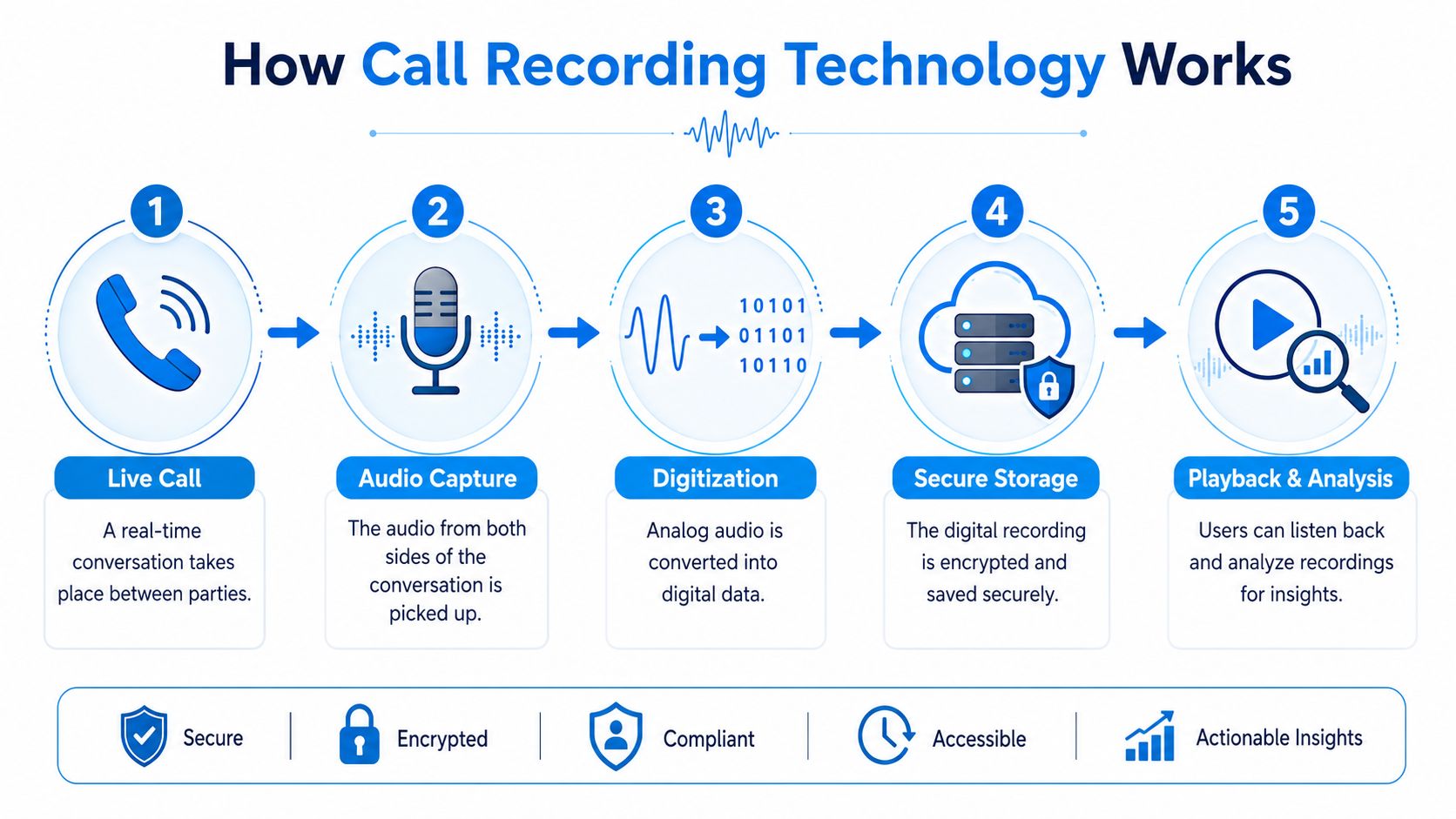
The easiest way to understand call recording is to think of it as making a digital photocopy of a conversation. The call still happens normally. The recording system creates a copy of the audio, stores it securely, and attaches useful details so you can find it later.
The three common ways businesses record calls
Older phone environments often use hardware-based recording. That usually means a physical setup connected to a legacy PBX phone system. It can work, but it tends to be less flexible and harder to scale.
Modern businesses usually prefer software-based VoIP recording. If your phone system runs over the internet, the recording software can often connect directly to it. That makes setup cleaner and removes a lot of the old hardware headaches.
Then there are mobile recording apps. These can be useful for individuals in limited cases, but they're rarely the best fit for a business that needs centralized storage, access controls, policy enforcement, and consistent compliance workflows.
Here's a simple comparison:
| Method | Best fit | Main drawback |
|---|---|---|
| Hardware-based PBX recording | Older on-prem phone systems | More equipment to maintain |
| VoIP software recording | Cloud phone systems and distributed teams | Depends on proper setup and policy controls |
| Mobile app recording | Individual use cases | Harder to manage consistently across a business |
What modern cloud recording does behind the scenes
Modern call recording systems use Session Initiation Protocol (SIP) integration to intercept and duplicate VoIP audio streams in real time, allowing direct digital capture without physical hardware. That duplicated stream is then encrypted and stored in the cloud with metadata for easy retrieval, as explained in this SIP-based call recording overview.
That sentence sounds technical, but the practical meaning is simple:
- The system captures the call automatically
- It stores the audio securely
- It tags the file with details like date, agent, and caller
- You can search and replay the conversation later
If your team uses cloud phones, this matters. You usually don't need a box in the closet to make it work.
What small businesses should check before buying
Don't just ask whether a tool records calls. Ask how those recordings fit your daily workflow.
- Searchability matters: Can you find a call by date, staff member, customer, or phone number?
- Access control matters more: Can you limit who hears sensitive recordings?
- Audio quality matters: If your staff use poor headsets, even a good recording platform won't fix muddy audio. This guide to headsets for Philippine businesses is a useful reference if you're trying to improve clarity at the front desk or in a call-heavy office.
- Oversight matters: If you're comparing recording with supervision tools, this call monitoring software guide helps clarify how the two relate.
A good setup should disappear into the background. Your staff answers calls. The system captures what matters. Your managers can review only what they need.
Unlocking Growth with Practical Use Cases
Many owners first look at call recording as protection. That's fair. But its bigger value often shows up in day-to-day improvement. You hear how work is sold, explained, delayed, approved, and recovered. That makes it an operational tool, not just a backup file.
Home services businesses
A customer calls an HVAC company and says, “I only approved the service visit, not the additional part.” Without a recording, the office has to trust memory. With a recording, the manager can review the original call, hear what the dispatcher explained, and decide whether the issue is a customer misunderstanding, a staff training gap, or a quoting process problem.
That same recording can improve the next ten calls.
For example, a plumbing owner might review five booking calls and notice that staff members describe arrival windows differently. One says “this afternoon,” another says “between one and five,” and a third says “we'll call first.” The fix isn't complicated. Standardize the script and reduce avoidable customer frustration.
A recorded call doesn't just tell you who was right. It shows you where the process broke.
Healthcare and wellness practices
In a dental clinic, the front desk handles insurance questions, cancellations, anxious patients, and follow-up scheduling all day. Those calls shape patient experience long before the appointment starts.
A practice manager can use recordings to coach a new receptionist on three practical habits:
- Slow down during insurance explanations: Patients often miss details when staff speak too quickly.
- Repeat next steps clearly: “We'll verify benefits and call you back” is better than vague reassurance.
- Use calmer language with nervous callers: Tone matters as much as information.
Healthcare offices also benefit from having a reliable record when a patient later says, “Nobody told me to bring that form,” or “I wasn't informed about the scheduling policy.” A recording won't solve every disagreement, but it gives the office something better than guesswork.
Legal and professional services
For a small law firm, intake quality determines everything that follows. If staff capture the wrong timeline, misunderstand the matter type, or fail to document a client instruction accurately, the error can spread into billing, calendaring, and case handling.
Call recording helps in three practical ways.
First, it preserves initial facts from intake calls. Second, it gives partners a way to review how staff handle sensitive conversations. Third, it creates an audit trail when a client later disputes what they authorized or when they were informed.
A simple example: a paralegal calls a client to confirm whether the firm should proceed with a filing-related step. If your policy allows recording and disclosure is handled correctly, that recording can later support the file record and help the firm verify exactly what was communicated.
The pattern across industries
The industry changes, but the business logic doesn't.
| Industry | Typical call issue | Practical use of recording |
|---|---|---|
| Home services | Quote or scope dispute | Verify what was promised |
| Healthcare | Patient communication gap | Coach staff and confirm instructions |
| Legal | Intake or authorization dispute | Preserve a reliable record |
The strongest teams don't use recordings to punish people. They use them to tighten scripts, improve consistency, and remove ambiguity from high-stakes conversations.
Navigating the Complex Legal and Privacy Landscape
Many owners assume call recording is either obviously legal or obviously dangerous. Neither view is accurate. It's operational in nature. Recording can be lawful and useful, but only if your process matches the rules that apply to your location, your customers, and your industry.
Consent rules are the first thing to understand
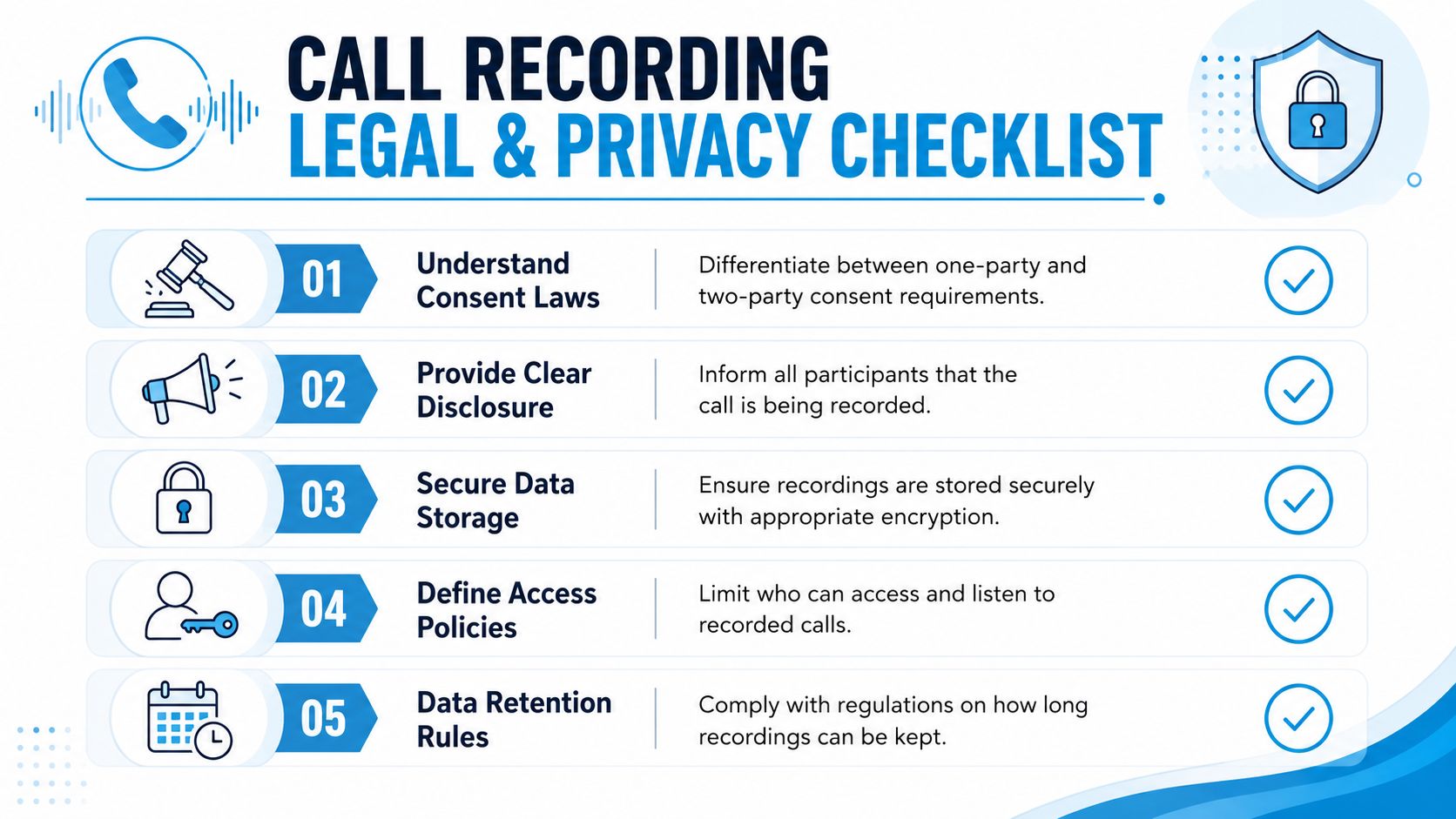
Under U.S. federal law, single-party consent applies, meaning one participant must know the conversation is being recorded. In places like Canada and Ireland, organizations must state the purpose of the recording so participants can give informed consent, and all attendees must be alerted with an audio or visual cue, as outlined in this guide to call recording laws and regulations.
For a small business owner, the practical takeaway is simple. Don't guess. Build your process around clear disclosure.
If your company handles interstate calls, mobile calls, or sensitive information, a short disclosure at the start of the call is often the safest habit. It also creates consistency across staff members, which matters just as much as the legal theory.
California deserves special caution
California is where many business owners get tripped up. In states with stringent dual-consent laws like California, liability risks are high. CIPA Section 632.7 can prohibit recording cell phone calls even if the conversation isn't confidential, and emerging 2025 data shows a 40% rise in class-action lawsuits against companies that failed to secure proper consent, particularly in home services and finance, according to this California call recording liability analysis.
That changes the way you should think about “This call may be recorded” messages.
An automated inbound disclosure helps, but it may not be enough on its own in higher-risk scenarios. Businesses should also train live agents to repeat the notice clearly and know what to do if the caller objects. If you operate in regulated fields, the same mindset that helps streamline real estate operations also applies here. Compliance only works when policies become daily habits.
Bottom line: If your staff speaks with customers on mobile phones or across state lines, treat consent as an active process, not a checkbox.
HIPAA doesn't ban recording by default
Healthcare owners often avoid recording because they think HIPAA makes it impossible. That's not accurate. Research on healthcare workflows makes the point clearly. Call recording is not a HIPAA violation by default. Compliance depends on how recordings are handled, including encryption, access controls, patient consent, and limiting unnecessary data capture. The same analysis notes that 68% of healthcare malpractice lawsuits involve undocumented or poorly recorded patient communications, which is why this HIPAA-compliant call recording discussion frames recording as risk mitigation as much as quality control.
That has real operational consequences for a clinic.
A medical office shouldn't record every line, every time, without thought. It should decide which calls need recording, who can access them, and how to avoid collecting more patient information than necessary. Manual recording may make sense for some workflows. Automatic recording may fit others. The key is intention.
Two practical safeguards that reduce risk
- Use clear agent language: Staff should know how to say the call is being recorded, why, and what happens if the caller declines.
- Document your policy: Your retention rules, access permissions, and disclosure steps should be written down and reviewed.
If you want a deeper operational checklist, this call recording compliance resource is a useful next read.
Best Practices for Deployment and Data Retention
Buying a recording feature is easy. Deploying it well takes more thought. Most problems come from fuzzy policies, uneven staff behavior, or poor data handling after the file is created.
Deployment
Start with the human side before the technical rollout.
- Tell employees what's changing: Explain which lines are recorded, why the business is recording calls, and how recordings may be used for quality review, dispute resolution, or compliance.
- Give agents a usable script: Keep it plain. “Before we continue, I need to let you know this call is being recorded.” Staff should know what to say next if the caller asks questions or objects.
- Record only what your business needs: A home services company may record customer-facing booking lines but not internal team chatter. A clinic may separate administrative calls from lines that involve more sensitive conversations.
- Test real workflows: Call your own main number, after-hours line, forwarding line, and mobile handoff paths. Make sure disclosure, recording, and storage happen as intended.
A deployment policy should also define when managers are allowed to review calls. If everyone can listen to everything, you've created a privacy problem inside your own company.
Data management
Once calls are recorded, the bigger job begins. You need to manage them like business records.
Here's a practical checklist:
- Secure storage: Use encrypted storage and avoid passing recordings around by email or personal devices.
- Role-based access: Limit playback and export rights to managers or compliance-approved staff who need them.
- Retention schedule: Decide how long different categories of recordings should stay available. Align that schedule with legal obligations and business needs, then apply it consistently.
- Access logging: Keep a record of who listened to, exported, or deleted recordings.
- Deletion discipline: Old files shouldn't sit around forever just because storage is cheap.
Store recordings with the same discipline you'd apply to signed agreements, patient paperwork, or client intake forms.
If you're refining your retention schedule, this data retention policies guide can help you translate broad policy ideas into daily practice.
The AI Advantage From Raw Audio to Actionable Intelligence
A recorded call has value on its own. But raw audio is still hard to use at scale. Nobody wants a manager spending hours replaying calls just to find one missed detail from Tuesday morning.
That's where AI changes the economics.
What AI adds to basic recording
The first upgrade is transcription. A spoken conversation becomes searchable text. That means a legal office can search for a date, a clinic can find a mention of insurance, and a home services dispatcher can locate where a customer approved Saturday service.
The next upgrade is summarization. Instead of listening to the entire call, a manager can review a concise summary of what happened, what was promised, and what needs follow-up.
Then comes analysis. AI tools can tag calls by topic, detect keywords, and flag interactions that sound tense, confused, or unresolved. That helps owners focus attention where it matters.
Why this matters operationally
Think about the difference between a file cabinet and a working dashboard. Traditional recording gives you the cabinet. AI helps organize the contents.
For example:
- Home services: Flag calls that mention cancellations, refunds, or missed appointments.
- Healthcare: Surface conversations where patients sounded uncertain about instructions or scheduling.
- Legal: Identify intake calls that contain conflict-check details, deadlines, or authorization language.
One option in this category is Recepta.ai, which combines AI receptionist workflows with conversation intelligence features such as transcription, summaries, secure call handling, and automatic logging into connected business systems. If you're comparing reporting and review capabilities, this call detail reporting guide gives a practical framework for what to look for.
AI works best when it triggers action
The ultimate payoff isn't just insight. It's response.
A call summary can create a CRM note. A flagged sentiment issue can prompt a manager callback. A captured booking detail can update a scheduling system without anyone retyping it. In healthcare settings, broader AI workflow ideas like those discussed on the ProMed Certifications AI blog are useful because they show how conversational tools can support staff rather than replace judgment.
This short walkthrough shows the shift from recording to usable intelligence:
A small business usually doesn't need more data. It needs cleaner follow-up, faster review, and fewer dropped details. AI makes recorded calls practical to use every day, not just when something goes wrong.
Frequently Asked Questions About Call Recording
Can I use a smartphone app to record business calls
Sometimes, yes technically. But that doesn't make it a strong business process. Smartphone apps can be hard to govern, easy to misuse, and difficult to audit. If your business needs consistent disclosure, secure storage, and controlled access, a centralized business system is usually the safer choice.
What's the difference between call recording and call monitoring
Call recording saves the conversation so someone can review it later. Call monitoring usually means listening to calls live, or reviewing active interactions as they happen. Many businesses use both, but they solve different problems. Recording helps with documentation and coaching over time. Monitoring helps supervisors intervene in the moment.
Should every call be recorded
Not always. The better question is which calls should become part of your business record. Customer booking lines, intake calls, dispute-prone conversations, and training-heavy workflows are common candidates. Internal chatter and highly sensitive discussions may require a different policy.
How much does call recording cost
Pricing varies widely by phone system, storage model, compliance requirements, and whether you want AI features like transcription and summaries. Basic recording is usually cheaper than a full conversation intelligence stack. The key is to evaluate total operating value, not just the line-item feature price.
What should I do first before turning it on
Check your consent requirements, write a simple policy, decide which lines to record, create staff scripts, and test retrieval before you rely on recordings in a real dispute. If you can't quickly find, secure, and manage a recording, you're not ready yet.
If you want to turn call recording into something more useful than a saved audio file, Recepta.ai is one option to explore. It combines AI receptionist workflows, call summaries, logging, and conversation handling so small businesses can capture interactions, route them properly, and keep cleaner records without adding more manual admin.