
Virtual Assistant for Lead Generation: A Setup Guide
In 2024, only 37.8% of calls to small businesses were answered live, based on a study of 85 businesses across 58 industries conducted by 411 Locals (Missed Call Math). The rest met a voicemail box, a ring-out, or a receptionist already tied up with the customer standing in front of her. That single number explains why so many owners go shopping for a virtual assistant for lead generation, and why so many of them end up disappointed: they buy an answering service when what they need is an intake system with a deadline attached.
A virtual assistant for lead generation only pays for itself when three things are true. Every inquiry gets a response inside five minutes, a person takes over at the exact moment judgement matters, and somebody can prove both from the record afterwards. That's a build sequence, not a purchase order. The order below is the one I'd use: targets first, then scripts and routing, then qualification and handoff rules, then the CRM wiring, then follow-up, then measurement, then a 30-day pilot on a single lead source.
Lead Response Targets to Build Against
The numbers your assistant has to beat come from a 2021 study of more than 55 million sales activities tied to 5.7 million inbound leads across more than 400 companies (InsideSales). Only 0.1% of inbound leads were engaged within five minutes, and 57.1% of initial call attempts happened more than a week after the lead arrived. Conversion rates were reported to be eight times higher when a lead was contacted within five minutes than when contact was delayed past that window.
Read that as a coverage problem, not an effort problem. The same crew that ignores a web form at 9 p.m. answers the phone at 9 a.m. In home services, healthcare, legal work and insurance, the prospect is often contacting three providers in one evening, and the one who replies first gets the consultation. The assistant exists to close the coverage gap so your staff can keep doing the work that needs them.
Write this on the target page: five-minute automatic first touch on every inbound lead, 60-minute escalation to a person if the assistant can't finish the job, and a failure alert on anything still unanswered after 24 hours.
Here are the three windows worth setting as targets, each with the build action it forces.
| Response timing | Reported effect | What to build |
|---|---|---|
| Within 5 minutes | About 100x higher odds of contact and 21x higher odds of qualification than a 30-minute wait | Automatic first touch on every inbound lead |
| Within 1 hour | Nearly 7x more likely to qualify a lead than responding after another hour, across 1.25 million leads | Escalate any lead not contacted within 60 minutes |
| After 24 hours | More than 60x less likely to qualify a lead than a one-hour response | Treat as a failure alert in weekly reporting |
Then pick the six numbers you'll report every Monday: median first-response time, contact rate, qualification rate, booked-appointment rate, show rate, and revenue per lead by channel. Reporting only booked appointments hides the leads the assistant never reached, which is exactly where a practical approach to increasing qualified leads starts, with the count you spoke to rather than the count you booked.
An HVAC company taking 40 leads a week in July, many of them after 6 p.m., should spend its first hour counting how many evening form fills got a text inside five minutes before anyone writes a word of script. The answer is usually worse than the owner expects, and it tells you whether the problem is coverage, follow-through, or both.
Put the three targets and six metrics on one page. Every later decision, from menu depth to escalation thresholds, gets checked against that page.
How to Set Up Scripts, Menus and Routing
A virtual assistant for lead generation works only when each inquiry reaches the right person or calendar. Set the routing logic before polishing the script: capture the lead's timestamp, source, consent and contact details; validate and deduplicate the record; respond by phone, SMS or email; ask the required intake questions; then qualify and route the opportunity. Record the transcript, disposition, next action and follow-up deadline in the CRM so the sales team can see what happened and what remains to be done.
Speed matters, but this section is about turning that target into a dependable path. Contacting a lead within five minutes produced roughly 100 times higher odds of contact and 21 times higher odds of qualification than waiting 30 minutes, based on more than 15,000 leads. A Harvard Business Review analysis of 1.25 million leads across 42 U.S. companies found that a response within one hour made firms nearly seven times more likely to qualify a lead than a response after another hour, and more than 60 times more likely than waiting at least 24 hours, as Voiso's lead-response metrics breakdown sets out. Set a response trigger, a fallback owner and a clear handoff rule before launch.
From Greeting to Routing in Six Steps
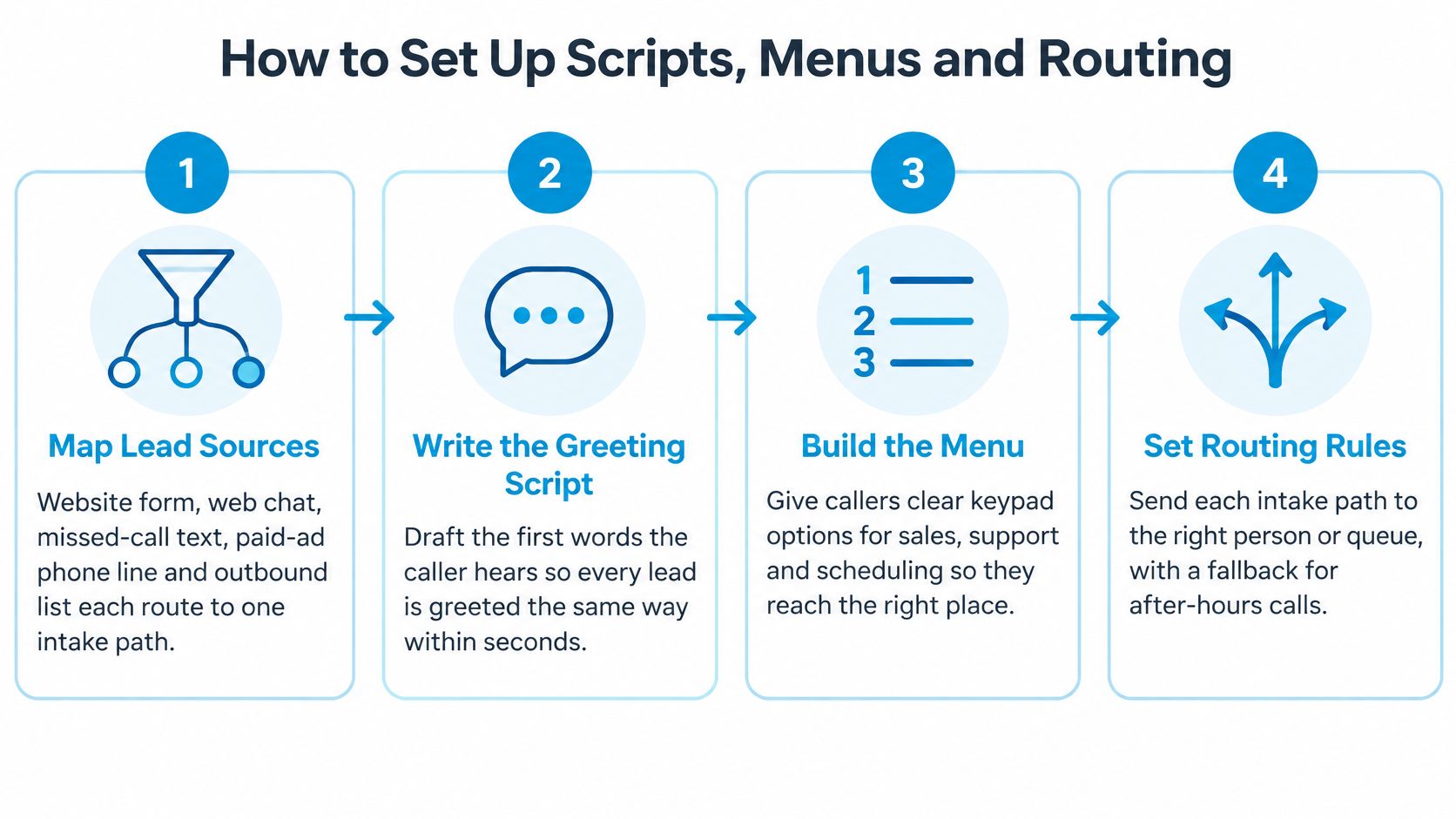
Map each source to an intake path. Website forms, web chat, missed-call texts, paid-ad phone lines and outbound lists should capture the same core details. Keep the source attached to each record, so you can see which channel produced the opportunity. Avoid shortcuts that send one source directly to an individual inbox, where it can sit without a clear owner.
Write the greeting in three parts. State the business name, explain briefly what the assistant can do, and give the recording and consent notice before collecting personal data. If the notice comes after someone shares an address or case details, the sequence is already wrong. Keep the opening short enough that callers can understand what to do next.
Limit the menu to three clear options. For a home service business, that might be 1 for an active emergency, 2 for a quote, and 3 for an existing customer. Send emergencies to a live person, not voicemail. Filter spam before the menu so unwanted calls do not take up a caller's time. For more on setting up small-business call routing rules, define who owns each option and what happens if that person is unavailable.
Ask questions that make the lead actionable. A plumber may need the service address or zip code, problem type, whether water is running, and a preferred appointment window. A law firm may need the practice area, incident date and any deadline. Add business-specific questions, such as a case number, car model or project timeline, where they help the team assess the request. A name and phone number alone rarely give the next person enough context to act.
Set routing rules before connecting calendars. Specify which team owns each service area, what happens when a lead is outside the coverage area, and which qualified prospects should be offered a consultation or quote request. For new leads, capture and qualify each opportunity, then route it to the sales team. Keep the rule simple enough to audit: if the lead meets the customer's criteria, send it to the assigned team or calendar; otherwise, record the reason and set the next action.
Test the full path with scripted calls. Check the greeting, consent notice, handoff timing and destination for each record. Include callers who stay silent, interrupt the prompt or give an out-of-area zip code. Confirm that the system records what happened and assigns a next step, rather than merely ending the call. Fix routing errors before connecting more lead sources.
"Thanks for calling Maple Plumbing. I'm the automated assistant. This call may be recorded, and I can take your request now. Press 1 for an emergency, 2 for a quote, or 3 for an existing job."
Keep the approved script and routing table in one shared document. When a caller challenges what they were told, the team needs one current version to check, not several competing copies.
Qualification Questions and Escalation Triggers by Industry
Qualification is a decision system, not a conversation. Start with a schema per vertical: service type, serviceable area, urgency, property or case details, insurance or budget, appointment window. Run the binary facts through plain rules first (zip code served, phone number valid, no duplicate record, consent captured), then score the answers that need judgement. We screen leads against the customer's own criteria so fit is decided immediately, and the criteria are the part you have to write down.
Consumer evidence points the same way. In the survey Emplifi reported, 71% of consumers were satisfied with AI-assisted support, yet 56% still preferred human support and only 25% preferred AI-only (Emplifi). Among the group that wanted a person, 60% cited personalized interaction against 26% who prioritized faster resolution. That isn't an argument against automation. It's an argument for routing by stakes.
Where automation should stop: the moment the answer could cost the caller money, health or legal standing, or the moment they need to feel heard.
Where Each Industry Needs a Person
Escalation triggers worth copying into any build: emotional distress, complex pricing questions, medical or legal sensitivity, ambiguity that survives two attempts, a repeated misunderstanding, high-value opportunities, and any request for an exception. Write them as hard rules, not as vibes the assistant is supposed to sense.
| Industry | Qualifying fields to capture | Hand off to a human when |
|---|---|---|
| Home services (HVAC, plumbing, pest control) | Service type, zip code, urgency, property type, preferred time window | Active leak, gas smell, no heat in winter, or a quote above your approval threshold |
| Residential and commercial cleaning | Home or office, square footage, cleaning frequency, access details | Commercial contract requests or pricing exceptions |
| Healthcare and dental | New or existing patient, insurance carrier, reason for visit, preferred provider | Symptoms described, pain or urgent care needs, billing disputes |
| Legal | Practice area, case number, incident date, opposing party, deadline | Any mention of a deadline, a statute question, or emotional distress |
| Insurance and finance | Policy type, current carrier, renewal date, coverage needs, budget range | Coverage advice requests, claims in progress, complex pricing |
| Franchise and multi-location | Location, service line, capacity, decision authority | Franchisee or corporate-level requests, territory conflicts |
A dental office shows how the split works in practice: a routine cleaning request can finish inside the assistant, while a caller who says a tooth broke this morning goes straight to a receptionist. Our hybrid setup runs on the same line, with AI handling the high-volume routine conversations and trained agents taking the complex ones.
Measure the handoff itself, not just the lead. Track transfer rate, abandonment after transfer, time to human contact, qualified-lead rate after escalation, and revenue per assisted lead. If your sales side wants the scoring half in more depth, how SDR teams score prospects faster covers the model and the cutoffs behind it.
Connecting the Assistant to Your CRM and Calendar
The calendar is where a lead becomes revenue, and it's where integrations fail without notice. Nobody notices a broken field mapping until a report at month end disagrees with the schedule, and by then three weeks of follow-up have gone to the wrong person.

Build the connections in this order.
- Name one source of truth for contacts and one for appointments. Write both down before anyone builds a connection. When two systems both claim the client record, the assistant's transcript and the sales team's note end up in different places.
- Connect the calendar first. A booking that exists only in a chat log isn't a booking, and the person who shows up expecting a technician will disagree with you.
- Connect the CRM second, so every lead writes a complete record using the fields below.
- Connect the triggers last, so the next action and follow-up deadline create real tasks instead of sitting in a field nobody reads.
| Field | Written when | Why it matters |
|---|---|---|
| Timestamp and lead source | At capture | Measures speed-to-lead by channel |
| Consent status | Before any follow-up message or recorded call | Required before SMS or outbound calls |
| Duplicate check result | At validation | Stops two staff members calling the same prospect |
| Qualification score and answers | After intake questions | Shows which leads reached sales and why |
| Call transcript and disposition | End of each interaction | Lets staff review handoffs and mistakes |
| Booked slot and calendar ID | When an appointment is confirmed | Prevents double-booking |
| Next action and follow-up deadline | At handoff or booking | Drives the follow-up sequence in the next section |
Here's the workflow behind those fields, from a booking through to the record it leaves behind.
What to Verify Before Go-Live
Test with a fake booking. Confirm it appears on the correct calendar, check that the CRM record holds every field, then cancel it and confirm the slot reopens for anyone else. Then test duplicates by submitting the same phone number through two channels and checking that only one record is created.
A franchise with three locations shows why the mapping matters. Map each location calendar to the zip codes it serves, and a booking from a covered zip lands on the right technician's schedule with the local manager seeing the lead under their own record. Confirmed appointments go straight onto the business calendar and trigger the follow-ups, and depending on setup the assistant can also book and modify appointments in scheduling tools, update CRM or practice management records, and raise follow-up tasks.
The plumbing between phone system and CRM deserves the same care as the fields themselves, which is why CRM telephony integration is worth reading before you hand the build to anyone. Keep a change log of every field mapping. A renamed CRM field is the most common reason a report stops matching reality.
Follow-Up Sequences and Sample Messages
Most leads don't book on the first attempt, and the ones who don't book are usually the ones nobody chased. Mailshake's compilation of sales statistics reports that email sequences of four to seven messages achieve a response rate three times higher than sequences of one to three, and that a follow-up can still earn replies well after the first message, including a reported 7% response rate on the tenth email in one study.
Here's the cadence I'd start with for a home services or legal lead.
| Timing | Channel | Message purpose | Stop when |
|---|---|---|---|
| Immediately | SMS or email | Confirm the request and name the next step | Lead replies or books |
| Same day, two hours later | Outbound call | Qualify the lead or offer a consultation slot | Appointment booked |
| Day 2 | SMS | Send the booking link and one qualifying question | Lead replies |
| Day 4 | Request required documents or photos | Documents received | |
| Day 7 | Call | Final check-in with a same-day slot offer | Lead books or declines |
Follow one lead's week. Someone requests a water heater quote on Sunday night and books nothing. Monday brings the two-hour call; Tuesday brings the choice of times; Thursday brings the ask for a photo of the unit so the technician arrives with the right part; the following Sunday brings one last offer.
"Hi, this is Maple Plumbing's assistant. Thanks for your water heater request. Reply 1 for a Tuesday morning visit or 2 to talk with our team."
A law firm version is quieter: an immediate confirmation, then a short email listing the three documents needed for a consultation with a single booking link, then a reminder for the one document still missing. One ask per message, always.
Every message ends the sequence the moment the lead replies, books or opts out, and all reminders stop the same day someone opts out. We place outbound calls for booking, confirmations, reminders and follow-ups from your lists and instructions, and messaging can be triggered by new leads, missed calls, upcoming appointments or lifecycle milestones as you configure them. Before you add a fifth email, test email deliverability so the later messages land in an inbox rather than a spam folder.
If you want the wider playbook, lead follow-up best practices covers the cadence choices behind these numbers.
Tracking Results, Compliance and Optimization
Measurement and compliance check each other. A sequence that looks productive can still break consent rules or stuff the sales team with leads that never belonged there, and you find out either way by looking at outcomes rather than at conversation volume.
Set expectations with benchmarks first. Belkins' pipeline conversion benchmarks place median conversion at roughly 11–20% for early stages such as lead-to-MQL, MQL-to-SQL and SQL-to-opportunity, while nearly half of surveyed teams report lead-to-MQL conversion below 11%. Those figures are directional, because market, source, offer and qualification definitions differ from one business to the next.
Run this routine monthly.
- Sample 20 leads marked qualified and compare them with what sales accepted. Fix the rule behind every mismatch, not the individual record.
- Hold out about 20% of traffic through the old process and compare qualified-lead rate, sales-accepted rate, appointment completion and cost per qualified lead.
- Keep a timestamped event log for each classification and handoff, so any call can be audited months later.
- Recheck compliance before go-live and quarterly: consent captured before messages and recorded calls, opt-outs stopping automation, retention limits set, transcript access restricted by role. For healthcare, confirm a business associate agreement is in place if protected health information is involved. For legal and insurance intake, write down what the assistant may say about cases or coverage, and block the rest.
Optimize by vertical, not by brand average. Home services should tighten the emergency menu first. Franchises should compare response time location by location. Clinic intake should shorten whichever questions are causing abandonment. And if nine of your 20 sampled "qualified" leads turn out to be duplicates, fix the duplicate check before you touch a single script line.
Launch a 30-Day Pilot on One Lead Source
Pick one source and run a 30-day pilot before changing anything else. The website form or the after-hours missed-call line are the usual candidates, because both fail in ways you can measure quickly.
- Week one: measure the baseline. Record the current median response time and the share of leads reached within five minutes. No baseline means no decision at the end.
- Week two: build the path. Apply the intake path, script, routing and handoff rules, then run the 20 scripted calls before anything touches a real lead.
- Week three: go live with a holdout. Keep roughly 20% of leads on the old process so the comparison stays honest.
- Week four: compare and decide. Qualified-lead rate, sales-accepted rate and cost per qualified lead, then expand, adjust or stop.
Write the stop rule before week three, not after a bad week. Something like: pause the pilot if handoff abandonment rises above the level measured in week one. That keeps the decision on data instead of on how good the demo sounded.
Bring three things to the first planning meeting: your response-time target page, the three questions your leads ask most often, and your escalation list. The build then starts from your numbers rather than from a blank script and someone's memory of how calls usually go. If you'd rather see the system before you build one, our pricing conversation starts with a 15-minute call where you describe your call volume, your hours and what a great customer experience looks like, and you hear the AI live on that call.
Recepta.ai handles the calls, chats and texts your team can't reach, qualifies each lead against your own criteria, and puts confirmed appointments on your calendar with the follow-up already triggered. It blends conversational AI with trained human agents, so routine intake runs at any hour while the sensitive conversations still reach a person. Visit Recepta.ai to hear how it sounds on a call like yours.