Mastering Reporting Compliance: Your 2026 Guide
You get the email at 4:42 p.m. A payer wants documentation for a disputed claim. A regulator asks for call logs, policy acknowledgments, and proof of follow-up. A client wants a copy of the intake trail that led to a decision. Your team knows the information exists somewhere, but it lives across phones, inboxes, sticky notes, a scheduling app, and one spreadsheet nobody fully trusts.
That is what reporting compliance looks like in practice for most small and midsize businesses. It's rarely a dramatic legal event at first. It starts as a scramble for records.
For a dental office, that scramble may involve appointment confirmations, patient communications, and who accessed what information. For a law firm, it may be client intake notes and timestamped contact history. For an HVAC company, it may be proof of customer authorization, dispatch records, and safety documentation. The details differ by industry, but the pattern is the same. If you can't produce a reliable record quickly, you've already lost control of the moment.
Why Reporting Compliance Is Your Business Lifeline
A lot of owners think compliance reporting is a back-office task. It isn't. It's your business's memory under pressure.
When a request lands, nobody cares that your team was busy, short-staffed, or in the middle of switching software. They want a clean record. They want dates, names, actions taken, and proof that your controls worked. If you can provide that in one package, the conversation is manageable. If you can't, every follow-up gets more expensive.
Hyperproof notes that regulatory compliance and federal intervention cost the U.S. economy about $1.9 trillion annually, that U.S. businesses spend an average of $10,000 per employee on regulatory costs, and that structured CEO- and board-level reporting on compliance efforts and issues saved businesses an average of $1.08 million (Hyperproof compliance statistics). That's why reporting compliance isn't just paperwork. It's cost control and risk control.
A practical way to think about it is this. Compliance reporting is the difference between saying, “We believe we handled that correctly,” and saying, “Here is the timeline, here is the owner, here is the record, and here is the sign-off.”
Practical rule: If your team needs more than one afternoon to assemble a defensible answer, your reporting process is too fragile.
Healthcare-adjacent businesses see this quickly around billing and communication records. If you manage reimbursements, intake, or patient-facing admin, these compliance insights for billing leaders are useful because they highlight how operational details turn into compliance exposure when records are incomplete.
The same principle applies to frontline communications. A proper call detail reporting system can turn phone interactions from informal activity into usable documentation. That matters because many disputes begin with what was said, when it was said, and whether anyone can prove it later.
What the scramble usually looks like
Most businesses don't fail because they ignored compliance entirely. They fail because they relied on habits instead of a system:
- Calls were answered, but not logged. The team remembers the conversation, but the record is thin.
- Notes were taken, but not standardized. One employee writes full summaries. Another writes two words.
- Documents were stored, but not linked. You have the files, but not the trail connecting them.
That's why reporting compliance is a lifeline. It preserves order when someone outside your business asks hard questions.
The Core Components of Reporting Compliance
Think of reporting compliance like a building security system. The cameras capture events. The footage is stored. The access log shows who viewed what. The alarm panel records changes. If any one of those pieces is missing, the story breaks.
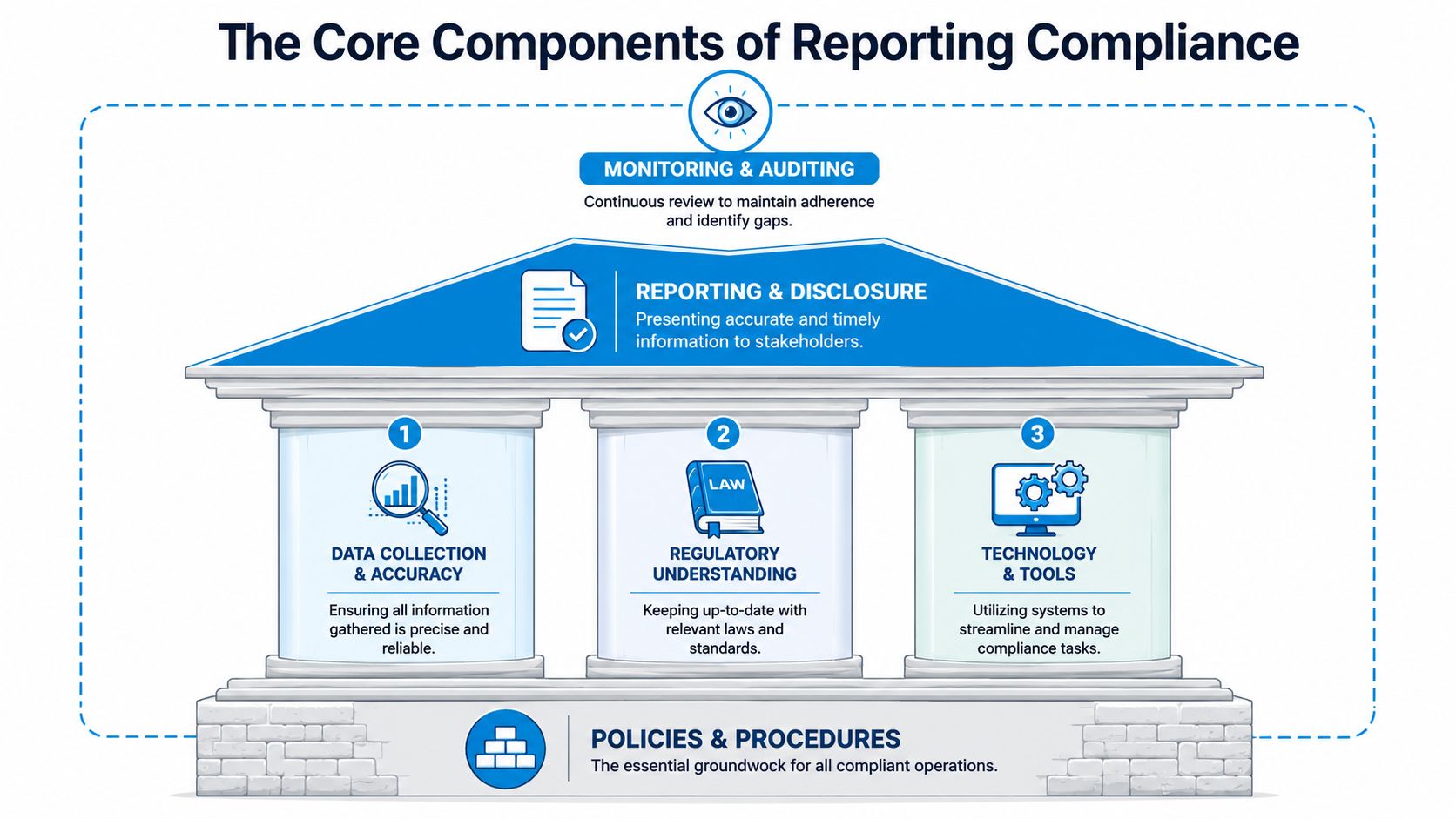
In practice, reporting compliance has four parts. First, you need accurate capture. Second, you need retention that preserves the record. Third, you need an audit trail that shows what changed and who changed it. Fourth, you need controlled access so sensitive information doesn't float around the organization.
What auditors and regulators actually look for
A compliant report is not a summary memo. It is a structured evidence package. Optro describes that package as including control status, open findings, remediation owners and timelines, risk-rated exceptions, KRIs or KPIs with trend data, prior-period comparisons, third-party status, cost of compliance, and for regulator-facing reports, scope, methodology, exclusions, attestation language, and sign-off signatures (Optro compliance reporting guide).
That sounds enterprise-heavy, but the logic applies to small businesses too. Your version might be simpler, but it still needs the same bones.
For example, if you run a clinic, your evidence package for a communication workflow might include:
- Control status: Are appointment reminder scripts approved and in use?
- Open findings: Did anyone identify missed consent logging last month?
- Remediation owner: Who is fixing that gap, and by when?
- Exceptions: Which interactions fell outside process?
- Attestation: Who reviewed the report and approved it?
Good reporting compliance answers three questions fast: what happened, who approved it, and what you did about exceptions.
The minimum system most SMBs need
If you're not sure where to start, build around these essentials:
- Data capture at the source: Log the call, text, intake form, appointment action, or service update where it happens.
- Consistent record format: Use one template so every employee records the same core fields.
- Secure storage: Keep records in a system with permissions, not scattered across devices.
- Reviewable change history: If someone edits a note or closes an issue, that change should be visible.
- Role-based access: Front desk staff, managers, and owners should not all see the same thing by default.
Teams that are tightening reporting compliance usually discover that their real weakness isn't intent. It's inconsistent handling of sensitive data. That's why it helps to align your process with practical data security best practices before you start polishing reports.
Reporting Compliance in Your Industry
Generic advice breaks down fast. Reporting compliance only becomes useful when it maps to the work your staff already does every day.

Healthcare and wellness practices
A dental office usually feels the pressure first around communications. A patient says they were never told about a schedule change. Another disputes whether they gave consent to receive reminders a certain way. The office manager opens three systems and a personal text thread to reconstruct the timeline.
A stronger process logs every appointment confirmation, cancellation, callback, and message attempt in one standard format. The useful fields are simple: patient identifier, communication channel, timestamp, staff member or system handling the contact, outcome, and any escalation. If a message contains sensitive information, the note should record the event, not copy unnecessary details into open text.
That gives the practice a defensible record without forcing staff into long manual writeups.
Law firms and professional services
Law firms have a different problem. Intake often happens before a formal engagement, which means the first call can be operationally important and legally sensitive at the same time.
A practical reporting compliance workflow for a law office captures when the prospect contacted the firm, what matter type they described, whether any conflict check was triggered, who handled the intake, what disclaimers were given, and whether the matter was accepted, declined, or escalated. If a client later says, “Your office told me X,” the firm needs more than memory.
For firms that handle regulated financial matters, it also helps to study broader thinking around internal controls for financial institutions, because the discipline of evidence, approvals, and exception tracking applies well beyond banks.
Home services and field operations
An HVAC company, plumbing business, or restoration firm faces reporting compliance in a more physical setting. The issue is often consent and execution. Did the customer approve the visit? Was a safety check completed? Did the dispatcher note a hazard? Was a follow-up promised?
A weak operation relies on technician memory and ad hoc texts. A stronger one creates a service record tied to the original call and updates it at each step: booking, dispatch, arrival, work performed, customer acknowledgment, and any unresolved issue.
That's especially important when the first contact happens by phone after hours. A documented financial answering service workflow shows the broader value of structured intake and message handling in regulated environments, even if your own business is in another service category.
The industry changes the vocabulary. It doesn't change the rule. You need a record that survives scrutiny from someone who wasn't in the room.
Your Practical Implementation Checklist
Most reporting compliance projects fail because they start with software instead of process. Buy tools later. First decide what record you need, who owns it, and how it moves.
Flagright emphasizes that data standardization is a critical technical step. Without standardized templates and automated cleaning rules for data aggregated from multiple systems, inconsistent formats can undermine the accuracy and auditability of compliance reports (Flagright on data standardization for compliance reporting).
Start with the record, not the report
Before you think about dashboards, decide what every interaction must capture. For most SMBs, that baseline includes:
- Who: Customer, patient, client, or vendor identifier
- When: Date and time of the interaction
- Where: Phone, text, web form, email, in person
- What happened: Reason for contact and outcome
- Who handled it: Staff member, contractor, or system
- What changed next: Follow-up, escalation, approval, closure
If one team uses “callback requested” and another uses “follow up later,” your reports will look messy because your records are messy. Standardized labels matter more than people expect.
Build a repeatable operating rhythm
Use a checklist that your staff can follow. If it takes too long, they'll work around it.
| Phase | Action Item | Why It Matters |
|---|---|---|
| Data Capture | Define required fields for every call, text, form, and service update | Missing fields create gaps you can't fix later |
| Standardization | Use one naming convention, one date format, and fixed status labels | Consistency improves accuracy and auditability |
| Data Review | Check records for missing entries, duplicates, and obvious mismatches | Small errors become reporting failures if nobody catches them |
| Retention | Set storage rules by record type and keep them in one policy | Teams need to know what stays, where, and under what controls |
| Access Control | Limit who can view, edit, export, and approve records | Broad access raises privacy and integrity risk |
| Exception Handling | Define what counts as an exception and who resolves it | Unclear ownership leaves problems open |
| Reporting Cadence | Schedule weekly operational reviews and periodic formal sign-off | Review turns raw data into controlled evidence |
| Audit Trail | Make sure edits, approvals, and status changes are logged | You need a defensible history, not just a final version |
What to do in the first month
Don't try to redesign everything at once. Tighten the highest-risk workflow first.
- Pick one interaction type. Start with intake calls, appointment changes, billing contacts, or field service authorizations.
- Create the template. Limit it to the fields people need to complete every time.
- Assign one owner. Someone has to review exceptions and incomplete records.
- Run a weekly spot check. Look for blanks, duplicates, and vague notes.
- Document the retention and access rule. Staff shouldn't guess where records belong.
A lot of businesses also need to clean up how documents and conversation records connect. If your teams struggle with what has to be written down and how complete the file should be, these documentation requirements for operational records are a useful reference point.
Field-tested advice: If staff can't complete the record in under a few minutes during normal work, the design is wrong. Simplify the form before you blame the team.
Common Reporting Compliance Pitfalls to Avoid
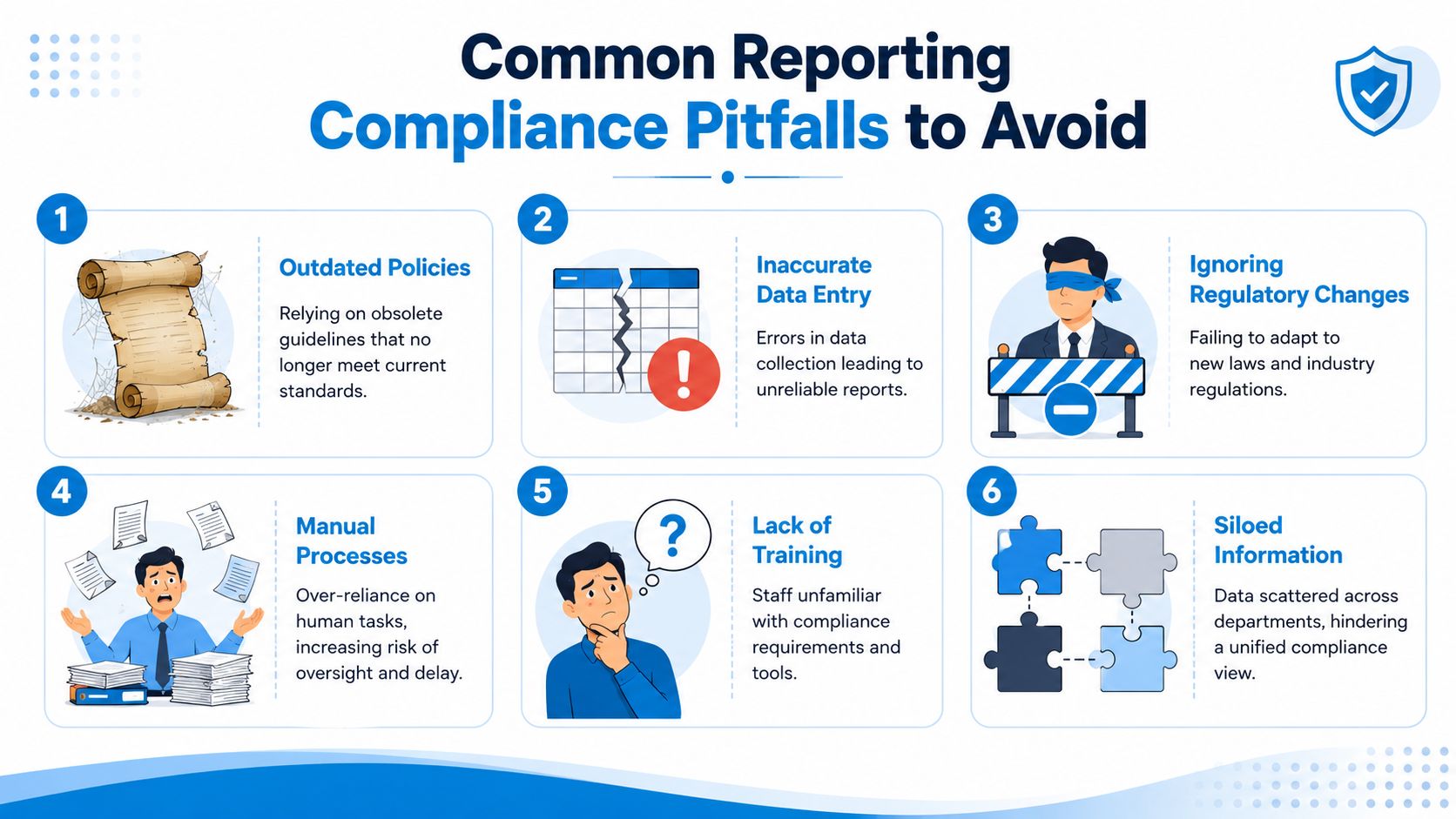
Bad reporting compliance usually doesn't come from one dramatic failure. It comes from a series of shortcuts that look harmless until someone asks for proof.
The mistakes that create the most pain
The first is siloed information. Your scheduler has one version of the story, your front desk has another, and your owner has a spreadsheet export from last quarter. That is not a reporting system. It is scattered memory.
The second is set-and-forget policy writing. Businesses write a retention rule once, then never revisit it after adding a new phone provider, CRM, or chatbot. The policy still exists, but the workflow moved on.
The third is overbroad access. Many small businesses give too many people view and edit rights because it feels convenient. Then nobody can tell whether a record was corrected appropriately or imperceptibly rewritten.
Automation helps, but it also creates new failure modes
This is the part many vendors skip. Automation reduces manual effort, but it doesn't eliminate accountability.
Cube Software points out that automated data feeds can introduce errors, stale data, or duplicates, and organizations still remain responsible for certifying the accuracy of submitted information, which means human review, exception handling, and clear data lineage are still critical (Cube on compliance reporting automation risk).
Here's what that looks like on the ground:
- A CRM sync maps the wrong field. Now every report carries the same quiet error.
- A missed integration update leaves stale records in place. Staff trust the dashboard, but the source is old.
- An AI summary sounds plausible. Nobody checks the underlying transcript or original note.
That doesn't mean avoid automation. It means design controls around it.
If an automated workflow can create a record, someone should own the rule for reviewing exceptions, stale entries, and mismatched source data.
What to fix before the next audit request
Use this short test:
- Can you explain where each report field comes from?
- Can you show who approved corrections?
- Can you identify records created or edited by automation?
- Can you restrict exports of sensitive information?
If the answer is no to any of those, tighten the process now. Practical checklists such as Paradigm International's compliance advice are helpful because they focus on operational mistakes teams make before those mistakes become formal compliance issues.
How AI Receptionists Ensure Compliant Reporting
At 7:12 p.m., a prospective client leaves a voicemail, then sends a text with different details, then fills out a web form before your staff returns in the morning. If those three contacts land in three places, reporting starts with gaps. An AI receptionist helps close that gap by turning first contact into a consistent, traceable intake record.
For small and mid-sized businesses in regulated fields, that matters more than the call-answering feature. Its core value is disciplined intake. Phone calls, texts, and web inquiries can be captured in one workflow with timestamps, summaries, routing history, and follow-up status attached from the start.
That creates a better reporting trail and a better control environment. Guidance discussed by SHVS points to a broader expectation: businesses and public programs need reporting systems that are fair, explainable, and accessible, with more than one reporting channel and review of the workflow itself for bias or uneven impact (SHVS on fair and accessible reporting systems).
What an AI receptionist should do for compliance
A useful system should do more than answer and summarize. It should help your team produce records that hold up when someone asks what happened, when it happened, and who touched the record after intake.
Look for these basics:
- Standardized capture across channels so phone, text, and web submissions follow the same required fields
- Timestamps and routing logs so you can show when the contact came in and where it went next
- Role-based access controls so sensitive details are visible only to the right staff
- Exception handling so unclear, high-risk, or incomplete interactions are routed to a human
- A single intake record so staff are not rebuilding the same story from voicemails, inboxes, and sticky notes
The trade-off is straightforward. More automation gives you cleaner intake and fewer missed records. It also means you need tighter rules for what the system is allowed to capture automatically, what it must escalate, and who reviews edge cases.
That matters in day-to-day operations. A legal office may want the system to capture matter type, urgency, and conflict-check triggers, but never make judgment calls about legal merit. A clinic may want after-hours patient messages logged and routed, but anything with symptoms, medications, or distress signals should be flagged for staff review. A home service company may want emergency calls turned into dispatch-ready records, with every reschedule and customer callback logged automatically.
Visible handoffs are part of the control. If the AI receptionist logged the initial request and a staff member later changed the outcome, the record should show both actions clearly.
Here's a product walkthrough that makes that idea more concrete.
Where this works well and where it doesn't
AI receptionists fit structured interactions well. Appointment requests, intake screening, service authorizations, reminders, and routing usually benefit from automation because the required fields are known in advance.
They are a poor fit for situations that depend on judgment, context, or careful interpersonal handling. Complaints with legal exposure, complex fact patterns, distressed patient conversations, and any issue that could trigger mandatory reporting still need a trained person involved early.
Recepta.ai is one example of this category. It combines conversational intake with logging, summaries, and downstream integrations that can support recordkeeping. That can help if your compliance problem starts with missed calls, inconsistent note-taking, or scattered communication logs. It does not replace policy, review, or approval. It gives you a cleaner intake layer to build those controls on top of.
Developing Your First Reporting Compliance Policy
A reporting compliance policy doesn't need to be long to be useful. It needs to be clear enough that staff know what to capture, where to store it, who can access it, and when someone reviews it.
Use this simple draft and customize it.
Basic policy template
Policy purpose
This policy defines how the business captures, stores, reviews, and reports operational records required for legal, regulatory, contractual, and internal governance purposes.
Scope
This policy applies to all covered interactions, including phone calls, text messages, web forms, emails, appointment changes, service records, billing contacts, and internal escalations related to customer, patient, client, or vendor activity.
Data handling procedures
All covered interactions must be recorded in the approved system of record using the required template fields. Records must include date and time, interaction channel, responsible handler, outcome, and any required follow-up. Sensitive information must only be stored in authorized systems with role-based access.
Access and editing
Only authorized personnel may view, edit, approve, export, or delete records. Material changes to records must be traceable through an audit log or equivalent change history.
Review schedule
Operational owners will review exception items on a recurring basis. Management will review reporting outputs and unresolved findings on a defined schedule and document sign-off.
Policy owner
Name:
Role:
Effective date:
Review date:
Keep the first version simple. A policy that your team follows beats a polished document nobody uses.
If your reporting compliance process breaks down at the first phone call, Recepta.ai is worth a look. It helps businesses capture calls, texts, and intake activity in a structured way so teams have cleaner records, clearer follow-up trails, and fewer manual gaps to fix later.