Interaction History: Capture, Sync, and Turn It Into Revenue
Tuesday morning starts the same way at too many shops and clinics. The phone rings, the dispatcher is already on a job, a caller lands in voicemail, and by lunch nobody can say who called, what they needed, or whether a follow-up was promised. That's how a real opportunity disappears, not because the team didn't care, but because the business had no usable interaction history to hold the story together.
The fix is rarely “hire more people.” It's building a record of every call, SMS, appointment, and handoff so the next person can act fast with context. Once that record is tied to the live CRM and calendar, missed calls stop being dead ends and start becoming recoverable revenue.
The Call You Didn't Know You Lost
The lost call usually doesn't feel dramatic in the moment. A homeowner calls about a broken AC unit, the front desk is busy, and the message gets routed to a generic inbox. By the time someone checks it, the caller has already hired the shop that answered first and booked the visit.
I've seen the same pattern in dental offices, law firms, and multi-location service businesses. The issue isn't just speed, it's the absence of a retrievable interaction record that tells the team who the caller was, what they asked for, and what happened next. Without that, a callback is guesswork, and guesswork is where revenue leaks.
A real operational record also keeps teams from double-handling the same person. If one staff member already confirmed a visit, another shouldn't call and ask the same questions again. That's how customers end up repeating themselves, which creates friction, wastes labor, and makes the business look disorganized.
The strongest systems treat every contact as part of a chain, not a one-off event. That chain needs names, timestamps, channel details, outcomes, and follow-up status so the next touchpoint can pick up cleanly. If a team can't reconstruct the last interaction, it doesn't really have interaction history, it has scattered notes.
Practical rule: if a missed call can't be turned into a same-day callback with context, the business is treating intake like voicemail, not like pipeline.
The difference shows up quickly in the field. A dispatcher who can see the caller's last appointment, the recorded reason for contact, and the promised next step can make a direct, useful callback instead of starting over. That's the point of this whole topic, not storage for its own sake, but a working memory for the business.
What Interaction History Actually Means
Interaction history is a time-stamped, immutable record of contact events tied to a customer, account, or case. That can include an inbound call, an outbound callback, an SMS, a chat, an email, a booking, a reschedule, or a follow-up note, as long as each event is linked to the live record that matters operationally. Oracle's CRM model is useful here because it treats an interaction as a timed entity with an outcome and result, and once it's closed, it becomes a historical record rather than something people casually rewrite later. (Oracle CRM interaction record model)
A flight's black box is not a passenger list. A passenger list tells you who was present. A black box tells you what happened, in what order, and what conditions led to the outcome. That's what makes the record useful for coaching, recovery, compliance, and follow-up.
The practical difference from a static call log is simple. A call log says a call happened. A usable interaction history says who called, which channel they used, which agent or queue handled it, what was promised, whether a transcript or recording exists, and whether the case is still open. That extra context is what makes the record actionable instead of archival.
For teams building outbound workflows, a structured history also supports targeting and sequencing. A contact list alone doesn't tell you whether a person already booked, declined, or needs a specialist callback. If you're building outbound motion, a resource like AI sales data for outbound teams is useful because it frames the same idea from the sales side, namely that the value sits in the quality of the interaction record, not in volume alone.
What belongs in the record
- Event time and channel: capture when the interaction happened and whether it came through phone, SMS, email, chat, or booking flow.
- Actor and owner: tie the event to the customer, the agent, and the queue or department.
- Outcome and next step: record whether the contact was resolved, escalated, scheduled, or deferred.
- Artifacts: store the note, transcript, recording, disposition, and related attachments with the event.
The simplest test is this, can someone new to the account understand the last conversation without calling the customer back for a recap. If the answer is no, the business has data, but not a usable interaction history.
How Interaction History Gets Captured and Synced
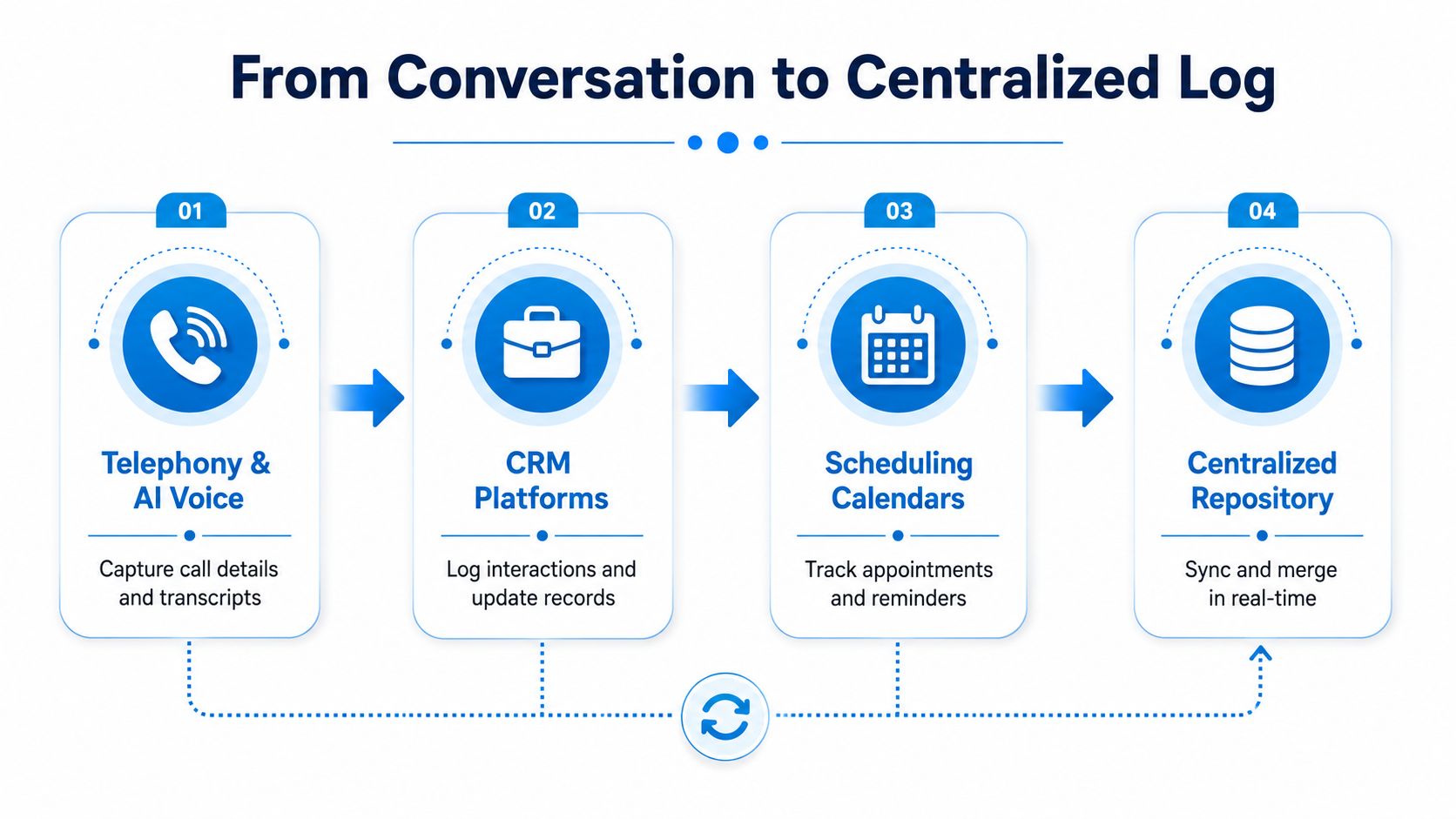
A healthy stack usually has four layers. Telephony or AI voice captures the raw event, the CRM attaches it to the live contact or account, the calendar confirms whether an appointment exists, and analytics or QA tools add context like disposition, sentiment, or escalation flags. When those layers stay in sync, the record becomes operational instead of decorative.
The first job is capture. That means call metadata, transcripts, recordings, IVR selections, and disposition codes arrive immediately when the interaction ends, or while it's still happening if the system supports real-time logging. If the call exists only in a phone system and not in the CRM, the next person has to hunt for it later, which defeats the purpose.
The second job is synchronization. The CRM should know which contact the interaction belongs to, and the calendar should reflect whether the caller booked, canceled, or moved an appointment. Recepta-style intake workflows make this concrete, a receptionist layer can capture the call, create the contact, sync the booking to the calendar, and write the disposition back to the CRM without manual re-entry.
The third job is retrieval. Genesys' RetrieveInteractionHistory endpoint is a good example of how operational systems think about this problem. It defaults to the last month if no date range is supplied, supports explicit from and to filtering, includes a maxSize limit, and separates main from archive sources for performance and retention management. That tells you something important, interaction history isn't just for display, it has to be queryable at scale. (Genesys RetrieveInteractionHistory)
The last layer is enrichment. A sentiment flag, a missed-appointment marker, or an escalation trigger turns a plain contact record into something that can drive action. The point isn't more fields for the sake of it. The point is reducing the time between contact and next move.
If the CRM, calendar, and call system disagree, the front desk ends up reconciling reality by hand. That's the fastest way to lose trust in the record.
For teams that want the same idea in a broader customer-experience frame, the mechanics line up well with real-time data sync practices, because stale records are almost as useless as missing ones.
Why Interaction History Drives Real Business Outcomes
A resolution-ready record changes the economics of intake. When the team can see what was discussed, what was promised, and what the next action is, it avoids duplicate questions, reduces repeat contacts, and shortens the time it takes to move a customer forward. That's why the best ops teams don't treat the history as an archive, they treat it as a decision aid.
For a dental practice, the value shows up when a missed follow-up is caught before the patient disappears into silence. The front desk can see the treatment plan status, the last promise made, and the next step, so the callback is specific instead of generic. In a law firm, the consultation trail matters because one touchpoint may confirm eligibility while another establishes urgency, and the staff member who answers the next call needs the authoritative version, not a half-remembered summary.
A franchise sees the same benefit at a different scale. If multiple locations start logging similar call dispositions for the same complaint, the pattern can reveal a regional service issue, a product problem, or a training gap. That's the difference between a transcript pile and a management signal.
CMS Wire's point about a resolution-ready view is the right frame here, because agents need more than identity and profile data, they need verified status, current workflow state, constraints, next actions, promised follow-ups, and source freshness. (CMS Wire on resolution-ready context)
The same thinking applies to customer service more broadly. If you want the operational case for this mindset, benefits of AI in customer service is a helpful companion piece because it puts the workflow benefits in plain business terms. The pattern is consistent, better context produces better handoffs, and better handoffs produce fewer avoidable contacts.
What works: storing the last authoritative status beside the next action.
What doesn't: saving transcripts without telling the next agent what to do with them.
Best Practices for Organizing and Leveraging Interaction History
A good history starts with clean structure. Standardize event names, disposition codes, tags, and channel labels so the same situation doesn't get logged three different ways by three different people. If one agent writes “reschedule,” another writes “callback,” and a third writes “rebook,” your reporting gets muddy fast.
Build the record around the live case
Every interaction should attach to a live customer record and, when relevant, to a current case, appointment, or open work order. That's what makes the history usable at the moment of action. If the record sits alone, detached from the active workflow, the team still has to search, match, and interpret.
Linking the history to the live record matters even more once the customer moves across channels. A missed call followed by an SMS, then a booking, then a reminder should read like one thread. Expertflow's model is a solid example of this kind of archive because it ties together recordings, agent IDs, call duration, disposition, and related web or survey data in one place. (Expertflow interaction history)
Separate hot history from archive
Not every record needs to be front-and-center forever. Use a clear retention design that keeps active history easy to search while pushing older material into archive storage that still remains retrievable. That's consistent with how retrieval systems are built, and it stops the front desk from digging through stale data every time a question comes up.
Automate the follow-up chain
Disposition codes should trigger something useful. A missed call can open a callback task, a booked appointment can trigger an SMS confirmation, and a cancellation can create a reschedule prompt. Mitel's history page is a practical example because it treats the archive as an action surface, letting an agent reply by email or SMS directly from the historical record. (Mitel history page)
If you're comparing engagement models across regions, engagement strategies for UK service firms is a useful reference because the same principle shows up there too, the business wins when each contact leads to the next right action.
Use one stack, not three disconnected habits
Recepta.ai's workflow is relevant here because it integrates with 2,500+ tools, which is the kind of connective tissue that prevents duplicate entry. A call can book a slot, create a CRM activity, and send an SMS confirmation while the context stays intact. That's the standard to aim for, one event, one source of truth, many systems updated consistently.
- Standardize first: define one field set before you chase dashboards.
- Automate second: let the system route obvious follow-ups.
- Review third: use a searchable dashboard for QA, coaching, and exception handling.
- Escalate last: make sure a human can pick up exactly where automation stopped.
The trap is hoarding transcripts and calling it history. Structured, time-aware records beat a noisy archive every time.
Privacy, Consent, and Compliance Considerations
A compliant record is not a bonus feature, it's part of the design. Teams handling calls need clear recording disclosure, consent where required, role-based access, and retention rules that fit the industry they're in. If the system can't show who heard what, when, and why, it creates more risk than value.
Healthcare, finance, and legal work each have different constraints, but the operational pattern is the same. Sensitive data should be redacted where appropriate, payment details should stay out of unnecessary exposure, and only the right staff should be able to review recordings or transcripts. For a practical policy lens, Coto & Waddington on privacy compliance is a useful reminder that disclosure, retention, and access controls matter long before a complaint lands on someone's desk.
The best systems make compliance easier. An immutable interaction record gives you an audit trail for what was said, what was disclosed, and what happened next. That kind of history is a strength when a patient, client, or regulator asks for a reconstruction of the interaction.
A clinic example that avoids unnecessary pain
A patient calls about billing, the intake agent reads a recording disclosure, the card number gets masked, and the note gets attached to the case with the follow-up already documented. Later, if there's a question about consent language or next steps, the office manager can review the exact record instead of asking staff to remember it from memory. That's how the history supports compliance instead of fighting it.
For teams that want a deeper operational view of call handling controls, call recording compliance guidance is worth reading because it lines up the technical and procedural pieces. The important takeaway is simple, compliant-by-default systems are easier to scale than systems that rely on after-the-fact cleanup.
Metrics That Prove Interaction History Is Working
A useful dashboard stays small enough to act on. Start with first-call resolution, qualified-lead conversion from inbound interactions, average time to follow up after a missed call, repeat-contact rate within seven days, scheduling accuracy, and cost per interaction versus the current reception model. If those numbers improve, the interaction history is doing real operational work.
For a platform example, Recepta.ai reports up to 30% more qualified leads and 80% cost savings versus an in-house receptionist, with the usual caveat that results depend on industry, volume, and integration quality. Those figures matter because they connect the workflow to revenue and labor economics, not because every team should expect the same result. Recepta.ai overview
| Metric | What it signals | Review cadence |
|---|---|---|
| First-call resolution | Whether the team is closing issues without back-and-forth | Weekly |
| Qualified-lead conversion | Whether intake is surfacing real opportunities | Weekly |
| Time to follow up | How fast the team recovers missed demand | Daily or weekly |
| Repeat-contact rate | Whether customers keep calling about the same unresolved issue | Weekly |
| Scheduling accuracy | Whether bookings are sticking | Weekly |
| Cost per interaction | Whether the workflow is more efficient than manual reception | Monthly |
Pair lagging and leading measures. Revenue tells you whether the system paid off. Follow-up speed and repeat-contact rate show whether the process is healthy before revenue shows up. Managers who only watch outcomes usually find problems too late.
The deeper review should include call recordings, dispositions, and the exceptions that do not fit the pattern. The dashboard is for action. The review is for tuning.
Putting It Together With an AI Receptionist Layer
A missed call, a booked job, and a follow-up note should all land in the same place. The cleanest way to operationalize interaction history is to capture it at the source, sync it to the CRM and calendar, and route the next step without manual re-entry. An AI receptionist layer fits that workflow in home services, healthcare, and legal offices where every call needs an answer, every appointment needs a record, and every handoff needs context. Recepta.ai's AI receptionist for small business is built around that flow, with call handling, scheduling, lead capture, follow-ups, and escalation to human support when the conversation needs judgment. AI receptionist for small business
That does not replace the team. It gives the team a cleaner operational record to work from, so the next call starts with context instead of guesswork and the next booking is less likely to slip. For operators who want to see whether resolution-ready history changes performance, a 30-day trial is the practical way to observe it in live traffic.
Pick one metric from the table above this week, instrument it, and compare before-and-after performance. That is the fastest way to tell whether your current record stores calls passively or converts them into revenue.
If you want to turn missed calls, bookings, and callbacks into one dependable workflow, Recepta.ai gives you the receptionist layer that captures the interaction, syncs the record, and hands off the next step without manual cleanup. For a home services shop, clinic, or firm, that is the difference between a voicemail trail and a real operational memory.