Master Workflow Optimization: Your 2026 Playbook

Most owners don't realize they're running two businesses at once. The first is the service they sell. The second is the invisible admin machine behind it: missed calls, reschedules, quote follow-ups, manual data entry, inbox triage, calendar cleanup, approval bottlenecks, and status checks.
That second business is usually the one exhausting the team.
When the front desk is buried, the dispatcher starts cutting corners. When the office manager is chasing paperwork, sales follow-up slips. When technicians or attorneys or coordinators have to stop real work to update three systems by hand, the day fills up and output doesn't. That's where workflow optimization stops being an operations buzzword and becomes a survival skill.
Why Working Harder Is Hurting Your Business
A plumbing company gets a burst of calls on Monday morning. One customer needs an urgent repair. Another wants an estimate. A third is trying to reschedule. The office manager answers two, misses four, writes callback notes on paper, enters one job into the calendar, forgets to update the CRM, and asks a technician by text if he can squeeze in an extra stop. By lunch, everyone feels busy. By Friday, the owner feels behind.
That's not a staff motivation problem. It's a workflow problem.
The same pattern shows up in dental offices, law firms, HVAC companies, and insurance agencies. People work hard, but the work arrives in a messy sequence. Requests come through phone, email, web forms, and text. One person holds too much tribal knowledge. Another has to re-enter the same customer details in multiple places. The team spends its day reacting instead of moving work through a consistent path.
Busy doesn't mean productive
A useful benchmark puts this in perspective. A commonly cited McKinsey benchmark, referenced by Slack, found that organizations using structured workflows saw 20% to 25% productivity improvements through clearer handoffs, reduced manual work, and standardized steps that increase throughput without proportional headcount growth, as summarized in Slack's guide to workflow optimization.
That matters because most SMBs don't have a labor problem first. They have a coordination problem first.
Practical rule: If good employees keep dropping the same kind of ball, assume the process is weak before assuming the people are.
Owners often try to patch this with hustle. They answer calls after hours. They remind staff manually. They create one more spreadsheet. They ask everyone to "communicate better." It works for a week, then volume rises and the same cracks reopen.
A better starting point is to reduce personal memory as a dependency. That's why basic operating discipline matters. If your team needs a reset, these actionable productivity tips are useful because they reinforce focus, prioritization, and repeatable execution at the individual level. But individual habits alone won't fix a broken intake path or fragmented handoff between sales and service.
For customer-facing businesses, the highest-friction point is often the first interaction. A missed call isn't just a missed call. It's a broken first step in the workflow. That's one reason many teams look at systems that combine intake, routing, and follow-up, especially when reviewing the benefits of AI in customer service for high-volume inbound communication.
What workflow optimization actually changes
Done well, workflow optimization changes three things:
- Work arrives in a defined lane instead of bouncing across inboxes, texts, and sticky notes.
- Handoffs become explicit so people know when they're done and who owns the next step.
- Repetitive admin gets reduced so skilled staff spend more time on service, judgment, and revenue-producing work.
The immediate payoff isn't just speed. It's less rework, fewer dropped details, and lower stress across the team. Owners usually feel that first as fewer interruptions. Staff feel it as fewer fire drills. Customers feel it as faster response and cleaner communication.
How to See Your Business with New Eyes
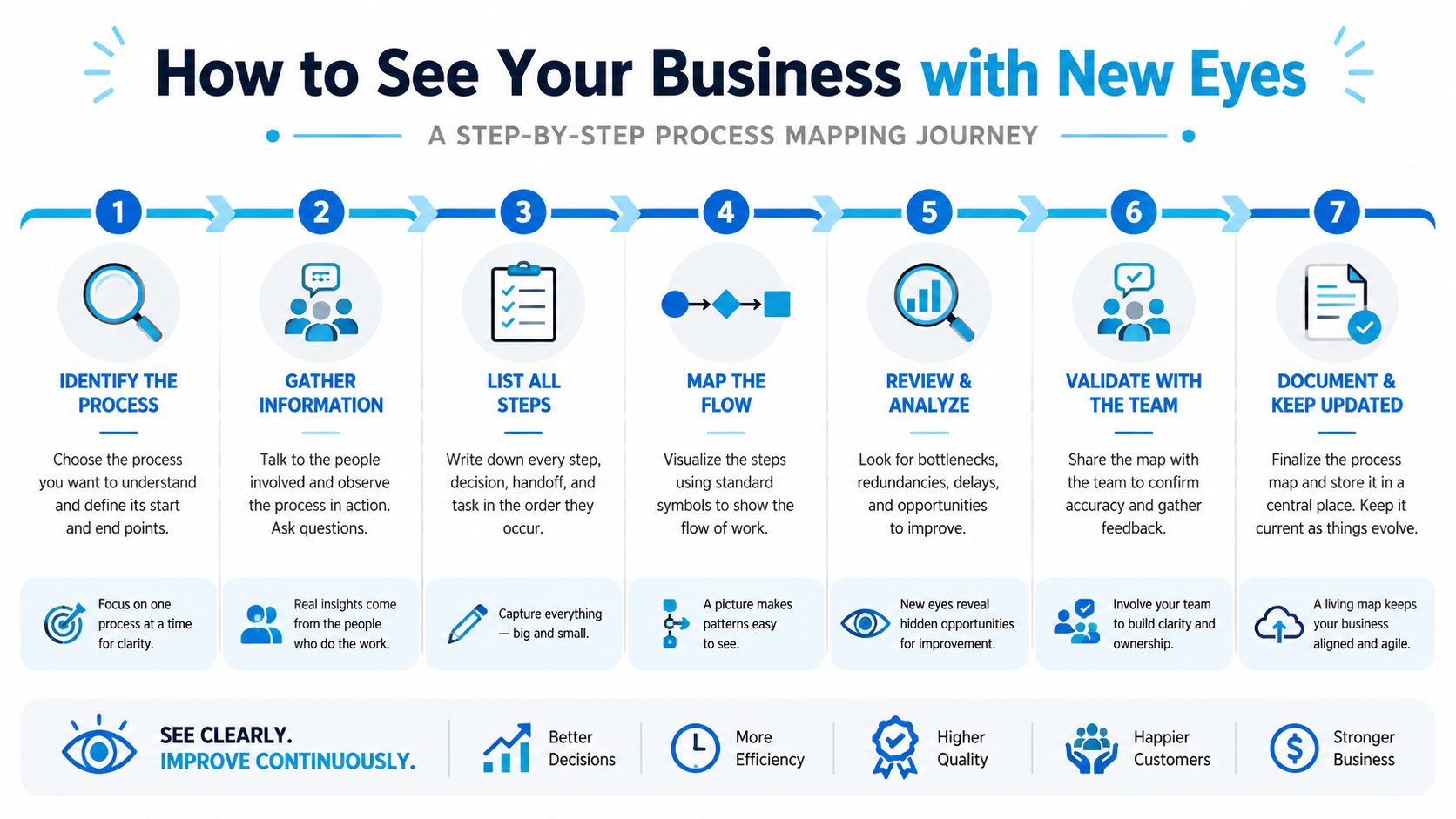
At 4:15 p.m., the office phone rings, two web leads are waiting in the inbox, and a technician texts that tomorrow's first appointment needs to move. The owner thinks the problem is staffing. The map usually shows something else. Work is entering the business through too many doors, getting touched by too many people, and depending on memory to keep moving.
That is why process mapping matters. It helps you see the business as it runs under pressure, not as it looks in a training document or software demo.
Map one workflow, not the whole company
Pick one workflow that affects revenue, customer experience, or staff load every day. For a home services company, that is often new inquiry to scheduled job. For a law firm, lead to signed retainer. For a clinic, appointment request to confirmed visit.
Then map what happens in order, using the version of the process your team lives with on a busy day.
- Define the trigger. A prospect calls, fills out a form, sends a text, or comes through a referral.
- List each action that follows. Who answers, who qualifies, who schedules, who confirms, who enters the record.
- Assign an owner to every step. Use real roles and names people recognize.
- Record the tools used at each point. Phone system, CRM, inbox, calendar, intake form, EHR, spreadsheet.
- Mark decision points. New or existing customer, urgent or routine, qualified or unqualified, open slot or waitlist.
- Capture every handoff. Show where one person finishes and another person needs to act.
- Flag re-entry of data. If staff type the same details into two systems, note it.
Keep the first version plain. Boxes and arrows in a shared doc are enough. The goal is visibility.
Use a real example, not an abstract one
A cleaning company gives a good example because the workflow looks simple until you map it.
| Step | Who owns it | Tool used | Common failure |
|---|---|---|---|
| Customer calls or submits form | Prospect | Phone or website | No unified intake path |
| Office staff reviews request | Coordinator | Inbox and phone log | Delayed response |
| Staff asks service questions | Coordinator | Call or email | Inconsistent qualification |
| Quote is prepared | Manager | Spreadsheet or CRM | Missing details |
| Appointment is scheduled | Coordinator | Calendar | Double entry |
| Confirmation is sent | Staff or tool | Text or email | Forgotten follow-up |
Owners often look at this and say they need another admin. Sometimes they do. Just as often, the underlying problem is that one request gets handled across five disconnected steps, with no clear rule for who owns the next move. That creates delay, dropped details, and burnout long before anyone reaches full demand.
Map the work as it happens on a bad Tuesday, not as it appears in your training manual.
Include the hidden work
Visible steps are only half the story. The hidden work is usually where capacity gets eaten up.
Add these details to your map:
- Wait states. How long the task sits before someone touches it.
- Approvals. Who has to review or sign off before work can continue.
- Exceptions. Urgent cases, cancellations, missing information, duplicate contacts.
- Recovery work. What staff do when the first attempt fails.
- System sync gaps. Places where one system updates and another stays wrong.
Those sync gaps matter more than they look. If customer records live in multiple tools, real-time data sync between systems affects whether handoffs work or fail. What staff call a communication problem is often stale information, duplicate records, or mismatched statuses that force someone to stop and verify everything manually.
A useful map should make people a little uncomfortable. If it shows that the business depends on side conversations, personal memory, and one reliable employee cleaning up every exception, that is progress. You are finally looking at the operating system of the company.
Pinpoint the Real Roadblocks to Growth
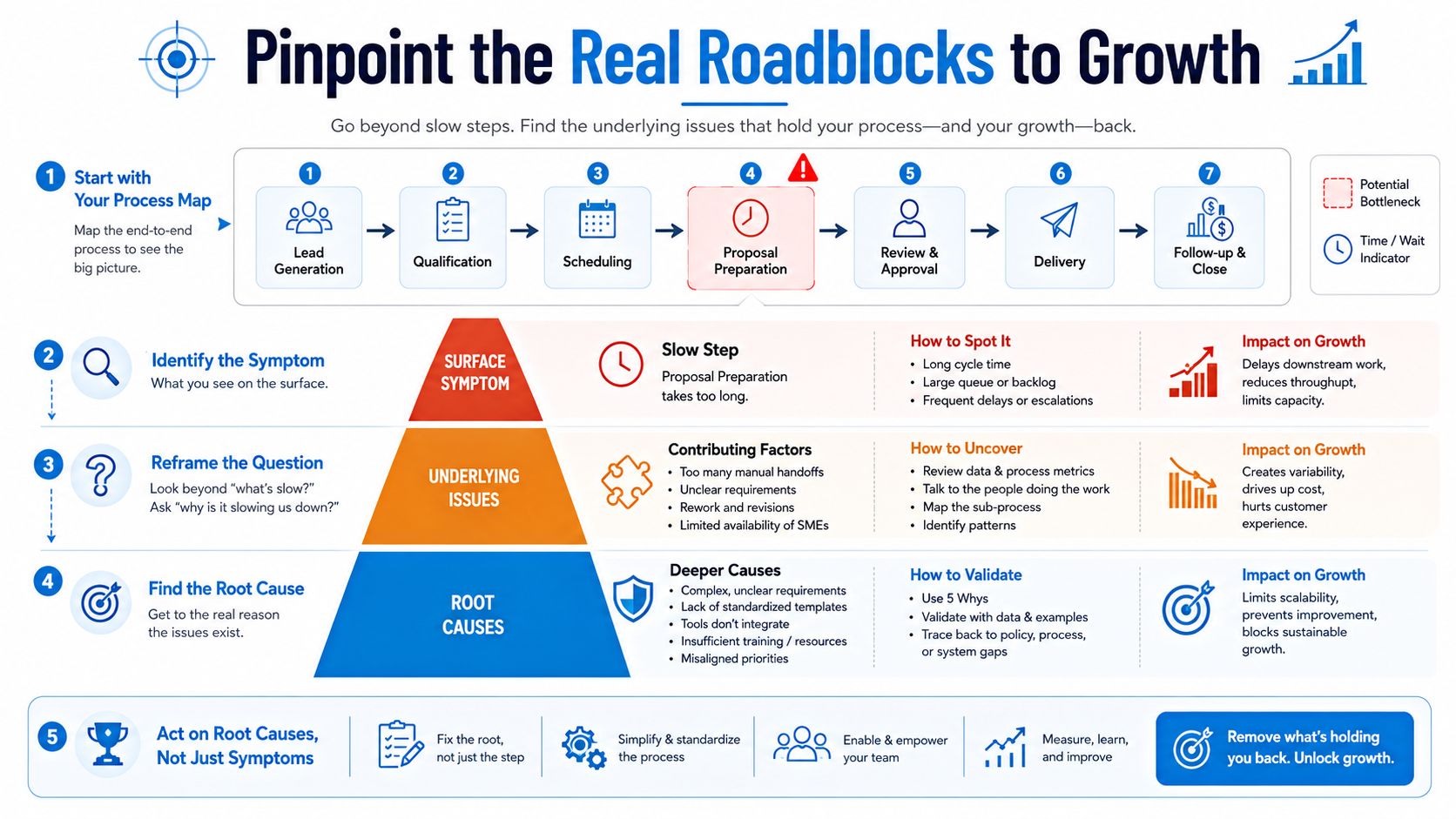
Once the map is on paper, the next mistake is hunting for the "slow step." That sounds logical, but it's often the wrong diagnosis.
The problem is usually capacity. One person owns the approvals. One scheduler handles every inbound request. One attorney reviews all consult intakes. One front-desk employee confirms appointments manually while also checking patients in. The software may be clunky, but the bottleneck exists because demand hits a narrow point in the process.
Symptoms lie. Queues tell the truth
Guidance on workflow optimization increasingly frames it as a capacity-management problem. For businesses like home services, clinics, or law firms, missed calls, appointment backlogs, and follow-up delays are often symptoms of capacity mismatch, not just inefficient software, as noted in this workflow and access optimization guide.
A dental clinic is a good example. Owners may say, "We need better reminders because no-shows are hurting us." Sometimes that's true. But often the front desk is already overloaded. They don't have enough capacity to confirm appointments consistently, manage incoming calls, answer insurance questions, and refill cancellations fast enough. The reminder issue is downstream of a queue management issue.
The same thing happens in legal intake. Firms think they need more leads. In reality, existing inquiries wait too long for callback, conflict check, or consult scheduling.
How to diagnose the root cause
Look at your map and ask these questions:
- Where does work pile up? Not just where it moves slowly, but where tasks wait untouched.
- Who is the choke point? If one person vanished for a day, where would the backlog spike first?
- What arrives in bursts? Calls at opening time, quote requests after ad campaigns, post-lunch appointment confirmations.
- What requires special authority? Pricing approval, legal review, insurance verification, dispatch assignment.
- What gets done manually because no rule exists? Routing, escalation, qualification, callback priority.
A bottleneck isn't always the longest task. Sometimes it's the step with the least available capacity relative to incoming demand.
If a task is fast when one request arrives and chaotic when ten arrive, you don't have an efficiency problem alone. You have a capacity problem.
Use an impact versus effort filter
Not every bottleneck deserves immediate attention. Owners often pick the most annoying problem, not the most valuable one.
A simple way to prioritize is an impact versus effort matrix:
| Priority type | What it looks like | Example |
|---|---|---|
| High impact, low effort | Fix first | Standardize intake questions |
| High impact, high effort | Plan carefully | Redesign scheduling and routing |
| Low impact, low effort | Do if convenient | Clean up notification templates |
| Low impact, high effort | Usually defer | Rebuild a process that rarely breaks |
For example, a clinic might get more value from standardizing triage questions than from replacing its phone system immediately. A pest control company may benefit more from assigning callback ownership by service area than from launching a large automation project.
Customer demand patterns also matter. If you're trying to determine where inquiries stall or what customers do before converting, reviewing your customer behavior analysis can help connect operational delays to actual buying behavior.
The strongest optimization work starts here. Not with shiny tools, but with a hard look at where demand outstrips process capacity.
Design Smarter Not Harder Workflows
Monday at 8:15 a.m., the phones are ringing, two technicians are waiting on route changes, yesterday's web leads still need callbacks, and the front desk is already behind. In that moment, a bad workflow does more than slow the team down. It burns capacity, drops demand on the floor, and pushes good staff toward burnout.
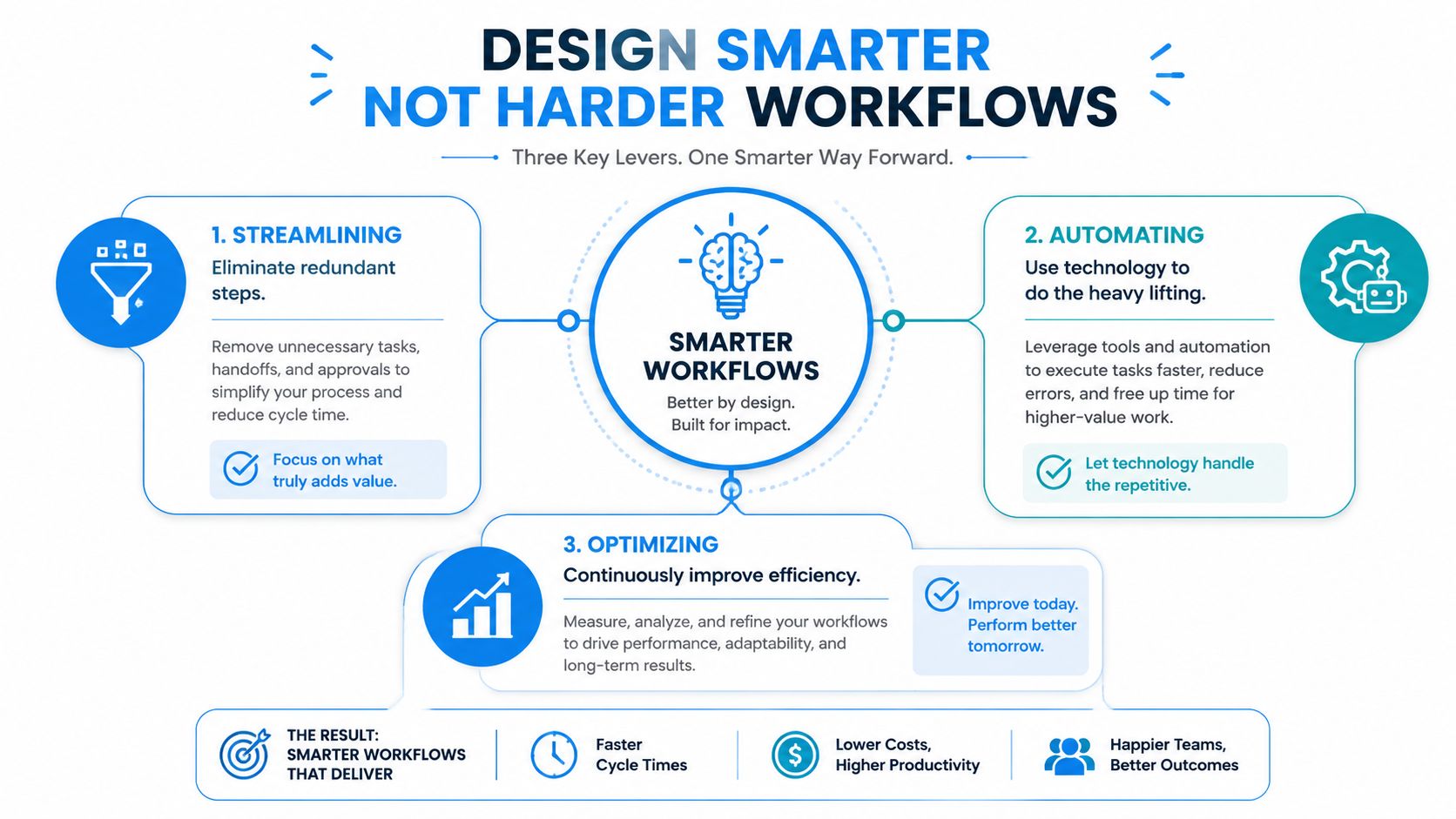
Good redesign solves for flow and handoffs, not just speed. The goal is to make routine work easier to absorb during busy hours while protecting the moments that still need judgment, empathy, or exception handling.
Streamline first
Start by removing work that should never enter the process.
I see the same pattern across service businesses. Teams automate duplicate data entry, approvals nobody uses, and follow-up steps that exist only because the first handoff was unclear. That does not improve operations. It lets waste move faster.
A franchise office may route a basic local promotion through several approvals even though store managers already operate within preset rules. A law office may ask for the same contact details on the phone, in a form, and again in the consultation email. A wellness practice may still have staff sending reminders by hand even though the calendar system can trigger them automatically.
The fix is simple to describe and harder to enforce. Remove duplicate collection. Cut unnecessary approvals. Set one source of truth for customer information. Then document the new standard. Teams that invest in process standardization for repeatable service tasks usually get better consistency before they buy anything new.
Automate routine work, not judgment
Automation earns its keep on predictable tasks with clear rules. Intake questions, appointment confirmations, status updates, document requests, simple routing, and CRM logging fit well here. Sensitive conversations, unusual exceptions, and revenue-saving recoveries usually do not.
A home services company might automate a straightforward path:
- Capture the lead from phone or web form
- Ask standard intake questions such as service type, location, and urgency
- Check calendar availability by territory or technician skill
- Route or book the job using preset rules
- Send confirmation and follow-up without staff touch
That kind of design cuts manual work, but the bigger benefit is capacity protection. The office team is no longer spending peak hours repeating the same questions for every low-complexity request.
The same logic applies to revenue workflows. If sales reps are chasing basic admin instead of qualifying and following up, the process needs redesign before headcount. This guide on how to improve sales productivity is a useful complement because it focuses on reducing time waste in lead handling and rep activity.
Build human and AI handoffs deliberately
Many workflow projects falter at this point. The team adds AI to intake or scheduling, but nobody defines where automation should stop and where a person should step in.
Clear handoff rules matter most in high-volume service environments because failure is rarely dramatic at first. It shows up as missed calls that never get returned, frustrated customers who repeat themselves, staff who spend half the day fixing edge cases, and managers who think the system is working because response times look fast on paper.
Guidance from telehealth workflow optimization practical strategies clinicians can apply today emphasizes structured triage, scheduling criteria, and explicit escalation paths. The same operating discipline works in clinics, legal offices, franchise groups, and home service businesses.
A few examples:
- Franchise: AI handles store hours, location routing, booking, and common questions. Staff take over for billing disputes, upset callers, and exceptions outside policy.
- Legal: AI collects practice area, urgency, opposing party details, and preferred consult times. Staff step in for conflict-sensitive matters, emotional calls, or nuanced case screening.
- Clinic: AI manages routine scheduling and basic intake. Staff handle symptom complexity, insurance issues, anxious patients, and anything that needs medical judgment.
One practical setup is a standardized workflow supported by tools such as Recepta.ai, which handles inbound and outbound calls, appointment scheduling, lead capture, and follow-ups, then escalates to trained agents when human judgment or empathy is needed. That model keeps routine demand moving while giving staff better context when a real person needs to step in.
Define those thresholds in advance. If you do not, the team ends up with the worst of both worlds: automation for simple cases, manual cleanup for the costly ones, and no clear ownership in between.
Launch and Measure Your New Workflow
Monday at 8:07 a.m., the phones light up, two schedulers are already behind, and the new intake process that looked clean in a meeting starts breaking in the first hour. A caller gives partial information. An urgent job needs a human decision. Someone on the team goes back to the old workaround because it feels faster. That is the test of workflow optimization. The goal is not a prettier process map. The goal is stable capacity under normal demand, peak demand, and messy real-world exceptions.
A controlled rollout works better than a company-wide switch. In practice, I recommend treating the first 90 days as three working blocks. First, confirm the current process and baseline performance. Next, build and test the new workflow with a small team. Then launch the pilot, measure the pressure points, and adjust before scaling.
Start with one workflow. Pick the one that creates the most drag on capacity or creates the most avoidable stress for staff. For many service businesses, that is intake, scheduling, rescheduling, quote follow-up, or missed-call handling.
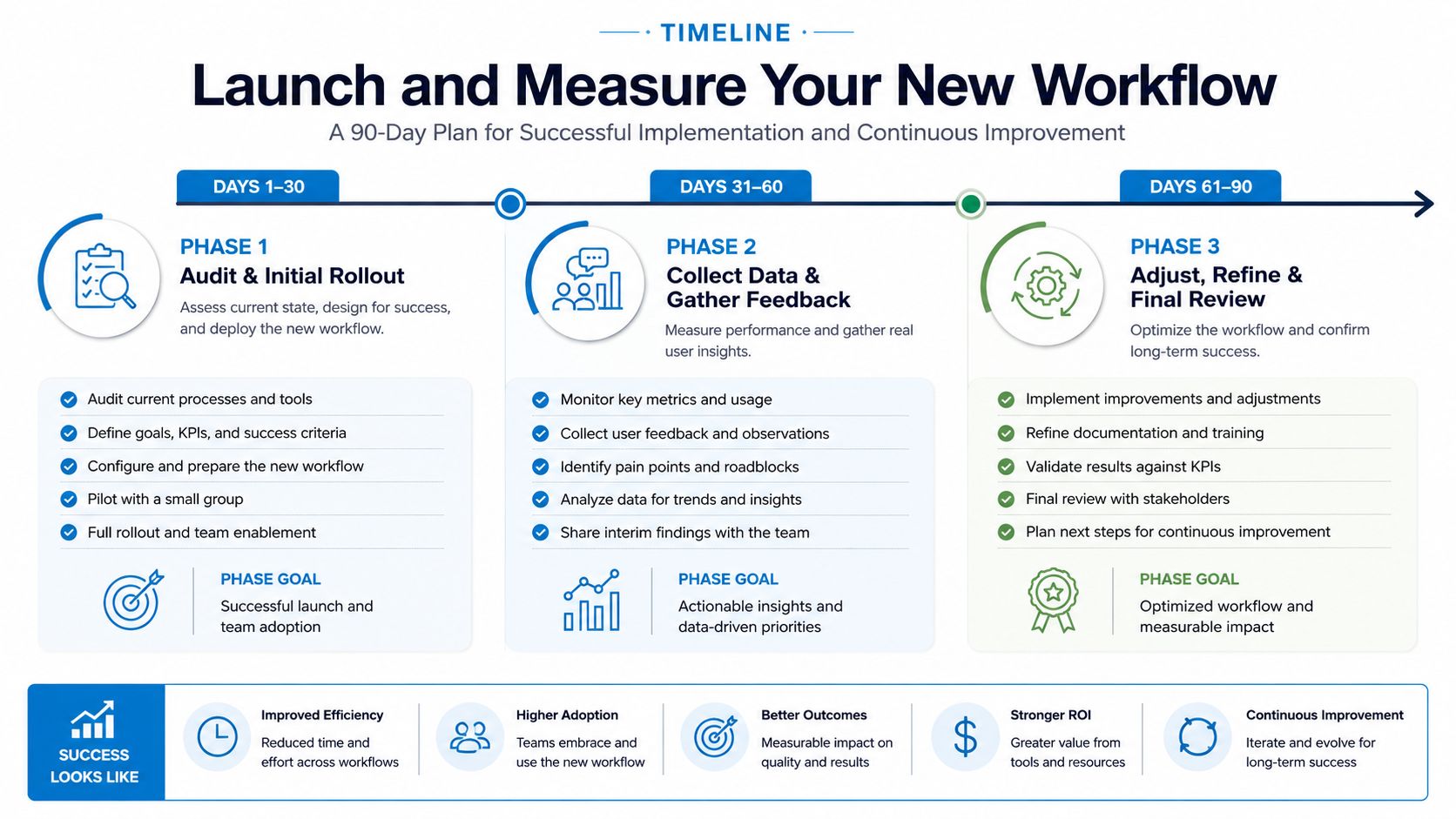
What the first 90 days should look like
A practical rollout usually follows this rhythm:
Days 1 to 30
- Validate the current state. Confirm the process map with the people doing the work, not just managers.
- Choose one pilot workflow. Keep the scope narrow enough that the team can learn from it.
- Set baseline measures. Track cycle time, throughput, error rate, and task iteration count before making changes.
Days 31 to 60
- Build the operating rules. Standardize intake questions, routing logic, ownership, escalation triggers, and required system updates.
- Train a small test group. One branch, one coordinator pod, or one service line is enough.
- Prepare for exception traffic. Decide who handles edge cases, after-hours issues, emotionally charged calls, and requests that AI should never close on its own.
Here's a useful overview before the final phase:
Days 61 to 90
- Launch the pilot in live conditions. Watch where staff pause, bypass the workflow, or create side channels in text, email, or sticky notes.
- Review performance weekly. Front desk, dispatch, sales, coordinators, and managers each see different failure patterns.
- Refine before rollout. Fix the handoffs, staffing gaps, and escalation rules that break under load.
Measure operations, not optics
Teams often judge a rollout by adoption screens, login counts, or whether the software appears busy. Those signals do not tell you if the business gained capacity. A workflow has improved when work moves faster with fewer errors, fewer touches, and less burnout on the team handling exceptions.
Use operational KPIs tied to the workflow itself:
| KPI | What it tells you | Example use |
|---|---|---|
| Cycle time | How long work takes end to end | Inquiry to booked appointment |
| Throughput | How much work gets completed | Leads processed per day |
| Error rate | How often work needs correction | Wrong customer details or booking mistakes |
| Task iteration count | How often work loops back | Number of follow-ups needed to complete intake |
Add one more lens during rollout. Measure human intervention rate. If AI answers every easy call but dumps unclear, emotional, or high-risk cases onto already overloaded staff with poor context, the business has not solved a workflow problem. It has shifted strain from one part of the system to another. That is why I look at missed calls, callback backlog, exception volume, and time spent cleaning up bad handoffs alongside the table above.
Pilot changes in one lane first. A weak process rolled out company-wide only creates bigger confusion faster.
What rollout usually gets wrong
Three mistakes show up repeatedly.
- Going company-wide too early. Owners want one clean cutover. Staff have not built trust in the workflow yet, and edge cases are still undefined.
- Treating training as a software demo. Teams need to know why the workflow works, when to escalate, and what to do when reality does not match the script.
- Skipping weekly review. Small failures become accepted workarounds within days.
The hard part of launch is not technical. It is operational. The workflow has to hold when the receptionist is covering lunch, when a field team runs late, when callers are frustrated, and when AI needs to hand off to a person without dropping context. If that handoff fails, the team pays for it in rework, missed revenue, and stress.
A successful launch gives the business more usable capacity. Staff spend less time chasing preventable errors. Customers wait less. Managers get fewer surprises. That is the standard worth measuring.
Your Playbook for Continuous Improvement
A plumbing company fixes its intake process, adds automated reminders, and sees cleaner scheduling for a month. Then one CSR quits, call volume spikes after a cold snap, and the team starts using side notes, personal cell phones, and sticky-pad callbacks to keep up. The workflow did not fail because the software changed. It failed because capacity changed, handoffs changed, and nobody adjusted the system.
That is the operating reality for service businesses. Workflow optimization is not a one-time cleanup project. It is an ongoing management discipline for protecting capacity, service quality, and staff energy as conditions shift.
A practical way to run that discipline is a simple five-part loop: define, measure, analyze, improve, and control. The label matters less than the habit. Good operators keep revisiting the workflow before small workarounds become the new process.
The repeatable checklist
Use a short review cycle your team can maintain:
- Define the workflow clearly. Set the start point, end point, owner, and escalation path. If nobody owns the exception path, staff will invent one under pressure.
- Measure performance. Track a small set of operating numbers tied to speed, volume, quality, and rework. For phone-led businesses, that often includes answer rate, time to callback, booking rate, no-show rate, and exception volume.
- Analyze the queue, not just the task. A task can look efficient while the overall system is overloaded. Check where work stacks up, where AI hands off to people, and where experienced staff keep getting pulled in to rescue broken cases.
- Improve with restraint. Remove steps, standardize routine decisions, and automate repeatable work. Keep human review where judgment, empathy, or risk is high.
- Control the process over time. Review the workflow after staffing changes, seasonal swings, new service lines, or recurring customer complaints. Those moments usually expose weak points faster than a formal audit.
The goal is not to automate everything. The goal is to build a system that absorbs demand without dropping calls, losing context, or burning out the people who handle the hard cases.
Why this matters more now
Plenty of owners still treat workflow work as a software purchase. That is usually too narrow. In the SMBs I have worked with, significant gains come from matching labor, process, and automation to the type of demand coming in. If AI handles simple scheduling well but creates messy handoffs on urgent or emotional calls, the business still pays in rework and stress.
Continuous improvement fixes that. It gives managers a way to spot drift early, before missed callbacks turn into bad reviews or good employees start cutting corners to survive the day.
The businesses that improve fastest usually share four habits. They make work visible. They respect capacity limits. They use automation carefully instead of blindly. They review the system often enough to catch failure while it is still cheap to fix.
That is the playbook. A weekly operating habit that protects capacity and makes human and AI work together without dumping the hard parts on an already stretched team.
Recepta.ai helps businesses design phone-led workflows that don't stop at answering calls. It combines conversational AI with human escalation, appointment scheduling, lead capture, follow-up, and integrations with CRMs, calendars, and other business systems so teams can reduce manual admin and keep customer communication moving. If your biggest workflow problems start with missed calls, delayed intake, or inconsistent handoffs, it's worth exploring Recepta.ai as one option within a broader workflow optimization strategy.
.webp)