Telephone Answering Service: A Practical Buyer's Guide
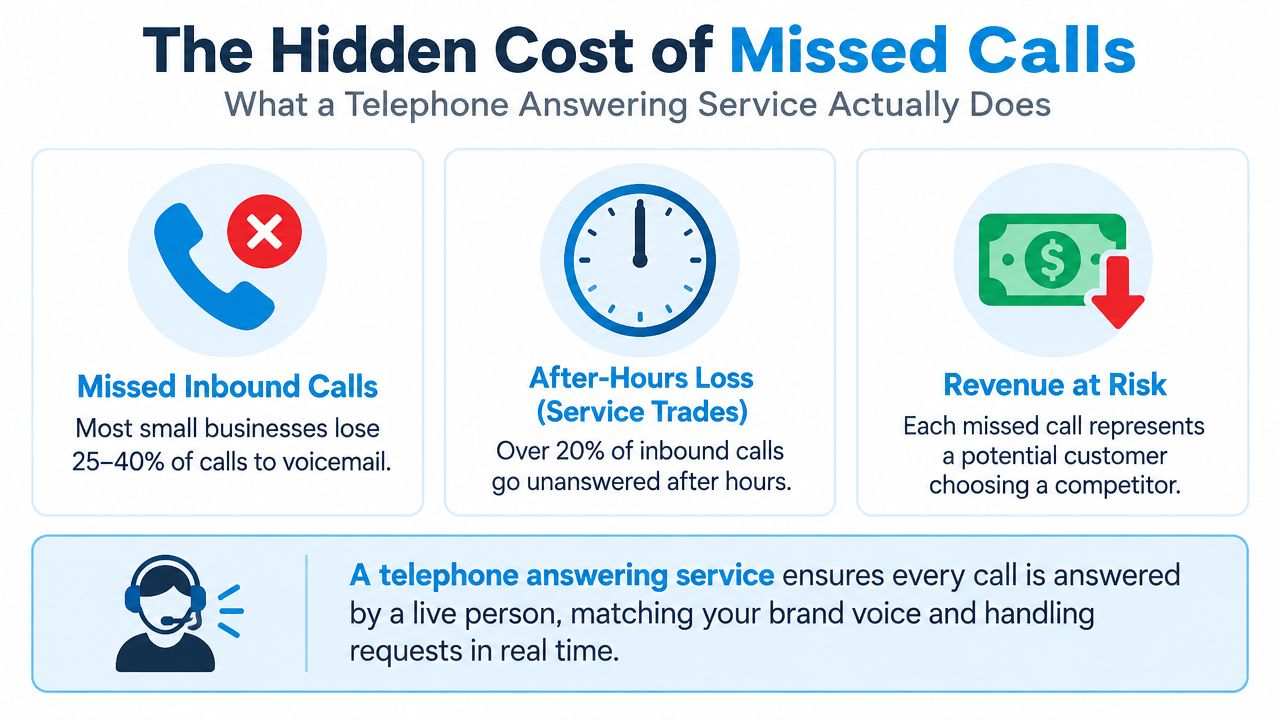
62% of small-business calls go unanswered during business hours, and a meaningful share of home-service calls arrives after 5 PM. A telephone answering service earns its keep when it closes those coverage gaps, not when it merely replaces voicemail with a polished greeting.
That distinction matters. You're not buying a generic call center. You're buying a coverage and lead-capture layer that should answer, qualify, schedule, route, and document calls according to the way your business operates. The right model depends on three questions most buying guides avoid: How complex are your calls? How much demand arrives outside staffed hours? What compliance risk follows every conversation?
What a Telephone Answering Service Does
A telephone answering service is outsourced reception. Agents, AI, or both answer under your business name, follow your instructions, collect caller details, transfer calls, schedule appointments, and send structured messages to your team. It is a coverage layer for inbound work, not an outbound campaign center or generic scripted-support operation.
The buying decision starts with call complexity. Live-only human coverage earns its cost when callers need judgment, reassurance, negotiation, sensitive intake, or rapid decisions. AI-only virtual reception fits repeatable questions, basic routing, appointment requests, and message capture. Use blended AI triage with human escalation when routine calls dominate but defined risks require a person. Set those thresholds before comparing feature lists.
Four coverage models
- Live-only human coverage puts a trained receptionist on every interaction. Choose it for complex conversations, high emotional stakes, or compliance-sensitive intake.
- AI-only virtual reception handles predictable questions, basic routing, appointment requests, and message capture without human involvement on every call.
- Blended AI triage with human escalation lets automation collect routine information, then transfers callers when the request, caller profile, or compliance risk crosses a rule you define.
- Overflow or after-hours coverage supplements internal staff during simultaneous calls, evenings, weekends, holidays, or emergency periods.
Call timing changes the answer. A plumbing company receiving burst-pipe calls at 6 PM needs more than voicemail. A capable service captures the address and problem, checks the emergency rule, and contacts the on-call technician. That is frontline dispatch, not message-taking.
Practical rule: Define a qualified lead, emergency, bookable appointment, and escalation event before you buy coverage. If the service cannot follow those rules and document the outcome, its feature list is irrelevant.
Start by listing the work your current receptionist handles, using this reference on what receptionists do in day-to-day operations. For automated intake and escalation ideas, review SupportGPT-1 blog articles. Nextiva's discussion of answering-service trends can provide broader context (Nextiva's coverage of answering service trends).
The decisive thresholds are call complexity, after-hours share, and compliance risk. Choose live coverage when one mistake can create material harm. Choose AI triage with human escalation when automation can safely resolve routine demand and route exceptions quickly.
In-House Receptionist vs Telephone Answering Service
The choice is not just human versus outsourced. It is a trade-off among cost, coverage, and operational complexity.
An in-house receptionist gives you direct control. That person learns your team, recognizes regular callers, handles walk-ins, and can manage nuanced interactions without a vendor handoff. Medical offices, law firms, hotels, and businesses with a substantial front-desk function often need that physical presence.
A telephone answering service wins when demand is uneven or coverage must extend beyond one person's working hours. It can absorb overflow during storms, seasonal peaks, staff meetings, lunch breaks, evenings, weekends, and holidays. It also gives small teams access to bilingual coverage without hiring a separate employee.
The popular cost comparisons in many guides aren't reliable enough to use as a universal budget. Your decision should start with call timing and complexity, then compare the cost per answered call and the value of recovered opportunities.
| Factor | In-House Receptionist | Telephone Answering Service |
|---|---|---|
| Daily call pattern | Works well with steady, predictable demand | Works well with uneven, seasonal, or after-hours demand |
| Complex interactions | Strong brand familiarity and judgment | Depends on scripts, training, and escalation quality |
| Coverage | Limited by shifts, absences, breaks, and PTO | Can provide overflow, after-hours, or continuous coverage |
| Scalability | Requires hiring and training as demand grows | Capacity can usually expand without adding internal staff |
| Physical front desk | Available for visitors and office tasks | Not a substitute for an on-site receptionist |
| Bilingual support | Requires internal language capability | Often available as an outsourced capability |
| Accountability | Direct managerial control | Requires service-level agreements and reporting |
For a small office with under 40 calls per day and steady volume, an in-house receptionist can be the cleaner operating choice if that person also manages visitors, documents, and administrative work. When the business handles 50 to 60 daily calls with variable timing, outsourced coverage often produces a better cost per answered call because the company isn't paying for idle capacity during quiet periods and uncovered demand during peaks.
A practical example makes the gap obvious. Your office team answers calls until closing, but the phone rings repeatedly during the evening when staff has gone home. A service that covers only overflow and after-hours can protect those calls without replacing the person who handles your front desk during the day. If callers need complex advice, transfer them to a designated employee. If they need a routine appointment, let the service book it.
For teams considering automation alongside human coverage, AI answering service capabilities offer a useful comparison point. Don't select a model because it sounds modern. Select it because it matches your call distribution.
Core Features Worth Paying For
Buy outcomes, not a feature checklist. The useful question isn't whether a provider offers call recording or CRM integration. It's whether the workflow produces more booked appointments, better lead records, faster escalation, and lower abandonment.
Essentials
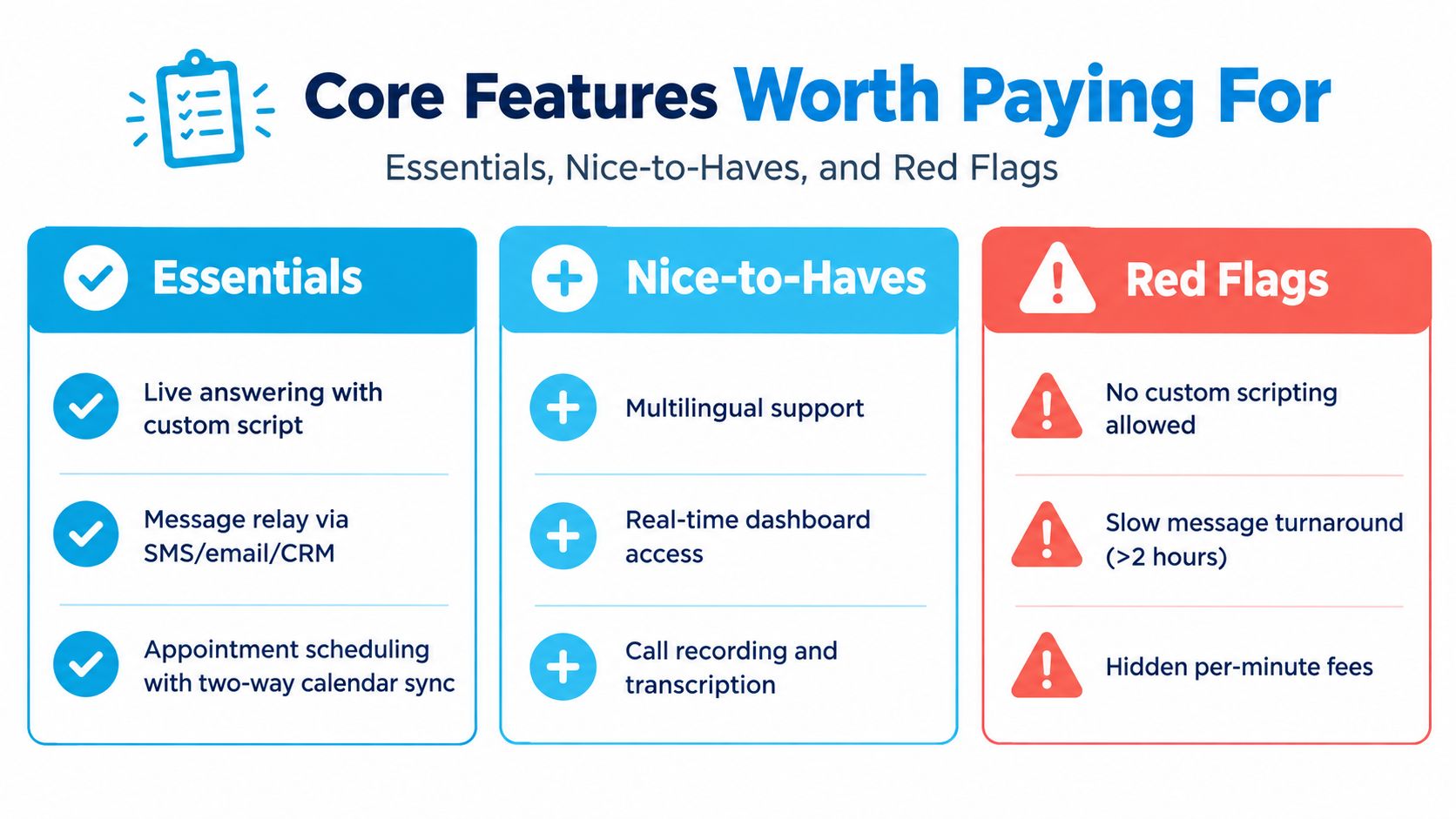
- Custom-scripted live answering: A dental clinic should give agents approved language for new-patient intake, appointment types, insurance questions, and urgent symptoms. Test whether agents can follow the script without sounding like they're reading one.
- Structured message relay: Messages should arrive through SMS, email, or your CRM with the caller's name, number, intent, urgency, and requested next step. A vague “please call back” message forces your staff to repeat the intake.
- Calendar-connected scheduling: Two-way calendar synchronization matters. The service should see live availability and book the correct appointment type, rather than create double bookings or collect requests for later manual entry.
- Lead capture: A law firm may need the caller's matter category, opposing-party information for a conflict check, location, and deadline. Those fields should reach the intake workflow in a consistent format.
- Overflow routing: An HVAC contractor might route routine calls to the service, urgent no-heat requests to an on-call queue, and existing customers to the office team. Ask for routing rules that reflect these distinctions.
- Bilingual support: If your customers regularly speak more than one language, verify the exact languages, hours, scripts, and escalation process. “Multilingual” is meaningless without a live test.
- After-hours coverage: Match the schedule to actual demand. A home-service operator may need emergency dispatch overnight but only appointment capture for non-emergency requests.
Useful extras and warning signs
Order entry, payment capture, dispatch integrations, call recording, and quality-assurance transcripts can be valuable once the core workflow works. For example, a ServiceTitan integration is worthwhile if it creates or updates dispatch records without manual rekeying.
Walk away from vague uptime claims, missing audit access, unsupported scripting, and per-minute billing with no cap. If a vendor can't show how it measures answer speed, message accuracy, transfer success, and abandoned calls, it can't prove operational value.
How Telephone Answering Service Pricing Breaks Down
Pricing determines which calls your service can handle profitably. Per-minute billing suits complex conversations, while per-call pricing works for short, repeatable requests. A cheap plan becomes expensive when calls require transfers, system searches, or after-hours coverage.
Industry cost guides place the U.S. benchmark at $2.54 per minute, with prices rising across the 2023 to 2026 period (Voksha's answering service cost guide). The same guide notes after-hours surcharges of 25% to 40%. Use these figures for vendor comparisons, not as a guaranteed quote. Your bill also depends on call length, coverage windows, integrations, service levels, and escalation rules.
| Pricing Model | Typical Rate | Best For | Watch For |
|---|---|---|---|
| Per-minute | Roughly $1.00 to $2.50 per minute | Low-volume, high-complexity calls such as legal intake or medical triage | Rounding increments, transfer time, minimums |
| Per-call | $0.75 to $2.50 per call | Predictable short interactions such as HVAC dispatch or dental scheduling | Long calls priced the same as short calls |
| Monthly bundle | $200 to $600 for 100 to 500 minutes | Steady monthly usage | Expiring rollover minutes and overage rates |
| Hybrid AI plus human | AI intake priced well below human rates, with escalation at standard rates | Repeatable requests with selective escalation | Setup quality, escalation fees, poor handoff context |
Per-minute billing matches cost to talk time, but waiting during transfers or software searches still adds to the bill. Per-call pricing rewards short, consistent interactions and penalizes complex intake. Bundles make sense when monthly volume is stable and included minutes will not expire unused.
Hybrid pricing earns its place when routine calls dominate, after-hours demand is meaningful, and exceptions need human judgment. Fully live coverage remains the better choice for callers who regularly describe nuanced symptoms, legal matters, urgent field conditions, or other situations where a wrong classification creates compliance or operational risk.
Build a total-cost worksheet before signing:
- Rollover rules: Confirm whether unused minutes expire and whether overages begin automatically.
- Coverage premiums: Apply the after-hours surcharge to your actual overnight and weekend volume, not your total call count.
- Integration charges: Separate setup fees from recurring CRM, scheduling, dispatch, or reporting fees.
- Minimum commitments: Check whether a quiet month still triggers a minimum bill.
- Escalation billing: Confirm whether transfers, warm handoffs, and on-call alerts count as additional billable activity.
Use this cost of an answering service breakdown to structure vendor questions, then test the assumptions against your call recordings. The lowest rate is irrelevant if the service produces incomplete leads, mishandles complex calls, or sends urgent customers to voicemail.
Selection Criteria for Small Businesses and Service Industries
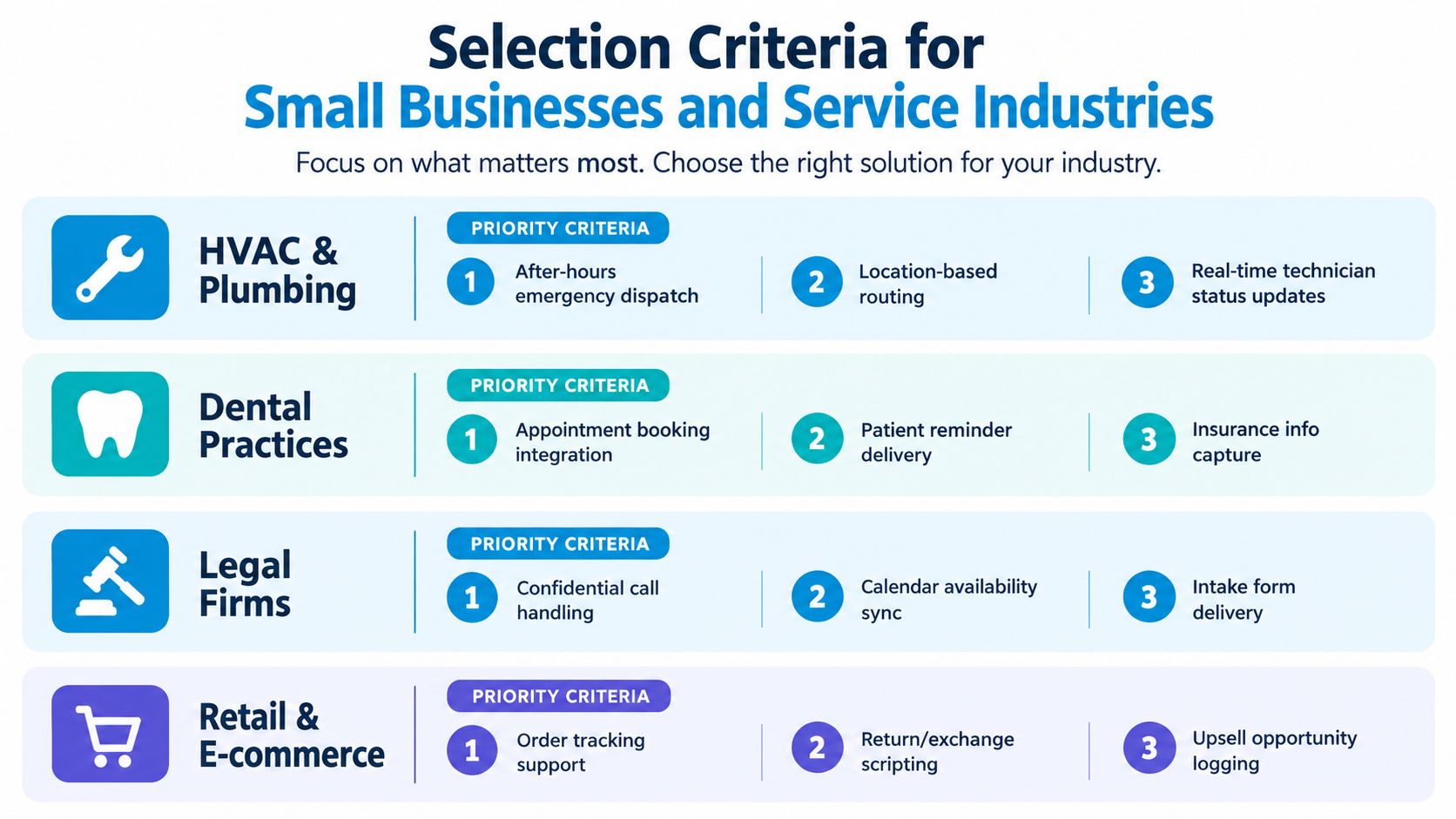
Start with the workflow, not the vendor's homepage. A plumbing company, dental practice, legal firm, and retail operation all need different scripts, routing logic, and escalation rules.
Use this priority order
First, test industry fit. Ask the vendor to handle a realistic scenario, not a generic greeting. A plumbing test should include an emergency address, service area validation, on-call dispatch, and a non-urgent quote request. A dental test should cover appointment type, insurance information, reminders, and patient privacy. Legal intake should include confidentiality, calendar availability, and conflict-check fields.
Second, verify compliance posture. When a service touches protected health information, it becomes part of a compliance-controlled business process. HIPAA workflows require a written business-associate agreement, minimum-necessary intake, secure message delivery, role-based access, retrievable audit logs, and encryption in transit and at rest, as described in this HIPAA-compliant answering service guide. Don't accept a “compliant” badge without documentation and a walkthrough of the data path.
Third, confirm integrations directly. Your CRM, calendar, payment system, and field-service software should connect through documented, supportable integrations. A Zapier bridge may be useful for a simple notification, but it shouldn't be the only route for a dispatch-critical workflow.
Fourth, put service levels in writing. Professional providers commonly target an average speed of answer below 20 seconds, while top-tier performance is described as below 10 seconds, roughly 3 to 4 rings (Answering365's service FAQ). Require an ASA target under 20 seconds and an abandonment threshold under 5%, with credits or remediation if the vendor misses them.
Finally, test the commercial terms. Confirm that after-hours coverage is included or capped, not treated as a premium. Run a 14 to 30 day trial with a usage cap and a clean exit clause. Review recordings, message completeness, transfer accuracy, answer speed, and abandonment before expanding coverage.
A vendor that resists a controlled pilot is asking you to trust sales language over operating evidence. Don't.
When AI Triage Plus Human Escalation Beats Fully Live Coverage
Hybrid coverage earns its cost when more than half of incoming calls follow one of five repeatable scripts and the remaining calls need judgment. AI can capture identity, identify intent, answer approved FAQs, schedule standard appointments, filter spam, and collect the details a human needs before taking over. If after-hours calls make up a substantial share of your volume, this model can extend coverage without putting a live agent on every routine interaction.
The handoff determines whether the system works. The caller should not repeat their name, reason for calling, address, or urgency after escalation. If the human receives only “caller wants help,” automation added delay rather than capacity.
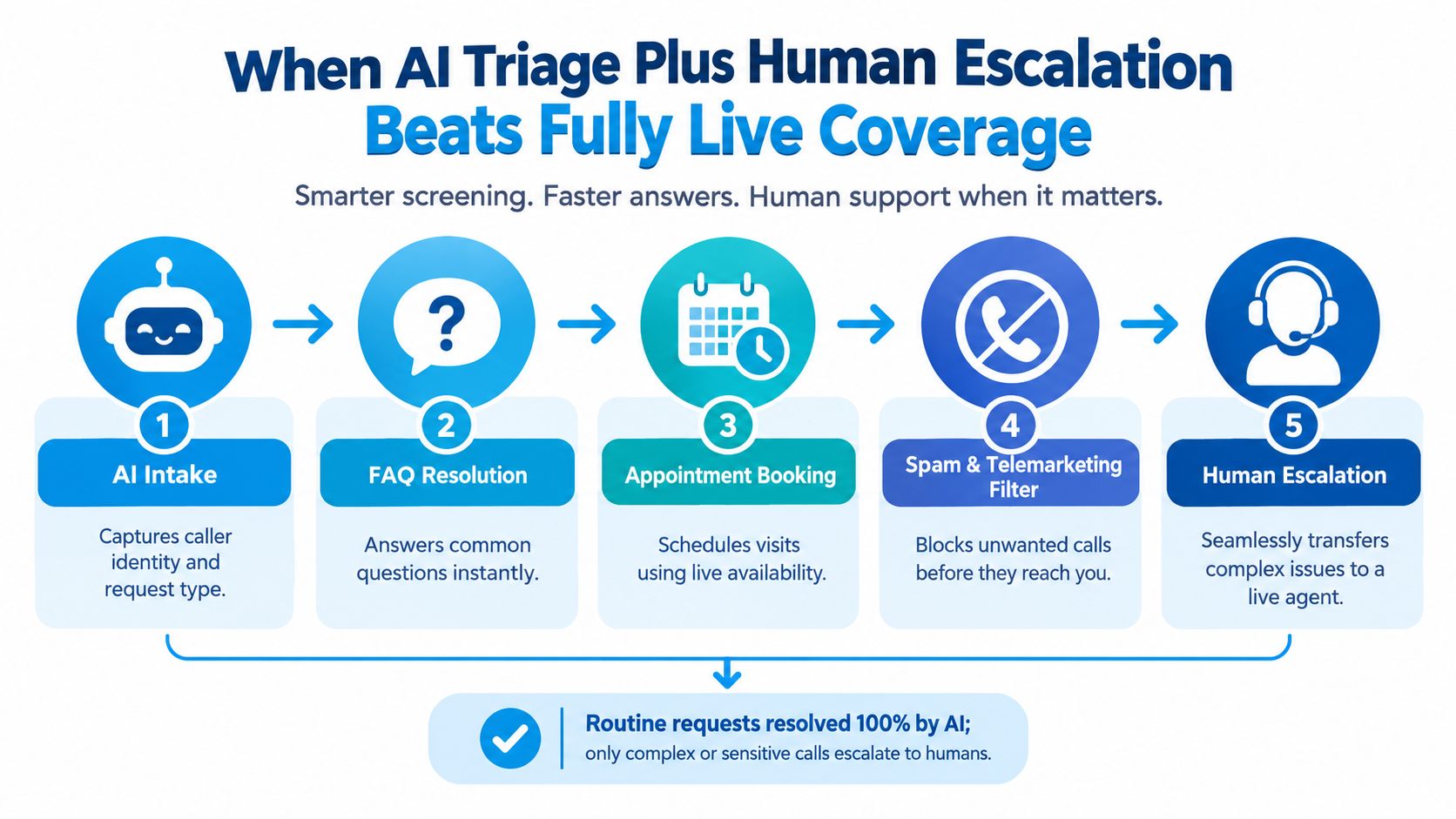
Automate repeatability, not sensitivity
Use AI for tasks with stable questions and predictable outcomes:
- Address and identity capture, followed by service-area validation.
- Appointment booking against live calendar availability.
- Routine FAQ resolution, such as hours, location, preparation instructions, and accepted service categories.
- Spam and telemarketing filtering, with a clear route for callers who do not fit the filter.
- Basic lead qualification, when answers map cleanly to a defined workflow.
Require human escalation for distressed callers, emergency dispatches, complaints, sensitive health or legal matters, and pricing negotiations above your approved floor. Trigger escalation from both intent and language. A caller who says “I'm locked out,” “I'm in pain,” or “I want to dispute this charge” should reach a person instead of entering a generic automation loop.
Measure three thresholds before choosing coverage: call complexity, after-hours share, and compliance risk. High repeatability and heavy after-hours demand favor hybrid service. Calls requiring diagnosis, negotiation, emotional judgment, or licensed handling favor fully live coverage. Trend coverage points to practical hybrid setups where AI books standard appointments while a human handles escalations, with audit logging for regulated callers.
Hybrid coverage loses for ultra-low-volume businesses when setup effort exceeds the value of automation, especially if calls are mostly unusual. Regulated workflows may require a licensed human from the first second, with controlled handling throughout. AI can still support internal summaries or routing, but it should not replace the required front-line interaction.
For a practical look at always-on hybrid workflows, review 24/7 AI answering service operations.
ROI Checklist and 30-Day Implementation Plan
You don't need a complicated financial model. Start with three inputs:
- Average new-customer value
- Missed-call rate before coverage
- Expected recovery percentage
For live answering, use a planning assumption of 30% to 50% recovery. For AI plus human triage, use 40% to 60% recovery. These are scenario assumptions for your model, not guaranteed results. Multiply the number of missed calls by the relevant recovery assumption and average customer value, then compare the recovered revenue estimate with the full service cost, including integration and escalation fees.
For example, if your average job is $400 and you receive 60 monthly calls, don't assume every call represents a new job. Separate new leads, existing customers, service questions, spam, emergencies, and calls that already reach staff. Then calculate revenue only from the portion of missed, qualified opportunities your pilot recovers.
A four-week rollout
Week one, establish the baseline. Export call logs, review voicemail, count unanswered calls, and classify call intent. Capture answer rate, ASA, abandonment, booking outcomes, message completeness, and after-hours share.
Week two, test two providers. Run paid trials with the same scripts and scenarios. Give both vendors identical routing rules. Score every call for correct greeting, required fields, disposition, escalation, and calendar accuracy.
Week three, connect the workflow. Set up forwarding, CRM and calendar integrations, dispatch rules, escalation scripts, and on-call contacts. Keep a manual fallback while your team checks records and appointments.
Week four, measure and reconfigure. Compare recovered calls, booked appointments, ASA, abandonment, transfer accuracy, and cost per qualified opportunity against the baseline. Remove unnecessary questions, tighten emergency triggers, and change coverage hours to match observed demand.
Call abandonment deserves special attention. One 2026 industry summary places the standard target at 3% to 5%, with top performers below 2% and rates above 10% treated as a red flag (Ringly's call abandonment analysis). Use the target as a management threshold, not a marketing promise. If your rate is above 5%, fix staffing, routing, answer speed, or IVR friction before adding more features.
A telephone answering service should survive a spreadsheet review and a caller review. If the vendor can't show better coverage, cleaner records, and an acceptable cost per recovered opportunity after the pilot, switch providers or keep the work in-house.
Recepta.ai combines conversational AI with human support for inbound and outbound calls, appointment scheduling, lead capture, follow-ups, and escalation when a caller needs trained human attention. Visit Recepta.ai to evaluate a hybrid answering workflow against your call mix and start with a controlled trial.