Virtual Assistant for Customer Service: A Practical Guide
So, what exactly is a virtual assistant for customer service? Think of it as the digital front door to your business. It’s an AI system designed to answer your calls, qualify potential customers, and book appointments automatically, 24/7. It handles all the routine stuff but, more importantly, knows precisely when to pass a caller to a real person, so you never lose a customer to voicemail or a frustrating chatbot loop.
Meet Your New Digital Frontline
Imagine a receptionist who never takes a sick day, never misses a call, and never gets overwhelmed by a sudden rush of inquiries. That's no longer a fantasy—it's what a modern virtual assistant for customer service brings to the table. This isn't one of those clunky, keyword-based chatbots from a few years ago. We're talking about a sophisticated AI built to be the first, and often best, point of contact for your business.
It expertly handles the predictable-but-essential tasks: qualifying new leads, scheduling appointments right in your team's calendar, and answering frequently asked questions any time of day. This aligns perfectly with modern customer behavior, as studies show 73% of customers would rather try to solve their issues on their own first. A smart AI gives them a quick and effective way to do just that.
The Power of an Intelligent Handoff
But what really sets this technology apart is its ability to know its own limits. The magic is in the handoff.
A great way to think about it is like a triage nurse in a busy ER. The AI performs the initial intake, gathering the essential details quickly and efficiently. The second it senses something more complex—or picks up on emotional cues like frustration in the caller's voice—it seamlessly transfers the call to the right human expert. No repeating information, no starting over.
This AI-plus-human model directly solves one of the biggest sources of lost revenue for many businesses: unanswered calls and slow response times. Every person who contacts you feels heard and taken care of, whether their request is simple or requires a specialist.
The Recepta.ai dashboard below shows you exactly how these interactions are tracked. It gives you a clear, at-a-glance view of performance, call outcomes, and customer data.
With key metrics right there on the dashboard, you can instantly see how the virtual assistant is performing and where your human team is stepping in, giving you a complete picture of your customer service operation.
Comparing Your Customer Service Options
To really grasp the value, it helps to put a virtual assistant side-by-side with the traditional options. When you look at factors like availability, cost, and raw capabilities, the differences become pretty clear. Digging into the specifics of an AI phone answering service can offer even more perspective on this.
Here’s a quick breakdown of how the models compare.
Comparing Customer Service Models
| Feature | AI Virtual Assistant | In-House Receptionist | Basic Answering Service |
|---|---|---|---|
| Availability | 24/7/365, instantly responsive | Business hours only, subject to breaks and sick days | 24/7, but with potential for long hold times |
| Cost | Low monthly fee, typically 80% less than a salary | Full-time salary, benefits, and overhead costs | Variable, often per-call or per-minute fee |
| Lead Capture | Instant, with automated qualification and follow-up | Manual; missed calls often become lost leads | Basic message taking, with delayed follow-up |
| Integration | Syncs with CRM, calendars, and other tools automatically | Requires manual data entry and system updates | Limited or no direct software integration |
| Scalability | Handles unlimited concurrent calls without issue | Can only handle one call at a time | Limited by the number of available human agents |
As you can see, the AI model delivers constant availability and scalability for a fraction of the cost of a full-time employee, all while integrating directly into the tools you already use.
How Core AI Capabilities Drive Business Growth
To really get what a customer-service virtual assistant can do for your business, you have to look past the tech buzzwords. It’s not about abstract concepts; it’s about concrete actions that make your operations smoother and boost your bottom line. Let's dig into the three core capabilities that actually move the needle.
24/7 Call and Lead Management
Your business might close at 5 PM, but your potential customers are still looking for solutions. An AI assistant’s most fundamental job is to be there for them, managing both inbound and outbound communications around the clock. Think about it: research shows that getting back to a lead within the first five minutes can make or break a sale.
When a customer calls, they're greeted by a professional, helpful voice—not a voicemail black hole. The AI can instantly qualify that lead based on criteria you set, which means your team only ever talks to people who are genuinely interested and ready to move forward.
Practical Example (Home Services): It's 10 PM and a homeowner has a burst pipe. They call your plumbing company, and the AI assistant immediately confirms the urgency, collects their details, and verifies they're in your service area. By the time your on-call plumber gets the alert, the job is already vetted and waiting.
Practical Example (Legal): A potential client is researching law firms after work and fills out your website's contact form at 9 PM. The AI can trigger an immediate call or text to gather the basic case details. Your firm is the first to respond, instantly grabbing that person's attention before your competitors even know they exist.
Intelligent Scheduling Automation
We've all been there—the endless email chains just to find a 30-minute slot for a meeting. It’s a massive time sink. Intelligent scheduling automation puts a complete stop to that administrative headache. The AI assistant connects directly with your team's calendars, whether you use Google Calendar, Microsoft Outlook, or something else.
This integration lets the AI see real-time availability and book appointments on the spot, with zero risk of double-booking. It can juggle schedules for multiple people, handle different appointment types (like a 15-minute intro call vs. a 60-minute consultation), and even send out automated reminders to cut down on no-shows.
- Practical Example (Financial Advisor): A prospective client calls to book a consultation. The AI asks, "Are you a new or existing client?" Based on the answer, it offers available slots for either a 60-minute "New Client Discovery" session or a 30-minute "Portfolio Review," pulling real-time availability from the advisor's calendar and sending a confirmation email to both parties once booked.
Key Insight: This isn't just about booking meetings; it's about buying back time. When you automate scheduling, your team is free to focus on what they do best—closing deals, serving clients, and generating revenue—instead of playing calendar Tetris.
The graphic below shows how these functions—constant availability, smart lead capture, and a human touch—work together to create a powerful system for growth.
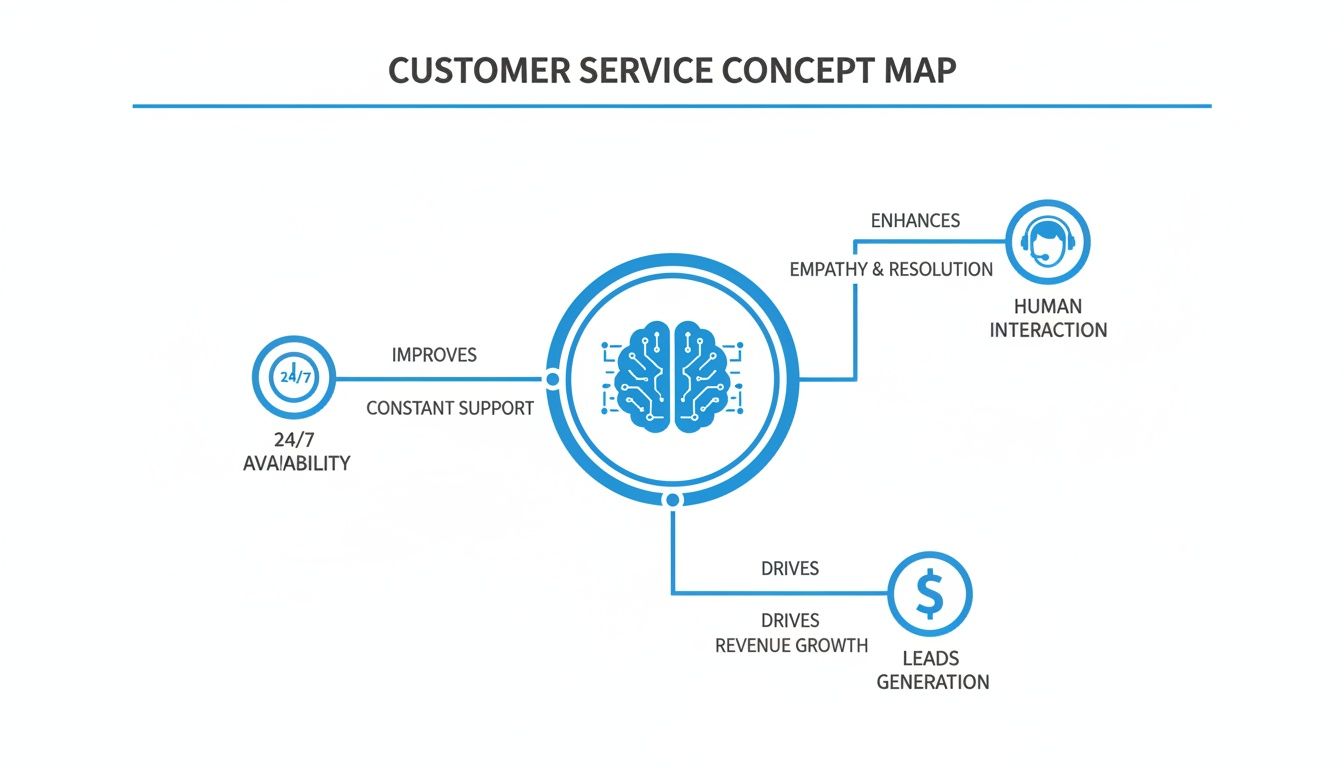
As you can see, the AI acts as the central hub, connecting always-on support with revenue-focused activities and essential human oversight. It creates a complete and effective customer service engine.
Seamless Human Escalation
Perhaps the smartest thing an AI assistant can do is know when it's out of its depth. The best solutions operate on a “white-glove” hybrid model. The AI isn’t just programmed with a script; it’s trained to understand when a conversation needs a real person.
It listens for subtle cues in the caller's tone and word choice, detecting frustration, confusion, or a complex problem that requires human empathy. The moment it flags one of these signals, it executes a seamless handoff to one of your team members.
- Practical Example (E-commerce): A customer calls about a delivery. The AI handles the initial query, "What is your order number?" and provides the tracking status. But if the customer says, "That's not what I see online, and this is the third time I've called," the AI detects the frustration, says, "I understand this is frustrating. Let me transfer you to a human agent who can resolve this right away," and routes the call with the order details to the support queue.
Most importantly, this isn't a cold transfer. The human agent gets the full context of the conversation—who they're talking to, what the issue is, and everything that's been discussed so far. The customer never has to repeat themselves, which makes for a smooth, positive experience. This intelligent routing gives you the best of both worlds: the efficiency of AI and the irreplaceable value of a genuine human connection. Blending these channels is a key part of what makes an omnichannel customer service strategy so effective.
The Real-World ROI of AI Customer Service
So, why are so many businesses making the switch to a virtual assistant for customer service? It’s not just about flashy technology. It’s about the very real, measurable return on investment (ROI) that hits your bottom line. Think of adopting an AI assistant less as a tech gadget and more as a smart financial move that directly improves your costs, revenue, and even customer retention.
The market for AI in customer service is expected to reach an incredible $15.12 billion by 2026, and that's not just hype. That growth is built on proven results. We're seeing businesses use AI to cut their First Response Time by as much as 74%. Just look at Klarna, the financial services company—their AI assistant took issue resolution time from a sluggish 11 minutes down to just 2, a perfect example of how speed translates directly into business efficiency.
Dramatic Cost Reduction
The first and most obvious win is a serious drop in operational costs. When you hire a full-time, in-house receptionist, you're looking at a huge investment. Once you add up the salary, benefits, payroll taxes, and training, that cost can easily climb past $45,000 per year.
An AI-powered virtual assistant gives you the same level of coverage—and often, even better—for a tiny fraction of that cost. Many businesses see savings of up to 80% compared to sticking with a traditional receptionist. This isn't just about trimming the budget; it's about freeing up that money to pour back into things that actually grow the business, like marketing or developing new services.
ROI in Action: Imagine a dental clinic paying a receptionist $4,000 a month. By switching to an AI assistant for just a few hundred dollars, they can pocket over $40,000 in savings annually. All while making sure every single patient call gets answered professionally, appointments are booked flawlessly, and reminders go out on time, every time.
Accelerated Lead Capture and Conversion
Here’s a hard truth: every call you miss is a customer you've likely lost forever. This is especially true in competitive fields like home services. If someone has a burst pipe or a dead AC unit, they aren't going to leave a voicemail. They're just going to call the next name on the list.
An AI virtual assistant is your 24/7/365 safety net, making sure you never miss another lead. It answers instantly, day or night, catching motivated buyers right when their need is highest. That immediate response is often the only thing separating you from your competitor down the street.
- For home service companies, this always-on readiness can boost qualified leads by 30%. The AI can even pre-screen callers to confirm they're in your service area and need a job you actually do before a technician's time is wasted.
- For law firms, it means you're capturing new client inquiries from someone filling out a web form at midnight, then scheduling their consultation before your team is even in the office.
It's not just about getting more leads; it's about understanding their value. To get a better handle on the numbers, it's worth exploring the real-world ROI of AI marketing to see how these gains are calculated.
Improved Customer Loyalty and Retention
First impressions are everything. The foundation of real customer loyalty is built on consistent, reliable support. When your customers know they can get a quick answer or book an appointment without sitting on hold, their trust in your business skyrockets.
An AI assistant guarantees every interaction is professional and follows your rules to the letter, every single time. That kind of reliability creates a fantastic customer experience, which naturally leads to higher retention and more repeat business. It also frees up your human staff to put their energy where it matters most—solving complex problems and delivering exceptional service for high-value clients. If you want to dive deeper into the financial side, take a look at our guide on how to calculate cost per lead.
Why a One-Size-Fits-All AI Doesn't Cut It
Here's the thing about AI: a generic tool will only ever give you generic results. The real magic happens when a customer service virtual assistant is trained on the specific language, problems, and workflows of your industry. It's the difference between a glorified answering machine and a core part of your team that actually understands how you operate.
This specialized approach is exactly why we're seeing such a huge uptake. The market for intelligent virtual assistants is on track to hit $6.5 billion by 2026. We see the proof in the real world every day—real estate firms getting a 25% jump in lead engagement, sales teams slashing response times by 30%. These aren't vanity metrics; they're the kind of results that lead to the 15x ROI we see with platforms like Recepta.ai. You can dig deeper into the numbers in this breakdown of intelligent virtual assistant statistics.
Let's look at a few before-and-after snapshots to see what this looks like on the ground.
Home Services: From Lost Calls to Locked-In Jobs
If you're an HVAC tech, plumber, or electrician, you know that every missed call is a missed job. When a customer has an emergency, they're not going to wait around for a callback. A virtual assistant built for home services acts like your best-ever dispatcher.
Before AI: It’s 11 PM on a freezing night, and a homeowner's furnace dies. They call you, but it goes to voicemail. By the time your on-call tech gets the message, that homeowner has already called three other companies and booked the first one to pick up the phone. You just lost a high-value emergency job.
After AI: The same homeowner calls. This time, the AI assistant answers instantly. It hears keywords like "no heat" and "freezing" and immediately triggers an emergency protocol. In under two minutes, it gets the address, confirms they're in your service area, checks the on-call tech’s synced calendar, and books the appointment. A text with all the job details is already on its way to your technician, and you've just secured the business.
Healthcare: A HIPAA-Compliant Front Desk That Never Sleeps
Medical and dental practices are buried in administrative work. Between scheduling appointments, chasing down patient info, and staying HIPAA compliant, it’s a constant battle. An AI assistant designed for healthcare can take on these tasks with perfect accuracy and security.
- Smarter Scheduling: It doesn't just book appointments; it understands the difference between a new patient consultation and a routine cleaning, blocking off the correct amount of time for each.
- Fewer No-Shows: It sends out automated appointment reminders via text or call, which is a huge deal. Practices using this regularly see their costly no-show rates drop by 15-20%.
- Instant Insurance Info: The assistant can run an initial insurance verification by collecting carrier and policy details right on the call, freeing up your staff from hours of phone tag.
The Bottom Line: For healthcare, the AI is more than a scheduler. It’s a 24/7, HIPAA-compliant front office manager that keeps patient data secure, the clinic running smoothly, and the patient experience top-notch.
Legal & Professional Services: Nailing the First Impression
For law firms and other professional services, the intake process is everything. You need to screen leads effectively while ensuring every interaction is documented perfectly for compliance. A virtual assistant can be set up to act as your firm’s most efficient and reliable intake specialist.
Before AI: A potential client finds your website late at night and fills out the contact form. Your paralegal sees it the next morning but is swamped with court filings. By the time they finally call back that afternoon, the lead has already booked a consultation with another firm that was quicker on the draw.
After AI: The moment that form is submitted, the AI initiates a call or text. It runs through a pre-approved script of qualifying questions to determine if the case is a good fit. If it is, the AI schedules a consultation directly on an attorney’s calendar and logs the entire transcript in your CRM. Your firm looks incredibly responsive and organized from the very first touch.
Implementing Your First Virtual Assistant
Bringing a virtual assistant into your customer service workflow might sound like a massive undertaking, but it’s not about ripping out your old systems. Think of it as adding a new, highly efficient team member who works hand-in-hand with what you’ve already built.
Let’s walk through a practical playbook for picking the right partner and getting them on the job, fast.

Key Evaluation Checklist
Before you sign on the dotted line, you need to understand what separates a genuinely helpful AI assistant from a clunky, frustrating one. Not all are created equal. You're looking for a tool that feels like a natural part of your team, not just another piece of software you have to manage.
Here are the absolute must-haves to look for in any provider:
- Powerful Integrations: Does it play well with others? A top-tier assistant has to connect directly with your CRM and calendars. This is how it logs every conversation and books appointments without anyone lifting a finger. If you're new to this concept, our guide on what is CRM integration breaks it down.
- Intelligent Human Handoff: The best AI knows its limits. You need to see a clean, seamless process for escalating a call to a human agent. Does it transfer the call with all the context, so your customer doesn't have to repeat themselves?
- Rock-Solid Security: You're trusting this system with sensitive customer data. The provider must have clear, robust security and compliance protocols baked in—especially if you're in a field like healthcare (HIPAA) or law.
- Scalability and Support: Your business is going to grow, and your tools need to keep up. Make sure the provider offers reliable support and can handle a sudden spike in call volume without breaking a sweat.
Your Five-Step Implementation Guide
Once you’ve found a provider that checks all the right boxes, getting set up is usually surprisingly quick. Most modern platforms, including Recepta.ai, are designed to get you live in a matter of minutes—often with a free trial so you can see the results for yourself before committing.
Follow these five steps for a smooth rollout:
- Define Your Primary Objective: Pinpoint the #1 problem you’re trying to solve. Is it to finally capture every lead that calls after 5 PM? Or maybe it’s to drastically cut down on appointment no-shows. Having a single, clear goal focuses your entire setup.
- Map Your Core Call Flows: Think through your most frequent calls. Where can the AI make the biggest impact? For a home services company, this might be qualifying new leads and scheduling estimates. For a medical clinic, it could be handling appointment requests and answering questions about office hours.
- Prepare Simple Scripts and Triggers: You don’t need to write a novel. Just give the AI the basic info it needs to answer common questions. More importantly, define simple triggers for when to escalate. For example, any caller who says "billing issue" or "I'm unhappy" can be set to automatically transfer to a live person.
- Connect Your Core Software: This is usually the easiest part. Just a few clicks link the virtual assistant to your CRM, calendars, and other key tools. This is the magic step that makes sure appointments booked by the AI instantly appear on your team's schedule and lead info is saved correctly.
- Brief Your Team on the New Workflow: Show your staff how this new tool makes their lives easier, not harder. Frame it for what it is: a way to offload the repetitive, routine calls so they can focus their energy on the complex conversations and high-value customers the AI has already qualified for them.
Common Questions About AI Customer Service
Look, adopting any new technology for something as critical as customer communication is going to come with some tough questions. It’s smart to be skeptical. After talking with hundreds of business owners, we've found the same handful of concerns pop up time and again.
Let's tackle them head-on.
Is a Virtual Assistant Too Expensive for a Small Business?
This is probably the biggest misconception out there—that sophisticated AI is only for enterprise giants with bottomless budgets. The reality is quite the opposite. You shouldn't think of a virtual assistant as a cost, but as an investment in pure efficiency.
When you really break down the numbers, the a-ha moment happens. A full-time receptionist can easily run you over $45,000 per year once you factor in salary, benefits, payroll taxes, and training. An AI assistant? Most businesses find they save up to 80% on those exact staffing costs.
- Practical Example: A small landscaping company might pay for an AI service that costs $300/month. A traditional answering service could easily cost them $800/month for basic coverage, and a part-time receptionist would be over $2,000/month. The AI provides 24/7 coverage, books quotes automatically, and pays for itself by capturing just one new landscaping project that would have otherwise been a missed call.
But here’s the real kicker: it’s not just about saving money, it’s about making money. If that AI captures just one or two valuable new customers a month that would have otherwise hit your voicemail and hung up, it has likely paid for itself. It's a tool for growth that works 24/7 for a tiny fraction of a single employee's cost.
Will an AI Assistant Sound Robotic and Annoy My Customers?
That's a completely fair question, and honestly, if we were still talking about the clunky chatbots from a few years ago, you'd be right to worry. But today's conversational AI is a different beast entirely. It’s built from the ground up to sound patient, natural, and genuinely helpful.
The real secret, though, isn't just a better voice—it's the hybrid model. A great virtual assistant is designed to handle the routine, predictable parts of a call with lightning speed. Think scheduling an appointment or gathering contact details.
The moment a caller has a complex problem, shows frustration, or simply needs to speak with a person, the AI's most important job is to know its limits. It seamlessly escalates the call to one of your human team members. This gives your customers the best of both worlds: robotic efficiency for the simple stuff and human empathy when it truly counts.
How Difficult Is It to Set Up and Integrate?
You definitely don't need a degree in computer science to get this running. The best virtual assistant platforms are designed to be incredibly straightforward, often taking just a few minutes to get the basics in place.
Getting started usually just means telling the AI your business's ground rules. You'll define how it should greet callers, what information is essential to collect, and what specific words or requests should trigger an immediate handoff to a person.
- Greeting: "Thank you for calling Smile Bright Dental. How can I help you today?"
- Information to Collect: For new appointments, always get the patient's full name, phone number, and email.
- Handoff Trigger: If a caller says "insurance question" or "speak to a doctor," immediately transfer them to the front desk staff.
- Data Encryption: All data, whether it's being transmitted or just sitting on a server, must be fully encrypted to prevent anyone from snooping.
- Compliance Certifications: If you're in a regulated industry, you need proof. For healthcare, ask to see their HIPAA compliance measures.
- Auditable Records: The system must log every single interaction, creating a secure and complete trail for quality control and compliance checks.
From there, it connects right into the software you’re already using every day, like your CRM or calendars from Google or Salesforce. Top providers like Recepta.ai even give you dedicated support to walk you through it and offer a risk-free trial so you can fine-tune everything with real calls before making a final decision.
Can I Trust an AI with Sensitive Customer Information?
Security isn't an afterthought; it’s the entire foundation. For any reputable provider, enterprise-grade security and compliance are baked in from the very beginning, not bolted on later. This is an absolute deal-breaker in fields like healthcare or law where data privacy is everything.
When you're looking at different options, be direct and ask about their security protocols. Here’s what you should confirm they have:
A properly designed AI system often handles sensitive data more securely than manual processes ever could, because it eliminates the risk of human error and ensures every single interaction is tracked and protected.
Ready to see how a virtual assistant can transform your customer service without the risk? Recepta.ai offers a 30-day risk-free trial so you can experience the benefits firsthand. Stop losing leads to voicemail and start delivering a world-class experience 24/7. Learn more and get started with Recepta.ai today.