Virtual Receptionist Pricing: A Complete 2026 Cost Guide

A missed call rarely looks expensive in the moment. It looks like a voicemail notification, a blinking light, or a note to call someone back after the rush.
But in operations, missed calls don’t stay small. They turn into unbooked estimates, delayed intake, frustrated patients, and leads that go to the company that answered first. That’s why virtual receptionist pricing deserves a harder look than “what’s the cheapest monthly plan?”
The critical factor is total cost of ownership. Sticker price matters, but so do overages, workflow fit, scheduling accuracy, escalation quality, and whether your CRM receives the caller details your team needs. A cheap plan that creates admin cleanup can cost more than a higher monthly fee that routes calls correctly from day one.
Why Your Voicemail Is Costing You More Than You Think
A homeowner calls at 12:10 because the AC went out. A prospect calls a law office at 6:15 after getting home from work. A patient calls before the clinic opens, hoping to grab the first cancellation.
They get voicemail, hang up, and keep looking.
That loss rarely shows up as a line item, which is why teams underestimate it. The obvious cost is the missed conversation. The bigger cost is everything that follows: slower response times, duplicate admin work, weaker intake notes, and lower conversion because the caller reached a competitor before your team called back.

If voicemail is still your fallback, at least tighten it up. A clear automated voicemail message can set expectations and route urgent callers better. It still leaves the core problem in place. People who are ready to book, schedule, or ask for help usually want an answer on that call.
The real cost shows up in operations
Teams often compare a virtual receptionist to the salary of an in-house front desk hire. That comparison matters, but it is incomplete. In practice, voicemail creates hidden costs that do not sit neatly inside payroll.
I have seen the same pattern across service businesses, clinics, and legal intake teams. Staff spend part of the day listening to messages, figuring out who called first, returning calls in batches, and recreating details that should have been captured once. Some callers do not answer the callback. Some call back again and create duplicate records. Some never return because another business picked up live.
Those costs stack up in a few predictable places:
- Lost revenue: High-intent callers book elsewhere while your team works through messages.
- Admin rework: Staff transcribe names, numbers, and service requests manually, then clean up errors later.
- Scheduling friction: Back-and-forth callbacks turn a simple appointment into a multi-touch task.
- Poor visibility: Voicemail boxes do not give managers clean reporting on call volume, missed opportunities, or peak-hour demand.
- After-hours leakage: Evening and weekend calls often include some of the highest-intent inquiries, especially in home services, legal, and healthcare.
A low monthly rate can look efficient until you count the labor needed to patch the gaps.
Total cost of ownership matters more than the voicemail alternative
This is the part many pricing guides skip. The right comparison is not "voicemail is free, a receptionist service costs money." The right comparison is total cost of ownership.
For voicemail, total cost includes missed conversions, callback labor, inconsistent intake, scheduling delays, and the lack of usable data in your CRM. For a virtual receptionist, total cost includes the monthly plan plus overages, setup, call transfer rules, CRM syncs, calendar integrations, and any escalation workflows for urgent calls.
That distinction matters because a cheaper service can still cost more to run. If messages arrive in email only, your team may still re-enter every lead by hand. If the provider cannot push caller details into your CRM or booking system, you are paying for coverage while keeping the cleanup work. If after-hours calls are answered by AI but urgent calls are not escalated correctly, you may save money on the invoice and lose it on high-value opportunities.
A practical rule helps here: if your phones ring most when your staff is already busy, voicemail is not neutral. It is an operating bottleneck with a delayed price tag.
Decoding Virtual Receptionist Pricing Models
Most proposals look confusing because providers package similar services in different ways. Strip away the branding, and virtual receptionist pricing usually comes down to three models: per-minute, per-call, and flat-rate subscription.
The easiest way to understand them is to compare them to transportation.
Per-minute pricing works like a taxi meter
The clock starts, the cost climbs, and every extra minute changes the bill.
This model dominates many human and hybrid services. According to Wishup’s pricing breakdown, per-minute billing models dominate human and hybrid services, ranging from $0.25–$3.50 per minute, and a 20% increase in average call length from complex inquiries can double monthly costs.
That’s the core trade-off. If your calls are short and predictable, the model can work. If callers ask detailed questions, need intake, or bounce between scheduling and service questions, your costs become hard to predict.
Per-call pricing works like paying per ride
You pay for each interaction rather than for time. That can make sense when calls vary in length and you’d rather not watch the clock.
Operationally, per-call pricing works best when a provider counts only meaningful calls and when your call quality is clean. It works poorly when spam, robocalls, wrong numbers, or repeat callbacks eat into your budget. Some businesses like this model because it feels simpler than minute tracking. In practice, it can still get messy if your call flow is noisy.
Flat-rate pricing works like a monthly transit pass
You pay one subscription fee and value predictability over micro-billing.
This is usually the easiest model to budget, especially for AI-first plans and businesses with uneven call patterns. If your phones are quiet one week and slammed the next, flat-rate pricing keeps finance from playing catch-up after every spike. The trade-off is that some “flat” plans still hide usage thresholds, feature gates, or exclusions in the fine print.
Comparison of Virtual Receptionist Pricing Models
| Model | Best For | Cost Predictability | Risk of Overage |
|---|---|---|---|
| Per-minute | Short, routine calls with stable call length | Low to medium | High |
| Per-call | Longer conversations when each valid interaction has similar value | Medium | Medium |
| Flat-rate subscription | Businesses that want budget control and easier scaling | High | Low, if the plan is truly flat |
What works and what doesn’t
I’ve found the wrong pricing model usually causes more pain than the wrong provider. Teams often choose the lowest entry price, then discover their actual call behavior doesn’t match the plan.
A few practical examples:
- A dental office with quick confirmations: Per-minute can work if calls stay brief and staff have clean escalation rules.
- A law office screening nuanced intake calls: Per-minute usually becomes stressful because conversations don’t stay short.
- An HVAC company with seasonal surges: Flat-rate tends to be easier to manage because volume swings are part of the business.
Per-minute pricing isn’t automatically bad. It’s bad when your call complexity is unpredictable and your finance team needs a stable monthly number.
How to read a quote fast
When a provider sends pricing, identify the billing unit first. Don’t start with the monthly fee. Start with the billing logic.
Ask:
- What exactly gets counted? Talk time, hold time, transfers, or admin time?
- What happens when calls run longer than expected?
- Does the plan stay usable during peak season?
If you can’t answer those three questions from the quote, you don’t yet understand the price.
What Really Drives Your Virtual Receptionist Bill
The invoice rarely matches the headline number on the website. That’s where a lot of virtual receptionist pricing guides fall short. They compare plan tiers but skip the line items that turn a manageable service into a budget problem.
What matters most isn’t just the pricing model. It’s what your provider bills inside that model.
Call patterns matter more than listed plan size
A plan can look generous until your real-world calls hit it. A provider may include a block of usage that seems fine on paper, then overages start piling up when callers ask follow-up questions, staff transfer calls awkwardly, or intake requires more detail than expected.
That’s why average call length matters so much. It’s also why industries with variable conversations should be wary of plans that look cheap only when calls stay short.
Watch for these pressure points:
- Overage exposure: Included usage disappears quickly when call length stretches.
- After-hours handling: Nights and weekends often involve different workflows, not just different timing.
- Feature-billed tasks: Scheduling, intake, message routing, and follow-up actions may not all be included equally.
- Escalation costs: A hybrid service might look efficient until every human handoff adds cost.
Integration work is part of total cost of ownership
The biggest hidden cost I see isn’t always on the invoice. It’s the labor your team absorbs when the system doesn’t connect cleanly to calendars, CRMs, intake forms, or ticketing workflows.
If caller details land in email but not in your operating system, someone has to retype them. If appointments need manual review because the calendar sync is shallow, someone has to clean them up. If legal intake or patient details arrive incomplete, someone has to chase information the receptionist should have captured the first time.
That’s why some teams compare software-based reception against staffing alternatives such as Hire LatAm Virtual Assistants. Not because the services are identical, but because both choices affect workflow labor, supervision, and handoff quality. A cheaper reception tool isn’t cheaper if your staff still do the primary coordination manually.
What to inspect before signing
Use the quote review process like an operations audit.
| Bill driver | Why it changes cost | What to ask |
|---|---|---|
| Usage limits | Heavy or longer calls can trigger overages | What counts toward usage? |
| Human escalation | Complex calls may move to a higher-cost path | How are escalations billed? |
| Scheduling features | Booking logic can be basic or advanced | Is appointment setting included or limited? |
| CRM sync | Weak integrations create admin work | Does data post automatically into our system? |
| Coverage scope | After-hours needs often differ from daytime needs | Is 24/7 workflow identical or reduced? |
Cheap plans often push cost downstream. The provider saves money up front, and your staff pay for it later in rework.
A practical quote test
When you compare providers, don’t ask for the cheapest plan. Ask each vendor to price the same operating scenario:
- Your normal business-hours call flow
- Your after-hours call flow
- Your busiest common inquiry type
- One complex inquiry that needs escalation
- Your required integrations
That forces real comparison. It also reveals who’s quoting a marketing package versus who understands operational reality.
How to Calculate Your Virtual Receptionist ROI
ROI gets fuzzy when teams treat a receptionist service as a generic overhead line. It’s easier to evaluate when you break it into four buckets: recovered revenue, staff time returned, retention value, and service cost.
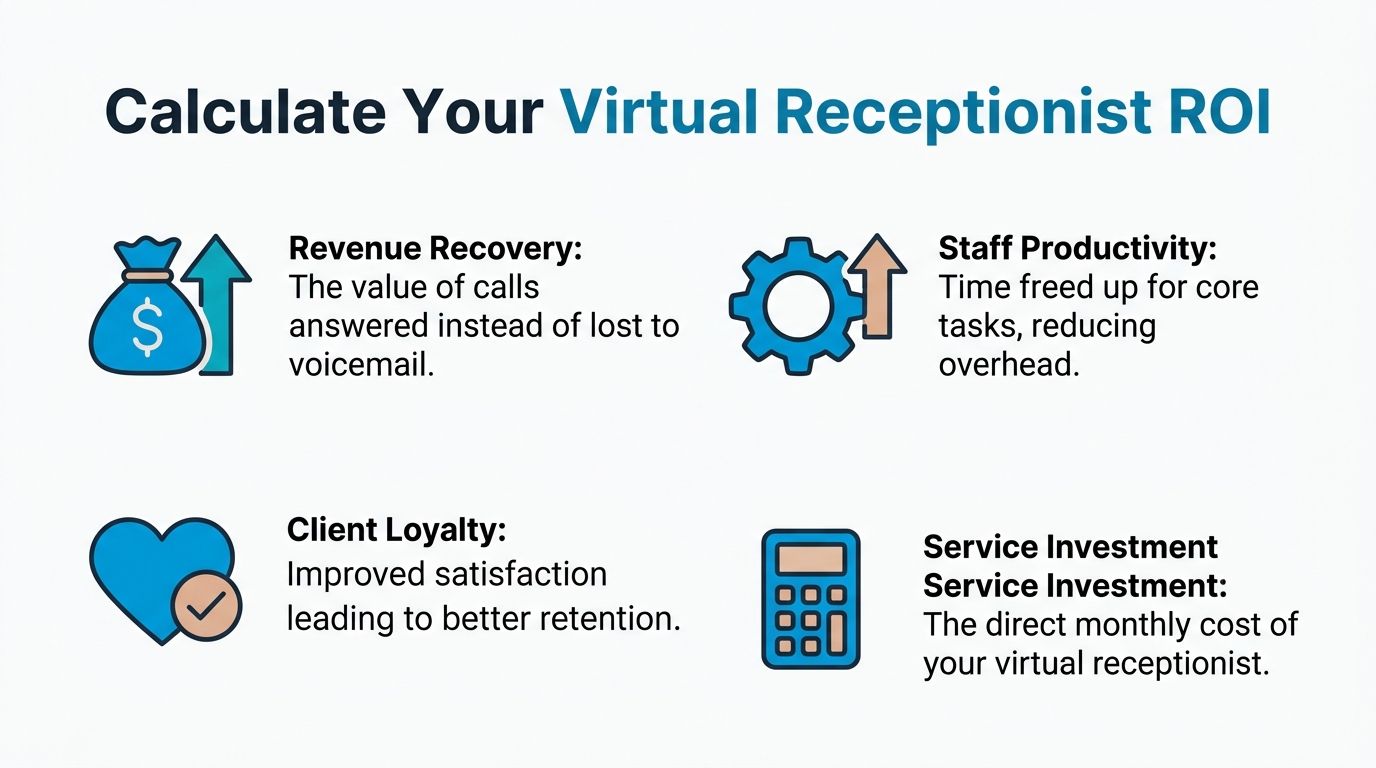
A simple working formula is:
ROI = (Revenue recovered + productivity gained + retention value - service cost) / service cost
You don’t need perfect attribution to make this useful. You need a disciplined estimate.
A back-of-the-napkin method
Start with the pieces you can observe inside your business.
Estimate missed-opportunity value
Look at how many calls currently go to voicemail, get returned late, or never reach the right person.Estimate conversion value
Identify what a booked appointment, qualified consult, or scheduled site visit is worth to you on average.Estimate labor reclaimed
Count the time staff spend answering repetitive questions, routing calls, and re-entering caller details.Subtract total service cost
Use the actual monthly service price plus any setup, integration, or admin time needed to keep it running.
If your team already tracks lead economics, the logic is similar to broader frameworks for how to measure marketing ROI. The difference is that you’re measuring call handling as an operational revenue lever, not just a marketing channel.
A practical example for a home services company
Take a small HVAC company. The owner doesn’t need a perfect spreadsheet to evaluate the service. They need to answer three questions.
- Are calls being missed during jobs, after hours, or during dispatch bottlenecks?
- What is one booked service call or estimate worth on average?
- How much office time goes into callbacks, rescheduling, and fixing incomplete messages?
If the service consistently captures even a small number of calls that previously slid to voicemail, the economics often work fast. To model lead value cleanly, use a framework like this guide on how to calculate cost per lead, then connect that number to answered-call volume.
Include soft value, but keep it honest
Not every gain belongs in a spreadsheet. Some benefits are real but harder to price precisely:
- Faster response quality
- Cleaner intake records
- Less front-desk context switching
- Better caller experience for repeat customers
Still, stay conservative. Don’t stuff the model with optimistic assumptions just to justify the service.
Operator’s shortcut: If one additional qualified opportunity per month would cover the service, you probably don’t need a complex ROI model. You need a cleaner call-handling process.
A better way to compare providers on ROI
Don’t compare two vendors solely on monthly fee. Compare them on this question:
Which option produces the lowest total handling cost per successfully completed business outcome?
That outcome might be:
- a booked appointment
- a qualified intake
- a routed emergency call
- a logged lead in your CRM
The provider with the lower sticker price isn’t always the provider with the lower cost per outcome.
Virtual Receptionist Costs for Different Industries
A missed call does not cost the same in every business.
In one office, it means a voicemail that can wait until lunch. In another, it means a lost case intake, an unbooked service call, or a patient who gives up and calls the next provider. Industry changes the economics fast, which is why the cheapest plan on paper often turns into the most expensive setup to run.
According to Dialzara’s analysis of AI virtual receptionist cost, pure AI plans usually sit at the low end of the market, while hybrid AI and human services cost more and tend to fit businesses with a meaningful share of complex calls. That pricing spread matters, but the bigger question is what each industry has to spend after the call. Rework, bad routing, missed context, and manual data entry are part of the actual cost.
Law firms need clean intake and fewer handoff failures
Legal teams rarely benefit from buying the lowest-cost answering coverage.
A caller may start with a simple question and turn it into a ten-minute intake with deadlines, conflict details, and emotional context. If the service charges by the minute and the workflow is weak, firms get hit twice. First on the invoice, then again when staff have to call back, clarify facts, and rebuild the intake inside the case system.
The better fit is usually a hybrid model with rules for when AI should stop and a trained person should step in. I also look hard at CRM or case-management sync. If receptionist notes arrive by email instead of posting into the right matter fields, the service is still creating admin work.
What usually matters most for law firms:
- Structured intake fields
- Human escalation for sensitive or high-value matters
- Conflict-check friendly data capture
- Case-system or CRM sync that reduces retyping
HVAC companies need capacity during peaks, not cheap minutes in slow weeks
HVAC has a different cost profile. The risk is not usually a poor intake narrative. It is failing to answer quickly when demand spikes, especially after hours or during weather events.
That changes how pricing should be evaluated. A low base plan can look fine in a mild month and break during the week you need it most. Overage fees, dispatch transfers, and after-hours routing rules matter more than a polished demo.
I prefer to price HVAC reception against schedule fill rate and missed-demand reduction. If the provider can capture urgent calls, route emergencies correctly, and push booked jobs into the calendar without front-desk cleanup, a higher monthly fee can still produce a lower total cost of ownership.
| Business type | Pricing fit | Priority features |
|---|---|---|
| Law firm | Hybrid | Structured intake, empathy, system logging |
| HVAC company | Flat-rate or hybrid | Fast answer times, dispatch logic, after-hours capture |
| Healthcare clinic | Hybrid | Compliance-ready workflows, scheduling, secure handoff |
A short demo can help teams see the handoff quality in action before they commit:
Healthcare clinics need workflow accuracy, not basic message taking
Healthcare pricing gets underestimated because buyers compare it to generic answering services instead of the operational standard clinics need.
A clinic may need appointment-type logic, secure handoff rules, escalation for urgent language, and accurate documentation that staff can trust. A cheap service that only takes messages often shifts work back to the front desk. Staff then spend time correcting patient details, sorting urgency, and re-entering information into the scheduler or EHR-adjacent tools. That is cost, even if it does not appear on the vendor quote.
Teams evaluating medical use cases should review this guide to using a medical virtual receptionist because healthcare usually requires more structured workflows than standard call answering.
In healthcare and legal, downstream correction work can erase the savings from a low monthly plan.
A practical way to price by industry
Use industry risk to choose the model.
- Routine, repeatable, high-volume calls: AI-first or flat-rate plans often work if the workflow is narrow and integrations are solid.
- Mixed call types with real escalation needs: Hybrid plans usually cost more upfront and less in rework.
- Compliance-heavy or high-emotion environments: Price the full process, including integrations, escalation paths, and staff correction time.
Per-minute rates matter. Total handling cost matters more.
Your Checklist for Comparing Virtual Receptionist Providers
By the time you’re down to a shortlist, the goal isn’t to find the lowest monthly fee. It’s to avoid buying a service that looks efficient in a proposal and behaves expensively in production.
Use a checklist that forces operational clarity.
Contract and billing terms
Start with the terms nobody pays enough attention to.
- Billing logic: Is the service charging by minute, by call, or by subscription?
- Overage treatment: What happens when your normal month becomes a busy month?
- Exit flexibility: Can you leave without friction if the workflow breaks down?
- Growth path: What changes when you add locations, users, or more complex routing?
A provider can be well priced and still be a poor fit if the contract makes adaptation painful.
Workflow fit and handoff quality
Most demos look polished, yet most implementations stumble. Ask providers to walk through actual call paths, not idealized ones.
Test these situations:
- A routine scheduling call
- An upset caller
- A call that needs transfer or escalation
- A lead that must post into your CRM
- An after-hours call with urgent language
If they can’t explain those paths cleanly, the service will create confusion later.
Integration depth
“Integrates with your CRM” can mean almost anything. Sometimes it means the system sends an email. Sometimes it means the platform writes structured fields directly into the tool your team already uses.
Ask what happens after the call ends.
- Does the record sync automatically?
- Do appointment details land in the right calendar?
- Can your team report on outcomes without manual cleanup?
For small companies comparing options, this roundup of the best virtual receptionist for small business is useful because it frames provider choice around workflow needs, not just price tags.
Support and operational maturity
A virtual receptionist is part communications tool, part process layer. Support quality matters more than many buyers expect.
| Evaluation area | Good sign | Warning sign |
|---|---|---|
| Onboarding | Provider asks detailed workflow questions | Provider rushes to activate with generic scripting |
| Reporting | Clear call summaries and usable logs | Vague summaries that require follow-up |
| Escalations | Defined human handoff process | No clarity on who takes over or when |
| Change management | Easy updates to scripts and routing | Slow edits and ticket backlogs |
Buying advice: Don’t ask “Can it answer our phones?” Ask “What happens when the call gets messy?”
Use the trial like an audit
A trial period is only useful if you test real conditions. Don’t spend it admiring the dashboard. Use it to pressure-test edge cases.
During the trial, check:
- Real call transcripts or summaries
- How quickly workflows can be adjusted
- Whether your staff trust the notes and routing
- Whether caller information reaches the right systems
- How the service performs outside normal office hours
A good provider won’t just sound good on the first call. It will reduce cleanup for your team after the call.
Answering Your Top Pricing Questions
Is a virtual receptionist the same as an answering service
Not always. A basic answering service usually focuses on message-taking and simple routing. A virtual receptionist should do more, such as scheduling, intake, lead capture, and workflow-driven handoff. The pricing may look similar at first, but the operating value is different.
If your business needs more than “we’ll take a message,” treat those as separate categories.
How does a hybrid AI-human service usually get billed
Usually through a combination of base subscription and some form of human-assisted usage. The exact billing method varies by provider. The practical issue isn’t whether hybrid costs more than pure AI. It usually does. The issue is whether the human escalation happens often enough, and well enough, to justify the spend.
For legal, healthcare, and other complex environments, the answer is often yes because pure automation can create quality problems on sensitive calls.
Should I keep my existing business number
In most cases, yes. Businesses usually want continuity for customers, marketing materials, directories, and reputation. Providers can typically work with your existing number through forwarding or porting arrangements, but the exact process depends on your phone setup and carrier.
Ask providers to explain the handoff plainly before you sign. If they make number migration sound confusing, expect implementation to feel the same way.
Are toll-free, international, or after-hours calls priced differently
Sometimes. This depends entirely on the provider’s billing rules and coverage model. Some services fold those scenarios into the base plan. Others treat them as separate usage or premium handling categories.
The only safe approach is to ask for a written list of what changes the bill. Don’t rely on “unlimited” language without examples tied to your actual call patterns.
What’s the best pricing model for a small business
That depends on how your calls behave.
- If calls are short and stable, per-minute can work.
- If each valid call tends to be long, per-call may fit better.
- If volume is inconsistent or you need easier forecasting, flat-rate is often easier to manage.
Most small businesses regret unpredictable billing more than they regret paying a slightly higher flat monthly fee.
How do I compare providers fairly
Give each one the same scenario set. Include normal business-hours calls, after-hours calls, one complex intake, and the integrations you need. Then compare total monthly cost, overage risk, workflow quality, and admin burden on your team.
That gives you a real comparison. List prices alone don’t.
What’s the biggest pricing mistake buyers make
They compare plans without pricing the labor their own staff still have to do.
If your receptionist service answers calls but doesn’t book correctly, log data cleanly, or escalate well, your front desk still absorbs the work. You haven’t removed cost. You’ve just moved it.
If you want a system that combines AI call handling with human backup, scheduling, lead capture, and workflow integrations, Recepta.ai is worth a close look. It’s built for businesses that can’t afford missed calls or messy handoffs, and the 30-day risk-free trial makes it practical to test with real call flows instead of guessing from a sales demo.