Finding the Cheapest Virtual Receptionist: A 2026 Playbook

Most advice on the cheapest virtual receptionist is bad. It tells you to sort providers by monthly price and pick the smallest number.
That's how small businesses buy the wrong service.
If a cheap plan misses leads, fumbles scheduling, or routes urgent calls badly, it isn't cheap. It's expensive in the way that hurts most. Repeatedly, and right at the point where a customer tried to reach you. A lot of businesses would be better served by treating front-desk coverage like a revenue system, not a utility bill. If you need a broader view of what strong outsourced phone coverage should handle, this breakdown of a modern call answering service is a useful gut check.
The True Meaning of the Cheapest Virtual Receptionist
The cheapest virtual receptionist is not the one with the lowest sticker price.
It's the one with the lowest total cost of ownership, or TCO, for your business. That means the plan cost, the overages, the setup friction, the admin burden on your team, and the cost of calls that still go nowhere. If you don't evaluate all of that, you're not comparing offers. You're comparing headlines.
Most pages ranking “cheap” options play this game. They lead with the lowest visible entry price, even though recent comparison pages show starting prices from $15/month for AI-only options up to $385/month for human-only plans, and some providers layer in extra fees or per-minute charges, which is exactly why headline pricing is a weak buying signal according to this pricing comparison discussion from AMBS Call Center.
Cheap monthly fee versus cheap business outcome
A plan can be inexpensive and still be a terrible decision.
A home services company with simple calls like “Do you service my ZIP code?” or “Can someone come tomorrow?” might get excellent value from a low-cost AI-first setup. A law office dealing with sensitive intake and nuanced caller emotion might save money upfront with AI-only, then lose trust and create rework for staff. Same category. Different economics.
Practical rule: If your front desk exists to capture demand, then missed or mishandled calls belong in your cost model.
TCO matters more than price
I'd rather see you buy a service that costs more and reliably books appointments than chase a bargain that creates voicemail backlog.
Use two filters:
- TCO first: What will this service really cost after usage, escalations, and exceptions?
- ROI second: Does it help your business answer more calls, schedule more appointments, and capture more leads than your current setup?
That's the whole game. Not “what's the smallest monthly number I can find?” but “what's the least expensive way to run my front office without leaking revenue?”
Decoding Virtual Receptionist Pricing Models
Before you compare providers, understand how they charge. Most buyers skip this step, then act surprised when the “cheap” option becomes the most expensive invoice on the stack.
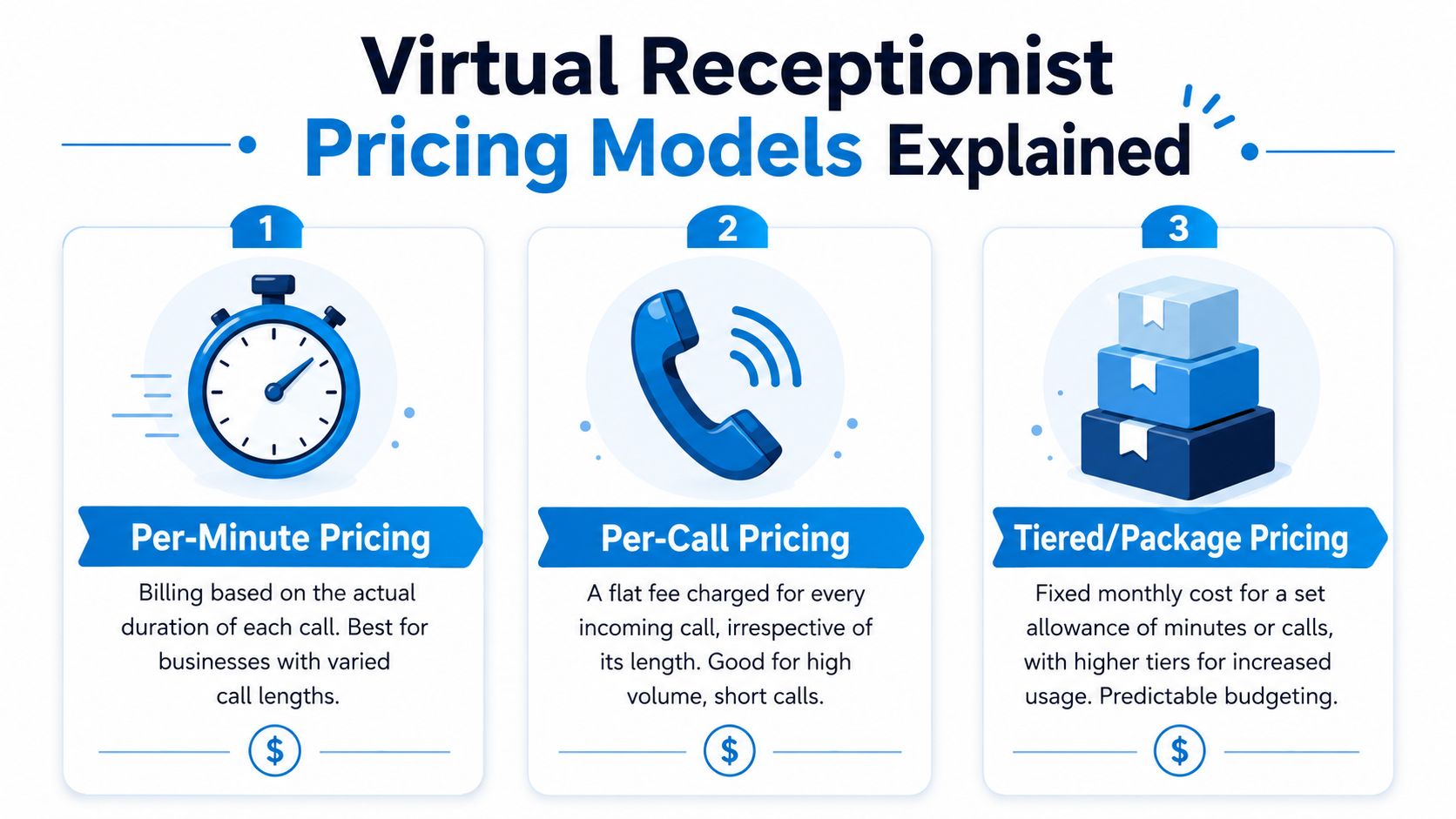
The three pricing models that matter are per-minute, per-call, and tiered or package pricing. Learn those, and most sales pages become much easier to read.
Per-minute pricing
This is the classic live answering model. You buy a block of usage, and every conversation eats into it.
That can work if your calls are predictable and short. It gets ugly when callers ramble, staff transfer calls often, or your office receives bursts of after-hours traffic. The meter keeps running while you're trying to look “professional.”
Think of per-minute like an old mobile phone plan. Fine if usage stays low. Punishing when life happens.
Per-call pricing
Per-call sounds simpler. It often is.
You pay for each inbound interaction, regardless of length. That can make sense if your calls tend to be longer and fewer, or if your business wants clean cost accounting per conversation. It can also be wasteful if you get lots of junk calls, misdials, or low-value inquiries.
A practical example: a plumbing company with a lot of short “Do you do emergency service?” calls may hate per-call pricing if those calls don't convert. They're paying the same unit cost whether the conversation becomes a booked job or a dead end.
Tiered and package pricing
This is usually the most familiar format for buyers. You pick a monthly package with an included allowance, then move up as volume grows.
It's predictable, which small businesses like. It also hides the most landmines. Included minutes or calls can look generous until your usage pattern changes. Seasonality, weekend spikes, and staff handoff rules can push you into the next tier faster than expected.
A lot of teams should prefer predictable monthly budgeting. They just shouldn't confuse “predictable” with “fully loaded.”
What the market says about price bands
The broad price spread tells you something important about the market. AI-only plans are now commonly priced at $25 to $300 per month, while live answering services usually start around $200 to $800 per month. A full-time in-house receptionist is estimated at $4,000 to $5,000 per month in all-in cost, which is why low-end outsourced options can come in at less than 1% of in-house cost at the low end according to GetNextPhone's virtual receptionist cost guide.
That pricing gap is why the cheapest virtual receptionist options are usually software-led.
Here's the simpler rule I give clients:
- Choose per-minute if call flow is light and controlled.
- Choose per-call if you understand your call quality and don't get much junk traffic.
- Choose flat or package-heavy models if budget predictability matters more than shaving a little off the base rate.
A short explainer can help if you want to see how providers frame these models in practice:
A blunt example from the field
Take a local plumbing company.
On paper, a low entry per-minute plan looks smart. In reality, plumbers get urgent calls, confused callers, repeat callers, and dispatch-related transfers. That mix inflates billed usage fast. A flat-fee AI-first setup may look pricier at first glance, but if it handles routine triage, confirms service area, captures job details, and only escalates real emergencies, it often produces a cleaner cost structure.
The right pricing model depends less on what the provider calls the plan and more on what your callers actually do.
Build Your Total Cost and ROI Calculator
If you don't build your own model, you'll end up borrowing the provider's assumptions. That's a mistake.
Your cheapest virtual receptionist depends on your call pattern, not theirs. A useful buying process starts with your own numbers, even if they're rough. You don't need a complex spreadsheet. You need a simple operating model you can test against offers.
Start with the metrics that matter
Industry guidance on selecting a low-cost virtual receptionist is straightforward. Model total cost from call volume, average call length, and escalation rate, then compare that against the plan structure. The most useful operating metrics are calls answered, appointments scheduled, and leads captured, because those let you calculate cost per lead and cost per appointment, as outlined in Vida's guide to cheap virtual receptionist evaluation.
That's the backbone of your calculator.
Use this table as your working template:
| Metric | Your Business Value | Example Calculation |
|---|---|---|
| Monthly inbound calls | Count calls from phone logs over a normal month | |
| Average call length | Estimate from call history or sample recordings | |
| Escalation rate | Share of calls that must reach a person | |
| Calls answered | Answered calls divided by inbound calls | |
| Appointments scheduled | Booked appointments from answered calls | |
| Leads captured | New inquiries with usable contact details | |
| Monthly service cost | Base plan plus overages and add-ons | |
| Cost per lead | Monthly service cost divided by leads captured | |
| Cost per appointment | Monthly service cost divided by appointments scheduled |
Audit your current phone reality
Pull your last few weeks of phone data and stop guessing.
Look for patterns like these:
- Peak windows: Monday mornings, lunch breaks, after-hours, and weekends.
- Call intent: sales inquiry, existing customer support, scheduling, urgent issue.
- Escalation need: could AI or scripted handling resolve it, or does a person need to step in?
- Failure points: voicemail, missed calls, delayed callbacks, duplicate conversations.
A practical example. If you run a dental office, separate appointment requests from insurance questions and urgent patient concerns. If you run an HVAC company, separate quote requests from no-heat emergencies. Those categories don't deserve the same answering workflow, and they shouldn't share the same cost assumptions either.
Put a value on outcomes, not just activity
A receptionist service doesn't create value because it answers calls. It creates value when answered calls turn into booked work, qualified leads, or fewer interruptions for your staff.
That's why I tell owners to track two numbers every month: cost per lead and cost per appointment. Those are more honest than “monthly fee.” If one provider costs less but delivers weaker lead capture, it's probably not cheaper.
If you need help framing the revenue side of that equation, Adwave's marketing ROI guide gives a practical way to connect spend to business outcomes. It's useful because the front desk is part of your revenue chain, not separate from it.
You can also use this primer on how to calculate cost per lead to tighten the math around inbound calls that turn into real opportunities.
Build a simple scenario model
Don't create one estimate. Create three.
Normal month
Use average call volume and standard call mix.Busy month
Add heavier intake, more after-hours calls, and more escalations.Messy month
Include scheduling changes, service disruptions, or marketing campaigns that trigger lower-quality inbound traffic.
Cheap plans often look cheap only under ideal conditions.
If a provider only works financially in your calmest month, you don't have a pricing fit. You have a spreadsheet trick.
A fill-in-the-blanks example
Let's say you run a cleaning company.
Your team gets quote requests, recurring customer changes, and occasional reschedules. Some calls only need info capture. Others need a human to confirm timing or pricing. In your model, you'd estimate total monthly calls, average length, and the share that really need escalation. Then compare two providers:
- an AI-first flat monthly plan that handles booking requests and routine questions
- a live plan that charges by usage and forwards complex calls
Now compare output, not just cost. Which one captures more leads? Which one books more appointments without staff jumping in? Which one creates fewer follow-up tasks?
That answer is your cheapest virtual receptionist.
Screening Low-Cost Providers Like a Pro
Price narrows the shortlist. Quality decides whether you regret the contract.
A low-cost provider can still be a good deal, but only if it handles your real workflows. A lot of businesses buy based on price, then discover the service can't manage appointment rules, doesn't integrate with their systems, or escalates so often that staff end up doing the work anyway.

Match the provider to call complexity
At this stage, buyers get sloppy.
The lowest-cost plan may be fine for basic call capture, but not for workflows that require empathy or compliance sensitivity. Human and live services still market specialized support such as HIPAA-oriented positioning and bilingual support, which AI-only options may not offer, as discussed in RingCentral's overview of AI receptionist tradeoffs.
That means your screening standard should change by industry:
- Home services: prioritize speed, lead capture, routing, and after-hours handling
- Healthcare and wellness: prioritize scheduling accuracy, escalation rules, and compliance posture
- Legal and professional services: prioritize intake quality, tone, and nuance
- Real estate and insurance: prioritize lead qualification, routing logic, and CRM sync
Ask harder questions on the sales call
Most demos are too polished to be useful. Force specifics.
Ask questions like these:
- What happens on a call you can't resolve? You want a clear escalation path, not “our team can usually handle that.”
- How do you handle appointments? Ask whether the system reads real calendar availability or just sends messages.
- What gets logged automatically? If staff still have to re-enter notes, your labor cost didn't disappear.
- How do you handle bilingual calls or regulated workflows? If the answer is vague, move on.
- What counts toward usage? If billing isn't easy to explain, assume the invoice won't be either.
A provider like Recepta.ai's outsourced call center solutions sits in the hybrid category, where AI handles routine conversations and trained agents take over when a workflow needs judgment. That kind of structure can make sense for businesses that need cost control without forcing every complex call through automation.
Read the contract like a CFO, not a hopeful buyer
Cheap plans hide problems in the fine print.
Scan for these red flags:
| Red flag | Why it matters |
|---|---|
| Long lock-ins | You lose leverage if service quality slips |
| Vague service definitions | “Support” and “coverage” can mean almost anything |
| Overage language | Your cheap plan may be cheap only at trivial volume |
| Weak integration detail | Manual data entry shifts cost back to your team |
| No clear escalation process | Staff end up cleaning up failed interactions |
Run a live workflow test
Don't approve a provider until you test common calls from your business.
A practical test set might include:
- New lead call: “I need service this week. What's the next opening?”
- Existing customer call: “I need to reschedule.”
- Urgent call: “This issue needs attention today.”
- Edge case: “I have a billing question and a scheduling issue.”
Buy the provider that handles your boring calls cleanly and your difficult calls safely.
That's a much better filter than “Who has the lowest starter plan?”
Advanced Strategies to Slash Receptionist Costs
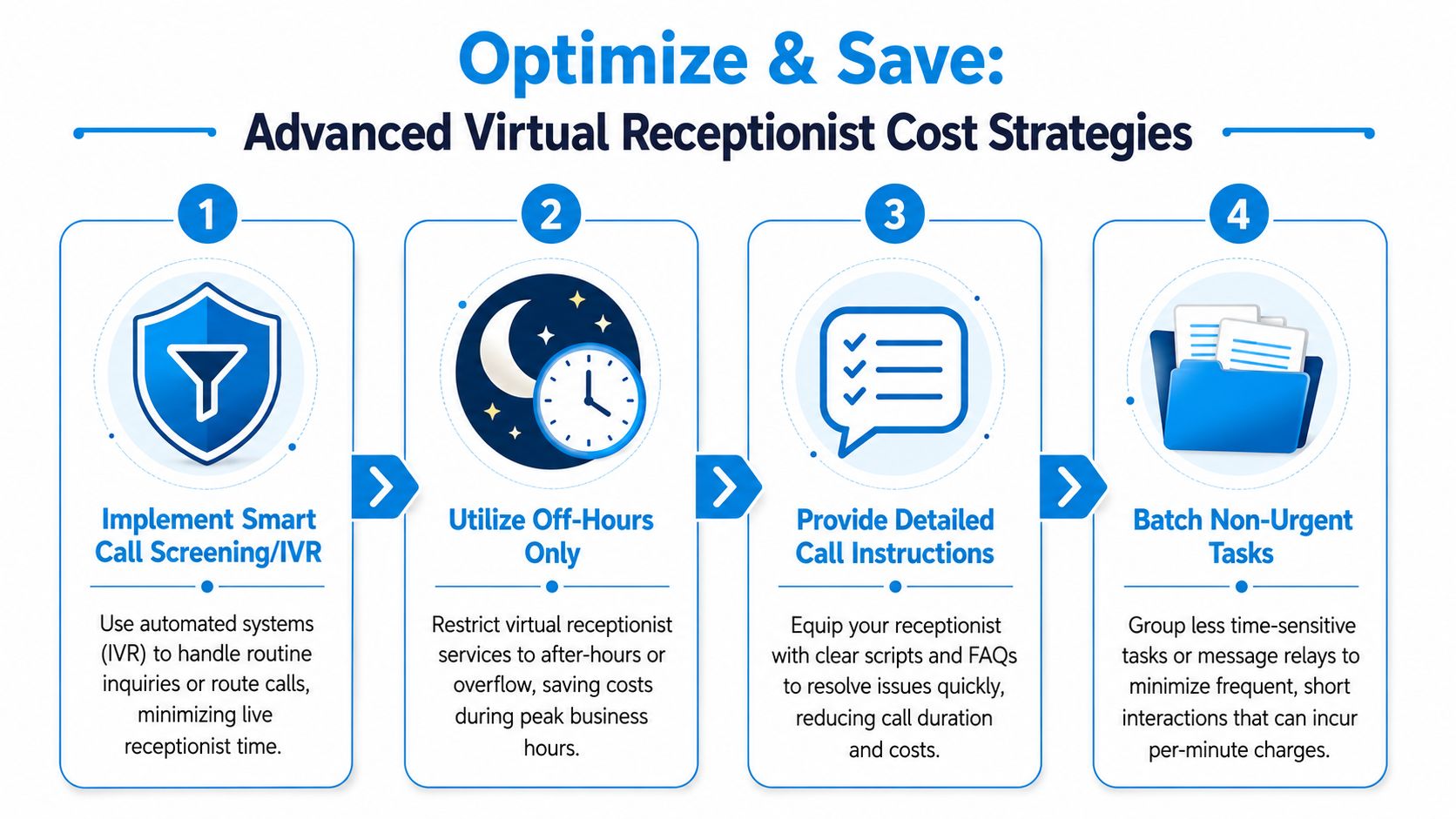
Once you've picked a provider, significant savings come from design. Most businesses overpay because they let every call follow the same path.
That's lazy operations. Smart businesses route simple work to cheaper handling and reserve expensive attention for moments that need it.
Use AI-first triage for routine calls
The category is moving this way for a reason. The global virtual receptionist service market is projected at US$4.64 billion in 2026 and projected to reach US$10.85 billion by 2035, with a 9.8% CAGR, reflecting the shift toward AI-assisted, flat-rate, always-on call handling according to Alliance Virtual Offices' market overview.
That trend matters because it changes how you should buy.
If your receptionist flow starts with routine questions, use AI to handle first contact. Business hours, service area, appointment requests, intake forms, lead qualification, and basic routing should not consume expensive human time unless there's a clear reason.
Tighten your call instructions
A provider can only be efficient if you give it useful rules.
Here's what strong call instructions look like:
- Define urgent calls clearly: “No cooling,” “water leak,” and “same-day legal deadline” should trigger fast escalation.
- Write concise FAQ answers: keep standard responses short and consistent.
- Set routing priorities: sales leads to closers, routine support to admin, emergencies to on-call staff.
- Create appointment boundaries: what can be booked directly, what needs approval, and what requires a callback.
Most owners bury providers in long documents. Bad move. Clear workflows reduce call time and reduce mistakes.
Limit expensive handoffs
Every handoff costs money somewhere. Sometimes it hits your invoice. Sometimes it hits staff time.
Cut handoffs by deciding in advance:
- which calls can end with a message
- which calls should result in direct booking
- which calls deserve immediate transfer
- which calls should trigger follow-up instead of interruption
A practical example: a pest control company doesn't need every “Do you serve my area?” call transferred to office staff. It needs area confirmation, basic service info, and a path to book or capture details. Save the human touch for unusual property issues, commercial accounts, or upset customers.
Negotiate with data, not vibes
Providers take buyers more seriously when buyers know their call patterns.
Use language like this on the sales call:
“Our volume is stable, our routine inquiries are well defined, and we know what should escalate. Quote me on the all-in cost for our normal month and our busy month.”
That one sentence changes the conversation.
You can also ask for specific concessions:
- Included usage buffer for seasonal spikes
- Setup help for scripting and routing rules
- Month-to-month flexibility while you validate call handling
- Bundled integrations if your team depends on CRM or calendar sync
If a vendor won't discuss total operating fit, it's probably because the base price is doing too much work in the sale.
For businesses exploring automation-first options, this guide to an AI call answering service is worth reviewing alongside your provider quotes so you can compare workflow design, not just plan labels.
Your Smartest Investment is Not Just the Lowest Price
The cheapest virtual receptionist isn't the lowest number on a pricing page. It's the service that handles your call flow at the lowest real cost while still protecting revenue.
That requires discipline. You need to model TCO, not shop by headline price. You need to measure cost per lead and cost per appointment, not just monthly spend. You need to screen providers for workflow fit, escalation quality, integration depth, and contract risk. Then you need to optimize the setup so routine calls stay cheap and complex calls get the right attention.
Most businesses skip that work because they want a fast answer.
The fast answer is usually wrong.
If you remember one thing, remember this: a receptionist service is part of your sales process, your scheduling process, and your customer experience. Buy it like an operator, not like a coupon hunter. The provider with the best value model for your call mix is your cheapest option. Everyone else is just better at hiding the bill.
If you want a virtual receptionist setup that combines AI handling with human escalation for more complex conversations, take a look at Recepta.ai. It's built for teams that want 24/7 call coverage, lead capture, scheduling, and workflow automation without forcing every call into a one-size-fits-all script.