What Is Customer Service Automation: A 2026 Comprehensive
Customer service automation is the use of technology to resolve customer inquiries and execute tasks with minimal human input, from answering questions to booking appointments. It's becoming a core business function fast: the global AI for customer service market is valued at USD 12.06 billion in 2024 and projected to reach USD 47.82 billion by 2030, while 75% of customer inquiries can now be resolved by AI tools without human intervention.
If you're running a business, you probably know the feeling. Calls come in while your team is on jobs, your front desk is juggling three conversations at once, the inbox keeps filling, and someone always seems to reach out right after closing time.
That's where people often get confused about what customer service automation means. They think it's just an auto-reply, a chatbot that says hello, or a phone tree that annoys callers. Good automation does more than respond. It helps a customer finish something useful, like scheduling an appointment, checking an order, updating an account, or getting routed to the right person without friction.
Why Every Call and Message Matters
A missed call isn't just a missed call. For a plumber, it might be an emergency repair that goes to a competitor. For a dental office, it might be a new patient who never books. For a law firm, it might be a high-intent lead who gives up after voicemail.
Customer service automation is the practical system that catches those interactions, handles routine requests, and moves people toward an outcome with minimal manual effort. That outcome could be a booked appointment, a routed billing question, a captured lead, or a resolved service issue.
Responses are easy. Resolutions are harder
Most businesses don't struggle to send responses. They struggle to close loops.
An automated text that says, “We received your message,” is polite. But it doesn't solve much. A stronger setup can answer common questions, collect the right details, check a calendar, create a record, and hand off anything sensitive to a person with context attached.
Practical rule: If your automation can only talk, but can't take action, customers still feel stuck.
This is why the category is growing so quickly. The MarketsandMarkets outlook on AI for customer service projects growth from USD 12.06 billion in 2024 to USD 47.82 billion by 2030, a 25.8% CAGR. That growth reflects a shift in how businesses operate, not just a new software trend.
What this looks like in daily operations
Think of automation as an always-on service layer sitting between incoming demand and your team's limited time.
- After-hours calls get answered and turned into booked appointments or qualified messages.
- Routine questions get handled without pulling staff away from higher-value work.
- Urgent issues get recognized and escalated quickly.
- Interaction details get logged so no one has to reconstruct the story later.
If missed calls are part of your problem, it helps to see how an AI-powered call answering service works in practice. The key idea is simple: the system should reduce dropped opportunities, not just reduce ringing phones.
The Core Components of an Automated System
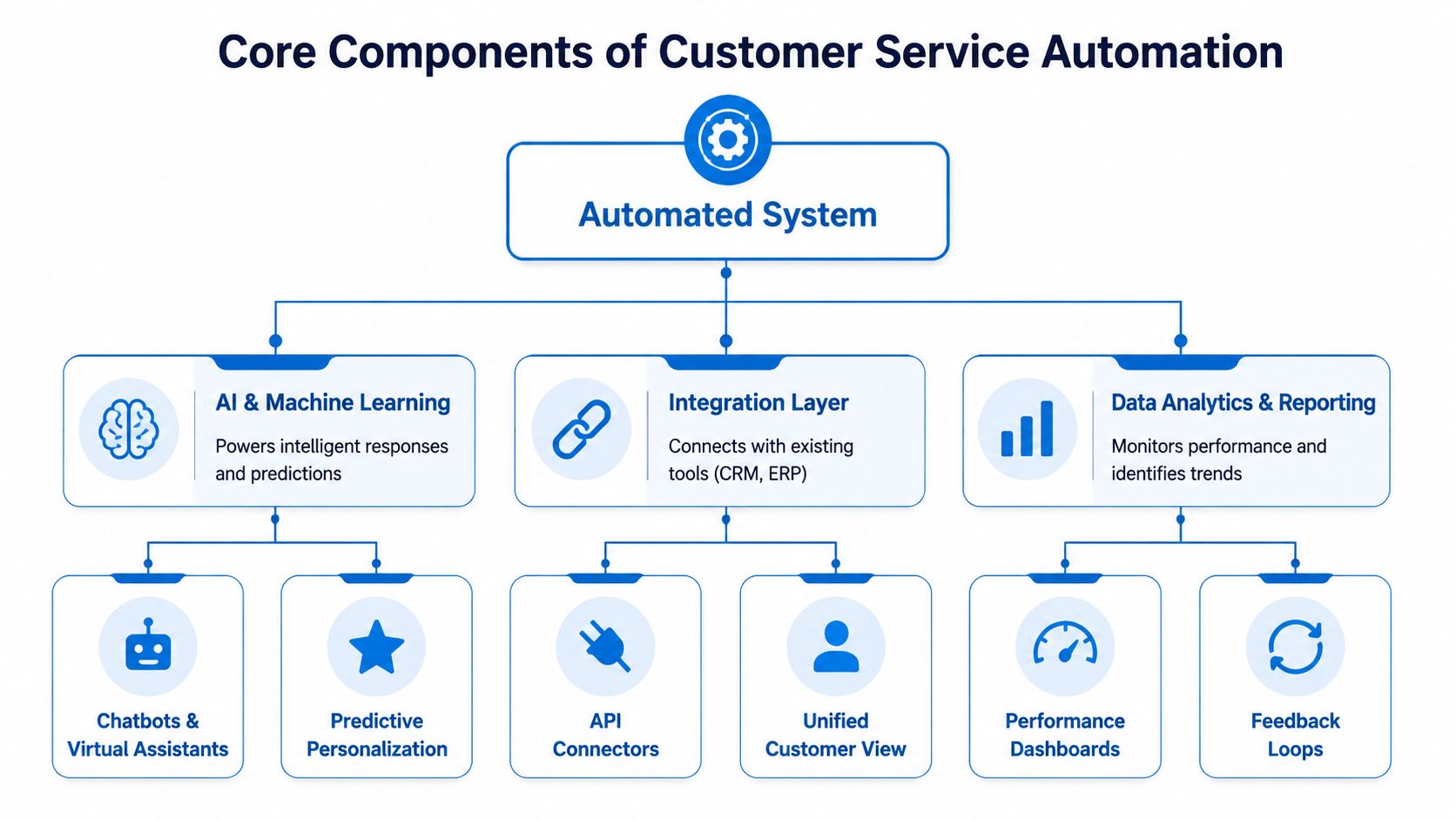
Customer service automation sounds technical until you break it into parts. Most systems are built from a few familiar functions working together.
The digital front desk
Chatbots, voice assistants, and AI receptionists are the front door. They greet the customer, understand the request, ask clarifying questions, and move the interaction forward.
That ability depends on Natural Language Processing and Machine Learning. As Talkdesk explains in its overview of customer service automation, these systems interpret unstructured customer data and adapt in real time, which lets them analyze inquiries and escalate complex issues to the right live agent. In plain language, that means the system doesn't just look for one exact keyword. It can understand that “I need to move my appointment,” “Can I come in later?” and “I have to reschedule” are versions of the same request.
If you want a useful comparison of how AI agents handle these conversations, SnapDial's AI customer support guide is a solid reference because it shows how conversational systems are applied in real support environments.
The smart phone menu and the back office
Most owners know IVR as “press 1 for billing, press 2 for service.” Modern IVR can be much smarter than that. Instead of forcing rigid paths, it can identify intent and route the caller based on what they need.
Behind that front end is workflow automation. This is the back-office assistant that sends reminders, creates tickets, assigns tasks, updates records, and triggers follow-ups. A customer may only notice the smooth experience, but these workflow steps are what make automation useful instead of cosmetic.
Here's the common stack in simple terms:
- Chatbot or AI receptionist handles incoming voice or chat conversations.
- IVR or routing logic directs the interaction by need, urgency, or department.
- Workflow rules create tasks, send confirmations, and trigger next steps.
- Knowledge sources provide answers to common questions.
The central brain is the integration layer
The part most businesses underestimate is integration. If the system can't connect to your CRM, calendar, ticketing software, billing platform, or helpdesk, it can only provide surface-level help.
That's why the integration layer acts like the central brain. It keeps data consistent so the customer doesn't have to repeat themselves and your team doesn't have to re-enter information. If you're evaluating how this works in support operations, this guide to conversational AI for customer support is useful because it shows how conversation and system actions need to work together.
Automation should collect context once, share it everywhere it belongs, and hand it to a human only when a human is actually needed.
The human handoff is not a failure
Many owners worry that automation will feel cold. That usually happens when there's no clean handoff.
The best systems know their limits. They route emotional, unusual, or high-risk situations to a person with the history attached. That preserves empathy and keeps customers from repeating the same details twice. In practice, this safety net matters as much as the automation itself.
Key Business Benefits Beyond Cost Savings
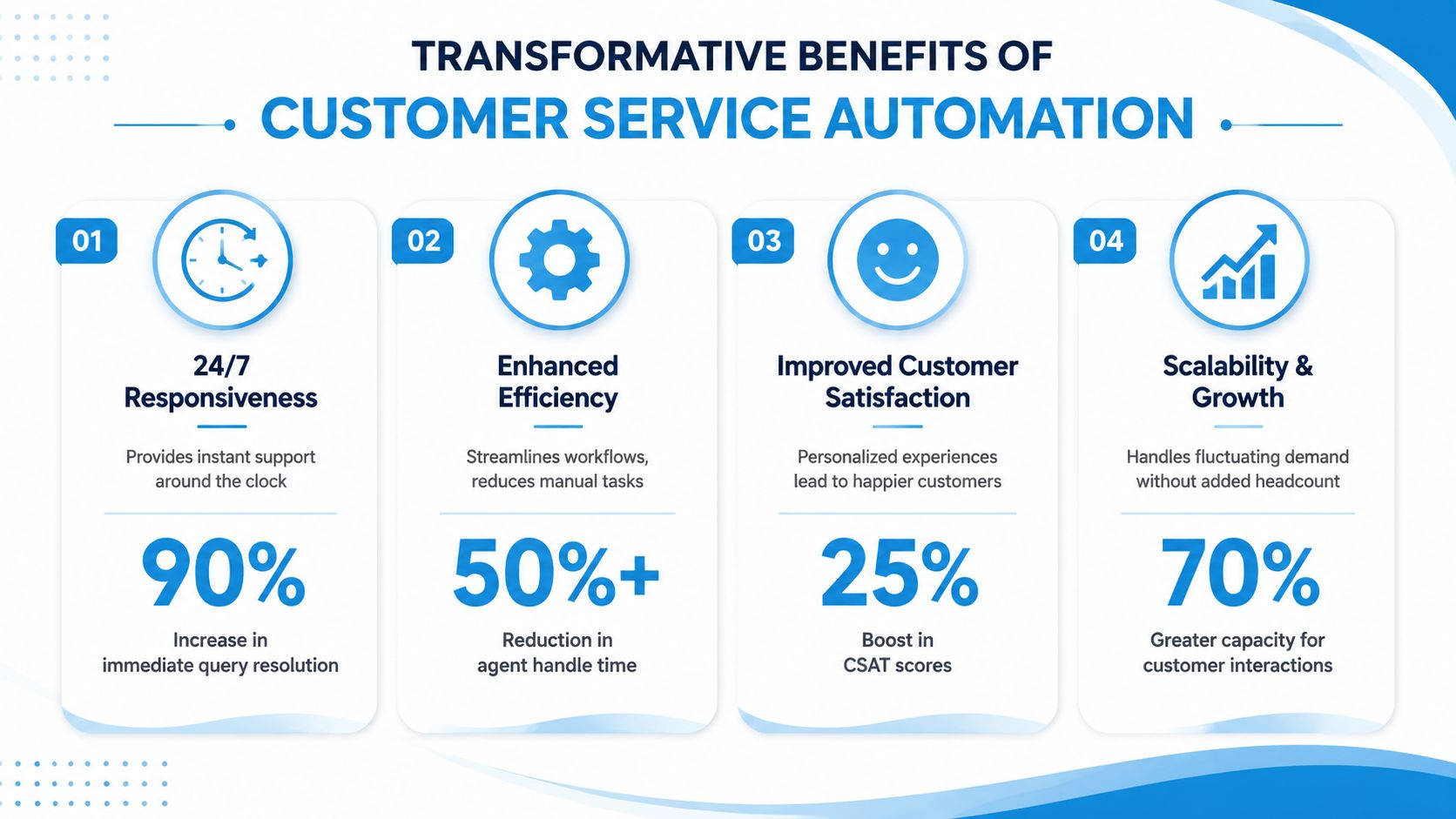
The first benefit most owners ask about is cost. Fair enough. But cost is only part of the value. The bigger gains usually show up in responsiveness, workload control, and customer experience.
Early in the decision process, it helps to see the outcomes visually.
Faster service without adding chaos
A customer who contacts you wants progress, not a place in a queue. Automation gives your business a way to respond immediately, any time of day, and handle common requests without making staff bounce between phones, texts, emails, and admin work.
The Master of Code roundup on AI in customer service notes that implementing AI agents in contact centers can drive a 50% reduction in cost per call while increasing customer satisfaction scores. The same source says 69% of consumers prefer AI-powered self-service tools for quick issue resolution, and agents using these tools handle up to 40% more tickets per shift.
That combination matters because it shows automation isn't just a finance play. It can lighten repetitive work while helping customers get answers faster.
Better coverage and better use of people
A live team can't be available every minute without getting expensive fast. Automated systems can. That means a customer can check a status, request an appointment, ask a policy question, or start a service request after hours instead of waiting until the next morning.
The payoff is often operational, not just financial:
- Coverage improves because basic interactions no longer depend on staff availability.
- Agents stay focused because they spend less time on repetitive questions.
- Service stays consistent because every customer gets a structured first step.
If you're weighing where AI helps most, this breakdown of the benefits of AI in customer service is a practical next read.
The hidden benefit is cleaner data
Every automated interaction can capture structured information: name, issue type, urgency, location, preferred time, policy number, or reason for calling. That makes the rest of your operation run better.
For example:
- A home service company can sort calls into estimate requests, emergency repairs, and existing-job updates.
- A clinic can separate scheduling questions from billing issues before staff even log in.
- A law office can collect practice area and case basics before an attorney reviews the lead.
When businesses automate intake well, they don't just save time. They make every later step easier to manage.
Automation in Action Across Industries
Theory helps, but examples make the idea stick. Customer service automation works best when it fits the shape of a real workflow.

Home services
A plumbing company gets calls all day, but the busiest moments are usually when no one can answer. The owner is on-site. The dispatcher is already coordinating techs. Customers still need help now.
A practical setup can answer the call, identify whether it's an emergency, collect the address, note the issue, offer the next available appointment, and send the details to the dispatch system. If the caller is dealing with a burst pipe or a dispute about a completed job, the system can escalate to a human immediately.
The value here is simple. Routine intake becomes orderly, and urgent situations get surfaced faster.
Healthcare and wellness
A dental clinic has a different problem. The phones spike during lunch, before work, and after work. Patients ask about appointment times, forms, insurance basics, reminders, billing, and rescheduling.
A useful real-world pattern comes from a healthcare clinic that uses an automated ticketing system to handle patient onboarding emails and route billing questions directly to the finance team, as described in NICE's customer service automation examples. That example shows why routing matters. Staff don't waste time sorting every request manually, and patients get to the right team sooner.
A clinic can apply the same logic across channels:
- New patient inquiries trigger intake instructions and scheduling options.
- Billing questions go straight to finance.
- Reminder flows reduce back-and-forth over confirmations.
- Clinical concerns go to staff, not automation.
Legal and professional services
A law firm doesn't want every inquiry handled the same way. Some callers need immediate help. Others are outside the firm's practice areas. Many require careful intake before an attorney should step in.
Automation can ask structured qualifying questions, collect contact details, identify the case type, and route the inquiry to the correct team member. That gives lawyers cleaner intake and fewer interruptions from unqualified leads.
The same pattern works for accounting firms, consultants, and property managers. The system handles first-pass triage. The professionals handle judgment-heavy conversations.
Insurance, finance, and franchise operations
Insurance agencies field a lot of repeat requests: proof of insurance, billing questions, policy change requests, and claim-status questions. Automation can gather the policyholder's details, classify the reason for contact, and move the request to the right desk.
Franchises face a different challenge: consistency across locations. A central automation layer can answer common questions, capture leads, and route by zip code or location. That helps customers get a reliable experience even when each branch has its own team and schedule.
Good automation doesn't force every industry into one script. It mirrors the actual decisions your staff already make.
How to Implement Customer Service Automation
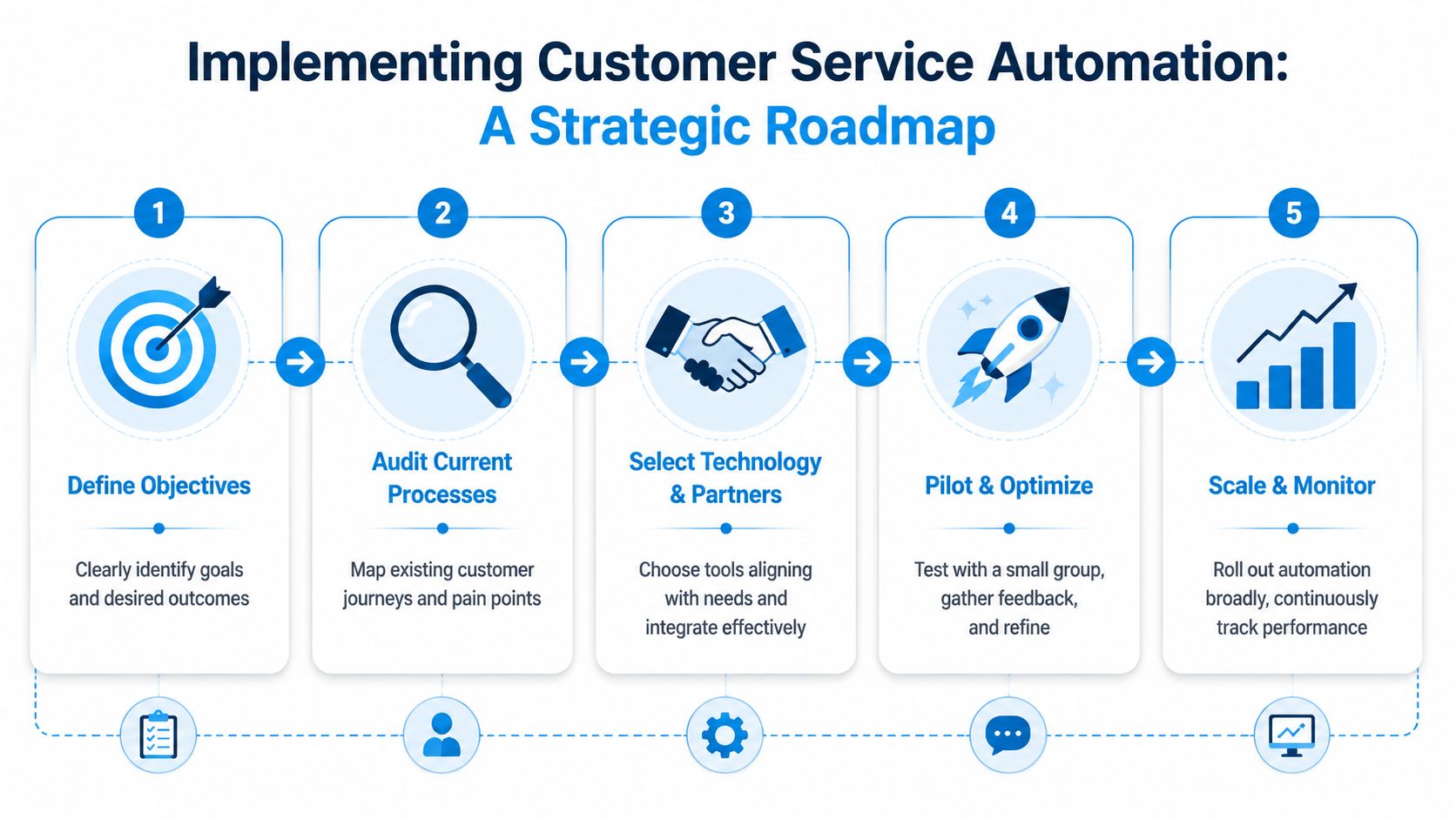
Buying software is the easy part. Building a system that customers and staff will trust takes more discipline.
Start with one workflow, not a grand rollout
Most automation projects go wrong when the business tries to automate everything at once. Start with one high-volume process that is predictable and annoying to do manually. Appointment booking, after-hours call capture, basic intake, order-status checks, and billing routing are common candidates.
Before choosing tools, write down:
- What customers ask most often
- Which interactions eat the most staff time
- Where work gets dropped, delayed, or repeated
That exercise usually reveals the best first use case in one meeting.
Design for action, not just conversation
This is the turning point. If the system only answers questions, it may reduce some load, but it won't create many completed outcomes. Effective automation needs access to the systems where work takes place.
The ASAPP discussion of enterprise AI automation highlights this clearly: 91% of top-tier AI deployments achieve first-contact resolution because they are connected to CRM, billing, and scheduling systems, enabling the AI to execute actions instead of only providing information.
That means your checklist should include:
- CRM integration so customer records update automatically
- Calendar or scheduling access so the system can book or move appointments
- Ticketing connectivity so requests create follow-up tasks
- Escalation rules so edge cases reach a human cleanly
If you're evaluating tool compatibility, a practical place to start is this guide to third-party integrations for customer communication workflows.
Pick handoff rules before launch
The best automation projects are clear about where automation stops.
Use human escalation for:
- Emotion-heavy issues, such as complaints or sensitive billing disputes
- Exception handling, where policy or judgment matters
- High-value sales opportunities, where a personal touch changes outcomes
- Compliance-sensitive conversations, especially in healthcare and legal settings
One option businesses consider is Recepta.ai, which combines conversational AI with human escalation and integrates with business systems for scheduling, lead capture, and logging. The point isn't that one platform fits everyone. It's that your chosen setup should support both automation and smooth handoff.
Pilot, review, then expand
Don't launch across every channel on day one. Test a narrow use case, review transcripts and outcomes, refine prompts and routing, then expand to the next workflow. A phased rollout usually exposes gaps in data, process ownership, and exception handling before they become customer-facing problems.
Measuring Success and Avoiding Common Pitfalls
Automation needs a scoreboard. If you don't measure outcomes, you can't tell whether the system is reducing work, improving service, or subtly frustrating customers.
The KPIs that matter most
Here's a simple set of metrics to track.
| KPI | What It Measures | Why It Matters |
|---|---|---|
| First Contact Resolution | Whether the customer's issue gets solved in the first interaction | Shows whether automation is delivering outcomes instead of deflecting work |
| Automation Containment Rate | How many inquiries the system handles without human intervention | Reveals where automation is useful and where it still breaks down |
| Customer Satisfaction | How customers rate the interaction | Helps you catch experiences that feel confusing, robotic, or slow |
| Routing Accuracy | Whether the request reached the right team or person | Reduces rework, transfers, and customer repetition |
| Response Time | How quickly the customer receives an initial answer | Indicates whether the system is improving access and availability |
| Escalation Quality | Whether handoffs include the right context and notes | Protects the customer experience when a human needs to step in |
Three common mistakes
The first mistake is building automation that sounds polished but can't complete a task. Customers get an answer, then still have to call back, email, or wait for staff.
The second is poor handoff design. If a customer has to repeat everything after being transferred, the automation didn't save effort. It just added a step.
The third is neglect after launch. Owners often assume that once the workflow is live, the job is done. It isn't. New questions appear, policies change, and routing logic needs upkeep.
Watch where customers drop off. That's usually where your automation stops being helpful.
Practical fixes
Use this as a working checklist:
- Review real conversations each week. Look for repeated confusion, dead ends, and unnecessary escalations.
- Tune the knowledge and workflows when customers ask new versions of old questions.
- Set clear escalation triggers for urgency, sentiment, compliance, and ambiguity.
- Audit logged data to make sure names, contact details, and notes land correctly in your systems.
- Ask frontline staff where automation helps and where it creates cleanup work.
A good automated service operation feels quieter behind the scenes. Fewer dropped balls. Fewer repeated explanations. Less guessing about what happened.
Your Next Steps Toward Smarter Customer Service
If you've been asking what is customer service automation, the most useful answer is this: it's a way to turn incoming calls, chats, texts, and emails into completed outcomes with less manual effort. The businesses that get the most value don't stop at automated responses. They build automated resolutions.
That doesn't mean replacing people. It means reserving people for the moments where judgment, empathy, and persuasion matter most. As Helpware's overview of automated customer service notes, automated service provides 24/7 support and reduces labor expenses by handling routine tasks, freeing human representatives to focus on complex or emotional issues that need personal attention.
Start with two practical moves:
- Audit your busiest communication channel. Look at missed calls, repetitive questions, after-hours requests, and the points where staff re-enter the same information.
- Choose one workflow to automate end to end. Booking, intake, billing routing, or follow-up are often the easiest places to prove value.
Once you see one workflow run cleanly, the rest of the roadmap becomes much clearer. That's when automation stops feeling like a tech project and starts functioning like an operations upgrade.
If you want to see how blended AI and human support works in a real business workflow, Recepta.ai offers 24/7 call handling, appointment scheduling, lead capture, follow-ups, and live escalation with integrations across CRM, calendar, and industry systems. It's a practical option for teams that want automation to do more than answer. It should help complete the work.