Databases for Business: How to Choose and Use Them Right
Your operations lead has three spreadsheets open, the receptionist is checking a shared calendar, and the sales manager is copying new leads into a CRM by hand. A customer calls after hours, gets missed, and nobody can tell whether the appointment was ever confirmed. The business has data, but it doesn't have a dependable system for using that data.
That distinction matters. Databases for business aren't just storage containers for technical teams. They're the operating layer behind scheduling, customer records, billing, reporting, automation, and compliance. The right choice gives every tool a consistent view of the business. The wrong choice creates duplicate records, slow dashboards, fragile integrations, and an operations team that spends its week repairing information instead of serving customers.
Why Your Business Needs a Real Database
A spreadsheet works well when one person owns a small list. It becomes risky when several people edit customer records, appointments, invoices, and job statuses at the same time. One employee sorts a column, another pastes over a formula, and a third exports an old copy for a report. Nobody has to make a serious mistake for the numbers to drift apart.
A database changes the operating model. It stores structured records in a controlled system, applies rules to those records, and lets approved applications read or update the same underlying information. The CRM can use the customer record, the scheduling tool can use the availability record, and the reporting layer can use completed jobs without forcing staff to re-enter each update.
Practical rule: If two or more teams depend on the same customer or transaction data, stop treating the spreadsheet as the system of record.
Files, spreadsheets, and databases serve different jobs
A file is a document. It may contain useful information, but it usually has limited control over simultaneous edits, relationships, permissions, validation, and recovery. A spreadsheet adds formulas, filters, and collaboration, yet it still leaves the business exposed to accidental overwrites, inconsistent formats, and disconnected copies.
A database is designed for shared, repeatable operations. It can connect a customer to multiple appointments, link each appointment to a technician, record payments against an invoice, and preserve the rules that keep those relationships valid. That structure makes automation possible.
Consider a plumbing company. A spreadsheet might contain a customer name and a phone number. A database can connect that customer to the service address, prior work orders, warranty details, technician notes, call history, and outstanding balance. When the customer calls again, the business can retrieve the relevant history instead of asking the customer to repeat everything.
For a practical foundation, review these data security best practices before granting every employee unrestricted access to customer records.
The four decisions that shape the result
A database project becomes manageable when you answer four questions in sequence:
- Type: Do your records fit predictable tables, flexible documents, fast key-value lookups, or another model?
- Workload: Are you processing frequent operational transactions, running heavy analysis, or doing both?
- Integration: Which CRM, calendar, accounting platform, AI tool, and reporting system must exchange data?
- Migration: How will you clean, validate, back up, and move existing information without interrupting daily work?
The database isn't an IT project for its own sake. It's the backbone that prevents lost leads, double-booked appointments, duplicate invoices, and reports rebuilt by hand. If the business has outgrown shared files, choosing a proper data layer is usually less disruptive than continuing to patch the old one.
The Main Database Types Explained
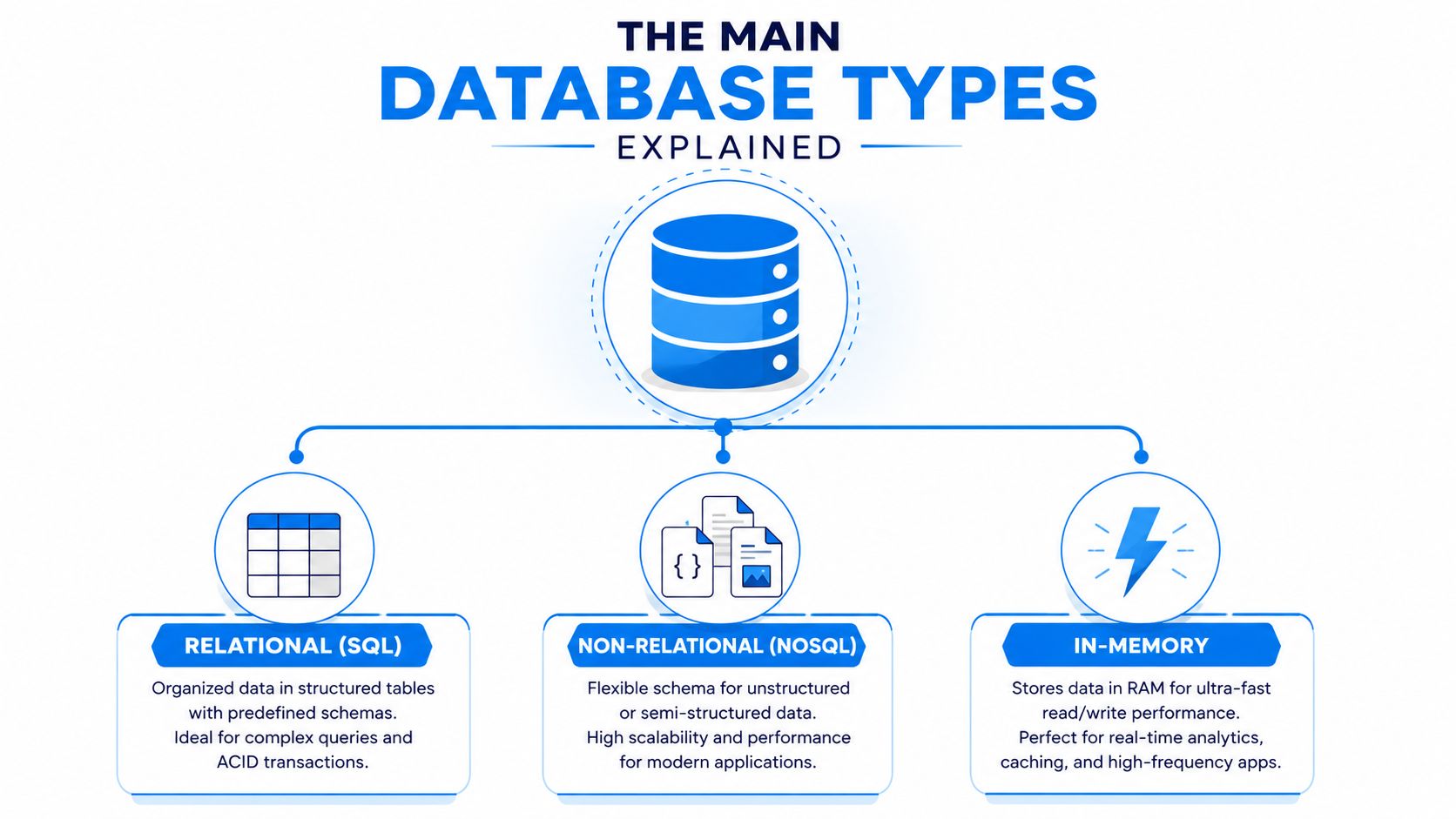
Start with the shape of the work, not the vendor name. Most buyers can narrow the field quickly by asking whether their data behaves like a set of connected tables, a collection of changing documents, a service that must scale elastically, or a workload that needs extremely fast access.
Relational databases
A relational database resembles several connected spreadsheets. One table stores customers, another stores appointments, and a third stores payments. Shared identifiers connect the tables, while rules help prevent an appointment from pointing to a customer who doesn't exist.
This model remains the default for much business software. Current market reporting places relational databases at 62% of DBMS deployments, compared with 28% for NoSQL and 10% for cloud-native databases according to market segmentation data. Relational systems fit accounting, CRM, order management, scheduling, and inventory because those applications depend on clear relationships and dependable transactions.
Ask yourself: Do your records have stable fields and relationships that must remain accurate? If yes, start with a relational database such as PostgreSQL, MySQL, Microsoft SQL Server, or Oracle.
NoSQL databases
NoSQL is useful when information doesn't fit neatly into fixed rows and columns. A document database can store customer preferences, product attributes, call metadata, or application content whose fields vary from record to record.
For example, an online retailer may sell products with very different attributes. A pair of shoes, a refrigerator, and a service plan don't need identical fields. A document-oriented database can represent those differences without forcing every record into the same rigid structure.
Ask yourself: Do your records change shape often, or do you need flexible document and key-value access? If not, don't choose NoSQL because it sounds modern.
Cloud-native databases
A cloud-native database is built to use cloud infrastructure for elasticity, managed operations, distributed availability, or serverless behavior. It may reduce the need for a small business to handle hardware, patching, capacity planning, and routine maintenance itself.
That flexibility helps a multi-location franchise whose demand changes by season or region. It can also help a software company that expects unpredictable bursts. Cloud-native doesn't automatically mean better, though. It can introduce new pricing, networking, governance, and portability decisions.
Ask yourself: Is elastic capacity or managed infrastructure worth the added architectural complexity for your workload?
In-memory systems
An in-memory database keeps frequently used data in memory rather than relying primarily on disk-based access. It suits speed-sensitive use cases such as session data, queues, temporary results, leaderboards, and caching.
A home-services application might use an in-memory layer to hold frequently requested availability or session information while keeping authoritative customer and booking records in a relational system. That separation matters. In-memory speed shouldn't replace durable storage for records the business must retain.
Ask yourself: Do you need exceptionally fast access to a specific working set, or are you trying to solve a general data-management problem? Use in-memory technology for the former, not the latter.
OLTP Versus OLAP and Why It Matters
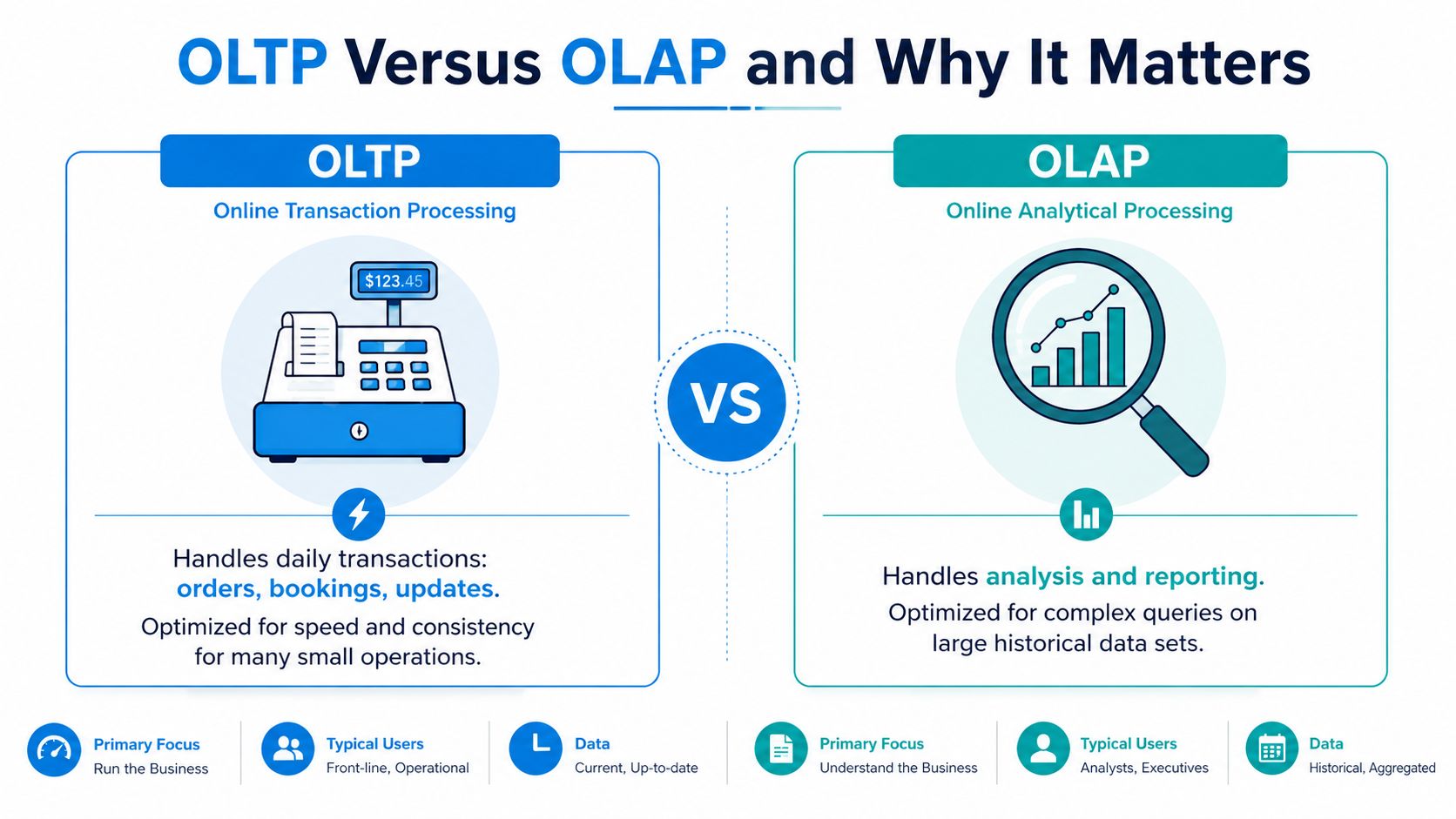
A booking system and a management dashboard ask very different questions of data. The booking system must create an appointment, update availability, and confirm payment quickly. The dashboard may scan historical orders, group them by location, compare periods, and calculate trends.
OLTP, or online transaction processing, handles high-frequency, short transactions. It commonly uses row-oriented storage and B-tree indexes, with a design target of sub-50 ms p99 lookup latency according to ClickHouse's OLTP and OLAP comparison. OLAP, or online analytical processing, handles aggregations across millions to billions of rows, often using columnar storage and scan performance measured from sub-second to seconds.
One service company, two workloads
Take a home-services company that logs every service call. The operational database records the caller, address, technician, appointment window, job status, and payment. Those writes need consistency because two employees shouldn't assign the same slot or mark an unpaid job as completed by accident.
The owner asks a different set of questions: Which services produce the most revenue? Which locations generate repeat work? How long does it take to convert an inquiry into a booked appointment? Those queries are broader and more computationally demanding. Running them directly against the live booking tables can compete with the short transactions that keep the business moving.
An analytics database is designed for read-heavy workloads such as BI dashboards, recurring reports, forecasting, and complex SQL analysis, as described in this overview of analytics databases. A practical pattern is to keep the operational records in an OLTP database, then copy or transform the relevant history into an analytical layer.
Mixed workloads need deliberate architecture
Some businesses can use an HTAP-style system that supports transactions and analysis together. Others should separate the workloads with a data pipeline. The right answer depends on concurrency, reporting intensity, freshness requirements, and the cost of operational complexity.
Don't select a database based on an isolated throughput number. Hybrid workloads need mixed OLTP and OLAP testing because TPC-C and TPC-H measure different behaviors. The benchmarking research on hybrid OLTP and OLAP systems describes TPC-CH as a way to bridge those behaviors and produce more comparable results.
Decision test: Run your candidate stack with realistic users, writes, reports, joins, and scheduled dashboards at the same time. A system that looks fast in a single-purpose test may struggle once managers start querying live operational data.
How to Pick the Right Database for Your Business
Use four filters in order. Don't begin with a product comparison page, because vendor features can't compensate for a mismatch between the database and the work your employees perform.
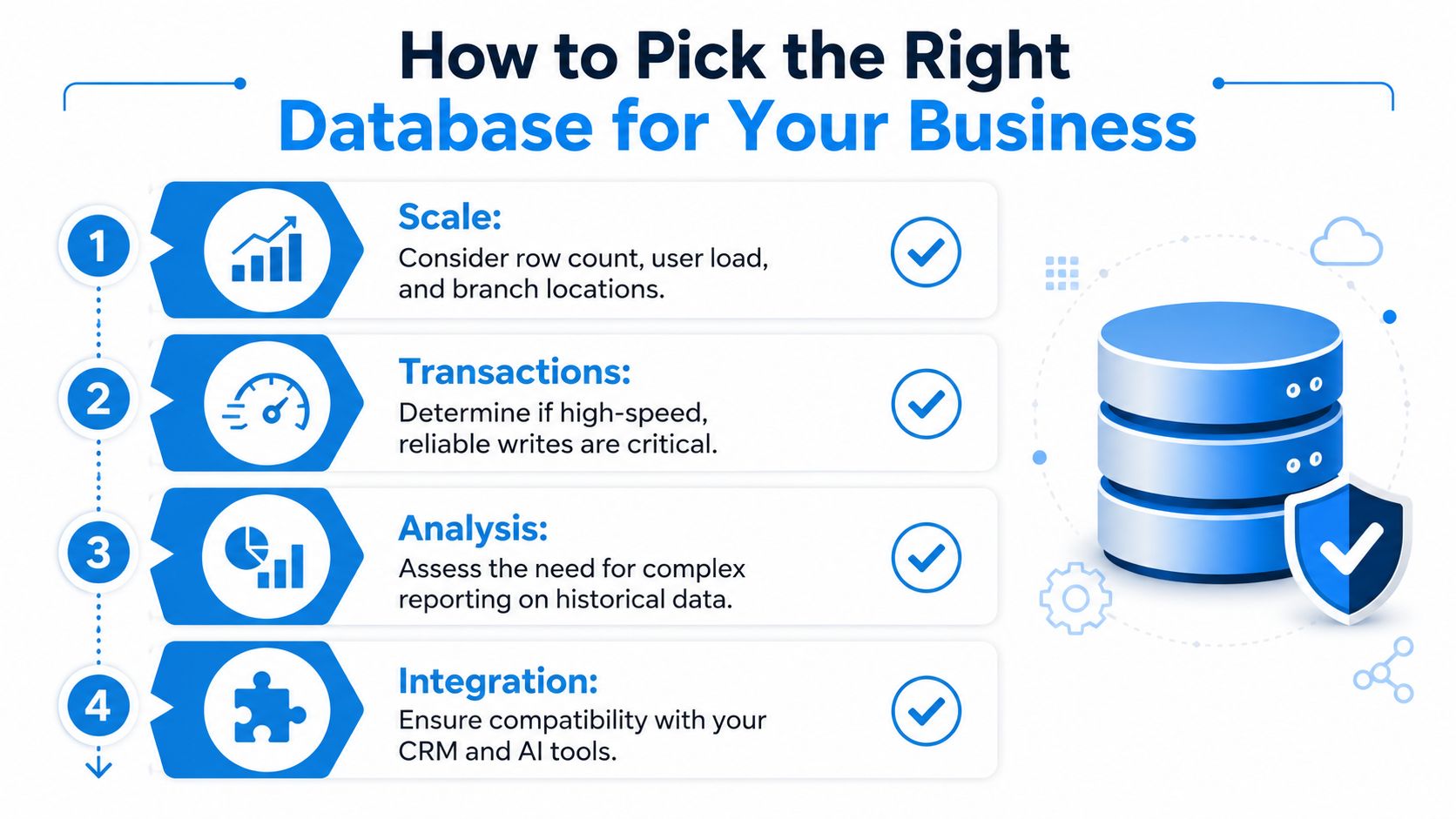
Start with scale
Ask: How many records, users, locations, and simultaneous operations must the system support now, and what growth would make the design uncomfortable?
Scale isn't just row count. A regional HVAC company may have moderate customer data but demanding scheduling across branches, technicians, dispatchers, and a customer-facing booking form. A database that works for one office may become difficult when every branch shares availability and reporting.
Don't overbuild for a hypothetical future. Choose a platform that can expand without forcing a complete rewrite, but keep the first design understandable to the people who'll operate it.
Check transaction requirements
Ask: Does every change need to be complete, valid, isolated from competing changes, and preserved after a failure?
Those are the ACID properties. Atomicity means every part succeeds or none does. Consistency moves the database between valid states. Isolation prevents simultaneous transactions from interfering, and durability preserves committed changes after failure, as explained in this ACID and data consistency guide.
A bank transfer is the clean example. The debit and credit must both complete or both roll back. The same principle applies when a booking reserves a time slot, a payment changes an account balance, or an insurance claim updates several related records.
Treat integration as a design requirement
Ask: Which systems need to create, read, or update the same record?
List the CRM, calendar, accounting platform, phone system, AI assistant, website, and analytics tools before you choose a database. Confirm whether they support APIs, webhooks, connectors, identity controls, and reliable error handling. Your software compatibility planning should include field mapping, duplicate handling, and what happens when one system is temporarily unavailable.
A company that skips this step often chooses a capable database that its CRM or scheduling platform can't use cleanly. The result is manual exports, delayed updates, and staff workarounds.
Put compliance before convenience
Ask: What information can the business store, where can it be processed, who may access it, and how must activity be recorded?
Healthcare teams need to consider HIPAA obligations. Payment workflows may involve PCI requirements. Multi-region businesses may face data residency and sovereignty rules. These aren't database features you can bolt on at the end. They affect hosting regions, encryption, access controls, retention, audit trails, vendor agreements, backups, and integrations.
The cloud DBaaS market is expanding faster than the broader database market, with one estimate placing it at USD 24.17 billion in 2025 and projecting USD 120.22 billion by 2034, at a 19.6% CAGR, according to market coverage of cloud database services. Managed services can reduce administrative work, but you still own the governance decisions.
Best Database Picks by Industry
There isn't one universal winner. The best starting point depends on the records each industry protects, the transactions it performs, the reports it runs, and the tools it must connect.
| Industry | Recommended Stack | Primary Reason |
|---|---|---|
| Home services | Relational operational database, CRM integration, analytics warehouse, optional in-memory cache | Reliable scheduling, customer history, dispatch updates, and branch reporting |
| Healthcare | Relational clinical and administrative database, controlled integration layer, separate analytics environment | Structured records, transaction integrity, access control, auditability, and healthcare compliance |
| Legal | Relational matter database, document storage, search index, analytics layer | Matters and billing need structure, while documents require flexible storage and fast retrieval |
| Insurance | Relational policy and claims database, event or document layer, analytical warehouse | Policy and claims relationships need consistency, while intake and risk analysis can vary by product |
| Franchises | Relational core database, cloud-managed deployment, regional integration and reporting layers | Shared operating rules with location-level workflows and consolidated visibility |
Home services
Use a relational core for customers, properties, jobs, technicians, appointments, invoices, and payments. Add a reporting layer if owners need branch-level revenue and utilization analysis without slowing dispatch.
The common mistake is storing the schedule in a spreadsheet while customer history lives in a CRM. That split makes a missed call harder to recover and creates uncertainty about which appointment record is current.
Healthcare
A clinic should keep patient, appointment, billing, and treatment records in a structured system with strict access controls and a documented audit process. A separate analytical environment can support reporting without exposing the operational database to broad reporting access.
A dental practice shouldn't choose a flexible document database just because clinical notes vary. The more important question is whether the system supports the required privacy controls, integrations, retention rules, and recovery procedures.
Legal
Law firms need a relational system for matters, clients, deadlines, time entries, invoices, and permissions. Documents can live in specialized document storage, with a search layer that makes filings and correspondence easy to retrieve.
The trade-off is straightforward. Structured matter data needs dependable relationships, while legal documents need flexible content handling and strong search.
Insurance
Insurance agencies and carriers need a dependable policy and claims model. Customer, policy, premium, coverage, claim, and payment relationships should remain consistent, while intake documents and changing product attributes may benefit from a more flexible data layer.
Build the analytical environment separately when underwriting, portfolio, or claims reporting becomes complex. Don't make the transactional system carry every historical query.
Franchises
Multi-location operators need a shared core model with local permissions and workflows. A managed cloud deployment can simplify operations across branches, while a reporting layer consolidates performance without forcing every location to query the same live tables.
The right design gives headquarters visibility without turning every local process into a centralized bottleneck.
Connecting Databases to CRMs and AI Platforms
A database creates value when other systems can use its records reliably. The useful question isn't whether a platform has an integration marketplace. It's whether a customer update can move through the business without duplicate entry, silent failure, or confusing ownership.
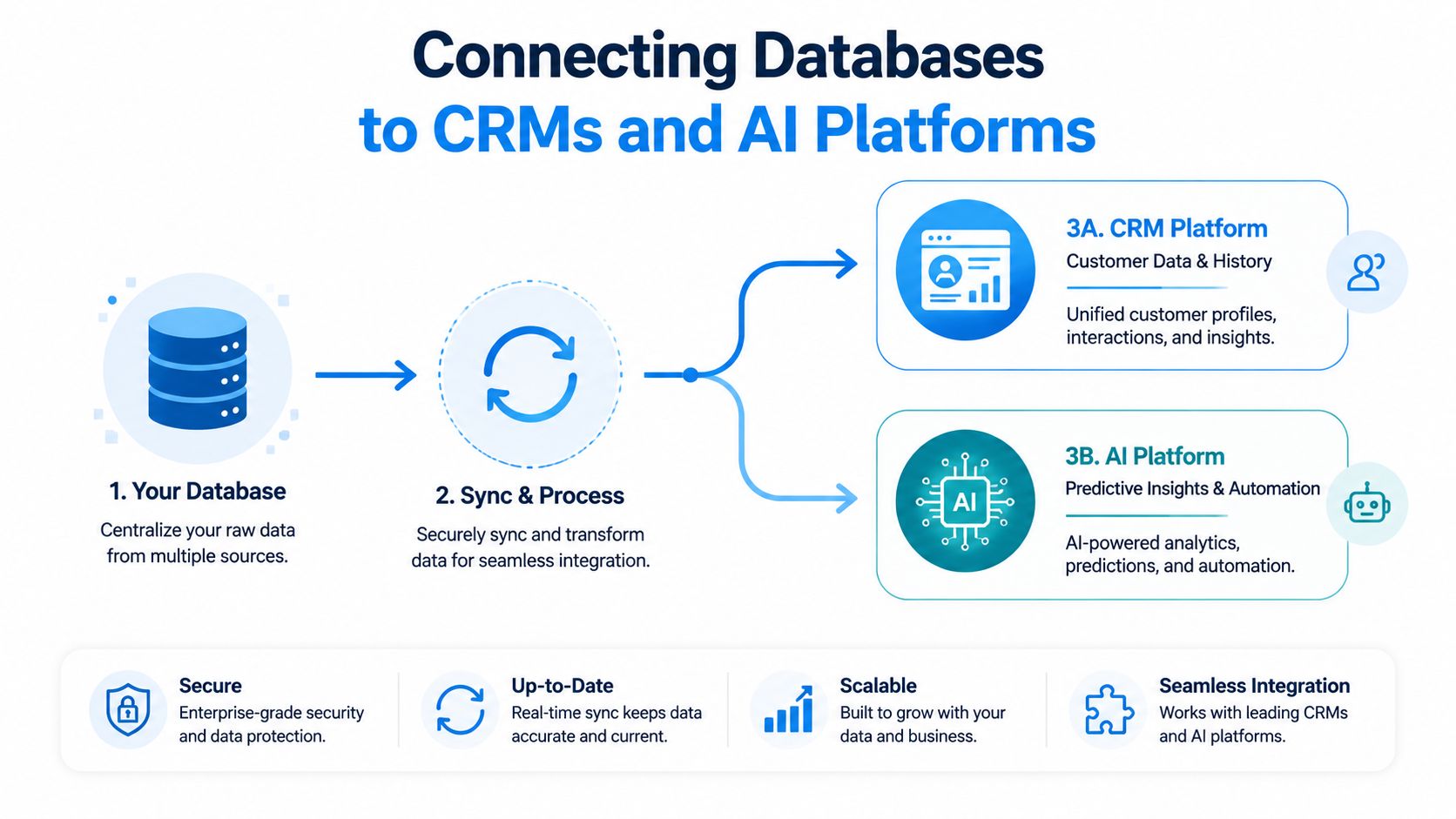
Follow one lead from call to calendar
A practical workflow looks like this:
- Capture the interaction: An AI receptionist answers an after-hours call and records the caller's name, number, request, location, and preferred appointment window.
- Create the source record: An integration service writes the lead and call summary to the database, using a stable customer identifier when one already exists.
- Update the CRM: The CRM receives the new lead, interaction history, and follow-up status.
- Reserve the appointment: The scheduling system checks availability and writes the confirmed booking back to the shared data layer.
- Expose the outcome: Dashboards show response status, booked work, and unresolved follow-ups without asking staff to reconcile separate exports.
Use an API layer rather than letting every application connect directly to every table. The API connectivity guide covers the broader integration principle: define what each system can read or write, then make failures visible.
Fix slow queries before buying more hardware
An index is a lookup structure that helps the query optimizer find matching rows without scanning an entire table. Indexes can improve filters, joins, sorting, grouping, distinct queries, and index-only scans, according to this practical guide to database indexing.
Suppose a service company frequently searches recent orders by customer_id and order_date. An IT partner should test whether those access patterns have suitable indexes, inspect the execution plan with EXPLAIN, and compare the result with production slow-query logs. Adding every possible index is also a mistake, because indexes consume storage and can slow writes.
Ask your IT partner: Which query is slow, which table does it scan, what does the execution plan show, and how will we verify the change under real workload?
Migrating to a New Database Without the Drama
Migration becomes necessary when staff maintain multiple conflicting copies, reports require repeated manual cleanup, integrations fail regularly, backups can't be trusted, or the existing system can't support the workflows the business now depends on. Don't wait for a major outage to discover that nobody knows which records are authoritative.
Treat the move as a controlled operational change, not a software installation.
Audit before you select
List every source first. Include spreadsheets, legacy databases, CRM exports, accounting files, shared folders, call records, and paper-based processes that someone still re-enters manually. For each source, identify the owner, format, duplicate fields, missing values, sensitive data, retention needs, and business process attached to it.
Then define the target model. Decide which system owns customers, appointments, payments, documents, and reporting history. If two systems both claim ownership, the migration will reproduce the same confusion in a new interface.
Pilot with real records
Clean a representative sample rather than a perfect sample. Include duplicate customers, incomplete addresses, unusual names, old appointments, cancelled jobs, and records with missing relationships. Map fields, validate results with the people who use the data, and test CRM, calendar, accounting, and reporting connections.
Back up the original sources before transformation. Test restoration, not just backup creation. If the database supports point-in-time recovery, document how the team would use it and who has authority to start recovery.
Switch in phases
A sensible cutover has four stages:
- Prepare: Freeze the target schema, finalize mappings, and document access.
- Load: Import cleaned data and validate counts, relationships, permissions, and key workflows.
- Pilot: Let a small operational group use the new system while the old process remains available for comparison.
- Switch: Set a clear cutover time, communicate ownership, monitor failures, and keep a rollback plan.
A phased approach also exposes the administrative drag of backups, patches, access reviews, and monitoring. If your team can't own those tasks, a managed database service or outside specialist may be cheaper than adding an unreliable internal burden. The broader market is treating databases as strategic infrastructure, with one estimate valuing the DBMS market at USD 89.0 billion in 2024 and projecting USD 248.19 billion by 2034, as reported in this database market analysis.
Use real-time data synchronization when the migration or integration plan requires updates to move between systems without repeated manual exports. This week, assign a data owner, inventory every source, choose one representative workflow, and run a small pilot before committing to a full cutover.
Recepta.ai connects AI reception, human support, CRM and calendar workflows, call summaries, lead capture, and operational data so businesses can keep customer records consistent as they grow. Visit Recepta.ai to see how the platform can support your database and integration strategy.