AI Receptionist Pricing Explained and How to Budget Smart
AI receptionist plans in 2026 generally cost about $25 to $300 per month. Full-featured flat-rate plans often sit around $99 to $299 monthly, but included usage limits and overage charges can push the final bill higher.
You may be looking at an after-hours call from a potential customer while your team is on a job, in a consultation, or already helping someone else. The caller hears voicemail, hangs up, and your business loses the chance to book the work. That's why AI receptionist pricing isn't just a software expense. It's an operations decision tied to coverage, workload, customer experience, and captured opportunities.
Introduction to AI Receptionist Pricing Today
AI receptionists now handle tasks that once required a dedicated front-desk employee, including answering calls, collecting details, routing conversations, booking appointments, and sending follow-ups. The basic idea is straightforward, but vendor pricing often combines several variables, which makes comparisons harder than checking two monthly subscription fees.
The market commonly falls into a $25 to $300 monthly range, while fuller-featured plans often cluster around $99 to $299 per month. Premium or enterprise options can rise to $500 or more monthly, especially when they include high-volume usage, advanced integrations, emergency routing, or human escalation, as outlined in this 2026 AI receptionist pricing guide.
A small plumbing company might need the receptionist to answer calls during evenings, identify urgent leaks, and book appointments. A dental clinic may care more about calendar accuracy, patient routing, and message capture. A law firm may need qualified intake and a human handoff for sensitive conversations. The right plan depends on what happens after the phone rings, not on how cheaply the system answers.
Practical rule: Treat the monthly fee as the starting point, not the final decision. Your real comparison is the cost of handling a call successfully and converting the right callers into customers.
The cost gap becomes clearer against traditional staffing. A U.S. receptionist's median wage is about $17.90 per hour, or roughly $37,230 per year, while one fully loaded estimate places employer cost near $53,250 annually after benefits and overhead, according to this AI receptionist labor-cost comparison. Typical annual AI software costs are commonly estimated around $600 to $3,600, though usage and features determine the actual total.
By the end of this guide, you'll be able to identify the pricing model, estimate your monthly usage, test overage exposure, and compare the cost of a captured lead rather than chasing the lowest sticker price. If you need a foundation first, this explanation of what an AI receptionist does provides useful context.
How AI Receptionist Pricing Models Actually Work
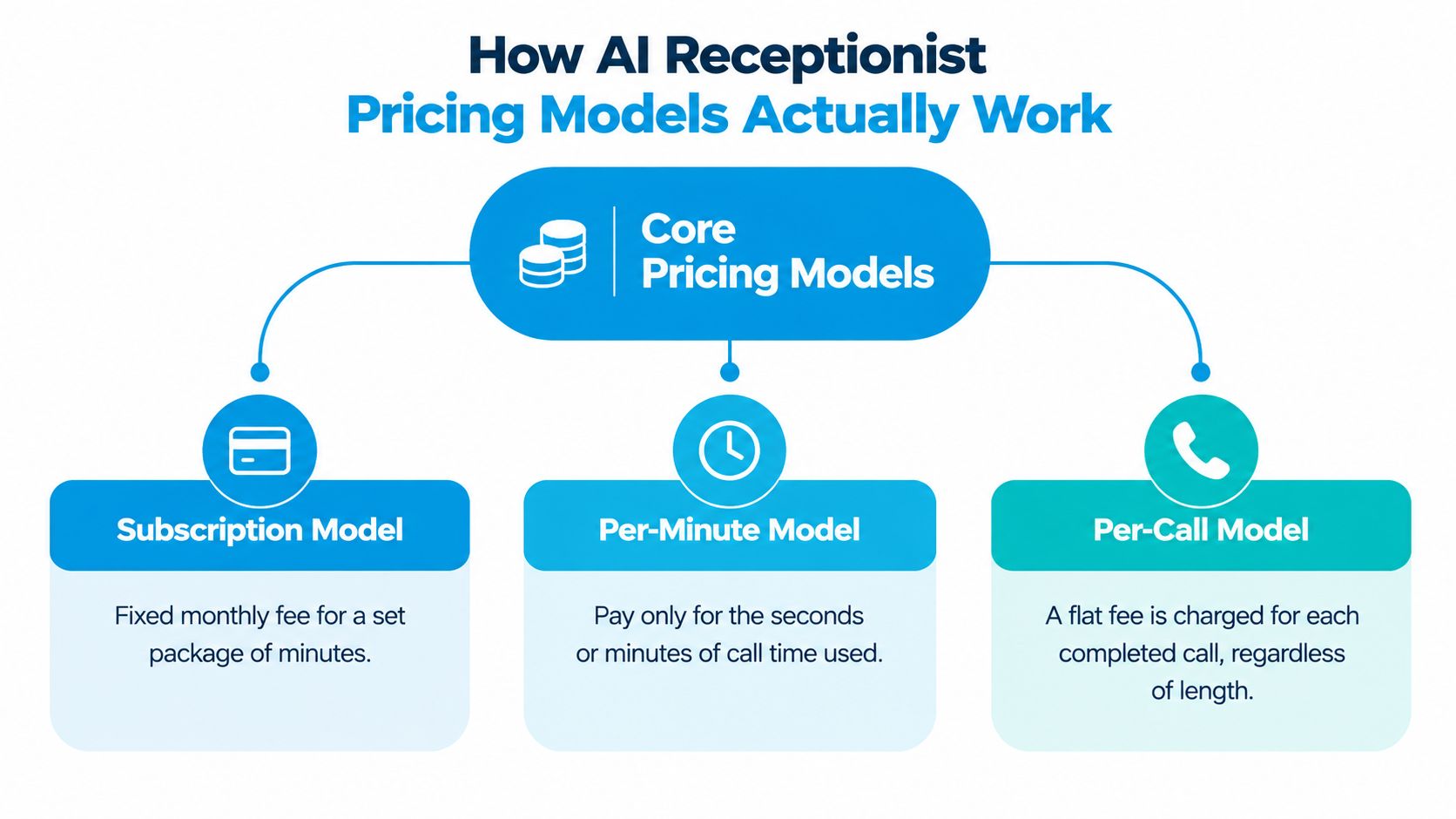
Most plans use one of three structures: a recurring subscription, a per-minute charge, or a per-call fee. Some vendors combine them. Think of the subscription as renting a phone system with a usage allowance, the per-minute model as paying for fuel as you drive, and the per-call model as paying a fixed entry fee each time someone contacts you.
Subscription pricing
A monthly subscription gives you a package for a fixed fee. The package may include a certain number of minutes, calls, phone numbers, integrations, or simultaneous conversations. Higher tiers usually add capacity and features, while lower tiers may limit volume or functionality.
For example, a plan can look inexpensive because the base fee is low, but the included minutes may run out during a busy month. A contractor whose call volume rises during a storm could then pay overage charges on top of the subscription.
Per-minute pricing
A per-minute model charges for call time. It can work well when your call volume is light or unpredictable because you pay for actual usage. The trade-off is that longer conversations, transfers, qualification questions, and appointment scheduling all increase billable time.
Independent 2026 pricing guides commonly place all-in infrastructure-style usage around $0.05 to $0.25 per AI-handled minute, while packaged small-business offerings can land closer to $0.20 to $0.40 per minute after included minutes are exhausted, according to these AI call center pricing benchmarks. Some packaged services report overage rates as high as $0.65 to $2.25 per minute, so the contract language matters more than the headline plan.
Per-call pricing
A per-call model charges a set amount for each handled call, regardless of whether the call is brief or lengthy. It's easier to forecast when calls have similar patterns, but it can become less attractive when one conversation takes substantially longer than another.
Use this comparison before signing:
| Pricing model | Best fit | Main risk |
|---|---|---|
| Subscription | Predictable workloads and bundled features | Overage or unused capacity |
| Per-minute | Variable call volume and short conversations | Long calls increase the bill |
| Per-call | Consistent call patterns | Lengthy calls may cost more than expected |
Effective cost is the total monthly bill divided by the actual minutes or calls handled.
Ask vendors for three figures: the base fee, the included allowance, and the overage rate. Then model a quiet month and a busy month. A plan that looks cheapest under light usage may not remain cheapest once your team receives overflow calls, runs campaigns, or experiences seasonal demand.
What Drives Your Final Monthly Cost
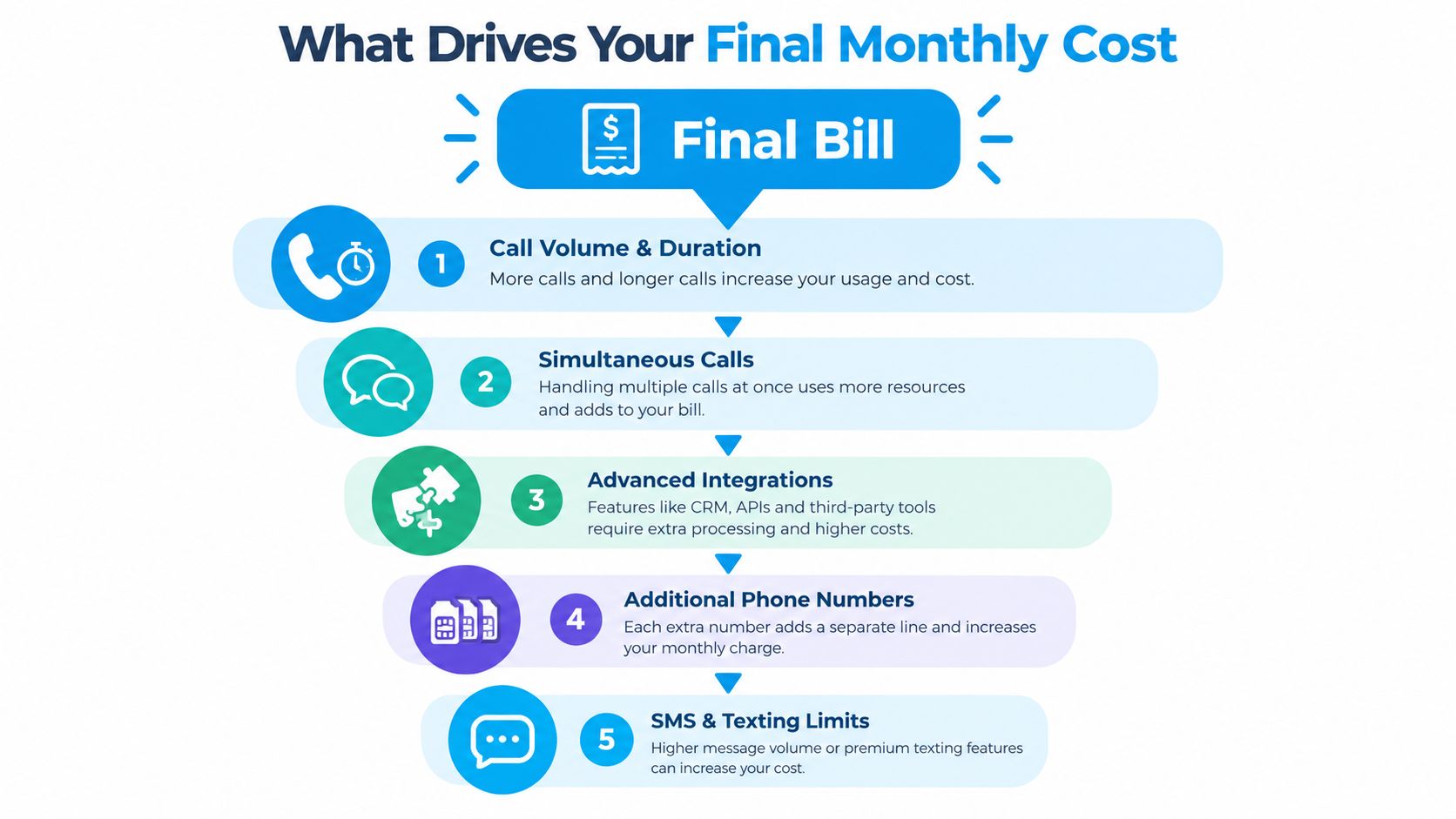
The final bill usually reflects more than the advertised subscription. Call volume and duration sit at the center, but several operational features can change the total. A business that only compares base fees may miss the charges that appear when the system becomes useful.
Usage and call length
A short message-taking call consumes less capacity than a conversation that qualifies a lead, checks availability, books a slot, confirms an address, and sends a text. Review your call recordings or summaries and classify calls by purpose. You're looking for the difference between a quick routing interaction and a full customer journey.
Per-minute overages matter most when demand changes from month to month. A home service company may have quiet periods followed by a rush after heavy weather, while a healthcare office may experience concentrated call activity around appointment reminders or schedule changes.
Concurrent calls and overflow
Simultaneous call capacity determines how many callers the system can handle at once. If the plan supports only one active call and a second caller receives a busy signal or voicemail, the apparent savings can create missed opportunities.
Overflow matters even when total monthly minutes look modest. A franchise location may need extra capacity during local promotions, while a legal office may receive multiple inquiries after a public event. Ask whether simultaneous calls are included or restricted by tier.
Integrations, phone numbers, and messaging
Calendar and CRM connections can affect both price and workflow. A basic system may take a message, while an integrated system can place an appointment on a calendar, create a CRM record, notify a staff member, and preserve the conversation details.
Extra phone numbers, SMS, and texting quotas can also add charges. A multi-location operator should confirm whether each location requires its own number or whether the plan supports shared routing. If customer experience is part of your broader operating system, it can help to browse CX management solutions alongside receptionist tools.
Setup and coverage
Setup fees, onboarding services, after-hours coverage, and escalation rules deserve a line-by-line review. Human services often add after-hours charges, while some flat-rate AI plans bundle continuous coverage. One 2026 comparison notes that human 24/7 answering can use a $99 to $299 monthly base plus $1.50 to $2.50 per minute, while a flat-rate AI service example costs $720 per month for unlimited 24/7 coverage including weekends and holidays, as detailed in this after-hours answering cost guide.
Before choosing a tier, audit:
- Call patterns: Average duration, busiest periods, and overflow frequency.
- Routing needs: Number of departments, locations, and simultaneous conversations.
- Software connections: CRM, calendar, scheduling, payment, or dispatch integrations.
- Communication extras: Phone numbers, SMS, email notifications, and transcripts.
- Coverage rules: Nights, weekends, holidays, emergency calls, and human escalation.
AI Receptionist Versus Live Answering Service Costs
AI and live answering services solve a similar problem, but they use different cost structures. AI generally offers lower monthly software pricing and consistent automated coverage. Human services cost more, but they can handle nuanced conversations, exceptions, emotional situations, and complex escalation with greater flexibility.
Industry comparisons commonly place AI virtual receptionist plans at $25 to $300 per month, while live human services run around $235 to $1,640 per month, according to this virtual receptionist cost comparison for small businesses. The same source gives a practical example of an AI plan at $24.95 per month for 30 calls, compared with a live plan at $235 per month for 50 minutes.
| Service Type | Typical Monthly Cost | Pricing Structure | After-Hours Cost |
|---|---|---|---|
| AI receptionist | $25 to $300 | Subscription, included usage, and possible overages | Often included in flat-rate plans, depending on vendor |
| Live answering service | $235 to $1,640+ | Monthly base, minutes, calls, or combinations | May involve added base fees and per-minute charges |
| Human 24/7 example | $99 to $299 base plus usage | Base fee plus $1.50 to $2.50 per minute | Commonly charged through the same usage structure |
| Flat-rate AI example | $720 | Unlimited 24/7 coverage | Includes weekends and holidays in the cited example |
AI makes sense when callers need consistent answers, appointment booking, lead capture, or simple routing. A live service can justify its premium when callers need empathy, judgment, detailed intake, or a conversation that shouldn't feel automated.
A hybrid model can be the practical middle ground. Let AI handle routine questions and scheduling, then route high-intent or sensitive calls to a human. The right test isn't “Which service is cheaper?” It's “Which service captures the calls that matter without paying human rates for routine work?”
For a deeper comparison of staffing alternatives, review this guide to business answering service costs. Use the same call scenarios when requesting quotes, so the comparison reflects your actual workflow rather than generic vendor assumptions.
How to Estimate ROI and True Cost Per Lead
A useful AI receptionist budget starts with outcomes. The simplest calculation is:
Effective cost per minute = total monthly cost ÷ minutes used
For example, a monthly bill of $150 divided by 100 minutes equals $1.50 per minute, as illustrated in the required ROI and cost-per-lead visual. That number is useful, but it's not the final business measure. A long call can be expensive per minute and still be profitable if it produces a valuable customer.
Move from minutes to captured leads
The stronger formula is:
Cost per captured lead = total monthly cost ÷ qualified leads captured
If the same $150 monthly cost produces 30 captured leads, the cost is $5 per lead, using the example shown in the visual above. This calculation rewards systems that qualify callers and record useful information, rather than systems that just keep conversations short.
A plumbing company can apply the worksheet like this:
- Estimate usage: Review recent call records and identify typical call length.
- Add allowance limits: Check how much usage the proposed plan includes.
- Apply overages: Add the vendor's per-minute or per-call rate for expected excess.
- Count outcomes: Track booked jobs, qualified inquiries, and calls requiring staff follow-up.
- Calculate unit cost: Divide the complete bill by the outcome that matters.
The company shouldn't judge a plan only by minutes. If a higher tier captures more emergency requests and books them directly, its cost per booked opportunity may be lower than a cheaper tier that frequently sends callers to voicemail or loses context during transfers.
Compare lead value with receptionist cost
A dental clinic may value a new patient differently from a routine administrative call. The clinic can separate appointment requests, cancellations, insurance questions, and urgent concerns in its reporting. That classification shows whether the AI is protecting revenue-producing conversations or merely reducing interruptions.
The visual example compares an average customer value of $500 with an AI cost per lead of $5, using the cited calculation. Don't assume every lead produces that value. Instead, replace the example with your own average customer value and qualified-lead rate.
The cheapest plan wins only when it captures the right conversations at the lowest sustainable cost.
For a reusable worksheet, record monthly fee, included usage, overages, integrations, captured leads, booked appointments, and closed customers. Guidance on calculating cost per lead can help you structure the comparison.
Negotiation and Contract Tips That Save Money
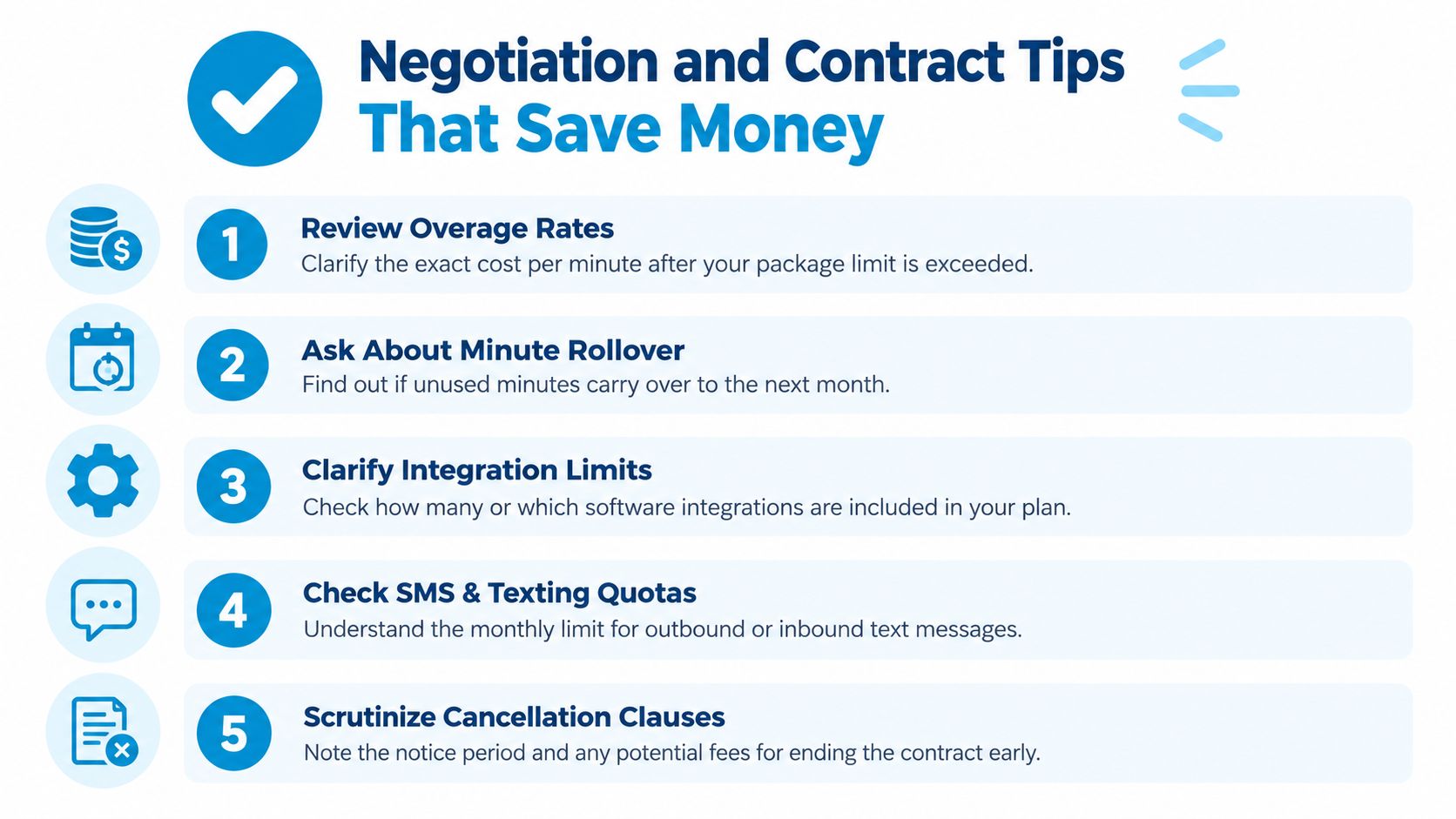
A low base fee can become an expensive agreement if the contract leaves usage and cancellation rules vague. Before approving a plan, ask the vendor to price your expected quiet, normal, and busy workloads in writing. You want to see the complete bill, not just the entry tier.
Questions that protect your budget
- Review overage rates: Confirm the exact per-minute or per-call price after the package limit is exceeded. Some 2026 pricing guides report packaged overages as high as $0.65 to $2.25 per minute, so don't accept “standard rates” as an answer without the figure in the contract, as noted in these AI pricing benchmarks.
- Ask about minute rollover: Find out whether unused minutes expire or carry into the next billing period. Rollover can matter when demand changes seasonally.
- Clarify integration limits: Check which CRM, calendar, dispatch, and scheduling tools are included, and whether advanced connections require a higher tier.
- Check SMS and texting quotas: Confirm inbound and outbound limits, notification charges, and whether appointment links count as billable messages.
- Scrutinize cancellation clauses: Note notice periods, renewal terms, early termination fees, and the process for exporting call records.
Use your volume pattern as leverage
Seasonal businesses shouldn't negotiate from an average month alone. A pest control company can ask for a plan review before its busiest period, while a franchise operator can request pricing based on combined locations instead of treating every phone number as a separate purchase.
You can also negotiate the service mix. Ask whether the vendor can bundle more minutes, provide a flat-rate option, or add human escalation only for defined call types. A hybrid arrangement may reduce the number of calls sent to live staff while protecting conversations that require judgment.
Service reliability belongs in the agreement, too. Define response expectations, escalation behavior, reporting access, and support responsibilities, then compare the language with these service-level agreement considerations.
Get every verbal promise in the order form or contract. If the sales conversation mentions unlimited coverage, included integrations, waived setup, or flexible cancellation, the written agreement should say the same thing.
Choosing the Right AI Receptionist Plan With Confidence
Choose the plan by matching usage, workflow, and outcome, in that order. Start by reviewing call volume, average duration, busy periods, after-hours demand, and the conversations that require human involvement. Then map those requirements against included minutes, simultaneous calls, phone numbers, integrations, SMS limits, and escalation options.
A small business with straightforward FAQs and appointment requests may need only a basic AI plan. A healthcare practice, legal office, or multi-location franchise may need a more capable tier because routing, compliance, scheduling accuracy, and escalation have a greater effect on customer experience.
Use the first month as an operating test. Track:
- Answered calls: How many callers reached a useful response?
- Qualified inquiries: Did the system collect the details your team needs?
- Booked appointments: Did scheduling happen accurately?
- Escalations: Were urgent or sensitive calls transferred correctly?
- Total bill: Did overages, messages, numbers, or integrations change the expected cost?
- Cost per outcome: What did each qualified lead or booked appointment cost?
Treat pricing as fuel for growth, not just a line item. A higher plan can be sensible when it prevents missed calls and produces a lower cost per qualified opportunity. A cheaper plan is sensible when your call flow is simple, your volume is stable, and added features won't improve the result.
Recepta.ai is one option that combines conversational AI with human support, handling inbound and outbound calls, appointment scheduling, lead capture, and follow-ups, with escalation when a conversation needs trained human assistance. Compare it with other vendors using the same workload assumptions and outcome measures.
Start today by exporting your recent call history, estimating a quiet and busy month, and requesting an itemized quote that includes overages and integrations. Test the proposed workflow, review the first month's call summaries, and keep the plan that captures the right opportunities without creating surprise costs.
Recepta.ai can help businesses manage calls, appointment scheduling, lead capture, and follow-ups with 24/7 AI coverage and human escalation when needed. Visit Recepta.ai to compare your workflow, evaluate the pricing fit, and take the next step toward fewer missed interactions.