Answering Service For IT Company: A Step-by-Step Guide
The usual failure point isn’t that nobody answers the phone. It’s that the wrong person answers it.
A senior engineer is in the middle of a migration window. A project manager is trying to close out a change request. A help desk lead is working through an outage queue. Then a basic inbound call lands. It’s a pricing question, a vendor callback, or a client who really just needs a ticket update. Someone technical stops what they’re doing, switches context, and the whole operation gets slower.
That’s why an answering service for IT company use cases has to do more than pick up calls. It has to protect engineer focus, route work correctly, create clean records in your systems, and escalate only the issues that deserve immediate attention. If it can’t do those things, you’ve just outsourced interruption instead of solving it.
Why Your IT Company Needs More Than an Answering Machine
Missed calls hurt. Mishandled calls hurt too.
Research indicates that 78% of customers will switch to a competitor if their call goes unanswered, and 85% of callers won’t call back after reaching voicemail, according to this industry guide on answering service performance. For IT companies, that’s not just a front-desk problem. It affects support, onboarding, renewals, and new business.
A basic answering machine doesn’t solve that. Voicemail stores the problem for later. It doesn’t qualify urgency, it doesn’t create a ticket, and it doesn’t know whether “the server is down” means an actual outage or a user who forgot a password.
What the real cost looks like
In practice, the hidden cost shows up in three places:
- Engineer interruption. Technical staff lose focus on billable or high-risk work when they field low-value calls.
- Slow lead handling. Sales inquiries that sit in voicemail often go cold before anyone responds.
- Poor incident triage. Real emergencies get mixed in with routine requests because there’s no structured intake.
Practical rule: If your phone process treats every call the same, your operations team pays for it.
A modern answering setup works better when it acts like a controlled intake layer. It asks the right questions, identifies the caller type, applies your escalation rules, and pushes the result into your stack. For MSPs and internal IT teams, that often means support triage. For firms selling projects, managed services, or software, it also means lead capture and callback scheduling.
If you’re comparing options for managed service workflows, this overview of IT service providers and MSP call handling is useful because it frames the service as an operational layer, not just reception coverage.
Defining Your Answering Service Needs and SLAs
Teams often shop for coverage before they define call logic. That’s backwards.
Before you evaluate vendors, write down what the service must do by call type, by hour, and by business impact. An MSP with after-hours alerts needs a different setup from a software agency that mainly wants lead capture during business hours.

The market is moving toward hybrid models for a reason. The AI customer service market is projected to reach $47.82 billion by 2030, reflecting the shift toward platforms that can handle lead capture, appointment scheduling, and integrations with 2,500+ tools, according to these AI customer service statistics. For IT companies, that matters because call handling is rarely standalone. It touches calendars, CRMs, ticketing, and on-call systems.
Start with a call inventory
Pull a few months of phone and ticket records if you have them. Don’t overcomplicate it. You’re trying to answer four basic questions:
When do calls hit
- Business hours only
- Overflow during peak periods
- Evenings, weekends, and holidays
- After-hours incident bursts
Who is calling
- Existing managed services clients
- Prospects asking for demos or pricing
- Vendors and partners
- Users calling about an active issue
- Executives or VIP client contacts
Why are they calling
- Password reset or account access
- Server or network outage
- New project inquiry
- Billing or contract question
- Appointment or callback request
What should happen next
- Ticket creation
- Live transfer
- Scheduled callback
- On-call escalation
- Message only
- Urgent incidents should trigger a live escalation path.
- Routine support should become structured tickets, not free-text emails.
- Sales calls should land on a shared calendar with notes, not a vague “please call back.”
- Known spam or vendor solicitations should never hit technical staff directly.
- Ticketing systems such as ConnectWise, Autotask, or Kaseya workflows
- CRM platforms like HubSpot or Salesforce for lead capture and account context
- Calendars for booking callbacks, demos, and onboarding meetings
- On-call tools such as PagerDuty or equivalent escalation paths
- Internal collaboration tools where messages, transcripts, or alerts need to appear
- Controlled scripts so agents don’t over-collect data
- Role-based escalation so sensitive matters reach the right people only
- Consistent records that support audits and dispute review
- Defined retention and deletion practices
- Clear separation between routine intake and protected information
- Show a ticket being created from a real intake workflow.
- Show a call note syncing to the CRM record you specify.
- Show an escalation rule based on caller type or issue severity.
- Show auditability for who touched the data and when.
- Show how the provider handles permission boundaries for sensitive clients or accounts.
- Show failure behavior when an integration is temporarily unavailable.
Who is this person
Existing client, prospect, vendor, internal staff member, or unknown caller.What kind of issue is this
Outage, standard support, project inquiry, billing, onboarding, or something else.What happens next
Live transfer, ticket creation, callback scheduling, or on-call escalation.- If the caller is an existing client and reports “server down,” “network outage,” “can’t access all systems,” or similar impact language
- Then the answering service uses the outage script
- Client name
- Caller name and callback number
- Affected location or department
- Brief issue summary
- Business impact
- Whether service is fully down or partially degraded
- Then trigger the on-call alert through your escalation stack
- Then create the related ticket or incident record
- Then send confirmation to the caller about expected callback handling
- Verify account
- Gather short problem summary
- Check whether it’s tied to an existing ticket
- Create or update the ticket
- Set callback expectation
- Do not wake on-call unless the issue meets documented trigger criteria
Patch follow-up
Ask which device or environment is affected, whether work is blocked, and whether the caller has a current maintenance window concern.Client onboarding check-in
Confirm company, onboarding stage, primary contact, and whether the issue is access-related, scheduling-related, or documentation-related.Non-urgent support
Capture symptoms, user impact, best callback number, and whether a ticket already exists.Executive or VIP account
Route to named contacts or priority queues with minimal friction.- Clients who bypass normal support paths
- Prospects calling during an active outage
- Repeat callers with unresolved issues
- Callers asking agents technical questions they should not answer
- Requests involving credentials, protected data, or contractual disputes
- Per-minute plans can work well when your scripts are tight and your call handling is controlled.
- Per-call pricing can get expensive if agents need longer intake for support scenarios.
- Flat-fee models look clean but sometimes hide limits around after-hours handling, transfers, or integration support.
Estimate recovered opportunities
Count the calls that currently go to voicemail, ring out, or interrupt the wrong people.Estimate engineer time protected
Look at how many non-technical calls currently reach technical staff and what that does to focused work.Estimate admin reduction
Count manual ticket logging, note cleanup, callback coordination, and missed follow-ups.Subtract full service cost
Include setup, integration work, and recurring charges.- After-hours only for existing support clients
- Overflow only during business hours when internal lines are busy
- One department only, such as sales intake or general support
- One call type only, such as outage triage or appointment booking
- Caller identity
- Account or company name
- Callback number
- Short description of issue
- Impact on work
- Existing ticket reference if available
- Company name
- What they need help with
- Timeline
- Best contact details
- Whether they want a callback or scheduled meeting
- What is down
- Who is affected
- Whether there is an active workaround
- Which on-call path should trigger
- Existing client reports internet outage for one office
- Prospect asks for managed security support
- Caller wants to know status of an open ticket
- Vendor asks for accounts payable
- Executive assistant calls on behalf of a VIP client
- A handful of urgent escalations each week at first
- Random routine support intakes
- Every sales call booked in the first month
- Any complaint tied to call handling or follow-up quality
- Agents collecting too much irrelevant detail
- Escalating too much because scripts are vague
- Not escalating enough because threshold wording is weak
- CRM notes that don’t map cleanly to the right account
- Ticket subjects written so poorly that triage takes extra time
Build SLAs by scenario
A single SLA for all calls is sloppy. IT companies need separate handling rules for separate risk levels.
Here’s a practical way to define them:
| Call type | Business priority | Recommended handling approach |
|---|---|---|
| Existing client reporting outage | Critical | Answer immediately, gather required details, trigger escalation workflow |
| Existing client with routine support issue | Medium | Log intake, create ticket, schedule response by support queue |
| New sales inquiry | High | Qualify lead, capture budget/timeline basics, book discovery call |
| Vendor or non-client admin call | Low | Take message or route during business hours |
| Billing or contract issue | Medium | Route to account owner or create finance follow-up task |
MSP versus software agency
An MSP usually needs stronger incident triage. The answering team should know the difference between “email is slow” and “multi-site outage.” They should gather device, environment, contact, and impact details before escalating.
A software development agency often needs a different pattern. Calls are more likely to be about proposals, project scoping, support requests from retained clients, or hiring inquiries. In that environment, appointment setting and clean CRM logging matter more than waking up an on-call engineer.
If your provider can’t tell the difference between a P1 issue and a sales lead, your scripts aren’t finished.
Define the handoff rules before onboarding
Most failed implementations break in the handoff layer. The service answers the call, but nobody knows what happens after that.
Write down these requirements before you sign:
This prep work sounds basic, but it’s what separates a useful service from a polite bottleneck.
The Non-Negotiable Integration and Security Checklist
For an IT company, a provider without proper integration is just another inbox to babysit.
That’s why I treat integration and security as go or no-go items. If the answering service can’t write to the right system, attach the right notes, and preserve a clean audit trail, your team will end up doing manual cleanup. That wipes out most of the operational benefit.

A 2025 Gartner report notes that 68% of MSPs cite integration failures as a top outsourcing barrier, with 42% experiencing compliance issues in their first year, as summarized in this help desk answering service review. Those numbers line up with what IT teams already know. The call itself is easy. The system fit is the hard part.
What must integrate
Ask vendors to show, not tell, how they connect to your environment.
For most IT companies, that means some combination of:
Don’t accept “we can send an email” as integration. That’s fallback, not workflow design.
A useful way to frame the conversation is through field-level mapping. What exact data gets captured? Where does caller name go? Where is severity stored? Does the service create a new ticket, append to an existing one, or wait for approval? If you need a primer before vendor demos, this guide to CRM integration in operational workflows is worth reviewing.
Security questions that expose weak vendors
A surprising number of providers sound polished until you ask specific security questions.
Use a checklist like this:
| Security topic | What to ask |
|---|---|
| Data access | Which staff can view caller data, and how is access limited? |
| Logging | Do you maintain audit logs for record creation, edits, transfers, and escalations? |
| Retention | How long are transcripts, recordings, and message logs stored? |
| Encryption | How is sensitive data protected in transit and at rest? |
| Compliance scope | What processes support HIPAA, GDPR, or SOC 2-aligned handling if we need them? |
| Incident response | What happens if there’s a security event affecting call data or integrations? |
When a provider talks vaguely about “bank-level security,” push deeper. Ask whether they support secure transmission standards and whether their workflow design can reduce unnecessary data exposure. If you need a concise explainer on the basics, this overview of end-to-end encryption helps clarify what secure communication should mean in practice.
Compliance isn’t only for healthcare
HIPAA comes up fast when an IT provider supports clinics, dental groups, or healthcare-adjacent clients. GDPR matters when callers are in regulated international environments. SOC 2 concerns show up even when no regulation forces the issue, because enterprise buyers will still ask.
Here’s the practical test. Can the answering service operate with the same discipline your internal team would need?
That includes:
Later in your review process, it helps to watch how a provider explains its own controls and escalation logic:
The checklist I’d use in every vendor demo
Bring this to the call and insist on live answers:
A provider that can’t demo the workflow usually doesn’t own the workflow.
For IT operations, that’s the dividing line. Nice voice, polite scripting, and 24/7 coverage are fine. But without system fit and security discipline, the service becomes an extra step your team has to fix.
Designing On-Call Escalation and Call-Flow Logic
A good answering service runs on decision trees, not generic scripts.
If your call flow says “take a message and email the team,” you haven’t designed an IT workflow. You’ve designed delay. The right approach is to build if-then logic around caller identity, issue type, urgency, and next action.
Start with three routing questions
Every inbound call should answer these questions fast:
That sounds simple because it should be. Complex call trees usually fail at 2 a.m.
A practical outage workflow
For an MSP or internal IT support team, outage intake needs a defined path.
A workable example looks like this:
Transfer rules are important. Some vendors can warm transfer urgent calls. Others should create the alert and stop. Pick one method and document it clearly. If your team needs a cleaner handoff process, this guide on how to transfer calls covers the mechanics well.
Don’t let agents decide severity from instinct alone. Give them trigger phrases, exclusion rules, and a clear escalation threshold.
Separate emergency logic from sales logic
A lot of answering service setups fail because they use one script family for everything. Support and sales need different outcomes.
For a new project inquiry, your logic might look like this:
| If the caller says | Intake action | Outcome |
|---|---|---|
| “We need help with cybersecurity” | Capture company, headcount, urgency, current provider | Book discovery call with sales |
| “We need a quote” | Gather scope basics and timeline | Create CRM lead and notify sales owner |
| “We need support now” but they are not a client | Confirm prospect status and issue nature | Route to sales or service desk per policy |
For a routine support request, the path is different:
Write scripts for outcomes, not conversations
A script should help the agent capture what your team needs next. It should not force callers through unnatural dialogue.
Use compact scripts for these common IT scenarios:
Document exception handling
The edges are where teams get burned.
Write explicit rules for:
If the service can’t answer those edge cases consistently, your engineers and account managers will still get dragged into call triage. The whole point is to stop that.
How to Evaluate Vendors and Calculate Your ROI
By this point, you should know your call types, escalation rules, integrations, and compliance requirements. Now you can compare vendors without guessing.
Organizations often make this harder than it needs to be. They sit through demos, react to polished sales language, and end up comparing unlike-for-like services. A simple scorecard works better.
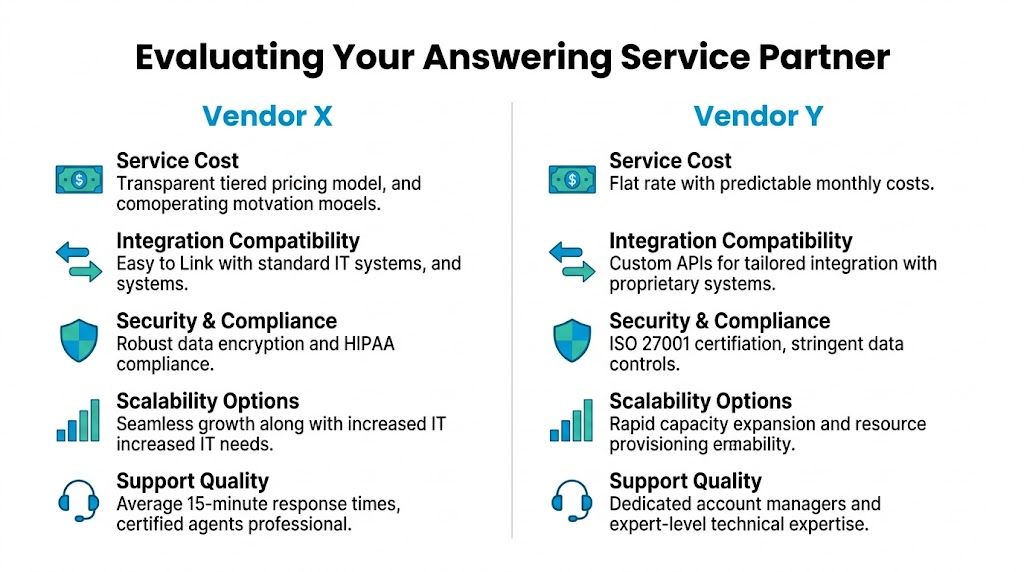
Use a weighted comparison, not a gut check
Here’s a practical table you can lift into a spreadsheet.
| Feature/Capability | Vendor A Score (1-5) | Vendor B Score (1-5) | Notes & Key Questions |
|---|---|---|---|
| Ticketing integration | Can it create and update records in our service desk? | ||
| CRM sync | Does lead data map cleanly into our CRM fields? | ||
| On-call escalation support | Can it trigger our existing process reliably? | ||
| Security controls | Are access controls, logging, and retention policies documented? | ||
| Compliance readiness | Can it support HIPAA, GDPR, or SOC 2-aligned workflows we need? | ||
| Agent training quality | Can agents follow IT-specific scripts without freelancing? | ||
| Reporting | Do we get usable call data, outcomes, and trend visibility? | ||
| Pricing clarity | Are fees understandable, including overflow or after-hours usage? | ||
| Scalability | Can the service absorb spikes without breaking workflow quality? | ||
| Support responsiveness | How fast can scripts, routing, or integrations be updated? |
Use the notes column aggressively. That’s where you catch the significant differences.
Pricing model fit matters more than headline price
Most providers charge by minute, by call, or through some form of monthly plan. The cheapest-looking model can become expensive if your call pattern doesn’t match it.
For smaller IT firms with 2 to 10 employees, a reasonable planning baseline is 200 to 500 minutes per month, with a 20% to 50% buffer added for after-hours and peak loads, according to this minute allocation guide for answering services. The same source warns that underestimating usage can drive 10% to 20% call abandonment.
That gives you a practical vendor test. Ask each provider to price your expected normal month and your ugly month. If your calls spike during outages, releases, onboarding batches, or marketing pushes, the ugly month matters more than the tidy estimate.
A few trade-offs I’d call out directly
Some hybrid platforms are worth considering if you want a mix of automated intake and human escalation. For example, Recepta.ai’s answering service pricing overview is useful because it frames cost around workflow coverage rather than just receptionist time. That’s the right lens for IT teams.
ROI should include labor protection, not just lead capture
A lot of ROI calculators are too narrow. They only count new revenue from answered calls. For IT operations, you also need to count time returned to expensive staff.
Use this structure:
Here’s a simple practical example without inventing hard numbers. Say your engineers currently field a mix of basic support intake, vendor calls, and new inquiries. A properly configured answering service can absorb the first touch, route the issue, and create structured records. That doesn’t just save missed opportunities. It also saves your senior staff from doing receptionist work.
Operator’s view: The best ROI usually comes from reducing interruption and cleanup, not from the phone being answered faster by itself.
Don’t skip vendor governance
If your clients ask security questions during procurement, your vendor review process has to stand up to scrutiny. This guide to SOC 2 vendor management requirements is a useful reference when you’re formalizing what evidence and controls to request from outsourced service partners.
That step matters because your answering provider may end up touching lead data, customer records, support details, and regulated workflows. Treat them like an operational vendor, not like a simple overflow service.
Testing, Rollout, and Measuring Long-Term Success
Signing the contract is the easy part. Getting the workflow right is where the work starts.
I’d roll out an answering service for IT company operations in phases, not all at once. Start with one lane of traffic, prove the intake quality, then expand.
Phase the rollout
A controlled launch usually works best in one of these formats:
This keeps your team from debugging scripts, routing, and integrations across every scenario at the same time.
Build script packs before go-live
Your agents need short, structured scripts tied to outcomes. Keep them modular.
A basic support intake script should include:
A sales qualification script should capture:
An escalation script should focus on:
Keep language plain. Agents should never sound like they’re reading a compliance manual to a stressed caller.
The script should reduce ambiguity for your team, not create friction for the caller.
Run internal test calls
Before live traffic, have your own staff place test calls. Use realistic scenarios, not ideal ones.
Try cases like:
Check what happens in your systems after each call. Did the ticket land in the right queue? Did the CRM note save properly? Did the escalation go to the correct on-call person? Was the message written in a way your team can use?
Measure the service with operational KPIs
Success isn’t “calls were answered.” Success is whether the service improves your workflow.
A solid baseline comes from these targets: aim for First Call Resolution of 70% to 85%, keep Average Handle Time under 5 minutes for troubleshooting queries, and reduce call abandonment to under 5% by maintaining an 80% service level, meaning calls answered in 20 seconds, according to this KPI guide for answering services.
Track those alongside your own business metrics, such as:
| KPI | Why it matters for IT teams |
|---|---|
| First Call Resolution | Shows whether intake and routing solve simple issues without rework |
| Average Handle Time | Indicates whether scripts are focused or bloated |
| Call Abandonment Rate | Reveals whether staffing and coverage match actual demand |
| Service Level | Shows how quickly the service picks up during normal and peak periods |
| Lead conversion from handled calls | Measures whether sales inquiries are being captured and moved forward |
| Escalation accuracy | Confirms whether urgent calls are being flagged correctly |
Audit quality after launch
Don’t just look at dashboards. Read transcripts, listen to recordings where appropriate, and compare call outcomes to what should have happened.
I’d review:
Common failure patterns show up fast:
Tune monthly, not annually
Your call flow should evolve with your business.
New client types, new service lines, different after-hours expectations, and changing on-call structures all affect intake. Review scripts and routing whenever you change internal process. The answering service should mirror operations, not lag six months behind them.
The teams that get value from this model do one thing consistently. They treat call handling as an operational workflow, not a receptionist function.
Conclusion: Your Partner in Scalable IT Operations
An answering service only helps an IT company when it reduces noise and improves control.
That means tighter intake, cleaner routing, fewer interruptions for technical staff, stronger lead handling, and dependable escalation when something is urgent. It also means the provider has to fit your stack. If it can’t work with your ticketing, CRM, calendars, and security expectations, it won’t hold up under real use.
The practical path is straightforward. Define call types. Set handling rules. Vet integrations and compliance. Build call-flow logic around real incidents and real sales conversations. Roll it out in phases. Then measure it like any other operational system.
Handled properly, an answering service for IT company operations becomes part of your service delivery layer. Your engineers get focus back. Your clients get faster, more consistent responses. Your leads stop leaking into voicemail. And your team scales without turning every phone call into an interruption.
If you want a platform that combines AI intake with human escalation, Recepta.ai is one option to review. It handles inbound and outbound calls, lead capture, scheduling, and follow-ups, then escalates to trained agents when a conversation needs human judgment. For IT teams, the main value is operational: cleaner handoffs, better coverage, and less manual admin around every call.