Virtual Front Desk Guide for Service Businesses
A ringing phone is rarely just a ringing phone in a service business. It's a homeowner with no heat, a patient trying to move an appointment, or a prospective client deciding which firm to call next. When nobody answers, that person doesn't wait in a neat queue. They call a competitor, postpone care, or give up.
What a Virtual Front Desk Actually Does
A 30-day monitoring study found that only 37.8% of inbound calls to 85 small businesses across 58 industries were answered by a live person, while 24.3% received no response at all. That means about 62.1% failed to connect with a human. For plumbers, dentists, and law firms, I've seen the same pattern for simple reasons. Staff are with a customer, on a job site, in a treatment room, or closed for the day.
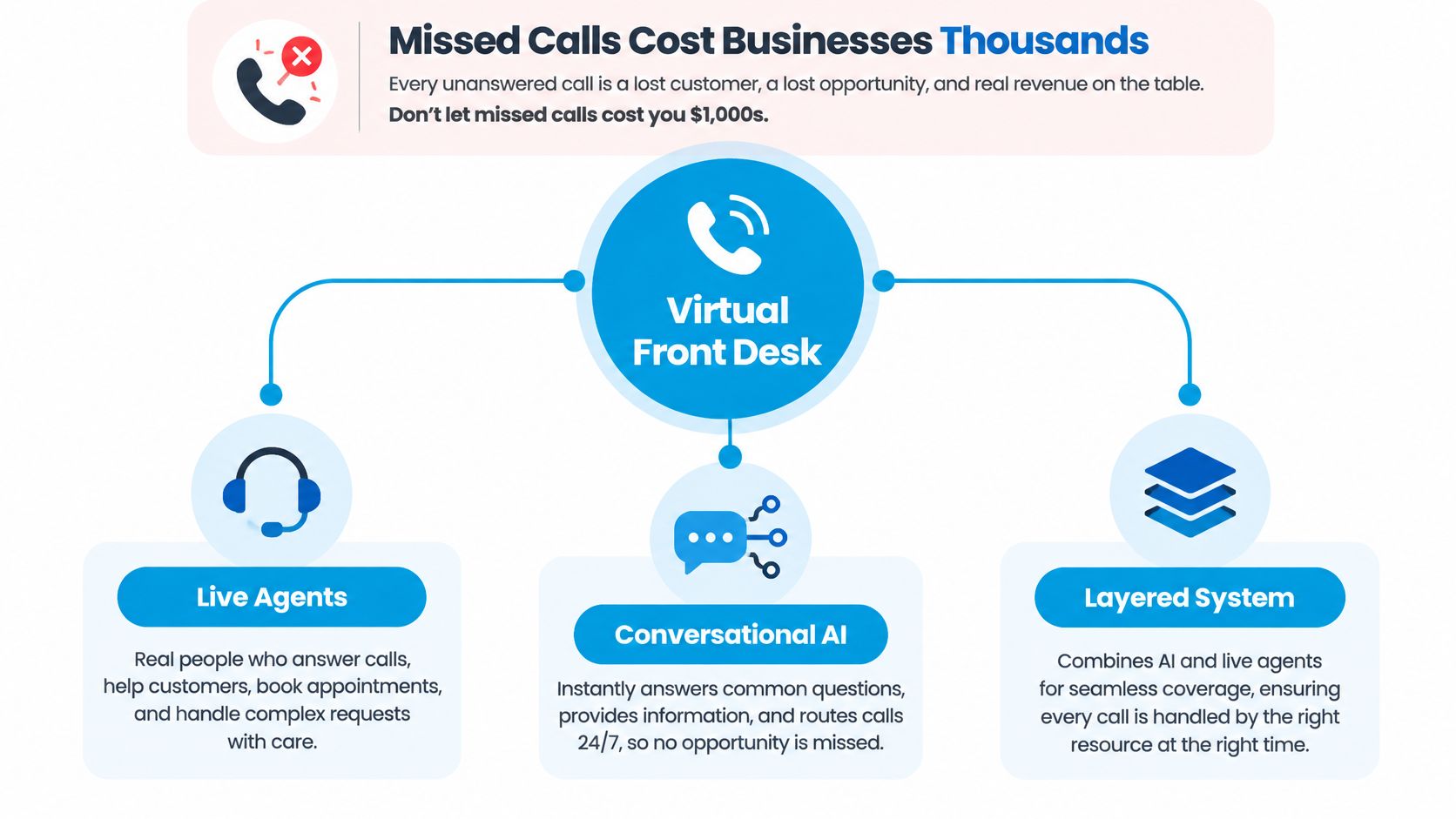
A virtual front desk is a layered system, not one app. It combines conversational AI, live agents when needed, scheduling, call routing, reminders, and sync with your calendar and CRM. Its job is to classify each request and trigger the right business action, not just take a message.
Three Ways Readers Usually Arrive Here
- Solo practitioner: A dentist or attorney who can't answer during appointments needs booking, rescheduling, and basic questions handled without hiring full-time cover.
- Multi-location operator: A franchise owner needs the same greeting, qualification questions, and routing rules at every site, with records in one place.
- Compliance-driven firm: A clinic, insurer, or law office needs clear limits on what automation can say and a fast path to a person.
The practical test is continuity. If a caller books at 8 p.m., that booking should appear on the right calendar, create or update the CRM record, and send a confirmation. Insurance teams asking the same workflow question across offices can also streamline your agency operations by standardizing intake before staff touch the file.
Don't buy a brighter voicemail box. Buy a system that finishes the task or hands it to a person with full context.
That distinction shapes everything that follows, from staffing model to escalation rules to measurement.
Human AI or Blended Operating Models Compared
Most owners ask me whether they should keep a human receptionist, go AI-only, or blend the two. The honest answer depends on your call mix and risk profile. A cleaning company confirming recurring visits has different needs from a law firm screening a potential conflict of interest.
Comparing Front Desk Operating Models
| Criterion | Human-only | AI-only | Blended |
|---|---|---|---|
| Availability | Limited to staffed hours | Around the clock | Around the clock, with human cover for defined cases |
| Cost pattern | Predictable salary, harder to scale for peaks | Lower marginal cost per call | Mid-range, pays for humans where judgment matters |
| Empathy capacity | High, if staff are trained | Limited for distress or nuance | High on escalated calls, efficient on routine calls |
| Compliance exposure | Depends on training and supervision | Higher if scripts stray into advice | Lower when escalation rules are explicit |
| Scalability | Slow, hiring dependent | Fast across locations | Fast, with shared rules and local exceptions |
A human-only desk works well when call volume is modest, conversations are sensitive, and someone is reliably at the desk. It breaks down at lunch, during sick days, and after hours. One person also can't answer three simultaneous calls during a Monday morning surge.
An AI-only desk handles volume and consistency. It can ask the same qualifying questions every time, check a calendar, and write clean notes. It struggles when a caller is upset, describes symptoms, disputes a bill, or asks something outside approved knowledge.
The blended model is the default I recommend for regulated and high-touch businesses. AI handles routine scheduling, reminders, directions, and first-pass qualification. Trained agents take over for judgment calls. Platforms in this category, including Recepta.ai, combine automated call handling with escalation to human receptionists and sync the outcome to business tools.
If you're comparing vendor claims against your actual call types, it's worth taking time to find the best AI receptionist for the tasks you'll automate and the tasks you'll reserve for people. Don't start with features. Start with twenty recent calls and sort them into automate, escalate, and never automate.
Sorting rule: If a wrong answer could harm health, legal position, money, or trust, that call belongs with a human.
Where a Virtual Front Desk Pays Off Across Industries
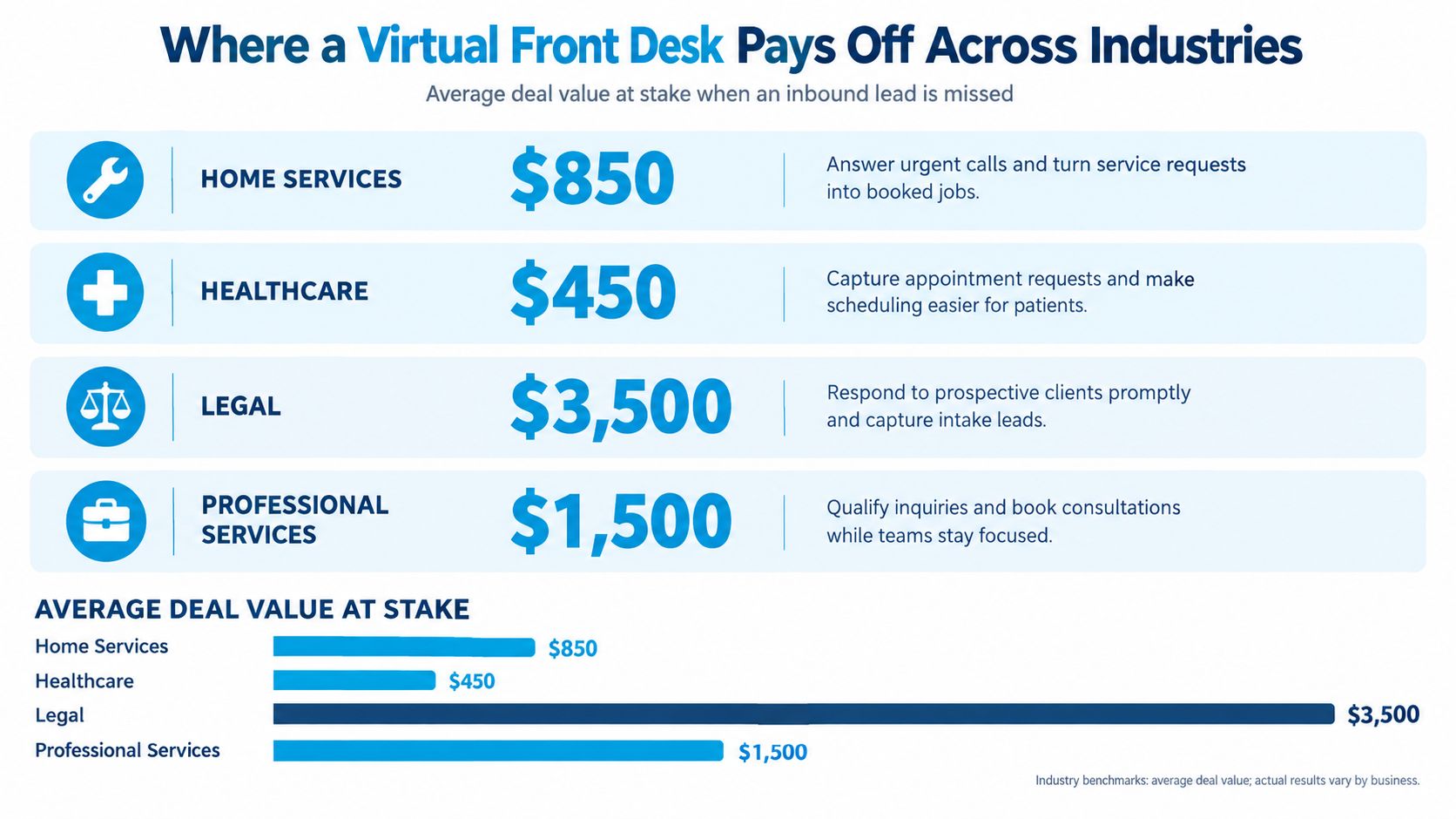
Availability only matters when it converts into booked work, attended appointments, or protected revenue. The payoff looks different by industry, which is why generic promises about answering more calls don't help owners decide.
Home Services Where Intent Is Immediate
In home services, reporting shows businesses miss approximately 27% of inbound calls, with a separate measurement across 225,000 businesses reporting 28%, an average missed sales call worth about $1,200, and high-ticket HVAC replacements sometimes exceeding $3,500. Value varies by trade and job size, so don't treat every missed call as identical. Still, even modest answer-rate gains matter when a burst pipe caller books the first company that responds.
Practical example. A plumbing firm routes calls by urgency. Water actively leaking triggers immediate dispatch and a text to the on-call technician. A request for a water heater quote triggers qualification questions about location, tank size, and access, then books an estimate. Same phone number, different outcomes.
Healthcare Where Attendance Is the Outcome
For dental and medical practices, the front desk protects the schedule. Staff confirm appointments, fill cancellations, answer insurance basics within approved limits, and route clinical questions to clinicians. The value isn't a friendly reminder alone. It's a released slot refilled from a waitlist before that chair sits empty.
Legal and Professional Services Where Screening Protects Both Sides
A law firm's intake call needs conflict detection, matter type, deadlines, and jurisdiction before anyone offers substantive guidance. Automation can collect those fields consistently and book a consultation, but it shouldn't assess merits or quote outcomes. A paralegal or attorney reviews flagged matters.
Accountants, consultants, and real estate teams face a similar version. A new client inquiry needs qualification and a booked meeting. An existing client with a deadline needs routing to the right person, not a generic callback promise.
Franchises Where Consistency Travels
Multi-location operators gain from one script framework with local calendars, service areas, and escalation contacts. A caller in one time zone gets the same standard as a caller in another, while owners compare results by location. That's difficult when each site relies on whoever is near the phone.
A Day in the Life of a Blended Front Desk
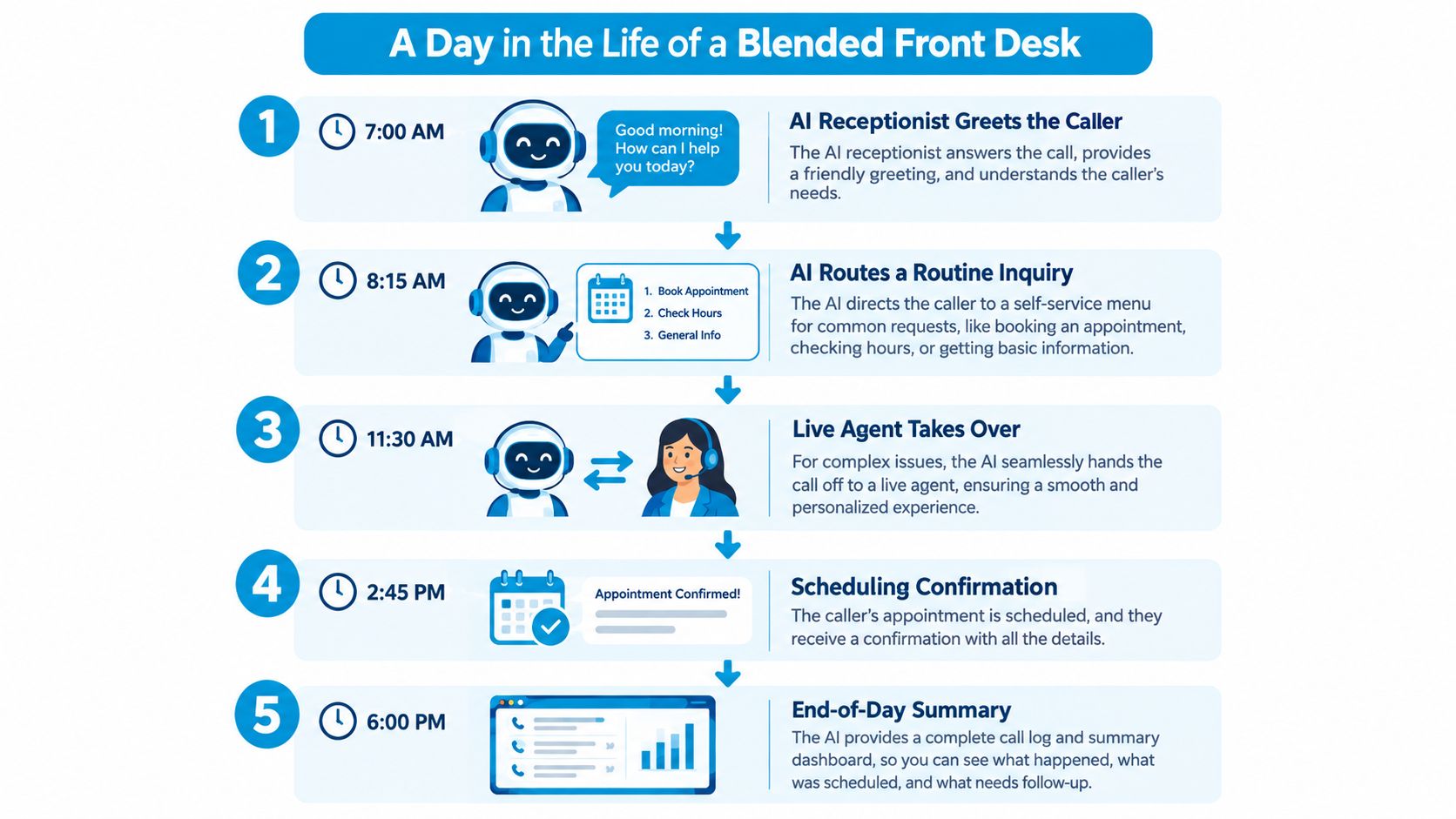
Monday, 7 a.m. A homeowner calls an HVAC company because the furnace stopped overnight. The virtual front desk greets her, states clearly that she's speaking with an automated assistant, and asks whether anyone in the home is vulnerable to cold. Her answers meet the firm's emergency criteria.
The system checks the dispatch calendar, books the earliest slot, writes the service address and equipment details to the CRM, and sends a confirmation text. A dispatcher sees the job with notes attached, not a sticky note asking someone to call back.
The workflow below shows how those handoffs chain together across a day.
Mid-Morning at a Dental Practice
At 10 a.m., a patient replies to a reminder and needs to move a hygiene appointment. Evidence supports building reminders into the front desk, since a review found attendance of 78.6% with text reminders compared with 67.8% without, and one study reported no-shows could fall by 51%. The patient picks a new time, the old slot opens, and the system offers it to the waitlist.
Practices mapping this flow can review how automated appointment booking handles confirmations and rescheduling before they rewrite reminder scripts. The key detail is timing. Send the reminder early enough that a cancellation can still be refilled.
Afternoon at a Law Firm and the Evening Wrap-Up
At 2 p.m., a caller describes a dispute involving a current client of the firm. The system stops routine intake, flags a possible conflict, and transfers the call to a paralegal with the transcript and collected fields attached. The caller doesn't repeat his story.
This short video walkthrough helps visualize how a blended desk moves from greeting to booking to human handoff.
By evening, managers review a log of booked jobs, escalations, unanswered questions, and tomorrow's confirmations. That connected output, classification plus action plus record, separates a true front desk from a chatbot that says someone will call back.
Human Escalation and AI Disclosure as Designed Controls
Owners often treat escalation as a backup plan for when automation fails. I treat it as a designed control. You decide in advance which situations a system may handle, which it must hand over, and what information travels with the transfer.
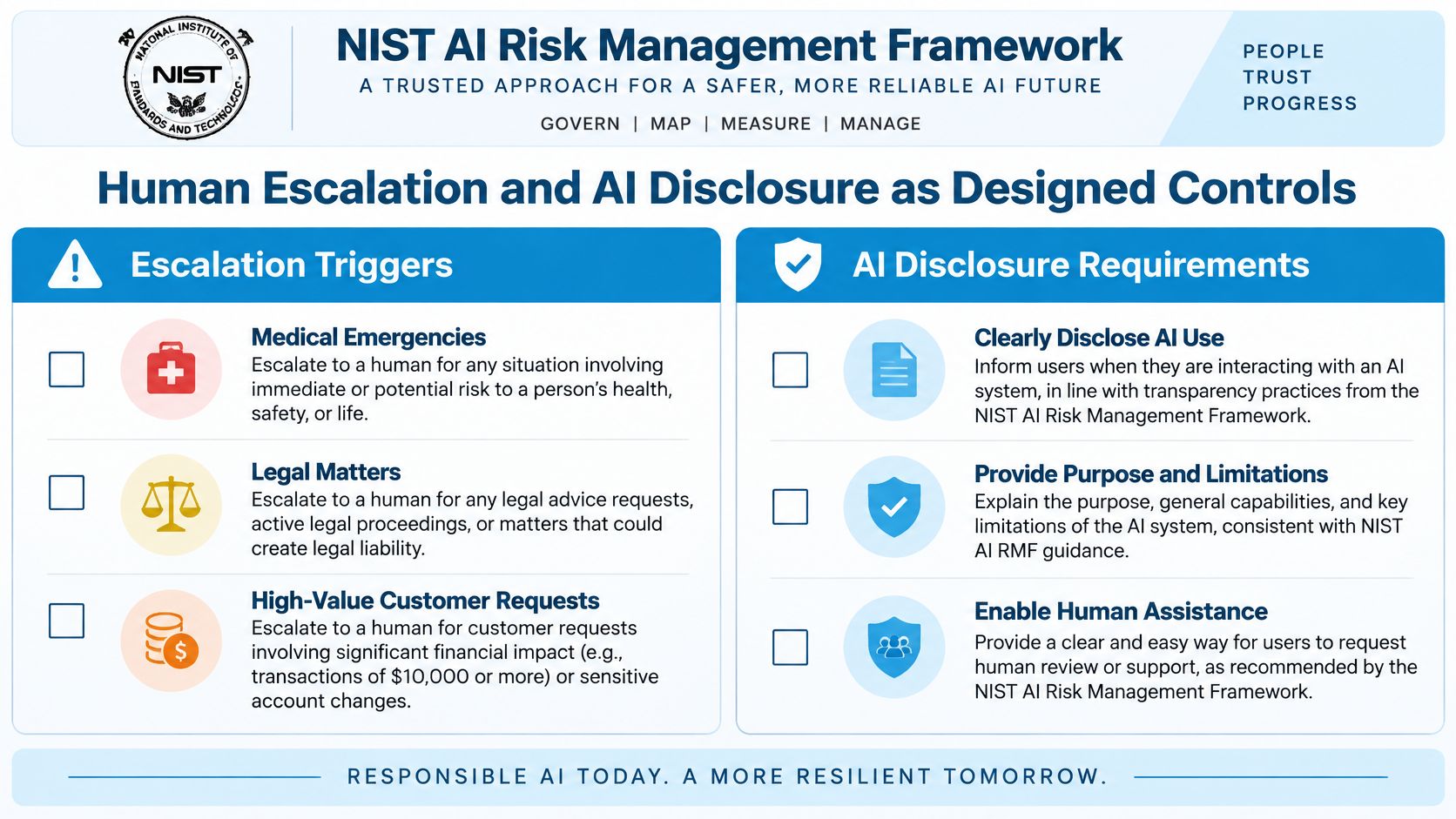
The NIST AI Risk Management Framework guidance on defining human roles and oversight responsibilities supports that approach. Systems may act autonomously, defer to human experts, or support human decision-makers. Your configuration should say which mode applies to each call type.
Triggers That Should Reach a Person
- Medical symptoms or anything that sounds like an emergency
- Legal advice requests, deadlines, or possible conflicts
- Financial suitability or insurance coverage judgments
- Billing disputes, threats, or a distressed caller
- Low confidence or questions outside approved knowledge
Disclosure matters just as much. A 2025 survey found 55% of 1,000 U.S. adults had to escalate an AI-handled issue to a human, 45% said AI failed to understand their problem, only 22% felt companies clearly disclosed AI use, and 69% believed companies should always disclose it. Callers aren't only asking for speed. They're asking to know who they're talking to.
Use a plain opening, such as naming the business, identifying the assistant as automated, and offering a person at any point. Then keep that promise. Teams deciding how the transfer itself should feel can compare cold and warm transfer approaches for AI front desks and choose based on urgency and sensitivity.
A good handoff preserves the transcript, detected intent, collected fields, confidence score, and reason for escalation, so the caller never starts over.
Assign an owner for every escalation type, set a maximum response time, and define what happens when nobody is available. Measure transfer completion, repeated explanations, abandonment after transfer, and post-transfer resolution. Those numbers tell you whether callers trust the system, not just whether it answered.
Outbound Calls Privacy and Compliance Essentials
Inbound cover gets most of the attention, but outbound work carries its own risk. Reminders, follow-ups, and reactivation calls only help if recipients trust the number on their screen and you've respected consent.
The FCC description of STIR/SHAKEN call authentication explains the technical baseline. These are interconnected standards that digitally authenticate caller-ID information on IP-based voice networks, with originating providers signing calls and downstream providers validating legitimacy. Applicable providers must also maintain robocall-mitigation programs.
A Plain Language Outbound Checklist
- Registered number: Use a properly registered business number for each location and confirm your carrier applies appropriate attestation.
- Consent records: Record who agreed to calls or texts, when, and for what purpose. Separate appointment reminders from marketing outreach.
- Suppression lists: Remove opted-out contacts promptly across every workflow, not just one campaign.
- Truthful disclosure: Identify the business and the automated assistant clearly at the start.
- Monitoring: Track answer rate, spam labeling, opt-out rate, and completed actions together.
STIR/SHAKEN doesn't prove a call is safe, and it doesn't tell a recipient whether AI is involved. It validates caller-ID assertions only. That's why authentication sits alongside consent management, rate controls, and accurate logs rather than replacing them.
Map industry duties to system settings. Healthcare teams limit what appears in reminders and route clinical replies to staff. Law firms protect privileged details and restrict who can view transcripts. Marketing follow-up needs appropriate consent before automation dials. Businesses planning campaigns can review outbound call automation workflows and controls and test them on internal numbers first.
Franchises need extra discipline. One location with poor list hygiene can damage trust in numbers across the brand. Central monitoring with location-specific numbers gives headquarters visibility while callers still see a local identity.
Measuring What a Virtual Front Desk Actually Changes
Answer rate is the easiest number to report and the easiest to misread. A desk can answer every call and still book the wrong slot, lose the CRM note, or trap urgent callers in a polite loop. Measure outcomes instead.
Speed is one outcome with clear evidence behind it. A Harvard Business Review audit found firms attempting contact within one hour were nearly seven times more likely to have a meaningful conversation with a decision-maker than firms waiting even one additional hour, and more than 60 times more likely than firms waiting at least 24 hours, across 1.25 million web-generated leads. A front desk should therefore route website inquiries into an immediate call or text workflow, not tomorrow's callback list.
An Outcome Dashboard Worth Reviewing
- Qualified-lead rate: Share of new inquiries that meet your service, location, and budget criteria
- Booked-appointment rate: Qualified conversations that become scheduled work
- Time to first follow-up: Minutes from inquiry to first real contact attempt
- Transfer success: Escalations completed with context intact
- No-show change: Attendance before and after reminder workflows
- Revenue recovered: Booked value by location, campaign, or call source
Healthcare operators connecting schedule performance to collections can get Clarity on revenue cycle management as a reminder that front-desk accuracy affects downstream billing. For call-level evidence, use call detail reporting that ties conversations to outcomes rather than relying on a vendor's summary count.
Set a cadence. Check lead capture and failed transfers daily, scheduling accuracy weekly, and revenue by source monthly. Watch for a new bottleneck I see often, calls captured neatly but never synchronized with the calendar, dispatch board, or CRM.
Availability is valuable only when it becomes a qualified conversation, a booked appointment, or a resolved request.
If missed calls, slow follow-up, or messy handoffs are costing you booked work, Recepta.ai gives your business a blended virtual front desk that answers, qualifies, schedules, and escalates to trained humans with context intact. Set up your call rules, disclosure script, and escalation triggers once, then let every location follow the same standard around the clock. Visit Recepta.ai to see how it would handle your next call.