Best Call Recording Software for Business in 2026
A customer calls at 4:47 p.m. asking if you can fit in one more service visit tomorrow. Your receptionist says she'll check the schedule and call back. The callback never happens. By the next morning, that customer has booked with someone else.
Most owners don't realize how often this kind of leak happens until a dispute comes up, a lead goes cold, or a team member insists, “That's not what the customer said.” At that point, call recording stops feeling optional. It becomes part of running the business properly.
The bigger shift is this: recording alone isn't enough anymore. A saved audio file helps you review what happened. A better system helps you act on what happened.
What Is Call Recording Software and Why Your Business Needs It
Call recording software for business started out like a security camera for your phone lines. It captured what happened so you could review it later if there was a complaint, a misunderstanding, or a training issue.
That's still useful. But it's only the baseline.
Today, many businesses use recording systems as part of daily operations. The market reflects that shift. The global market for call recording software for business reached an estimated value of $2.5 billion in 2025 and is projected to grow at a 12% CAGR from 2025 through 2033, showing that it has moved from a niche utility to a core business tool, according to Data Insights Market research on call recording software.
If you want a simple overview before comparing platforms, this guide on what call recording is and how it works is a useful starting point. If you're already shopping, a curated look at the best call recorder for businesses can help you narrow your shortlist by use case.
Five ways it pays for itself
The easiest way to understand the value is to look at how real teams use it.
Quality assurance: A plumbing office hears several complaints that callers feel rushed on the phone. Instead of guessing which employee needs coaching, the manager reviews a handful of booking calls and hears the exact pattern. The issue isn't attitude. It's that staff are skipping the explanation of arrival windows.
Compliance protection: A healthcare practice needs a reliable record of what was disclosed on patient scheduling calls. A recording gives the office something concrete to review when a patient says they were never told about a form, fee, or timing requirement.
Faster training: New front desk staff learn quicker when they can hear actual calls from your own business. One strong example of a receptionist calmly handling a price objection is worth more than a generic script in a binder.
Sales and service insight: If callers keep asking whether you service a particular ZIP code, offer weekend appointments, or accept a certain insurance plan, those questions should shape your website and your scripts. Recordings show what customers ask, not what you assume they ask.
Lead capture: A missed call is obvious. A mishandled live call is harder to see. Recording helps you find the quieter losses, like callers who asked for an estimate, got vague answers, and never called back.
Practical rule: If a call can create revenue, risk, or rework, it should be recorded, searchable, and reviewable.
What basic systems do well, and where they fall short
A basic recorder works fine if your only goal is archive and playback. That's enough for some firms, especially those with a low call volume and a narrow compliance need.
What doesn't work is treating recordings like a dusty file cabinet. If no one reviews them, tags them, or ties them to follow-up tasks, the software becomes storage with a monthly bill attached. The strongest setups use recordings to improve scripts, settle disputes, train staff, and uncover operational friction.
That's where the return starts showing up in practical terms. Fewer “he said, she said” moments. Better coaching. Cleaner handoffs. More booked jobs from the calls you're already paying to generate.
Navigating Call Recording Laws and Compliance
The legal side is where many businesses get nervous, and for good reason. Most software vendors say they're “compliance-ready.” That phrase doesn't protect you. Your setup, disclosure process, retention policy, and team behavior do.
A 2025 study found that 62% of US businesses using call recording face potential liability due to ambiguous consent protocols, and it notes that recent 2025 to 2026 updates require explicit verbal consent or clear disclosure that many cloud systems don't enforce dynamically, according to Gong's analysis of call recording software.
Early in your policy work, it also helps to review broader essential data privacy laws so your recording process fits your overall handling of customer data, not just your phone system.
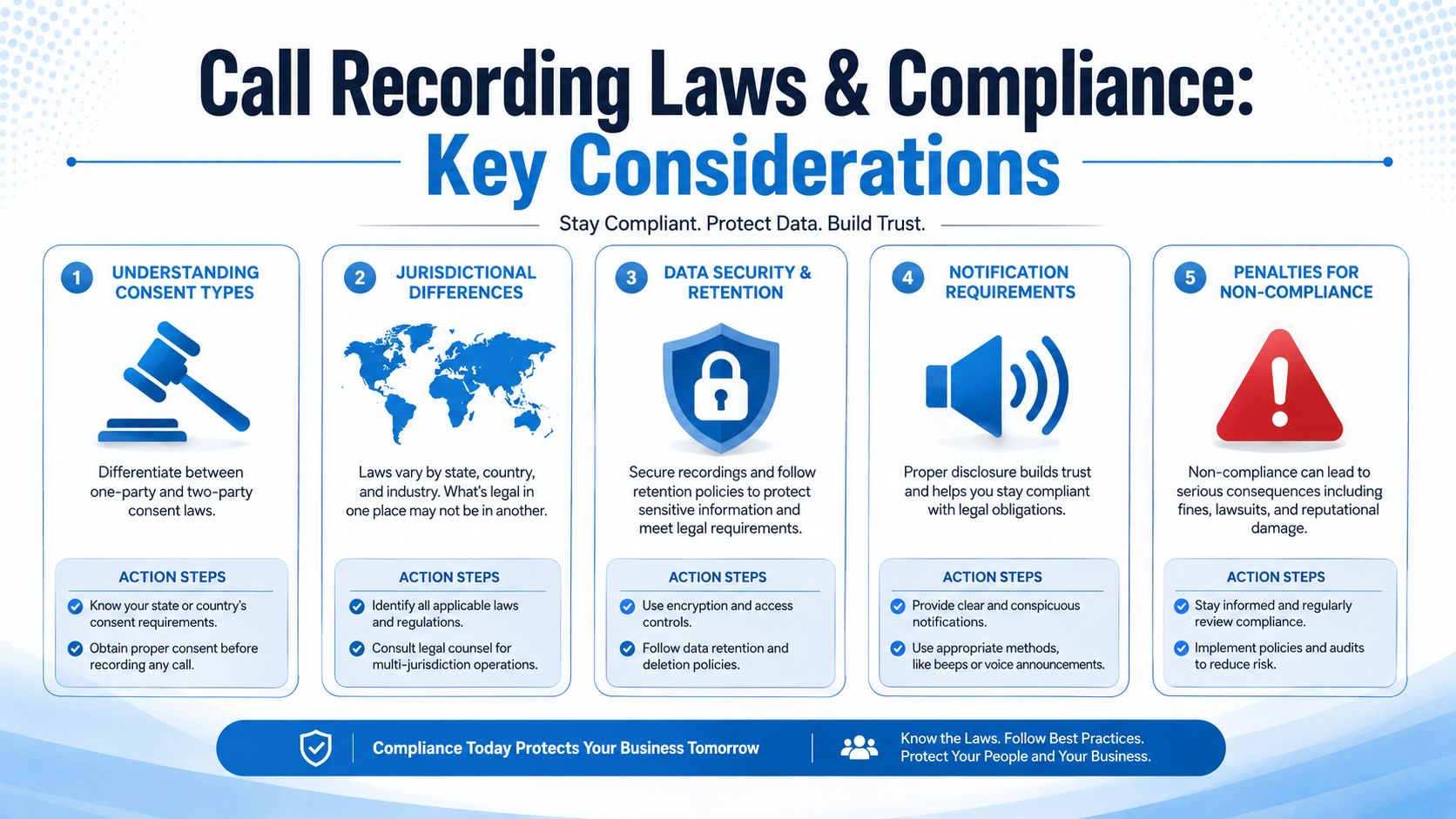
Understanding consent types
In practical terms, businesses usually think about consent in two buckets.
One-party consent means one participant in the conversation can consent to the recording. Two-party consent or all-party consent means everyone on the call must be informed and agree before recording starts.
For a small business that serves multiple states, this gets messy fast. If your HVAC office is in one state but takes calls from customers in another, your safest operating standard is usually to use a clear disclosure at the start of external calls and make sure your team knows when that disclosure is mandatory.
What fails in real life is assuming a general website privacy policy covers call recording. It usually doesn't solve the operational problem of notifying the caller in the moment.
For a detailed operational walkthrough, this guide to call recording compliance requirements is worth reviewing before rollout.
Call Recording Consent Requirements at a Glance
| Scenario | Consent Type | Required Action Example |
|---|---|---|
| Inbound customer service call | Best handled as all-party disclosure | Play an opening message that the call may be recorded, then have staff continue only after the caller remains on the line |
| Outbound sales call | Best handled as all-party disclosure | Agent opens with a verbal notice that the call is being recorded for service and quality purposes |
| Internal coaching review between employees | Depends on jurisdiction and company policy | Notify staff in written policy and in onboarding that business lines are recorded |
| Healthcare scheduling call | Best handled with explicit disclosure | State recording notice clearly before discussing patient details |
| Multi-state home service business | Use the stricter standard across the board | Standardize a disclosure script on every external recorded call |
Here's a simple approach that works better than vague legal advice.
- Use one standard script for external calls: Don't ask staff to remember different wording by scenario if you can avoid it.
- Trigger disclosure before the conversation gets substantive: Don't wait until the customer is already sharing details.
- Document your retention policy: Decide who can access recordings, how long you keep them, and when they must be deleted.
- Separate legal hold from normal retention: If there's a dispute, preserve that call intentionally rather than extending retention for everything.
- Train for exceptions: Staff need to know what to do if a caller objects, asks to stop recording, or requests a copy.
A compliant system isn't the one with the most badges. It's the one your staff can actually follow on a busy Tuesday.
This video gives a useful visual primer on call recording compliance questions teams often miss:
Sample disclosure scripts that are usable
These don't need to sound robotic.
- For inbound service calls: “This call may be recorded for quality and service purposes. How can I help you today?”
- For outbound estimate follow-up: “Before we continue, I want to let you know this call is being recorded for quality and documentation purposes.”
- If a caller objects: “No problem. We can continue without recording if our system allows it, or we can move this request to another channel.”
The key is consistency. Legal risk usually grows in the gap between policy and execution. If your phone tree says calls are recorded but your agents can manually start recordings later without disclosure, that gap matters.
Must-Have Features to Demand From Your Software
Most feature lists are padded with items that sound useful but don't change outcomes. When you evaluate call recording software for business, split the conversation into two categories: foundational controls and operational features that save time or recover revenue.
If a vendor can't handle the first category, stop there. If it only handles the first category, you're buying an archive, not a working system.
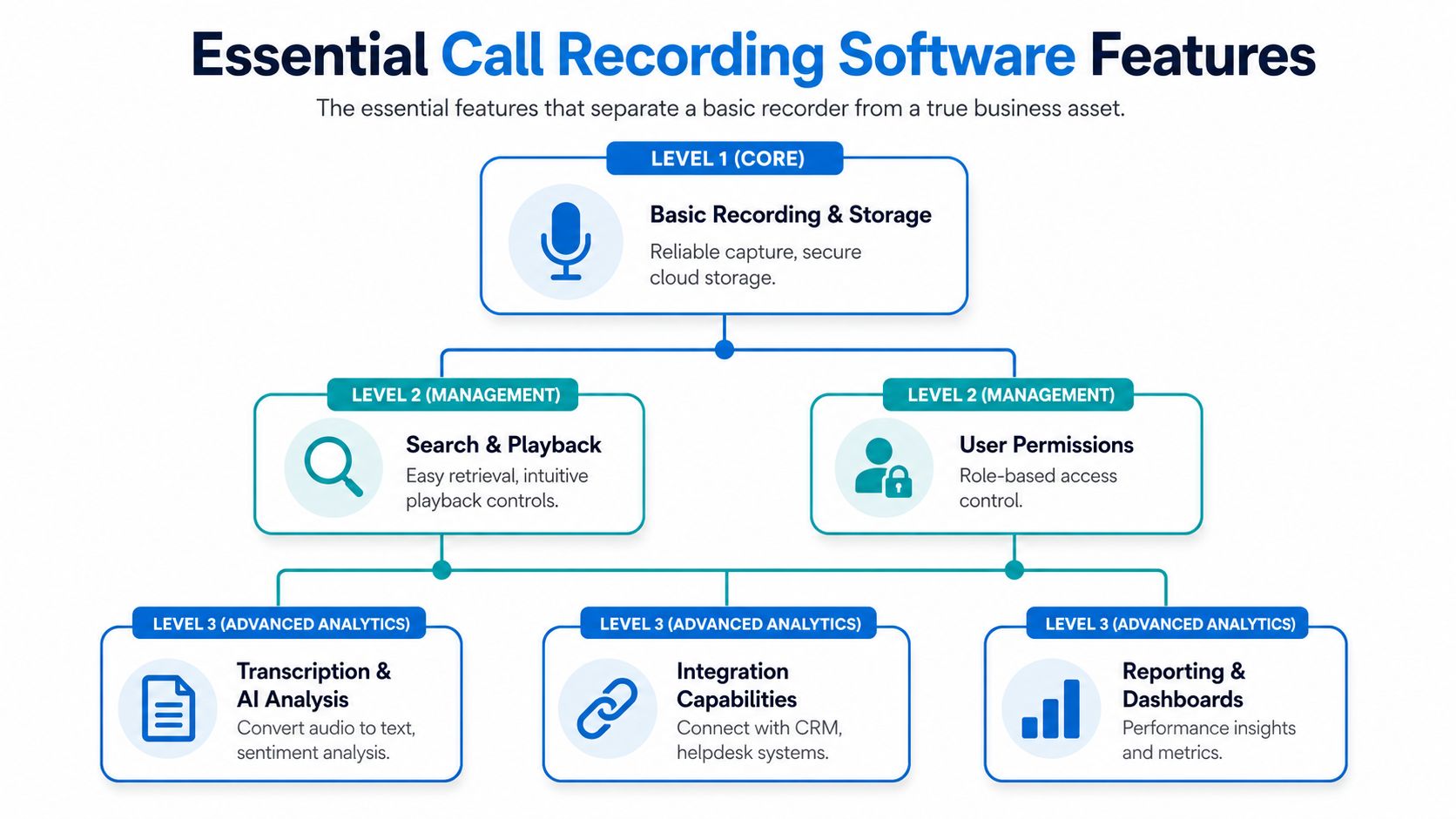
Foundational features you shouldn't compromise on
Security comes first. Enterprise-grade call recording software mandates dual-layer encryption with AES-256 at rest and TLS 1.2 or higher for transit to prevent data interception, which is a technical requirement tied to regulations such as HIPAA and GDPR, according to Telnyx's guide to business call recording security.
That translates into simple buying advice.
- Encryption: If the vendor can't clearly explain encryption at rest and in transit, move on.
- Role-based permissions: Your dispatcher, owner, office manager, and outside consultant should not all have the same access.
- Retention controls: You need the ability to keep recordings based on business need and legal requirement, then delete them deliberately.
- Reliable search and playback: A system that records perfectly but can't retrieve a call quickly is painful in practice.
A broader overview of call monitoring software features and use cases can help you sort what matters from what's just vendor packaging.
Game-changing features that create actual ROI
Here, the software starts earning its place in operations.
Automatic transcription matters because no one wants to listen to a long recording just to confirm whether a customer approved after-hours service. Searchable text cuts that work down dramatically.
Keyword tagging matters because it lets you find patterns. If you run a dental office, you can review calls containing “insurance,” “emergency,” or “crown” and tighten your front desk process around those topics.
AI analysis matters when it highlights calls that need human review. If a customer sounds frustrated, asks to cancel, or disputes pricing, your team should know without manually sampling recordings all week.
Integration matters because isolated recordings create admin work. Good systems connect calls to customer records, tickets, or jobs so staff don't waste time stitching together what happened.
What works and what disappoints
What works is a practical stack with clear priorities. For example:
- A home service office uses automatic recording, transcription, and CRM syncing so every estimate request is attached to the customer record.
- A legal intake team uses permissions and retention rules to control access tightly while still making key conversations easy to retrieve.
- A multi-location clinic uses searchable transcripts so managers can review how each front desk team explains appointment prep.
What disappoints is buying advanced analytics before fixing retrieval and permissions. Fancy dashboards won't help if your team can't find the call, trust the transcript, or control access correctly.
Bottom line: Buy for retrieval, control, and action. Not for the longest feature page.
If a vendor demo spends fifteen minutes on visual analytics and two minutes on retention settings, that's a warning sign. In operations, the boring settings are often the ones that save you.
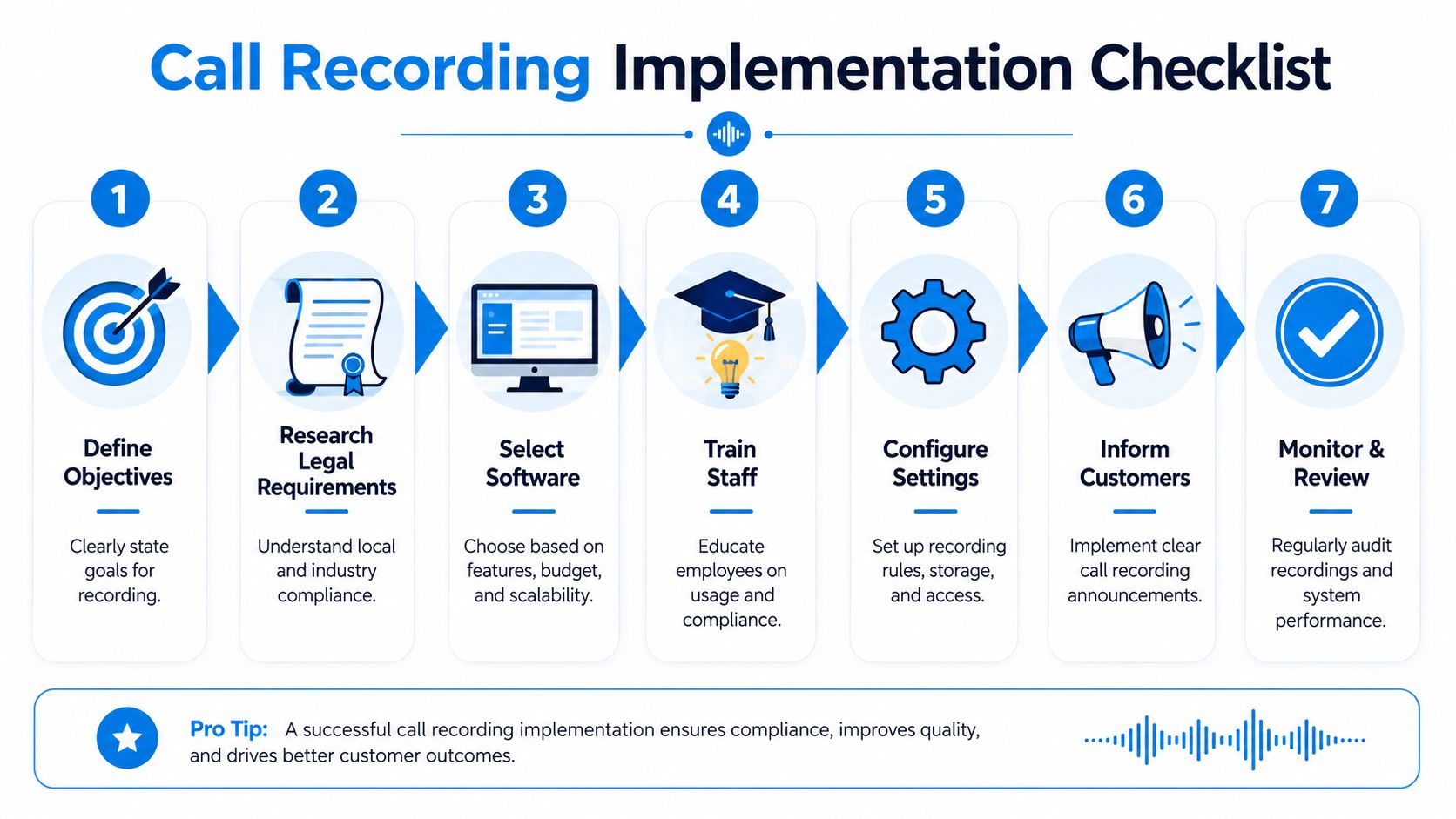
Your Step-by-Step Implementation Checklist
A messy rollout creates two problems at once. Staff resent the tool, and management never gets reliable data from it. The cleanest implementation is usually the simplest one.
Start with one business problem
Don't begin with “we need call recording.” Begin with the operational issue you want to fix.
If you own a plumbing company, your first goal might be reducing missed estimate follow-ups. If you run a medical office, it might be documenting scheduling disclosures. If you're a law firm, it might be preserving intake accuracy.
Write down one primary goal and one secondary goal. That keeps your software choice and setup grounded in business reality.
Use this rollout checklist
Define the objective
Pick the main reason you're recording calls. Compliance, training, dispute resolution, lead handling, or service quality. One comes first.
Audit your current stack
Check your phone system, CRM, scheduling software, and help desk. If the recorder can't connect to the systems your team already uses, someone will end up doing manual work every day.
Write the internal policy
Spell out who can access recordings, when calls are recorded, how staff disclose recording, and what happens if a caller refuses.
Configure disclosures and retention
Set your opening messages, call flows, and data retention rules before launch. This is not the part to “clean up later.”
Pilot with a small team
Test with one location, one department, or one group of users first. You'll catch script issues, retrieval problems, and permission mistakes without disrupting the whole business.
Train using real scenarios
Don't just show staff where to click. Walk through examples. A customer disputes a quote from last month. A caller asks not to be recorded. A manager needs to review a difficult service complaint.
Review after launch
After the first few weeks, listen for friction. Are calls attaching correctly? Can supervisors find what they need? Are agents following the disclosure process naturally?
The common mistake
Many teams install recording and stop there. Then six months later, someone needs to verify a verbal agreement from an old customer conversation and discovers the search tools are weak, the naming is inconsistent, or the retention settings removed the file.
That's why implementation matters more than the checkbox feature. A workable system should make old conversations easy to find, easy to govern, and useful in a real business decision.
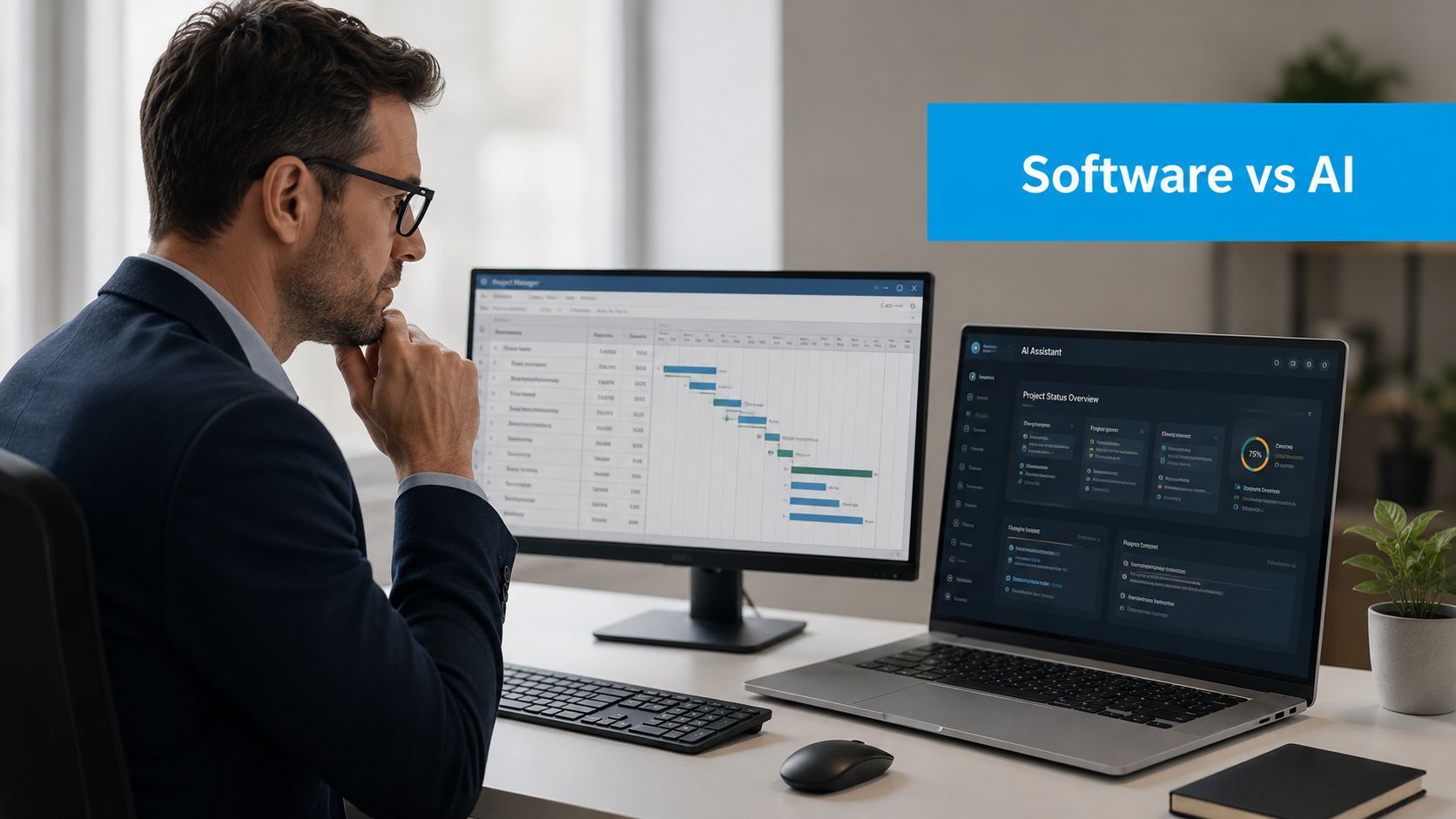
Evaluating Software vs AI Receptionist Platforms
A lot of buyers get stuck. They compare products inside the same category when they're really deciding between two different jobs.
Traditional call recording software is mostly a passive tool. It captures and stores conversations so your team can review them later.
AI receptionist platforms are active tools. They don't just preserve the call. They can use the conversation to trigger the next step while the interaction is happening or immediately after it ends.
The operational gap most businesses feel
This gap is bigger than many owners realize. Data shows 73% of SMBs lose revenue due to missed follow-ups after calls, and the most underserved opportunity is converting passive audio into active workflow triggers such as generating repair estimates or scheduling patient intake, according to Cirrus Insight's discussion of call recording software for business.
That's the difference between knowing what happened and doing something with it.
A standard recorder might store a call where a homeowner asks for an AC repair appointment. An AI receptionist platform can capture the request, book the appointment, log the caller, and trigger follow-up tasks without waiting for someone in the office to remember.
If you want a broader sense of where these systems fit, this guide to an AI receptionist for small business is useful because it focuses on workflow execution, not just call handling.
Which one fits your business
Here's the practical way to decide.
| Need | Standard recording software | AI receptionist platform |
|---|---|---|
| Archive calls for review | Strong fit | Strong fit |
| Resolve disputes with a call record | Strong fit | Strong fit |
| Coach staff after the fact | Strong fit | Strong fit |
| Capture caller intent and create tasks | Limited unless heavily integrated | Strong fit |
| Book appointments during or after calls | Usually manual | Strong fit |
| Reduce admin after inbound calls | Limited | Strong fit |
What works in the field
For some businesses, plain recording software is enough. A small law office with low call volume may only need secure records, search, and retention controls.
For others, passive tools create too much follow-up work. A dental office that gets a rush of appointment requests, insurance questions, and reschedule calls doesn't just need a recording. It needs those interactions to turn into calendar updates, intake steps, and documented next actions.
If your team keeps saying “we'll call them back,” you're not just buying phone software. You're buying a process decision.
That's the key trade-off. Choose standard recording when your main need is documentation and review. Choose an active platform when missed handoffs, delayed callbacks, and manual admin are costing you business.
Measuring ROI and Adopting Best Practices
By this point, the question isn't whether the category matters. It clearly does. As of 2026, over 65,866 companies globally are actively using call recording tools, which shows the technology has reached critical mass and moved into mainstream business operations, according to 6sense market usage data for call recording tools.
The question is whether your setup is producing measurable value.
A practical ROI lens for owners
You don't need a complicated finance model. Start with three buckets:
- Recovered revenue: Count appointments, consults, or jobs booked because missed details were caught and follow-up improved.
- Saved admin time: Estimate the staff hours reduced when recordings, transcripts, and customer records are easier to search.
- Reduced friction: Look at fewer disputes, faster coaching, and cleaner handoffs between front office staff and service teams.
If you want a simple framework for thinking through attribution and business impact, this piece on calculating marketing ROI in B2B is useful because the logic applies well to call-driven pipelines too.
Best practices that keep the system useful
A recorder becomes shelfware when no one builds habits around it. These practices usually make the difference.
- Review a small set of calls every week: Don't wait for a complaint. Pick a mix of booked jobs, lost leads, and difficult service calls.
- Create call examples for training: Save real recordings that show how to handle pricing questions, schedule changes, or frustrated callers.
- Flag moments that deserve action: Build a process for anything involving disputes, cancellations, urgent service, or verbal approvals.
- Use findings to improve scripts: If callers repeatedly get confused at the same point, your script or process is the problem.
- Match staffing to call patterns: Recording data often reveals where callers are waiting too long, being transferred too often, or dropping off before booking.
The benchmark that matters
The best measure isn't how many calls you recorded. It's whether those calls changed decisions.
Did your team fix weak scripting? Did managers settle disputes faster? Did callers move into scheduling or follow-up without details getting lost? That's where call recording software for business stops being an insurance policy and starts becoming an operational asset.
If you need more than passive recording, Recepta.ai is built for businesses that want calls to turn into action. It handles inbound and outbound conversations, appointment scheduling, lead capture, and follow-ups, while syncing with your CRM and calendars so customer intent doesn't get stranded in a recording. For teams in home services, healthcare, legal, finance, and multi-location operations, it's a practical way to stop losing opportunities between the phone call and the next step.