Call Screen Service: Capture Leads & Cut Costs

A missed call usually does not look expensive in the moment.
It looks like a voicemail badge, a front-desk note, or a number in the call log that nobody recognizes. But if that caller needed urgent service, wanted to book an appointment, or was ready to hire, the cost is real. The next business that answers first often gets the work.
That is why a call screen service matters. Done well, it does more than block spam. It identifies intent, qualifies leads, routes urgent calls correctly, updates your systems, and hands off sensitive conversations to a human without making the caller repeat themselves.
For small and mid-sized businesses, the difference between a weak setup and a well-built one shows up in bookings, staff workload, and how often valuable calls disappear into voicemail.
Why Missed Calls Are Costing Your Business Money
A plumbing company gets a call at 5:40 p.m. The office manager has already left. The technician in the field ignores unknown numbers because too many are spam. The caller has an active leak and needs help tonight.
They do not leave a voicemail. They call the next company.

This happens in home services, dental offices, law firms, and insurance agencies every day. The phone still carries urgency in a way email and web forms do not. When people call, they usually want an answer now.
Customers expect speed on the phone
The gap between customer expectations and business capacity is not small. 38.2% of callers will abandon their call if they have to wait less than a minute, and 54% of customers believe a live agent resolves problems fastest according to Sprinklr’s call center statistics roundup.
That means two things for an SMB owner:
- Short delays matter: You do not need a long hold time to lose the call.
- Voicemail is a weak fallback: Many callers will not wait, and many will not leave a message.
A call screen service closes that gap by making sure every inbound call gets an immediate response, even when your team is on a job, with a patient, in court, or already speaking with another customer.
Missed calls create hidden operational costs
The obvious cost is the lead you never spoke to. The less obvious cost is what your staff does next.
When a business relies on ad hoc call handling, teams end up:
- Calling back cold leads who already hired someone else
- Interrupting billable work to sort through junk calls
- Double-handling requests because call notes never made it into the CRM
- Letting urgent calls sit beside routine questions in the same inbox
A better process starts by deciding what happens to each type of call before it reaches your staff. If you want a practical look at how businesses extend live coverage beyond the front desk, this overview of a call answering service is useful context.
Practical takeaway: If your current phone process depends on one person being available at the right second, you do not have a process. You have a bottleneck.
Where the money leaks out
In practice, the biggest losses usually come from three places:
- After-hours inquiries that never reach an on-call workflow.
- Peak-time overflow when staff cannot answer and serve at the same time.
- Unqualified interruptions that consume attention while high-intent callers wait.
Most owners notice the symptom first. Busy phones, annoyed staff, patchy follow-up. The root cause is simpler. The business has no reliable layer between inbound demand and the people doing the work.
How a Business Call Screen Service Works
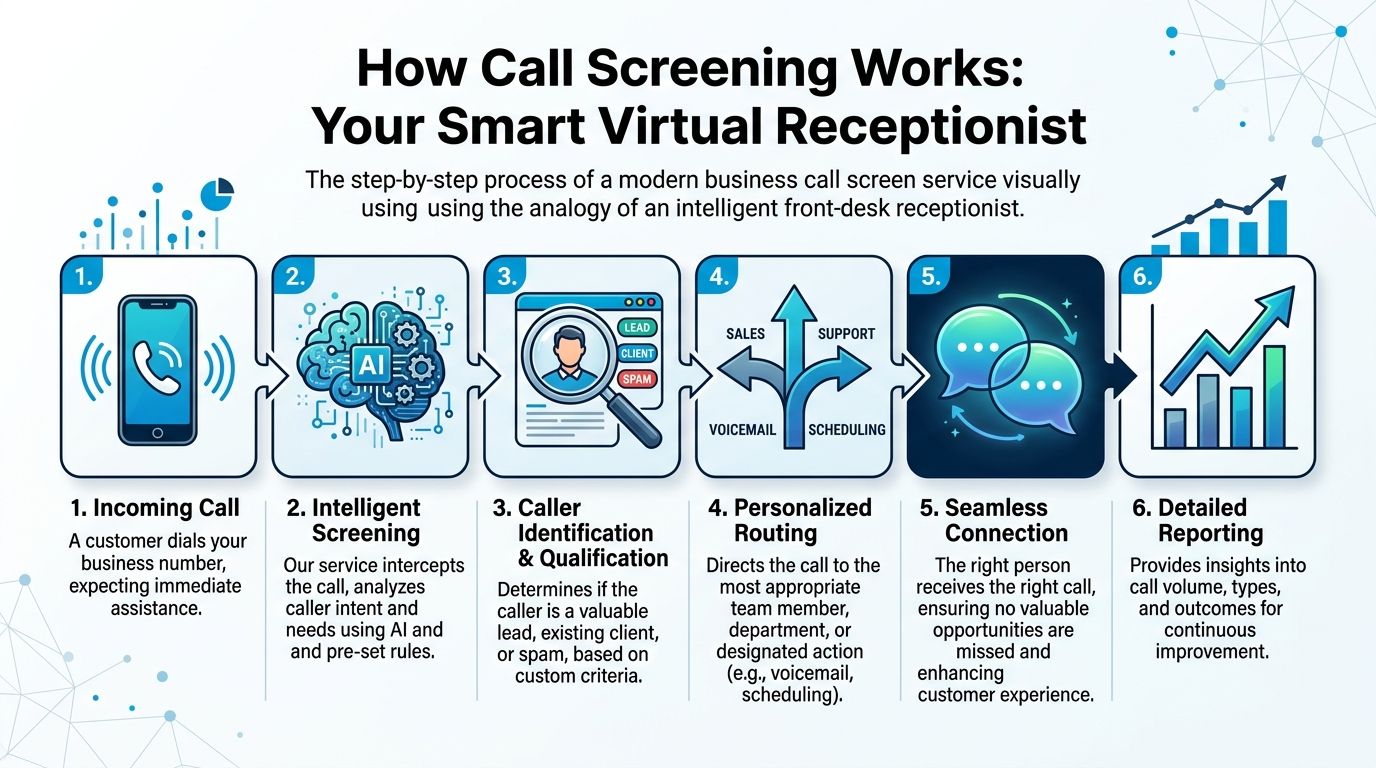
The simplest way to think about a business call screen service is this. It acts like a front-desk receptionist who never lets the phone ring blindly.
Instead of passing every call straight to your team, the system answers first, identifies the caller, determines intent, and decides the next step. That next step might be a transfer, a booking flow, a message, voicemail, or a human takeover.
The first layer filters and identifies
Modern systems usually start with rules and automation. A known client may be routed one way. An emergency service request may be prioritized. A likely spam call may never reach your staff.
Some VoIP platforms also use simple prompts to identify the caller before your team is interrupted. Dialpad uses IVR prompts such as asking the caller to state their name, then plays that audio for the recipient before connecting the call. Dialpad reports that this kind of automated pre-qualification shows 80 to 90% accuracy in filtering spam and can prevent over 30% of unqualified interruptions on business lines like law firms and insurance agencies, as described on Dialpad’s call screening feature page.
That matters because business call screening is not the same as the spam filter on a personal phone. A consumer tool tries to stop nuisance calls. A business tool should help you decide:
- Is this a new lead, existing customer, vendor, or wrong number?
- Is the caller asking for urgent help or routine information?
- Should the call go to sales, scheduling, billing, intake, or after-hours coverage?
- Does someone on your team need to take over right now?
The second layer handles qualification and routing
Once the service has basic information, it can ask practical questions.
A home service business might screen for location, job type, and urgency. A dental office may ask whether the caller is a new or existing patient and whether they want scheduling or billing. A law office may screen for practice area, opposing party conflicts, and whether the matter is time-sensitive.
That information lets the system route calls with context instead of just forwarding noise.
Here is a typical flow:
- Caller reaches your main number
- Service answers immediately
- System checks caller data and preset rules
- Caller gives reason for calling
- Service qualifies the request
- Call is routed, booked, logged, or escalated
For businesses evaluating automation options, this guide to an automated phone answering service helps clarify where automation should stop and live support should start.
What strong implementations do differently
A weak setup only asks callers to press buttons. A strong setup captures useful context and uses it.
For example:
- HVAC company: “Are you calling about a new installation, regular maintenance, or a no-cooling emergency?”
- Dental clinic: “Are you an existing patient, or do you need a first appointment?”
- Law firm: “Are you calling about family law, personal injury, or another matter?”
Those small differences matter because they shorten the handoff. Your technician, scheduler, or intake specialist gets the call with enough context to act.
Tip: If your team still has to ask the same five questions on every transferred call, your call screen service is not really screening. It is only delaying.
Why timing matters
Business call handling has to happen quickly. Even at the device level, speed is part of the design. In Android’s CallScreeningService, the screening service must respond within 5 seconds of binding to the incoming call event, as documented in the Android developer reference for CallScreeningService. The broader lesson for SMBs is practical. Screening only helps if it is fast enough to feel seamless to the caller.
That is why the best systems use lightweight logic for early decisions, then escalate exceptions to a person instead of trying to automate every edge case.
Key Features That Drive Business Growth
Many owners shop for a call screen service by asking one question. Will it stop spam?
That is too narrow. The better question is whether the service improves how your business accepts, qualifies, routes, books, and records inbound demand.
Hybrid workflows matter more than pure automation
The strongest setups use a human-in-the-loop model. AI handles routine tasks such as routing, availability checks, and first-pass qualification. Humans step in for emotional, complex, or high-stakes conversations.
That model is becoming standard. CMSWire reports that 76% of leaders are formalizing a human-and-AI split, and Gartner projects automated agent interactions will increase 5x by 2026 compared with 2022, according to this contact center statistics summary.
For an SMB, that translates into a simple operating rule. Let the system do the sorting. Let people do the judgment.
The features worth paying for
Not every feature carries equal business value. These are the ones that change outcomes.
Custom screening rules
A good platform lets you build rules around caller type, time of day, service line, urgency, and geography.
A practical example:
- A plumbing company routes “burst pipe,” “leak,” and “no hot water” to urgent service.
- Quote requests go to sales or next-day scheduling.
- Vendor calls and anonymous callers go to a lower-priority queue.
This protects technician time and reduces missed emergency work.
Live handoff with context
Many systems fail at this point. They transfer the call, but they do not pass along what the caller already said.
Your team should receive context such as:
- caller name
- reason for calling
- urgency
- location
- any captured intake notes
Without that, callers repeat themselves and staff lose time. In legal and healthcare environments, that repetition also creates friction right when trust matters most.
CRM and calendar sync
A call screen service should not end at the phone line. It should write data back to the systems your team already uses.
When this works, the call creates or updates a contact, triggers follow-up, notes the outcome, and checks booking availability. When it does not work, leads fall into a gap between phone system and office workflow.
If you are comparing platforms broadly, this roundup of AI support platform features is a useful reference point for evaluating integrations, workflow controls, and escalation design.
Key takeaway: The ROI does not come from screening alone. It comes from connecting screening to booking, follow-up, and staff action.
Appointment capture and scheduling logic
For service businesses and clinics, screening should move directly into scheduling when appropriate.
Useful logic includes:
- Existing customer routing: Send repeat clients to faster booking paths.
- After-hours capture: Take a request, promise a callback window, and notify the on-call person if needed.
- Location-aware scheduling: Route by branch, territory, or technician coverage.
At this point, one factual mention belongs. Recepta.ai is one example of a platform built around this hybrid model, combining AI call handling with human escalation and syncing with business tools for call notes, scheduling, and follow-up.
For a broader look at that category, this article on an AI phone answering service outlines what to evaluate beyond basic routing.
What does not work well
Some features sound good in demos but cause trouble in production.
| Feature choice | Works well when | Breaks down when |
|---|---|---|
| Long IVR menus | callers know exactly what they need | urgent callers just want a person |
| Pure AI qualification | requests are simple and repetitive | nuance or emotion determines next step |
| Broad spam blocking | nuisance traffic is heavy | legitimate new leads call from unknown numbers |
| Manual note-taking | call volume is low | multiple staff need the same record quickly |
The pattern is clear. The more important the call, the more dangerous rigid automation becomes.
A better buying lens
When reviewing features, ask whether each one does one of three things:
- Protects staff time
- Captures more qualified demand
- Classifies inbound calls for a real outcome
If a feature does not support one of those, it is probably dashboard decoration.
Real-World Examples from Services, Healthcare, and Law
The easiest way to judge a call screen service is to watch it inside a real workflow. Not in a product demo. In the mess of actual operations, where callers are rushed, staff are busy, and details matter.

Home services example
An HVAC company has two kinds of inbound calls that should never follow the same path.
One caller says, “My AC stopped working and the house is getting hot.” Another says, “I want to price a replacement unit next month.” If both land in the same voicemail box, the business treats urgent revenue and future revenue as if they are identical.
A better screen flow sounds like this:
- “Are you an existing customer?”
- “Is this an emergency repair or a quote request?”
- “What is your ZIP code?”
- “Is the system completely down?”
If the caller reports a no-cooling emergency in a covered area, the system routes the call to the on-call technician or urgent dispatcher. If it is a quote request, the service captures property type, preferred callback time, and job notes, then schedules a sales follow-up.
Sample script
- Service: “Are you without heating or cooling right now?”
- Caller: “Yes, the system is off.”
- Service: “Thanks. I’m marking this as urgent and connecting you to the after-hours technician.”
The ROI here is operational before it is financial. Your field team gets fewer random interruptions, and urgent jobs surface faster.
Healthcare example
Healthcare calls punish weak routing. A patient asking about a bill, a parent calling about a child’s symptoms, and a new patient wanting an appointment all need different handling.
In healthcare, pure automation can become risky. A 2025 study found that 27% of screened calls in fields such as healthcare and finance were incorrectly routed by purely automated systems, leading to a 15% revenue loss from missed appointments, according to WithAllo’s review of call screening and related 2025 findings.
For a dental clinic, a practical setup looks like this:
New patient booking flow
The service asks:
- whether the caller is a new or existing patient
- the reason for visit
- preferred location
- insurance carrier, if relevant
- preferred appointment window
If the request is routine, it can move into scheduling or callback capture. If the caller sounds distressed, confused, or medically urgent, the service escalates to staff.
Sample script
- Service: “Are you calling to book, reschedule, or ask a clinical question?”
- Caller: “I need to book and I’m a new patient.”
- Service: “Got it. I’ll collect a few details so the office can place you in the right appointment type.”
That avoids one common problem. Front-desk teams waste time calling back to ask basic intake questions they could have captured during the first interaction.
Tip: In healthcare, the best screen service is not the one that automates the most. It is the one that knows when to stop automating.
Law firm example
Law firms benefit from screening because not every inquiry should reach an attorney. But legal intake is also where many firms lose good matters by sounding disorganized or cold.
A family law or personal injury firm might use screening to separate:
- new matters from existing clients
- urgent filings from general questions
- target case types from poor-fit inquiries
A practical legal call flow starts with basic qualification:
- area of law
- opposing party check
- timing sensitivity
- callback details
- how the caller found the firm
Then the service either books an intake consultation, routes to a paralegal, or records the lead for review.
Sample script
- Service: “Is this a new legal matter or are you already a client?”
- Caller: “A new matter.”
- Service: “Thanks. What type of issue are you calling about today?”
- Caller: “Custody.”
- Service: “I’ll note that for intake and connect you with the right team member if available.”
If you want to tighten the steps after that first contact, this guide to the law firm intake process is worth reviewing. It is a good reminder that screening only adds value if the rest of intake is structured.
The pattern across all three
Different industries ask different questions, but the design principle is the same.
| Industry | What to screen for first | When to escalate fast |
|---|---|---|
| Home services | urgency, service type, coverage area | active emergency, high-value estimate, repeat customer issue |
| Healthcare | patient status, visit reason, location, scheduling intent | clinical concern, confusion, emotionally sensitive call |
| Legal | practice area, matter type, fit, urgency | deadline-driven issue, qualified new matter, distressed caller |
The strongest implementations do not try to replace judgment. They create a clean first pass so the right human spends time on the right call.
Your Guide to Choosing the Right Call Screen Service
Vendor selection gets messy when every platform claims it handles routing, automation, and integrations. The faster way to evaluate options is to inspect the business process behind the feature list.
The biggest mistake is buying a service that answers calls but does not fit your operating system. That is where lead leakage starts.
Integration is not a nice-to-have
This is one of the few areas where a hard number should change how you buy. A 2025 Gartner report highlighted that 42% of SMBs using call screening tools face integration failures, leading to a 25% lower lead capture rate, as summarized in HeyRosie’s discussion of call screening integration issues.
If your call screen service cannot reliably sync with your CRM, calendar, scheduler, or intake software, your team ends up repairing the workflow by hand.
That means:
- copying notes from one screen to another
- re-entering lead details
- chasing staff for status updates
- missing callbacks because nobody owned the follow-up
Vendor Selection Checklist for a Call Screen Service
| Evaluation Criteria | Why It Matters | Look For |
|---|---|---|
| CRM integration depth | Shallow integrations create duplicate records and lost notes | Two-way sync, custom fields, activity logging, contact updates |
| Calendar and scheduling sync | Booking errors damage trust quickly | Real-time availability, location-based calendars, buffer rules |
| AI-to-human handoff | High-value calls need context, not blind transfers | Warm transfer, summary notes, agent visibility into prior answers |
| Rule flexibility | Different call types need different paths | Routing by service, time, geography, caller type, urgency |
| Reporting quality | You cannot improve what you cannot see | Call outcomes, missed-call patterns, lead source tagging, queue trends |
| After-hours handling | Nights and weekends often carry high-intent calls | On-call routing, escalation rules, message capture with urgency flags |
| Setup support | Good tools still fail with weak onboarding | Script design help, testing, live support during launch |
| Compliance controls | Sensitive industries cannot improvise on data handling | Access controls, auditability, retention settings, appropriate safeguards |
Questions to ask in the demo
A sales demo should look less like a tour and more like a stress test.
Ask the vendor to walk through these scenarios:
- A new lead calls after hours
- An existing customer needs urgent service
- A caller books at one location but wants another
- A transfer fails and the call needs fallback handling
- A receptionist changes hours or on-call rules
- A contact already exists in the CRM with partial data
If the answers stay abstract, the implementation will probably be painful.
Practical test: Ask the vendor to show exactly where the call notes land in your CRM and how your staff sees them. If they cannot show the record path clearly, assume there will be manual cleanup.
What to prioritize by business type
Different SMBs should weight criteria differently.
- Home services: routing by urgency, territory, and after-hours rules
- Healthcare practices: escalation controls, scheduling accuracy, privacy safeguards
- Law firms: intake customization, conflict-aware workflows, structured lead capture
- Franchises: location routing, centralized reporting, branch-specific calendars
The right service should match the way your team already works, while removing friction from the weak points.
Navigating Security, Compliance, and Pricing Models
Many owners treat security and pricing as final-step details. They should be early filters.
A call screen service touches customer identity, call recordings, appointment details, and sometimes health or legal information. If the service is sloppy with access, storage, or handoff controls, the operational risk outweighs the convenience.
Security and compliance need operational proof
Do not settle for vague assurances. Ask how user access is controlled, how call data is stored, who can listen to recordings, and what your retention options are.
For regulated businesses, the question is not whether a platform says it supports compliance. The question is whether your actual workflow remains compliant once real staff start using it.
Healthcare practices should be especially strict. If that is your space, this overview of a medical office answering service highlights the operational side of phone coverage in environments where privacy and escalation rules matter.
Pricing models and where they fit
Vendors usually package call screen service pricing in one of three ways.
Per-minute pricing
This can work if call volumes are steady and calls are short. It is less comfortable when your team handles long intake conversations or complex triage, because cost can become harder to predict.
Per-call pricing
This model is easier to forecast when calls are brief and screening is the main value. It can be a reasonable fit for businesses that want quick qualification and simple routing.
Flat-rate subscriptions
Flat monthly plans are easier for budgeting and often better for businesses with variable demand, seasonal spikes, or multi-location operations. The trade-off is that you need to understand what counts as included usage, agent support, and integrations.
How to compare pricing without guessing
Instead of asking which vendor is cheapest, ask:
- What work shifts off my staff?
- What happens after hours?
- What is included in setup and workflow design?
- What happens when a call needs a human?
- Will my team still need manual data entry?
The cheapest plan often becomes expensive if it creates rework, poor handoffs, or missed opportunities. A more expensive plan can still be the better operational buy if it removes enough front-desk labor and captures more of the calls you are already paying to generate.
Stop Losing Leads and Start Growing Your Business
A strong call screen service changes the role of your phone line.
It stops being a weak point that depends on staff availability and becomes a managed intake channel. Calls get answered quickly, qualified consistently, routed intelligently, and documented where your team can act on them.
That matters because growth problems often look like communication problems first. Missed calls. Delayed callbacks. Front-desk overload. Technicians and attorneys answering the wrong calls. Schedulers piecing together notes from voicemail and sticky pads.
The fix is not more noise. It is better flow.
What the right setup gives you
- More captured demand: New leads reach a response path instead of voicemail.
- Less interruption: Staff spend less time sorting calls that should never have reached them.
- Cleaner follow-up: Notes, appointments, and routing decisions move into the systems your business already uses.
- Better customer experience: Callers feel heard quickly, especially when the issue is urgent or sensitive.
A pure spam filter cannot do that. A generic answering layer often cannot do it either. You need screening tied to qualification, business rules, and a reliable human handoff.
Final takeaway: If your business depends on inbound calls, phone handling is not admin. It is revenue operations.
The businesses that win on the phone are not always the ones with the largest teams. They are the ones that answer fast, sort well, and make the next step easy for the caller.
If you want to put that kind of process in place, Recepta.ai offers a practical hybrid model. It combines AI call handling with human escalation, supports scheduling and lead capture, and connects with business tools so call data does not get stranded outside your workflow.