Call Screening Service: A Guide to Choosing the Right One
Your phone is probably doing two jobs badly right now. It's interrupting your staff with junk calls, and it's still letting good leads slip into voicemail, hold queues, or dead air.
That's expensive. If you run an HVAC company, dental clinic, law office, or multi-location service business, every missed call has a business outcome attached to it. Some calls waste payroll. Some calls book revenue. Some calls decide whether a stressed customer trusts you or moves to a competitor.
A good call screening service fixes both problems at once. It blocks what shouldn't reach your team, and it qualifies what should. The trick is choosing a model that protects time without killing conversion.
The Hidden Cost of Unanswered and Unscreened Calls
A lot of owners think their phone problem is “too many calls.” Usually it's two separate problems hiding under one symptom.
First, the office gets hammered by junk. The average small business receives 50 robocalls per day, and that volume leads to an estimated $118,000 in annual revenue loss according to Forbes' call screening coverage. Second, legitimate callers still fall through the cracks because staff are distracted, already on the line, or tired of answering unknown numbers.
That's what this looks like in practice. A plumbing company has one dispatcher juggling technicians, customer updates, and inbound calls. Half the interruptions are garbage. The other half include real jobs, but they hit at the wrong moment and roll to voicemail. A medical office front desk gets buried with routine questions, spam, and insurer callbacks while actual patients wait. A small law firm misses first-contact inquiries because the person answering the phone is also handling intake paperwork and billing.
Practical rule: If your team is manually deciding which calls deserve attention, you're paying skilled employees to do gatekeeping work.
The damage isn't just missed revenue. It's slower response times, irritated callers, and staff burnout. Good employees quit when every hour gets shredded by interruptions. Good prospects leave when nobody answers cleanly on the first attempt.
That's why call screening belongs in the same conversation as staffing, scheduling, and lead management. If you want proof, start with your own reporting. A proper review of call detail reporting for small business phone operations will usually show the same pattern: too many low-value interruptions, not enough controlled routing, and no consistent process for handling unknown callers.
What Exactly Is a Call Screening Service
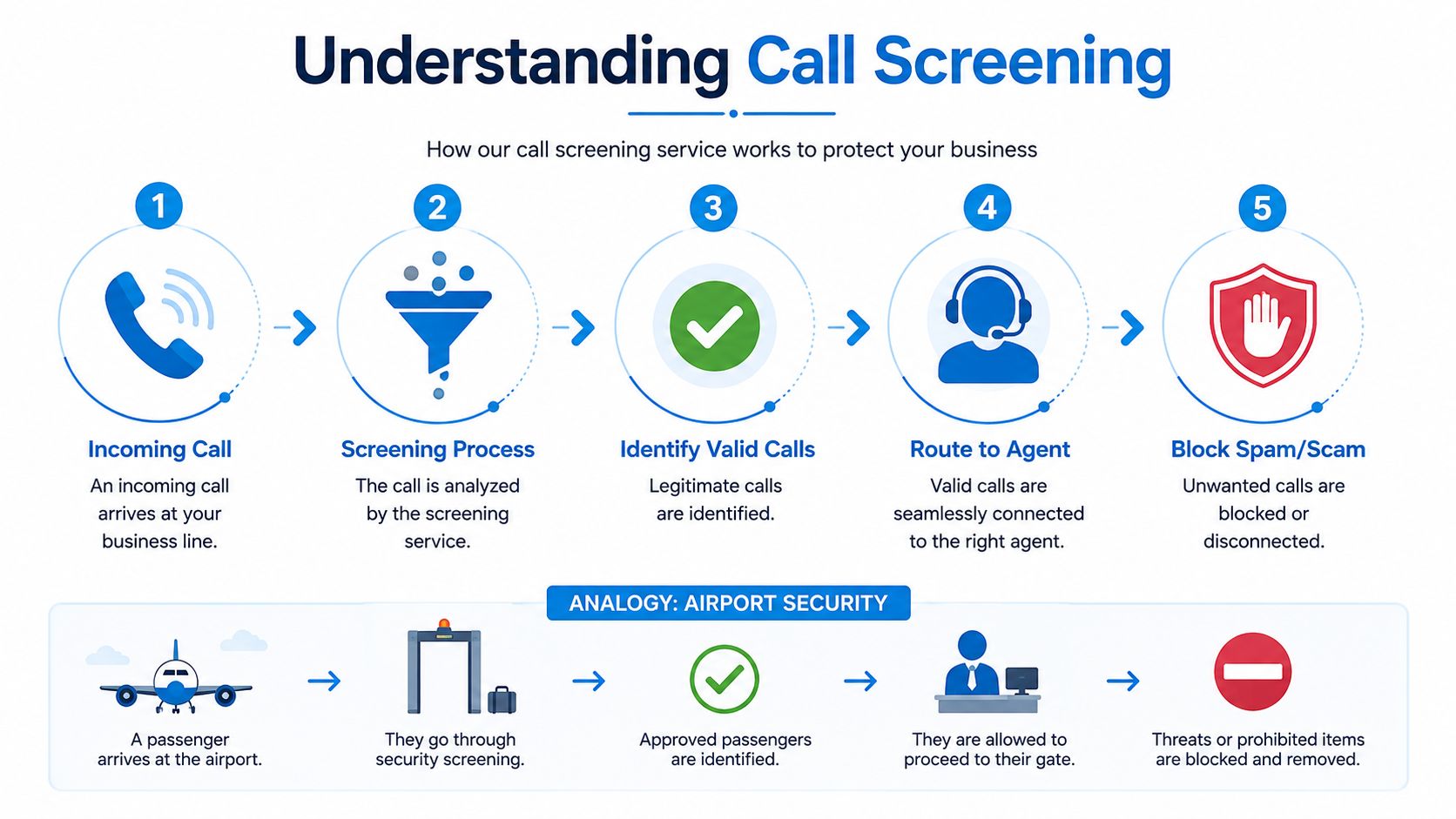
A call screening service is the front-door system for your business phone line. It functions as a building concierge combined with a security guard. Every caller shows up at the entrance. The system figures out who they are, why they're calling, and where they should go before your team gets pulled in.
That matters because customer behavior has changed. Over 65% of U.S. mobile users now rely on active screening tools to filter incoming calls, and approximately 10% of all outbound business calls are automatically routed to screening environments by carriers and apps, according to Convoso's analysis of call screening and contact rates. If your business doesn't account for that, you're not just dealing with operations. You're dealing with deliverability.
What the service actually does
A modern screening setup usually handles five jobs before your employee says hello:
- Identifies the caller: It checks caller ID, known contacts, prior interactions, and sometimes CRM data.
- Filters obvious spam: It blocks or diverts calls that match junk patterns.
- Asks for intent: It can collect the reason for the call before routing.
- Sends the call to the right place: Sales, dispatch, intake, billing, appointment desk, or voicemail.
- Logs what happened: It stores call outcomes so you can improve routing rules.
That last point gets overlooked. If your phone process can't tell you which calls were blocked, qualified, transferred, abandoned, or booked, you're flying blind.
Why this is no longer optional
Years ago, screening was mostly a consumer convenience feature. Now it's a business necessity because your customers already use it on their side. Unknown numbers don't get the benefit of the doubt anymore. Your system has to help callers trust the interaction quickly, while also shielding your staff from noise.
A simple call answering service guide for growing teams can help you think through this distinction: answering every call isn't the same as handling every call well. Screening decides whether the call should reach a person, which person should get it, and what information should be collected first.
A bad phone process treats every inbound call as equal. A smart one separates urgency, value, and intent before it consumes payroll.
Automated vs Human vs Hybrid Screening Models
Most businesses don't have a phone problem. They have a model problem. They picked the wrong way to screen calls.
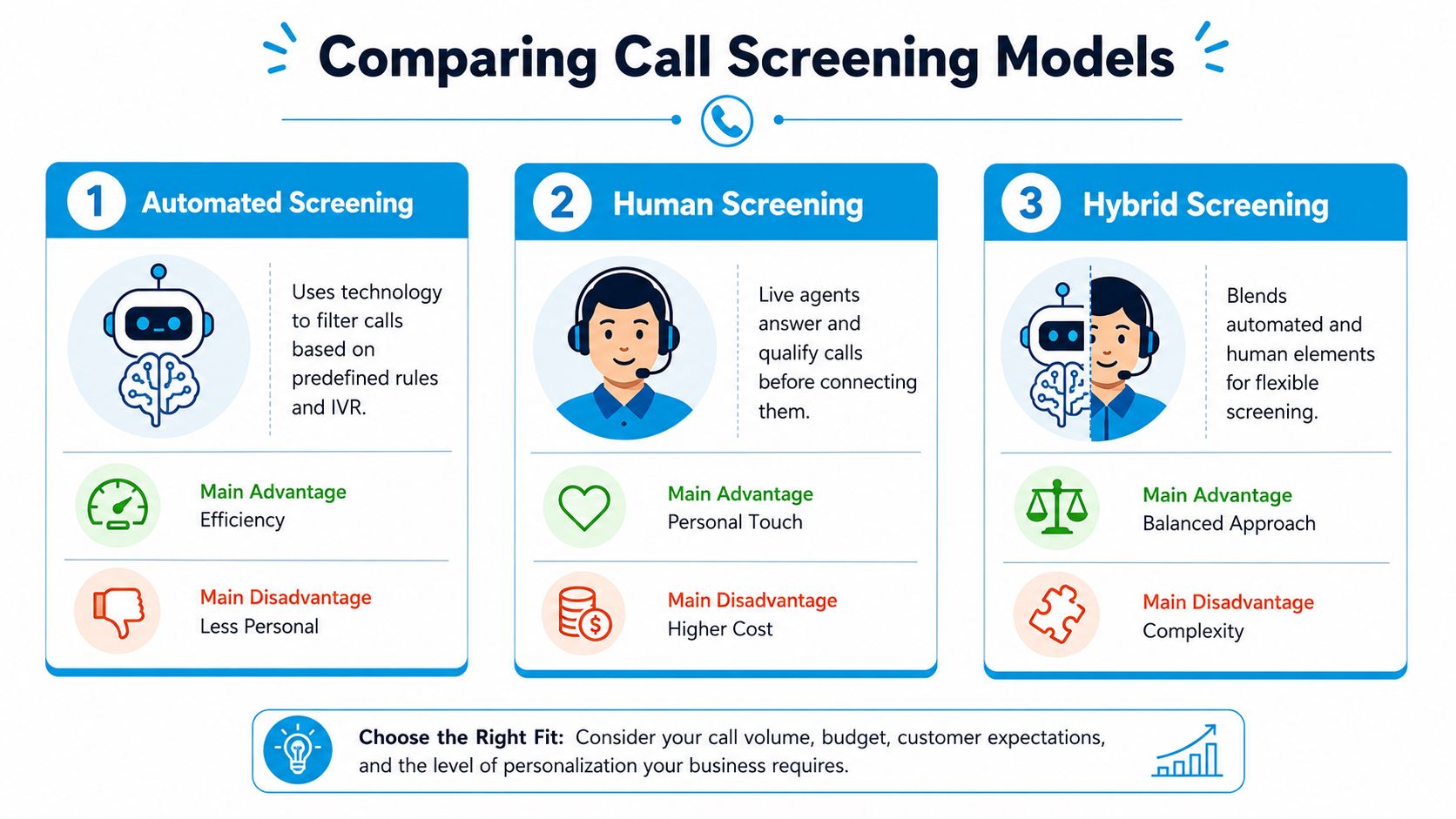
There are three basic options. Automated screening, human-powered screening, and hybrid screening. Each one affects conversion, labor cost, response speed, and customer trust differently.
Automated screening
Automated systems use AI, IVR rules, caller data, and predefined workflows to intercept and sort calls. For high-volume businesses, this can be useful. Google Pixel's Call Screen, for example, automatically screens spam, robocalls, and first-time callers, provides a real-time transcript, and benchmark data shows “Maximum protection” blocks 90%+ of suspicious calls, as described in this overview of AI call screening behavior.
That's strong protection. It's also where many SMBs overcorrect.
Pure automation is efficient when the call is simple. It's weak when the caller is confused, emotional, elderly, in a hurry, or dealing with a high-trust issue like legal representation or medical care. It also struggles when intent doesn't fit your script neatly.
Best fit: businesses drowning in obvious spam, after-hours overflow, and routine call sorting.
Poor fit: businesses where the first phone interaction determines trust.
Human-powered screening
A live answering team picks up, asks questions, qualifies the caller, and transfers or messages your team. This gives you warmth, context, and flexibility. A trained human can tell the difference between a panicked family member, a high-value consultation lead, and a wrong number in seconds.
The drawback is cost and consistency. Human-only models can become expensive fast, especially if they answer every low-value call that should have been blocked automatically. They also depend heavily on training quality, scripts, and staffing discipline.
Best fit: firms where tone, empathy, and judgment matter on every first touch.
Poor fit: businesses with huge call volume and lots of repetitive junk.
Hybrid screening
This is the model I recommend for growth-focused SMBs. Hybrid screening lets AI handle what software should handle, and hands off to people when judgment matters.
That means the system can block obvious spam, verify basic intent, route common requests, and collect intake details automatically. Then, when the call is urgent, unusual, high-value, or emotionally sensitive, a trained person steps in. This is how you protect labor cost without sounding cold.
If you're trying to streamline customer experience, hybrid is usually the only model that improves efficiency without creating a sterile front door.
A practical example: a home services company can let AI screen after-hours calls, identify emergency keywords, and route true dispatch calls immediately. A legal office can have AI gather case type and contact details, then escalate live when the caller signals urgency or confusion. A clinic can keep routine scheduling automated while ensuring sensitive patient issues hit a human.
One option in this category is Recepta.ai, which combines AI call handling with human escalation and workflow integrations for routing, scheduling, and intake. If you're comparing vendors, use that blend as the baseline standard, not the luxury add-on.
Call Screening Model Comparison
| Feature | Automated (AI) | Human-Powered | Hybrid (AI + Human) |
|---|---|---|---|
| Speed | Instant for routine filtering | Fast if adequately staffed | Instant for simple calls, live help when needed |
| Spam blocking | Strong | Inconsistent for obvious junk | Strong |
| Customer warmth | Low to moderate | High | High when it matters |
| Scalability | High | Moderate | High |
| Cost control | Strong | Weaker | Stronger than human-only |
| Handling edge cases | Weak | Strong | Strong |
| Best use case | Basic filtering and routing | High-touch intake | Revenue protection plus trust |
| Main risk | Feels impersonal, may lose good calls | Higher labor cost | Requires smart setup |
If you want a deeper look at where automation works and where it doesn't, this breakdown of automated customer service solutions for SMB teams is useful. The short version is simple: software should manage repetition, not relationships.
The right model isn't the cheapest one. It's the one that stops wasted calls without making legitimate callers work too hard to reach you.
Calculating the ROI of a Call Screening Service
Most owners evaluate phone tools like overhead. That's the wrong frame. A call screening service should be judged by protected revenue, recovered staff time, and fewer lost opportunities.
Home services ROI is usually immediate
For HVAC, plumbing, electrical, restoration, pest control, and similar businesses, the phone is part of the sales pipeline. A screening system pays off when it helps your team respond faster to real jobs and ignore junk automatically.
You don't need a complicated spreadsheet to see the value. If dispatch gets interrupted less, technicians get booked faster. If emergency calls stop dying in voicemail after hours, you recover jobs that would've gone elsewhere. If office staff spend less time swatting nonsense, they spend more time confirming appointments and following up estimates.
Healthcare and legal need a trust filter, not just a spam filter
Many cheap systems falter in this respect. In high-stakes industries, pure automation can protect the schedule while hurting trust.
A 2025 AMA study found 31% of patients delayed care due to impersonal automated screening, and a 2024 Legal Services Board analysis found 28% of potential clients abandoned contact after encountering overly aggressive screening, as cited in this discussion of call screening in high-trust environments. That should change how you buy.
If you run a clinic, don't ask only, “Can this tool block spam?” Ask, “What happens when a worried patient doesn't know which menu option fits?” If you run a law practice, ask, “Can the system recognize urgency and hand off fast?”
Don't optimize your phone process for average calls if your profit comes from a small number of critical ones.
A practical ROI lens
Use this checklist when you evaluate return:
- Recovered staff capacity: How much front-desk or admin time gets freed from low-value interruptions?
- Lead capture quality: Are you getting complete intake details before the handoff?
- Speed to the right person: Can urgent calls bypass generic queues?
- Reduced abandonment: Does the screening experience feel easy enough that callers stay on the line?
- Reporting visibility: Can you trace what happened to inbound opportunities?
Many owners compare vendor pricing without comparing operational waste. That's backwards. Start with what missed calls, bad transfers, and front-desk interruptions are already costing you. Then review business answering service cost factors through that lens. A tool that costs less but loses trust is more expensive than it looks.
How to Choose and Implement the Right Service
Most buyers get distracted by demos. Don't start there. Start with your call flow.
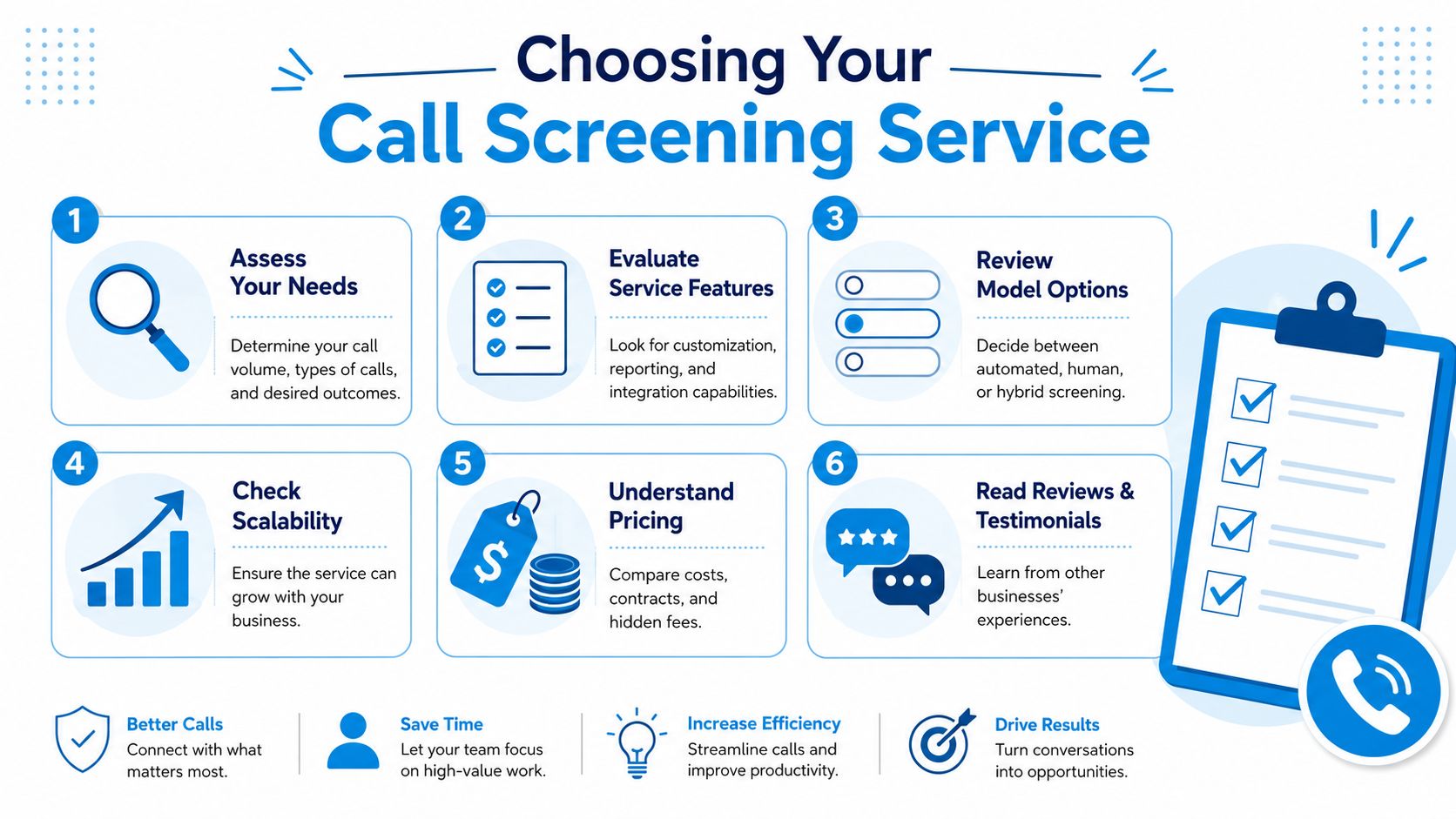
If you don't know which calls should be blocked, which should be qualified, and which should go straight to a human, you're not ready to choose a vendor. You're just shopping for a nicer dashboard.
Start with your real call categories
Map your inbound calls into buckets that matter operationally. For most SMBs, that means:
- Revenue calls: new leads, quote requests, emergency service, consultations
- Existing customer calls: reschedules, support, billing, status checks
- Low-value interruptions: spam, robocalls, sales pitches, misdials
- Sensitive calls: complaints, urgent legal matters, patient concerns
Once those are clear, routing rules get easier. You're no longer buying a generic phone feature. You're building a front-end triage system.
Use a rule-based setup, not a one-size-fits-all script
Modern tools offer capabilities that distinguish them from old answering services. Each unwanted call costs an average of $9.46 in wasted staff time, and one practical approach for a dental clinic is to route known patient numbers in the CRM directly to staff while sending unknown numbers through AI verification first, as outlined in this call screening example for clinics and service businesses.
That kind of rule should be standard.
For example:
- Known contacts go first: Existing patients, clients, or active jobs skip generic screening and reach the right desk faster.
- Unknown callers get qualified: Ask why they're calling, capture intent, and direct them properly.
- No caller ID gets stricter handling: Not every hidden number is bad, but it shouldn't interrupt your best staff immediately.
- Urgent keywords trigger escalation: Water leak, severe pain, same-day legal issue, lockout, cancellation risk.
- After-hours logic changes: Emergency service should route differently from routine scheduling.
Here's a useful walkthrough before you buy:
Vet the service like an operator, not a consumer
Use this checklist in demos and sales calls:
- Integration capability: Does it sync with your CRM, calendar, dispatch software, or practice management system?
- Customization depth: Can you set different rules by location, department, call type, and time of day?
- Compliance fit: If you're in healthcare or regulated services, can it support your privacy and handling requirements?
- Scalability: Will it still work when you add locations, agents, specialties, or service lines?
- Reporting quality: Can you see outcomes by call type, source, routing path, and disposition?
- Pricing clarity: Ask about implementation fees, seat charges, overages, transfer costs, and contract lock-ins.
Buyer check: If a vendor can't clearly explain what happens to an unknown urgent caller, keep shopping.
A good implementation is simple. Pick your call categories, define your routing rules, connect your systems, test edge cases, and review transcripts and outcomes weekly for the first month. Most failures happen because businesses leave the default settings untouched.
Frequently Asked Questions About Call Screening
Will a call screening service sound robotic and hurt my brand
It can, if you choose pure automation and force every caller through a rigid script. That's a bad fit for service businesses that win on responsiveness and trust. Hybrid setups solve this by using automation for filtering and routing, then bringing in a person when the call needs empathy, judgment, or nuance.
How does call screening handle callers who don't speak English
This is one of the biggest weaknesses in automated-only systems. A critical gap in many screening tools is multilingual support. 43% of screened calls involve non-English languages, yet fewer than 12% of business screening tools offer real-time multilingual transcription or AI translation, according to RingCentral's overview of call screening capabilities.
For SMBs in diverse markets, that means a lot of legitimate callers may sound “unclear” to the system when they're ready to buy or book. If your customer base includes Spanish-speaking families, multilingual homeowners, immigrant communities, or international clients, make multilingual handling a buying requirement, not a bonus.
Is setup difficult if I already use other software
Usually not, if the provider was built for business workflows instead of basic call blocking. The important question isn't whether the tool can connect. It's whether the connection changes what happens next. Good integrations should update records, route by customer status, trigger scheduling, and log call outcomes automatically.
What industries benefit most from screening
Any business that depends on the phone for first contact. Home services, clinics, law firms, insurance agencies, property management teams, and franchise operators usually see the clearest gains because they deal with a mix of urgent leads, repeat customers, and constant interruptions.
What's the biggest buying mistake
Choosing based on price alone. Cheap systems often save money only on paper. If callers get stuck, abandon the call, or never reach the right person, the “savings” disappear fast. Buy for business outcome first. Then compare cost.
If your team is tired of spam, missed leads, and front-desk overload, Recepta.ai is worth a look. It combines AI call handling with human support, routing, scheduling, and integrations so you can screen low-value calls without losing the high-trust conversations that drive revenue.