Outbound Calling Software: The Complete Guide for 2026
It's late Friday afternoon at a plumbing company. The owner is greeting a walk-in, the dispatcher is moving appointments on a calendar, and a technician needs a parts update. A homeowner who requested an estimate earlier in the day still hasn't received a call. Another customer's appointment reminder is sitting on someone's handwritten list. By closing time, the team may have lost a job because nobody had a clear moment to make the right call.
That kind of miss usually isn't a motivation problem. It's a workflow problem: calls, customer records, schedules, and follow-ups live in separate places, so busy staff have to remember what the system should coordinate. Outbound calling software can help organize those tasks, but the useful question isn't how many numbers it can dial. It's whether the right person gets a timely, appropriate call, whether the result reaches the calendar or CRM, and whether the team can prove the contact was handled properly. The distinction between inbound and outbound calls helps clarify which workflows need proactive outreach and which should stay available for customers who call in.
Why Outbound Calling Software Matters Now
Manual phone work is manageable when one person handles a small list and can see the whole day at a glance. It breaks down when the front desk also has walk-ins, rescheduling, lead intake, payment questions, and calls coming in from existing customers. Follow-ups slip because they compete with immediate requests, and a call that doesn't get logged can be repeated by another employee or missed entirely.
The lost opportunity isn't limited to new sales. A clinic may forget to confirm a visit. A home-service team may leave a fresh estimate request waiting while dispatch handles an urgent job. A firm may fail to follow up with someone who's ready to retain counsel. In each case, the cost comes from a broken handoff: the person who knows the next action isn't necessarily the person available to make it.
Automation gives the team a shared queue, a record of attempts and outcomes, and a way to connect follow-up to a calendar or customer file. That doesn't make every call successful, and it won't fix a poor list or unclear process. It does make it easier to see which eligible contacts need attention, who owns the next step, and whether an appointment was booked.
The regulatory context matters, too. The U.S. Telephone Consumer Protection Act was enacted in 1991 and restricted certain calls made using automatic telephone dialing systems and artificial or prerecorded voices. More than 50 billion robocalls were made in the United States in 2021, and annual totals have exceeded 30 billion every year since 2017, underscoring why automation needs controls alongside capacity (EPIC's robocalls overview). For a business, the practical response is to treat consent, calling permissions, and opt-outs as part of the workflow, not as an afterthought.
What Outbound Calling Software Actually Does
Think of a dialer as a traffic controller for call work. It takes a permitted contact list, determines when and how to place calls, presents useful information to the person handling the conversation, and records what happened. A simple browser-based click-to-dial tool starts a call from a CRM record. A fuller platform can also pace calls, manage callbacks, detect answering machines, route live conversations, and log outcomes against the right customer.
The dialer mode determines how much control the operator keeps:
| Dialer Mode | How It Works | Best Fit |
|---|---|---|
| Power | Places calls from a list in sequence, often moving to the next record after an outcome | Small teams that want faster manual outreach |
| Preview | Shows the contact record before the agent decides to call | Consultative sales, legal intake, or sensitive follow-up |
| Progressive | Places a call when an agent is ready for the next contact | Structured campaigns where steady pacing matters |
| Predictive | Estimates agent availability and calls ahead to reduce idle time | Larger, carefully monitored teams with enough agent capacity |
These labels don't guarantee that a product handles your workflow well. Ask to see how it treats busy signals, voicemail, callbacks, time-zone rules, and a live answer when no agent is free. Predictive dialing can increase activity, but it needs abandonment controls and a real-time view of available agents. A five-person dental clinic may benefit more from preview dialing and calendar integration than from a high-throughput contact-center setup. A multi-location franchise may need campaign controls, shared suppression records, and reliable routing across teams.
AI voice is another operating mode, not a required feature. It may suit scripted tasks such as confirming a service window or qualifying a lead before a person follows up. It's a poor default for complex disputes, sensitive clinical conversations, or situations that need judgment. For a practical example of building a targeted prospect list before calling, see this commercial cleaning leads playbook. The contact source and its permissions still need to be checked before a campaign begins.
Core Features That Separate Tools
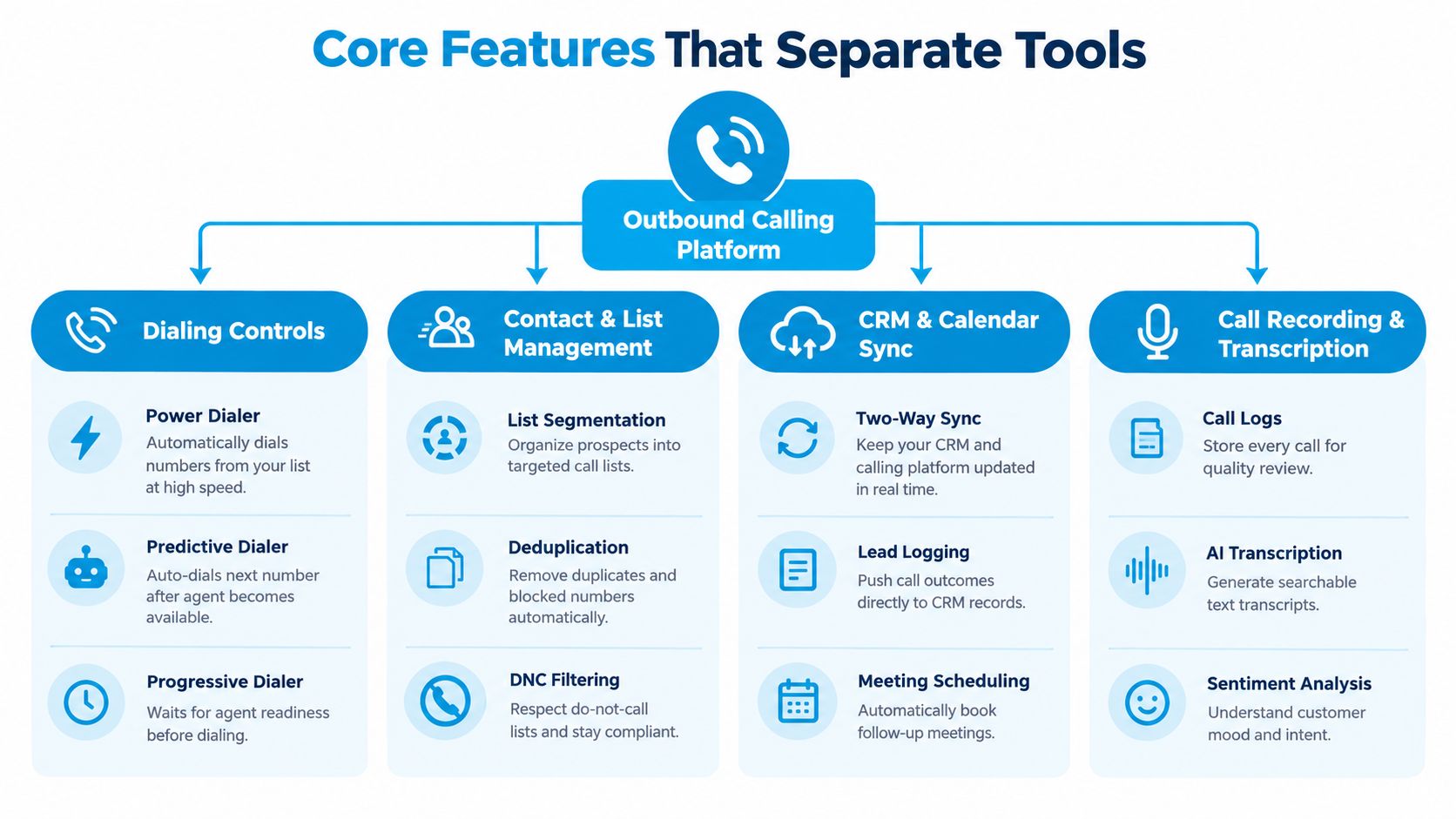
A production platform should connect the call to the work around it. During a vendor demo, follow the process from selecting a contact to recording the outcome, rather than judging the system by a slick dial screen. The infographic below highlights four foundational parts of that workflow.
Dialing and contact controls
Start with pacing and list handling. The system should support the dialing mode your campaign needs, let staff pause or reschedule work, and prevent blocked or duplicate records from slipping into the queue. A dental practice might use a local-presence number for outbound scheduling, but it should check that number's caller identification and reputation rather than assume a local area code guarantees a pickup.
Contact management should let an operator segment lists by purpose and status. A new estimate request shouldn't be mixed into a dormant-lead reactivation campaign, and a record with an opt-out shouldn't reappear because it was imported into a different list.
CRM, calendar, and call records
CRM sync should log the attempted call, the outcome, and the agreed next action on the correct contact. Calendar integration should make it possible to schedule a confirmed appointment without asking an employee to copy details later. Test both directions: a changed customer record or appointment should remain consistent between the calling platform and the system staff rely on.
Recordings and transcripts help managers review whether a script is clear and whether agents capture the details needed for a handoff. They also create responsibilities around access, retention, and disclosure, so ask who can view call material and how recording settings are controlled.
Demo test: Have the vendor place a call, book a test appointment, record an opt-out, and show exactly what appears in the CRM. If a staff member has to repair the record manually, the integration isn't finished.
Finally, inspect reporting and escalation. A plumbing franchise may need an after-hours call routed to an on-call dispatcher, while routine follow-up stays with the office team. The reporting layer should make those outcomes visible without confusing dial attempts with completed customer work.
Sales, Reminders, and Collections Compared
Sales, appointment reminders, and collections all use the phone, but they're different jobs. Their scripts, pacing, contact rules, and success measures shouldn't be forced into one generic campaign. The comparison graphic summarizes the operational distinctions.
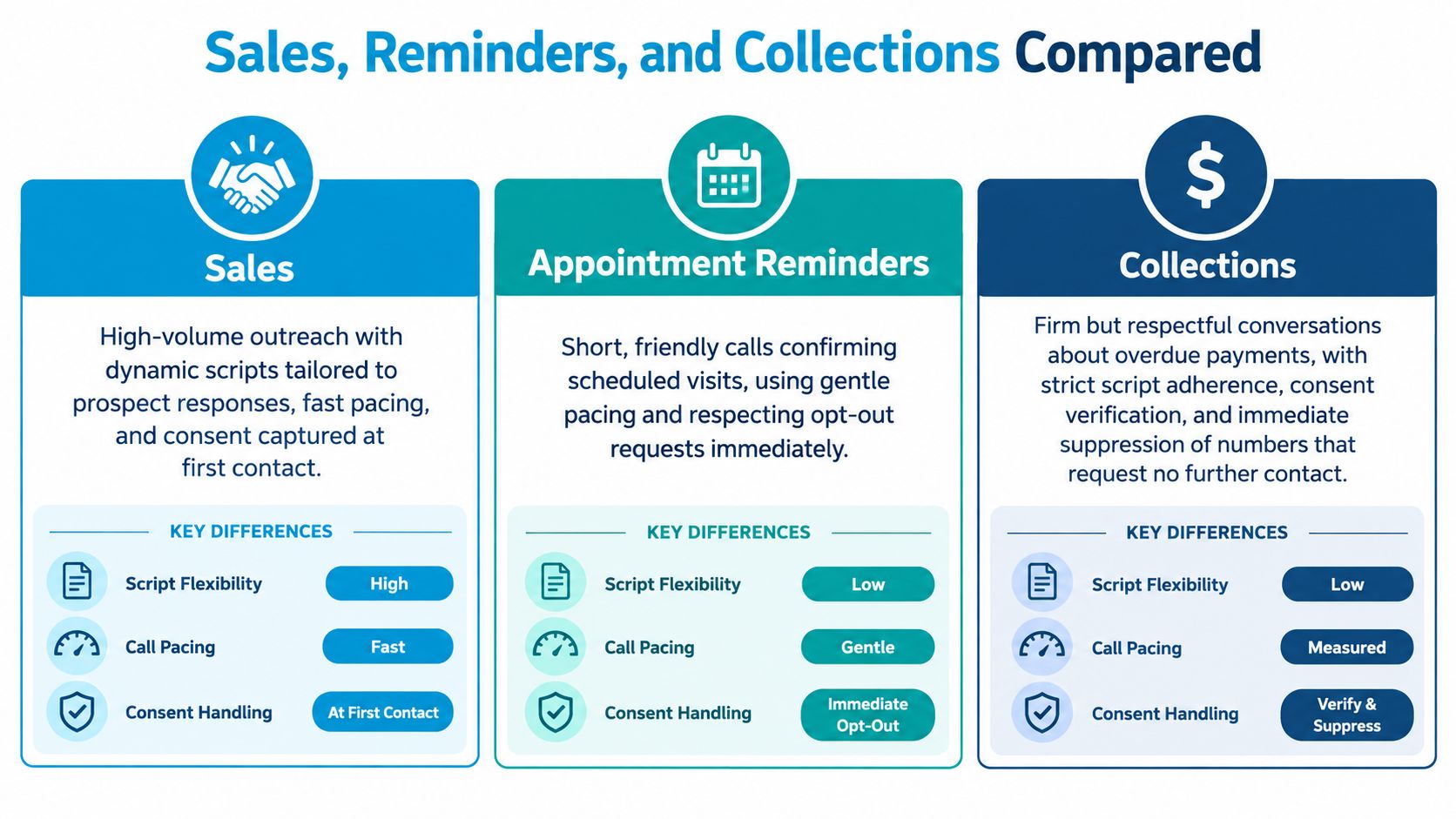
Sales follow-up should make it easy to tailor a conversation to the prospect's context. A law firm could assign a person to follow up with a lead who asked about a retainer, capture the questions raised, and schedule a consultation if the lead is ready. The useful result is a qualified next step, not just a call marked complete. Outreach must follow the consent and contact rules that apply to the number and call type.
Appointment reminders should be brief, clear, and focused on confirming or changing a scheduled visit. A clinic might call to confirm an upcoming dental appointment, then route a request to reschedule to reception rather than treating it as a sales opportunity. Promotional content needs separate consideration from a service reminder. In the United Kingdom, automated marketing calls that play recorded messages require specific consent, so software should distinguish consent purpose instead of relying on a broad marketing flag (ICO guidance on direct marketing and data protection).
Collections calls need a controlled, respectful script and a clear path for disputes or requests to stop contact. An insurance agency following up on a past-due balance should verify the right record, avoid exposing sensitive information to the wrong person, and escalate disputes to a trained employee. A payment reminder is not permission to ignore a customer's objection or to keep dialing a suppressed number.
For post-service customer feedback, don't confuse a review invitation with an outbound sales call. A separate workflow for automated review requests can help keep reputation follow-up distinct from sales, reminders, and account conversations. That separation makes campaign purpose easier to explain to staff and easier to audit.
Metrics That Actually Move Revenue
Call volume is an activity measure, not a business result. The commercial question is how many eligible records lead to a useful conversation, a qualified opportunity, a booked appointment, a completed appointment, and revenue. Teams also need to count opt-outs and failed transfers, because a campaign that creates friction can look busy while damaging customer experience.
A cold-calling analysis of more than 55,000 business-to-business dials found an average connection rate of approximately 16.6%, with rates commonly in the 10%–20% range. The same dataset reports that sales development representatives using CRM systems and automation tools make 30%–40% more calls than representatives who manually dial and track activity (Cleverly's cold-calling statistics). That capacity can reduce manual work, but it doesn't establish whether the extra attempts turn into customers.
Use a funnel that preserves the difference between stages:
- Eligible records: Contacts that can properly be called for this campaign.
- Answered calls: Attempts that reach a person, not a machine or busy signal.
- Meaningful conversations: Live interactions that meet the campaign's definition of engagement.
- Qualified leads and appointments: Prospects who fit the service and book a next step.
- Completed appointments and revenue: Work delivered and commercial value realized.
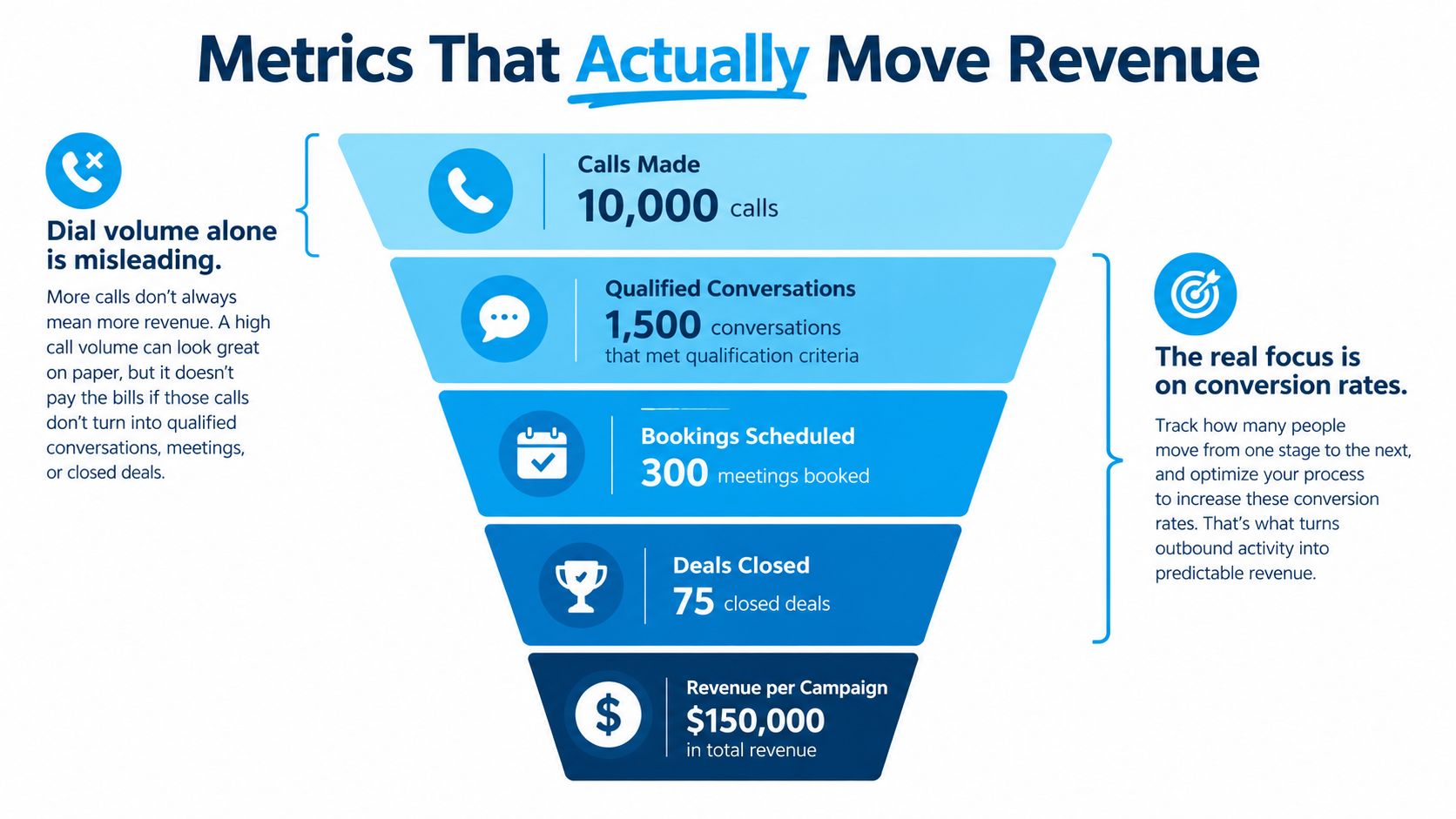
For example, compare two campaigns using their actual records. One makes many attempts but has weak list eligibility or poor follow-through; another makes fewer attempts but reaches the right people and books qualified jobs. Don't declare a winner from dial count. Compare qualified conversations, completed appointments, opt-outs, and cost per qualified lead, then check whether the booked work generated enough value to justify the campaign cost.
Response rates also vary by audience and campaign. HubSpot's 2025 cold-calling survey reports that 15% of respondents had response rates below 5%, 24% reported 5%–10%, and the largest group, 38%, reported 11%–20% (HubSpot's State of Cold Calling). Use your own funnel to diagnose where performance drops, and use call-detail reporting to inspect outcomes rather than relying on a blended dashboard number.
Compliance and Call Quality Essentials
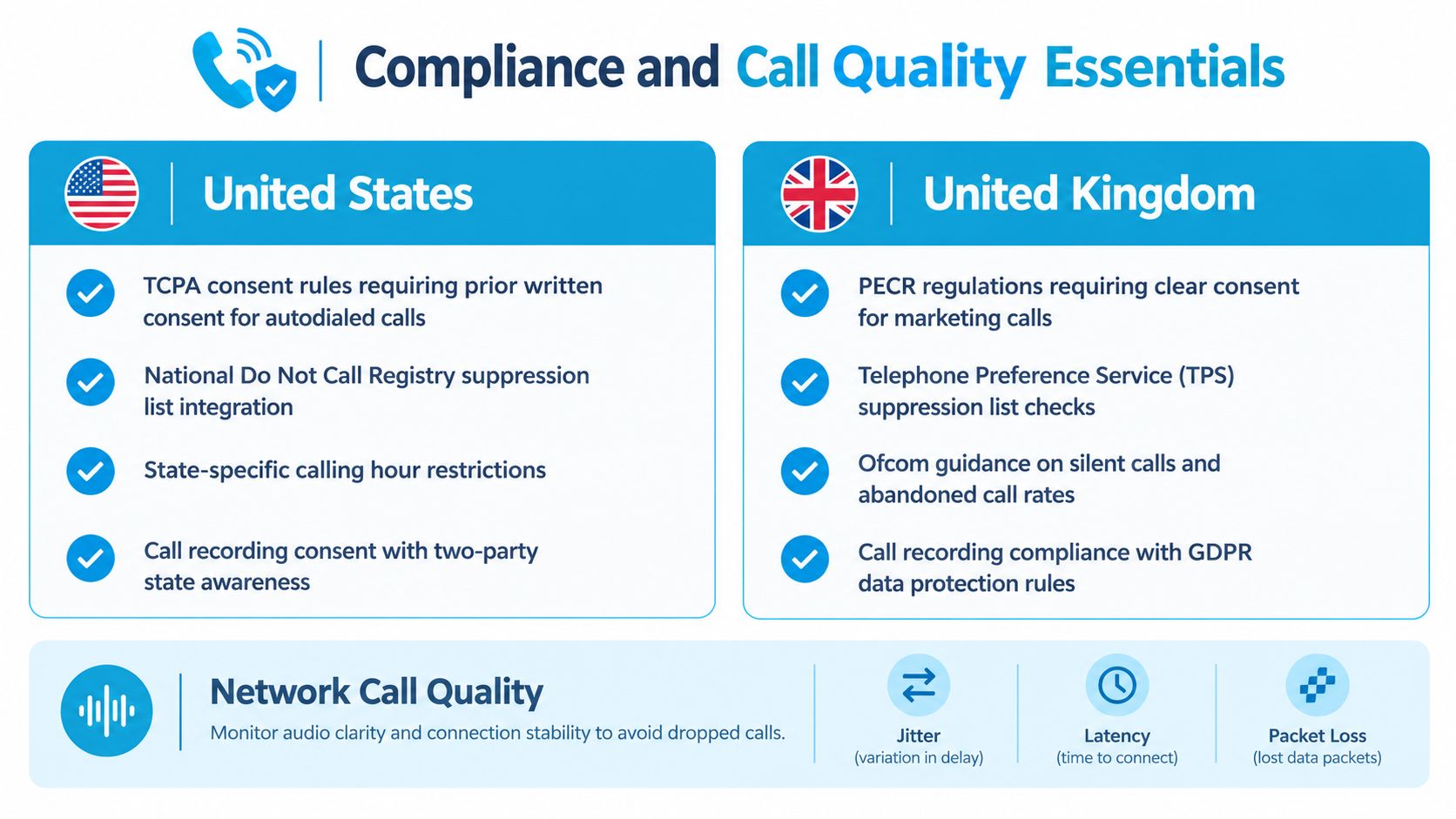
Build campaign rules before loading contacts. In the United States, the applicable requirements depend on the call type, technology, recipient, and consent. The TCPA framework generally requires prior express written consent for telemarketing robocalls, and nonemergency autodialed or prerecorded calls to mobile phones generally require prior express consent. The rules also address opt-outs, caller identification, and AI-generated voices, which the FCC treats as artificial or prerecorded voices under the TCPA (Congressional Research Service guidance). Don't treat a generic “TCPA compliant” toggle as a legal review.
In the United Kingdom, screen live outbound marketing against the Telephone Preference Service and Corporate Telephone Preference Service, plus the company's own suppression list. A previous objection must still be respected even if a number isn't on those registers. Automated marketing calls that play a recorded message require specific consent, not merely permission for live marketing calls (ICO guidance on business-to-business marketing).
Make compliance enforceable
Record consent source, purpose, timestamp, and applicable disclosure; make withdrawals propagate across locations and campaigns. For U.S. telemarketing under the FTC Telemarketing Sales Rule safe harbor, an answered call is abandoned if the consumer isn't connected to a representative within two seconds after the completed greeting. The safe harbor allows no more than 3% abandonment among live-person answered calls over a campaign or successive 30-day period, and requires a representative to take at least 97% of answered calls (FTC Telemarketing Sales Rule guidance). Calculate that rate using answered-person calls, not total attempts.
Call quality is a separate operational control. Twilio identifies MOS below 3.5 as a warning and 4.2 or higher as generally good; its monitoring flags round-trip time above 400 ms, jitter above 30 ms, or packet loss above 1% when the condition persists across three of five samples (Twilio Voice Insights call summary documentation). Track these per call leg and network path. Poor latency causes people to talk over each other; jitter and packet loss make speech difficult to follow. For more operational context, review this guide to TCPA and PCI rules for call centers, and see call recording compliance considerations before enabling recordings.
A Buying Checklist for the Right Platform
Choose a platform against the work your team needs to complete, not a vendor's feature count. A clinic may prioritize appointment scheduling, clear opt-out handling, and an easy handoff to reception. A multi-location service business may need centralized suppression rules, local team routing, and consistent campaign reporting. A law firm or insurance agency may place more weight on reviewable call records and permission history.
| Evaluation area | Pass condition | Fail signal |
|---|---|---|
| Dialing and pacing | The vendor can demonstrate controls suited to your campaign and agent availability | The demo focuses on maximum throughput without showing how calls are paced |
| Consent and suppression | The platform records permission context and applies opt-outs across relevant campaigns | Staff must maintain separate, unverified do-not-call lists |
| CRM and calendar | Call outcomes and appointments appear on the correct records | Employees must re-enter routine outcomes by hand |
| Human escalation | A live employee can take a call with enough context to continue it | Transfers drop the caller or lose the reason for contact |
| Quality and reporting | The dashboard can expose network quality and segment results by campaign | Reporting shows only total attempts and aggregate connection status |
| Cost and operations | The quote makes seat, usage, telephony, setup, and support charges clear | Important charges or service limits appear only after purchase |
Ask the vendor to explain abandonment measurement and show the denominator used. Ask whether call-quality reports expose latency, jitter, packet loss, and carrier or geography detail, rather than a single connected/not-connected status. For predictive dialing, require a demonstration of how agent availability constrains additional calls.
Test the system with a real workflow: import a small, permission-checked list, place calls, schedule a test appointment, record an opt-out, and confirm that records update correctly. Security, user permissions, retention, and audit logs should be reviewed with the people responsible for customer data. Recepta.ai is one option for businesses that want outbound list calls, scripted lead qualification, calendar booking, and follow-up alongside receptionist workflows. Compare those capabilities against your specific campaign and integration requirements rather than assuming one platform fits every team.
Implementation, Integration, and FAQ
Start with one campaign and a clean list. Before launch, agree on the purpose, eligibility rules, script, escalation owner, CRM fields, calendar behavior, and baseline measures. Run a limited pilot, review call outcomes with the people who handle the work, correct data or routing problems, and expand only when staff can reliably complete the workflow.
Map fields before connecting HubSpot, Salesforce, a scheduling platform, or an industry-specific system. Decide where the source of truth lives for contact details, consent, appointments, and opt-outs. A CRM and telephony integration guide can help teams identify the handoffs that need to work before they configure campaigns.
Does a team need AI voice? No. A human-led dialer may fit consultative sales or sensitive follow-up; automation should match the conversation, not the trend.
How should opt-outs work across locations? Store them centrally or synchronize suppression records so a withdrawal in one campaign doesn't leave another team free to call the same person.
What should a trial prove? That eligible contacts are handled correctly, outcomes land in the right records, appointments reach the calendar, and staff can review quality and exceptions.
Before signing, ask the people who will use the system to complete a test call from start to finish. Then agree on who owns exceptions, who reviews reporting, and what must be true before the pilot expands.
Recepta.ai combines AI receptionist workflows with human support for inbound and outbound calls, appointment scheduling, lead capture, and follow-ups. If your team needs to connect outreach with calendars, CRMs, and live staff escalation, visit Recepta.ai to see whether its approach fits your operation.