Customer Service Automation: A Practical Guide for 2026
It usually starts the same way. The phones are ringing after hours, a chat widget is unanswered, and a customer who was ready to buy is already comparing your competitor against your voicemail greeting. By the time someone gets back to them, the lead is colder, the schedule is tighter, and your team is stuck apologizing for a delay that never should've happened.
That's why customer service automation isn't really a chatbot story. It's an operating model decision about whether your business stays reachable when people need you, or whether every missed call becomes a lost opportunity. The teams that get this right don't just automate replies, they automate intake, routing, scheduling, follow-up, and clean handoff to a human when the situation calls for judgment.
For a practical example of 24/7 call coverage, see Recepta's AI answering service. If you're comparing how different support workflows fit together, automated customer service solutions is a useful companion view.
The Missed Call That Started This
A small business owner knows this scene too well. It's Tuesday evening, the last tech has left, the front desk is quiet, and the phone rings three times before going to voicemail. The caller isn't a random inquiry, either. They need an estimate, they're ready to book, and they won't wait until Thursday for a callback that may never happen.
That's the primary reason automation matters. Not because it sounds modern, but because it keeps the business open after hours without forcing you to add headcount every time call volume rises. McKinsey's 2025 analysis says 78% of organizations now use AI in at least one business function, 71% regularly use generative AI tools, and 26% of customer service professionals report integrating AI into daily workflows, which shows how quickly this has moved from experiment to operating norm in service work (McKinsey-based 2025 roundup).
Why the missed call matters more than the missed ticket
For a home services firm, that voicemail can be the whole pipeline for the week. For a dental practice, it can be a patient who never calls back. For a law firm, it can be a consultation that disappears to another office. The issue isn't just responsiveness, it's that the first interaction often decides whether the lead ever enters your system at all.
Practical rule: if a customer can contact you only during staffed hours, your service model is already leaking revenue.
That's why phone-based intake deserves as much attention as chat or ticketing. A clean automation layer can capture the call, identify intent, route the customer, and preserve the context for whoever takes over. That's what turns customer service automation from a software feature into a real business continuity tool.
What Customer Service Automation Means
Customer service automation is software, including AI, handling, routing, or resolving customer interactions without a human doing every step manually. It works like a triage nurse in a busy clinic. The first pass gathers symptoms, confirms what kind of help is needed, and sends the case to the right specialist, while the specialist handles the work that requires judgment.
That comparison matters because many teams still picture automation as a rigid phone tree or a FAQ bot that answers the same three questions badly. Modern automation does more than that. It can answer common questions, check order or appointment status, capture lead details, route tickets and calls, schedule appointments, and trigger follow-ups when something needs a next step. It can also support phone, chat, and ticket workflows without forcing every customer into the same script.
What it replaces in day-to-day work
The useful lens is not “Can a bot talk?” It's “Can the system do the repetitive parts reliably enough that a human only steps in when judgment is needed?” A support team might use automation to pull the customer's status from the source system, confirm availability on a calendar, or send a follow-up once a ticket closes. A phone team might use it to collect caller intent, capture contact details, and move the request to the right queue.
For voice-heavy teams, that matters a lot. Donely's AI support agent for WhatsApp is an example of how automation can live inside a channel customers already use, rather than forcing them into a new process. The point isn't the channel itself, it's that the channel is tied to the actual service workflow.
Automation works when it handles the repetitive part of the job and leaves the exception handling to people.
If you want the simplest working definition to share with your team, use this one. Customer service automation is the layer that greets, gathers, routes, and resolves routine requests while keeping humans available for escalations, edge cases, and conversations that need empathy. It is closer to a service desk with a triage front end than to a chatbot alone. That frame is more useful than “chatbot,” and it is the one that helps you scope a real deployment instead of buying a shiny demo. For a closer look at how that stack gets built in practice, see this guide to automated customer service solutions.
The Five Building Blocks of an Automated Service Stack
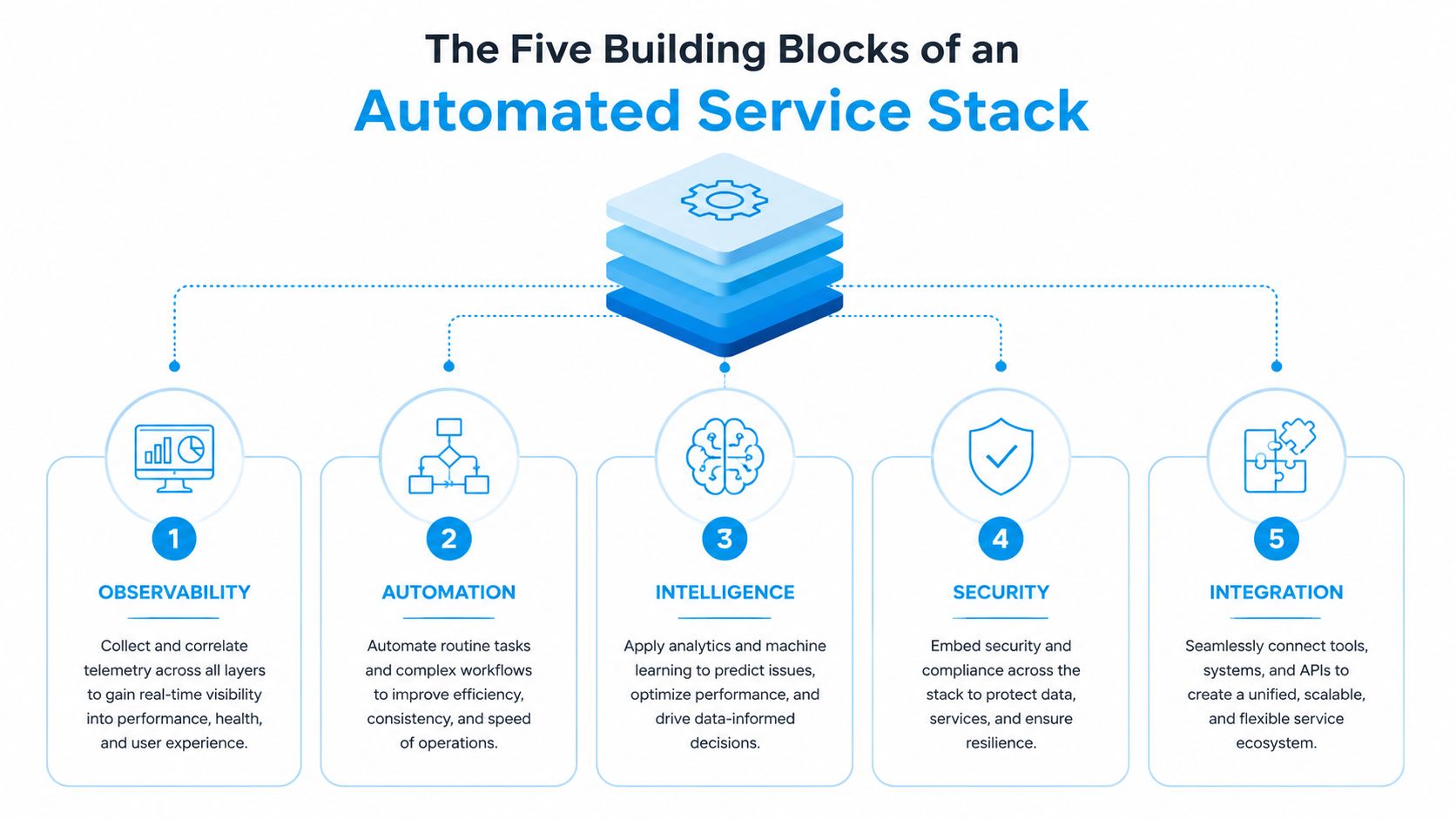
A working stack has five parts, and all five have to hold together. If one fails, customers feel it immediately, usually as a repeat question, a broken transfer, or a dead-end loop that forces them to start over. The most common mistake is treating the chatbot as the whole project when the actual work is in the data, rules, and integrations around it.
How the pieces fit together
Conversational AI understands intent in natural language, so a caller or chat user doesn't have to learn your internal menu structure. Intelligent routing sends the issue to the right queue or person. Automation rules handle deterministic actions like lookups, updates, and status changes. Integrations connect the support layer to the CRM, calendar, ticketing, and knowledge systems that hold the source of truth. Analytics shows what's getting resolved, where people get stuck, and which flows still need human rescue.
The common failure modes are predictable. Conversational AI fails when it isn't grounded in real business data. Routing fails when escalation rules are vague. Rules fail when they're built for ideal cases instead of real customer behavior. Integrations fail when teams treat them like a checkbox instead of the core dependency.
| Component | What it does | Human task it replaces | Common failure mode |
|---|---|---|---|
| Conversational AI | Interprets intent and collects details | Front-line intake and repetitive Q&A | Gives answers without real business context |
| Intelligent routing | Sends the case to the right place | Manual triage and queue sorting | Escalation paths are unclear |
| Automation rules | Executes predefined actions | Repeated lookups, updates, and confirmations | Edge cases break the flow |
| Integrations | Connects CRM, calendar, and ticketing tools | Copying data between systems | The support stack loses its source of truth |
| Analytics | Measures outcomes and friction points | Manual QA and guesswork | Teams optimize volume, not resolution |
The practical lesson is simple. A stack is only as strong as its weakest integration, which is why the integration layer deserves the same attention as the AI layer. For deeper planning around connected systems, API connectivity is where most deployments either stay clean or start drifting into operational mess.
The ROI Numbers That Matter
The first question most owners ask is whether automation pays for itself. The honest answer is yes, but only if you measure the right things. Deflection, resolution time, cost per interaction, CSAT impact, and lead capture are the numbers that tell the story, not vanity metrics about how many messages a bot touched.
A 2025 customer service roundup says 30% of service cases were resolved by AI in 2025 and projects that figure to 50% by 2027 (Salesforce stats roundup). Another enterprise CX dataset puts tier-1 automation around a 41.2% median, with the top quartile at 58.7%, and shows the spread matters by issue type, with 78% median deflection for password resets versus 19% for complaint-heavy issues (2026 enterprise data).
What the time and cost numbers really mean
Analysts at 2026 enterprise data report 1.9 minutes average resolution time for AI agents versus 11.4 minutes for human agents, plus first-response times of 4 seconds for chat and 1 ring for voice for AI compared with 9 minutes 12 seconds and 2 minutes 41 seconds for humans, respectively. That does more than make a dashboard look healthy. It reduces abandoned chats, cuts time spent waiting on hold, and gets a live agent involved sooner when the issue falls outside the scripted path.
Cost is where the business case usually gets approved. Salesforce stats roundup cites $0.25 to $0.50 per automated interaction, versus $6 to $12 for a human-handled ticket. AmplifAI voice stats cites voice automation at about $0.40 per call, versus $7 to $12 for a human agent. Those figures are easier to trust when they sit in separate sentences, because the trade-off is simple, lower unit cost only matters if the workflow still captures the customer and routes the hard cases cleanly.
Independent 2026 summaries also say mature programs can cut support operating costs by 25% to 40% within 18 months and handle 40% to 70% of tier-1 support volume depending on maturity and industry (StealthAgents 2026 summary, DigitalApplied 2026 data).
If you want a clean ROI model, count the cost of the bad handoff too. A cheap automation that loses a qualified lead is expensive.
For a cleaning company, that may mean the after-hours call that now gets booked instead of lost. For a healthcare practice, it can mean more completed scheduling conversations. For a law firm, it can mean consultations that reach intake instead of getting stuck in voicemail. The right model adds the value of the interaction saved, not just the cost of the ticket avoided.
A 90-Day Rollout Roadmap You Can Follow
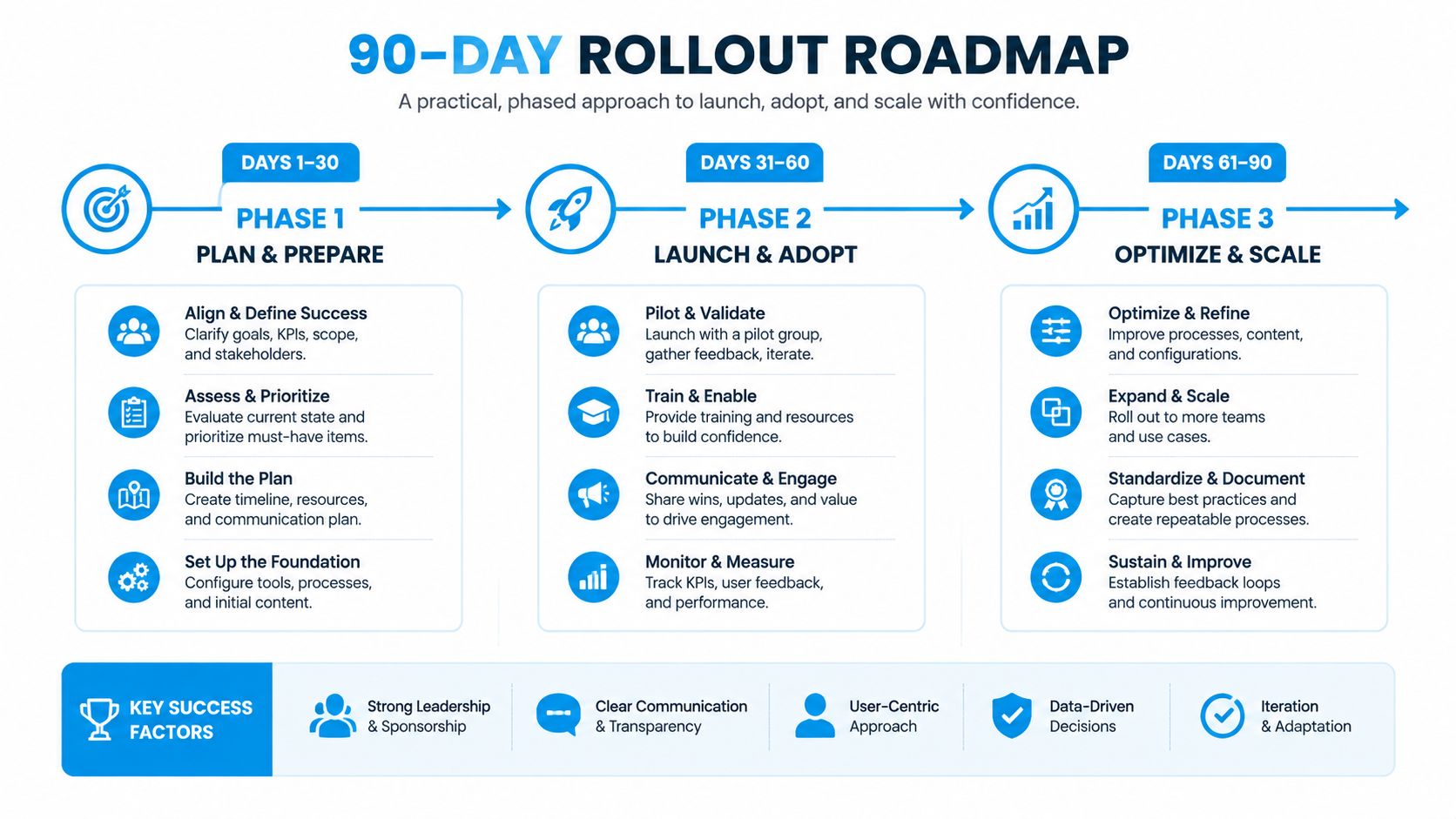
The cleanest deployments start small, then widen only after the first workflow holds up in production. Teams that try to automate everything at once usually end up with brittle logic, confused ownership, and a support team that does not trust the system. A better path is to sample real work, find the repetitive patterns, and build around one narrow win first.
A rollout that does not create chaos
- Pull a 60- to 90-day sample of tickets, calls, and chats.
- Segment by channel, intent, and resolution type so you can see what repeats.
- Pick the highest-volume, lowest-judgment tasks first, not the flashiest ones.
- Wire the flow into the CRM, calendar, and ticketing tools that hold the source of truth.
- Launch with explicit escalation rules and ownership assigned before go-live.
A practical example is appointment scheduling for a cleaning or HVAC business. The caller reaches the system, the intake flow captures the request, checks the calendar, books the slot, sends confirmation, and escalates only when the schedule is full or the request falls outside the standard service window. That is a far better use of automation than trying to make the bot sound friendly while it still cannot complete the booking.
One useful launch checklist is simple. Confirm the trigger, confirm the data source, confirm the fallback path, and confirm who owns exceptions. That last part matters more than many expect, because automation without a named owner tends to drift into nobody's problem.
Watch escalation rate and CSAT in week one. If escalation is too high, the flow is too broad or the data is not clean enough. If CSAT drops, the handoff probably feels robotic or the system is trapping people in steps they cannot complete.
How Three Industries Deploy It Differently
Home services usually get the fastest payback because missed calls are so expensive. A cleaning, plumbing, or HVAC business can use automation for inbound call capture, after-hours lead capture, and appointment booking. The metric that matters there is simple, leads that were previously lost now enter the schedule, and the business stops paying for missed rings with lost revenue.
Healthcare works differently. A practice usually wants automation for intake forms, appointment confirmations, and reminder flows, while routing clinical questions to staff instead of trying to answer them automatically. That keeps front-desk work moving without putting the wrong conversation in the wrong queue, and it protects patient trust when the issue is sensitive or clinical.
Law firms need even tighter boundaries. Automation can handle conflict-check intake, consultation scheduling, and document-status updates, but privileged conversation belongs with a human from the start. The value metric there is consultation completion, not just response speed, because a fast but clumsy intake process can still lose the matter.
The pattern across all three
What changes is not the logic, it's the boundary. Home services can automate more of the first touch because the transaction is straightforward. Healthcare and legal teams have to route earlier to humans whenever the issue becomes sensitive, ambiguous, or regulated.
The best deployment in any of these sectors is the one that gets the person to the right human without making them repeat the same facts twice.
That's the true test. If the automation captures the context once, passes it cleanly, and gets out of the way, it helps. If it forces customers to restate everything at every transfer, it's just a slower version of the old process.
Where Automation Quietly Fails
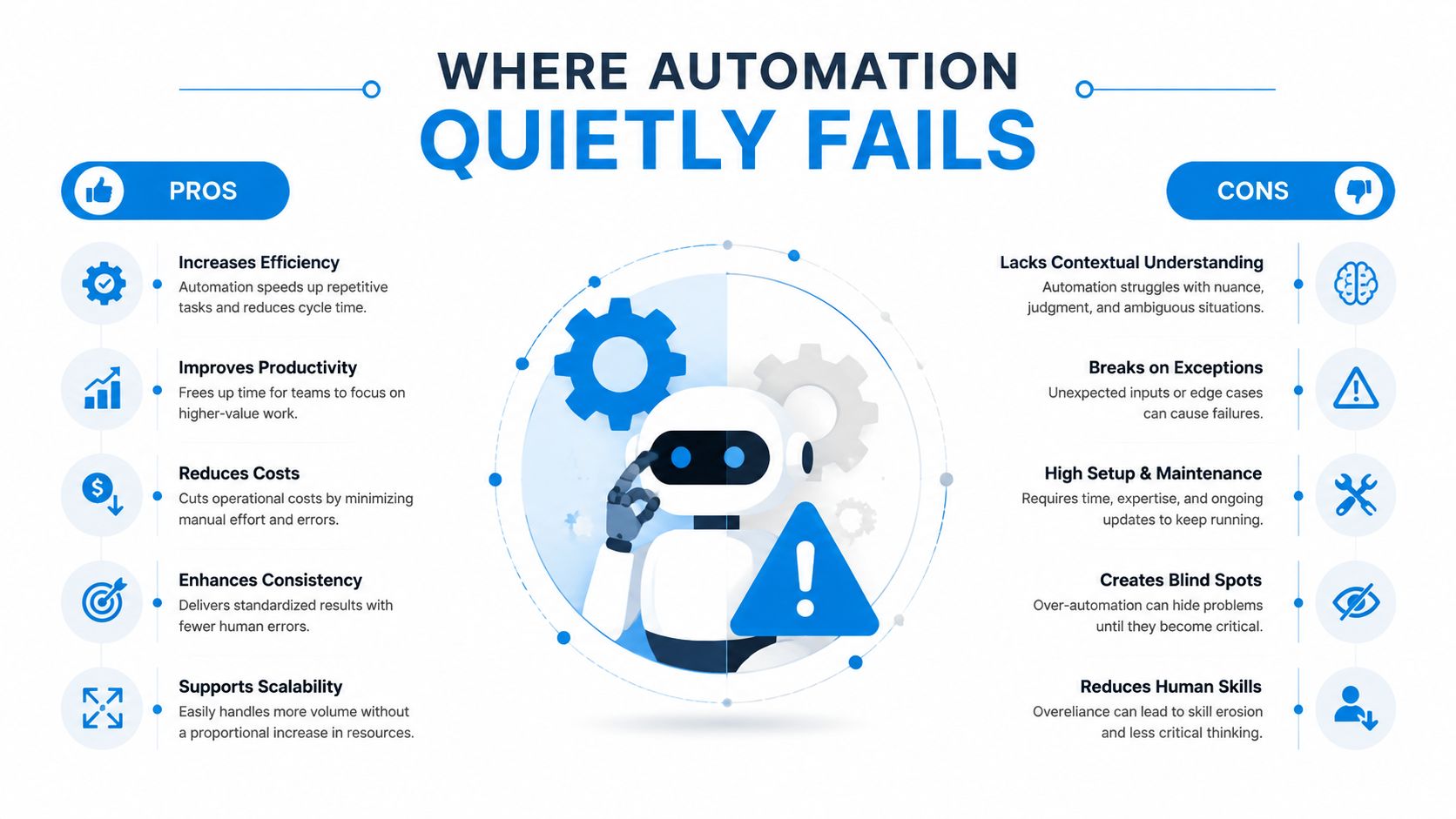
The failures are rarely dramatic in vendor demos. They show up later, when a bot gives a confident answer that doesn't match the CRM, when a caller gets trapped in a loop, or when a complaint is marked “resolved” even though nobody fixed the underlying problem. That's why the safest rule is still the most boring one, automate only high-volume, repeatable tasks with a data-derivable answer.
The bad outcomes to design against
Hallucinated answers happen when the system isn't grounded in business data. Dead-end loops happen when there's no visible human escape hatch. Trust erodes on emotionally charged calls when the automation is forced to play therapist instead of handing off fast. Silent failure happens when the system closes tickets but doesn't correct the issue behind them.
That last one is easy to miss because the queue looks healthy. The customer experience isn't. The caller may still be waiting, the lead may still be lost, or the account may still be broken, even though the dashboard says the interaction was handled.
Only automate what the system can answer or do deterministically. Everything else needs a visible handoff with full context.
The design choice that matters most is the escalation rule. If the customer can reach a person quickly, with transcript and context intact, automation protects revenue. If escalation is buried, inconsistent, or missing, automation creates friction and hides it behind tidy reports.
Security, Compliance, and Choosing a Vendor Without Getting Burned
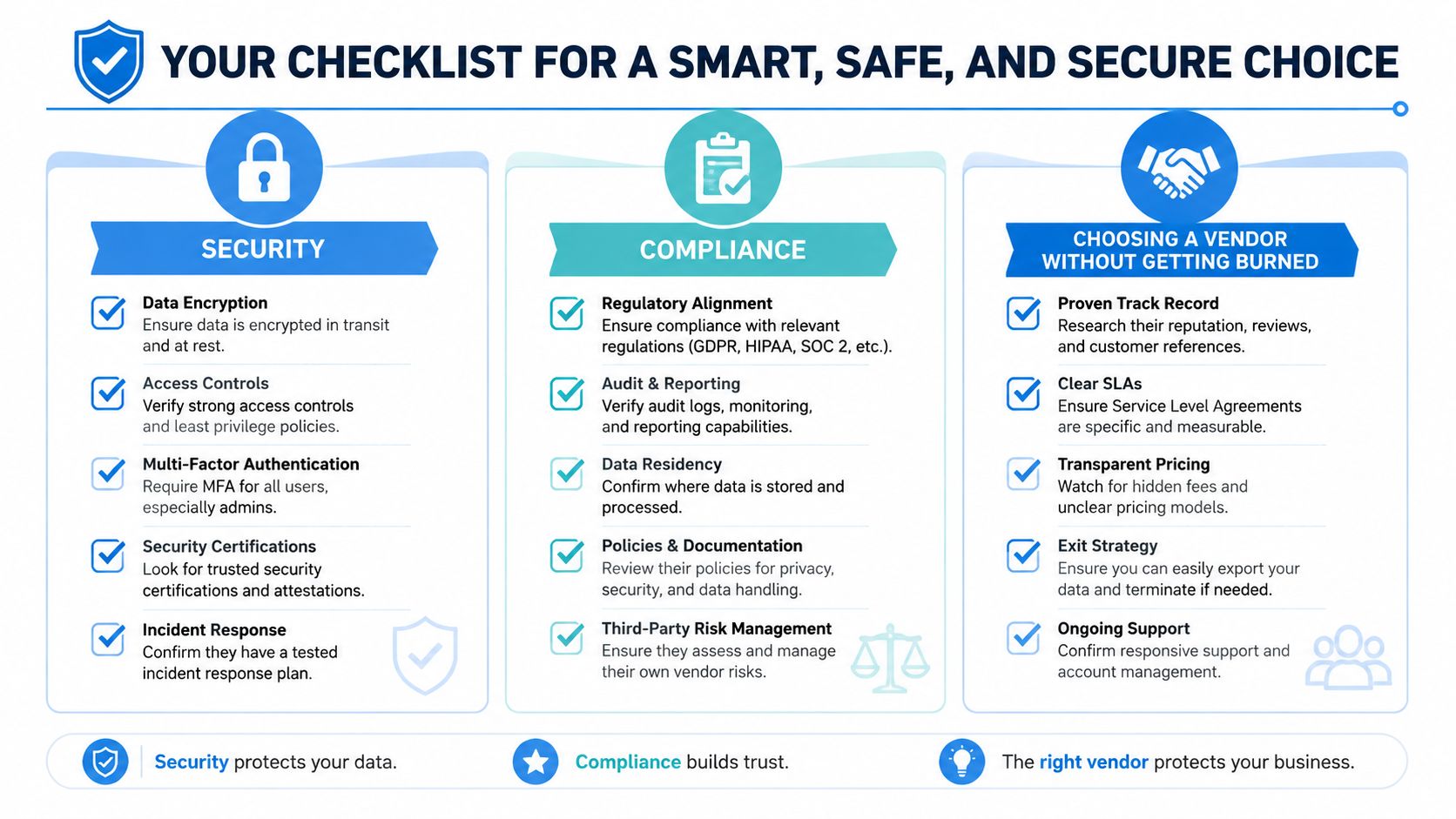
Security and compliance aren't side topics in service automation. They're part of whether the system can be trusted with real customer data, recorded calls, and sensitive intake. A solid baseline includes encryption in transit and at rest, role-based access, audit logs, and automatic data logging so the team doesn't have to do manual admin work after every interaction.
Healthcare, legal, and finance teams need extra care around HIPAA, PCI, and attorney-client considerations. Recorded lines need transcript review and consent capture where required, and escalation paths need to preserve context without exposing information to the wrong person. For practical security framing, data security best practices is worth reviewing before any vendor demo.
What to ask before you sign
- Integration fit: Does it connect to the CRM, calendar, and ticketing tools you already use?
- Human handoff: Can it route cleanly to a person with full context, not just a new ticket?
- Escalation logic: Will the vendor show how rules work, or keep them hidden?
- Outcome reporting: Does it measure resolution quality, not just deflection volume?
- Operational ownership: Can your team maintain it without rebuilding the stack every month?
The market is moving from simple deflection toward fuller resolution, which makes vendor choice a bet on where the category is headed. Recepta.ai fits this conversation as an AI receptionist layer that handles inbound and outbound calls, appointment scheduling, lead capture, follow-ups, and escalation to humans when needed, so it belongs in the same evaluation set as other workflow-centered service tools.
If you're ready to stop losing after-hours calls, cleanup time, and revenue to broken handoffs, visit Recepta.ai and see how an AI receptionist can fit into your phone, chat, and scheduling workflows. Start with the channels where you're missing the most opportunities, then build from there once the handoff is clean and the data stays intact.