Conversational AI Voice: What It Is and How to Use It
Conversational AI voice is an end-to-end system that combines speech recognition, language understanding, and text-to-speech, with practical deployments targeting under 500 milliseconds for a natural response, while delays above about 1,200 milliseconds can make a call feel broken. It gives customers a way to speak naturally with software that can understand requests, use business systems, respond aloud, and involve a human when the situation requires judgment.
You may already be seeing the problem it solves. A customer calls your plumbing company while you're under a sink, a patient reaches your clinic after the receptionist has gone home, or a prospective client contacts your law firm during another consultation. The call goes to voicemail, the caller tries another business, and your team never gets the opportunity to help.
Voice AI can answer that call immediately, but answering is only the beginning. A useful system must understand what the caller wants, retrieve or update information, keep the conversation moving without awkward pauses, and complete the next operational step. The genuine question isn't whether an AI voice can sound human in a demonstration. It's whether it can work reliably inside your business.
What Conversational AI Voice Actually Does for Your Business
A construction contractor is on a job site when a homeowner calls about a leaking roof. In the old workflow, the call goes to voicemail. In a stronger workflow, a voice agent answers, asks for the property address, identifies whether the leak is active, captures the caller's preferred appointment window, and sends the details to the scheduling process. The contractor can review a complete request instead of returning an uncertain voicemail later.

Conversational AI voice is a communication layer for spoken interactions. It combines automatic speech recognition, language understanding, conversation management, business integrations, and natural-sounding speech generation. The caller speaks, the system interprets the request, the software checks what it can do, and the voice agent responds with the next useful action.
Beyond a traditional phone menu
A traditional IVR usually asks callers to choose from a fixed set of options. A voice agent can accept a request such as, “I need to move my appointment because my child is sick,” then identify the likely intent, ask a relevant follow-up question, and preserve the context while checking availability. The difference is more than a more pleasant voice. The system can work with meaning, context, and changing details.
A practical guide to conversational AI for customer support illustrates why this matters for service teams. The strongest use cases involve routine requests that still require several steps, such as scheduling, lead qualification, status updates, reminders, and routing.
Practical rule: Use voice AI where a missed call creates a clear operational loss and the conversation follows a process your team can define.
Voice AI creates value when it improves access, captures information consistently, or completes a task outside staffed hours. It adds complexity when the workflow is unclear, the required data isn't available, or callers need expert judgment at every step. Start with one repeatable call type, define when the system must transfer the caller, and measure completed outcomes rather than how impressive the voice sounds.
The Three Core Technologies Behind Voice AI
A voice conversation feels like one exchange, but several systems work together in sequence. The caller speaks into the phone, speech recognition creates a transcript, a language system interprets that transcript, and text-to-speech produces the reply. In production, these stages must stream together instead of waiting for an entire call segment to finish.
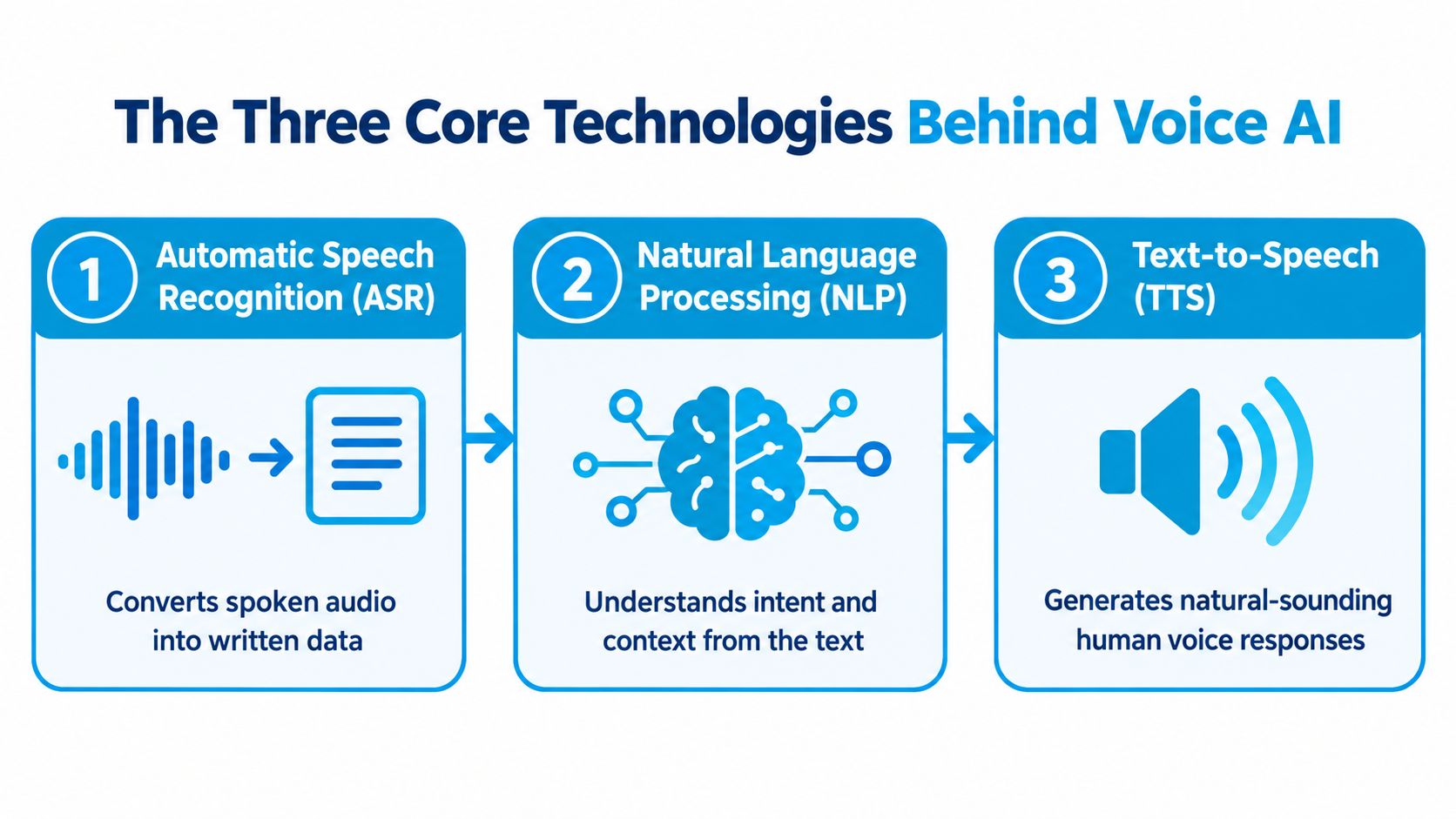
Automatic speech recognition
Automatic Speech Recognition, or ASR, converts audio into text. It must handle accents, background noise, interruptions, industry terminology, names, addresses, and numbers. If a caller says a street name or medication incorrectly in the transcript, every later step inherits that mistake.
Streaming ASR sends partial results as the caller speaks. That lets the rest of the system begin interpreting the request before the person has finished every sentence. A deeper explanation of generative AI for customer service helps place this component in the wider customer-service stack, where recognition is only useful when it leads to an accurate action.
Language understanding and conversation control
The language layer identifies intent, extracts entities such as dates or order references, and uses prior turns to interpret follow-up questions. If a caller says, “Book me for Tuesday,” then corrects it with, “Wednesday morning,” the system needs to update the original request rather than create two bookings.
A language model may generate the wording, but a reliable voice agent also needs rules, permissions, retrieval, and conversation state. Those controls determine whether the system can cancel an appointment, which information it may disclose, and when it must transfer the call.
Text-to-speech
Text-to-Speech, or TTS, converts the response into audio. Streaming TTS begins producing sound as soon as a usable portion of the answer is ready. The result should have appropriate pacing and emphasis, but it also needs to stop cleanly when the caller interrupts.
These technologies operate as a chain. A brilliant language model can't repair a badly recognized address, and accurate transcription doesn't help if the system can't access the scheduling calendar. That is why businesses should evaluate the complete call path rather than one model in isolation.
Key Features That Separate Good Voice AI From Great
A voice agent can pronounce words clearly and still frustrate callers. Evaluate the system by what it does during uncertainty, correction, interruption, and real operational work.
Speech quality and brand fit
Basic TTS may sound flat, rushed, or segmented. Advanced speech generation uses pacing, pauses, emphasis, and pronunciation controls to make the response easier to follow. A dental clinic confirming an appointment needs a calm, reassuring delivery. A roadside assistance service needs concise instructions that remain intelligible under stress.
Voice cloning can create a consistent brand voice or support accessibility requirements, but businesses should use it only with explicit consent and clear governance. A familiar voice shouldn't mislead callers about whether they're speaking with a person.
Prosody and intent handling
Prosody covers rhythm, stress, and intonation. It helps distinguish a question from a confirmation and prevents every sentence from sounding identical. Intent understanding goes further than keyword matching. It allows a system to recognize that “I can't make Friday anymore” is a change to an existing appointment, not a new general complaint.
A law firm, for example, may need to separate a request for an initial consultation from a request to send documents to an existing client. Both callers may use the word “case,” but the correct workflow depends on conversation history and caller status.
| Feature | Basic Implementation | Advanced Implementation | Business Impact |
|---|---|---|---|
| Text-to-speech | Clear but mechanical responses | Natural pacing, pronunciation, and emphasis | Easier conversations and stronger brand consistency |
| Voice cloning | Generic synthetic voice | Consent-based voice matching with governance | Consistent identity and accessibility options |
| Prosody | Flat delivery | Context-appropriate rhythm and pauses | More understandable confirmations and instructions |
| Intent handling | Keyword or menu matching | Context, corrections, entities, and follow-up questions | Fewer unnecessary transfers and better task completion |
Ask vendors to demonstrate interruptions, corrections, unclear requests, and industry-specific terms. A polished opening greeting tells you little about how the system behaves when a caller changes their mind or supplies information in an unexpected order.
Real-World Use Cases Across Industries
The most useful deployments connect a spoken request to a defined business outcome. A clinic doesn't need an AI voice merely to answer “What are your hours?” It needs a system that can identify the caller's need, find an available appointment, record the booking, and send the right follow-up.

Where service businesses can start
- Healthcare and wellness: Handle appointment requests, reminders, basic intake, and routing. Sensitive questions should move to trained staff according to clear escalation rules.
- Home services: Capture leads, collect addresses and issue descriptions, offer available windows, and route urgent calls to the right technician or dispatcher.
- Legal practices: Gather initial contact details, identify the broad matter type, schedule consultations, and confirm document or follow-up requests without offering unauthorized legal advice.
- Insurance and finance: Answer routine policy questions, begin a claim workflow, collect information, and transfer cases that require a licensed professional or security review.
- Franchises and multi-location businesses: Apply consistent call handling while routing by location, service type, hours, and local availability.
A pest control business might use voice AI to distinguish a routine inspection request from an urgent infestation report. A dental practice could let callers reschedule without waiting for the front desk. A property manager could collect maintenance details, classify urgency, and notify the appropriate team.
The operational advantage comes from matching the conversation to the team's existing process. If the agent captures information but doesn't create a usable ticket, update the CRM, or place the appointment on the calendar, employees still perform the work manually.
A voice agent for customer service can be evaluated against these concrete outcomes: answered calls, qualified inquiries, completed bookings, accurate records, and appropriate human handoffs.
This video offers another visual way to think about how voice systems fit into customer operations:
Before selecting a use case, map the caller's path from greeting to resolution. The best first workflow is usually narrow enough to control, frequent enough to matter, and connected to systems your team already uses.
The Latency and Accuracy Balance That Makes or Breaks Voice AI
Callers don't experience ASR accuracy or model quality as separate technical scores. They experience a turn gap: they finish speaking, then wait to hear whether the agent understood them. Practical voice-agent guidance targets under 500 milliseconds from the end of the caller's speech to audible agent response, while under 800 milliseconds can remain acceptable for many business use cases. Above about 1,200 milliseconds, the exchange commonly feels broken or unnatural, according to voice AI latency guidance from Coval.
Latency comes from the whole pipeline. Streaming ASR must finalize enough text, the language model must produce its first useful token, and TTS must generate its first audio. Improving only the language model won't solve a slow phone connection, a delayed transcript, or a TTS engine that waits for a complete answer.
Accuracy has more than one meaning
Word Error Rate, or WER, measures transcription mistakes, but businesses also care about entity accuracy and semantic meaning. Mishearing a filler word may have little impact. Mishearing a patient's medication, a customer's address, or a requested appointment date can send the workflow in the wrong direction.
On AssemblyAI's English voice-agent benchmark across 12,460 scripted scenarios, Universal-3.6 Pro Realtime achieved the lowest WER and entity error rate among the compared systems. The same real-time speech recognition benchmark analysis cites a 2.2% WER on Coval's streaming leaderboard and a 0.96% pooled semantic word error rate with a 307 millisecond median time to final transcript on Pipecat's open STT benchmark.
These figures are useful comparison points, not a promise about your calls. Background noise, overlapping speech, accents, telephone audio, and specialist vocabulary can change performance. Test with recordings and live scenarios that resemble your customers, then track failed intents, incorrect entities, transfer reasons, and completed outcomes alongside response time.
A call transcription workflow can also help teams review where errors occur. The goal isn't to choose the fastest or most accurate component in isolation. It's to find the architecture that gives callers a quick response without compromising the details your business needs.
Deployment Friction and the Globalization Gap
A voice agent can handle a polished demo, then stall when a real caller needs an appointment changed, an account verified, or a ticket transferred to an employee. The difficult work often sits behind the conversation: connecting the CRM, calendar, ticketing platform, identity process, and staff handoff already used by the business.
Legacy integration remains a primary adoption hurdle. 72% of buyers view performance quality, including voice quality and conversational flow, as the biggest barrier, according to the 2025 State of Voice AI report. A voice agent may sound natural, yet still create operational problems if it cannot read the current appointment book or gives an employee incomplete context.
Integration needs an operational owner
Before a pilot begins, assign responsibility for decisions that affect daily work:
- Systems of record: Identify whether the CRM, calendar, ticketing system, or practice-management platform owns each type of data.
- Allowed actions: Specify what the agent may read, create, change, or cancel.
- Failure behavior: Define the response when an integration is unavailable or returns conflicting information.
- Handoff context: Send staff the transcript, captured details, and reason for transfer.
- Data controls: Review recording, retention, access, and industry compliance requirements.
International deployment adds another layer of friction. Organizations serving customers in an average of 37 countries have production AI voice deployments in only 17 countries on average. Large multinationals operating in 50 or more countries have deployed AI voice across only about 25% to 30% of their geographic footprint, according to Business Wire's coverage of global voice infrastructure.
Language switching, dialects, local regulations, phone infrastructure, and regional workflows can change how reliably the same design performs. A telecom company might automate authentication in mature markets while routing other regions to human teams. Treat internationalization as its own delivery track, with regional testing and operational ownership, rather than a checkbox after the first pilot.
How to Implement Voice AI Successfully
Start with the business problem, not the vendor demo. A clear implementation connects one caller need to one measurable operational result, then expands only after the workflow performs reliably.
Define the first workflow
Choose a high-volume, low-complexity process such as after-hours call handling, appointment scheduling, lead capture, or status requests. Write the intended conversation in plain language, including the information the agent must collect and the decisions it can make.
Set success measures before configuration begins. These might include completed bookings, qualified leads, correct routing, escalation quality, record accuracy, and caller abandonment. Include a quality review process so staff can inspect failed or uncertain calls rather than relying only on an overall dashboard.
Connect the workflow to real operations
Ask each vendor to show how the system handles your actual tools, not a sample environment. Confirm whether it can read availability, create records, pass structured data, preserve context during transfers, and recover when an API or calendar is unavailable.
A practical rollout has five decisions:
- Define scope: Select the caller type, use case, hours, and boundaries.
- Set metrics: Establish the outcome and quality measures that determine whether the pilot works.
- Select the platform: Compare latency, recognition, integrations, security controls, analytics, support, and pricing.
- Integrate systems: Connect the CRM, calendar, ticketing tool, phone infrastructure, and escalation routes.
- Test and launch: Use internal callers, realistic recordings, interruptions, accents, edge cases, and supervised production traffic before wider release.
Train employees before launch. Staff should know which calls the AI handles, what information arrives with a transfer, and how to report a faulty workflow. Treat the agent as a team member with a defined job, not an unattended replacement for every customer conversation.
Avoid partners who show only scripted success paths, hide transfer behavior, or can't explain where transcripts and recordings are stored. A responsible evaluation should include a live test of failure recovery, human escalation, permissions, and data handling.
What's Next for Conversational AI Voice
A caller asks for an appointment, changes language halfway through, and then needs a human specialist. The future of conversational AI voice will be judged by how reliably it handles that sequence, not by how natural its opening greeting sounds.
Developers are working toward end-to-end speech-to-speech models, faster turn-taking, better interruption handling, and mid-conversation language switching. Some discussions cite sub-800 millisecond latency, but service businesses should test response timing and resolution quality during real calls. A fast reply is not useful if the system misunderstands the request or loses the caller's context. The overview of voice AI trends from Master of Code describes the broader move toward adaptive, agentic systems.
From responding to coordinating
An inbound agent can answer a question. A more advanced system can monitor an unresolved request, detect a scheduling conflict, follow up with a customer, or escalate after a condition changes. Those actions require carefully limited permissions, dependable integrations, explicit memory rules, and an audit trail.
Language support should become more flexible too. A caller might begin in one language and switch to another while the system preserves the intent and business context. Production performance still depends on regional vocabulary, pronunciation, compliance requirements, and transfers that preserve meaning.
Global deployment will remain uneven. Organizations may succeed with a pilot in one market yet face integration, governance, and support problems when expanding across regions. Global voice infrastructure reporting also points to the need for coordination and security as voice systems scale. Businesses that prepare escalation rules, data governance, integrations, and evaluation processes early can expand more deliberately.
Start with one workflow your team can measure and supervise. Add languages, channels, proactive outreach, and more complex decisions only after the system performs reliably.
Recepta.ai provides an AI receptionist for inbound and outbound calls, appointment scheduling, lead capture, follow-ups, analytics, call summaries, and human escalation. It integrates with CRMs, calendars, and other business tools. Visit Recepta.ai to explore its voice workflows.